
There is no notification more terrifying for a seller than the “Product Frozen” notice.
One minute, your hero product is driving thousands of dollars in sales; the next, it is greyed out, your ad spend is wasted, and your revenue drops to zero.
In 2026, TikTok Shop’s automated enforcement system has become faster, smarter, and significantly more aggressive.
The platform is no longer just flagging obvious counterfeits; it is freezing listings for quality violations, category mismatches, and even unusual pricing behavior.
Get Up to $6000 Free TikTok Ad Credit
If you are frantically searching, why are my TikTok shop products frozen or under review? You are likely dealing with an algorithmic flag, not a human decision.
This distinction is critical because how you react in the first 24 hours determines whether your product is back online tomorrow or banned forever.
This guide strips away the vague support emails and explains the exact mechanical reasons why your listings are stuck, the difference between a temporary review and a permanent freeze, and the specific steps to force the algorithm to re-evaluate your stock.
Table of Contents
Key Takeaways
- The Difference: Under Review is a standard procedural check (AI scanning text/images). Frozen is an enforcement action indicating a violation or a regulatory hold.
- The Trigger: In 2026, 60% of product freezes are caused by attribute mismatches, listing a product in the wrong sub-category to avoid fees or restrictions.
- The Loop Risk: Repeatedly editing a product while it is under review resets the clock. You must wait for the initial verdict before making changes.
- The Freeze Fix: If a product is frozen for Suspicious Activity, it is often an identity verification issue, not a product issue. Check your Shop Health tab first.
What Frozen vs Under Review Actually Means Inside TikTok Shop
Sellers often panic and treat these two statuses as the same problem. They are not. One is a red light; the other is a yellow light. When you ask, why are my TikTok shop products frozen or under review?, You must first identify which jail you are in.
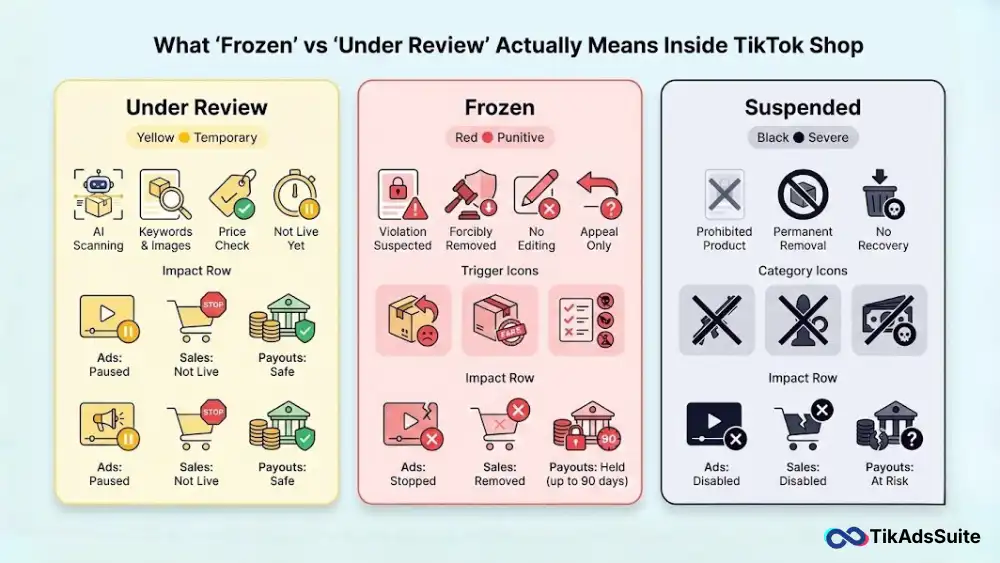
Product Statuses Explained
- Under Review (Yellow): This means the AI bot is currently scanning your keywords, images, and price against TikTok’s policy database. It is temporary. Your product is not live, but it is not in trouble.
- Frozen (Red): This is a punitive status. It means the product was live, but TikTok has forcibly removed it due to a suspected violation (e.g., high return rates, counterfeit claims, or prohibited ingredients). You cannot edit a frozen product; you can only appeal to it.
- Suspended (Black): This is often a permanent removal where the product is deemed illegal or strictly prohibited (e.g., weapons, adult items).
How Status Changes Affect Sales, Ads, and Payouts
If a product is frozen, any pending payouts associated with that specific SKU may be held for up to 90 days to cover potential customer refunds.
If it is under review, your funds are safe, but your ads will stop delivering immediately, killing your momentum.
The Hidden Reason Most Sellers Misunderstand Frozen
The confusion stems from TikTok’s interface. A product can be frozen for product-level reasons (you broke a rule) or category-level reasons (you don’t have permission).
How This Confusion Wrecks Search Results
If you try to fix a Restriction Freeze by changing the category (e.g., moving Vitamins to Candy), you trigger a secondary violation for circumventing category rules. This turns a fixable paperwork issue into a permanent ban.
Data Insight: According to TikTok’s 2025 Safety Transparency Report, nearly 22% of product freezes were automated actions taken against sellers attempting to bypass Invite-Only category restrictions.
The TikTok Shop Review System (What Actually Happens)
You hit Publish. What happens next is a race between three different algorithms.
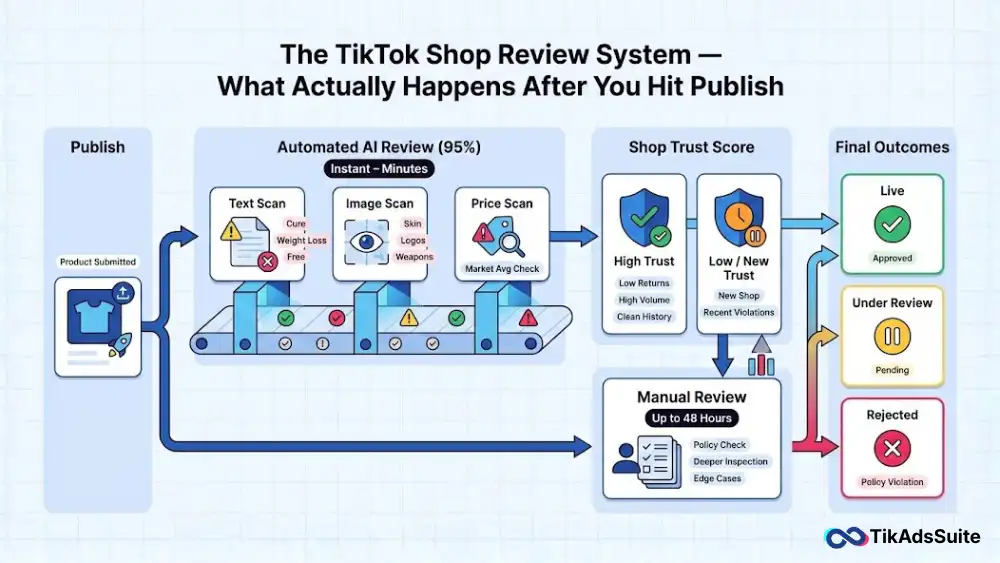
Automated AI Checks vs. Human Review
95% of products are reviewed by AI. The bot scans:
- Text: Searching for banned words (e.g., Cure, Weight Loss, Free).
- Images: Using computer vision to detect skin (nudity), logos (copyright), or weapons.
- Price: Comparing your price to the market average. (A $500 item listed for $5 triggers a Pricing Error review).
Why Some Products Are Reviewed Instantly
If your shop has a high trust score (low return rate, high volume), your products bypass the deep scan and go live instantly. New shops, or shops with recent violations, are placed in a manual review queue, which is why your first few products take 48 hours to approve.
Listing Elements That Trigger Automatic Review Holds
The algorithm is sensitive. Certain trigger words will freeze your product before it ever hits the feed.
High-Risk Words and Phrases
- Medical Claims: Cures, Treats, Heals, Permanent.
- Financial Claims: Get Rich, Free Money, Investment.
- Superlatives: Best Selling, #1, Official.
Image Signals That Flag Listings Instantly
Using before and after images as your main thumbnail is a guaranteed way to get frozen. TikTok views these as misleading content because the results aren’t typical.
Pricing, Claims, and Formatting Mistakes
If you list a bundle (e.g., 3-Pack T-Shirts) but the price is lower than a single unit, the system flags it as a Pricing Error and freezes the listing to protect you from losing money.
Strategic Insight: Before you upload a risky product description, you should audit it. A simple scan with the TikTok Ad Compliance Checker can highlight these trigger words so you can remove them before the algorithm sees them, saving you from the review loop.
The Difference Between Failed, Suspended, and Frozen
Not all rejections are created equal. Knowing the specific terminology can save you weeks of guessing.
TikTok Shop uses specific status labels to indicate the severity of the problem. Misinterpreting a failed QC check for a frozen enforcement action can lead to unnecessary panic, or worse, ignoring a critical warning.
The Severity Spectrum
Failed (Quality Control Reject): This is the lowest severity. It usually means your listing didn’t pass the initial automated QC checklist. Perhaps your image resolution was too low, or you missed a mandatory attribute like Fabric Type.
The Fix: You can simply edit the listing to fix the specific error and resubmit immediately. No violation points are usually assigned.
Frozen (Policy Enforcement): This is a moderate to high severity status. The product was likely live and collecting sales, but the system detected a potential violation (e.g., increased return rates or a trademark flag). The listing is locked; you cannot edit it, and funds related to it may be held.
The Fix: You cannot fix a frozen product. You must appeal the decision with evidence to prove the algorithm wrong.
Suspended (Severe Violation): This is the highest severity. It often indicates that the product falls under a strictly prohibited category (like weapons or adult novelty) or is a confirmed counterfeit.
The Fix: There is rarely a fix. Deletion is often the only path, and severe points are attached to your shop score immediately.
What To Do First When a Product Is Frozen or Stuck
The instinctive reaction is to delete the product to hide the evidence. This is the worst thing you can do. When you see a product status change to Frozen, you need to act like a forensic accountant, not a panicked seller.
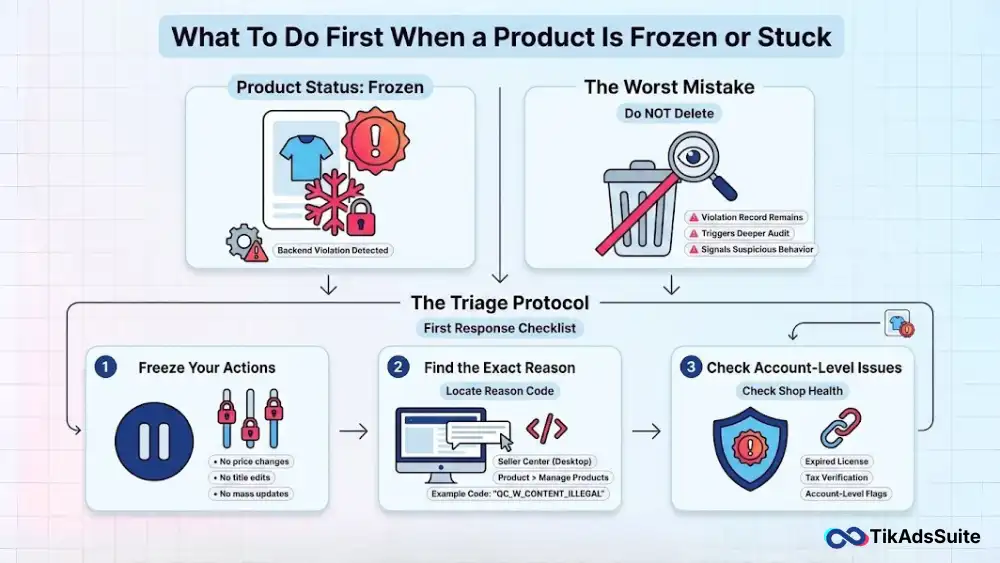
Deleting a frozen listing does not remove the violation record from TikTok’s backend; instead, it signals to the algorithm that you have something to hide, often triggering a deeper audit of your entire shop.
The Triage Protocol
- Stop All Edits: Do not try to change the price, title, or description of other products yet. If your shop is being crawled by a bot, mass edits can trigger further suspicious behavior flags.
- Locate the Exact Reason: Do not rely on the mobile app notifications, which are often vague. Log in to the TikTok Shop Seller Center on a desktop browser. Navigate to Product > Manage Products and hover over the Frozen label. It will often give a specific reason code (e.g., QC_W_CONTENT_ILLEGAL) that tells you exactly what triggered the bot.
- Check for Linked Violations: Go to the Shop Health tab. Sometimes a product freeze is just a symptom of a larger account issue, such as an expired business license or a pending tax document verification. Fixing the account issue often automatically unfreezes the products.
How to Get Products Unstuck From Review
Sometimes the AI just falls asleep. Here is how to wake it up without resetting your place in line.
If your product has been Under Review for more than 48 hours (excluding weekends), it is likely stuck in a logic loop or a manual review backlog.
The Nudge Strategy vs. The Reset Risk
Every time you click Update on a listing, you technically create a new submission ID.
The Risk: If you edit the product description while it is under review, you effectively pull your application from the reviewer’s desk and put it back at the bottom of the pile. This restarts the 24-48 hour clock.
The Safe Nudge: If it has been over 5 days, the listing is likely zombie. In this specific case, you can try deactivating the product (turning stock to 0) and then reactivating it an hour later. This action forces the system to re-index the SKU status without changing the product data, potentially jarring the review bot back into action.
Appealing a Frozen TikTok Shop Product the Right Way
Treat your appeal like a court case, not a customer service chat.
The person (or bot) reading your appeal processes hundreds of cases an hour. They do not care about your lost revenue or your sob story. They are looking for specific documents that tick specific boxes on their compliance checklist.
The Evidence Over Emotion Rule
- For Authenticity Claims: Submit a full chain of custody. This means a wholesale invoice from the brand or authorized distributor that includes your shop name and address. A screenshot of an email or an AliExpress order page will be rejected instantly.
- For Shipping Disputes: If you are frozen for fake tracking, upload a photo of the physical package on a scale, showing the label clearly, alongside the carrier’s delivery proof.
- For Product Quality: Create a PDF document that combines photos of your inventory, your packaging process, and close-ups of the product tags.
Pro Tip: Annotate your evidence. Use a red circle to highlight the dates and tracking numbers on your screenshots. Make it impossible for the reviewer to miss the proof.
Useful article for you:
👉 TikTok Ads Credit: Get Free $6000 Cash Back Promo
👉 Selling Digital Products on TikTok: Is It Allowed?
👉 Top 10 AI TikTok Script Writing Tools
👉 Trends vs. Evergreen Content: Balancing Your Ad Creative
Frequently Asked Questions (FAQ)
Why is my TikTok being under review?
Your product or video is Under Review because the automated system (AI) has flagged it for a potential violation of community guidelines or product policies. This often happens if the AI detects keywords related to medical claims, prohibited items (like weapons), or if the product images match known counterfeit listings. It is a standard check to ensure safety before the content goes live.
How long does it take for TikTok Shop to review an item?
Typically, TikTok Shop reviews take between 15 minutes and 48 hours. If your product is under review for longer than 48 hours, it has likely been escalated to a manual human review due to a complex issue (like trademark verification) or a system backlog during high-volume periods like Black Friday.
How long does a TikTok review appeal take?
A TikTok review appeal usually takes 3 to 5 business days to process. However, this timeline can extend up to 7 business days if the appeal requires additional documentation (such as wholesale invoices or brand authorization letters) to verify authenticity. Submitting multiple appeals for the same issue will often delay the process further.
What triggers a TikTok review?
A TikTok review is triggered by specific risk signals in your listing. Common triggers include using high-risk keywords (e.g., cure, weight loss), uploading images that contain text or watermarks from other platforms, listing products in restricted categories (like supplements or jewelry) without prior approval, or setting a price significantly lower than the market average.
Why is my TikTok product suspended?
A product is suspended when it is confirmed to be in violation of a severe policy. This is different from Under Review. Suspension usually occurs because the product is deemed illegal, counterfeit, or prohibited (such as adult products or weapons). Unlike a freeze, a suspension is often permanent unless you can prove the product was flagged in error with irrefutable evidence.
Why is my TikTok Shop not getting approved?
Your TikTok Shop may not be getting approved due to mismatched information in your application. The most common reasons for rejection include a business name that does not exactly match your tax documents, an invalid or blurry ID photo, or using a bank account that is not linked to the business owner’s name. Ensure all documents are clear, valid, and consistent.
How do I tell if my TikTok account is under review?
You can tell if your TikTok account is under review by checking your notifications or the Account Status section in your settings. You may see a banner stating Account Warning or notice a sudden, significant drop in views (shadowban) on your new posts. In TikTok Shop, your dashboard will explicitly label products as Suspended or Frozen if the account is under review.
Final Takeaway: Turning Reviews From a Risk Into a Filter
Why are my TikTok shop products frozen or under review? Usually, it is because the system is filtering out your competition. It is easy to get frustrated with TikTok’s aggressive enforcement. However, in 2026, this friction is actually your friend.
The Review Barrier filters out the low-effort dropshippers and scammers who cannot produce valid documentation or navigate complex compliance rules.
If you can master the art of the Clean Listing, using proper keywords, having invoices ready, and avoiding trigger phrases, you gain a competitive advantage.
While your competitors are stuck in Frozen purgatory, complaining about the algorithm, your products remain live, collecting sales in a less crowded marketplace.
Your Action Plan:
- Audit: Review your active listings today for any trigger words (like medical claims) that might invite a future freeze.
- Organize: Create a Google Drive folder with all your supplier invoices and brand authorizations so you are ready to appeal within minutes, not days.
- Patience: When under review, sit on your hands. Let the system work.
Compliance is no longer just a safety measure; it is a growth strategy.