
Opening a TikTok Shop lets people buy your products inside the TikTok app, straight from a video, a LIVE or your profile. The setup itself happens in TikTok Seller Center, and most of it is paperwork: who you are, where you ship from and where the money goes.
The details that trip people up are small and easy to miss: a country TikTok Shop does not serve, a blurry ID, or a bank account under a different name than the one on the registration.
Below, the steps follow the order Seller Center uses, with real screenshots, plus notes on the points that most often hold up approval.
Get Up to $6000 Free TikTok Ad Credit
Table of Contents
Quick Answer
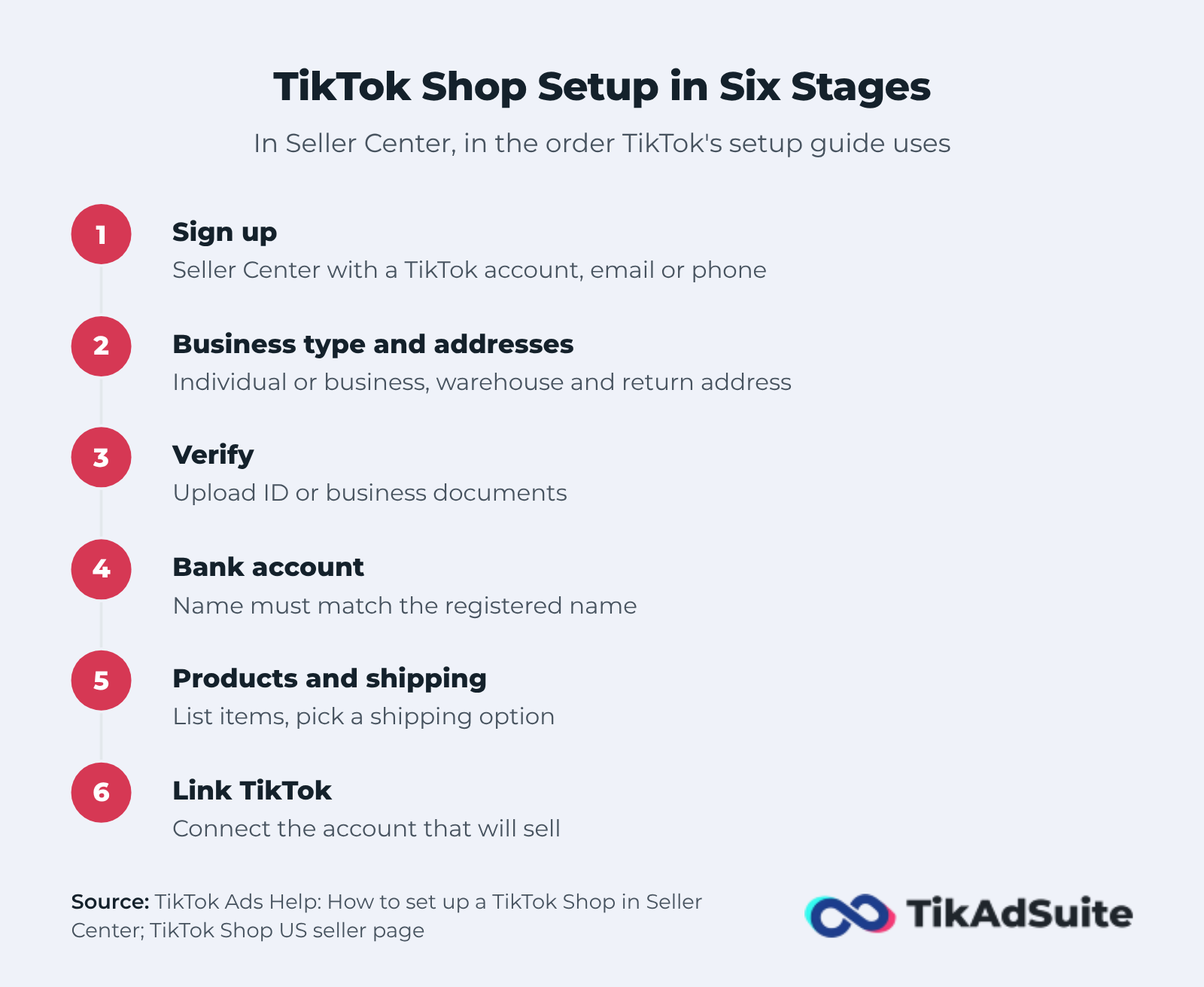
To set up TikTok Shop, go to the TikTok Seller Center for your country and sign up with a TikTok account, an email or a phone number. Choose whether you sell as an individual or a business, then upload your ID or business documents for review.
Once you are approved, add a warehouse and return address, link a bank account in the same name you registered, list your products, choose a shipping option and connect your TikTok account. In the US there is no setup fee; TikTok takes a referral fee on each completed sale.
Key Takeaways
- You set up a TikTok Shop in Seller Center, and you sign up separately for each country you want to sell in.
- TikTok Shop is not on TikTok’s own market lists for Canada, Australia or any Middle East country.
- Individuals upload a passport, national ID or driver’s license; businesses add a business license and an ID for the legal representative.
- Your payout bank account must use the same name as your registration.
- There is no setup fee in the US, and returns and refunds are handled in Seller Center.
Who Can Set Up a TikTok Shop?
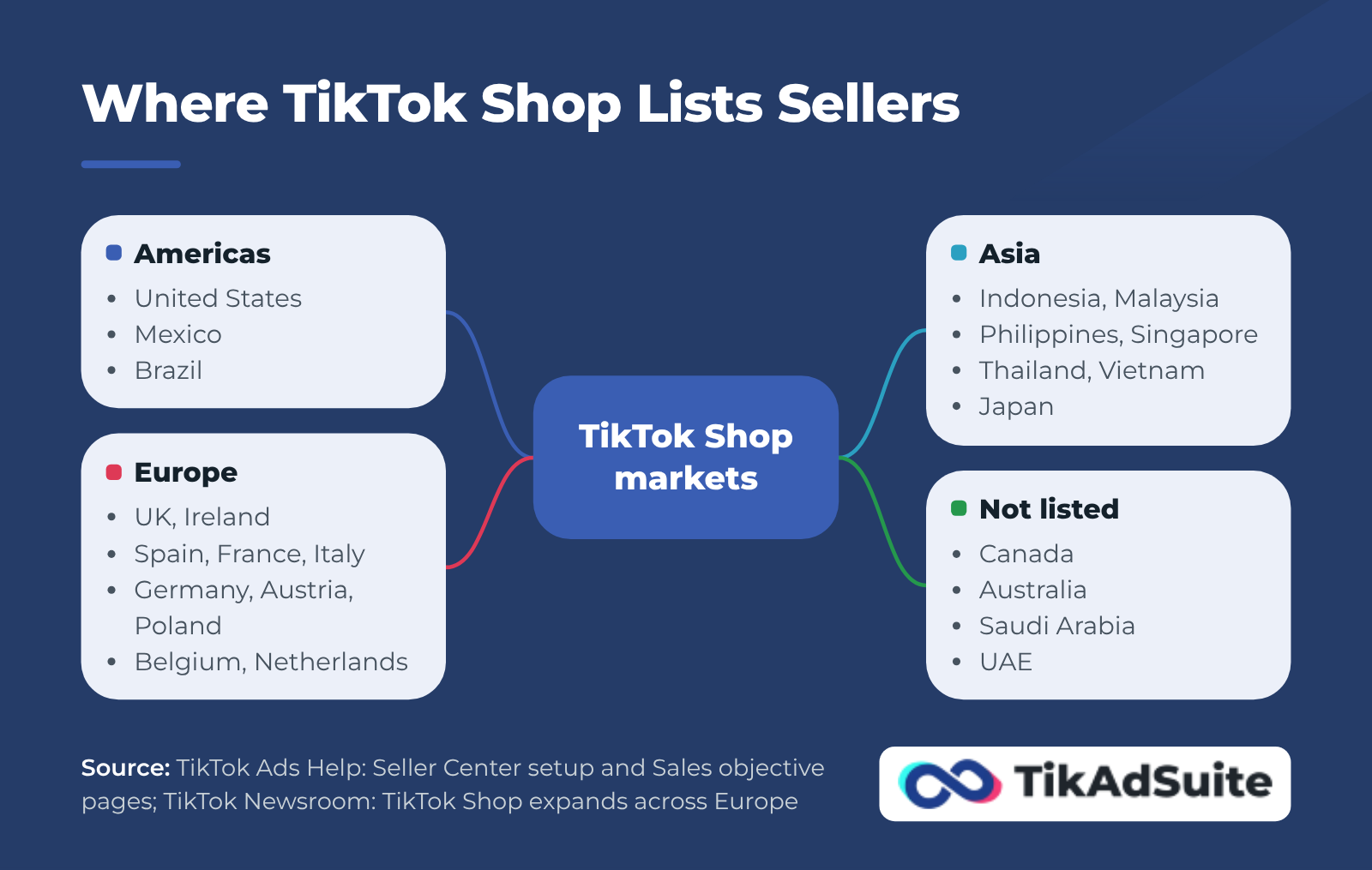
Businesses, brands and individual sellers can open a TikTok Shop, but only in countries where TikTok Shop runs. TikTok’s Seller Center setup guide lists Indonesia, Ireland, Malaysia, Mexico, the Philippines, Singapore, Spain, Thailand, the United Kingdom, the United States and Vietnam.
Other TikTok pages add more markets. The Sales objective help page also lists Japan, Brazil, Germany, Italy and France for TikTok Shop advertisers. A May 2026 TikTok newsroom post says Austria, Belgium, the Netherlands and Poland were added from June 15.
Canada, Australia, Saudi Arabia and the UAE are not on any of these lists. If you are based in one of those countries, TikTok’s current pages give you no local shop to register, and any guide that says otherwise is out of date.
Two more rules matter before you start:
- One shop per market. The TikTok Shop US seller page explains that TikTok Shop runs locally, so you sign up again for each region you want to sell in.
- No follower count for sellers. The same page says you only need to be in a supported market and pass verification.
What You Need Before You Start
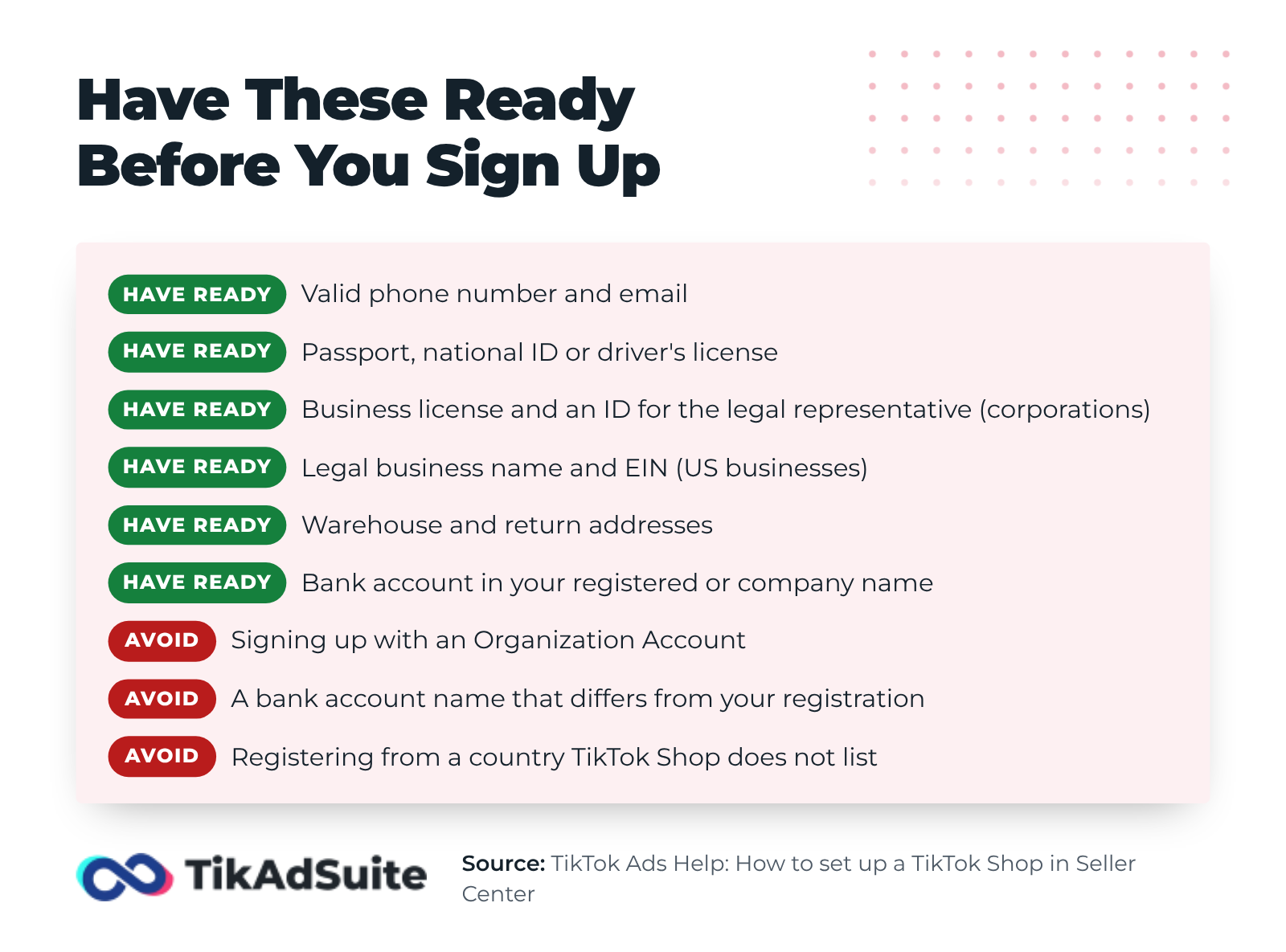
You need a valid phone number and email, documents that prove who you are, and bank details for payouts. According to TikTok’s Seller Center setup guide, you also cannot sign up with a TikTok Organization Account.
What to upload depends on how you register:
- Individually owned business: a clear image of the front and back of your passport, national ID or driver’s license.
- Corporation: a government ID for the legal representative, a company director or a person with significant control, plus a business license, registration or similar official document.
- Business details: your legal business name and, in the US, your employer identification number (EIN).
- Addresses: a warehouse or pickup address and a return address, with a contact person and phone number.
- Bank account: in your registered name if you are an individual, or in the company name if you are a corporation.
Before you upload anything, check that your ID, business documents and bank account all show the same name. The bank rule is strict, and a mismatch there is an avoidable reason to resubmit.
Step-by-Step: How to Set Up TikTok Shop
Setting up TikTok Shop takes nine steps in Seller Center, in the order TikTok’s setup guide uses and on the screens a new US seller sees. Menu names can differ a little by country.
Step 1: Get Your TikTok Account Ready
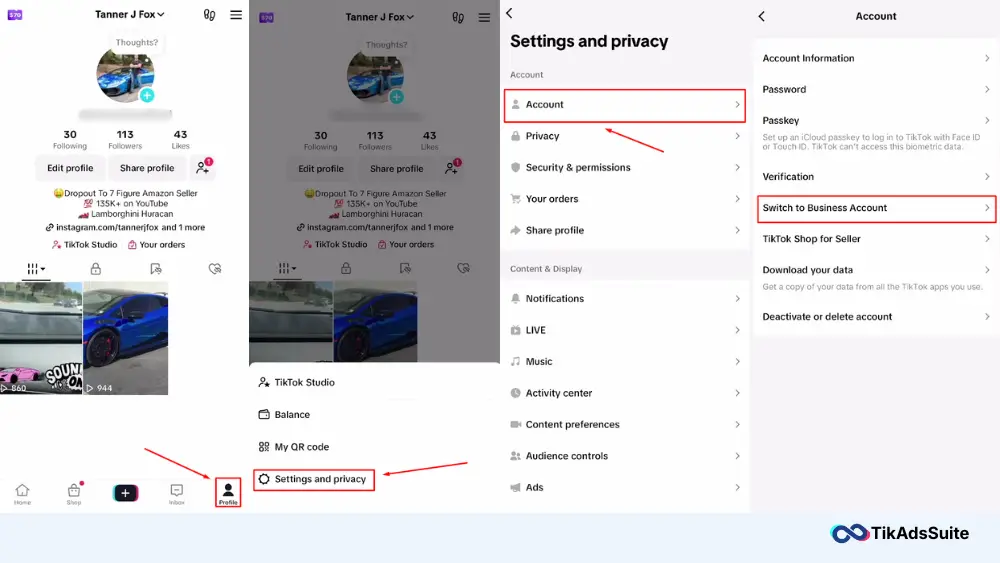
Decide which TikTok account will sell for your shop, and check that it is not an Organization Account. You can also switch it to a TikTok business account from Settings and privacy, then Account, then Switch to Business Account in the app. TikTok’s setup guide does not list this switch as a requirement.
Step 2: Sign Up on TikTok Seller Center
Go to Seller Center for your country. US sellers sign up at seller-us.tiktok.com. You can register with your TikTok account, an email address or a phone number, then pick your country and click Enter.
Step 3: Choose Your Business Type and Add Addresses
Next, choose whether you are setting up a shop for a business or selling under your own name. Then enter the warehouse or pickup address you ship from, a contact person and a phone number.
You can tick Set as return address to reuse that address for returns, or add a separate return warehouse. Agree to the terms and click Start Your Business.
Step 4: Upload Your Verification Documents
From the Seller Center home page, go to Seller Information, pick Corporation or Individually-owned Business, enter a shop name and upload the documents listed above.

Your application stays pending until TikTok approves it. If it fails review, the setup guide says you get an email explaining how to resubmit. As the screenshot shows, Seller Center also asks for tax information before you can sell.
Step 5: Link Your Bank Account
After your documents are verified, click Link Bank Account and enter the account name, bank name, account number, email and address. The account name has to match your registered name, or the company name for a corporation.
Step 6: Add Your Products
From Products, click Add new product. Pick an accurate category, then fill in the title, description, price, stock and photos. Products go live only after TikTok approves them.

If you already sell on Shopify, you can sync your catalog instead of typing each listing. TikTok’s Shopify onboarding guide notes that only one TikTok Shop account can link to one Shopify store. For the full connection steps, read about the Shopify TikTok Shop integration.
Step 7: Set Up Shipping
Open Shipping settings and choose how you will deliver orders. TikTok’s shipping requirements page lists three US options: TikTok Shipping with carriers listed in Seller Center, Fulfilled by TikTok, and Seller Shipping, which may only be open to select sellers.

Whatever you choose, ship on time. The same page warns that late dispatch can lead to auto-cancellation, and that labels must carry the buyer’s details and your return address.
Step 8: Design Your Shop Page
Under Marketing, open Shop design to set up how your shop looks to buyers. You can group products into collections and add sections such as flash sales, as the screen below shows.

Step 9: Link Your TikTok Account
On the Set up your shop checklist, find Connect your shop to a TikTok account and click Link account. Once linked, you can tag products in videos and LIVEs from that account.

Before you promote anything, read each listing as a buyer would: price, stock, shipping time and return address. Fix mistakes now, while no orders depend on them.
TikTok Shop Fees: What to Expect
In the US, opening a TikTok Shop costs nothing. TikTok charges a commission, called a referral fee, only when an order is completed.
According to the TikTok Shop US seller page, that commission is 6% per sale, and TikTok’s referral fee update explains how it is calculated: on what the buyer paid plus any platform discount, minus tax.
Refunds have a small cost too. According to the referral fee update, TikTok returns the referral fee on a refunded order but keeps a Refund Administration Fee of 20% of that fee, capped at $5 per SKU.
Other costs depend on your choices, such as shipping you cover for buyers, Fulfilled by TikTok fees and ads. Rates differ by country and category, so check the full breakdown of TikTok Shop fees before you set prices.
What Comes After Setup
After approval, your work shifts from setup to selling, payouts and returns. According to the TikTok Shop US seller page, payouts reach your linked bank account after orders are completed and any return or refund window has passed.
If you want to advertise your products, you will do it with GMV Max. According to TikTok’s Sales objective help page, GMV Max became the default and only campaign type for TikTok Shop Ads from July 2025.
Returns stay in Seller Center even if you run your store from Shopify. TikTok’s Shopify onboarding guide says returns and refunds can only be started in Seller Center.
For getting your first orders, read how to sell on TikTok Shop with videos, LIVE selling and affiliates.
Frequently Asked Questions
How long does TikTok Shop verification take?
TikTok’s Seller Center setup guide does not give a fixed time. Your application stays pending until it is approved, and if it fails, TikTok emails you how to resubmit. Clear scans and the same name on every document and on your bank account are the best way to avoid a second round.
Do I need 1,000 followers to open a TikTok Shop?
No. The TikTok Shop US seller page says businesses, brands and individual sellers can apply as long as they are in a supported market and pass verification.
What is the official TikTok Shop website for sellers?
Sellers register in TikTok Seller Center for their own country. In the US that is seller-us.tiktok.com, and business.tiktokshop.com explains the program. TikTok Shop runs locally, so a seller in another market signs up in that market’s Seller Center.
Can I connect TikTok Shop to Shopify?
Yes. US sellers can connect through the TikTok for Shopify app or from Seller Center, and products sync from Shopify. TikTok’s Shopify onboarding guide notes that one TikTok Shop account can link to only one Shopify store, and that returns and refunds are still handled in Seller Center.
Is TikTok Shop available in Canada or the Middle East?
Not on TikTok’s current pages. The markets TikTok lists include the US, Mexico, the UK and nine other European countries, Brazil, Japan and six Southeast Asian countries. Canada, Saudi Arabia and the UAE are not on those lists, so there is no local shop registration to complete there yet. Check Seller Center again before planning a launch.
What happens when a buyer requests a refund?
TikTok refunds the referral fee on that order but keeps a Refund Administration Fee of 20% of the referral fee, capped at $5 per SKU, according to TikTok’s referral fee update for US sellers. Buyers start the request from their orders in the TikTok app.
Wrapping Up
Setting up a TikTok Shop is mostly about matching details. Pick a supported country, register the right business type, upload clean documents and use the same name everywhere, from your ID to your bank account.
After approval, add addresses, products and shipping, connect the TikTok account that will sell, and check every listing once more. After that, the work moves to your videos and LIVEs.