
When a product video takes off, viewers want to buy right away. Send them to your website instead, and some of them drop off before they reach your checkout.
Connecting Shopify to TikTok Shop lets people buy inside TikTok while your products, stock and orders stay in Shopify. You keep one catalog and one order list instead of two.
Below is the current setup, what you need before you start, how product and order sync work, and the problems that most often block a connection.
Get Up to $6000 Free TikTok Ad Credit
Table of Contents
Quick Answer
To connect Shopify to TikTok Shop, add the free TikTok sales channel from the Shopify App Store, connect your TikTok for Business account, accept the TikTok Shop Merchant Terms, verify your shop and sync your products.
After that, Shopify sends products and stock to TikTok and receives TikTok orders. Returns, refunds and support stay in TikTok Shop Seller Center.
Key Takeaways
- The official TikTok sales channel is free to install from the Shopify App Store and keeps products, stock and orders in sync.
- Shopify lists ten countries where a store can use TikTok Shop through the channel, including the US, UK, Germany, Mexico and Japan.
- One TikTok Shop account can link to one Shopify store, and you can start the connection from Shopify or from Seller Center.
- Returns and refunds for TikTok orders must be handled in Seller Center. A refund made in the Shopify order admin does not reach TikTok Shop.
- TikTok creates an order in Shopify only when Shopify shows stock for it; otherwise TikTok Shop cancels the order.
What a Shopify TikTok Shop Integration Actually Does
The integration links two systems that each do one job. Shopify runs your catalog, stock and fulfillment. TikTok runs discovery and the in-app checkout.
When the two connect, your Shopify products become shoppable TikTok listings. A viewer taps a product in a video or a LIVE and pays inside TikTok. The order then lands in Shopify, so you pack and ship it like any other sale.
There is one condition. TikTok’s TikTok for Shopify app guide says an order is created in Shopify only if Shopify has stock for it, or if you turned off the inventory check. If the item is out of stock or missing in Shopify, TikTok Shop cancels the order.
This is different from running ads that send people to your website. With TikTok Shop, TikTok becomes the checkout, not just the ad. If you are still deciding between the two routes, compare Shopify and TikTok Shop as sales channels.
Requirements Before You Connect (2026)
Check your country, store address and documents before you start, because each one can stop the connection halfway. Shopify’s TikTok Shop setup page lists the store requirements.
| Requirement | What you need |
|---|---|
| Store country | A store based in one of ten countries: the US, the UK, Ireland, Spain, France, Germany, Italy, Mexico, Brazil or Japan |
| Store address | A verifiable address in Shopify under Settings, then Locations |
| Accounts | An online store and a TikTok for Business account (you can create one during setup) |
| Business documents | Clear, valid ID and business papers that match your registration details |
| Product data | Listings that meet TikTok Shop product rules, plus weight and dimensions |
For US sellers, TikTok’s document requirements page asks for full, unexpired documents under 10 MB in JPG, PNG, JPEG or PDF format. The same page also says that you can list and sell without tax documents only until you earn $2,000.
The TikTok for Shopify guide adds a few US details: warehouse addresses must be in the US, P.O. boxes are not accepted, and TikTok may ask for product weight, dimensions and, in some categories, certifications that Shopify treats as optional.
How to Connect Shopify to TikTok Shop: Step by Step
You connect the two from your Shopify admin by adding the TikTok channel and linking your TikTok accounts. The steps follow Shopify’s setup page; button names can shift slightly as both apps update.
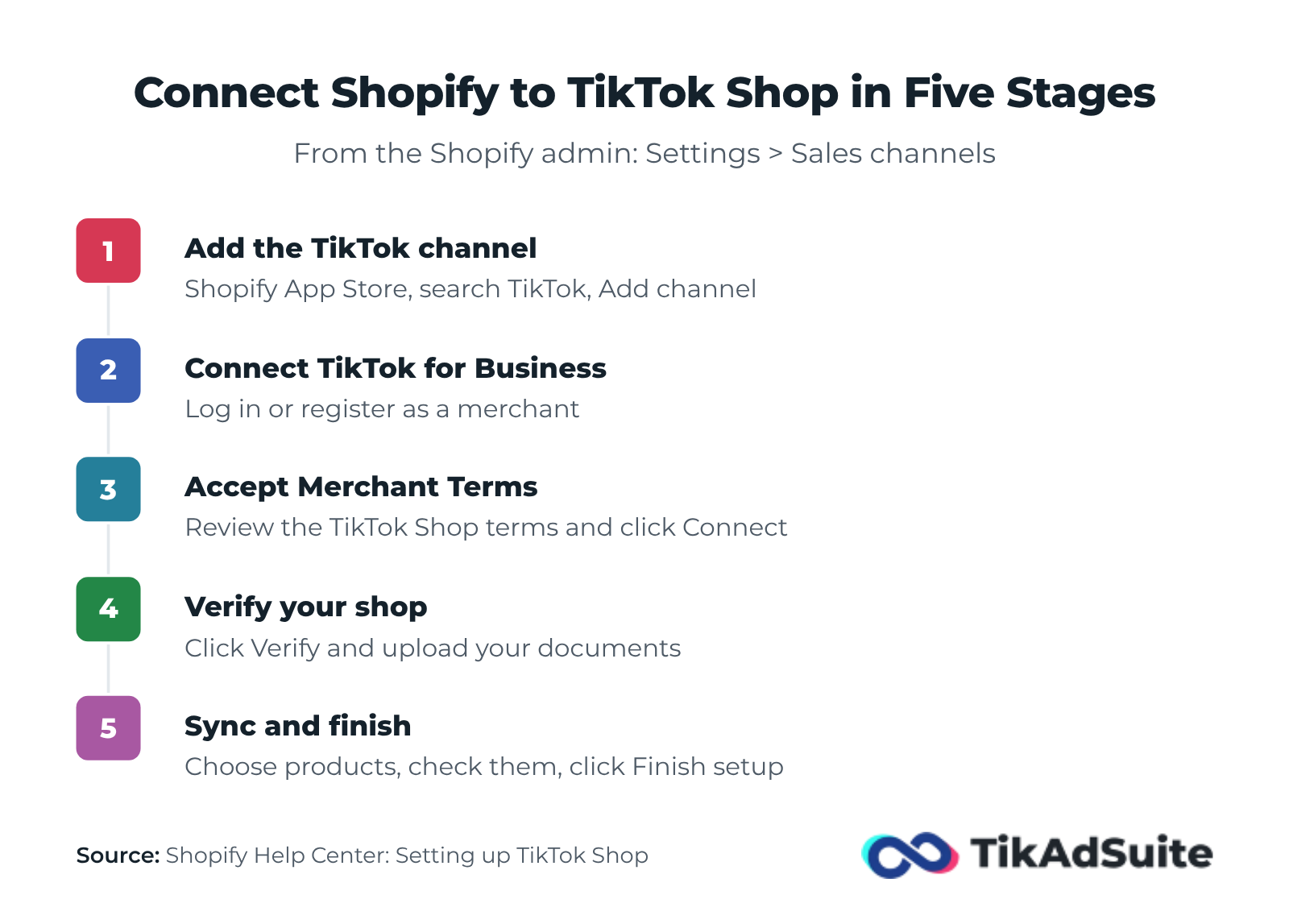
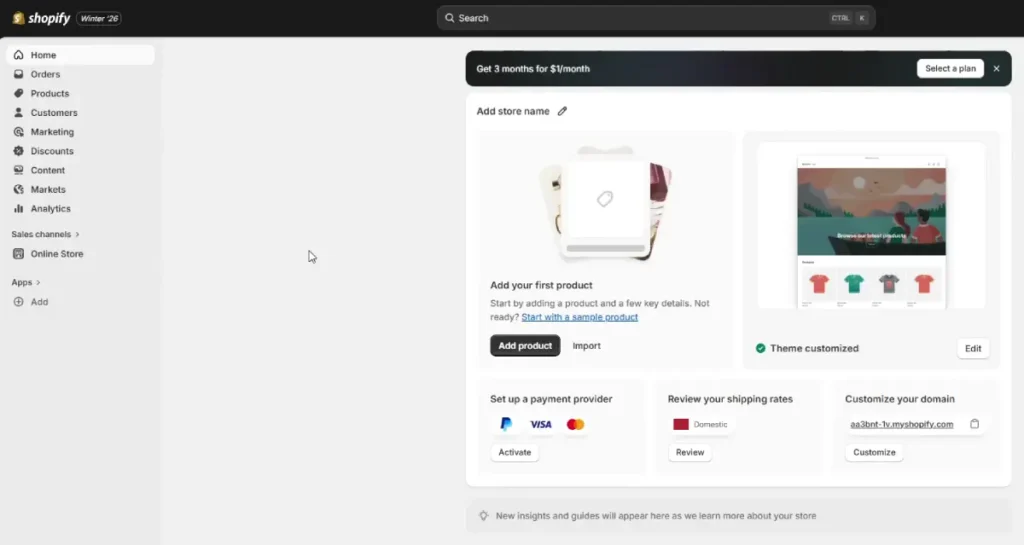
Step 1: Open your Shopify admin. Go to Settings, then Sales channels, and click Shopify App Store.
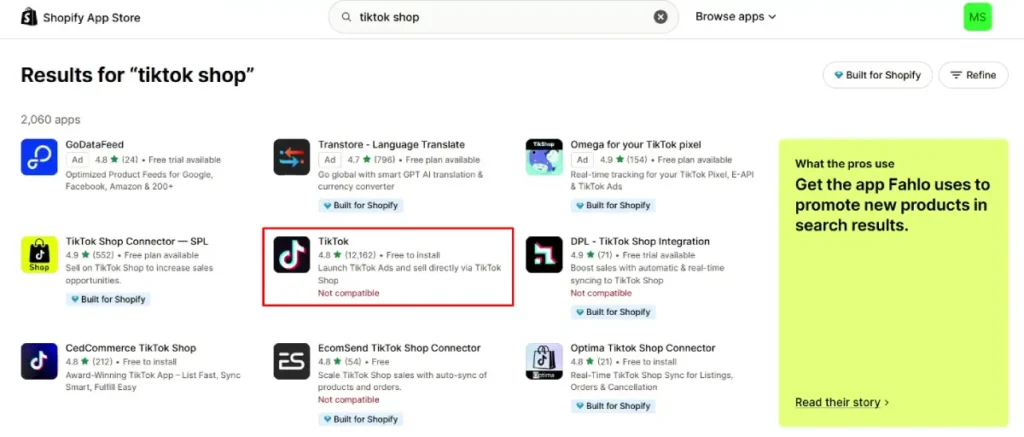
Step 2: Find the official TikTok app. Search for TikTok and pick the official app built by TikTok. Other results are third-party connectors.
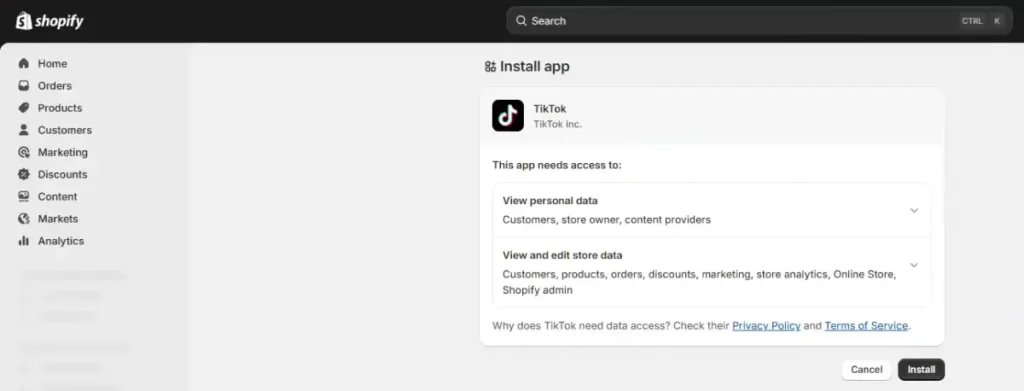
Step 3: Add the channel. Click Add channel and review the data access the app asks for, then install it. You land on the Set up TikTok Shop page.
Step 4: Connect your TikTok for Business account. In the TikTok Shop section, click Connect. Log in if you already have an account, or register as a merchant with your phone number, email and a password. If you need one first, see how to create a TikTok Business account.
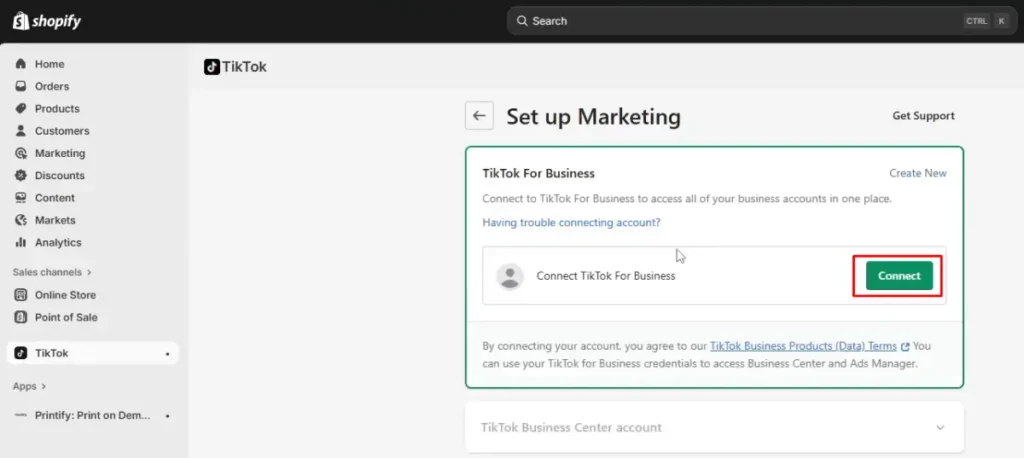
Step 5: Accept the merchant terms. In the Connect to Shopify dialog, review the TikTok Shop Merchant Terms of Service and click Connect.
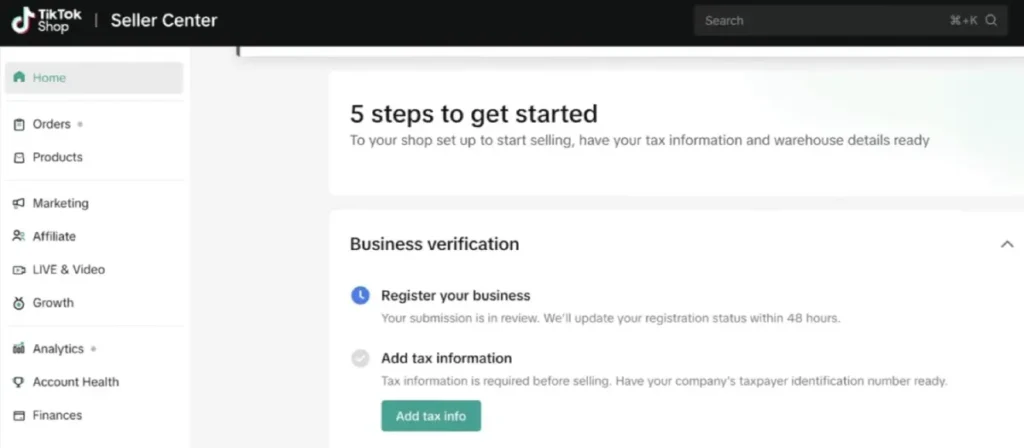
Step 6: Verify your shop. In the Shop information section, click Verify, fill in the Upload Documents dialog and click Next. TikTok reviews the details, and you can follow the review in TikTok Seller Center.
Step 7: Sync your products. Choose which Shopify products to send to TikTok and check each title, image and category before they go live.
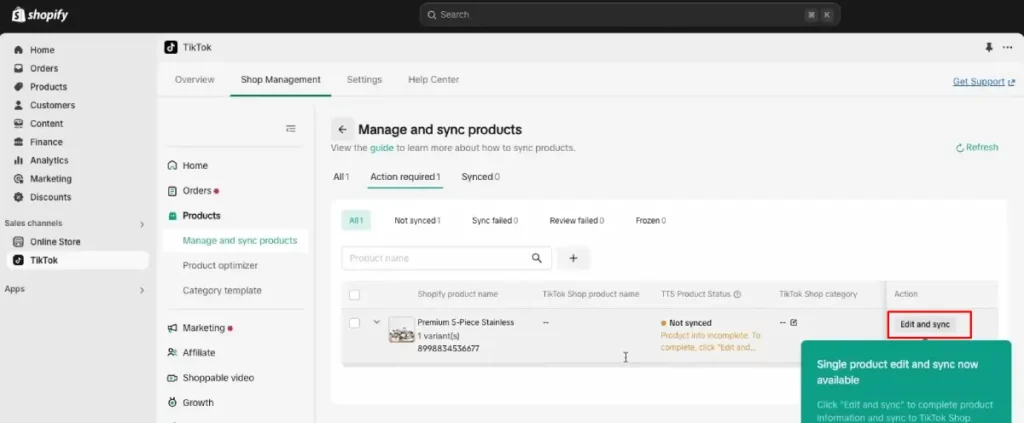
Step 8: Finish setup. Click Finish setup. Approved products appear in your TikTok Shop, ready to tag in videos and LIVE streams.
For a closer look at the seller dashboard itself, see how to set up TikTok Shop.
Connecting From TikTok Seller Center
You can also start from the TikTok side with the Shopify connector. The TikTok for Shopify guide gives this route:
- In Seller Center, click Shopify connector in the menu, then Get started.
- Enter your Shopify store domain and click Link account.
- Shopify opens the TikTok app. Install it to finish the link, then set up shipping and warehouse mapping.
If you already sell on TikTok Shop, use the Map Now banner to match your existing TikTok listings with your Shopify products instead of creating duplicates. Either way, one TikTok Shop account can link to only one Shopify store.
How Do I Sync My Shopify Products to TikTok Shop?
Product sync runs on its own once the channel is connected. Changes you make in Shopify, such as price, stock, images, variants or new products you publish to the app, flow to TikTok Shop.
TikTok also assigns a TikTok Shop category to each product. The TikTok for Shopify guide says to review and correct that category in Seller Center under Manage Products. A wrong category can hold a listing back, so check it once after the first sync.
Habits that prevent sync trouble:
- Write short, clear titles that read well on a phone screen.
- Use sharp, well-lit images, since blurry photos can fail review.
- Fill in weight and dimensions in Shopify before you sync.
- Change stock in Shopify only, and let it flow to TikTok, so you never sell items you do not have.
Once products are live, Shopify stays the single source of truth for your catalog.
Managing Orders, Inventory, and Returns After You Connect
After setup you run most daily work from Shopify, but returns, refunds and disputes stay in TikTok Shop Seller Center. Knowing that split saves you from refunds that never reach the buyer.
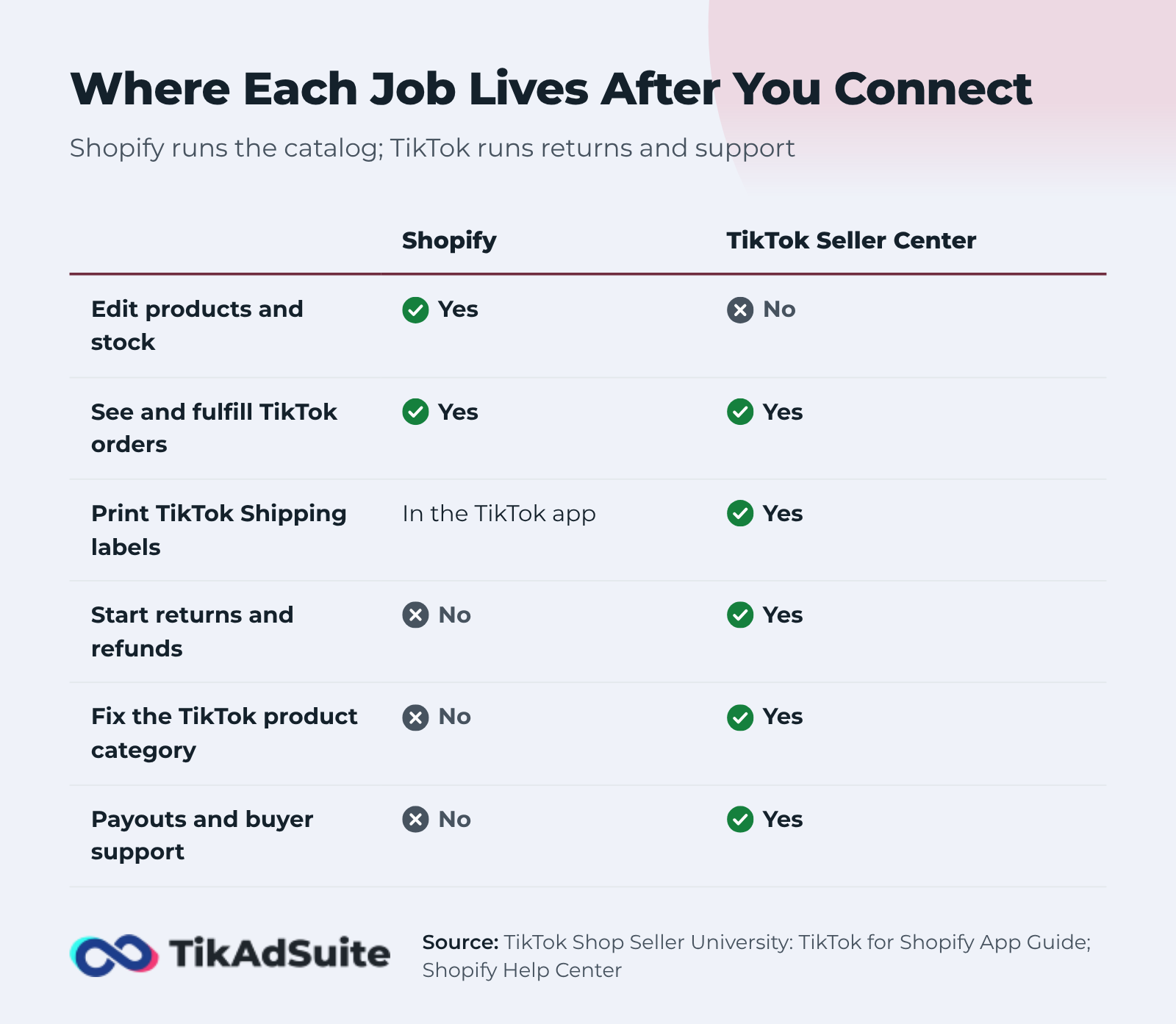
A TikTok order shows up in your Shopify order list with TikTok as the channel. You fulfill it the usual way, and stock drops in both places.
If you use TikTok’s own shipping service, which is the default for new US sellers, you print shipping labels in Seller Center or in the TikTok app inside Shopify. If you ship yourself, you fulfill in Shopify and add a valid tracking number, which then updates the order in TikTok.
Returns are where sellers slip up. The returns section of the TikTok for Shopify guide says returns and refunds can only be started in Seller Center. Shopify’s refund button still works on the screen, but TikTok Shop never sees that refund, so the buyer’s order is not updated.
Payouts and buyer support also run through TikTok. Shopify’s setup page notes that TikTok Shop is operated and supported directly by TikTok, so contact TikTok Shop support, or click Get Support in the channel, for order and payout questions.
Native Connector vs Third-Party Sync Apps
Most stores should use the native TikTok channel and add a third-party app only when they need tools the native app lacks. The native TikTok Shopify app is free to install, and when you run TikTok ads through it, the app’s Shopify App Store listing says ad spend is billed to your TikTok ad account.
| Factor | Native TikTok channel | Third-party sync app |
|---|---|---|
| Cost | Free to install | Usually a monthly plan |
| Setup | Built into Shopify | Extra install and settings |
| Sync | Products, stock, orders | Often adds bulk editing and custom mapping |
| Best for | Most small and mid-size stores | Large or complex catalogs |
| Support | TikTok Shop support | The app’s own support team |
Before you add any connector, check it works with the TikTok app. The TikTok for Shopify guide warns that apps that are not compatible can cause order status problems and should be disconnected before you connect.
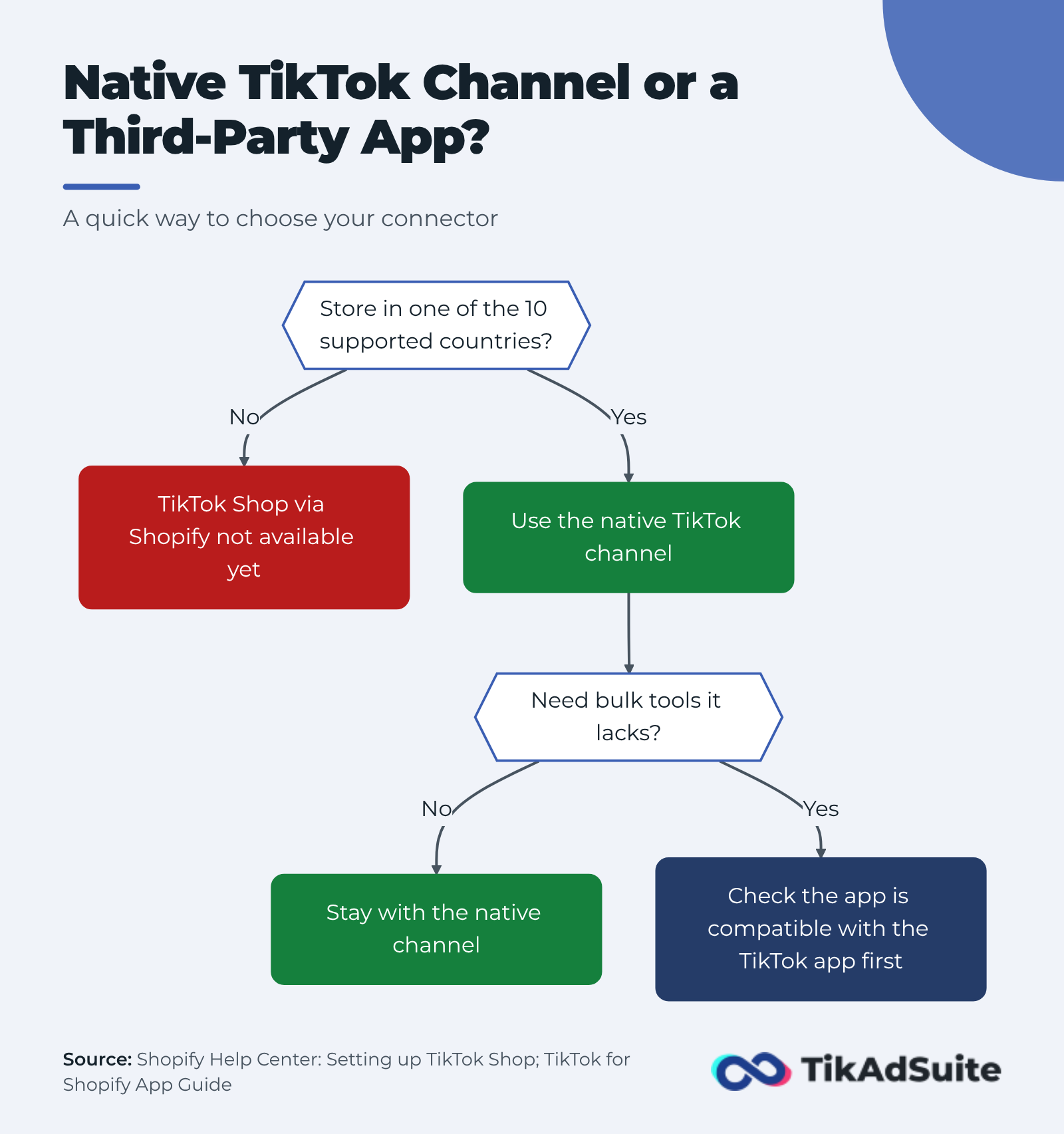
Can You Connect Shopify to TikTok Shop in Every Country?
No. Shopify’s setup page lists ten countries where a store can use TikTok Shop through the channel: the US and the UK, five EU countries (Ireland, Spain, France, Germany and Italy), plus Mexico, Brazil and Japan.
One TikTok Shop account links to one Shopify store, and the US version of the TikTok for Shopify guide accepts only US business and warehouse addresses. If you sell in several countries, check each market’s requirements in that market’s Seller Center before you plan the setup.
Common Problems and How to Fix Them
The same few problems block most connections. Check these before you contact support.
- Location address error: Shopify’s setup page says that this error clears when your location name in Settings, then Locations, is 35 characters or fewer and the address matches Google Maps.
- Products stuck under review: usually a category, image or policy issue. Learn why TikTok Shop products get frozen or reviewed and what to fix.
- Old orders missing in Shopify: the TikTok for Shopify guide says existing TikTok Shop orders are not synced, so finish pending orders and returns in Seller Center before you connect.
- Order status errors: another connector app may clash with the TikTok app. Disconnect apps that are not compatible.
- Stock mismatches: edit stock in Shopify only. Editing in two places creates conflicts.
- Verification stalls: blurry, cropped or expired documents are not accepted. Upload clear copies that match your registration details.
Turning the Connection Into Real Sales
Connecting the stores is the setup, not the sales plan. Sales come from three things working together: your own videos that tag products, paid Shop ads, and creators who promote your products through the affiliate program.
Paid Shop ads now run as TikTok GMV Max: TikTok’s GMV Max migration page says it became the default and only campaign type for TikTok Shop ads in July 2025.
To bring creators in, read how TikTok Shop affiliate marketing works and how commissions are set.
If you also want to send TikTok traffic to your Shopify website, that is a separate setup with the pixel and catalog. The steps to run TikTok ads for Shopify stores cover it.
Frequently Asked Questions
Does TikTok Shop integrate with Shopify?
Yes. Shopify has an official TikTok sales channel, built by TikTok, that connects your store to TikTok Shop. You add it from the Shopify App Store, link your TikTok for Business account and verify your shop. After that, products, stock and orders sync between the two.
Can I connect Shopify from TikTok Seller Center?
Yes. In Seller Center, open Shopify connector, click Get started, enter your Shopify domain and click Link account. Shopify then opens the TikTok app so you can install it and finish the link.
Is the TikTok Shopify app free?
The app is free to install. You still pay TikTok Shop fees on each sale; in the US the referral fee is 6% for most categories, according to TikTok Shop’s referral fee page. Any TikTok ads you run are billed to your TikTok ad account.
Can I sell on TikTok Shop without a Shopify store?
Yes. You can list and sell directly in TikTok Seller Center. The Shopify connection helps when you already run a Shopify store and want one catalog, one stock count and one order list.
Why are my Shopify products not showing on TikTok Shop?
The usual causes are products still under review, a wrong TikTok category, missing weight or dimensions, a location address error, or a policy issue. Check each product’s status in Seller Center and fix the cause in Shopify so the change syncs.
Wrapping Up
Connect through the official TikTok sales channel, check your country and store address first, and verify your business with clean documents. That covers most of the problems sellers run into.
After setup, keep Shopify as the place where you change products and stock, and use Seller Center for returns, refunds and payouts. Then put your time into videos, creators and Shop ads that give people a reason to tap Buy.