
If you sell on TikTok Shop and open Ads Manager to promote a product, the old Shopping Ads options are no longer the first thing you see. Since July 2025, new TikTok Shop ads run through GMV Max.
That change handed a lot of control to the system. You choose what to promote, how much to spend and the return you want, and TikTok’s algorithm decides the rest, mixing your paid ads with organic and affiliate videos.
Below you will find what GMV Max is, how Product and LIVE campaigns differ, how to set one up, and how to read its numbers without fooling yourself.
Get Up to $6000 Free TikTok Ad Credit
Table of Contents
Quick Answer
GMV Max is the automated ad campaign built into TikTok Shop ads, and it chases the most gross merchandise value (GMV) it can get at the return you set. You pick the products or a LIVE stream, enter an ROI target and a daily budget, and TikTok picks the creatives, audiences and placements.
Since July 2025, it is the default and only campaign type for new TikTok Shop ads. You can build it in TikTok Ads Manager under the GMV Max tab or in Seller Center under Shop Ads, for both product campaigns and LIVE campaigns.
Key Takeaways
- GMV Max became the default and only campaign type for new TikTok Shop ads in July 2025. Older Shopping Ads that were already running keep running.
- There are two types: Product GMV Max for your catalog and LIVE GMV Max for livestreams.
- Both types can be created in TikTok Ads Manager (GMV Max tab) and in Seller Center (Shop Ads). LIVE GMV Max is not limited to Seller Center.
- TikTok says there is no creative minimum, but more authorized videos give the system more to test.
- GMV Max counts every order of a promoted product, including organic and affiliate sales, so check results against your total shop sales before you scale.
What Is TikTok GMV Max?
Put simply, TikTok GMV Max is a fully automated ad campaign type built exclusively for TikTok Shop. Rather than optimizing for clicks or reach, it is designed around a single metric: gross merchandise value, which is the total sales revenue generated through your shop before fees, refunds, or ad costs.
TikTok’s GMV Max migration page says that starting July 2025, GMV Max is the default and only campaign type for TikTok Shop ads. Video, Product and LIVE Shopping Ads campaigns that were already running stay active.
You give it three inputs: the products you want to promote, an ROI target and a daily budget.
From there, the system does the work a media buyer used to do by hand. TikTok’s About Product GMV Max page says it builds ads from all your available creative, picks audience settings, and pauses weak ads on its own.
It also spreads delivery across every shoppable placement: the For You feed, search, the Shop Tab and TikTok Ad Network, which used to be called Pangle. Ads can show as videos or as product cards.
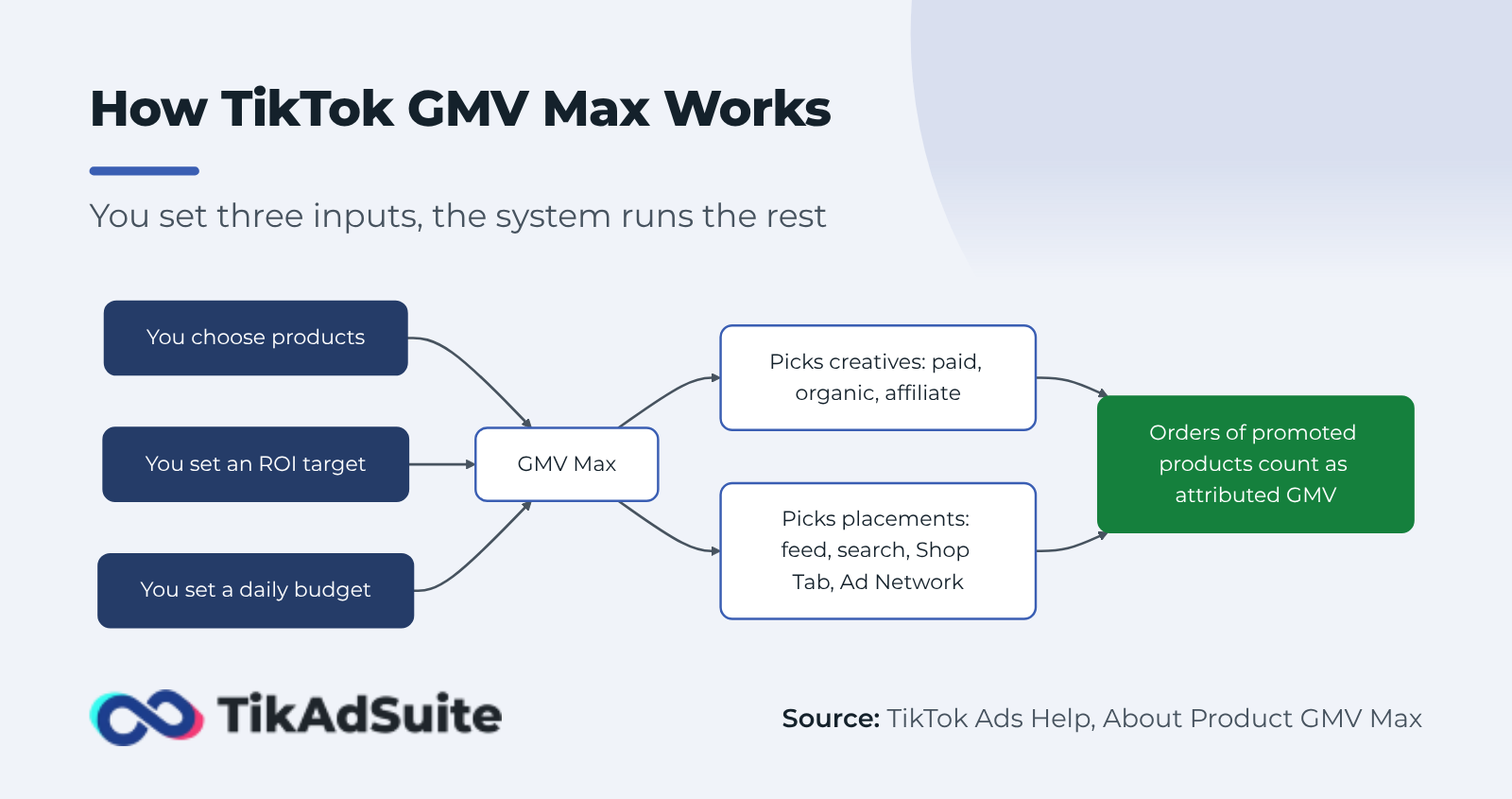
The biggest difference from a normal campaign is what gets counted. The same TikTok page says all orders of the products you advertise are attributed to Product GMV Max, including orders from organic posts and affiliate videos.
So if a creator’s video sells your product and that product is in your campaign, the sale shows up in your GMV Max results. That makes the numbers look strong, which is why the attribution section below matters.
Product GMV Max vs. LIVE GMV Max
GMV Max comes in two campaign types: Product GMV Max promotes items from your catalog, and LIVE GMV Max sends viewers into a livestream. Pick by how you sell: a shop that never streams only needs Product GMV Max, while LIVE GMV Max makes sense once you go live on a regular schedule.
Product GMV Max runs continuously after its start time and pushes the products you choose across feed, search and the Shop Tab. Most shops treat it as their always-on campaign.
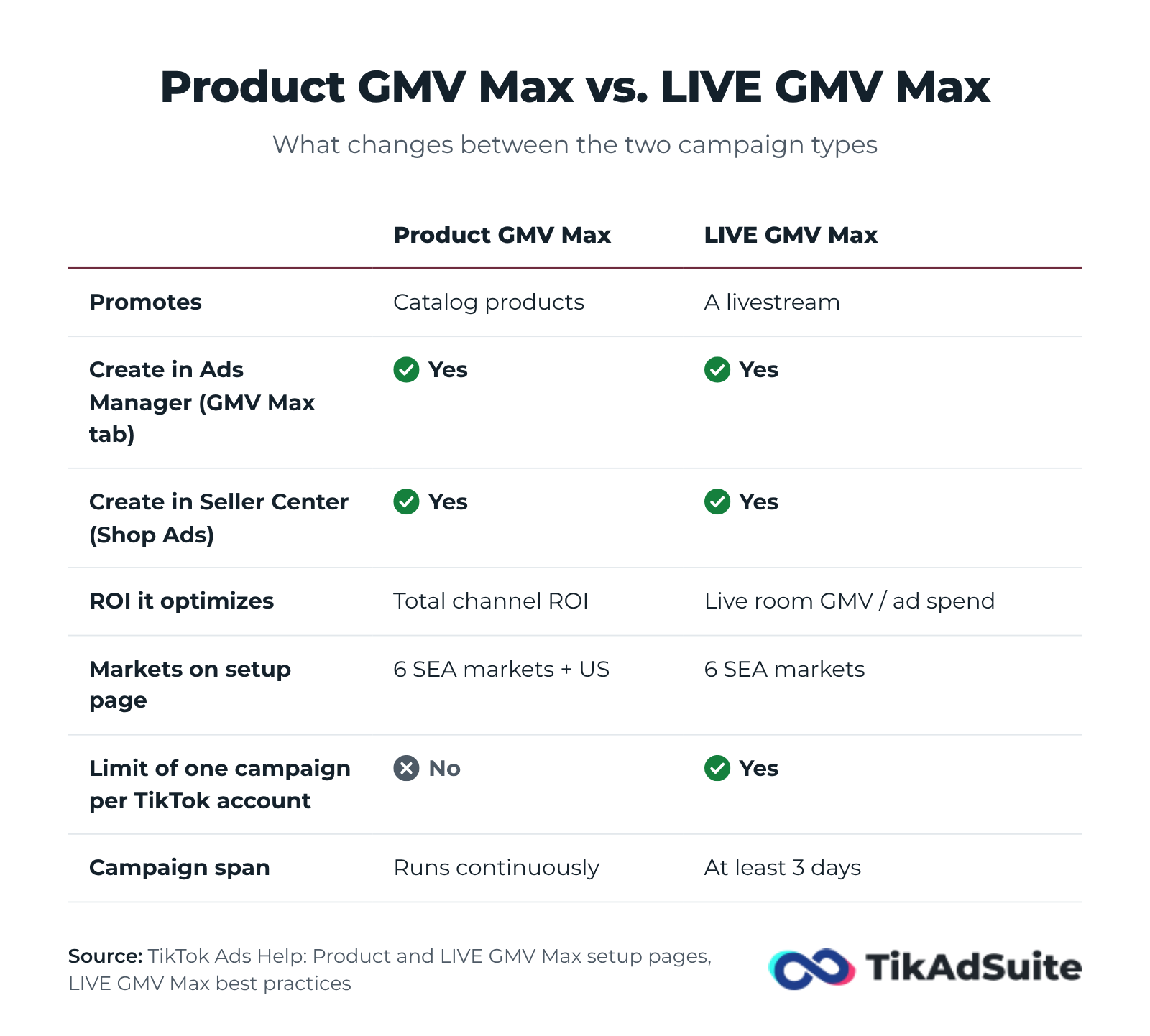
LIVE GMV Max is built to get the most gross revenue out of a live room. TikTok’s About LIVE GMV Max page explains that it drives viewers with two creative types: short videos that point to the LIVE (Video-to-LIVE) and the stream itself (LIVE-to-LIVE). Its LIVE ROI is total live room GMV divided by total ad spend.
Where You Can Create LIVE GMV Max
A common claim is that LIVE GMV Max only exists in Seller Center. That is not right. TikTok’s guide on creating a LIVE GMV Max campaign in Ads Manager shows the path: click GMV Max at the top of the dashboard, choose your shop, click Create GMV Max ads, then pick the TikTok account that will go live.
Seller Center works too. TikTok’s Seller Center setup guide starts from Shop Ads, then Create GMV Max ads, and builds the campaign in your primary ad account.
A few rules are worth knowing before you plan a stream:
- One campaign per account: TikTok’s comparison of LIVE Shopping Ads and LIVE GMV Max says each TikTok identity can have only one LIVE GMV Max campaign.
- Give it at least three days: TikTok’s LIVE GMV Max best practices ask for a campaign that spans at least three days. It does not have to run nonstop.
- Check your market: the Ads Manager and Seller Center setup pages list LIVE GMV Max for Indonesia, Malaysia, the Philippines, Thailand, Vietnam and Singapore. TikTok’s GMV Max blog says GMV Max as a whole is live in every TikTok Shop market, so look for the LIVE option under your GMV Max tab instead of trusting a list.
Classic LIVE Shopping Ads still exist, but the migration page says they now run with a TikTok identity only, with no shop attached. For that route, or for deeper LIVE planning, see the guide to TikTok live shopping ads.
How to Set Up a Product GMV Max Campaign
You set up a Product GMV Max campaign from the GMV Max tab in TikTok Ads Manager, once your shop is connected to Business Center. The steps below follow TikTok’s guide to creating a Product GMV Max campaign.
Before you start, check three things:
- Your TikTok Shop is connected to your Business Center account.
- The ad account you use has GMV Max authorization for that shop (you can check this in Business Center or Seller Center).
- You have Admin or Advertising Manager permission for the shop.
The same page lists Product GMV Max for Indonesia, Malaysia, the Philippines, Thailand, Vietnam, Singapore and the United States.
Step 1: Log in to TikTok Ads Manager and click GMV Max at the top of the dashboard.
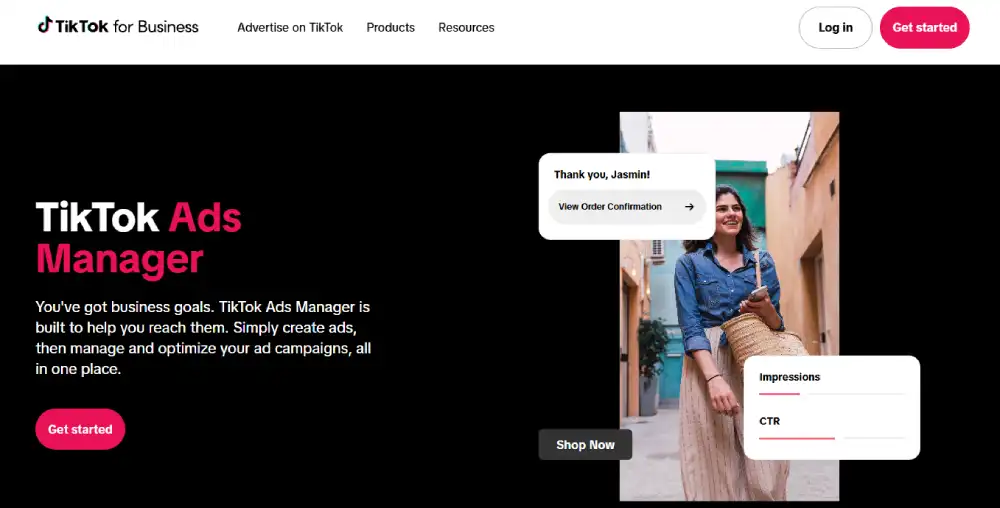
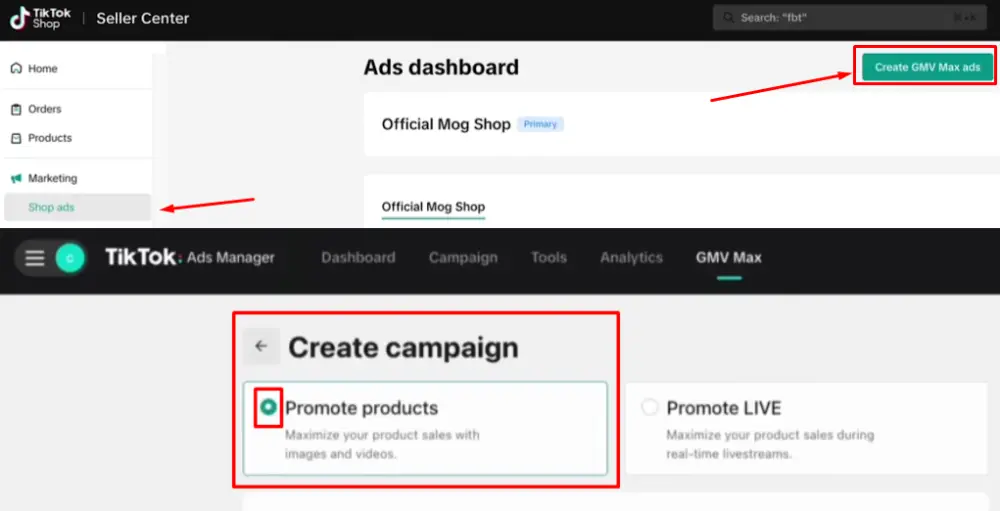
Step 2: Choose the TikTok Shop you want to promote, then click Next to open the overview page. Step 3: Click Create GMV Max ads, then choose Promote products. If the button is greyed out, your ad account is missing GMV Max authorization or you lack operator or admin access.
Step 4: In the Products section, turn on Promote all products in TikTok Shop or click Add product to pick specific items.
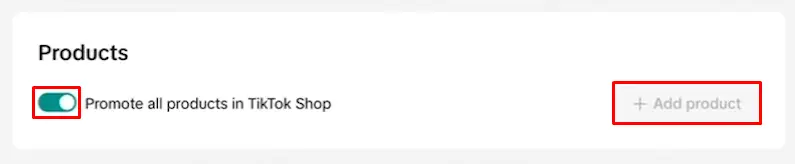
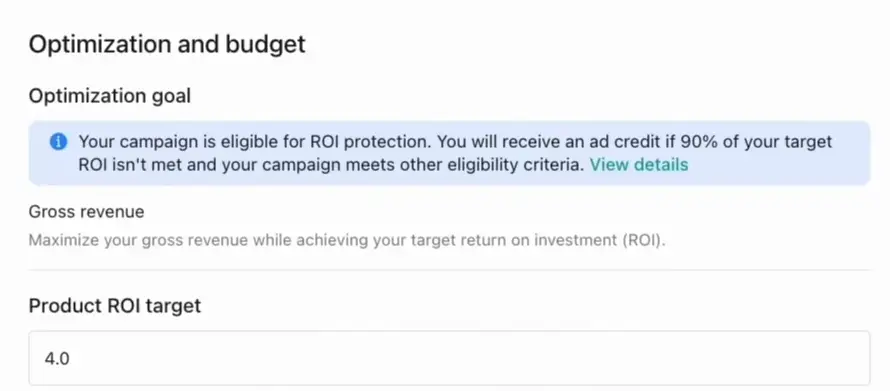
Step 5: Enter an ROI target under Optimization goal. TikTok shows a recommended number; keep it or type your own.
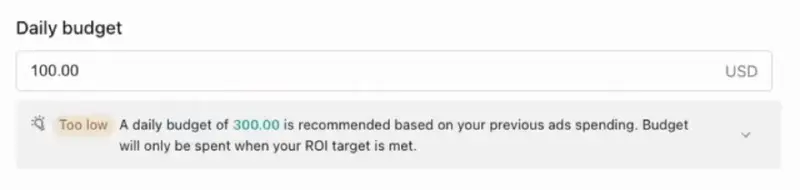
Step 6: In the Budget section, set a daily budget. TikTok shows a recommended amount; keep it or set your own.
Step 7: Set the start date and time in Schedule, check your settings and click Publish. The campaign runs continuously from the scheduled start.
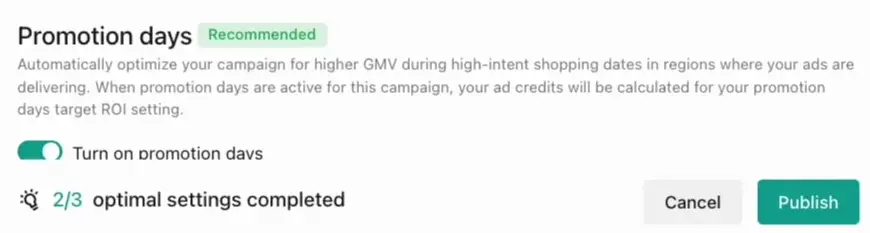
When the campaign goes live, TikTok turns off your Video Shopping Ads and Product Shopping Ads for the same products across all ad accounts. If you promote all products, every one of those older ads is turned off.
You can also start from TikTok Seller Center: open Shop Ads and click Create GMV Max ads.
How to Set Your ROI Target
Your ROI target is the gross revenue you want back for each dollar of ad spend. For example, a target of 4.0 asks the campaign to bring in about $400 of GMV for every $100 it spends.
When you create a campaign, TikTok shows a recommended ROI target. Start there. A target set far above what your shop has done before may hold spend back. TikTok’s LIVE GMV Max best practices, for example, say the budget is not fully used unless the campaign can come close to the target.
Once you have a steady flow of orders, raise the target in small steps rather than one big jump. Watch spend for a day or two after each change. If the campaign stops spending, the target is likely too high.
How ROI Protection Works
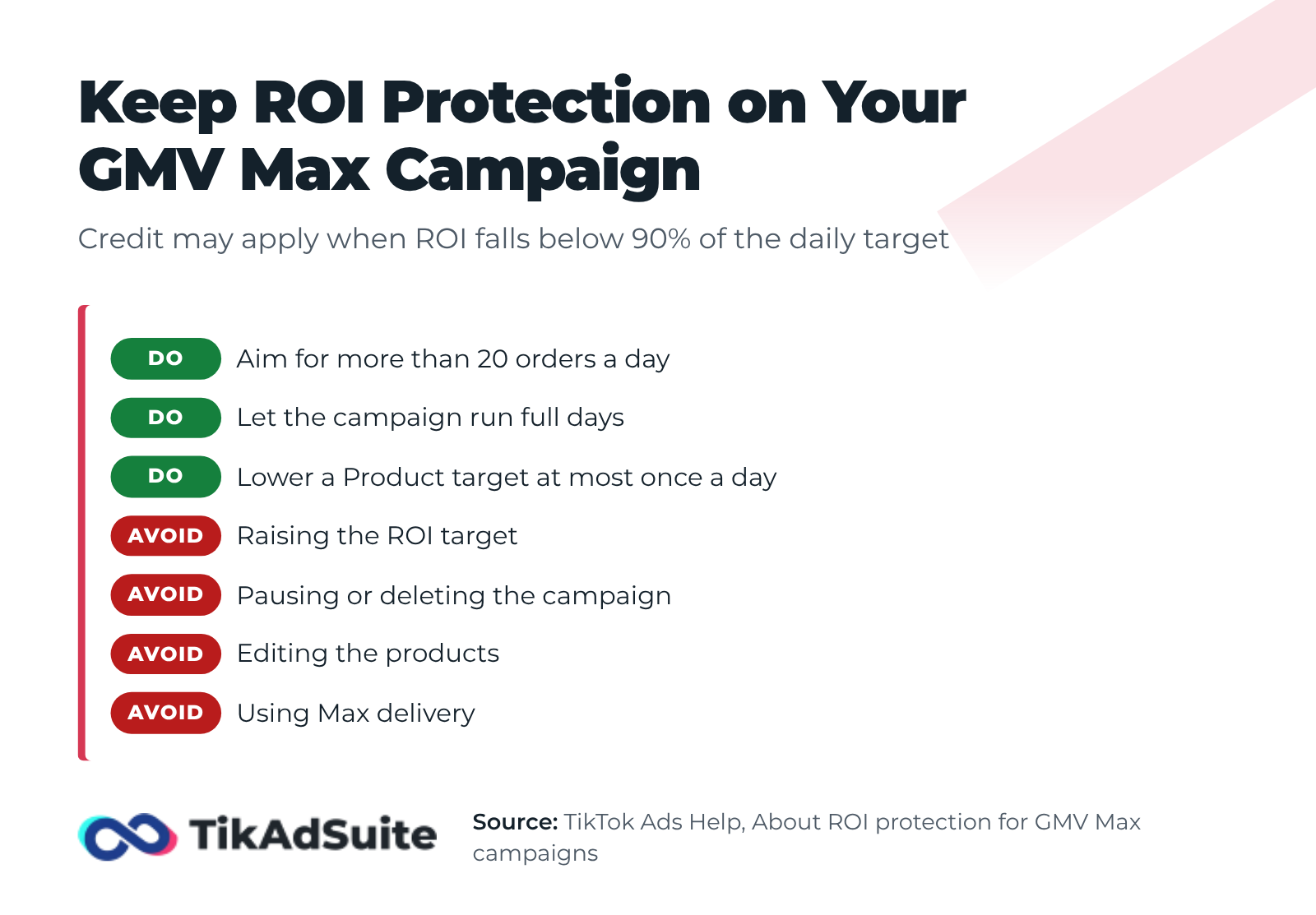
ROI protection is a TikTok feature that pays back part of your spend as ad credit when a campaign falls short of its target, as long as you followed the GMV Max rules. TikTok’s ROI protection page says a campaign may qualify when its ROI falls below 90% of the daily target and it gets more than 20 orders that day.
Since February 25, 2026, the same page says ROI protection covers campaigns built in Seller Center on desktop, the Seller Center app and TikTok Ads Manager.
The credit is lost for any day on which you:
- Raise the ROI target of a Product GMV Max campaign, or lower it more than once
- Pause or delete the campaign
- Edit the products in the campaign
- Run products or live rooms with Max delivery
According to TikTok’s own worked example, a campaign with a daily ROI target of 7.5 that spent $60 and brought in $300 of gross revenue got $15.56 back. The page says that the credit equals total cost minus gross revenue divided by 90% of the target.
Building a Creative Library That Performs
GMV Max picks the creatives, but it can only choose from the videos you make available. The more authorized content it can test, the sooner it finds the videos that sell.
TikTok’s GMV Max blog says there is no creative minimum to launch, so you do not need a big video library on day one. A wider mix of hooks, formats and creators still gives the system more options as the campaign runs.
A few habits that help in practice:
- Add affiliate videos on purpose. The About Product GMV Max page explains that GMV Max includes authorized affiliate videos when you set the video source to Affiliate post. If a creator’s video is missing, ask the creator to authorize it, or add it with its video code.
- Know the label rules. Affiliate videos in a GMV Max campaign get a commercial content label. In the EU and UK, TikTok adds that label to organic posts in a GMV Max campaign on its own.
- Test rough and polished versions. Simple product demos and customer-style reviews often fit the feed better than studio ads, but your own results should decide which style stays.
- Add new videos every few weeks. Fresh hooks give the system new options when older videos slow down.
How Attribution Works in GMV Max
Attributed GMV is the sales value TikTok credits to your GMV Max campaign, and it includes more than ad-driven sales. Per TikTok’s About Product GMV Max page, every order of a promoted product counts, whether it came from a paid ad, your own organic post or an affiliate video.
The same page adds two details that shape your reports:
- GMV is counted for same-day orders with a one-day attribution window.
- Only the products you promote count. Sales of products outside the campaign stay out of your GMV Max numbers.
This is different from most ad platforms, where a campaign gets credit only for sales after someone sees or clicks an ad. On GMV Max you are looking at sales of the promoted products from almost every source, including sales your organic content might have made anyway.
A Simple Check Before You Scale
Before you raise the budget, compare three numbers for the same week in Seller Center:
- GMV attributed to your GMV Max campaign
- Total shop GMV
- GMV from products that are not in the campaign
If total shop GMV grows when the campaign runs, and products outside the campaign hold steady, the campaign is likely adding new sales. If total GMV stays flat while campaign GMV looks high, the campaign is probably taking credit for sales you would have made anyway.
TikTok’s GMV Max blog also says GMV Max now counts affiliate commissions, coupons and referral fees when it optimizes, not just ad spend. That helps, but it does not replace your own profit check.
Practical Tips That Improve GMV Max Performance
GMV Max usually rewards good inputs and few interruptions. Most of the habits below follow from TikTok’s ROI protection rules.
Change settings on a schedule, not on impulse. Editing products, raising the target or pausing the campaign can cost you ROI protection for that day. Make changes in planned steps and give each one a full day.
Be selective about which products you promote. Products with strong video content, steady demand and healthy margins get the most out of GMV Max. Items with thin margins or high refund rates can inflate GMV while hurting profit.
Track cost per order next to GMV. GMV Max chases revenue at your target return, not profit. Cost per order shows whether the growth makes money, especially as you scale the budget.
Keep a written log of changes. Note the date of each target, budget or product change. When results move, you can tell whether your edit or the market caused it.
Frequently Asked Questions
What does GMV stand for in TikTok GMV Max?
GMV stands for gross merchandise value: the total value of products sold through your TikTok Shop before fees, refunds or ad costs. GMV Max is named after its goal, which is to get as much of that value as possible at the ROI target you set.
Is GMV Max only for TikTok Shop?
Yes. GMV Max promotes TikTok Shop products and TikTok Shop livestreams, and it needs a shop connected to your Business Center. Brands that sell on their own website use other objectives, such as Sales, with the TikTok Pixel.
Can I create LIVE GMV Max in TikTok Ads Manager?
Yes. In Ads Manager, click GMV Max at the top of the dashboard, choose your shop, click Create GMV Max ads and pick the TikTok account that will go live. You can also build it in Seller Center under Shop Ads.
Is GMV Max available in the US?
Product GMV Max is. TikTok’s Product GMV Max setup page lists the United States with Indonesia, Malaysia, the Philippines, Thailand, Vietnam and Singapore. The LIVE GMV Max setup pages list only the six Southeast Asian markets, so check the GMV Max tab in your own account.
What is attributed GMV in GMV Max?
Attributed GMV is the sales value TikTok credits to your campaign. It includes every same-day order of a promoted product, from ads, organic posts and affiliate videos, so compare it with your total shop GMV before you judge results.
What happens to my existing Shopping Ads after I launch GMV Max?
When a Product GMV Max campaign starts, TikTok turns off Video Shopping Ads and Product Shopping Ads for the same products across all ad accounts. Older Shopping Ads campaigns that you do not move stay active, and TikTok’s migration page explains how to switch them with the Upgrade now button.
Wrapping Up
GMV Max does the targeting and creative rotation for you, but it still depends on what you give it: the products you pick, the videos it can use and an ROI target your shop can really hit.
Start with TikTok’s recommended target, add affiliate and organic videos, and change settings in planned steps so you keep ROI protection. Then judge the campaign by your total shop sales and profit, not only by the GMV it reports.