
TikTok Ads Manager is where every paid TikTok campaign is built, run and measured. Most businesses use only a small part of it: they launch a campaign, check spend, and miss the settings that decide who sees the ad and what it costs.
If the dashboard has felt confusing, there is a reason. Menus have moved, new campaign types such as Smart+ and Search Ads have been added, and the campaign structure options look different from what many older tutorials show.
Below, you will find account setup, campaign structure, targeting, bidding, Smart+ and Symphony, mobile access, how to read the dashboard, and the mistakes that waste budget.
New to TikTok advertising in general, not just the interface? The TikTok ads beginner guide covers whether TikTok ads fit your business and how to plan a first campaign. This page sticks to the platform itself.
Table of Contents
Get Up to $6000 Free TikTok Ad Credit
Quick Answer
TikTok Ads Manager is TikTok’s free, self-serve tool for creating, running and measuring paid TikTok ads. You build each campaign in three levels (campaign, ad group and ad), install the TikTok Pixel to track results, and read performance in the Dashboard and Analytics tabs. You pay only for the ads you run.
Key Takeaways
- TikTok Ads Manager uses a three-level structure: Campaign, Ad Group and Ad. Most setup problems start with a choice made at the wrong level.
- Smart+ campaigns automate targeting, bidding and placement, so setup takes fewer manual choices.
- The platform is free to use. You pay only for the ads you run, and minimum budgets apply at both the campaign and ad group level.
- You can check results on a phone, but building campaigns is much easier on a desktop.
- Picking the wrong objective or bid strategy at setup is a common and costly mistake, because TikTok optimizes for exactly what you choose.
- Dashboard metrics are only useful when you read them against your campaign objective.
What Is TikTok Ads Manager?
TikTok Ads Manager, sometimes simply called TikTok Ad Manager, is TikTok’s self-serve advertising platform for creating, managing, and optimizing paid campaigns. It gives you access to audience targeting, budget controls, creative tools, and performance analytics, all in one dashboard. Results vary based on your industry, creative quality, and campaign objective selection.
According to TikTok’s About Ads Manager page, the platform has four main tabs: Dashboard for spend and alerts, Campaigns for your campaigns, ad groups and ads, Tools for Events, Creatives, Audiences, Catalogs, Comments and Instant Pages, and Analytics for custom and scheduled reports.
What’s New in TikTok Ads Manager?
Several recent TikTok Ads Manager updates change how you should set up campaigns. Here are the ones that matter most:
Smart+ Campaigns hand targeting, bidding and placement to TikTok’s automation. In its Smart+ announcement, TikTok said advertisers using Smart+ Web Campaigns to optimize for value saw a 52% improvement in return on ad spend, based on its internal data, and it quotes Ray-Ban reporting a 50% reduction in cost per acquisition after adopting Smart+.
Treat brand case studies as examples, not a forecast for your account.
TikTok Search Ads let you show keyword-targeted ads inside TikTok search results. TikTok’s Search Ads Campaign announcement says the campaign type is available in the US and testing in other markets, and that 57% of users use TikTok search, with 23% searching within 30 seconds of opening the app, based on TikTok internal US data from June 2024.
For advertisers, that means you can reach people while they are looking for a product, not only while they scroll the For You feed.
Symphony AI creative tools sit inside Ads Manager. The Symphony suite, including AI script writing, video dubbing and AI avatars, covers basic creative production without third-party tools.
Creating Your TikTok Ads Manager Account: A Step-by-Step Guide
Setting up your TikTok Ads Manager account correctly from the start saves you from billing issues, policy rejections, and restricted features later. Here is exactly how to do it.
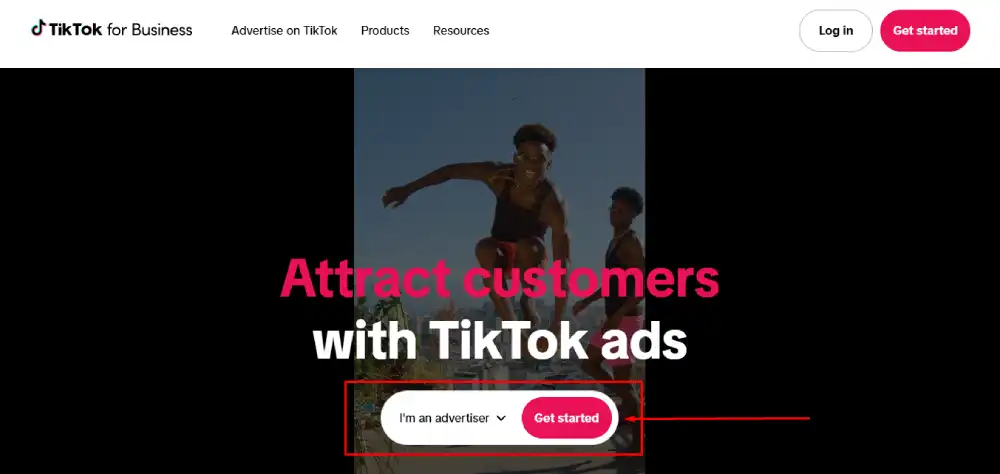
Step 1: Go to ads.tiktok.com, click Create Now on the homepage. You will be prompted to enter your email address or phone number, choose your password, and verify your contact information.
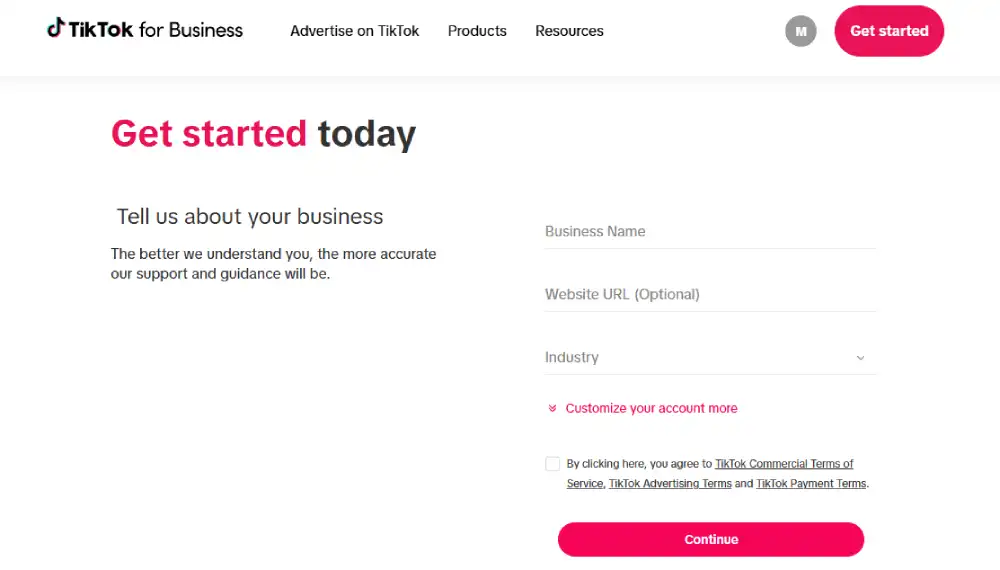
Step 2: Enter your business information. You will need to provide your country or region, your industry category, your business name, your website URL, and your business phone number. Make sure your website URL is live and matches the business name you enter. A mismatch can slow down or fail review.
Step 3: Set up your billing.
Manual payment gives you tighter spend control, especially useful if you are testing a new account.
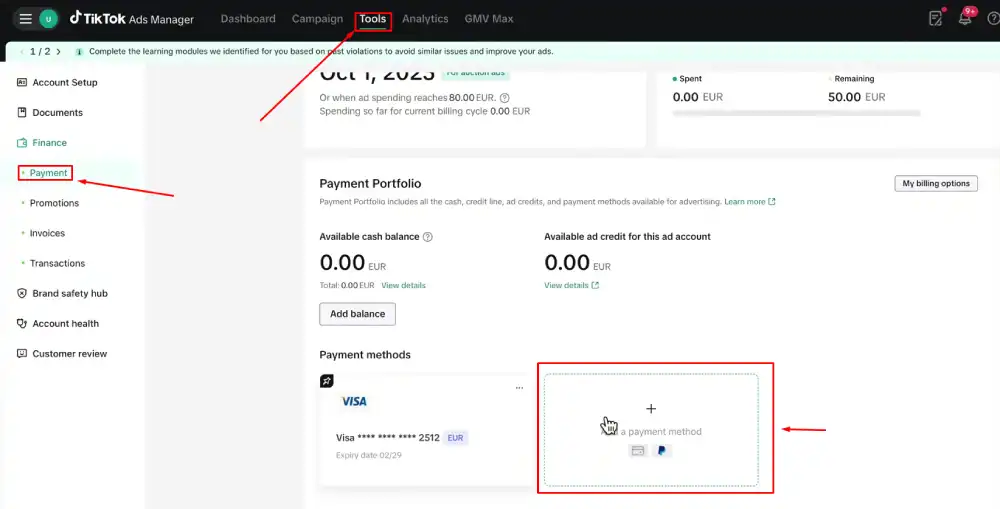
TikTok Ads Manager offers two payment options:
- Automatic payment: Your account is charged after you reach a billing threshold or at the end of each month.
- Manual payment: You add funds to your account in advance, and TikTok deducts from your balance as ads run.
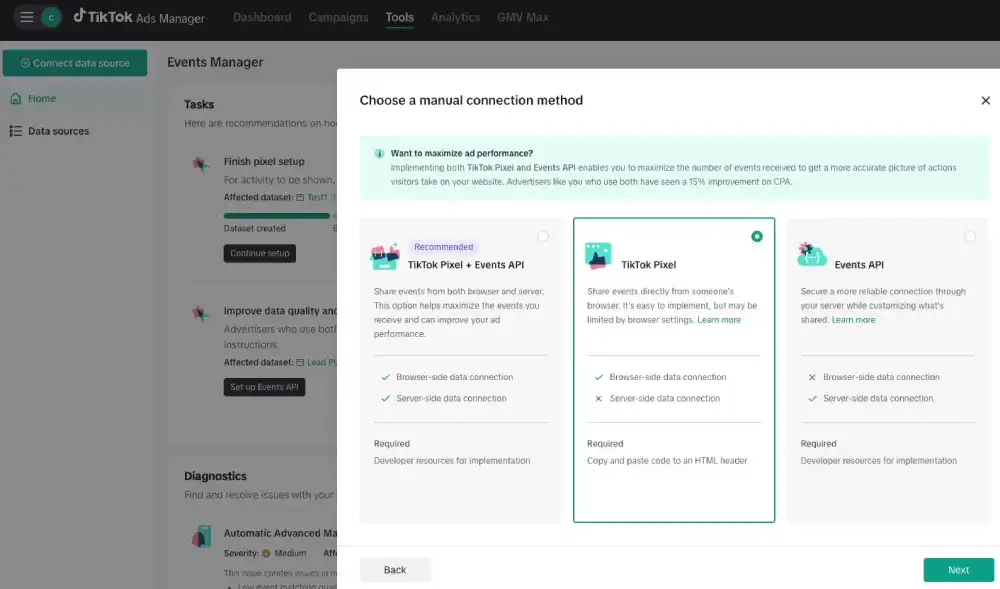
Step 4: Install the TikTok Pixel. Before you run a single ad, install the TikTok Pixel on your website. Per TikTok’s Pixel setup help page, you create it under Tools > Events > Connect data source > Web. The Pixel tracks conversions, builds Custom Audiences, and powers TikTok’s AI targeting. Without it, your conversion campaigns will underperform from day one.
Step 5: Set up TikTok Business Center (optional but recommended). If you manage multiple ad accounts, work with an agency, or plan to give team members access, connect your Ads Manager to TikTok Business Center at business.tiktok.com. Business Center lets you manage permissions, link TikTok accounts, and access shared assets across multiple accounts from one place.
This is also the setup path for agencies offering white-label TikTok ads management. Instead of logging into a client’s Ads Manager directly, an agency operates through its own Business Center, with the client’s ad account added as a managed asset. The client’s account and billing stay under their own name throughout.
Step 6: Verify your business (if prompted). TikTok’s Business Verification page says verification is requested when you create an ad account and again once your spend reaches a set threshold. You upload business details and a document such as a business license, and your status can affect whether you can run ads.
Your account is now ready to build campaigns.
Understanding TikTok Ads Manager’s Campaign Structure
Every ad you run inside TikTok Ads Manager lives inside a three-tier structure. If you do not understand how these three tiers work together, you will waste budget and get confusing data.
Campaigns, Ad Groups, and Ads: How the 3-Tier System Works
| Tier | What You Control | Key Decision |
| Campaign | Objective, budget type | What goal are you optimizing for? |
| Ad Group | Audience, placement, schedule, bidding | Who sees your ad and how much do you pay? |
| Ad | Creative, copy, call to action | What does the audience actually see? |
The Campaign level is where you set your advertising objective. TikTok organizes objectives into three categories: Awareness, Consideration, and Conversion. Your objective selection locks in what TikTok’s algorithm optimizes for. If you select Traffic, but you actually want purchases, your campaign will bring visitors who never buy. Choose the objective that matches your real business goal.
The Ad Group level is where most of the strategic decisions happen. Here you define your target audience, select your ad placements, set your daily or lifetime budget, choose your bidding method, and set your campaign schedule. One campaign can contain multiple ad groups. This lets you test different audiences or placements against the same objective without creating separate campaigns.
The Ad level is where your creative lives. Each ad group can hold multiple ads. TikTok recommends running three to five creative variations per ad group to give the algorithm enough material to optimize toward the best performer.
A clean account structure looks like this: one campaign per objective, two to four ad groups per campaign, testing different audience segments, and three to five ads per ad group, testing different creatives. This structure keeps your data clean and your optimization signals strong.
How to Create Your First TikTok Ad Campaign (Step by Step)
Before you create your first campaign, have your Pixel installed, your creative assets ready, and your landing page live. Starting without these in place means your first campaign will produce incomplete data.
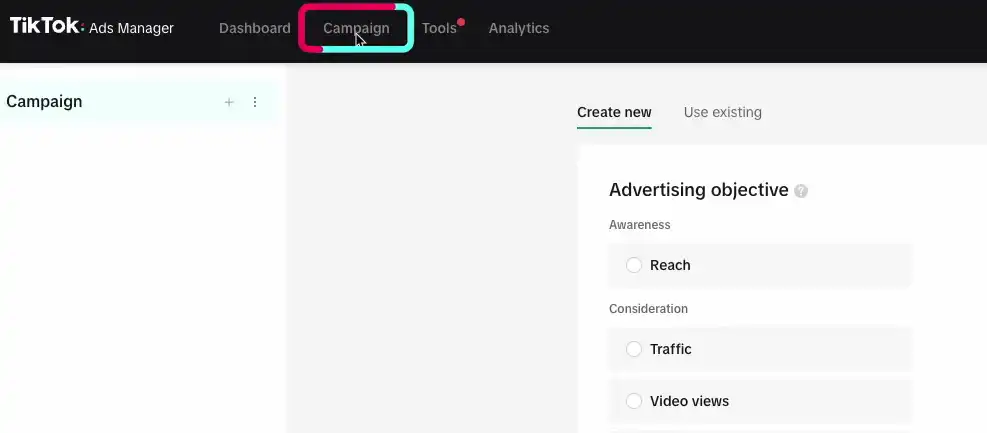
Step 1: Click Create Campaign in the Campaigns tab
Step 2: Choose your campaign objective: Select the objective that matches your actual goal. TikTok currently offers these objectives: Reach, Video Views, Community Interaction, Traffic, App Promotion, Lead Generation, Website Conversions, Catalog Sales, and In-App Purchases. For most direct-response advertisers starting out, Website Conversions is the right choice.
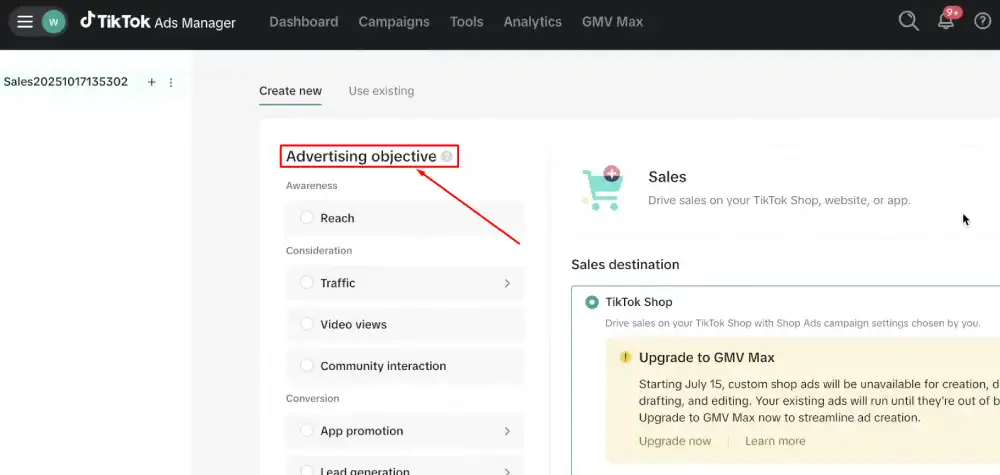
TikTok Shop sellers also have a separate objective category, LIVE Shopping Ads, which promotes an active livestream rather than a static video or product page. It’s set up from the same Campaigns tab but only applies to accounts running TikTok Shop.
Step 3: Name your campaign and set your budget: Use a naming convention that includes the objective, date, and target audience. For example: Conv-US-25to34-March2026. This makes reporting much easier at scale. Set a campaign-level budget only if you need a hard spend cap. Otherwise, control the budget at the ad group level for more flexibility.
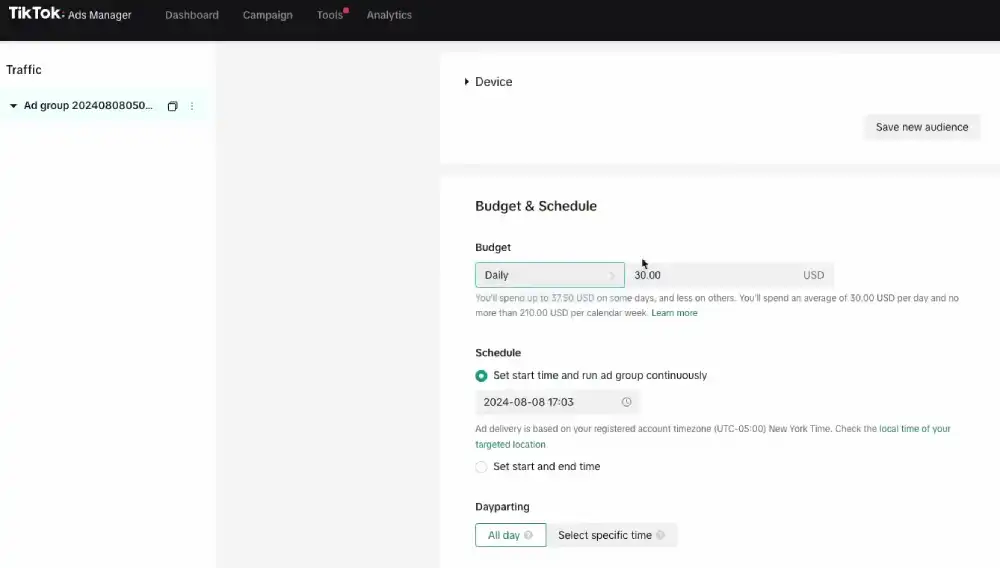
Step 4: Create your first Ad Group:
Inside the ad group, you will:
- Name the ad group using the same naming convention
- Select your Pixel and optimization event (choose Purchase for conversion campaigns)
- Define your audience using TikTok’s targeting options
- Select placements (start with Automatic Placement for your first campaign)
- Set your budget and schedule
- Choose your bidding strategy
Step 5: Upload your creative and build your ad: TikTok supports video ads, image ads (in Carousel and Collection formats), and Spark Ads (boosted organic posts). For in-feed ads, TikTok’s creative tips recommend shooting vertical 9:16 video so the ad fills the screen, and note that over 63% of videos with the highest click-through rate show their key message or product within the first three seconds.
Step 6: Review and submit: TikTok’s Ad Review FAQ says most ads are reviewed within 24 hours, though some take longer. Make sure your landing page URL is accessible, your creative does not include prohibited content, and your ad copy does not contain misleading claims. Ads that fail review will show a rejection reason inside the Ad level of your dashboard.
Step 7: Monitor through the learning phase: Do not make changes during the learning phase. TikTok’s algorithm needs time to gather data and optimize delivery. Per TikTok’s Learning Phase documentation, delivery volatility typically starts to decline after about 25 campaign results, or 7 days after the campaign enters the learning phase.
TikTok Ads Manager Targeting Options Explained
TikTok Ads Manager offers more targeting options than most advertisers use. Here is what each one does and when to use it.
Demographic Targeting You can target by age, gender, location (country, region, city, or radius), language, and household income (available in select markets). This is your baseline filter. Do not over-narrow here. Tight demographic targeting limits the data your algorithm needs to optimize.
Interest and Behavior Targeting TikTok lets you target users based on their content interaction history. Interests are broader categories. Behaviors are more specific, based on recent actions like video engagement or hashtag interaction. Combining one interest category with one behavior layer is a reliable starting point for new ad groups.
Custom Audiences:
Custom Audiences are usually your strongest targeting option once your lists are large enough to match a real share of users. You can build them from:
- Your TikTok Pixel data (website visitors, purchasers, cart abandoners)
- Customer file uploads (email or phone number lists)
- TikTok engagement data (users who interacted with your videos, profile, or ads)
- App activity data (for mobile apps with the TikTok SDK installed)
Lookalike Audiences Based on your Custom Audiences, TikTok can build a Lookalike Audience of users who share patterns with your source audience. You choose how close the match should be, from narrow to broad. A middle setting is a sensible start for most campaigns.
AI-Powered Audience Expansion (2026) When you enable Audience Expansion inside an ad group, TikTok’s algorithm automatically tests delivery beyond your defined targeting when it identifies signals of higher performance. This works well for campaigns with clear conversion events and sufficient Pixel data.
Targeting Recommendation: Start Broad, Then Narrow: A common mistake is over-targeting from day one. TikTok’s algorithm performs better with a broad initial audience because it needs volume to identify your best customers. Start with a demographic and one interest layer, run long enough to collect real results, then use your audience data to build Custom and Lookalike Audiences for your next campaign.
TikTok Ads Manager Bidding Strategies and Budgeting
TikTok Ads Manager is free to access. You pay only for the ads you run. TikTok’s Budget and Bidding FAQ, updated in August 2026, sets the minimum budget at $50 at the campaign level and $20 at the ad group level.
Bidding Strategies Available Now
TikTok’s bidding strategies page, updated in September 2026, names two main strategies, Maximum Results and Target Cost per Result. For purchase value, a separate value-based bidding comparison covers Highest Value and Minimum ROAS.
| Strategy | Best For | How It Works |
| Maximum Results | New campaigns, testing | TikTok aims to get the most conversions it can within your budget |
| Target Cost per Result | Stable CPAs needed | TikTok aims to keep your cost per result close to a target you set |
| Highest Value | eCommerce, high-AOV products | TikTok spends the full budget to win the highest-value purchases |
| Minimum ROAS | A set return target | TikTok aims to meet or beat the return on ad spend you set |
Maximum Results is the right starting point for most advertisers. It lets TikTok’s algorithm find efficient delivery without constraints while you gather performance data.
Target Cost per Result works well once you have enough conversion data (a steady flow of conversions in each ad group) and a clear target CPA from previous campaigns. Setting the target too low too early will cause your ads to underspend.
Value-based bidding is for campaigns optimizing for purchase value. TikTok prioritizes people likely to spend more, not just people likely to convert. Highest Value uses the full budget even if ROAS falls as costs rise, while a Minimum ROAS target set too high can stop delivery and leave budget unspent. In one TikTok Southeast Asia case study, a skincare start-up saw 35% higher ROAS with a one-week Highest Value campaign compared with a Conversion objective campaign.
How much does TikTok advertising cost? There is no fixed answer, because costs depend on your industry, audience, creative quality and bidding strategy. TikTok does not publish official average CPM or CPC benchmarks, so your own first campaigns are the most reliable cost data you will get. Competitive categories such as finance, insurance and software tend to cost more.
TikTok Ads Manager Features for Business
TikTok Ads Manager is now also a creative and automation tool, not only a place to buy media.
Smart+ Campaigns and AI Automation
Smart+ Campaigns are TikTok’s fully automated campaign type. When you create a Smart+ Campaign, TikTok’s AI controls audience selection, placement, bidding, and budget allocation. You provide the objective, the creative assets, and the Pixel event to optimize for. The algorithm handles everything else.
Smart+ still needs good inputs. It works best with strong creative and a clear conversion signal from your Pixel.
Smart+ covers several goals, including website conversions and app promotion, so you can keep your focus on creative and budget.
TikTok Symphony: The AI Creative Suite
Symphony is TikTok’s integrated AI creative platform, available inside Ads Manager. These AI-powered TikTok Ads Manager tools help businesses create scripts, videos, avatars, and multilingual creatives without relying entirely on third-party software.
Here is what Symphony currently includes:
- AI Script Generator: Generates video ad scripts based on your product URL, target audience, and campaign goal.
- AI Video Generator: Produces short-form video ads from product images or text inputs.
- AI Avatar: Creates a digital human spokesperson that can deliver your script in multiple languages.
- AI Dubbing: Translates and dubs existing video ads into different languages without re-shooting.
- Symphony Assistant: A chat-based creative assistant you can prompt inside Ads Manager to get script ideas, hooks, and caption suggestions.
Symphony is most useful for teams that produce high volumes of creative or need to test multiple markets. It is not a replacement for original, creator-produced content for top-of-funnel campaigns.
How to Use TikTok Ads Manager on Mobile
You can open TikTok Ads Manager on a phone through your mobile browser at ads.tiktok.com. It works best for checking results and making small changes, not for building campaigns from scratch.
Tasks that suit a phone:
- Checking spend and key results for campaigns, ad groups and ads
- Turning a campaign, ad group or ad on or off
- Adjusting a budget on a live campaign
- Reading account notifications and rejection reasons
Tasks that are easier on a desktop:
- Creating new campaigns and ad groups with full targeting
- Uploading and setting up new creatives
- Working with Symphony creative tools
- Setting up Pixel events and audiences in the Tools tab
If you look for an Ads Manager app in the App Store or Google Play, check that TikTok is listed as the developer before you sign in, since look-alike apps exist for many ad platforms.
Use mobile for monitoring between desktop sessions. Make bigger structural changes, budget overhauls and creative updates on a desktop, where you can see the full setup.
How to Read and Optimize Your TikTok Ads Manager Dashboard
Your TikTok Ads Manager dashboard gives you more data than most advertisers know what to do with. The key is knowing which metrics matter for your specific campaign objective and how to act on what you see.
The Core Metrics You Need to Track
| Metric | What It Measures | When It Matters |
| CPM (Cost Per 1,000 Impressions) | Efficiency of ad delivery | Always. High CPM means increased competition or a narrow audience. |
| CTR (Click-Through Rate) | Creative and copy relevance | Traffic and conversion campaigns |
| CPC (Cost Per Click) | Cost efficiency of traffic | Traffic campaigns |
| CVR (Conversion Rate) | Landing page and offer quality | Conversion campaigns |
| CPA (Cost Per Action) | Total cost per conversion | Conversion campaigns |
| ROAS (Return on Ad Spend) | Revenue generated per dollar spent | eCommerce and catalog campaigns |
| Video Play Rate | Hook effectiveness | All video ad campaigns |
| Video Completion Rate | Full video engagement quality | Awareness and consideration campaigns |
How to Diagnose Campaign Problems Using Your Dashboard
If your CPM is high but CTR is low, your creative is not resonating with the audience you are reaching. Test new hooks and opening visuals.
If your CTR is strong but CVR is low, the problem is your landing page or offer, not your ad. Your ad is attracting the right people, but they are not converting after the click.
If your CPA is climbing over time, your audience is fatiguing. Refresh your creative or expand your targeting to reach new users.
If your ROAS is below your target but volume is high, you may be attracting lower-value buyers. Testing value-based bidding can help you focus on higher-spend customers.
How to access the Analytics tab
Open the Analytics tab in the top navigation. From there you can build a custom report with the metrics and dimensions you need, start from a reporting template, or schedule a report to run at set times. The Dashboard tab gives the quick overview of spend, key metrics and alerts.
Check your dashboard regularly during active campaigns, but avoid frequent edits. Some edits send an ad group back into the learning phase, which makes delivery unstable again.
Common TikTok Ads Manager Mistakes (And How to Fix Them)
The most common TikTok Ads Manager mistakes are setup choices: the wrong objective, budgets too small to learn, early edits, too few creatives and narrow audiences. Most can be avoided with the right setup.
Mistake 1: Choosing the wrong campaign objective: If you want purchases but you choose Traffic as your objective, TikTok will optimize for clicks, not buyers. Your cost per click will look great. Your sales will be zero.
Fix: Match your objective to your actual business goal. If you want purchases, select Website Conversions and set your Pixel event to Purchase.
Mistake 2: Setting budgets too low to exit the learning phase: TikTok needs results to learn. If your budget is too small to produce conversions regularly, the ad group can stay in the learning phase and performance stays uneven.
Fix: Set a budget that can produce several conversions a day at your expected cost per result. For example, if you expect to pay $20 per purchase, a $100 daily budget gives room for about five purchases a day. Keep the platform minimum budgets in mind too.
Mistake 3: Making changes too early: You run a campaign for two days, see a high CPA, and immediately cut the budget or change the targeting. This resets the learning phase, and you never get stable data.
Fix: Give the ad group time to move through the learning phase before you judge it. Make one change at a time and give each change time to register.
Mistake 4: Running one creative per ad group: If your single creative underperforms, your entire ad group fails. You have no way to know if the problem is the audience, the bid, or the ad itself.
Fix: Run three to five creative variations per ad group. Let TikTok’s algorithm identify the best performer. Pause the weakest creatives once each one has had a fair amount of spend.
Mistake 5: Ignoring early video metrics: Many advertisers watch CTR and CPA and skip the metrics that show whether people stop scrolling. If viewers leave in the first seconds, no bid change will fix it. TikTok’s creative research points the same way: the strongest videos get their key message out early.
Fix: Check your video watch metrics weekly. If people drop off early, rework the first three seconds before you change anything else.
Mistake 6: Targeting too narrow an audience: New advertisers often layer demographic, interest, and behavioral filters until the audience is tiny. This starves TikTok’s algorithm of the volume it needs to find your best customers.
Fix: Watch the audience size estimate in the ad group and keep it broad at first. Start broad, collect data, then build Custom and Lookalike Audiences from real converters.
Frequently Asked Questions About TikTok Ads Manager
Is TikTok Ads Manager free to use?
Yes. Creating and using a TikTok Ads Manager account is free, and there is no monthly platform fee. You pay only for the ads you run, and TikTok sets minimum budgets at both the campaign and ad group level.
How do I create a TikTok Ads Manager account?
Go to ads.tiktok.com and sign up with your email or phone number. Then add your business details, set up billing, and create a TikTok Pixel under Tools, then Events. If TikTok asks for Business Verification, upload your business documents before you scale spend.
Why are my TikTok ads not delivering?
Common reasons are a bid that is too low, an audience that is too narrow, an ad still in review or rejected, or a campaign still in the learning phase. Check the status of each ad in the Campaigns tab. If it shows a rejection reason, start there.
What is the difference between TikTok Ads Manager and TikTok Business Center?
TikTok Ads Manager is where you create and manage campaigns. TikTok Business Center sits above it and lets you manage several ad accounts, team permissions, Pixels and linked TikTok accounts in one place. It is recommended for agencies and teams.
What is a Smart+ Campaign in TikTok Ads Manager?
A Smart+ Campaign is TikTok’s automated campaign type. You set the objective, creative and conversion event, and TikTok handles targeting, bidding and placement. It works best when your Pixel already sends a clear conversion signal.
How do I track conversions in TikTok Ads Manager?
Install the TikTok Pixel on your website and set up events under Tools, then Events. The Pixel records actions such as purchases or form submissions. You then choose that event as the optimization goal in the ad group. The Events API adds server-side tracking.
What is TT Ads Manager?
TT Ads Manager is shorthand some marketers use for TikTok Ads Manager. Both names refer to the same platform used to create, manage and measure TikTok ad campaigns.
Wrapping Up
TikTok Ads Manager rewards advertisers who set it up with care. Smart+, Search Ads where available, and Symphony have added options, but the basics still decide most results.
Build a clean account structure, pick the objective that matches your real goal, read the TikTok Ads Manager dashboard against that goal, and keep improving your creative with real campaign data.