
You have a blank content calendar. Your product catalog needs a hundred videos. There is no budget to hire a production crew for every ad cycle.
That is the gap TikTok built Symphony to close. By September 2026, it covers a lot more ground than it did even six months ago.
TikTok’s current Symphony suite has three main solutions: Creative Studio, Automation, and API. Symphony Agent runs as a newer AI-powered workflow inside Creative Studio.
If the last thing you read about Symphony described three pillars and a five-second video limit, you are looking at an outdated picture. This guide walks through what each part does today, what actually costs money, and where the tool still falls short.
Here is what you will learn:
- What TikTok Symphony includes now, and how the pieces fit together
- What changed in 2026, including the Dreamina Seedance 2.5 video upgrade
- How Symphony Agent differs from the older Symphony Assistant
- What is free, what carries a cost, and how to start your first project
- The real limitations TikTok’s documentation admits to
A note on how this article was researched: Symphony changes quickly. Availability can vary by account, market, and rollout stage. The capabilities described here are based on TikTok’s own current documentation and announcements available as of September 2026. Reverify anything time-sensitive against your own account before you plan a campaign around it.
Get Up to $6000 Free TikTok Ad Credit
Table of Contents
Key Takeaways
- TikTok’s Symphony suite has three main solutions: Creative Studio, Automation, and API. Symphony Agent is a newer AI-powered workflow inside Creative Studio, not a fourth suite-level product.
- TikTok’s August 2026 integration of Dreamina Seedance 2.5 extended video generation from 15 seconds to 30 seconds and raised multimodal reference inputs from 9 to 50.
- Symphony Creative Studio and Symphony Assistant are free for TikTok for Business accounts. Digital Avatars and API access can involve additional terms depending on your account.
- TikTok says Symphony Creative Studio content is labeled AI-generated. Invisible watermarking and C2PA Content Credentials are part of its transparency measures.
- Translate and Dub is not available to users in Texas and Illinois. TikTok’s own help documentation lists specific conditions where lip sync accuracy drops.
Quick Answer
TikTok Symphony AI is TikTok’s generative AI suite for advertisers. It has three main solutions: Symphony Creative Studio for generating and editing video, Symphony Automation for creative optimization inside Ads Manager, and Symphony API for brands that want Symphony built into their own tools. Symphony Agent is a newer AI-powered workflow inside Creative Studio that turns a brief into a finished video.
What Is TikTok Symphony AI?
TikTok Symphony is TikTok’s own generative AI toolkit for advertisers. It is not one app.
It is a set of connected products that cover research, video generation, editing, dubbing, and creative optimization. TikTok restructured the lineup in June 2026.
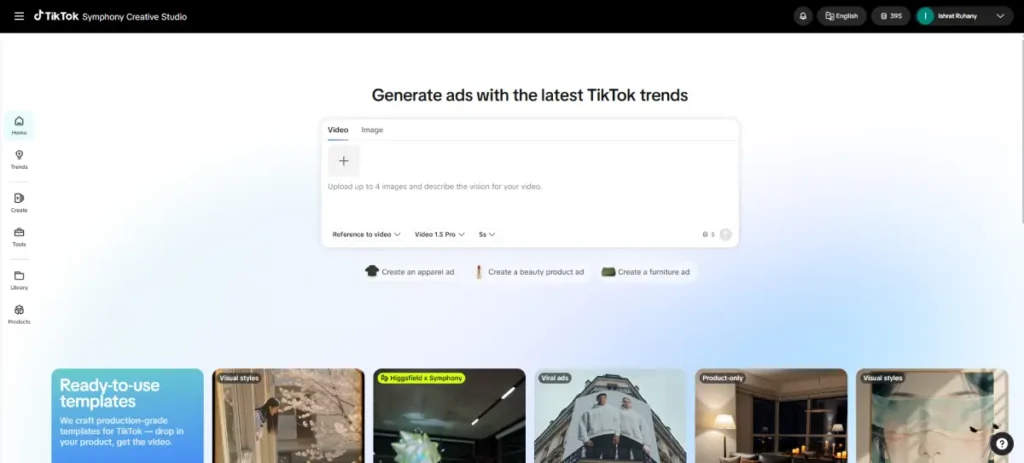
Creative Studio can generate TikTok-ready assets you can download or use directly in advertising workflows. Some of that output can also work as organic content.
TikTok’s Symphony Creative Studio documentation describes it as a free creation tool. You turn a product URL, script, or image into TikTok-optimized video.
How TikTok Symphony Is Structured
TikTok’s June 2026 announcement frames the suite around three solutions: Creative Studio, Automation, and API.
Symphony Agent is a new feature inside Creative Studio. Symphony Assistant is a separate research tool that lives in TikTok Creative Center, the broader hub for TikTok trend and ad research.
| Symphony component | Where it lives | Main purpose |
|---|---|---|
| Symphony Creative Studio | Standalone Symphony workspace | Generate, edit, and export TikTok-ready video and image assets |
| Symphony Agent | Inside Creative Studio | Chat-based, brief-to-video workflow |
| Symphony Automation | Inside TikTok Ads Manager | Generates, refreshes, and optimizes creative inside live campaigns |
| Symphony API | Developer/API layer | Connects Symphony’s generation engine to a brand’s own tech stack |
| Symphony Assistant | TikTok Creative Center | Trend research, Top Ads analysis, brainstorming, and script drafts |
If you have seen Symphony described as “three pillars, Assistant, Creative Studio, and Ads Manager AI,” that description predates this restructuring. Creative Studio, Automation, and API are the suite-level solutions.
Agent and Assistant live inside or alongside them. They are not separate products at the same level.
Symphony Creative Studio
Creative Studio is where you build assets. Log in with a TikTok for Business account and choose a starting point: a product URL, a script, a still image, or a text prompt.
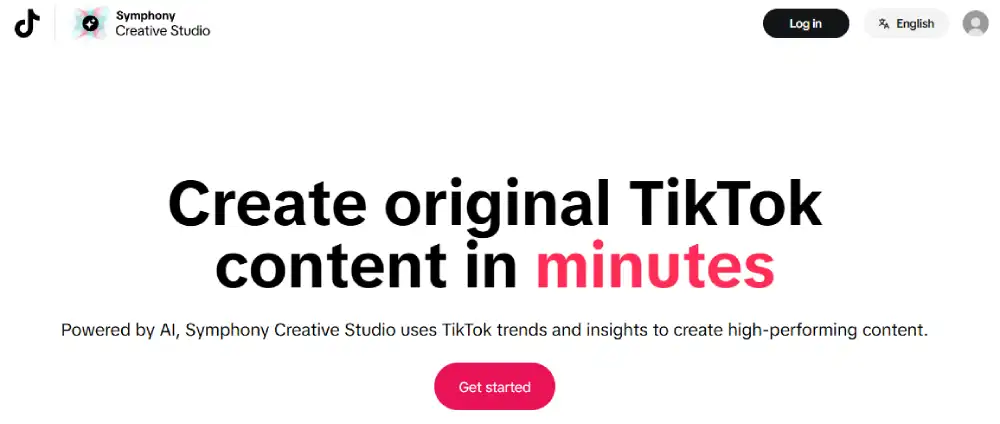
Symphony assembles a video around it. Anyone who has used a TikTok ad creative generator elsewhere will recognize the workflow.
The difference is that Symphony is built around TikTok-specific formats and, through Symphony Agent, TikTok trend and top-ad data.
Video generation
Point Generate and Remix at a product URL. Symphony imports your product information, pulls imagery, writes a script, adds a voiceover, and assembles a video.
Remix takes a video that already worked and re-cuts it with new text overlays, different music, and adjusted pacing. It can help refresh an existing creative without starting production from scratch.
Image generation
Creative Studio also includes a standalone image generation tool. You can generate images from text prompts and use up to four reference images to guide the result.
This is useful for brands that need fresh static assets without a photoshoot. TikTok added this capability in 2026; it was not part of Symphony’s original 2025 lineup.
Digital Avatars
Symphony’s Digital Avatars come in two forms. Voiceover Avatars use avatars of licensed actors to narrate your script over your video.
TikTok says they are available in more than 30 languages. That makes them a practical fit for multilingual TikTok ad creative without booking a shoot in every market.
Product Avatars appear on screen holding, wearing, or demonstrating a product. They give a catalog item a human presence without a photoshoot.
TikTok says videos created with Symphony Creative Studio are automatically labeled as AI-generated.
Translate and dub video
Symphony’s Translate and Dub feature translates a video’s existing voiceover into another language while adjusting lip sync to match the new audio. A video that already worked in one market can be adapted for another without a reshoot.
TikTok’s documentation notes that certain conditions can affect lip-sync results. These include multiple speakers in frame, a covered mouth, poor lighting, and background noise.
The Translate and Dub feature is also unavailable to users in Texas and Illinois because of local restrictions. Check current availability before you build a campaign timeline around it.
Video editor
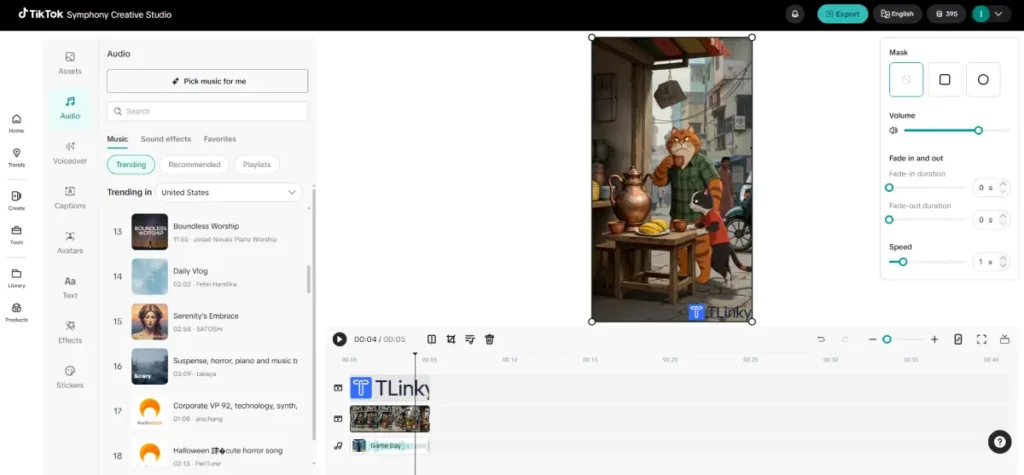
TikTok’s current documentation describes an editor with assets, audio, voiceover, captions, avatars, text, effects, stickers, timeline controls, translation, and lip sync in one workspace. If your last exposure to Symphony’s editor was basic text and music swaps, that has changed.
Your Daily Video Generations
Creative Studio also runs a feature called Your Daily Video Generations. It automatically produces a set of new video options each day, based on your brand’s past activity and TikTok’s top-performing content patterns.
It is meant to keep a content calendar supplied with fresh starting points, without anyone on the team having to request them.
Symphony Agent
Symphony Agent is a feature most articles published before mid-2026 missed entirely. That is a meaningful omission, since Agent is now the newer AI-powered workflow that drives a lot of the generation work inside Creative Studio.
Agent works through a chat-based workflow. You choose a starting point, a top ad trend, a TikTok template, or your own reference image or video.
Then you describe your goal in plain language: selling points, target audience, brand tone, and any creative constraints. Agent then produces a product brief, an insight report, a storyboard, and a finished video, and you can edit any stage before regenerating. (Source)
TikTok is explicit that Agent does not copy existing ads. It analyzes hooks, storytelling patterns, and calls to action from top-performing content, then generates original creative inspired by those patterns.
Agent also runs safety checks before generation. Non-compliant images or text get blocked.
The agent may flag adjustments or offer guides to fix your input. Human faces in product photos are automatically routed for review.
Manual Mode vs. Auto Mode
| Mode | How it works | Best for |
|---|---|---|
| Manual Mode | Walks through inspiration, brief, storyboard, and video generation one stage at a time, with your review at each step | Maximum control over the final output |
| Auto Mode | Skips individual confirmation stages between prompt and output, and can generate multiple creative variations at once | Speed and batch generation |
TikTok says Agent can generate a 15-second video in around five minutes using Manual Mode. Auto Mode is built to move faster by removing the intermediate review steps.
AI Edit
AI Edit is a set of editing tools inside Symphony Agent. It lets you fix a specific problem in a generated video without regenerating the whole thing.
It splits your video into individual scenes. You select one scene, describe the fix in plain language, or use a one-click auto-fix for common issues like product inconsistencies.
You can preview the corrected scene against the original before you replace it. That turns a small visual defect into a five-minute fix instead of a full regeneration.
Symphony Assistant vs. Symphony Agent
These two names get confused constantly. The confusion is understandable since both sound like a generic AI helper.
Symphony Assistant is TikTok’s AI research and ideation assistant inside Creative Center, not just a script tool. TikTok says Assistant can guide you through TikTok creative best practices, analyze and summarize Top Ads by keyword, provide video-level insights on ads with voiceovers, spot what is trending, brainstorm concepts, and generate or refine TikTok scripts.
Symphony Agent, by contrast, is the workflow inside Creative Studio that takes a brief or product input and turns it into a finished, generated video.
| Tool | What it actually does |
|---|---|
| Symphony Assistant | Research, trend and Top Ads analysis, brainstorming, and script drafts, inside TikTok Creative Center |
| Symphony Agent | Moves from a brief or reference input to a finished, generated video inside Creative Studio |
| Symphony Creative Studio | The workspace where you create, edit, and export assets |
| Symphony Automation | Generates and refreshes assets automatically inside Ads Manager |
| Symphony API | Connects Symphony’s generation engine to a brand’s own software |
If you are researching trends and drafting a script, that is Assistant’s job. If you are ready to turn that script or a product listing into a finished video with minimal manual editing, that is Agent’s job.
Creative Center itself is the broader research and inspiration hub. Assistant is one AI capability inside it, and Creative Studio is the separate production environment where the actual asset gets built.
Symphony Automation Inside TikTok Ads Manager
Symphony Automation is built directly into TikTok Ads Manager rather than existing as a separate destination. It currently offers two tools for Smart+ campaigns.
Recommended Creatives generates a mix of new and existing video assets from your campaign’s destination URL. Automatic Enhancements handles video and image quality improvements, music refresh, translation and dubbing, and resizing content for TikTok, all inside the same Smart+ workflow.
Automation is a creative layer, not a campaign type. It is not the same thing as Smart+ or GMV Max, which are campaign objectives and buying solutions.
Automation is the tool that generates and refreshes the assets those campaigns run.
This is a different job from Creative Studio. Creative Studio is where you build an asset from scratch, and Automation takes what is already running and works on it inside the live campaign.
That distinction matters if you already lean on TikTok ads automation elsewhere in your account and want the creative side to keep pace.
Symphony API
The Symphony API is aimed at brands and agencies with their own toolchain. Think a brand asset library, a product catalog system, or an internal creative pipeline that wants Symphony’s generation engine available inside it rather than as a separate login.
TikTok describes the API as giving access to endpoints that automate video translation, generate lifelike avatars, and audit performance at scale. In practice, that could mean a large ecommerce brand connecting its product catalog to an internal creative system, automatically generating localized video variants, producing avatar-based versions for different markets, and feeding the results into its own testing workflow.
That is an illustrative use case, not a guarantee of what every API account can do.
The API fits programmatic or high-volume creative work better than a one-off manual project. Access and eligibility depend on TikTok’s current API program, so check TikTok’s developer documentation and your account’s availability before planning an integration.
What’s New in TikTok Symphony in 2026
| Earlier Symphony | Current 2026 picture |
|---|---|
| Basic Creative Studio workflows | Agent-driven, chat-based generation |
| Dreamina Seedance 2.0 (April 2026) | Dreamina Seedance 2.5 (August 2026) |
| 15-second maximum under Seedance 2.0 | Up to 30 seconds with Seedance 2.5 |
| 9 multimodal reference inputs | Up to 50 multimodal references (image, video, and audio) |
| Manual generation only | Manual Mode plus Auto Mode with batch variations |
| Basic text and music edits | Full Video Editor plus Agent’s AI Edit |
| Three older conceptual pillars | Creative Studio, Automation, and API, with Agent inside Creative Studio |
Three developments this year account for most of that shift. TikTok integrated ByteDance’s Dreamina Seedance 2.0 model into Creative Studio in April 2026, improving character consistency and motion in generated clips.
In August 2026, TikTok upgraded to Seedance 2.5. It extended maximum video length from 15 seconds to 30 seconds, raised multimodal reference inputs from 9 to 50, and added timestamp-specific creative direction so you can specify which asset appears at which point in the video.
Symphony Agent then shipped in June 2026 as the newer AI-powered workflow layered over Creative Studio.
TikTok says Seedance 2.5 output carries additional moderation checks on top of its standard AI-transparency measures. The rollout is currently reaching select paid advertisers in select markets rather than every account at once.
None of this is universally available on day one. If a feature described here is not visible in your Ads Manager yet, that is expected rather than a sign something is broken.
TikTok Symphony Pricing
Here is what TikTok currently publishes on cost and access, without inventing a dollar figure where TikTok has not stated one.
| Component | Cost and access |
|---|---|
| Symphony Creative Studio | Free for any logged-in TikTok for Business account |
| Symphony Assistant | Free inside TikTok Creative Center |
| Symphony Automation | Included inside TikTok Ads Manager rather than sold as a separate subscription; your ad spend is billed separately |
| Digital Avatars | Availability and any associated cost can vary by account and market; confirm current terms for your account |
| Symphony API | Access and terms are arranged through TikTok’s API program; not a published flat rate |
| Seedance 2.5 capabilities | Rolling out to select advertisers in select markets; not yet universal |
Because TikTok rolls features out in phases, treat any specific access claim here as something to reconfirm for your own account rather than a permanent guarantee.
How to Start Using TikTok Symphony
1. Log in to Symphony Creative Studio with your TikTok for Business account. It’s free to create one. (Here is how you can create a TikTok for Business account )
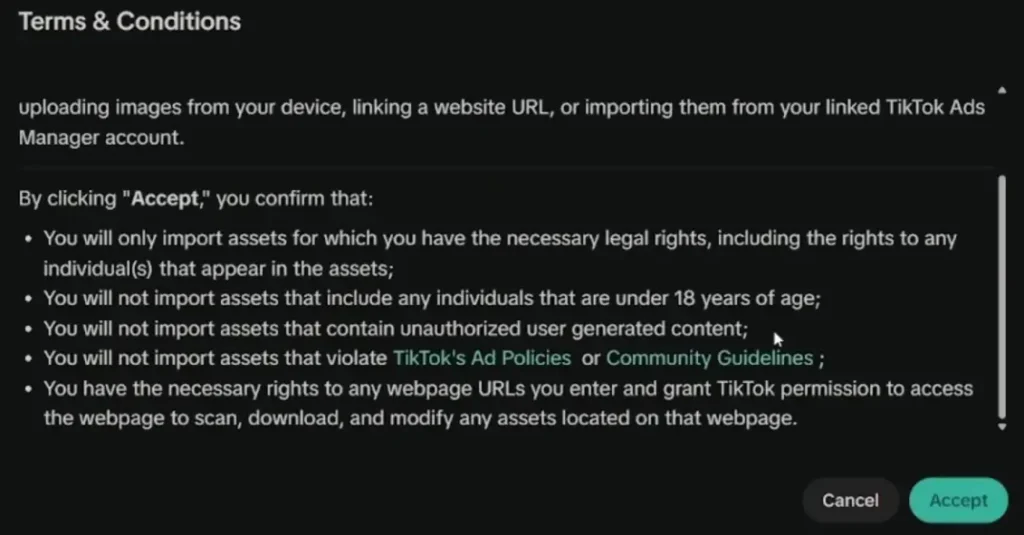
2. Accept TikTok’s Creative GenAI terms if this is your first time in the studio.
3. Choose a starting point. For a first project, try Generate and Remix with a product URL so you can see baseline output quality.
4. Review the output using the built-in editor to adjust text, audio, captions, or avatar selections.
5. Try Symphony Agent on your next project if you want a guided, brief-to-video workflow instead of picking each tool manually.
6. Export the finished asset, or sync it into an Ads Manager campaign for eligible accounts.
7. Review the AI disclosure and provenance information attached to the generated asset before publishing.
8. Use Symphony Assistant in TikTok Creative Center to research trends and draft scripts ahead of your next production session.
Input quality matters more than most guides mention. A clear product URL, sharp product imagery, and a specific creative direction tend to produce better first-pass results than a vague prompt.
That matters more now that Agent can incorporate brand goals and, in relevant workflows, brand guidelines and other brand resources.
Third-Party Integrations
Symphony’s Image to Video tool is built into the Adobe Express desktop app. Symphony Assistant is available there as an add-on.
A team already working inside Adobe’s ecosystem can research trends and generate a video without switching platforms.
On the agency side, WPP integrated Symphony into its WPP Open platform starting in 2025. That gave WPP staff access to AI Dubbing, Generate and Remix, and Digital Avatars inside their existing workflow, with Danone’s Alpro brand in Europe as the first named launch partner.
TikTok Symphony’s Real Limitations
Lip sync has documented weak spots. TikTok’s own help documentation lists the specific conditions that reduce lip-sync accuracy in dubbed and avatar video: multiple speakers in frame, a covered mouth, poor lighting, and background noise. This matters most for direct-to-camera spokesperson content and less for product demo footage where an avatar is performing an action rather than talking.
You can download and reuse your output. Older coverage claimed Symphony output was locked to TikTok. That is not accurate.
Creative Studio lets you download generated videos, so you can take an exported asset elsewhere. What Symphony does not offer is native optimization for other platforms.
A video built for TikTok’s format will likely need re-editing for a different aspect ratio, pacing, or creative convention before it works on Instagram Reels or YouTube Shorts.
Brand control is improving but still has ceilings. For teams that need precise, frame-level layout control over exact caption placement, a dedicated editor may still be preferable to Creative Studio’s built-in tools. That is an editorial judgment call, not a TikTok-documented limitation, but it reflects where a general-purpose generation tool tends to trail a specialist one.
Feature availability varies by account and market. Seedance 2.5 is rolling out to select advertisers in select markets, and Translate and Dub is unavailable in Texas and Illinois. Treat any specific access claim as something to reverify for your own account.
If you already run a creative testing framework, Symphony’s speed advantage is most useful for generating the volume of variants that framework actually needs to test.
Who Should Use TikTok Symphony?
Our assessment of fit, based on Symphony’s current feature set:
| Profile | Fit | Why |
|---|---|---|
| Small businesses with no video team | Strong | Free tools and minimal inputs produce usable first drafts fast |
| eCommerce brands with large catalogs | Strong | Generate and Remix plus Digital Avatars support volume production |
| Global advertisers running multilingual campaigns | Strong | Voiceover Avatars and Translate and Dub cut localization cost, market restrictions aside |
| Solo marketers managing their own account | Strong | Assistant for research, Agent for production, without hiring a copywriter or editor |
| Agencies managing several brand clients | Moderate | Useful for volume, but frame-level brand control may still need a supplemental tool |
| Brands with strict, exact visual identity standards | Weaker fit | Precise layout and caption placement control is still limited compared with a dedicated editor |
TikTok-Reported Results
Performance figures in this section are reported by TikTok or the named brand. Treat them as directional evidence, not independent benchmarks.
They also span different Symphony tools and release periods, so read them as a set of examples rather than a single benchmark for the current suite.
Fashion retailer YOOX used Image to Video to convert static product photos into video clips. TikTok reports a 15% reduction in cost per add-to-cart compared with standard imagery.
American Eagle used Showcase Products to pair product photos with a Digital Avatar. TikTok reported a 60% higher traffic ROAS versus its standard campaign assets.
More recently, Aporia LTD used TikTok’s Avatar API. TikTok reports a 12.3x increase in creative output, a 19% CTR lift, and a 6.2% ROAS improvement.
Pros and Cons
| Pros | Cons |
|---|---|
| Free core tools for any TikTok for Business account | Lip sync quality can drop under specific documented conditions |
| Symphony Agent speeds up brief-to-video work, with AI Edit for quick fixes | Avatar and API access can involve account-specific terms |
| Video Editor now covers captions, effects, and timeline control | Newest features roll out to eligible accounts and markets first |
| Downloadable output you can reuse outside TikTok | Frame-level brand control still trails a dedicated editor |
| Multilingual avatars and dubbing for global campaigns | Translate and Dub unavailable in Texas and Illinois |
Frequently Asked Questions About TikTok Symphony AI
What is TikTok Symphony AI?
TikTok Symphony is TikTok’s own suite of generative AI tools for advertisers. It isn’t a single app. It includes Creative Studio for generating and editing videos, Symphony Agent for turning a brief into a finished video, Automation inside TikTok Ads Manager, an API for developers, and Symphony Assistant for research in TikTok Creative Center.
Is TikTok Symphony AI free?
Symphony Creative Studio and Symphony Assistant are free for any logged-in TikTok for Business account. Some features, such as Digital Avatars and API access, depend on your account and market and may come with a cost. Check what’s available in your own account before you plan around a specific feature.
What tools are included in TikTok Symphony in 2026?
After TikTok’s June 2026 restructuring, Symphony’s main solutions are Creative Studio, Automation, and API. Symphony Agent is a newer AI workflow inside Creative Studio. Symphony Assistant is still a separate research tool in TikTok Creative Center. The older three-pillar setup of Assistant, Creative Studio, and Ads Manager AI no longer applies.
What is the difference between Symphony Assistant and Symphony Agent?
Symphony Assistant is a research and ideas tool in TikTok Creative Center. It helps with trend spotting, Top Ads analysis, and script drafts. Symphony Agent is a chat-based tool in Creative Studio that turns a brief, product details, or a reference video into a finished video.
Can I use Symphony-generated videos outside TikTok?
Yes. You can download videos made in Creative Studio and use them on other platforms. Symphony doesn’t optimize them for other platforms, though, so plan to reformat or re-edit before running the same video on Instagram Reels or YouTube Shorts.
Does TikTok label Symphony content as AI-generated?
Yes. TikTok says content made with Symphony Creative Studio is labeled as AI-generated. It also uses invisible watermarks and C2PA Content Credentials to show where the content came from. Videos made with Seedance 2.5 go through extra moderation checks before they can be published.
How long can Symphony-generated videos be in 2026?
Since the Seedance 2.5 integration in August 2026, Symphony can generate videos up to 30 seconds long. The earlier Seedance 2.0 version was limited to 15 seconds. Whether you get the longer format depends on your account and market.
Where to Go From Here
If you are already producing TikTok creative, Symphony is worth testing against your existing workflow before committing to another AI production tool. The core tools cost nothing, and Remix can refresh a fatiguing ad in minutes.
Start with Generate and Remix on one product. Then try Symphony Agent on your next brief so you can compare a manual build against an agent-driven one.
If multilingual reach is part of your plan, check Translate and Dub’s current market availability before you build a campaign timeline around it. And once a generated video is ready to launch, a clear read on whether it belongs as a standard In-Feed ad or a Spark Ad will do more for its performance than any single Symphony feature.