
Checking bids, pausing weak ads, swapping tired videos and moving budget across five campaigns eats a full day fast. Most small teams and store owners do not have that day to spare.
TikTok ads automation hands parts of that work to TikTok Ads Manager itself. It works well when you know what each tool does, what it needs from you, and where you should keep your hands on the wheel. Below are the three native tools, setup steps with screenshots, and the budget limits that keep automation from wrecking your learning phase.
Get Up to $6000 Free TikTok Ad Credit
Table of Contents
Quick Answer
TikTok ads automation is the set of built-in tools that run parts of your campaigns for you. Smart+ campaigns handle targeting, budget and creative delivery. Automated Rules pause, start or scale ads when a condition you set is met. Automate Creative improves the videos and images you upload.
Automation works best once a campaign has a working pixel or event, more than one creative, and enough budget to get through the learning phase, which TikTok’s Learning Phase page says usually settles after about 25 results or 7 days. Keep budget increases small and spaced out so you do not restart learning.
Key Takeaways
- TikTok ads automation has three native parts: Smart+, Automated Rules and Automate Creative.
- Automated Rules follow your if-then logic and work on Smart+ and manual campaigns alike.
- Automate Creative settings are locked once a campaign is published, so choose them before launch.
- Raise budgets in small, spaced-out steps so you do not restart learning.
- Start manual on a new account, then test Smart+ once you have conversions.
What Is TikTok Ads Automation?
TikTok ads automation is the group of tools inside TikTok Ads Manager that make campaign decisions for you, such as who sees your ads, how budget moves between ad groups and which creative gets shown. You set the goal, the limits and the assets. The platform handles the repeat work in real time.
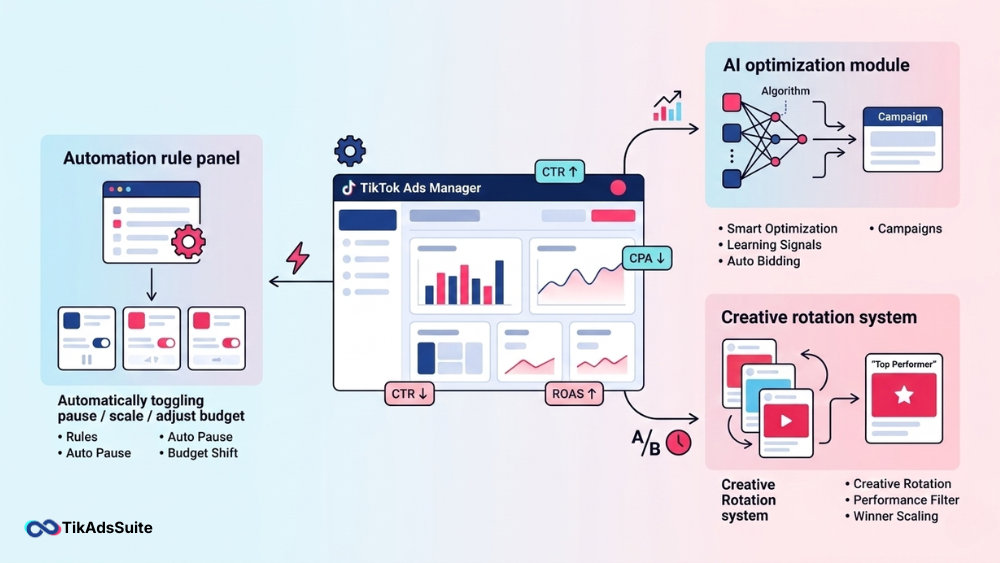
How well it works depends on what you feed it: clean conversion tracking, a few different creatives and a budget that can carry the campaign through its learning phase. Weak inputs give the system weak signals, and automation then repeats those weak results faster. If you are still learning the basics, our guide on how to run TikTok ads covers the manual setup first.
The Three Native Automation Tools in TikTok Ads Manager
TikTok Ads Manager has three automation tools, and each one handles a different job. Smart+ makes the big delivery decisions, Automated Rules act as your guardrails, and Automate Creative works on the assets themselves. You can use one, two or all three in the same account.
Smart+ Campaigns
Smart+ is TikTok’s AI campaign type that automates targeting, optimization and creative delivery in one setup. It is available for the Sales, App Promotion, Lead Generation and Traffic objectives, according to TikTok’s About Smart+ Campaigns help page.
The same page explains that Smart+ watches for ad group fatigue, refreshes delivery, moves budget toward the creatives that perform best and pauses weak ones. You supply the goal, the budget, the location and the assets. The system decides who sees which ad.
Results depend on your inputs, but the tool can pay off. In the Kooapps Snake.io case study, the game studio cut its cost per install by 56% and doubled ROAS with Smart+ and cost cap bidding in an Android test against a control campaign. Treat that as one advertiser’s result, not a promise.
Automated Rules
Automated Rules are if-then instructions that check your campaigns, ad groups or ads and act when a condition is met. They do not use machine learning. They follow your logic exactly, which makes them useful on both Smart+ and manual campaigns.
TikTok’s About Automated Rules page lists triggers such as a campaign spending 80% of its lifetime budget, a ROAS level or a cost per purchase. The actions include sending an email, turning campaigns on, pausing an ad, raising a budget and raising a bid.
TikTok’s rule setup guide lists a few limits that matter before you build rules:
- Each rule can hold up to five conditions.
- A rule set to run continuously checks every 30 minutes.
- If a rule covers more than 500 items in one tier, only the 500 most recently created are included.
- Rules do not work on reservation ads, Promote ads or campaigns made in TikTok Shop Seller Center.
Automate Creative (Formerly Automated Creative Optimization)
Automate Creative is a toggle in the ad creation flow that uses TikTok’s Symphony AI to improve the assets you upload. Many advertisers still search for it as automated creative optimization or ACO, but the current help page calls it Automate Creative. It sits alongside other AI ad creation tools, but it only works on assets you have already made.
According to TikTok’s About Automate Creative page, the features include quality upgrades through higher resolution, music swaps from the Commercial Music Library, image resizing for full-screen display, and audio effects at key moments in the first 15 seconds. It supports TikTok, TikTok Ad Network and Global App Bundle placements, and non-Spark video and carousel ads plus push Spark Ads.
Two details catch people out. Split testing is not supported yet, and once the campaign is published you cannot change the Automate Creative settings. To try different settings, you have to build a new campaign.
When to Automate and When to Stay Manual
Automate the parts of your account that already have steady data, and stay hands-on where the data is thin. Automation learns from results, so a brand-new pixel or a single video gives it very little to work with.
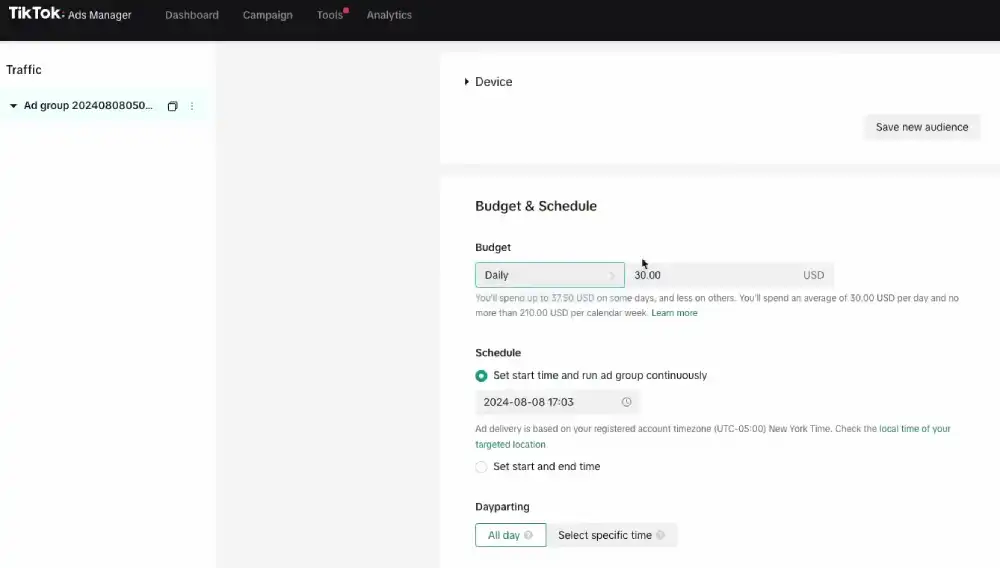
Budget is the other gate, so work out your likely TikTok ads cost first. TikTok’s budget help page says a campaign daily budget must be more than $50, an ad group daily budget more than $20, and budget increases should stay at 40% or less per change during learning and 30% or less after, at least two days apart. For starting budgets, TikTok’s budget best practices suggest about 10 times your current CPA for deep conversion goals such as purchases, 20 times CPA for installs, and 50 times CPA for shallow or non-conversion goals.
| Your situation | Good starting point |
|---|---|
| New account or new pixel with few conversions | Manual campaign plus one or two Automated Rules |
| Proven offer, working pixel, several creatives | Smart+ with automatic budget |
| You know your audience and want to keep it | Upgraded Smart+ with your own targeting, automated creative and budget |
| Many campaigns to babysit every day | Automated Rules for pausing and alerts |
| Strong videos that look rough on some screens | Automate Creative on new campaigns |
| Budget below about 10x your CPA | Stay manual until you can fund learning |
A common mistake is turning on Smart+ for a product with no sales history. The system has nothing to learn from, so delivery jumps around while the budget drains. Run a manual campaign first, get some conversions, then test Smart+ next to it.
How to Set Up Automated Rules in TikTok Ads Manager (Step-by-Step)
You create an automated rule from the Campaigns tab in a few minutes. The steps below follow TikTok’s How to create and apply Automated Rules guide, with screenshots from Ads Manager.
Log in to TikTok Ads Manager.
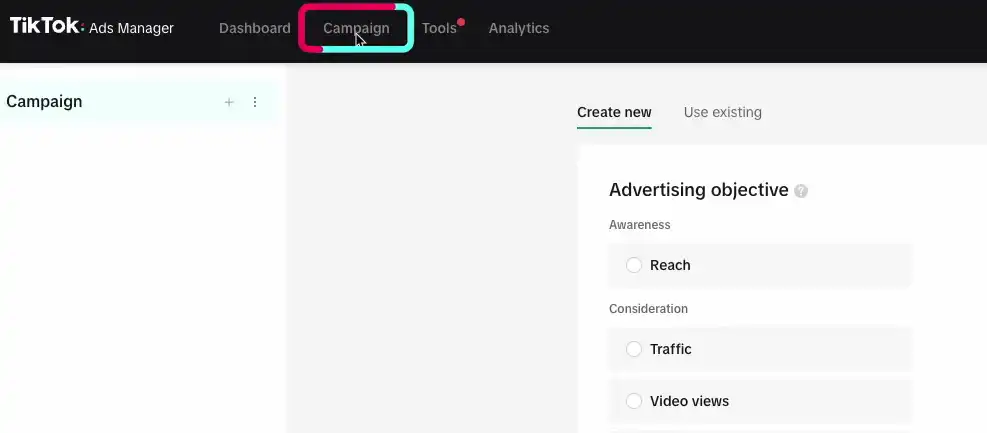
Click Campaigns in the top navigation menu.
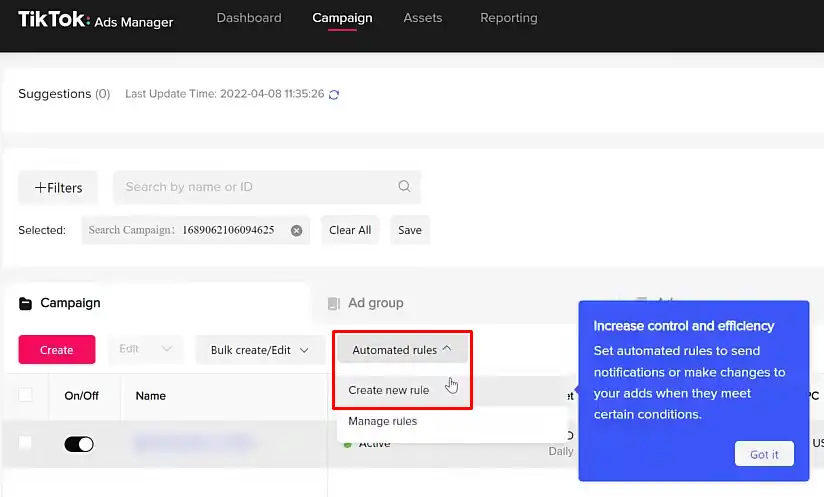
Click Automated Rules and select Create a New Rule. Pick a template or start a custom rule.
Under Apply Rule To, choose whether the rule applies to campaigns, ad groups, or ads.

Set your Conditions: choose the metric, the operator (greater than, less than) and the value. A single rule can hold up to five conditions.
Set the Action: choose what fires when conditions are met (pause, raise budget, raise bid, turn on or notify).
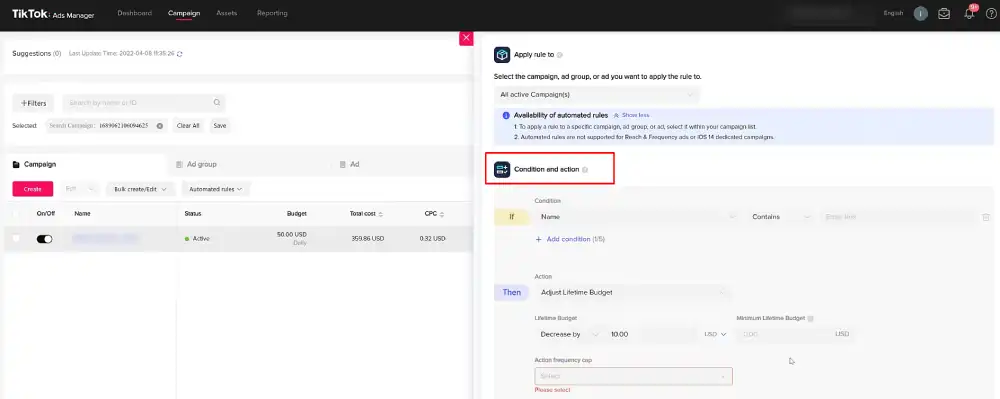
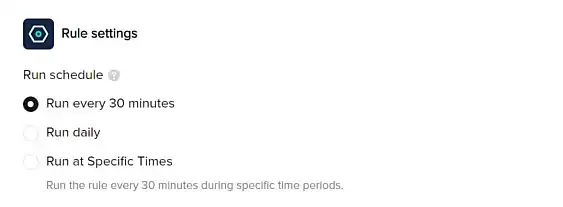
In Rule settings, pick how often the rule runs. Continuously checks every 30 minutes, Custom checks every 30 minutes on the days and hours you choose, and Once runs at one set time and then turns off.
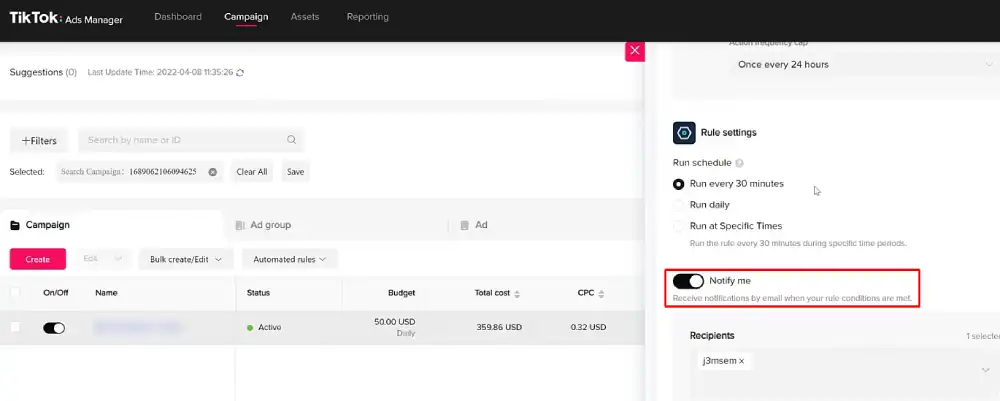
Turn on Notify Me to get an email when the rule triggers. You can add Business Center members as recipients and choose up to three set times a day.
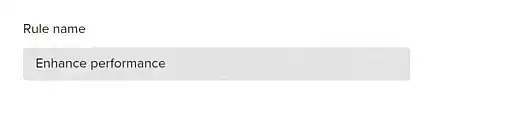
Name your rule clearly and click Complete.
One setup note: the same guide says automated rules are not supported for reservation ads, Promote ads or campaigns created in TikTok Shop Seller Center. If a campaign does not show up in the rule list, check whether it is one of these.
Common Automated Rule Templates and When to Use Them
TikTok gives you ready-made templates, so you rarely need to start from a blank rule. The list includes Schedule delivery, Control budget, Control CPA and Get conversions, and you can edit any template’s settings before saving.
These are the setups most advertisers find useful first:
- CPA guard: If cost per result is above your target and the ad has at least one conversion, pause the ad. This stops one expensive ad from dragging down the ad group.
- No-conversion stop: If spend passes a limit you choose, such as two or three times your target CPA, and conversions are zero, pause the ad.
- Budget alert: If a campaign has spent 80% of its lifetime budget, send an email so you can decide what happens next.
- Careful scaling: If CPA is under target, raise the daily budget by a set percentage. Keep each step inside TikTok’s budget limits covered earlier, and leave at least two days between changes.
Start with one or two rules, not ten. Too many rules on the same ad group can fight each other, and you will not know which one caused a change.
How to Run a Smart+ Campaign: Full Setup Walkthrough
Setting up a Smart+ campaign takes a handful of screens once your videos, ad text and tracking are ready. Menu names can differ a little by account, because TikTok is still rolling out its upgraded Smart+ flow.
Log in to TikTok Ads Manager.
Click Create Campaign and select Smart+ as your campaign type.
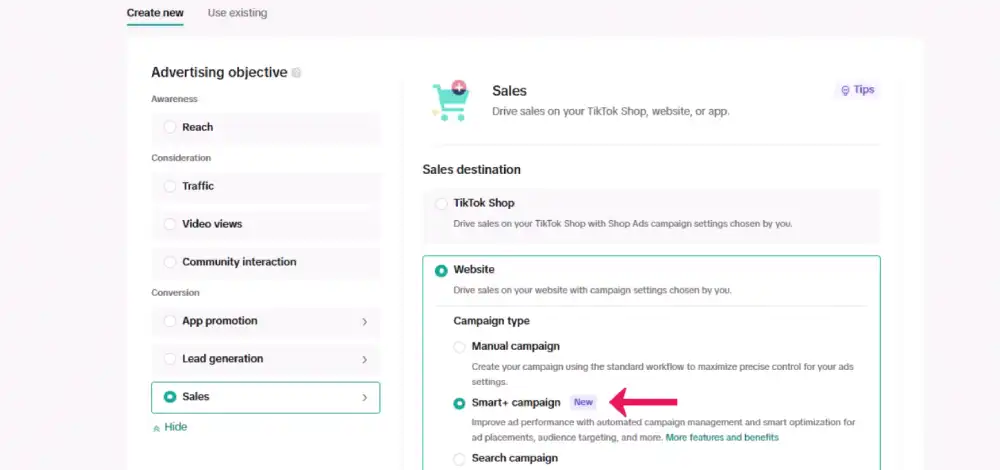
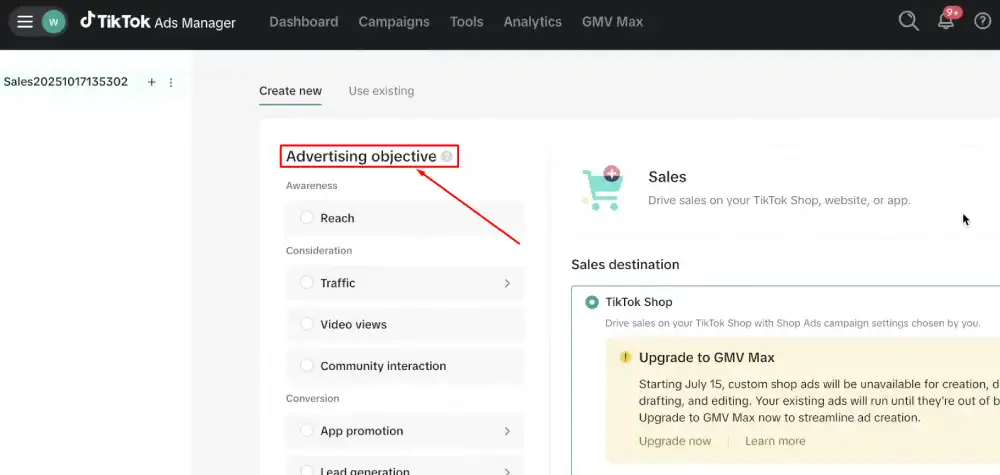
Choose your Objective: Sales, App Promotion, Lead Generation, or Traffic.
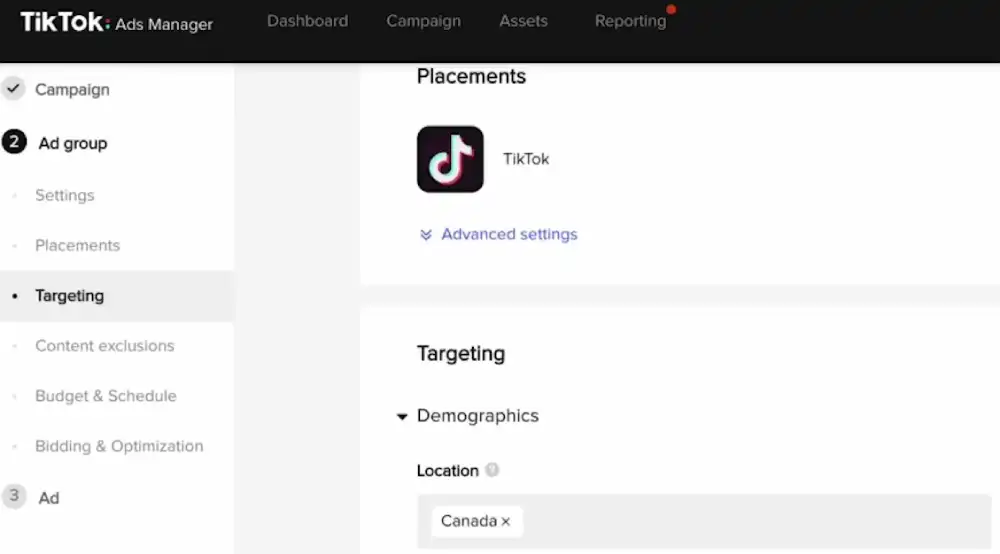
Set your Geography and Language targeting. You can stop there and let Smart+ find the audience, or add your own targeting in the upgraded flow.
Set your Campaign Budget at the campaign level. Choose an automatic budget that TikTok spreads across ad groups, or a custom budget per ad group. Make sure it clears the minimum budgets listed earlier.
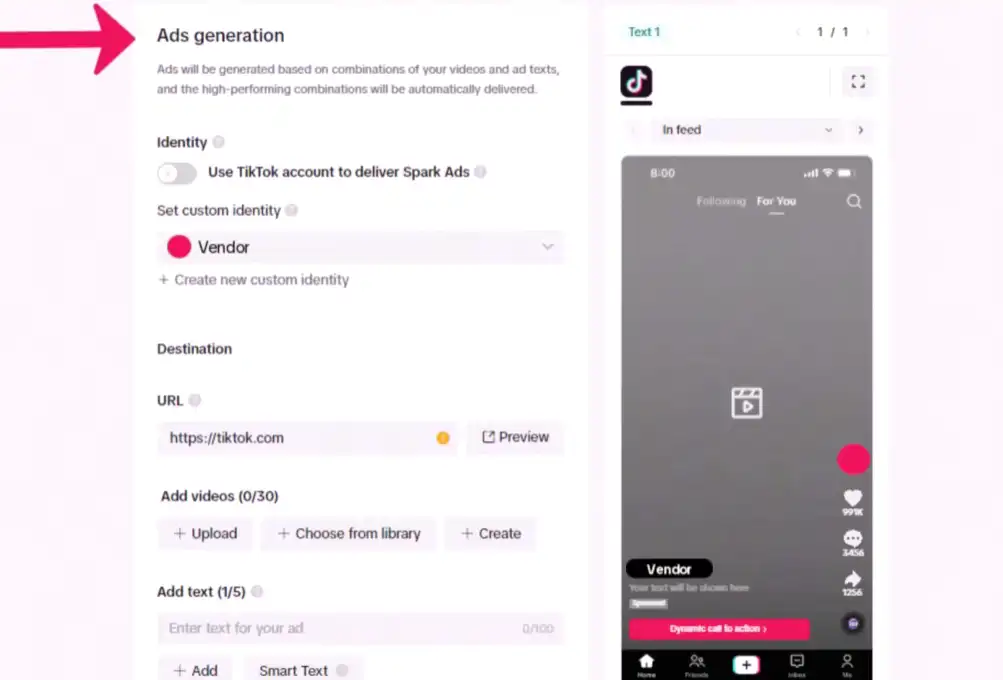
Upload your Creative Assets: several videos plus a few ad text and call-to-action options. More variety gives the system more combinations to test.
Define your KPI: set a target CPA, target ROAS, or cost cap depending on your bidding strategy.
Decide which parts stay automatic: budget, targeting, placement and creative each have their own setting.
Review settings and launch. Delivery is usually unstable during the learning phase, so avoid edits until it settles.
Give the campaign at least its first week before you judge it. Pausing it or making large edits early can push it back into learning.
Choosing How Much to Automate in Smart+
The upgraded Smart+ flow lets you pick, part by part, what TikTok controls and what you set yourself. You do not have to hand over everything at once.
| Part of the campaign | Let TikTok decide | Set it yourself |
|---|---|---|
| Budget | Automatic: one campaign budget shared across ad groups | Custom: a budget and goal per ad group |
| Targeting | Audience controls as suggestions | Manual targeting you enforce |
| Placement | Automatic placement (the default) | Pick placements yourself |
| Creative | High-performing combinations served automatically | Choose which assets go into each ad |
A good middle ground for most stores is to keep targeting you already trust and let Smart+ handle budget and creative combinations. If results slip, you can see which part you handed over and test it again.
TikTok Ads Automation Software: Native Tools vs. Third-Party Platforms
For most single-account advertisers, the tools built into TikTok Ads Manager are enough, and they cost nothing extra. Third-party software starts to make sense when the manual work sits outside what Ads Manager automates.
| Need | Native tools | When a third-party tool helps |
|---|---|---|
| Pausing, scaling and alerts | Automated Rules | You want the same rule logic across TikTok, Meta and Google in one place |
| Audience, budget and placement decisions | Smart+ | Rarely needed, since Smart+ runs on TikTok’s own delivery data |
| Creative quality fixes | Automate Creative | You want tag-level creative reports tied to revenue |
| Launching many ads at once | Manual upload in Ads Manager | You launch dozens of variations a week and need bulk upload with naming rules |
| Several client accounts | Business Center access | Agencies that need one dashboard and shared rules across accounts |
Before you pay for a tool, list the tasks that eat your week. If the answer is pausing losers and getting alerts, Automated Rules already do that. If it is uploading and naming 40 ads every Monday, a bulk launch tool is the better fix.
Recent Changes to TikTok Ads Automation
The biggest recent change is that Smart+ no longer forces an all-or-nothing choice. TikTok’s About upgrades to Smart+ page says manual and Smart+ setup now sit in one flow, with more targeting options, multiple ad groups per campaign, more budget choices, up to 50 creative assets per ad and creative-level reporting.
What this means for you:
- More control: you can keep your own targeting or placements and still automate budget and creative.
- Better creative insight: reports can be grouped by creative material, such as a single video or ad text, so you can see which asset is carrying the campaign.
- Mixed availability: the page notes the upgrade may not be in every account yet, so your screens may still show the older Smart+ setup.
The other change is a name. The feature many guides still call Automated Creative Optimization now appears in TikTok’s help center as Automate Creative, with the newer creative AI features described above.
If you tested Smart+ before and dropped it because it felt like a black box, the upgraded flow is worth a second, smaller test.
How to Measure and Optimize Your Automated TikTok Ad Campaigns
To measure and optimize automated TikTok campaigns, track cost per result, ROAS and creative trends, then fix the inputs instead of the bids. Automation cuts the daily clicking, but it does not replace your judgment.
Key Metrics to Track When Running Automation
Watch these numbers during and after the learning phase:
- Cost per result vs. your target: compare your real CPA or cost per install with the target you set. Judge it after the first week, not after day two.
- ROAS: for sales campaigns, check return on ad spend over the same window you use for other channels so the comparison is fair.
- Creative CTR and conversion rate: a steady drop over several days on one creative is an early sign of fatigue. Swap or add assets before cost per result climbs.
- Spend pace: if a campaign spends far less than its budget, look at bid, audience size and creative before raising budget.
- Creative-level reports: in the upgraded Smart+ flow, group results by creative to find which video or text is doing the work.
How to Avoid Common TikTok Automation Mistakes
Most wasted budget traces back to a handful of habits:
- Editing in the first week. Large edits and pauses can restart learning. Set the campaign up carefully, then leave it alone.
- Raising budget too fast. Big jumps can restart learning, so keep to the step limits listed in the section on when to automate. A rule that doubles budget overnight breaks them.
- Launching with one video. Smart+ and Automate Creative both need variety. One or two assets give the system almost nothing to test.
- Rules that fight Smart+. A rule that pauses any ad group with no sale in three days will cut campaigns off before they exit learning.
- Judging TikTok on last click only. People often see a TikTok ad and buy later through search or email. Check assisted conversions in your analytics before you cut spend.
Is TikTok Ads Automation Worth It?
Yes, for most advertisers who already have working tracking and a few creatives, but only if the inputs are ready. Automation repeats what it learns, so good inputs scale well and weak ones lose money faster.
It tends to pay off when you have:
- A pixel or app events that record real conversions.
- Several distinct creatives, not one video with small edits.
- A budget near TikTok’s suggested starting point, about 10x CPA for purchase goals.
- The patience to leave a campaign alone through its first week.
If you are missing one of these, start with a manual campaign and a couple of Automated Rules. If budget is the gap, check whether a TikTok ads credit offer fits your account. Move to Smart+ once you have conversions to learn from, and run it next to your manual campaign before you switch fully.
Frequently Asked Questions
What is TikTok ads automation?
TikTok ads automation is the set of tools inside TikTok Ads Manager that handle targeting, budget, bidding and creative delivery for you. The main tools are Smart+ campaigns, Automated Rules and Automate Creative. You set the goal, limits and assets, and the platform makes the routine decisions.
What is automated creative optimization on TikTok?
Automated creative optimization is the older name for what TikTok’s help center now calls Automate Creative. It is a toggle in ad creation that uses Symphony AI to raise video quality, swap music, resize images and add audio effects. Its settings cannot be changed after the campaign is published.
How often do TikTok automated rules run?
A continuous rule checks its conditions every half hour, the schedule TikTok lists in its rule setup guide. A custom schedule also checks every 30 minutes, but only on the days and hours you pick. A one-time rule runs once at a set time and then turns off.
Can I use automated rules with Smart+ campaigns?
Yes. Automated Rules work on campaigns, ad groups and ads, so you can add alerts and spend limits to Smart+ as well. Keep the rules loose during learning, because strict pause rules can stop a campaign before it settles.
How long should I wait before judging an automated campaign?
Wait for the learning phase to settle, which usually takes about a week. Judging earlier often means reacting to normal swings, and big edits at that stage can restart learning.
Wrapping Up
TikTok ads automation saves real time when you match each tool to the job it was built for, and give it clean data to learn from.
Start small. Add one or two rules, test Smart+ next to a manual campaign once you have conversions, and keep budget changes inside TikTok’s limits. Then spend the hours you save on better creative, which is still the part no tool can do for you.