
You booked the host, pinned the products and went live. The viewer count barely moved. On TikTok, the usual fix is to pay for traffic with LIVE ads.
The catch is that the setup most guides describe changed in July 2025. If you tried to build a LIVE Shopping Ad for your TikTok Shop since then, you probably found the shop option gone. If you are new to selling in the app, start with our guide to selling on TikTok Shop.
Below you will find what replaced it, how to set it up in Ads Manager or Seller Center, how to budget for it, and when a livestream is worth paying to promote.
Get Up to $6000 Free TikTok Ad Credit
Table of Contents
Quick Answer
TikTok Live Shopping Ads are paid ads that bring shoppers into your livestream so they can buy while you sell on camera. Since July 2025, GMV Max is the default and only campaign type for TikTok Shop ads, according to TikTok’s GMV Max migration notice, so LIVE ads for a shop now run as LIVE GMV Max.
You can build LIVE GMV Max in TikTok Ads Manager under the GMV Max tab or in Seller Center under Shop Ads. Setup asks for the return you want (a LIVE ROI target), what you will spend per day and when the campaign runs. Classic LIVE Shopping Ads still exist, but only for a TikTok identity with no shop attached. TikTok’s setup guides list six Southeast Asian markets for LIVE GMV Max, so confirm the option shows in your own account.
Key Takeaways
- LIVE ads for a TikTok Shop now run as LIVE GMV Max. Classic LIVE Shopping Ads remain only for a TikTok identity without a shop.
- You can create LIVE GMV Max in Ads Manager (GMV Max tab) or in Seller Center (Shop Ads).
- LIVE GMV Max credits every sale in the live room while it runs, so compare total live-room sales, not the old and new ROI figures.
- Plan a campaign of at least three days and a budget two to three times your past LIVE ad spend, or take TikTok’s recommended budget.
- Live still works for launches and sale events, but its share of TikTok Shop sales has shrunk, so keep short videos running too.
What Are TikTok Live Shopping Ads?
Live Shopping Ads on TikTok are paid placements that promote a livestream so more shoppers join it and buy while you are on camera. TikTok’s LIVE Shopping Ads setup page lists three placements for these ads: the TikTok feed, Shopping Center and search. Anyone who taps one lands on the livestream or video you picked.
The name now covers two products. LIVE Shopping Ads is the older, manual format in Ads Manager. LIVE GMV Max is the automated campaign TikTok built for shops, and it is what shop sellers use for new LIVE campaigns.
What Are TikTok Live Shopping Ads Used For?
Live ads exist to fill the live room while the stream is on. A host who demos a product to a handful of viewers sells little, however good the offer is. Paid traffic brings in people who have never seen your account.
Shoppers who tap in land in the active stream, where they can open pinned products and check out without leaving the app. That short path from watching to buying is why sellers pay for LIVE traffic instead of only posting videos.
You will need a TikTok Shop before you can run LIVE GMV Max. If you have not built your store yet, follow the TikTok Shop setup steps and connect it through Seller Center.
You can register and manage your store with TikTok Seller, which is the hub for everything shop-related.
What Changed in July 2025?
In July 2025, TikTok made GMV Max the only campaign type it supports for TikTok Shop ads, and the default one. Since then, you cannot create, edit or copy LIVE Shopping Ads, Product Shopping Ads or Video Shopping Ads in a Sales campaign that sends shoppers to your TikTok Shop. Campaigns that already existed kept running.
TikTok’s migration notice adds three details that matter for LIVE sellers:
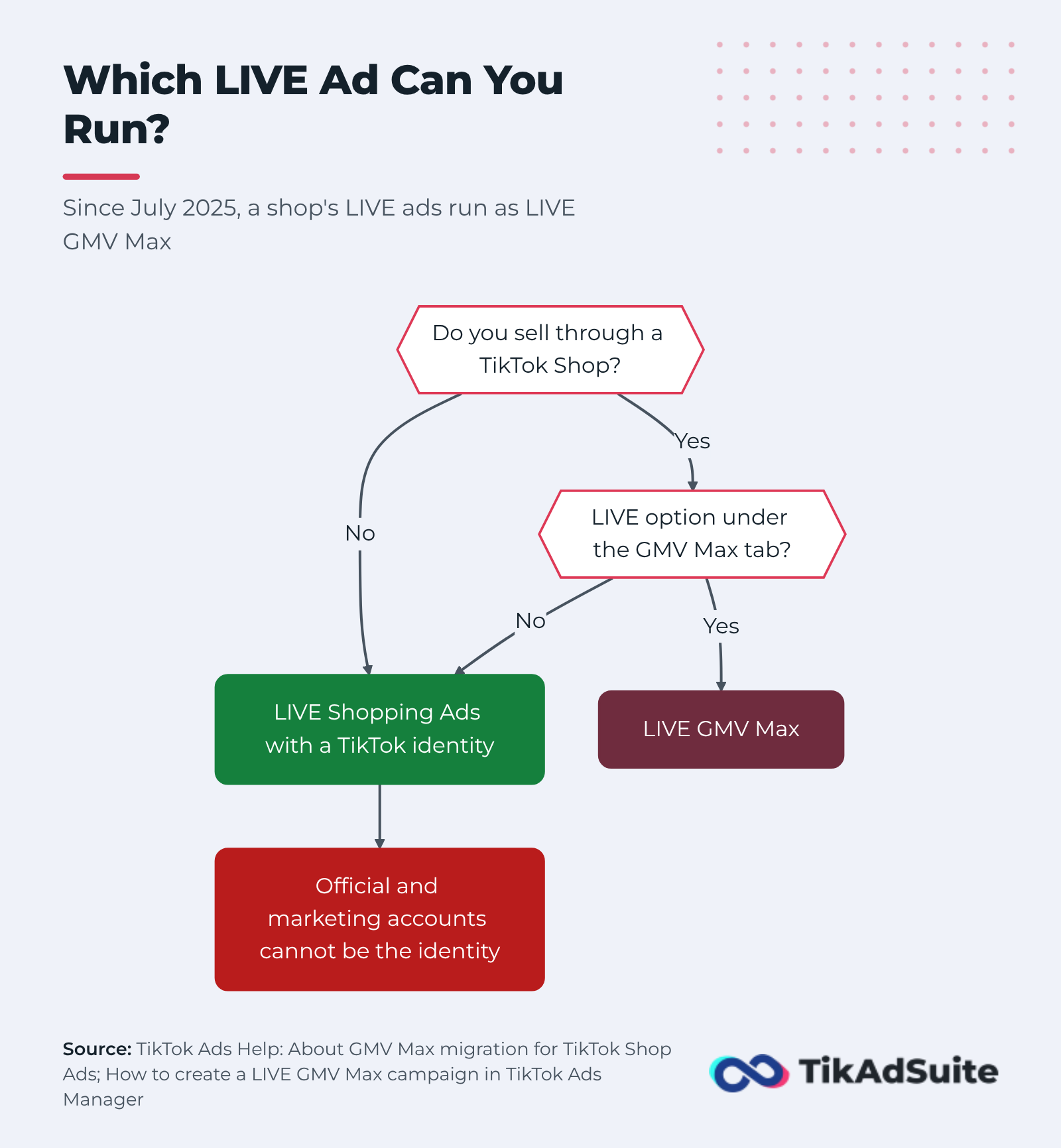
- LIVE Shopping Ads still exist, but only when you pick a TikTok identity. The option to attach a TikTok Shop is gone, and you can no longer pick an official or marketing account as the identity.
- Older Shop campaigns can move to GMV Max through the Upgrade now prompts in Ads Manager, and each campaign moves over with its past ROI results as its target ROI.
- The shop and its LIVE campaigns are linked. Per TikTok’s LIVE GMV Max overview, once the shop’s primary ad account has an active LIVE GMV Max campaign, any LIVE Shopping Ads running from the shop’s official TikTok account are paused, and they stay paused after that campaign ends until you restart them.
GMV stands for gross merchandise value, which is the total sales revenue your shop earns before fees and refunds. GMV Max is a campaign built to grow that number at the return you choose. For the product side of the system, see how TikTok GMV Max works.
LIVE Shopping Ads vs LIVE GMV Max: What Is the Difference?
LIVE GMV Max optimizes the whole live room toward a return target, while LIVE Shopping Ads spend a set budget on the paid traffic you configure. The table below follows TikTok’s comparison of the two campaign types.
| LIVE Shopping Ads | LIVE GMV Max | |
|---|---|---|
| Where you build it | TikTok Ads Manager | Seller Center Ads tab, or the GMV Max tab in Ads Manager |
| ROI formula | Gross revenue from ads, divided by ad cost | Total live-room gross revenue divided by ad cost |
| Sales it counts | 7-day click, 1-day view attribution | Every sale in the live room during the campaign |
| Delivery priority | Spends the budget, with even pacing under Maximum delivery | Hits the ROI target first and won’t scale spend unless it can reach about that ROI |
| Campaigns per TikTok account | Several | One per TikTok identity |
The attribution row matters when you judge results. LIVE GMV Max credits sales from viewers who came in through organic placements too, so its ROI can read higher than an ad-only ROI for the same stream. Compare total live-room sales before and after the switch rather than the two ROI numbers.
Which one you can use depends on your setup:
- You sell through a TikTok Shop and your account shows LIVE under the GMV Max tab: use LIVE GMV Max.
- You go live without a shop, or LIVE GMV Max is not offered to you: LIVE Shopping Ads with a TikTok identity are still open, as long as it is not an official or marketing account.
How Do You Set Up a LIVE GMV Max Campaign?
LIVE GMV Max can be built in two places: TikTok Ads Manager or Seller Center. Both routes ask for the same core inputs: the TikTok account that will go live, a LIVE ROI target, the daily spend and the run dates.
Before You Start
TikTok’s Ads Manager setup guide for LIVE GMV Max lists these requirements:
- A TikTok Shop connected to your Business Center account.
- Admin or Advertising Manager permission for the shop.
- An ad account with GMV Max authorization for that shop, which you can check in Business Center.
- Any running LIVE Shopping Ads or LIVE GMV Max campaign turned off first.
That guide names six markets where LIVE GMV Max is currently available: Indonesia, Malaysia, the Philippines, Thailand, Vietnam and Singapore. TikTok’s GMV Max overview for businesses says GMV Max itself is live in every market where TikTok Shop operates. Sellers in the US, UK or other markets should check whether a LIVE option appears under GMV Max in their own account before planning around it.
Steps in TikTok Ads Manager
- Click GMV Max at the top of your Ads Manager dashboard.
- Choose the TikTok Shop you want to promote.
- Click Create GMV Max ads. If the button is greyed out, check that you have operator or admin access and that the ad account is authorized for GMV Max.
- Choose the TikTok account that will host the LIVE.
- Set a LIVE ROI target. You can accept the recommended target or enter your own.
- Enter a daily budget, or follow the recommended budget based on your past LIVE performance. You can change it after launch.
- Adjust the schedule, then click Publish.
Steps in Seller Center
The Seller Center setup guide starts from Shop Ads in the left menu, then Create GMV Max ads. The campaign is created in your shop’s primary ad account, and your Seller Center role must be Admin or include Ads Tab access. You choose Gross revenue as the optimization goal, then set the ROI target, budget and schedule.
Creatives Are Picked for You
You do not build a set of ads. The LIVE GMV Max overview says the system uses two creative types and splits delivery between them on its own:
- Video-to-LIVE: videos from your TikTok account that pull viewers into the live room.
- LIVE-to-LIVE: your ongoing stream, shown to more people while you are live.
One rule catches people out. Each TikTok identity can have only one LIVE GMV Max campaign, because that single campaign covers the whole live room, as TikTok’s comparison page explains.
How Much Should You Budget?
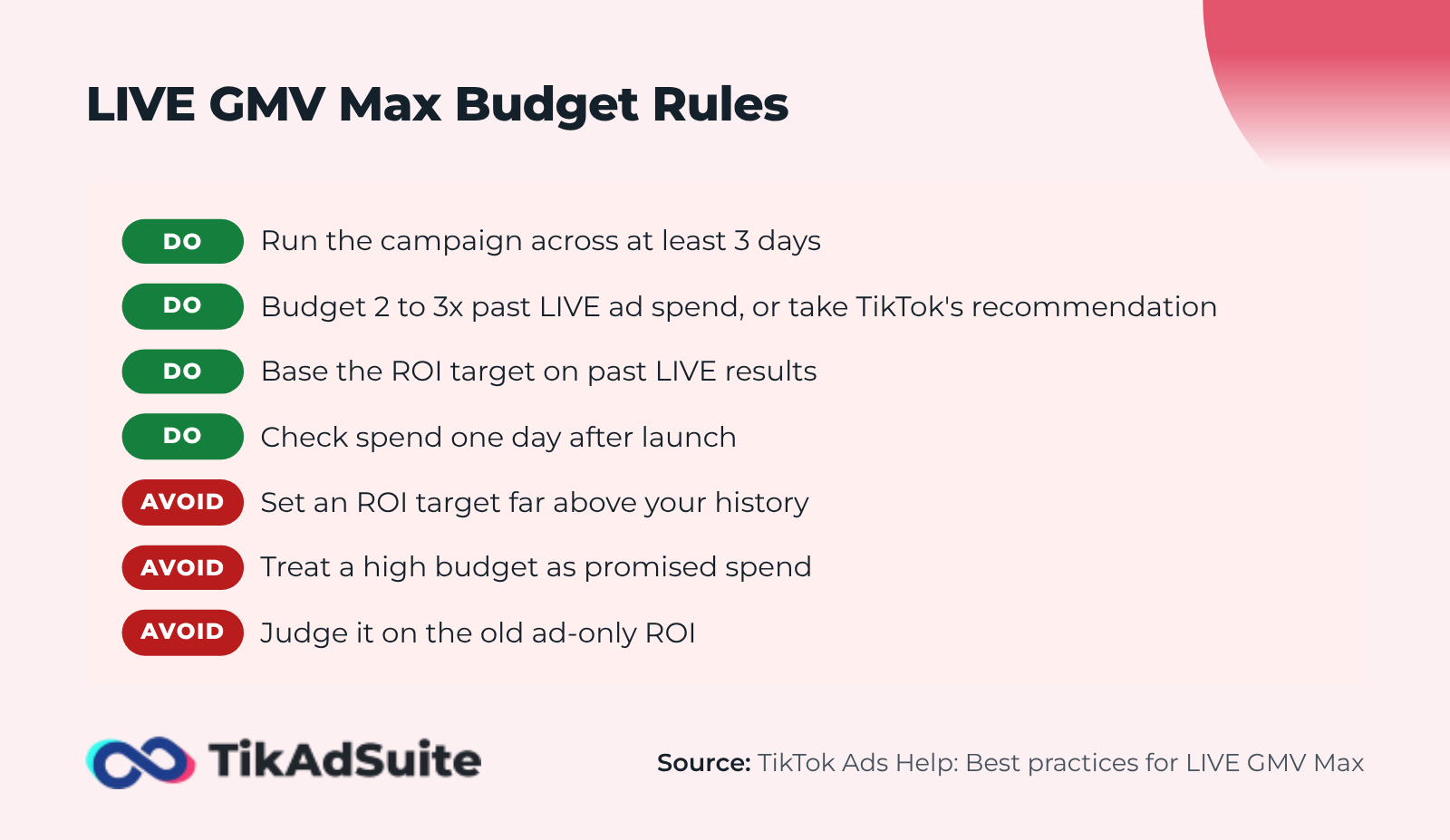
Budget LIVE GMV Max at two to three times what you spent on past LIVE ads, or follow the recommended budget TikTok shows at setup. TikTok’s best practices for LIVE GMV Max add that spend stays below the budget until the campaign can come close to your ROI target, so a higher budget works as a ceiling, not a promise of spend.
The same page sets out a few rules worth following:
- Run the campaign across at least three days. It does not need to run nonstop.
- Base your ROI target on past LIVE results rather than the number you hope for.
- Check spend one day after launch. If it is slower than expected, lower the ROI target. If it is faster, raise the budget or the ROI target. TikTok notes that fast spending usually means the campaign is doing well.
- Promote a TikTok profile that already sells on LIVE. The best practices page treats a profile with approximately $1000 in gross revenue over the last 7 days as strong.
If you still run classic LIVE Shopping Ads from a TikTok identity, the older LIVE Shopping Ads budget guide was written for that format. It says it takes about 40 conversions per TikTok Shop to exit the learning phase and suggests a total campaign budget of 40 times your historical average cost per action.
Do Live Shopping Ads Still Work in 2026?
Yes, for the right moments. TikTok’s own numbers from its 2025 Black Friday to Cyber Monday campaign show live selling is far from over: the TikTok Newsroom recap reports that brands and sellers hosting livestreams saw 84% sales growth over the year before, and shoppers tuned into over 760K livestream sessions with over 1.6 billion views.
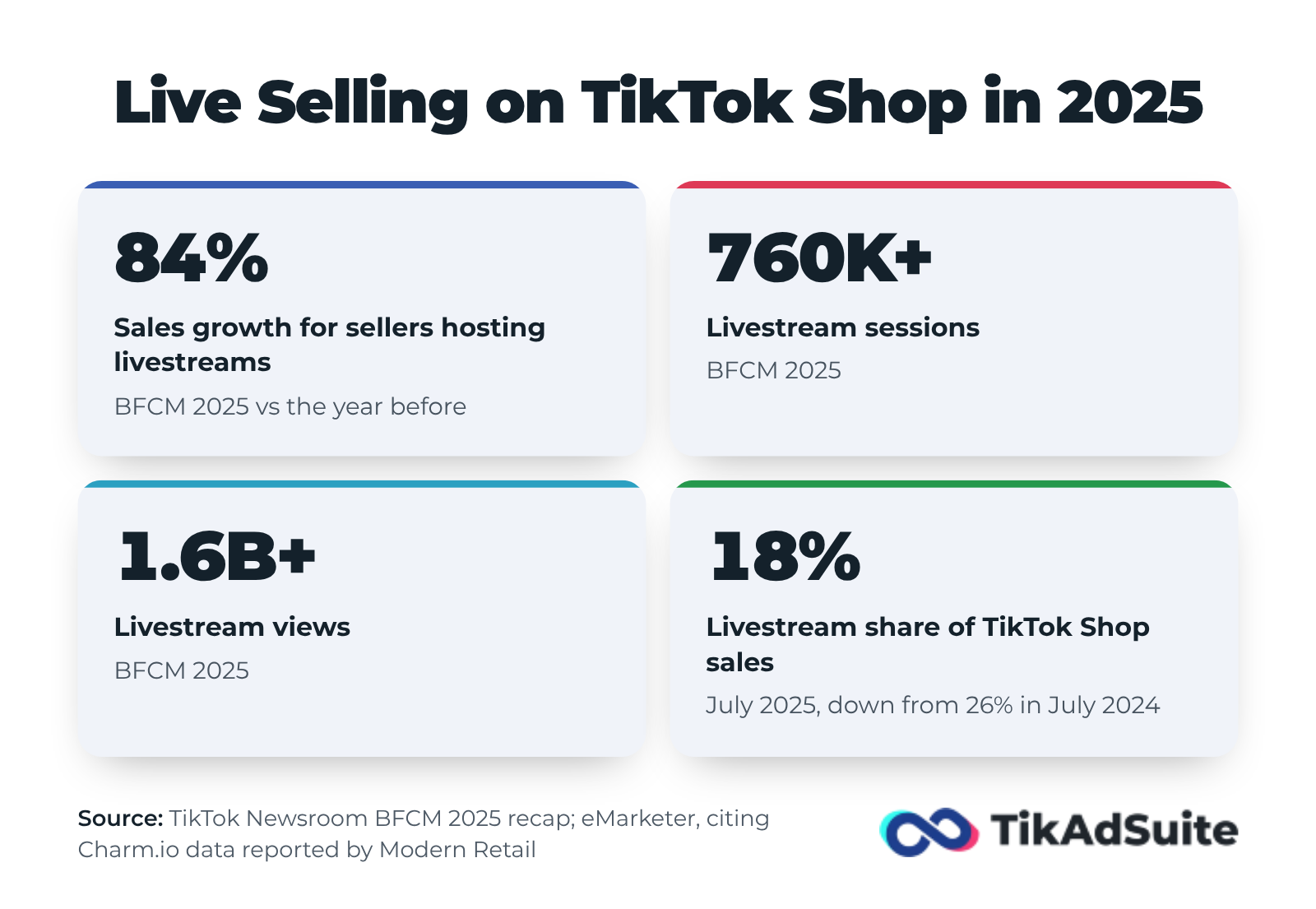
Live is still a smaller slice of Shop sales than it was, though. eMarketer cites Charm.io data, as reported by Modern Retail, showing that livestream’s share of total TikTok Shop sales fell from 26% in July 2024 to 18% in July 2025.
So live earns its budget on launches, limited drops and sale events where urgency drives buying, while short videos carry sales the rest of the year. If you want a fuller view of paid shop options, a rundown of TikTok Shop ads maps out the channels that work together.
Tips to Get More From Your Livestream Ads
To get more from livestream ads, stream longer, stream on a steady schedule and keep short videos coming. Those habits come straight from TikTok’s LIVE GMV Max best practices:
- Go long. TikTok says LIVE sessions of 3 hours or more generally see faster single-session GMV growth, and it suggests more than 8 hours of streaming a day for a bigger lift. Most small shops will not reach that pace, so treat it as a direction, not a target.
- Keep the timing steady. Start at the same time and run for a similar length on each campaign day.
- Feed Video-to-LIVE. TikTok’s LIVE GMV Max best practices page suggests having 50 to 70 videos for each round of creative testing, or adding 5 to 10 new videos a day.
- Pick Preferred videos. Select up to 10 videos that match the current stream and update the pick before each LIVE.
- Make clips that point to the LIVE. Shorter videos with a clear call to action that name the LIVE offer and the hero product tend to earn more taps, per the same page.
- Be real on camera. Show your real setting, explain who you are and answer viewer concerns as they come up.
Frequently Asked Questions
Can I still create LIVE Shopping Ads on TikTok?
Yes, but not for a TikTok Shop. Since July 2025, LIVE Shopping Ads can only be created by choosing a TikTok identity, and official and marketing accounts are excluded. A Sales campaign with your shop as the destination runs as GMV Max, so shop sellers promote their streams with LIVE GMV Max.
Where do I build a LIVE GMV Max campaign?
In TikTok Ads Manager, click the GMV Max tab, choose your shop and click Create GMV Max ads. In Seller Center, open Shop Ads and click Create GMV Max ads. Both routes ask for the TikTok account that will go live, a LIVE ROI target, the daily spend and the run dates.
What does GMV Max mean on TikTok?
GMV stands for gross merchandise value, the total sales revenue of your shop before fees and refunds. GMV Max is the automated TikTok Shop campaign type that aims for the most gross revenue at the ROI target you set, using paid and organic traffic together. LIVE GMV Max applies this to a livestream.
Is LIVE GMV Max available in the US?
TikTok’s LIVE GMV Max setup guides currently list Indonesia, Malaysia, the Philippines, Thailand, Vietnam and Singapore. TikTok also says GMV Max is live in every TikTok Shop market, so US sellers should check the GMV Max tab in Ads Manager or Seller Center to see whether the LIVE option is offered.
How do you get high GMV on a TikTok LIVE?
Promote a profile that already sells on LIVE, stream for 3 hours or more on a steady schedule, and keep new short videos flowing into Video-to-LIVE. Set your ROI target from past LIVE results, then adjust it after the first day based on how fast the budget spends.
Wrapping Up
If your shop sells on LIVE, stop hunting for the old LIVE Shopping Ads setup and check the GMV Max tab instead. Start with a campaign of at least three days, an ROI target based on past streams and a budget you can let run.
Then judge it on total live-room sales, check spend after the first day, and keep short videos coming so the campaign has something to promote during and between your streams.