
TikTok ads still work for dropshipping, but not the way most people run them. The usual setup is a recycled supplier video, a Traffic objective, and a broad audience. Then the budget runs out with clicks and no sales.
The platform, the ad review rules, and the TikTok Shop setup have all changed. If your plan has not changed with them, you are paying for a method that stopped working.
Get Up to $6000 Free TikTok Ad Credit
Below you will find what changed, what to set up before you spend, how to build the first campaign, what to film, how much budget a fair test needs, and how to read the numbers so you know what to cut and what to keep.
Table of Contents
Quick Answer
To run TikTok ads for dropshipping, pick one path first. If you sell through a Shopify store, run a Sales campaign that optimizes for purchases with the TikTok Pixel installed. If you sell through TikTok Shop, your ads run as GMV Max campaigns.
Then test two or three original, phone-shot product videos in one country, respect TikTok’s minimum budgets, and give each ad group time to finish the learning phase before you judge it.
Key Takeaways
- Choose your path first: a website Sales campaign for a Shopify store, or GMV Max for TikTok Shop.
- The creative carries most of the load. Original, phone-shot product demos beat reposted supplier clips.
- Budget for TikTok’s minimums and for enough days to get through the learning phase.
- Judge ads against current benchmarks and your own margin, not against gut feeling.
- Ad policy problems can reach past one ad, so check claims, before-and-after visuals, and prices before upload.
- TikTok and Facebook reach buyers in different moods. Use separate creative for each.
Can TikTok Ads Actually Work for Dropshipping?
Yes, TikTok ads work for dropshipping when your ad setup matches your store setup and you run purchase-focused campaigns with original creative. Recycled supplier videos and Traffic objectives rarely produce sales. Results depend on the product, the niche, the margin, and how much budget you give each test.
What Changed with TikTok Ads for Dropshipping
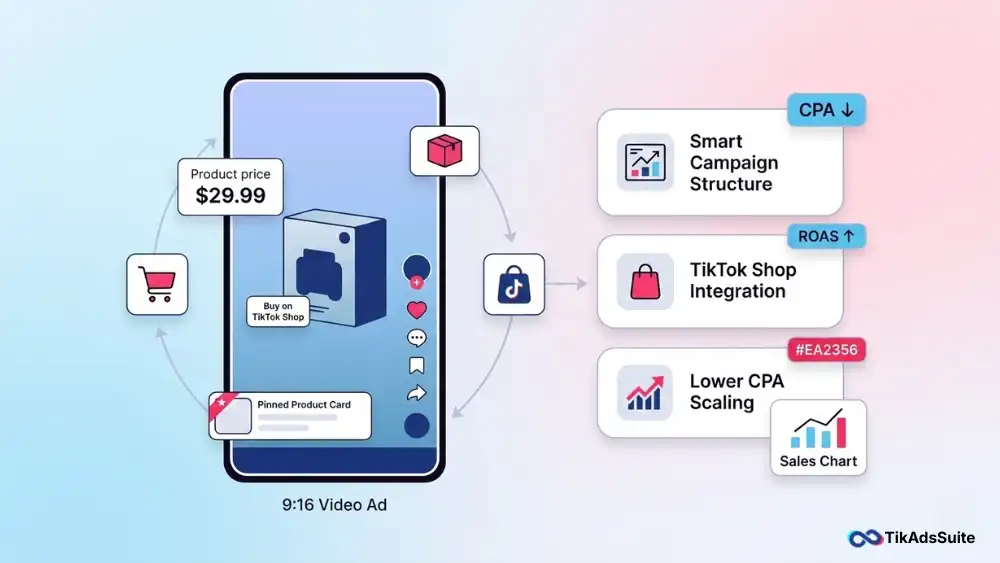
Three things changed for dropshippers: how TikTok Shop ads are built, how strictly ad claims are reviewed, and what a click and a sale cost. Each one affects which campaigns get delivery and which creatives pass review.
The Death of Low-Effort Ads: What No Longer Works
Both TikTok’s algorithm and its ad review reward original, honest creative. Stop doing these:
- Reposting supplier videos without your own editing. Everyone selling the same product has the same clip, so it blends in and tells viewers nothing new.
- Running Traffic or Reach campaigns to get cheap clicks. These objectives look for people who click or watch, not people who buy.
- Using before-and-after visuals that overstate results. They are a common reason for rejection, as the policy section below explains.
- Launching with no testing plan. Without a structure for testing creatives, you cannot tell what worked.
TikTok’s misleading and false content policy bans exaggerated results, misleading before-and-after comparisons, prices that conflict with the landing page, and ads that show a different product than the one you sell. Read it before you launch anything.
The TikTok Shop Shift and Why It Changes Your Strategy
TikTok Shop ads now run on one campaign type. According to TikTok’s GMV Max migration notice, GMV Max became the default and only supported campaign type for TikTok Shop Ads from July 2025. Older guides that walk through manual Video Shopping Ads setups for Shop sellers are out of date.
Costs moved too. Triple Whale’s TikTok benchmarks put overall TikTok benchmarks at a $4.08 CPM, a 0.61% CTR, and a 1.56% conversion rate for August 2025 to July 2026. Cheap reach is still there, but each visitor converts less often, which makes the product page and the offer matter more.

This does not mean you must use TikTok Shop. It means you need to choose a path on purpose, which the next section covers. For how the in-app store itself works, see our TikTok Shop overview.
Choosing Your Path: TikTok Shop Ads vs. Website Conversion Ads
Choosing between TikTok Shop ads and website Sales campaigns is the first decision to make before you open TikTok Ads Manager, because the rest of your campaign setup depends on it.
The short version: TikTok Shop suits low-priced impulse products because the buyer never leaves the app. A website Sales campaign gives you more control, your own customer data, and room to build a brand, which suits higher-priced or branded stores.
When to Use TikTok Shop (GMV Max)
TikTok Shop is the right choice when:
- Your product is a low-priced impulse buy
- You sell in trending categories: beauty, home, fitness accessories, kitchen gadgets, or pet products
- You are happy to let GMV Max handle most campaign settings
- You do not need to build a branded customer experience or post-purchase flow
To use TikTok Shop ads, you need to apply for TikTok Shop in your country, list your products directly in the shop, and connect your shop to TikTok Ads Manager. The buyer completes the purchase inside TikTok. Your job is to drive the click.
One honest limitation: you have less control over the post-purchase experience. Upsells, email capture, and customer retention are harder when the transaction happens inside TikTok’s checkout.
When to Stick with Website Conversion Campaigns
Website conversion campaigns remain the better path when:
- You run a Shopify store with a custom brand and want full customer data
- Your product costs more and buyers need time to decide
- You want to build retargeting audiences and email lists
- You sell in restricted categories that TikTok Shop does not fully support in your market
With website conversion campaigns, you send traffic to your Shopify product page, and TikTok optimizes for purchases recorded by your pixel. This requires a properly installed TikTok Pixel, which we cover next.
Setting Up Your TikTok Ads Foundation the Right Way
You cannot build a profitable campaign on a broken foundation. Two things must be in place before you spend a single dollar: your Business Center account and your TikTok Pixel.
Skipping these steps, or setting them up incorrectly, is one of the most common reasons new dropshippers see zero conversions even with solid creative.
Creating a Business Center Account (Not Just an Ads Manager)
Many beginners go straight to TikTok Ads Manager and skip Business Center. That makes it harder to manage access and assets later.
TikTok Business Center is the master account that controls your Ads Manager, your TikTok Shop, your Pixel, and your creative assets. With Business Center, you can hold several ad accounts, give team members different access levels, and keep your assets in one place.
Here is how to set it up correctly:
Go to business.tiktok.com and create your Business Center account using a business email, not a personal one.

Inside Business Center, create a new ad account from the Ad Accounts area.
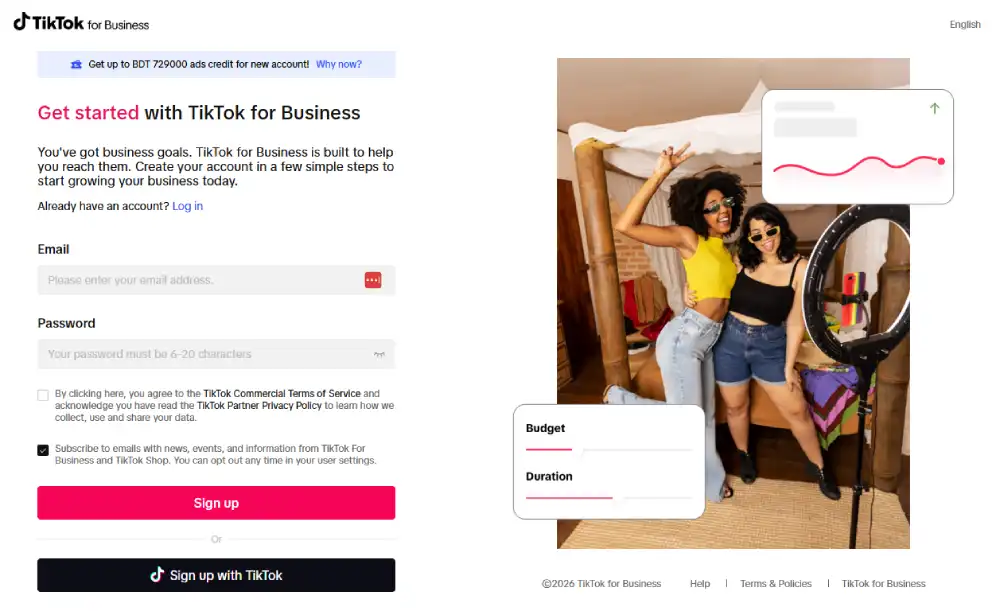
Assign your ad account to your Business Center so all pixel data, audiences, and billing flow through one place.
If you plan to use TikTok Shop, connect it to the same Business Center account so your product catalog and ad campaigns share data.
Use a real business name and accurate business information. Details that do not match your documents or website can slow down account review.
Installing the TikTok Pixel on Shopify Correctly
Your TikTok Pixel is what tells TikTok which visitors bought, which added to cart, and which left without doing anything. Without it, TikTok cannot tell which ads lead to purchases.
The TikTok Pixel setup guide places pixel creation under Tools and Events in Ads Manager. For Shopify, the steps look like this:
- In TikTok Ads Manager, go to Tools, then Events, and create a web event (pixel).
- Choose Shopify as the connection method, which sends you to the TikTok app for Shopify.
- Install the TikTok Shopify app from the Shopify App Store and authorize the connection.
- Enable Automatic Events, so TikTok captures ViewContent, AddToCart, InitiateCheckout, and CompletePayment automatically.
- Use TikTok’s Pixel Helper Chrome extension to verify that CompletePayment fires correctly on your order confirmation page.
The CompletePayment event matters most. If that event does not fire, TikTok cannot optimize for purchases, and your campaign will default to optimizing for cheaper, lower-intent actions.
The Best TikTok Ad Formats for Dropshipping Stores
The best TikTok ad formats for dropshipping are In-Feed ads for a Shopify store and GMV Max for TikTok Shop. Other formats fit later stages or bigger budgets.
| Ad format | Best for | Dropshipping fit |
| In-Feed Ads | Sending buyers to your store | High. The core format for most Shopify dropshippers. |
| GMV Max (TikTok Shop) | Sales inside TikTok Shop | High for Shop sellers. It is the campaign type Shop ads run on. |
| Spark Ads | Promoting organic posts or creator videos | High once you have posts or creators that already get engagement. |
| TopView | Big awareness bursts | Low. Built for brand reach, not product testing. |
| Collection and Catalog Ads | Showing several products | Medium. Useful once you have a few proven products. |
| LIVE Shopping Ads | Selling during a TikTok LIVE | Medium. Needs a host and planning. |
Start with one of the first two formats and learn it well before you add another.
How to Set Up Your First TikTok Ads Campaign for Dropshipping
Setting up your first campaign correctly from the start saves you weeks of wasted budget. TikTok’s campaign structure has three levels: Campaign, Ad Group, and Ad. Each level controls different settings.
Step 1: Choosing the Right Campaign Objective
Your campaign objective tells TikTok what action to optimize for. This is the most important decision at the campaign level.
For dropshipping, choose the Sales objective. TikTok’s objective guide lists Sales next to Reach, Traffic, Video views, Community interaction, App promotion, and Lead generation. With Sales, a Shopify store’s ads optimize for purchases tracked by your pixel, while TikTok Shop sellers run GMV Max.
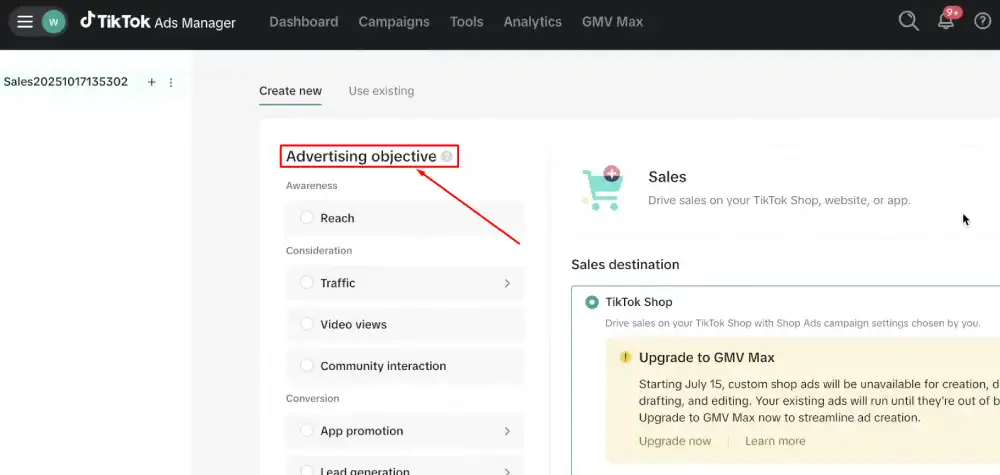
Avoid Traffic, Reach, and Video views for a sales test. These objectives find people who click or watch, not people who buy. Your CPC will look great, and your conversion rate will be terrible.
For a first test, setting budget at the ad group level makes it easier to see what each ad group spends and returns.
Step 2: Ad Group Setup, Targeting, and Budget
At the Ad Group level, you control who sees your ad and how much you spend.
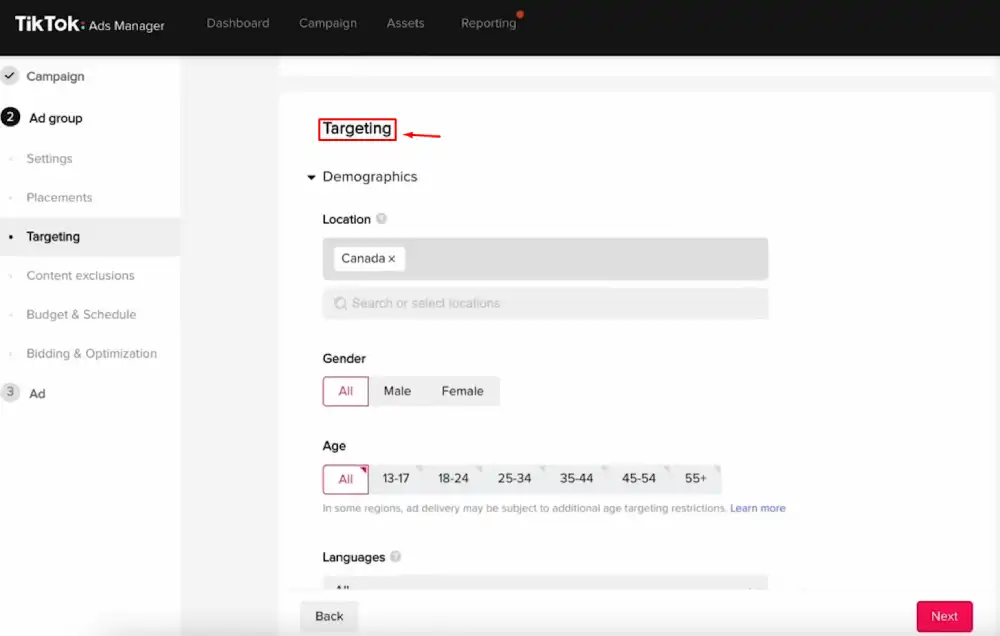
Targeting recommendations for new campaigns:
- Location: Target one country at a time. Start with the US, UK, Australia, or Canada, depending on where your supplier ships fastest.
- Age: Keep it wide unless the product is clearly for one age group. Narrow it only if your product has a clear age fit.
- Gender: Leave broad unless your product is clearly gendered.
- Interests and Behaviors: Use TikTok’s interest categories relevant to your product. For a kitchen gadget, pick a few closely related cooking and home categories instead of stacking many.
- Budget: Give each ad group at least TikTok’s daily minimum (see the budget guide below). The TikTok learning phase article says delivery usually starts to settle after about 25 campaign results or 7 days, so budget for enough time to get there.
Leave Placement on Automatic for your first campaign. That lets TikTok test where your audience converts best across its placements.
Step 3: Launching Your First Ad (and What to Watch)
At the Ad level, you upload your creative, write your copy, and set your call to action.
Keep your ad copy short: one line that states the benefit, then a CTA.
For example: Cut prep time with one tool. Shop now.
After launch, watch these three numbers:
- CPM: Compare it with the benchmark later in this guide. A CPM far above it can mean the creative is not holding attention.
- CTR (Click-Through Rate): A low CTR usually means the hook is not stopping the scroll.
- Cost Per CompletePayment: This is the number that decides profit. Compare it against your product margin to know if the campaign is profitable.
Avoid big edits while the ad group is still learning, since major changes can send it back into learning.
How to Create TikTok Ad Creatives That Convert for Dropshipping
On TikTok, your creative does more to decide results than your targeting or budget. A clear product demo with a strong opening gives an average product a real chance, and a dull video can sink a good one.
The Winning Hook Formula for Dropshipping Products
The hook is the opening of your video. If it does not stop the scroll, the rest of the video does not get watched.
Three hook styles fit most dropshipping products:
- Problem-first hook: start with the problem in one short line and show the problem visually in the first second.
- Curiosity hook: tease a small trick for the product category, then cut to the product immediately.
- Result-first hook: Show the result before explaining anything. Let the transformation create the question.
After the hook, your video structure should follow this flow:
- Show the problem clearly
- Introduce the product as the solution
- Demonstrate it working in real use
- State the key benefit in one sentence
- Close with a direct CTA such as Shop now
Keep the whole video short and test lengths against each other instead of guessing.
UGC vs. Branded Video: What Performs Better
UGC (User-Generated Content) style videos often do better than polished branded videos on TikTok for most dropshipping products. They look like the posts people already watch in their feed.
UGC-style means: filmed on a phone, real environment, real person talking directly to the camera, no studio lighting or corporate branding.
A polished ad looks like an ad and gets skipped. A UGC video looks more like a tip from another buyer.
You do not need real customers to produce UGC. You can hire UGC creators from creator marketplaces. Order a sample of your product, ship it to them, and brief them on your hook and key benefit.
Branded video still has a place: use it for retargeting audiences who have already visited your product page. They already know you exist. Now you can show up with a cleaner, more credible presentation.
TikTok Ads Budget Guide for Dropshipping: How Much Do You Actually Need?
You need enough budget for each ad group to finish the learning phase, not just enough to switch ads on. Those are two different numbers.
Start from the floor. TikTok’s budget help page requires more than $50 per campaign and more than $20 per day per ad group, and it advises raising a budget by no more than 40% per change during learning and 30% after, no more often than every two days. A test that stops after two days rarely tells you much, because the learning phase needs time and results.
A simple way to size a first test:
- Pick how many ad groups you will test (two or three is enough to start).
- Give each one at least the daily ad group minimum, more if your product is expensive and sales come slowly.
- Plan to run for at least 7 days.
- Multiply: ad groups x daily budget x days. That is your test budget.
When something works, raise the budget in those small steps instead of doubling it overnight.
One rule holds at every stage: more budget does not fix a losing ad. Fix the creative or the offer first, then spend more.
How to Read Your TikTok Ads Data and Know What to Kill or Scale
Reading TikTok ads data means comparing each ad with a benchmark and with your own margin. Many dropshippers cut ads too early or keep losers too long.
The Key Metrics That Matter (CTR, CPA, ROAS, Hook Rate)
Focus on these four metrics in TikTok Ads Manager:
- CTR (Click-Through Rate): Measures how often someone clicks after seeing your ad. Compare it with the Triple Whale CTR benchmark above. Well below that level, the creative is likely not stopping the scroll.
- CPA (Cost Per Acquisition): The total cost to get one sale. Compare this directly to your product margin. If your CPA is higher than your profit per order, you lose money on each sale.
- ROAS (Return on Ad Spend): Total revenue divided by total ad spend. Your break-even ROAS depends on your margin: work it out as price divided by profit before ad costs.
- Hook Rate: The TikTok video play metrics page lists 2-second video views among the standard reporting metrics. Divide that number by total impressions to get a simple Hook Rate. Compare hook rates across your own ads; the lowest ones need a new opening first, and the TikTok 3-second rule explains why the opening carries so much weight.
When to Cut an Ad vs. When to Give It More Time
Do not judge an ad on its first day. The learning phase needs time and results, so early numbers jump around. Use these rules of thumb:
Cut the ad when:
- It has spent well past your target CPA with no sales
- CTR stays well under the benchmark after several days of spend
- The hook rate is the lowest of your set, and a new hook test did not help
Give it more time when:
- It is still in the learning phase with little spend
- It has 1 to 2 conversions but needs more data to confirm the CPA trend
- CTR is above the benchmark, but conversions are slow, which may indicate a landing page issue, not a creative issue
TikTok Ads Compliance: How to Keep Your Account Safe
TikTok ads compliance means checking every claim, visual, and price against TikTok’s ad policies before you upload. Rejections cost time, and repeated or serious violations can put the whole ad account at risk.
What to Avoid and Monitor
Creative problems that commonly lead to rejection:
- Before-and-after comparisons that give a false picture of results
- Exaggerated results or health promises the product cannot back up
- Stolen content from competitors or manufacturers without modification
- Prices or discounts in the ad that do not match the landing page
Account-level behaviors that increase suspension risk:
- Opening new accounts to get around a ban
- Selling products in categories TikTok restricts or bans in your market
Best practices to protect your account:
- Always read TikTok’s Advertising Policies page before launching a new product category
- Keep a log of your creative reviews. If TikTok rejects an ad, fix the specific issue before resubmitting
- Do not resubmit a rejected creative with small cosmetic edits. Fix the part the rejection named
- Use your Business Center to assign separate ad accounts for different product categories. That way a problem in one category is easier to isolate
TikTok Ads vs. Facebook Ads for Dropshipping: Which Wins?
TikTok ads usually suit product discovery, while Facebook ads suit people already closer to buying. That difference changes how you use each one.
| Factor | TikTok Ads | Facebook Ads |
| Audience mindset | Discovery and entertainment. Buyers are not actively shopping | Intent and browsing. Buyers are more purchase-ready |
| Creative format | Short vertical video only. UGC style performs best | Image, video, carousel. More format flexibility |
| Best product type | Visual, low-priced impulse products | Higher-priced products that need more thought |
| Best for | Finding new audiences for trending products | Scaling proven products with retargeting and lookalikes |
How to use them by store stage:
- If you are just starting, start with one platform. TikTok’s low benchmark CPM makes early testing affordable.
- If you have a product already converting on one platform, add the second platform with separate creatives. Do not copy-paste the same video from TikTok to Facebook. The audiences behave differently.
- At scale, many stores use TikTok for top-of-funnel discovery and Facebook or Meta for retargeting and higher-ticket upsells.
Get one platform working before you add the second.
More helpful articles you’ll want to explore:
👉 Dropshipping on TikTok Shop: Is It Still Viable in 2026?
👉 How to Advertise on TikTok Shop: A Complete Beginner’s to Advanced Guide
👉 Proven TikTok Ad Copywriting Formulas That Convert
TikTok Dropshipping Ads FAQ
How much should I spend on TikTok ads for dropshipping?
Start at TikTok’s minimum budgets and plan for enough days to finish the learning phase. For a first test, give two or three ad groups at least the daily ad group minimum for about a week. Then put more budget behind the ad groups that sell at a profit.
What type of TikTok ad works best for dropshipping?
For a Shopify store, In-Feed ads in a Sales campaign optimized for purchases are the usual starting point. For TikTok Shop sellers, ads run as GMV Max campaigns. Spark Ads help once you have organic or creator posts that already get engagement.
Are TikTok ads worth it for dropshipping?
TikTok ads can be worth it for dropshipping if you run purchase-focused campaigns, use original creative, and track sales with the pixel. TikTok reach is relatively cheap, but conversion rates are modest, so your product page, price, and margin decide whether the ads pay off.
What is the best TikTok ads dropshipping strategy for beginners?
Start with one product, one country, and two or three original videos. Use a Sales campaign, keep targeting broad, and let each ad group run long enough to leave learning. Keep the creative with the lowest cost per purchase, cut the rest, and only then add products.
How do I make TikTok ads for dropshipping without spending a lot on production?
Order the product, film a short demo on your phone, and put the clearest visual in the first seconds. Show the problem, the product solving it, and a simple call to action. A UGC creator can make the video for you if you would rather not appear on camera.
Can I run TikTok ads for dropshipping without a TikTok Shop?
Yes. You can run In-Feed ads in a Sales campaign that sends traffic to your Shopify product page. You need the TikTok Pixel installed and the CompletePayment event firing on your order confirmation page. TikTok Shop is optional.
Wrapping Up
Profitable TikTok ads for dropshipping come from a clear path (Shopify Sales campaign or TikTok Shop GMV Max), a working pixel, original product videos, and tests that run long enough to mean something.
Your next step: pick one product, film two or three short demos, and launch one test at the minimum budget for a week. Keep what sells, cut what does not, and raise budget in small steps.