
TikTok is not just a place where people watch dances. It is one of the highest-converting paid traffic channels available to Shopify store owners right now.
The problem most merchants face is not motivation. It is the setup. Connecting your Shopify store to TikTok Ads Manager, installing the Pixel correctly, and building a campaign that actually drives purchases involves more steps than most tutorials show you.
Get Up to $6000 Free TikTok Ad Credit
This guide walks you through every step, from account connection to scaling your first winning campaign. You will also find real budget benchmarks, creative strategies that work, and the mistakes that waste most merchants’ ad spend.
Table of Contents
How Do TikTok Ads for Shopify Work?
TikTok Ads for Shopify work by connecting your Shopify store to TikTok Ads Manager through the TikTok app in the Shopify App Store. Once connected, you install the TikTok Pixel to track visitor behavior, sync your product catalog, and launch video-based ad campaigns targeting your ideal buyers. Results vary based on your budget, creative quality, and niche competition.
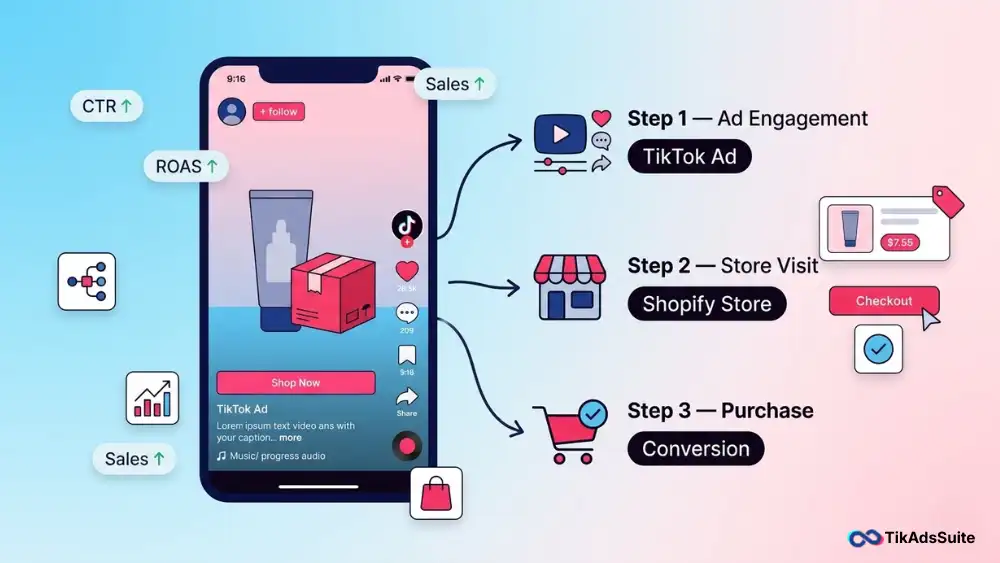
Why TikTok Advertising Is a Smart Move for Shopify Stores in 2026
TikTok reached approximately 1.6 billion monthly active users globally, according to Business of Apps. More importantly, 37% of TikTok users have purchased something they discovered through the app, according to The State of TikTok Advertising report by ROI Revolution, which cites TikTok’s own research data.
For Shopify merchants, purchase intent matters more than raw audience size.
When we look at how TikTok compares to Meta for eCommerce, the cost-per-click on TikTok is still lower on average. TikTok’s average CPC sits around $1.00, compared to Facebook’s average of $1.72. That gap still makes TikTok a cost-efficient channel for Shopify stores testing paid social for the first time.
Your products also reach a younger, mobile-first audience that buys impulsively when the creative hits right. If you sell in fashion, beauty, fitness, home, or consumer goods, TikTok advertising for your Shopify store is one of the most efficient channels you can run right now.
What You Need Before Running TikTok Ads for Shopify
Skipping any of these steps will block your campaign setup mid-process. Set them up first.
Before you spend a single dollar, make sure these are in place:
- TikTok Business Account: A personal TikTok profile does not give you access to Ads Manager. You need a dedicated business account at business.tiktok.com
- TikTok Ads Manager account: This is separate from your Business Account. Create it at ads.tiktok.com
- TikTok Business Center access: This is where you manage your ad assets, pixels, and team members
- Shopify admin access: You need full admin rights to install the TikTok app and connect your store
- Verified domain: TikTok requires a verified domain before running conversion campaigns. Set this up in Business Center under Assets
- Product catalog readiness: Your Shopify products need complete titles, images, prices, and descriptions before you sync them to TikTok
How to Connect TikTok to Your Shopify Store
Connecting TikTok to Shopify takes about 15 minutes when your accounts are ready. Here is how to do it:
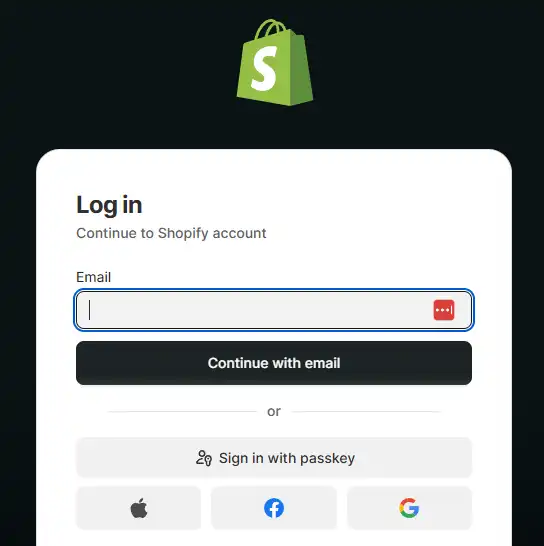
1. Log in to your Shopify admin panel
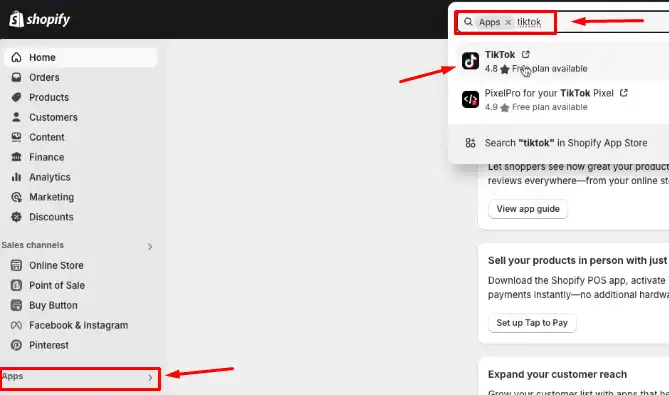
2. Go to the Shopify App Store and search for “TikTok”
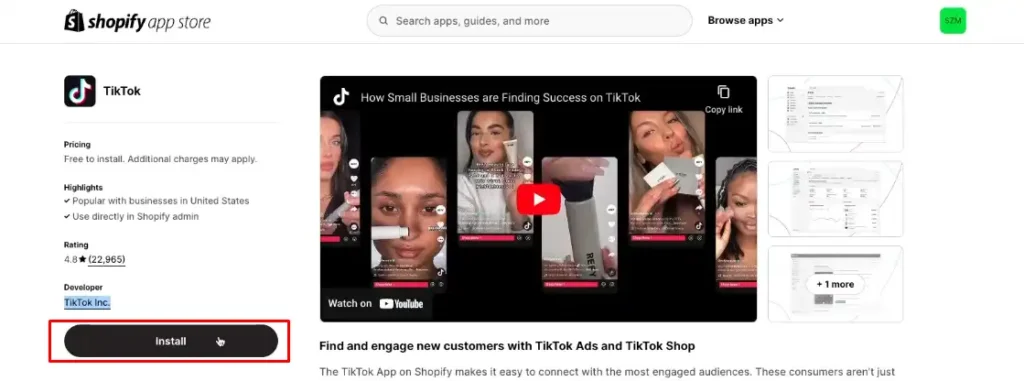
3. Install the official TikTok app by TikTok Inc.
4. Click “Connect” to link your TikTok Business Center account
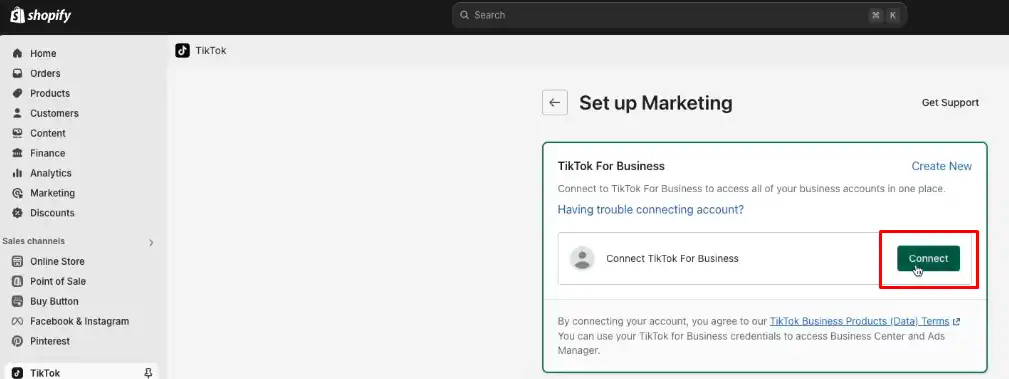
5. Authorize the data sharing permissions Shopify requests
6. Sync your product catalog by selecting your Shopify product collection
7. Confirm your catalog appears inside TikTok Business Center under “Catalogs”
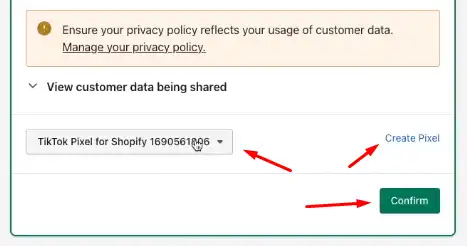
Once connected, your Shopify store and TikTok Ads Manager share a live data bridge. Product updates, pricing changes, and inventory status flow between both platforms automatically.
How to Set Up and Install the TikTok Pixel on Shopify
The TikTok Pixel is the tracking code that records what visitors do on your store after clicking your ad. Without it, your campaigns cannot optimize for purchases. They will only optimize for clicks, which wastes budget.
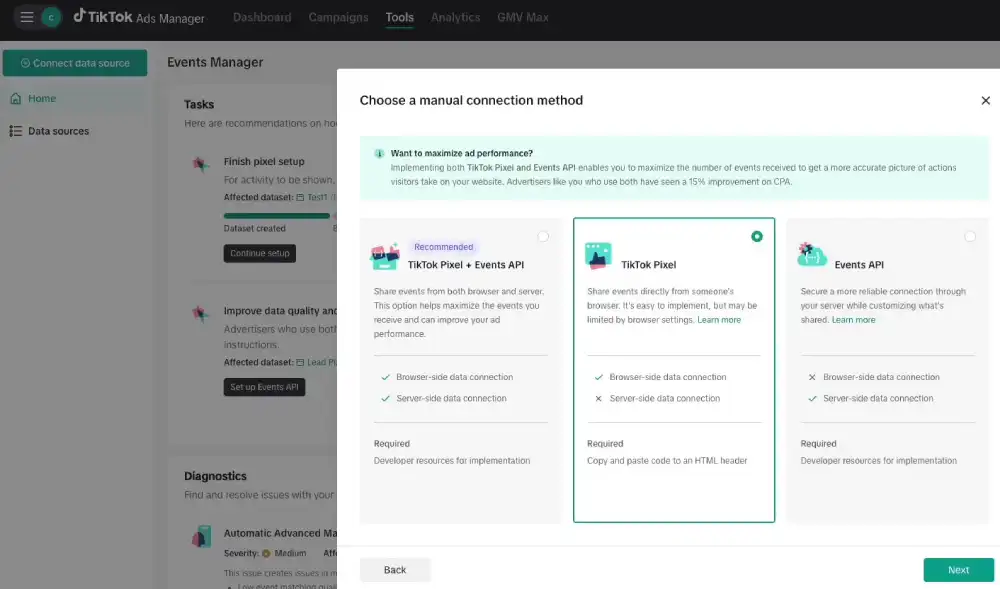
Here is how to create and install it:
- Inside TikTok Ads Manager, go to Assets and select Events
- Click Web Events and then Create Pixel
- Name your Pixel and choose Shopify as your connection method
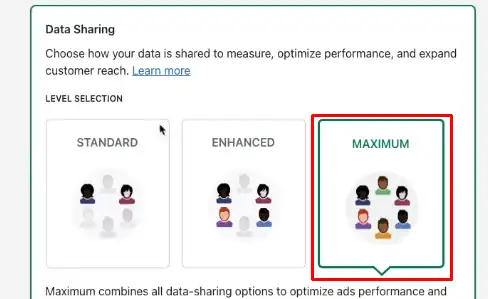
- Select your data sharing level. You have three options:
| Data Sharing Level | What It Shares | Best For |
| Standard | Basic events: page views, add to cart, purchase | Stores with privacy concerns or limited data |
| Enhanced | Standard events plus hashed email and phone | Most Shopify stores are a baseline |
| Maximum | Enhanced data plus advanced match signals | Stores running high-volume conversion campaigns |
We recommend Maximum for most Shopify merchants. The more signals you give TikTok’s algorithm, the faster it exits the learning phase and finds buyers.
- Complete the connection inside the TikTok Shopify app, which installs the Pixel code automatically
- Use TikTok’s Pixel Helper Chrome extension to confirm your Pixel fires on your homepage, product pages, cart, and order confirmation page
How to Create Your First TikTok Ad Campaign for Shopify
Once your Pixel is live and tracking, you are ready to build your first campaign.
Keep your first campaign simple. One campaign, two to three ad groups, three to five creatives per ad group.
Follow these steps inside TikTok Ads Manager:
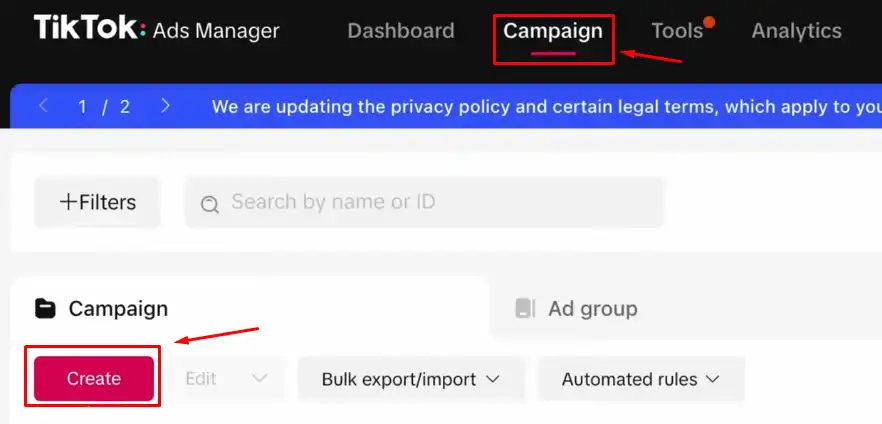
1. Click Campaign and then Create
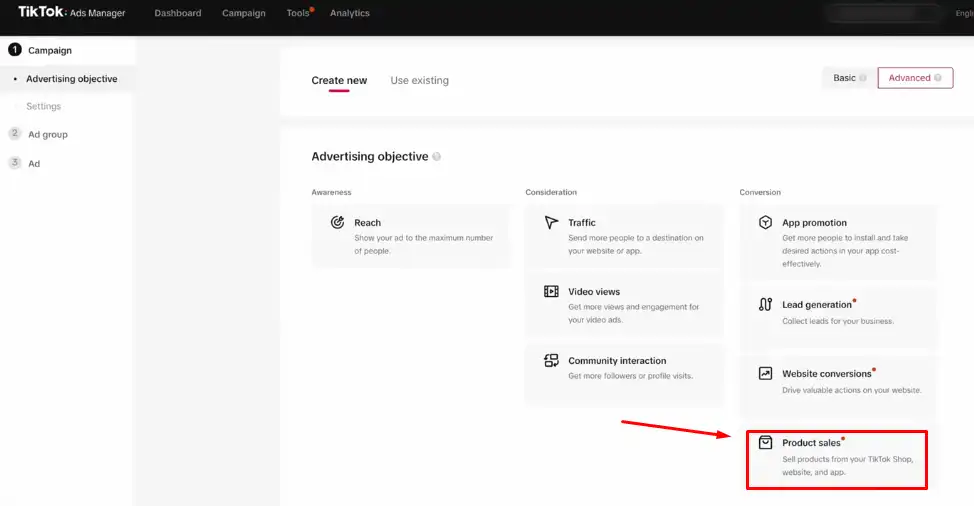
2. Select your campaign objective. For Shopify stores focused on sales, choose Product Sales if you have a catalog synced, or Website Conversions if you are sending traffic to a specific landing page
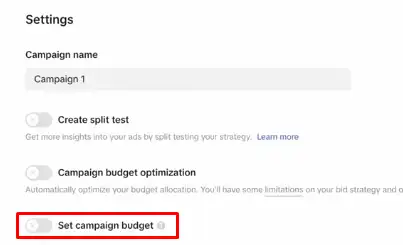
3. Set a campaign-level daily budget of at least $50. This gives the algorithm room to test
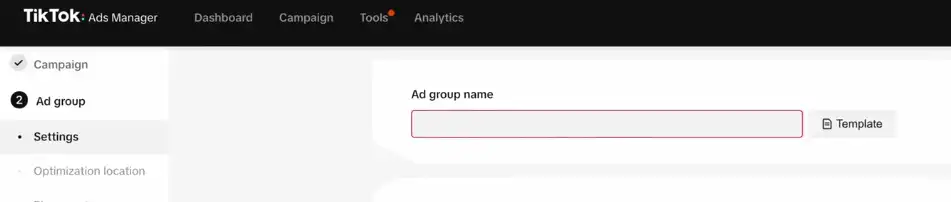
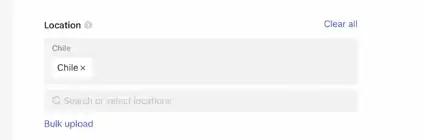
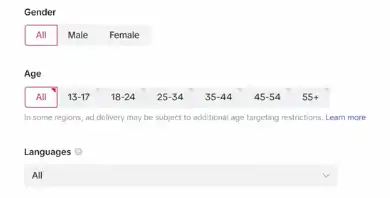
4. Create your Ad Group. Set your audience targeting:
5. Location: your target country
6. Age: based on your product’s buyer profile
7. Interests and behaviors: Use TikTok’s built-in category suggestions to start broad
8. Set your Ad Group budget at $20 to $30 per day minimum
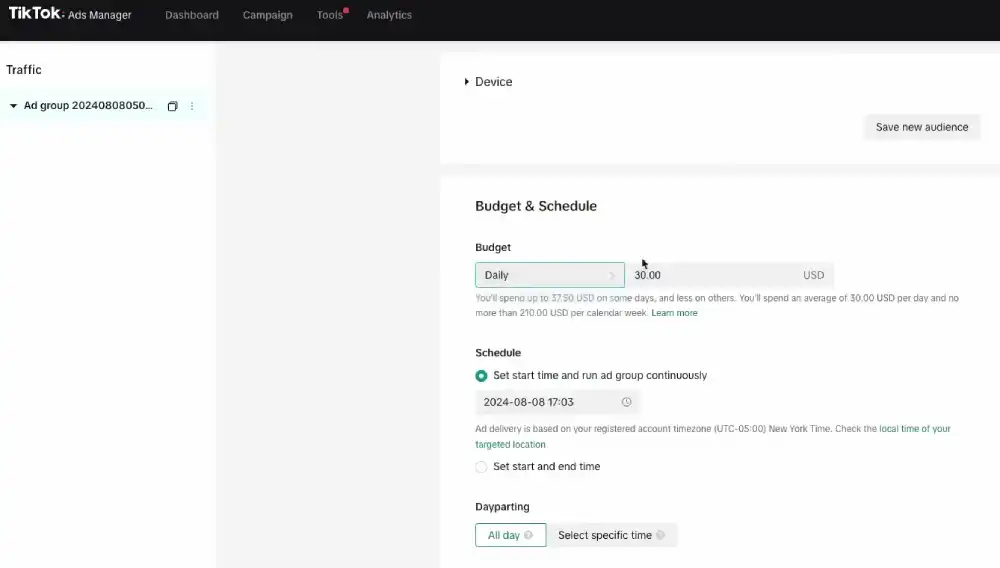
9. Choose Lowest Cost as your bid strategy when starting out
10. Set your schedule. Run ads continuously rather than with a fixed end date during the testing phase
Which TikTok Ad Format Works Best for Shopify Products?
| Ad Format | How It Works | Best Use Case |
| In-Feed Ads | Video ads that appear in the For You feed | Brand awareness and traffic campaigns |
| Spark Ads | Boost existing organic TikTok posts as paid ads | UGC amplification and social proof |
| Video Shopping Ads | Product cards attached to video that link directly to your store | Direct product sales with catalog |
| Smart+ Catalog Ads | Automated ads using your synced product feed | Scaling proven products with less manual work |
For your first campaign, start with In-Feed Ads or Spark Ads. They give you creative control and clear performance data before you move to automation.
How to Create TikTok Ad Creatives That Actually Convert
Your creative is the most important variable in your TikTok ad performance. A strong creative with average targeting will outperform a perfectly targeted ad with weak creative every time.
Here is what we have seen work consistently:
The 3-second hook rule: According to TikTok’s own research, over 63% of videos with the highest click-through rate highlight their key message or product within the first three seconds. Open with a bold visual, a surprising statement, or a product in action. Do not open with your logo.
UGC versus branded video: User-generated content consistently outperforms polished branded video on TikTok. According to Stackla’s Consumer Content Report, consumers find UGC 2.4 times more authentic than brand-created content. Film on a phone, keep it natural, and show real results.
Proven script structure for Shopify products:
- Hook (0 to 3 seconds): Show the problem or a striking result
- Problem (3 to 8 seconds): Describe what your viewer is experiencing
- Solution (8 to 15 seconds): Introduce your product as the fix
- Proof (15 to 22 seconds): A quick result, review, or before-and-after
- CTA (22 to 30 seconds): One clear action, “Shop now” or “Link in bio”
TikTok recommends keeping your video ads between 21 and 34 seconds for the best performance. This range consistently delivers the highest completion rates for eCommerce ads.
How Much Do TikTok Ads Cost for Shopify Stores?
TikTok has published minimum budget requirements inside Ads Manager.
Here is what you need to know:
| Budget Level | Minimum Amount |
| Campaign daily budget | $50 per day |
| Ad group daily budget | $20 per day |
| Lifetime budget (campaign) | $50 total |
For testing a new product from zero, plan to spend $300 to $500 before drawing any conclusions. This gives the algorithm enough data to exit the learning phase, which requires approximately 50 conversion events per ad group, according to TikTok’s official learning phase documentation.
Your cost per result will vary based on your industry, audience size, and creative quality. According to industry benchmark data from WebFX, the average CPM on TikTok sits around $9.16 for eCommerce campaigns. Your CPA will depend on your conversion rate and average order value.
If your product sells for under $30, you will need a strong conversion rate to make the numbers work. If your AOV is over $60, TikTok ads become significantly more viable.
How to Track TikTok Ad Performance in Shopify
You need to track performance in two places: TikTok Ads Manager and Shopify Analytics.
Key metrics to monitor in TikTok Ads Manager:
- CPM (Cost Per 1,000 Impressions): Tracks delivery efficiency
- CTR (Click-Through Rate): Above 1% is a healthy benchmark for eCommerce, with the platform average sitting at 0.84%
- CPA (Cost Per Acquisition): Your spend divided by total purchases
- ROAS (Return on Ad Spend): Revenue generated per dollar spent. A 2x ROAS is the general breakeven threshold for most Shopify stores, though this varies by your product margin
Inside Shopify Analytics:
Go to Marketing and then Reports. Filter by TikTok as your traffic source. This shows you sessions, conversion rate, and revenue attributed to TikTok ads, independent of TikTok’s own reporting.
We recommend comparing both dashboards weekly. TikTok tends to attribute more conversions than Shopify does due to view-through attribution. Use Shopify’s numbers as your conservative baseline.
How to Scale TikTok Ads for Shopify After Your First Wins
Once an ad group consistently delivers a positive ROAS for five or more days, you are ready to scale. Here is the process we follow:
Budget scaling rule: Increase your ad group budget by no more than 20% every 48 hours. Larger jumps reset the learning phase and destabilize performance.
Lookalike audiences: Inside TikTok Ads Manager, go to Assets and then Audiences. Create a Lookalike Audience based on your Pixel’s purchase event data. Use a 1% to 3% similarity range for the most relevant match.
Retargeting campaigns: Build a separate campaign targeting visitors who viewed your product pages but did not purchase. Use Video Shopping Ads with a direct product CTA for this audience. These campaigns typically deliver your lowest CPA.
Smart+ Catalog Ads: Once you have purchase data from at least 100 orders attributed to TikTok, test Smart+ automation. TikTok’s algorithm uses your catalog and Pixel data to automatically generate and serve the most relevant product ads to high-intent audiences.
Common TikTok Ads Mistakes Shopify Merchants Make (And How to Fix Them)
Skipping the Pixel setup: Running campaigns without a properly installed Pixel means TikTok cannot optimize for purchases. You will spend money sending traffic that never converts. Install and verify the Pixel before your first campaign goes live.
Too-narrow targeting: Starting with a highly specific audience limits TikTok’s ability to find buyers. Begin broadly, at a minimum of 1 million potential reach, and let the algorithm do the targeting work.
Over-polished creatives: Highly produced video ads look out of place on TikTok. They signal “advertisement” immediately and get scrolled past. Raw, authentic content performs better. Test phone-shot UGC before investing in production.
Wrong campaign objective: Using Traffic or Reach as your objective when you want purchases tells TikTok to find people who click or watch, not people who buy. Always use Website Conversions or Product Sales for eCommerce campaigns.
Stopping campaigns too early: Most merchants pull the plug after two or three days of no purchases. TikTok’s algorithm needs approximately 25 conversion events to fully optimize. Give each ad group at least five to seven days and a minimum of $100 in spend before making judgment calls.
More helpful articles you’ll want to explore:
👉 TikTok Ads Credit: Get Free $6000 Cash Back Promo
👉 Integrating Shopify with TikTok Shop: Full Walkthrough
👉 Selling Digital Products on TikTok: Is It Allowed?
👉 Shopify vs. TikTok Shop Native: Which is Better?
Frequently Asked Questions About TikTok Advertising for Shopify
Do I need a TikTok account to run TikTok ads for my Shopify store?
Yes. You need a TikTok Business Account and a TikTok Ads Manager account. These are separate from a personal TikTok profile. You create your Business Account at business.tiktok.com and your Ads Manager at ads.tiktok.com. Both are free to set up.
How do I link TikTok to Shopify?
You connect TikTok to Shopify through the official TikTok app available in the Shopify App Store. Install the app, authorize the connection to your TikTok Business Center account, and follow the prompts to sync your product catalog and install the TikTok Pixel. The process takes roughly 15 minutes with all accounts ready.
How much should I budget for TikTok ads as a new Shopify merchant?
TikTok requires a minimum campaign budget of $50 per day and a minimum ad group budget of $20 per day. For meaningful test results, plan to spend $300 to $500 before evaluating performance. This gives TikTok’s algorithm enough data to exit the learning phase and optimize for purchases.
Can I run TikTok ads for Shopify without TikTok Shop?
Yes. TikTok Shop and TikTok Ads are separate products. You do not need TikTok Shop to run paid ad campaigns that send traffic to your Shopify store. You only need a TikTok Ads Manager account, the TikTok Pixel installed on your Shopify store, and an active ad campaign with your Shopify URL as the destination.
How long does it take for TikTok ads to start converting for Shopify?
Most campaigns enter an active learning phase that lasts until TikTok records 50 conversion events on your Pixel. For a new store spending $50 per day, this typically takes five to ten days. You should not evaluate campaign performance or make major changes during this period. Let the algorithm collect the data it needs first.
What type of TikTok ad works best for a Shopify product launch?
For a product launch, In-Feed Video Ads or Spark Ads using UGC-style creative tend to perform best. These formats feel native to the platform and drive both awareness and clicks. Pair them with a Website Conversions objective and a direct product page landing URL. Once your Pixel has enough purchase data, move into Video Shopping Ads for stronger direct-to-cart performance.
Conclusion
Running TikTok ads for your Shopify store is not complicated, but it does require you to set things up in the right order. The Pixel has to be installed before your campaigns go live. Your creative has to feel native, not produced. Your budget has to be large enough to let the algorithm learn.
What separates merchants who get results from those who give up after a week is patience and structure. When we look at the patterns across successful TikTok eCommerce campaigns, they share one thing: the merchant trusted the setup, gave the algorithm room to work, and tested creative consistently.
You now have every piece of that process in one place. Follow the steps, monitor your metrics in both TikTok and Shopify, and improve one variable at a time. That is how you build a TikTok ads strategy that compounds over time.