
You filmed a product video on a whim, and it took off. The comments are flooding in with one question: where do I buy this?
But every viewer you push to your website checkout loses momentum on the way, and many never finish the purchase.
A proper Shopify TikTok Shop integration fixes that leak. Shopify centralizes your inventory and order management, while TikTok Seller Center continues to manage payouts, customer disputes, and parts of the returns process depending on your workflow.
This guide walks you through the exact setup for 2026, plus the requirements, the product sync, and the mistakes that trip up new sellers.
Here is what you will learn:
- The requirements you must meet before TikTok approves your shop
- The full step-by-step process to connect both platforms
- How to sync your products and keep inventory accurate
- The difference between the native connector and third-party sync apps
- How to fix the most common connection and catalog errors
By the end, you will have a clear path from “viral video” to “completed sale” without juggling two dashboards.
Get Up to $6000 Free TikTok Ad Credit
Table of Contents
Quick Answer
To integrate Shopify with TikTok Shop, open your Shopify admin, go to Settings, then Apps and sales channels. Add the official TikTok channel from the Shopify App Store, connect your TikTok for Business account, accept the TikTok Shop Merchant Terms, and verify your business in TikTok Seller Center. Then select products to sync and finish setup.
Key Takeaways
- The official TikTok sales channel inside Shopify is the most reliable way to connect, since it keeps products, inventory, and orders in sync automatically.
- TikTok Shop is region-specific in 2026, so a US Shopify store can only connect to a US TikTok Shop account.
- Only the main owner account in TikTok Seller Center can complete the Shopify connection. Staff and lower roles will hit an error.
- TikTok Shop continues to grow rapidly in the US, making it an increasingly important sales channel for many ecommerce brands.
- You manage everything from Shopify after setup, but TikTok Seller Center still controls verification, payouts, and disputes.
What a Shopify TikTok Shop Integration Actually Does
The integration links two systems that each do one job well. Shopify runs your store, your stock, and your fulfillment. TikTok runs discovery and the in-app buying experience.
When the two connect, your Shopify products become shoppable TikTok listings. A viewer taps a product card in a video or live stream and checks out inside TikTok. The order then flows back into Shopify, so you pack and ship it like any other sale.
This is different from simply running ads that send traffic to your website. With the full TikTok Shop setup, TikTok becomes the checkout, not just the billboard. If you are still weighing both routes, our breakdown of Shopify versus TikTok Shop as sales channels shows where each one fits.
The payoff is fewer dropped sales. Every step you remove between “I want this” and “I bought this” protects revenue you already earned with good content.
Requirements Before You Connect (2026)
TikTok Shop has gatekeeping for a reason. It wants real businesses with real products, not throwaway stores. Meeting these requirements first saves you from a rejected application later.
| Requirement | What you need |
| Store location | A live Shopify store based in a supported region, such as the US |
| Seller account | An active TikTok Seller Center account in the same region |
| Business documents | Business registration, tax info, and bank details for payouts |
| Warehouse address | A valid physical address, not a P.O. Box |
| Product catalog | Listings that follow TikTok Shop policy with clear titles and high-resolution images |
According to TikTok’s official seller guidance, US stores must use valid warehouse addresses and prepare business, tax, and banking documents before they start. Skipping any of these stalls verification.
One detail catches many sellers off guard. The connection is region-specific, so your Shopify store and your TikTok Shop must belong to the same country. A US store will not connect to a UK shop, and the reverse is also true.
How to Connect Shopify to TikTok Shop: Step by Step
Here is the full process using the official TikTok channel. Set aside about 30 to 60 minutes, since verification can take a few extra steps.
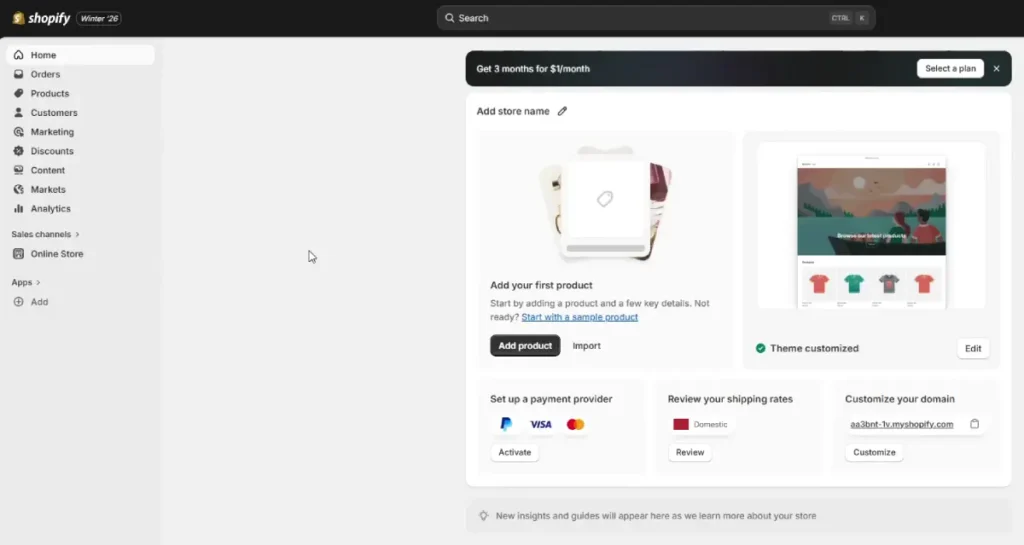
1. Open your Shopify admin: Go to Settings, then click Apps and sales channels. This is where you add new ways to sell.
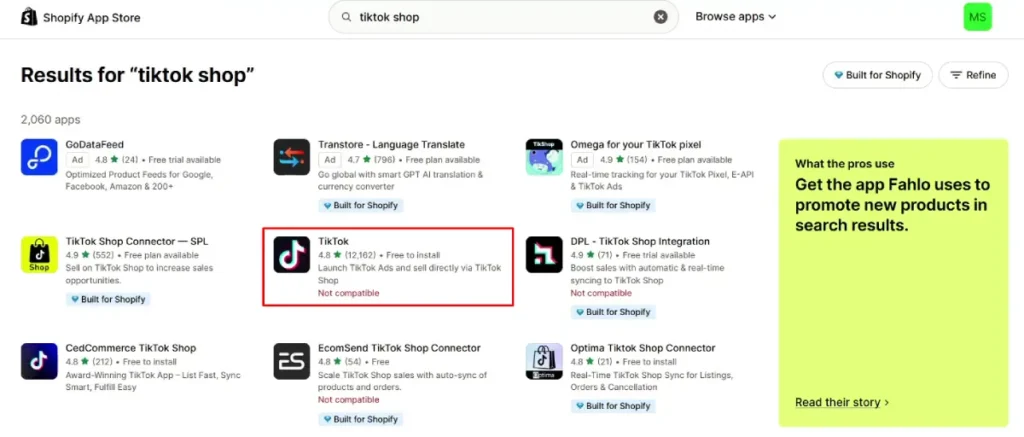
2. Find the TikTok Shopify App: Click Shopify App Store, then search for “TikTok.” Choose the official TikTok app published by TikTok Inc. Installing the official app keeps your data connection secure.
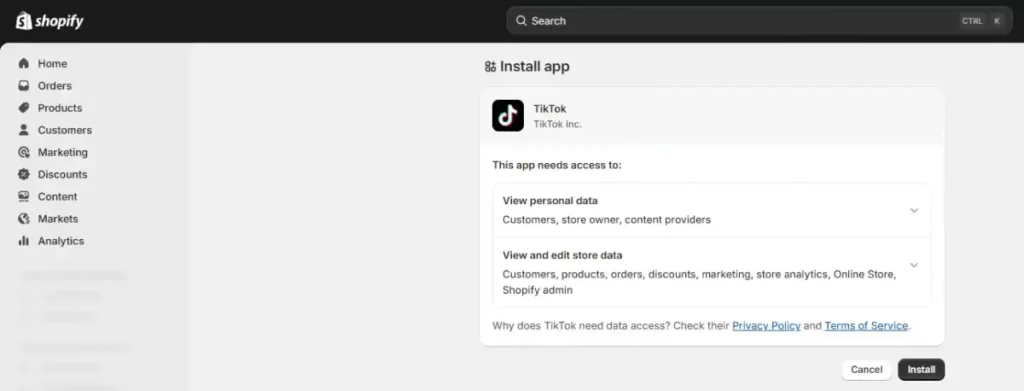
3. Install the TikTok Shopify App: Click to install and add TikTok as a sales channel. You will land on the Set Up TikTok Shop page inside Shopify.
4. Connect your TikTok for Business account: Click Connect on the TikTok Shop section and log in. This account is the umbrella for your Ads Manager, Business Center, and your shop. If you do not have one yet, our guide on how to create a TikTok Business account covers it in minutes.
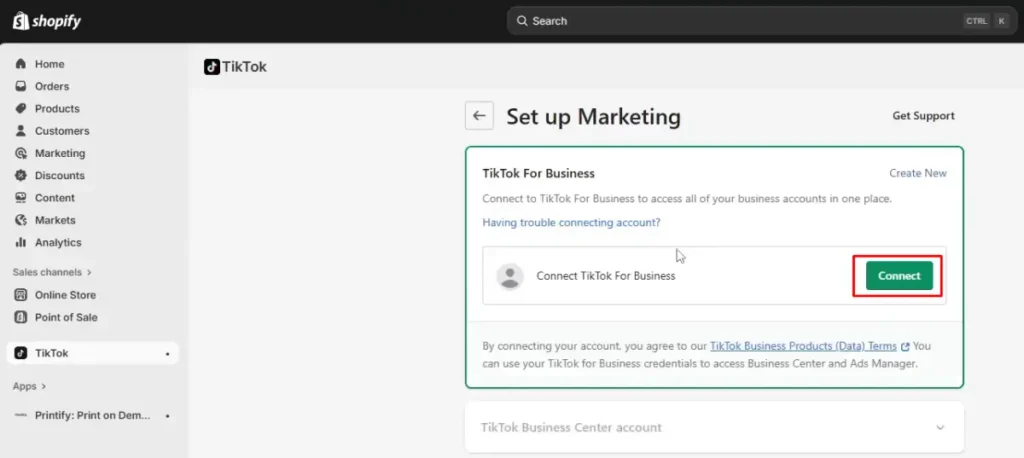
6. Verify your business: Go to the TikTok Shop Information section and click Verify. In the upload dialog, fill in your business details and attach the required documents.
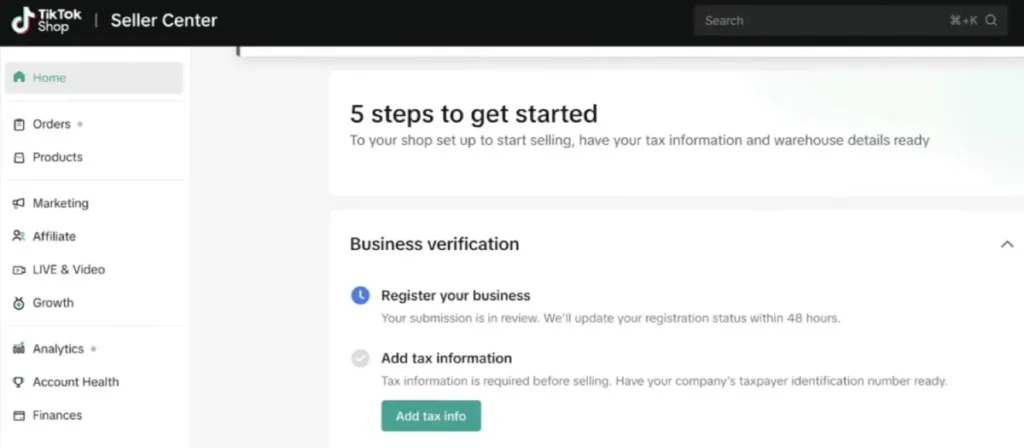
7. Complete identity verification in Seller Center: TikTok routes you to TikTok Seller Center to confirm your identity, banking, and tax information. Only the main owner account can finish this step.
8. Select products to sync: Choose which Shopify products to list. Review each title, description, and image so they meet TikTok’s standards before they go live.
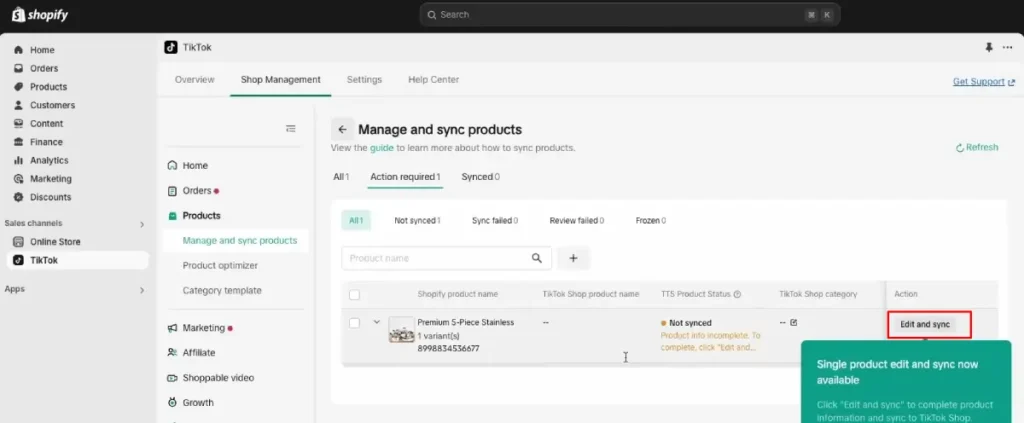
9. Finish setup: Click Finish Setup. Your approved products now appear in your TikTok Shop, ready to tag in videos and live streams.
If you want a deeper walkthrough of the shop side itself, our guide on how to set up TikTok Shop breaks down the seller dashboard in detail.
How Do I Sync My Shopify Products to TikTok Shop?
After the channel is connected, syncing is mostly automatic. The TikTok app pulls your selected Shopify products and converts them into TikTok Shop listings, including images and collections.
You still want to review before they go live. TikTok matches products at the SKU level, so check that each item maps to the right listing. For products where the codes do not line up, use the app’s mapping tool to link them by hand.
Keep these habits to avoid sync headaches:
- Use clear, keyword-rich titles that read well on a small phone screen.
- Upload high-resolution images, since blurry photos can fail catalog review.
- Assign the correct product category, because wrong categories slow approval.
- Update stock in Shopify only, and let it flow to TikTok, so you never oversell.
Once products are live, changes you make in Shopify appear on TikTok automatically. That single source of truth is the whole point of the integration.
Managing Orders, Inventory, and Returns After You Connect
The best part comes after setup. You run daily operations from Shopify, the tool you already know.
When a sale happens on TikTok, the order lands in your Shopify admin alongside your other channels. You fulfill it the same way. Inventory drops in both places at once, which protects you from selling stock you no longer have.
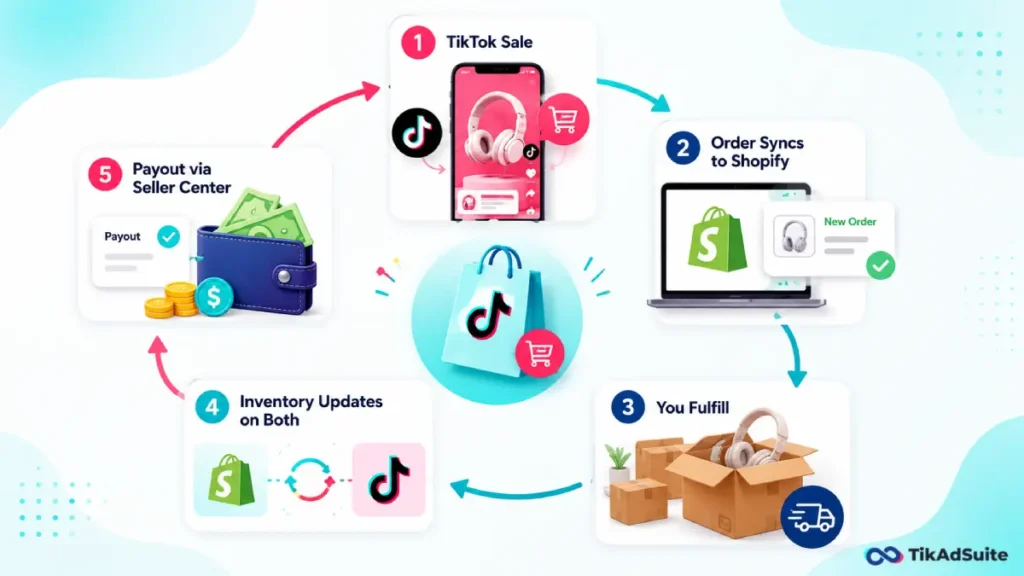
Returns and refunds also route back through Shopify in the current version of the app. That said, TikTok Seller Center still owns payouts, tax collection, and any buyer disputes. Think of Shopify as your operations hub and Seller Center as the financial and compliance layer.
This split matters for your bookkeeping. Your TikTok payouts arrive on TikTok’s schedule, not Shopify’s, so reconcile them carefully each month.
Native Connector vs Third-Party Sync Apps
You have two main ways to connect. The native TikTok Shopify app is free and official. Third-party connectors from the Shopify App Store offer extra features for a monthly fee.
| Factor | Native TikTok channel | Third-party sync app |
| Cost | Free | Monthly subscription |
| Setup | Built into Shopify, fastest path | Extra install and configuration |
| Sync depth | Products, inventory, orders | Often adds bulk editing and advanced mapping |
| Best for | Most small and mid-size stores | High-volume catalogs and complex SKUs |
| Support | TikTok and Shopify help centers | Dedicated app support, often live chat |
For most sellers, the native channel does the job. If you run thousands of SKUs or need bulk listing controls, a paid connector can earn its keep. You can compare options in the Shopify App Store before you commit.
Can You Connect Shopify to TikTok Shop in Every Country?
Not yet. In 2026, the integration is available in supported markets like the US, UK, and parts of Southeast Asia, and it stays region-locked.
That means your store country and shop country must match. If you sell across borders, you may need a separate TikTok Shop entity for each region you serve.
Check your eligibility in TikTok Seller Center before you plan a multi-country rollout, since requirements differ by market.
Common Problems and How to Fix Them
A few errors show up again and again. Knowing them in advance saves hours.
- “Only the owner can connect” error: A staff or non-owner role tried to link Shopify. Log in as the main Seller Center owner and retry.
- Products stuck under review: Usually a category, image, or policy issue. Our guide on why TikTok Shop products get frozen or reviewed explains the common triggers.
- Inventory mismatches: Edit stock in Shopify only. Editing in two places creates conflicts.
- Verification stalls: Missing or blurry documents are the usual cause. Re-upload clear copies of your business and banking papers.
If your catalog keeps getting flagged, review TikTok’s policy rules before resubmitting. A clean catalog clears faster than a rushed one.
Turning the Connection Into Real Sales
Connecting the platforms is the start, not the finish. Sales come from content and promotion on top of the setup.
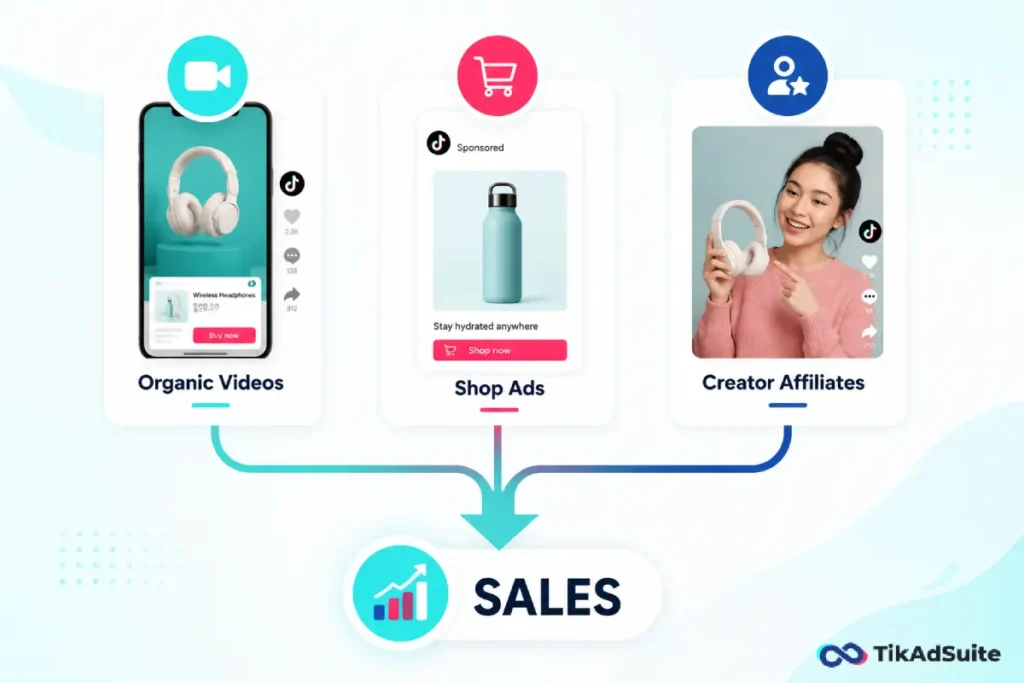
Three levers work together. Organic videos that tag your products, paid Shop Ads in the For You feed, and creator partnerships through the affiliate program.
The merchants who win usually run all three at once. To recruit sellers for you, our guide to affiliate marketing on TikTok Shop shows how the commission model works.
If you plan to scale with paid traffic, you will also want clean conversion tracking. Our walkthrough on how to run TikTok ads for your Shopify store connects the ad side to the shop you just built.
Raw, phone-shot videos tend to outperform polished studio content here, so keep your creative authentic.
Frequently Asked Questions
Does TikTok Shop integrate with Shopify?
Yes. Shopify offers an official TikTok sales channel that connects directly to TikTok Shop. You install it from the Shopify App Store, link your TikTok for Business account, and verify your business.
After setup, your products, inventory, and orders sync between both platforms, and you manage daily operations from your Shopify admin.
How long does it take to connect Shopify to TikTok Shop?
The technical connection takes around 30 to 60 minutes if your documents are ready. Business and identity verification in TikTok Seller Center can add extra time, sometimes a day or more.
Having your tax info, bank details, and a policy-compliant catalog prepared in advance is the fastest way to get approved without delays.
Is the TikTok Shopify app free?
Yes, the official TikTok sales channel inside Shopify is free to install and use. You only pay TikTok Shop’s standard seller and referral fees on sales.
Some third-party sync apps charge a monthly subscription for advanced features like bulk editing, but the native channel covers product, inventory, and order syncing at no cost.
Can I sell on TikTok Shop without a Shopify store?
Yes. You can sell directly through TikTok Seller Center without Shopify. But if you already run a Shopify store, the integration saves time by syncing your existing catalog and centralizing orders.
For brands managing stock across several channels, keeping Shopify as the control center is far simpler than manual updates.
Why are my Shopify products not showing on TikTok Shop?
The usual reasons are products still under review, incorrect category mapping, low-resolution images, or a policy violation. Check each listing in your TikTok channel and confirm it passed catalog review.
Editing stock in two places can also cause conflicts, so manage inventory from Shopify only and let the sync handle TikTok.
Wrapping Up
The single most important move is to connect through the official TikTok sales channel inside Shopify, then verify your business properly the first time. That clean setup is what keeps products, inventory, and orders flowing without manual work.
Get your documents ready, match your store and shop regions, and review every listing before it goes live. Do that, and the integration becomes a quiet engine running underneath your content.
From there, the growth is on you. Keep making videos people want to watch, tag your products, and let the connected checkout turn that attention into sales.