
People say TikTok Ads Library and mean two different tools. One is the Commercial Content Library, a public archive of paid ads. The other is Top Ads inside TikTok Creative Center, a curated set of strong performers.
Both are free, and both help you plan your ad creative before you pay for production. This guide covers how to use each one for research: spotting patterns in your niche, reading what works in an ad second by second, and turning it all into a brief.
It also covers which older Creative Center tools have dropped off TikTok’s help pages, so you don’t lose time hunting for them.
Get Up to $6000 Free TikTok Ad Credit
Table of Contents
Key Takeaways
- The name TikTok Ads Library covers two free tools: the Commercial Content Library at library.tiktok.com and Top Ads in TikTok Creative Center.
- The Commercial Content Library shows paid ads with run dates, main targeting and reach, but only data from Europe is available.
- Top Ads only includes ads that advertisers authorized in TikTok Ads Manager, so it shows strong examples, not the whole market.
- Log in to Creative Center before you research. Logged out, Top Ads shows only five ads.
- Keyword Insights and Top Products no longer have their own help pages, so build your routine around Top Ads and the library.
Quick Answer
To use the TikTok Ads Library for research, start in Creative Center’s Top Ads: filter by region, industry and campaign objective, sort by reach or view rate, and open See Analytics to find the moment each ad peaks. Then search the Commercial Content Library at library.tiktok.com for your product category to see paid ads shown in Europe, with their run dates, targeting and reach. Log patterns across many ads, not single ads, and turn them into a creative brief.
What the TikTok Ads Library Is
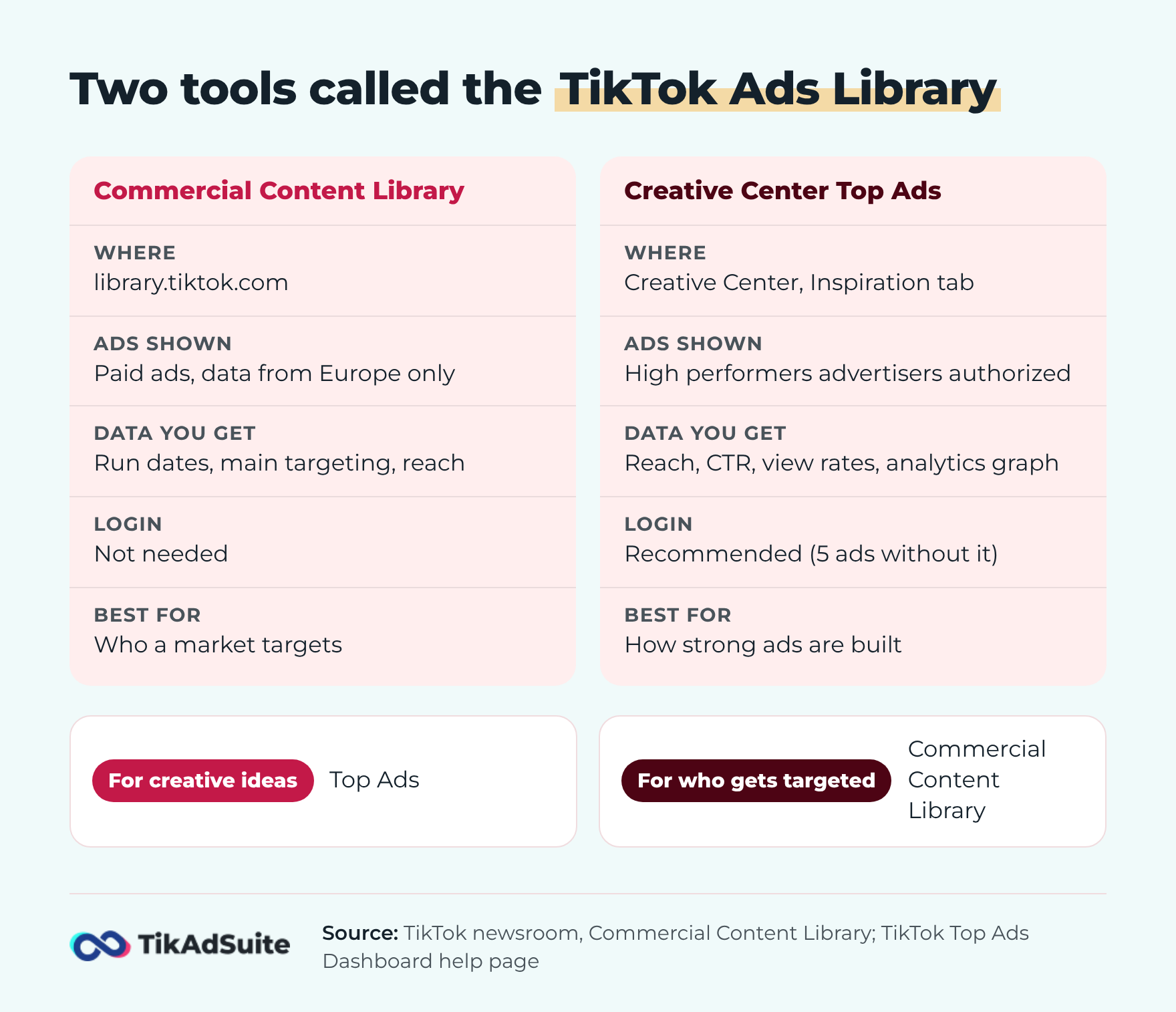
The TikTok Ads Library is the name people use for two separate research tools, and they show very different data.
The Commercial Content Library at library.tiktok.com is TikTok’s public ad archive. When TikTok introduced the Commercial Content Library, it described a searchable database of paid ads with the creative, the dates each ad ran, main targeting such as age and gender, and how many people were served the ad. Anyone can open it, but only data from Europe is available.
Top Ads lives inside TikTok Creative Center. The About Creative Center page describes Creative Center as a free, public hub. A login isn’t required, though TikTok recommends one to see all features and data. Top Ads sits under the Inspiration tab, next to Creative Tools such as Symphony Creative Studio.
Put simply, the library tells you who a market is targeting, and Top Ads tells you how strong ads are built.
How to Research Ads in Top Ads
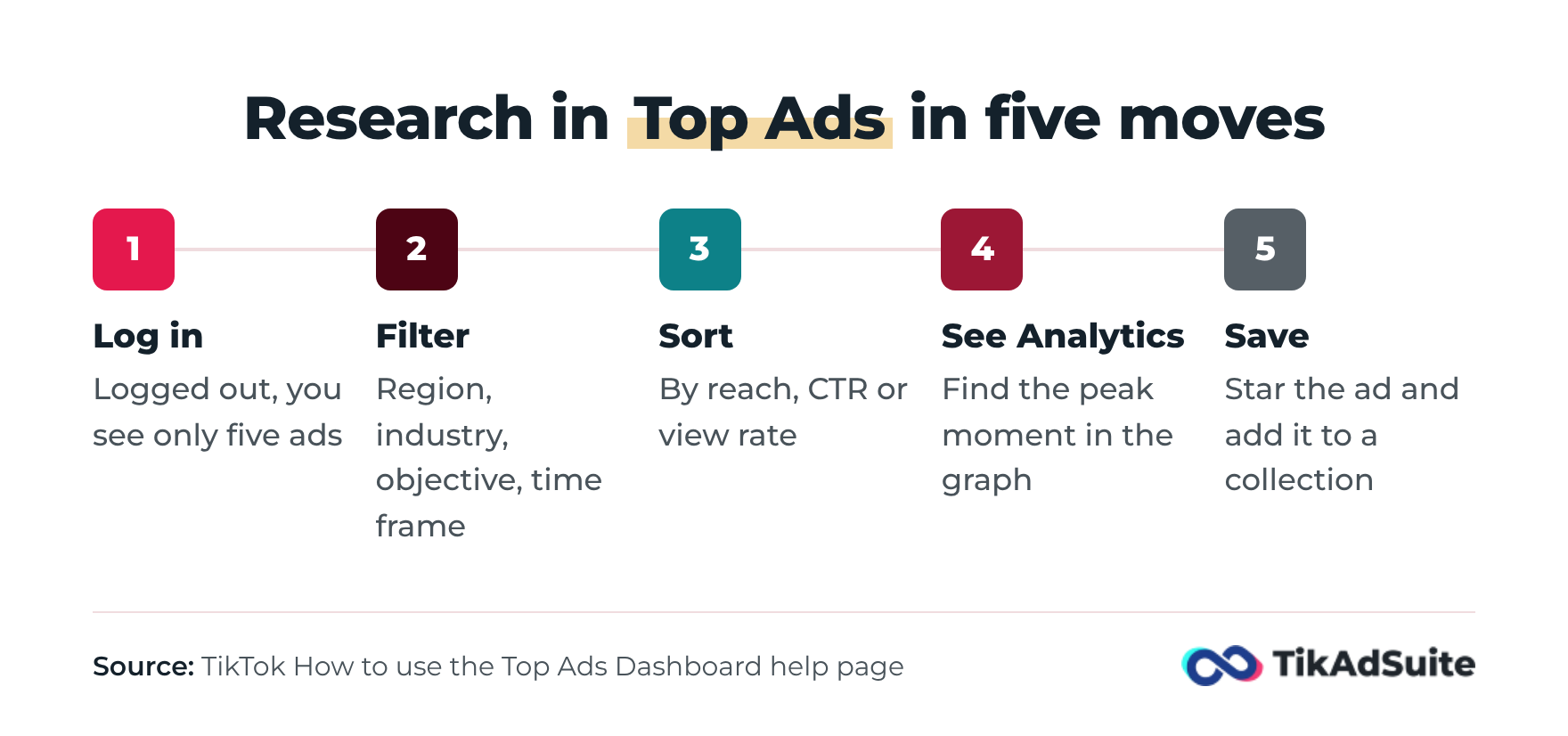
Top Ads is the better tool for creative research, because you can filter by industry and objective and see where each ad holds attention. The Top Ads Dashboard guide lays out how it works:
- Log in to Creative Center first. Without a login, the dashboard guide says Top Ads shows only 5 ads.
- Open the Inspiration tab and choose Top Ads.
- Filter by region, industry, campaign objective, likes and time frame. On desktop, you can also filter by ad language and ad format.
- Sort by reach, CTR, 2-second view rate or 6-second view rate. Desktop adds sorting by CVR and likes.
- Click See Analytics on any ad worth a closer look.
- Click the star to favorite an ad, then save it to a collection. Your saved ads appear under My Collections in your profile.
Set the objective filter to the campaign you’ll actually run. An app install ad follows a different script from one that sells a product online.
Read the Second-by-Second Graph
The second-by-second graph is the most useful part of Top Ads for research. TikTok’s About Top Ads page says it shows performance frame by frame, so you can find the ad’s strongest engagement moment.
Find the peak, then write down what’s on screen at that point: the product reveal, a price, a face talking to camera, a text overlay. Do the same for the opening seconds. Across a dozen or more ads, those notes show you which openings and reveals keep people watching in your category. The guide to TikTok ad hooks helps you name the opening styles you spot.
How to Use the Commercial Content Library for Market Research
The Commercial Content Library is useful for market research, not only for checking one competitor. Search a product category instead of a brand, and you see which advertisers are active in that space and who they target.
A simple way to run it:
- Pick a European country you sell to, or one close to your main market, and a recent date range.
- Search category words such as protein powder or phone case rather than a company name.
- Open several ads and compare the age and gender targeting. If most ads in your category aim at the same group, that’s the crowded segment.
- Compare reach between ads. Wide reach on a long-running ad suggests the advertiser kept funding it.
The library also covers creator posts with a paid partnership or promotional label, as TikTok’s launch post notes. That helps you see how brands in your niche use creators, not only their own ads.
For a step-by-step lookup of one company’s ads, follow the guide on spying on competitor ads.
What Happened to Keyword Insights and Top Products
Keyword Insights and Top Products still show up in many Creative Center guides, but TikTok’s help pages no longer describe them. When we checked on November 16, 2026, the Keyword Insights help link opened the About Creative Center page instead, and the Top Products help link did the same.
The current About Creative Center page lists Top Ads under Inspiration, plus Creative Tools and your Personal Profile. Its Inspiration intro still mentions keywords and products in general terms, but Top Ads is the only Inspiration tool it describes by name. Trend Discovery and Creative Insights, which older guides mention, aren’t described there either.
So check the live Creative Center menu before you plan around any single tool. For word and phrase research, start from trending TikTok keywords and the search results inside the TikTok app. For audio, the post on the best music for TikTok ads covers what’s cleared for ads.
A Short Research Routine Before Each Campaign
A short, fixed routine of about half an hour before each new campaign keeps research from turning into scrolling. Here’s one that uses only the tools above:
- Set up: Log in to Creative Center. Set Top Ads to your region, industry, objective and the most recent time frame.
- Watch: Sort by 6-second view rate, one of the sort options in the dashboard guide, and watch about ten ads all the way through. Note the opening, length, format and call to action of each.
- Dig in: Open See Analytics on your top three. Write down what happens at each peak.
- Check the library: Search your category for one European market, since TikTok’s launch post says the library only holds data from Europe. Note the targeting that keeps coming up.
- Write the brief: Write a one-page brief: two openings to test, one format, one offer angle and the audience you’ll start with.
Then run the brief through a creative testing framework so your own results, not someone else’s ads, pick the winner.
Common Research Mistakes
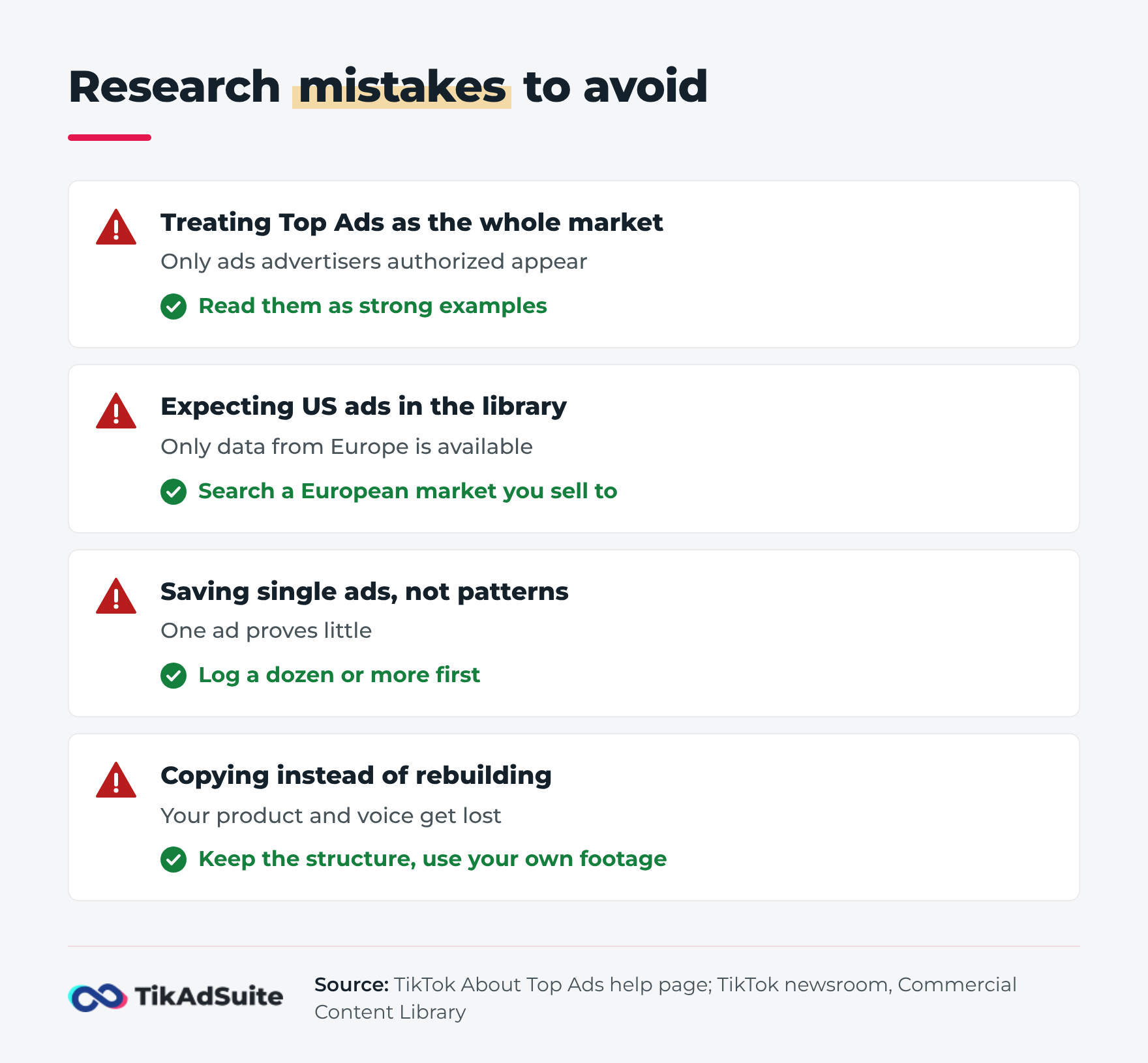
Most research mistakes with the TikTok Ads Library come from treating its tools as more complete than they are:
- Treating Top Ads as the whole market. TikTok says every ad in Top Ads was authorized by its advertiser in TikTok Ads Manager. You’re seeing ads brands chose to share, which leans toward winners.
- Expecting US or Asian ads in the library. The Commercial Content Library only has data from Europe, so a brand that advertises only in the US or Japan won’t appear.
- Saving single ads instead of patterns. One ad that worked tells you little. The same opening across many ads in your niche tells you a lot.
- Copying instead of rebuilding. Take the structure, pacing and offer type, then make it with your own product, footage and voice.
- Researching only your own category. Neighboring categories often use openings your niche hasn’t worn out yet.
FAQs
Is the TikTok Ads Library free?
Yes. The Commercial Content Library is a public website anyone can open, and TikTok Creative Center, where Top Ads lives, is free and public too. A Creative Center login isn’t required, but without one Top Ads shows only five ads, so log in before a research session.
How do I access the TikTok ad library?
Go to library.tiktok.com for the Commercial Content Library, choose a country and date range, and search a keyword or advertiser name. For Top Ads, open TikTok Creative Center, log in, click the Inspiration tab and choose Top Ads.
Where is Keyword Insights in TikTok Creative Center?
TikTok’s help pages no longer describe Keyword Insights. On November 16, 2026, its help link opened the About Creative Center page, and the same page lists Top Ads, Creative Tools and your Personal Profile. Check the live Creative Center menu, and use TikTok search and trend research for keyword ideas.
Can I use Top Ads without running ads?
Yes. Creative Center is a standalone research hub, so you can browse Top Ads, save collections and study the second-by-second graphs without an active campaign. You can use it to plan organic videos too, then move the strongest ideas into paid tests later.
What is the difference between the Ads Library and TikTok Ads Manager?
The Ads Library tools are for research: they show other advertisers’ ads. TikTok Ads Manager is where you build, fund and launch your own campaigns and read their results. Most advertisers research in Creative Center and the library first, then build in TikTok Ads Manager.
Wrapping Up
The TikTok Ads Library is most useful when you know which tool you’re in. Top Ads shows how strong ads are built, and the Commercial Content Library shows who a market is paying to reach in Europe.
Block half an hour before your next campaign, run the routine above, and leave with a brief you can test.