
Your TikTok ads are running. People are clicking. But your conversion numbers just don’t add up.
If you’re targeting iOS users and your results feel off, you likely have a tracking problem, not a creative problem.
Apple’s privacy architecture quietly blocks a large chunk of what your TikTok pixel is trying to report. And unless you know where to look, you won’t even see it happening.
This article explains what breaks, why it breaks specifically on iOS, and what signals to look for before you rebuild your setup.
You will learn:
- Why Apple’s iOS blocks TikTok pixel signals at the browser level
- What Event Match Quality (EMQ) actually tells you about your data
- How to diagnose whether your current setup has a signal leak
- Which fixes actually close the gap for iOS traffic
- How to validate that your tracking is working properly after changes
Whether you’ve never touched your tracking setup or you’re already running a hybrid pixel-and-API configuration, this guide covers the diagnostic layer most advertisers skip.
Get Up to $6000 Free TikTok Ad Credit
Table of Contents
Key Takeaways
- Apple’s Intelligent Tracking Prevention (ITP) limits cookie lifetimes in Safari and all iOS browsers to 24 hours or less, which cuts off attribution for purchases that happen after that window.
- Your Event Match Quality (EMQ) score in TikTok Events Manager tells you whether TikTok can connect your conversion events to the actual users who saw your ads. According to TikTok’s Help Center, scores below 5 indicate significant attribution problems even when events are technically firing.
- According to Funnel.io, advertisers using server-side Events API tracking alongside the pixel see up to a 48% lift in ROAS under iOS privacy conditions.
- The ttclid, TikTok’s click ID, is stripped by URL redirects and ad blockers before it reaches your pixel in a significant share of iOS sessions, which breaks last-click attribution even when the cookie survives.
- Fixing your EMQ score through Advanced Matching can raise it by 3 to 4 points with just one change: passing a hashed email during checkout or login.
Quick Answer
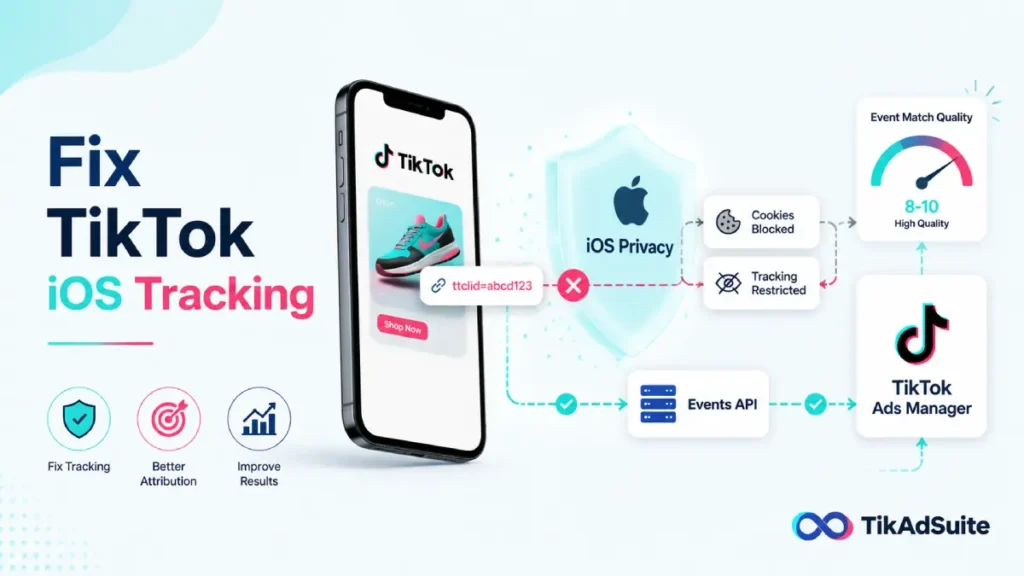
TikTok web events break on iOS because Apple’s WebKit engine limits or blocks the third-party cookies and click IDs that the browser-based TikTok Pixel depends on. When a user opts out of tracking or uses Safari, conversion data disappears before it reaches your account. The fix is a hybrid setup that pairs browser-based pixel events with server-side Events API calls, so iOS restrictions cannot block the data.
Why iOS Specifically Breaks TikTok Web Events
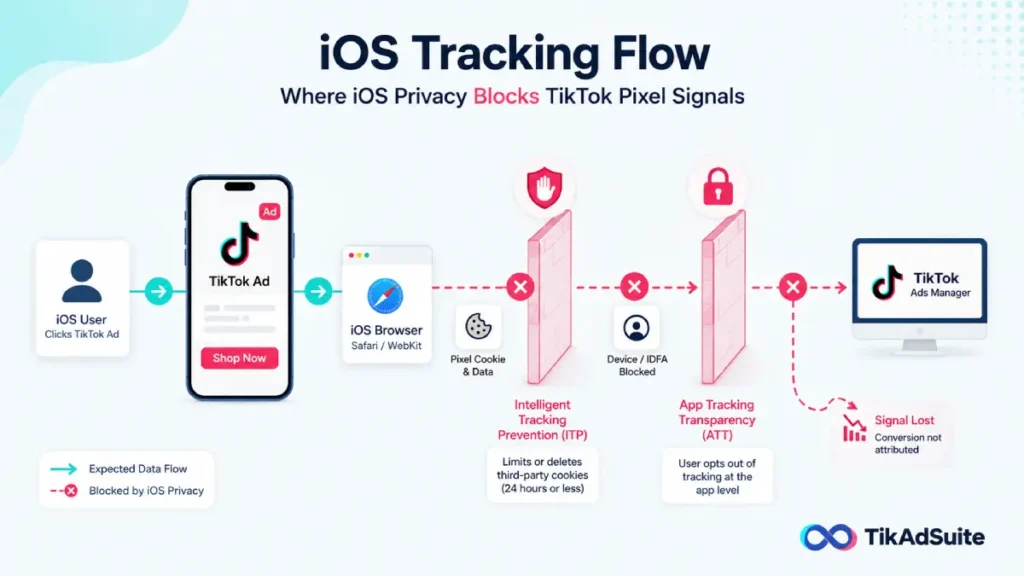
Every browser on an iPhone runs on Apple’s WebKit engine. That applies to Safari, Chrome, Firefox, and any other iOS browser. Apple controls WebKit, and Apple has used that control to enforce strict privacy rules since iOS 14.5.
The two mechanisms that break your TikTok pixel are Intelligent Tracking Prevention and App Tracking Transparency.
Intelligent Tracking Prevention (ITP) limits how long cookies from third parties can survive in a browser. The TikTok pixel places a cookie on your visitor’s browser when they arrive from an ad. On iOS, that cookie can be deleted in as little as 24 hours. So if your customer clicks your ad on Monday and buys on Wednesday, that sale never gets attributed to your campaign.
App Tracking Transparency (ATT) requires apps to ask users for permission before accessing Apple’s advertising identifier. When a user taps “Ask App Not to Track,” your targeting and attribution data for that session becomes incomplete.
The result? You can be running a profitable campaign and have no idea, because the signal never comes back to TikTok’s system.
What Is Event Match Quality and Why Does It Matter?
Event Match Quality, or EMQ, is TikTok’s 0-to-10 score for how well your conversion events are being connected to actual TikTok users. You’ll find it in TikTok Events Manager next to each event name.
Here’s what the score bands mean in practice:
| EMQ Score | What It Means |
| 0 to 4 | TikTok is receiving events but cannot match most of them to users. Optimization and attribution are heavily impaired. |
| 5 to 7 | Matching is working but incomplete. Some iOS conversions are still being missed. |
| 8 to 10 | Strong signal. TikTok can attribute events reliably and optimize ad delivery accordingly. |
EMQ reflects the quality and quantity of customer data you send with each event. When that data is thin (just a page URL and IP address), TikTok has very little to work with for matching.
A low EMQ does not mean your events aren’t firing. It means they’re firing with too little data attached. That’s a different problem, and it needs a different fix.
How to Check Your EMQ Score Right Now
You don’t need to touch any code to run this check.
Here’s where to find it:
- Go to TikTok Ads Manager
- Navigate to Assets > Events > Web Events
- Click on your active pixel
- Look at the Match Quality column next to each event
If your Purchase or Lead event shows an EMQ below 5, you have a data leak worth fixing before you spend another dollar on optimization.
You can also use the Test Events tab inside Events Manager. Open your website in a new browser window and complete a purchase or add-to-cart action.
You should see two entries appear in the log: one labeled “Browser” and one labeled “Server.” If you only see one, your hybrid setup is incomplete.
The Three Most Common iOS Tracking Problems
Understanding the symptoms helps you apply the right fix. Most iOS signal loss comes from one of these three sources.
Problem 1: Your ttclid Is Getting Stripped
The ttclid is TikTok’s version of a click ID. It gets added to your destination URL whenever someone clicks your ad. Your pixel reads it and uses it to link the session back to a specific campaign.
On iOS, several things strip the ttclid before it reaches your pixel:
- URL redirects between your ad destination and your landing page
- Ad blockers that filter URL parameters
- Apple’s Link Tracking Protection, which was expanded in iOS 17 and further strengthened in iOS 26
If ttclid is missing, TikTok can’t connect the session to the ad. Your ROAS reporting breaks, and your campaign optimization goes blind.
How to check: Open your site in a Safari browser on an iPhone. Click through from a TikTok ad and check whether ?ttclid= appears in the URL bar. If it doesn’t, the parameter is being stripped.
Problem 2: You’re Not Sending Enough Data With Each Event
A basic pixel installation captures the page URL and the user’s IP address. That’s rarely enough for TikTok to make a match.
TikTok’s matching engine works best when it receives hashed customer data alongside the event: an email address, phone number, or both. When those fields are empty, your EMQ score stays low even if your pixel is technically working.
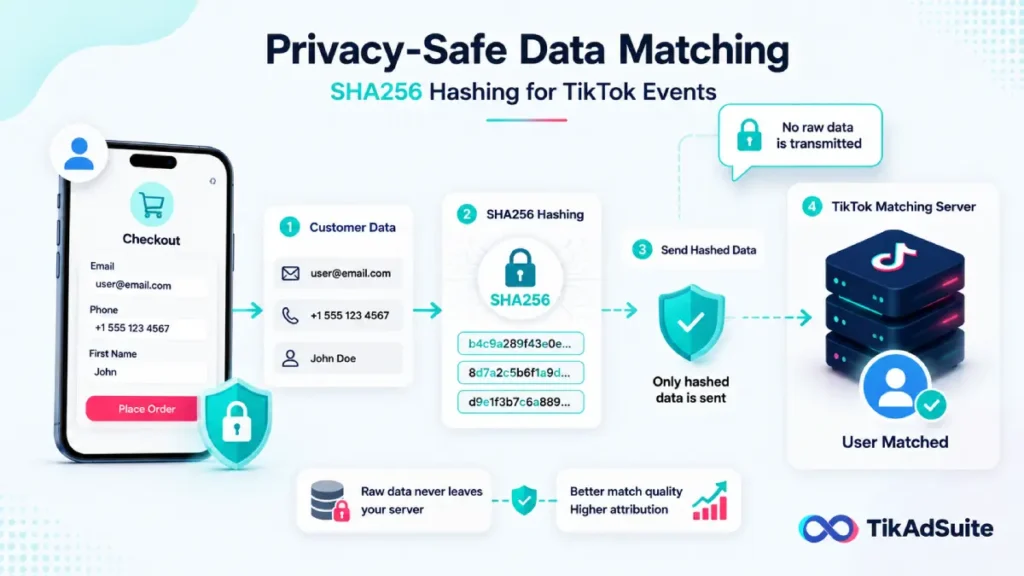
According to TikTok’s Advanced Matching documentation, customer emails and phone numbers are hashed with SHA256 before reaching TikTok’s servers, meaning no raw personal data is transmitted.
If your setup isn’t passing these fields, Advanced Matching isn’t doing its job.
Problem 3: Your Hybrid Setup Has a Deduplication Error
Many advertisers who’ve already added the Events API to their setup discover they’re now counting purchases twice.
This happens when the browser pixel and the server-side API both fire a Purchase event for the same transaction, but they use different event_id values.
TikTok’s deduplication system works by matching on event_id. If both signals share the same ID for the same event, TikTok collapses them into one. If the IDs don’t match, both count separately.
According to TikTok’s official documentation on event deduplication, using both the Pixel and Events API without proper deduplication will result in duplicate conversion reporting.
This inflates your reported conversions, distorts your cost-per-purchase, and teaches your campaign to optimize toward a number that isn’t real.
How Advanced Matching Fixes the iOS Attribution Gap
Advanced Matching is TikTok’s mechanism for linking conversion events to users when cookie-based tracking fails. Instead of relying on a cookie, it uses hashed customer data (email or phone) to match the event to a known TikTok account.
There are two versions: Automatic and Manual
Automatic Advanced Matching works by having the pixel scan your web pages for email and phone fields and capturing that data when users interact with forms. You turn it on in Events Manager with one toggle. According to TikTok’s best practices guide for Advanced Matching, it works best on pages where customer data is actively entered, such as checkout, login, and newsletter signup pages.
Manual Advanced Matching lets you pass specific customer data fields directly through the pixel code. It gives you more control but requires a developer to implement correctly.
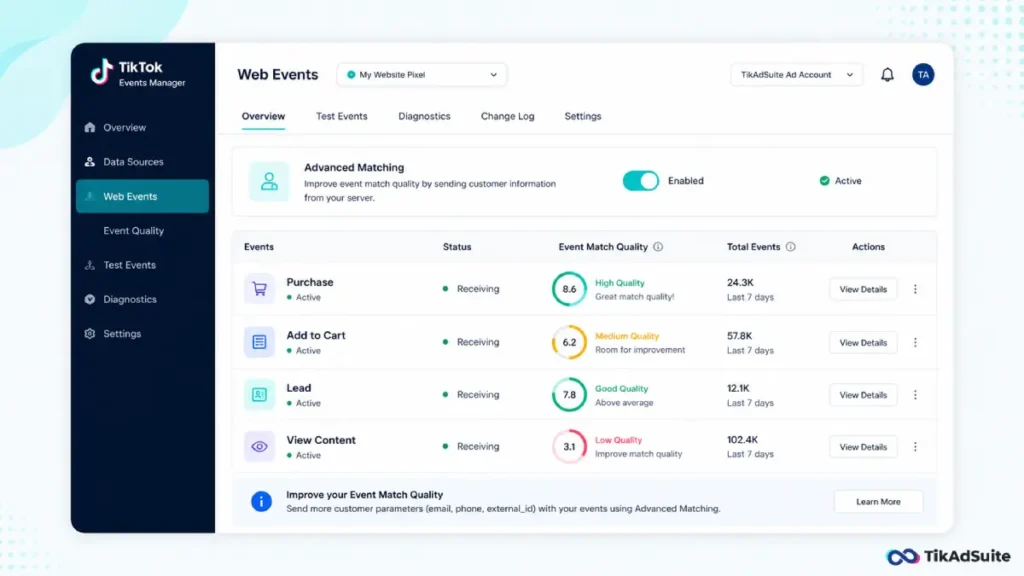
For most advertisers, turning on Automatic Advanced Matching is the fastest win available. Enabling Advanced Matching and passing a hashed email during checkout alone often raises an EMQ score by 3 to 4 points.
Why Server-Side Tracking Is the Real Fix for iOS
Advanced Matching helps with matching quality. But it still depends on the browser pixel firing in the first place. On iOS, the browser pixel gets blocked before it fires in a meaningful share of sessions.
The Events API solves this differently. Instead of sending data from the user’s browser, it sends data directly from your server to TikTok’s server. Apple’s tracking restrictions cannot reach that communication.
For TikTok eCommerce campaigns, this distinction matters especially for purchase events. A user who clicks your ad, browses your Shopify store on iPhone, and buys three days later would appear as a zero in a browser-only pixel setup.
With server-side tracking, the purchase event fires from Shopify’s servers after the order is confirmed, regardless of what the user’s browser allowed or blocked.
According to Funnel.io, advertisers using the TikTok Conversion API alongside the pixel see up to a 48% lift in ROAS under privacy-first conditions, specifically because Safari users start appearing in conversion reports and audience lists again.
How to Validate Your iOS Tracking Is Actually Working
Running the setup isn’t enough. You need to confirm it’s working before you trust your numbers.
Here’s a quick validation checklist:
- Test Events tab: Open your website in Safari on an iPhone and complete a purchase or key action. You should see both a Browser and Server event appear in the log. If only one appears, one layer of your setup is broken.
- EMQ score: Check your Match Quality column after 48 to 72 hours of traffic. A score of 6 or higher means Advanced Matching is working. A score below 5 means you’re still missing key customer data fields.
- Deduplication check: If both Browser and Server events appear in Test Events, confirm they share the same event_id. They should be grouped together in the log rather than listed as two separate entries.
- TikTok Pixel Helper extension: Install the Chrome extension and run it on your site. It will flag duplicate events and show you which fields are missing from each event payload.
- Attribution window: Confirm your attribution window in Ads Manager is set to 7-day click. Standard iOS tracking often misses purchases that happen more than 24 hours after the ad click. A 7-day window gives server-side attribution enough time to capture late converters.
If you’re running TikTok retargeting campaigns, the validation step is especially important. Retargeting depends on accurate audience building, and if your pixel is missing iOS sessions, your retargeting pool is smaller than it should be.
Does Your Platform Handle This Automatically?
Some eCommerce integrations configure server-side tracking for you. Others don’t.
Shopify: The native TikTok Sales Channel installs the pixel through Shopify’s Customer Events system. However, as of 2026, Shopify’s native TikTok channel does not send server-side Events API calls by default.
You need either a third-party app or a manual Events API setup to get full browser-plus-server coverage with proper deduplication.
To get the full hybrid setup in Shopify, go to the TikTok app in your Shopify Admin, navigate to Settings > Data Sharing, and select Maximum. This enables the API connection through Shopify’s back end.
WooCommerce: Install the official TikTok for WooCommerce plugin and enable Events API in the plugin settings. Without this step, you’re running browser-only.
Custom or headless storefronts: You’ll need a developer to implement the Events API manually. The API accepts hashed PII (email, phone, IP address) alongside standard event fields. Hashing happens on your server before transmission.
If you’re managing a TikTok Shop alongside a website, note that web events and in-app Shop events use separate tracking infrastructure. This article covers web events specifically.
What Happens to Your Campaign Performance When EMQ Is Low
When TikTok can’t match conversion events to users, the algorithm loses its ability to optimize. It can’t identify which audience segments are converting. It can’t find lookalike users based on recent buyers. And it can’t adjust bids toward high-intent behavior.
The practical result: your TikTok ad costs rise without a matching increase in results. CPAs creep up. Campaigns that were profitable start to look marginal. Some advertisers pause ads that were actually working.
According to Triple Whale, a score of 7 or higher enables reliable attribution. Below 5, many conversions cannot be attributed, meaning TikTok’s algorithm is optimizing blindly. Fixing EMQ often improves campaign performance more than any bidding or creative adjustment. (source)
Is There a Privacy-Safe Way to Do This?
Yes. Every piece of customer data sent through TikTok’s Advanced Matching or Events API is hashed using SHA256 before it leaves your server or browser.
TikTok never receives raw email addresses or phone numbers. It receives a one-way hash, compares it against hashed TikTok account data, and either finds a match or doesn’t.
If you operate in a regulated industry (healthcare, financial services), TikTok recommends using Manual Advanced Matching instead of Automatic, so you have precise control over which fields are passed.
You should also review your privacy policy to confirm it covers the use of hashed customer data for ad measurement purposes.
Tools like Clym can help you maintain GDPR and CCPA-compliant consent banners alongside your TikTok tracking setup, which is especially important if you have European or California traffic.
FAQ: TikTok Web Events for iOS
Why does TikTok tracking only break on iOS and not Android?
Android browsers do not enforce Apple’s WebKit-based Intelligent Tracking Prevention. Android Chrome uses Google’s Blink engine, which does not impose the same cookie lifetime restrictions. iOS devices, including iPhones and iPads, run all browsers on WebKit regardless of the browser app used, which is why iOS is the specific problem for TikTok pixel tracking.
What is the difference between the TikTok Events API and the TikTok Pixel?
The TikTok Pixel runs in the visitor’s browser and tracks behavior on your website by reading cookies and URL parameters. The Events API sends data directly from your server to TikTok’s server, bypassing the browser entirely. They’re designed to work together in a hybrid setup where the pixel handles early-funnel signals and the Events API confirms purchase and checkout events independently of browser conditions.
How long does it take to see EMQ improve after enabling Advanced Matching?
TikTok updates EMQ scores based on traffic over the preceding 7 days. After you enable Automatic Advanced Matching, allow 48 to 72 hours of consistent traffic before checking your score. EMQ improvements tied to server-side Events API changes may take slightly longer to reflect in the interface.
Can I use TikTok web events tracking without a developer?
Yes, for the most common eCommerce platforms. Shopify and WooCommerce both offer plugin-based integrations that enable the Events API without custom code. For Shopify, the Data Sharing setting in the TikTok app controls the level of server-side integration. For custom or headless storefronts, developer involvement is typically required to pass the correct event parameters and hashed customer data.
Does fixing TikTok web events for iOS also improve my audience targeting?
Yes. When TikTok can match your conversion events to actual users, it can build more accurate custom audiences and lookalike audiences from your buyer data. Advertisers with high EMQ scores and reliable server-side tracking consistently see better audience quality for retargeting campaigns and lookalike expansion.
Wrapping Up
The iOS tracking problem doesn’t announce itself. Your campaigns just slowly stop making sense. Conversions dip. CPAs rise.
You test new creatives and change targeting, but the numbers stay flat. Meanwhile, your pixel is quietly failing on the iPhones of every customer who bought after the 24-hour cookie window closed.
The fix starts with one check: pull up your EMQ score in Events Manager. If it’s below 5, you have a data problem that no amount of creative testing will solve.
From there, the path is clear. Enable Automatic Advanced Matching to start capturing hashed emails at checkout. Switch your Shopify or WooCommerce integration to the highest server-side data sharing tier.
Validate that both Browser and Server events appear in the Test Events log. Then wait 72 hours and check your EMQ again.
If you’re ready to get your TikTok Ads account running with clean data, starting from the measurement layer up is the only approach that holds.