
You filmed a great TikTok. The clip is fun, the product looks good, and you hit post. Then it flops. No saves, no comments, and barely any views.
Most of the time, the problem is not your idea. It is the edit. Pacing, captions, and the first second decide whether people watch or scroll. That is where CapCut for TikTok video edits earns its place.
CapCut is free, made by ByteDance (the same company behind TikTok), and built for fast vertical video. You can cut, caption, and polish a clip in minutes, even from your phone.
Here is what you will learn:
- How to edit a TikTok video in CapCut from start to finish
- Real editing examples you can copy today
- The main benefits and why creators pick CapCut
- How brands use it, backed by a real case study
By the end, you will have a simple workflow you can repeat for every video. Let’s start with the quick answer, then go deeper.
Get Up to $6000 Free TikTok Ad Credit
Table of Contents
Key Takeaways
- CapCut is a free, TikTok-friendly editor that handles cutting, captions, effects, and exports in one app.
- The first one to three seconds matter most. A strong hook keeps viewers from scrolling away.
- Auto captions, templates, and trending sounds let you finish a TikTok edit in under fifteen minutes.
- CapCut is one of the biggest video apps on earth. According to Influencer Marketing Hub, its monthly active users passed 300 million in 2024, based on Bloomberg data.
- Clean editing is not just about looks. Native, well-made short video drives real sales, as TikTok’s own case studies show.
What is CapCut?
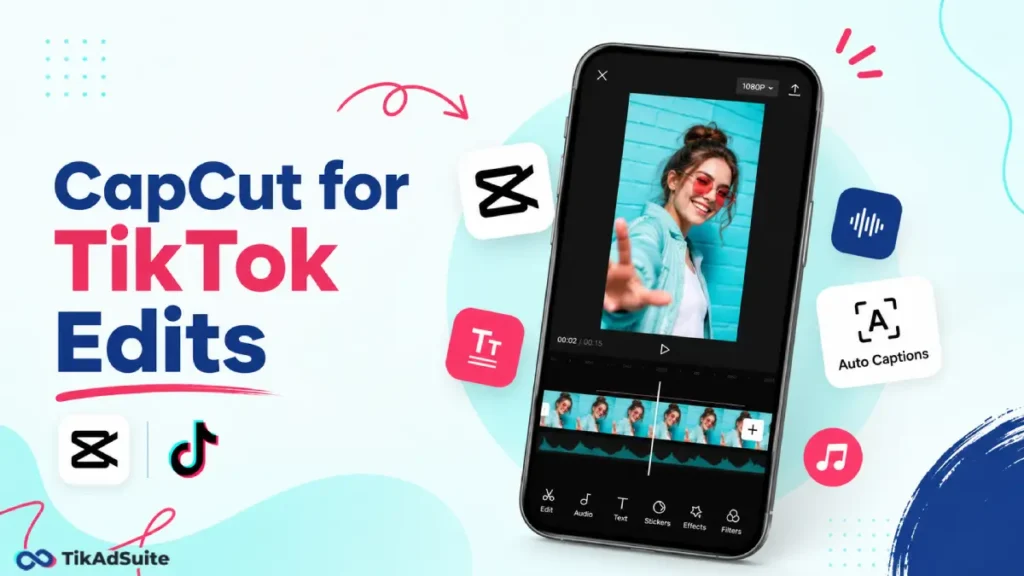
CapCut is a free video editor built by ByteDance for short vertical videos. For TikTok, you use it to trim clips, add auto-captions, sync trending sounds, and apply effects, then export in 9:16, ready to post. It works on phone, desktop, and web, and it connects smoothly with TikTok.
Why CapCut works so well for TikTok
TikTok rewards videos that feel native, fast, and made for the app. CapCut is built around those same rules. It opens in vertical mode, snaps to 9:16, and gives you the exact tools a short video needs.
You get trimming, speed controls, text, stickers, and a huge sound library in one place. Nothing feels bolted on. The app can also read your clips and add captions for you in seconds.
That speed matters. When editing is quick, you post more often, and posting often is how accounts grow. If you are still weighing your tools, it helps to see how it sits next to other top TikTok video editors before you commit.
How to Edit a TikTok Video in CapCut Step by Step
You do not need experience. Follow this order, and you will end up with a clean, post-ready clip.
- Import your clips: Open CapCut, tap New Project, and select your videos and photos.
- Trim the fat: Cut dead air at the start. Your hook should land fast, since the first three seconds decide if people stay.
- Set the size: Use the 9:16 ratio so the video fills the screen and matches TikTok’s video specs.
- Add auto captions: Tap Text, then Auto Captions. Most people watch on mute, so on-screen text is a must.
- Add a sound: Pick audio that fits the mood. The right music for your TikTok can lift watch time on its own.
- Polish lightly: Add a simple transition, a zoom, or one sticker. Keep it clean.
- Check the safe zone: Keep text away from the edges so TikTok buttons do not cover it.
- Export: Choose 1080p and 30fps, then save or post straight to TikTok.
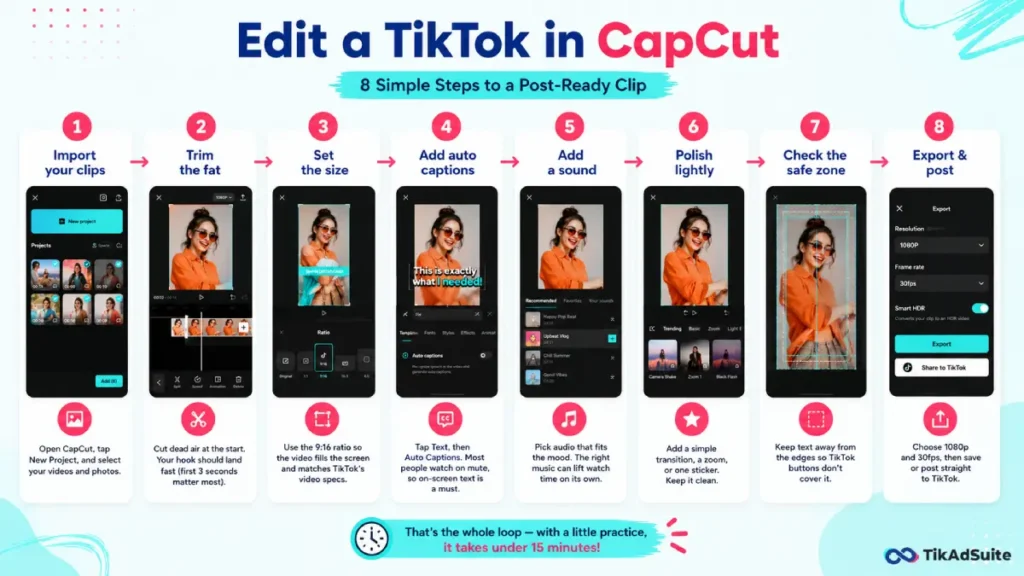
That is the whole loop. With a little practice, it takes under fifteen minutes.
Best CapCut features for TikTok edits
A few tools do most of the heavy lifting. Learn these first.
- Auto Captions: turns your speech into on-screen text in one tap.
- Templates: pre-made edits where you swap in your own clips.
- Text-to-Speech: adds a clear voiceover without recording.
- Background Removal: cuts you out of the background, no green screen.
- Keyframes: smooth zooms and movement for a pro look.
- Trending Sounds: a library of audio that matches TikTok trends.
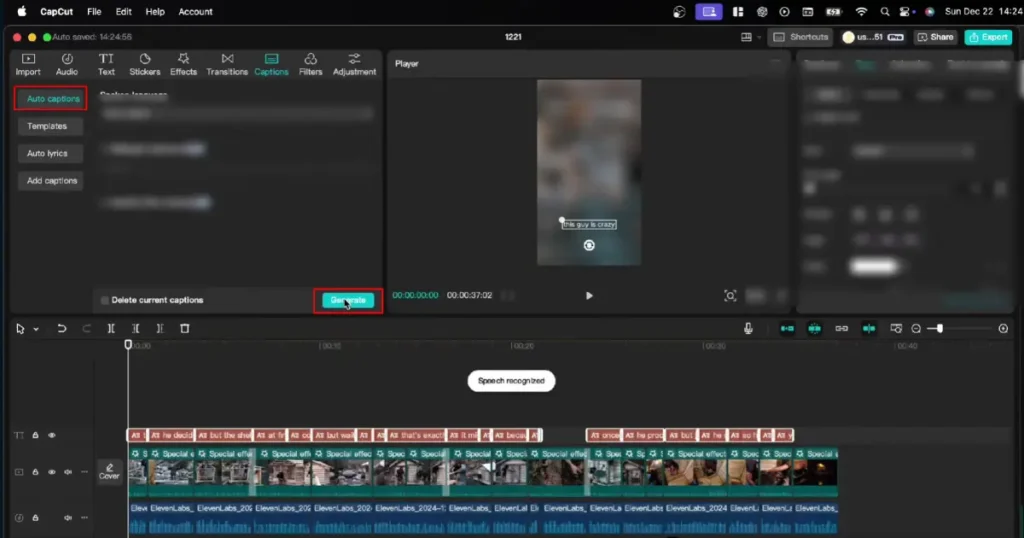
You do not need all six on every video. Pick the two that fit your idea and keep the edit simple.
CapCut editing examples you can copy
Examples make this real. Here are four edits that perform well on TikTok.
- The hook freeze: Start on your best frame, hold it for a beat, then start the action. It stops the scroll, which is the whole point of a strong TikTok hook.
- The caption story: Use auto captions, then bold one key word per line. Viewers read along even with sound off.
- The fast cut demo: Show a product in three quick cuts: problem, product, result. Each cut runs under two seconds.
- The trend remix: Drop your footage into a CapCut template tied to a trending sound, then swap in your own clips.
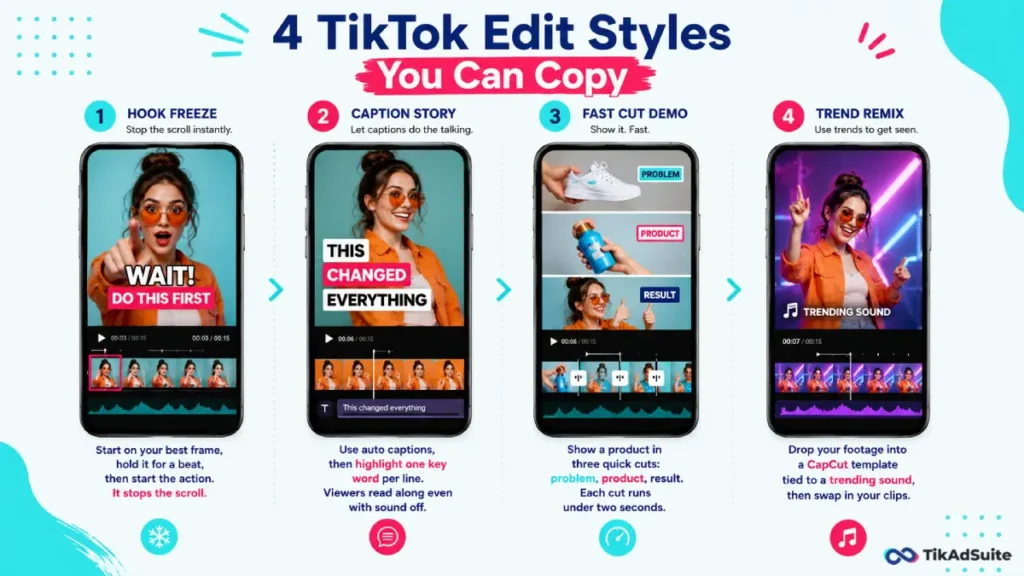
Each one uses tools that are free in the app. Pick one and rebuild your last flop with it.
Benefits of using CapCut for TikTok
CapCut saves time and removes guesswork. Here is what you actually gain.
| Benefit | What it means for you |
| Free core tools | Edit, caption, and export without paying |
| Auto captions | On-screen text in seconds, no typing |
| TikTok-native sizing | 9:16 exports that fill the screen |
| Templates | Match trends fast by swapping clips |
| Cross-device | Start on phone, finish on desktop |
The biggest win is speed. Faster edits mean more posts, more tests, and more chances to hit a winner.
Why creators pick CapCut over other editors
Plenty of editors exist. CapCut wins on three things that matter for TikTok.
First, it is free and deep at the same time. Many free editors lock the best features. CapCut keeps captions, effects, and templates open to everyone.
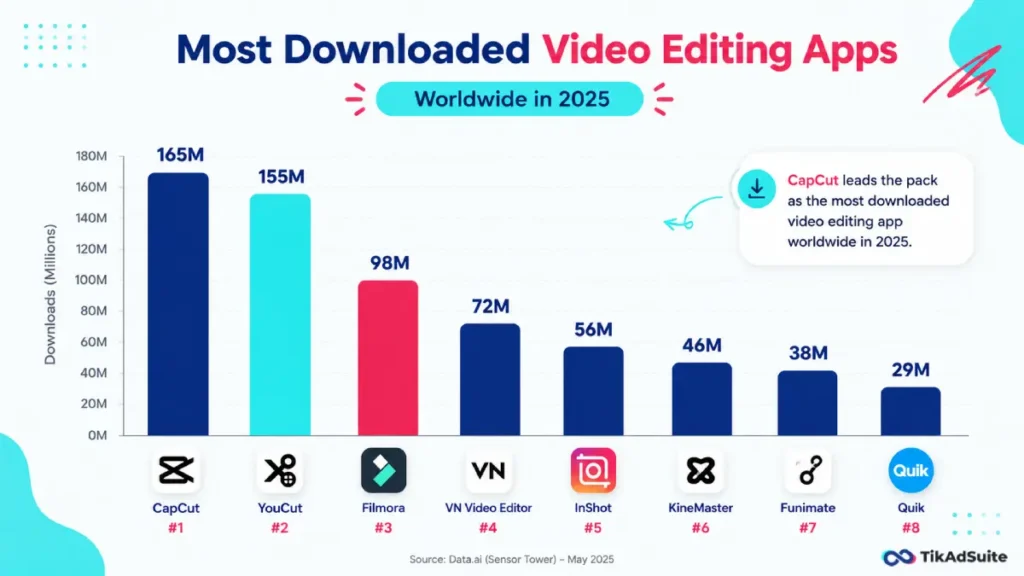
Second, it is fast to learn. You can make a real edit on day one with no course. Third, it is everywhere, which means endless tutorials and templates. According to Statista, CapCut ranks among the most downloaded video apps worldwide, so help is always a search away.
Want to try it yourself? You can start editing with CapCut for free and post your first clip today.
How brands and creators use CapCut
Most TikTok wins start with content that does not look like an ad. CapCut makes that style easy to make at volume, which is why it shows up in so many ads that don’t feel like ads.
Creators use it to chop one long video into ten short clips. Small brands use it to turn customer reviews into UGC-style edits that feel real. Bigger teams lean on the business version of CapCut for product videos and bulk captions.
The payoff is real. TikTok for Business shares case studies where native short-form content drove serious money. In one, fragrance brand Swiss Arabian grew on TikTok Shop and generated $449K in five months through organic content and commerce-driven posts. (source) Polished, native editing is the engine behind results like that.

Once an edit is performed, you can scale it. Many sellers turn a winning organic clip into a paid TikTok ad to put it in front of more buyers.
Common CapCut mistakes to avoid
A few small fixes raise your watch time fast.
- Slow starts: If nothing happens in the first second, viewers leave. Cut straight to the hook.
- No captions: Silent viewers need text. Always add auto captions.
- Text in the danger zone: TikTok buttons cover the right side and bottom. Keep words centered and high.
- Too many effects: A wall of transitions feels messy. Pick one or two and stop.
Frequently asked questions
Is CapCut free for TikTok edits?
Yes. CapCut’s core editor is free, and it covers almost everything a TikTok video needs. You get trimming, auto-captions, effects, transitions, and a sound library at no cost. A Pro plan adds extra effects, cloud storage, and some AI tools. Most creators never need to pay to make strong TikTok edits.
Can you edit TikTok videos on a computer with CapCut?
Yes. CapCut works on Windows, Mac, and the web, not just phones. The desktop version gives you a bigger timeline, which helps with detailed cuts and longer projects. You can start an edit on your phone and finish it on your computer, since projects sync across devices. Export in 9:16 and your video is ready for TikTok.
Does CapCut put a watermark on TikTok videos?
CapCut can add an ending watermark from certain templates, but you can remove it before exporting. Open the timeline, delete the outro clip or watermark layer, then export. Plain edits you make yourself usually export with no watermark. Always preview the final clip to confirm it is clean before you post.
How long should a TikTok video be?
There is no single best length. Short clips of nine to fifteen seconds work well for hooks and quick demos. Longer videos of thirty to sixty seconds suit tutorials and stories. Watch your retention graph in TikTok analytics. If people drop off early, trim your edit tighter in CapCut and test again.
Will CapCut lower my video quality?
Not if you export correctly. Edit your clip, then export at 1080p and 30fps for crisp TikTok playback. Avoid low-resolution exports to save space. Also film in good light, since CapCut cannot fully fix dark or blurry source footage. Good input plus a high-quality export keeps your TikTok sharp.
Can you post to TikTok directly from CapCut?
Yes. After exporting, CapCut gives you a share option that opens TikTok with your video ready to upload. You can also save the clip to your camera roll and post it later. Posting from your saved file lets you add TikTok’s own captions, hashtags, and trending sounds before you publish.
Is CapCut still available in the United States?
Yes. As of 2026, CapCut is available in the US and falls under the same US data safeguards as TikTok. It was briefly affected in early 2025 but returned to app stores. Availability can vary by country, so check your local app store if you cannot find it.
Putting it all together
CapCut takes a rough clip and turns it into a TikTok people actually watch. The formula is simple: hook fast, caption everything, keep the edit clean, and export in 9:16.
Start with one video. Use the step-by-step flow above, copy one of the examples, and post it. Then check your retention and tighten the next edit.
The creators who win on TikTok are rarely the ones with the fanciest gear. They are the ones who edit smart and post often. CapCut makes both easy, so open the app and build your next clip.