
Wrong ad specs are the fastest way to waste your production budget before a single person sees your creative. You can build a flawless video, write sharp copy, and set a solid budget, then watch TikTok reject it over a bitrate error or a logo sitting two pixels inside a UI overlap zone.
We have seen this happen to experienced media buyers and in-house teams alike. The spec documentation across most platforms is scattered, outdated, or missing key formats entirely. That creates real delays, re-export cycles, and failed launches.
Get Up to $6000 Free TikTok Ad Credit
This guide gives you every TikTok ad spec that matters in 2026, organized by format, with exact pixel measurements, file requirements, character limits, and safe zone rules. You will leave with a checklist you can use on every campaign before you hit submit.
Table of Contents
TikTok Ad Specs at a Glance (2026)
The standard TikTok ad spec is a 9:16 vertical video at 1080x1920px resolution, in MP4 or MOV format, with a maximum file size of 500MB and a video length up to 10 minutes for In-Feed placements, but specs vary by format and results differ based on your ad objective, buying type, and whether you are serving on the main TikTok feed or the Pangle network.
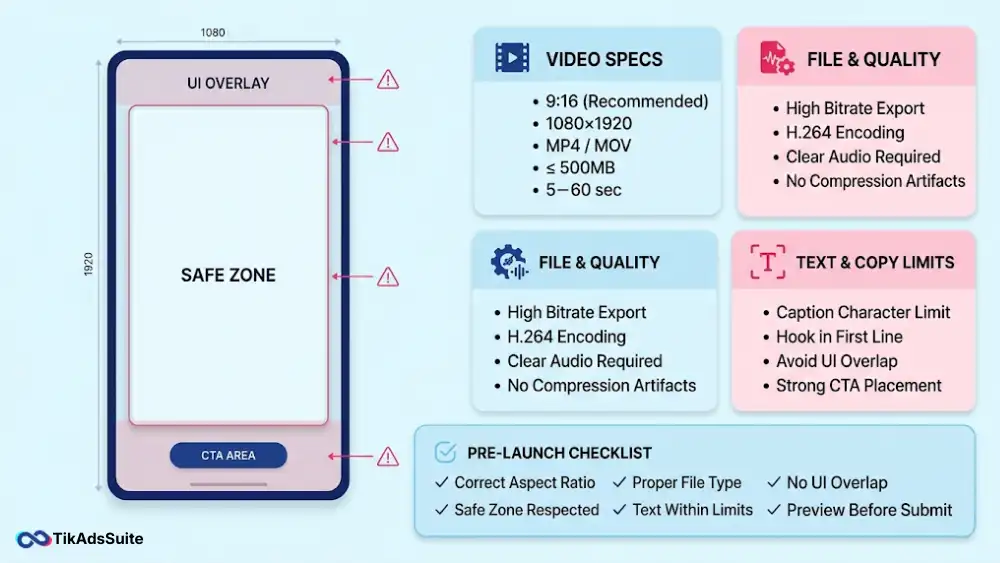
TikTok Ad Specification’s Quick Overview:
| Format | Aspect Ratio | Resolution | File Type | Max Size | Duration |
| In-Feed Video | 9:16, 1:1, 16:9 | 1080x1920px | MP4, MOV, AVI | 500MB | Up to 10 min |
| TopView | 9:16 | 1080x1920px | MP4, MOV | 500MB | 5-60 sec |
| Brand Takeover | 9:16, 1:1 | 1080x1920px | MP4, MOV, JPG | 500MB / 50KB | 3-5 sec |
| Carousel Image | 1:1 | Min 800x800px | JPG, PNG | 20MB per card | N/A |
| Spark Ads | 9:16 | 1080x1920px | MP4, MOV | No limit | No restrictions |
| Video Shopping | 9:16 | 1080x1920px | MP4, MOV | 500MB | 5-60 sec |
| Pangle | 9:16, 16:9, 1:1 | 720x1280px min | MP4, MOV | 500MB | 5-60 sec |
What’s New in TikTok Ad Specs for 2026?
The biggest spec change heading into 2026 is the In-Feed video duration update. As of TikTok’s July 2025 documentation update, Non-Spark In-Feed Ads now support video duration up to 10 minutes, replacing the older 5-60 second ceiling that most published guides still quote. Spark Ads have no duration restrictions at all, inheriting whatever length the organic post carries.
Two other changes affect how you build and review creatives.
Safe zone file updates: TikTok updated its downloadable safe zone files for both standard In-Feed and TopView placements. If your production team is working from safe zone templates built before mid-2025, download the current files directly from TikTok’s Ads Manager help center before your next campaign.
TopView moved to CPM buying: TikTok shifted TopView from Reservation to CPM buying, but many guides still list it as a Reservation format. TopView is now purchased on a CPM basis with audience targeting controls. Only Brand Takeover remains a pure Reservation buy. If your media plan still has TopView priced as a flat-rate takeover, flag that with your TikTok rep.
If your existing templates were built before these changes, review your duration settings and safe zone files before your next production cycle.
TikTok In-Feed Ad Specs (Auction and Reservation)
In-Feed Ads appear between organic content in the For You feed. You buy them either through Auction, where you bid for placements, or through Reservation, where you pay a fixed rate for guaranteed reach. Both use the same technical specs, sourced from TikTok’s official In-Feed Ad specification page.
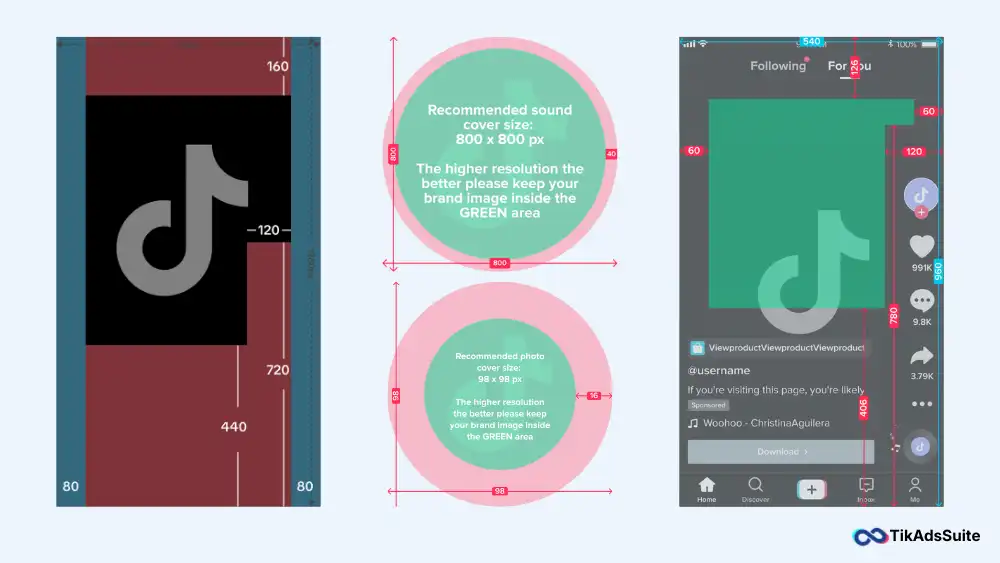
TikTok Video In-Feed Ad Specs
According to TikTok’s Creative Best Practices documentation, 9:16 vertical video consistently outperforms square and horizontal formats on mobile placements. Use 9:16 as your default unless you have a specific reason to test other ratios.
TikTok Video In-Feed Ad Specs:
- Aspect Ratio: 9:16 (recommended), 1:1, or 16:9
- Resolution: Minimum 540x960px, recommended 1080x1920px
- File Format: MP4, MOV, MPEG, 3GP, AVI
- Max File Size: 500MB
- Video Duration: Up to 10 minutes (recommended: 9 to 15 seconds)
- Bitrate: Minimum 516 kbps
- Video Codec: H.264 or H.265
- Audio Codec: AAC
- Profile Image: 98x98px, Square 1:1, max 50KB, JPG or PNG
- Account Name: Max 20 characters (Latin), max 10 characters (CJK)
- Ad Description: 1 to 100 characters, no emojis, no @ symbols, no hashtags
Image In-Feed Ad Specs
- Aspect Ratio: 1:1
- Resolution: Minimum 1200x1200px
- File Format: JPG, PNG
- Max File Size: 100MB
- Ad Description: 1 to 100 characters
Image In-Feed Ads are available in select markets. Use these when your creative budget is limited or when you are testing messaging before committing to video production.
TikTok In-Feed Ad Best Practices
- Export at 1080x1920px, H.264, AAC, minimum 2,000 kbps, every time.
- Build the safe zone overlay into your template before you start designing.
- Put your hook in the first 3 seconds, not the first 5.
- Keep on-screen text large, central, and under 6 words per frame.
- Test 9:16 first, then 1:1 for secondary placements
Spark Ads vs. Non-Spark Ads: Spec Differences
Spark Ads promote existing organic TikTok posts as paid placements. Non-Spark Ads are purpose-built creatives you upload directly to Ads Manager. The technical specs look similar, but the rules around content and duration differ significantly.
| Feature | Spark Ads | Non-Spark Ads |
| Creative Source | Organic TikTok post | New upload in Ads Manager |
| Watermark Policy | TikTok watermark retained | No third-party watermarks allowed |
| Max Video Duration | No restrictions | Up to 10 minutes |
| Ad Captions | Pulled from an organic post, emojis allowed | Max 100 characters, no emojis or @ symbols |
| Creator Authorization | Required (post authorization code) | Not required |
| UGC Compatibility | Strong fit for creator-led content | Better for brand-controlled creative |
According to TikTok’s Spark Ads in Video Shopping Ads documentation, Spark Ads deliver a 30% higher completion rate and a 142% higher engagement rate compared to standard Non-Spark In-Feed Ads in Video Shopping campaigns. If you run creator partnerships or shopping campaigns, Spark Ads offer both performance and native credibility.
TikTok TopView and Brand Takeover Ad Specs
TopView and Brand Takeover are both full-screen, sound-on formats. TopView is CPM-based with audience targeting. Brand Takeover remains a Reservation buy.
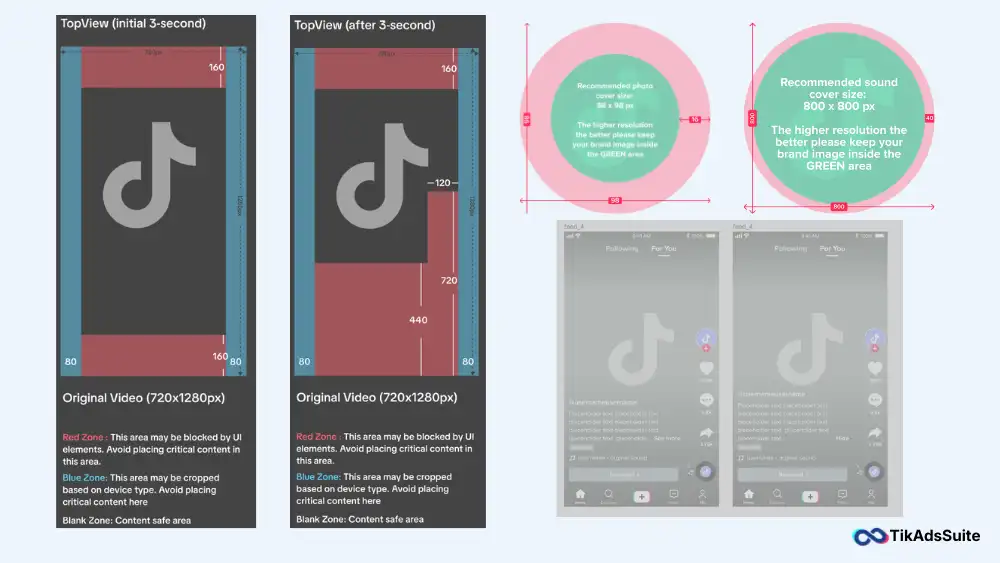
The core difference: Brand Takeover plays immediately when a user opens TikTok, displaying for 3 to 5 seconds with no in-feed interaction elements. TopView also fires on app open, but it starts with a 3-second full-screen takeover before transitioning to a standard in-feed experience with like, comment, and share buttons. Specs are sourced from TikTok’s TopView specification page.
| Spec | TopView | Brand Takeover |
| Aspect Ratio | 9:16 | 9:16 or 1:1 |
| Resolution | Min 540x960px, recommended 1080x1920px | 1080x1920px or 1080x1080px |
| File Format | MP4, MOV, MPEG, 3GP | MP4, MOV (video), JPG (image) |
| Max File Size | 500MB | 500MB video, 50KB image |
| Video Duration | 5 to 60 seconds (9-15 sec recommended) | 3 to 5 seconds |
| Bitrate | Minimum 2,500 kbps | Not publicly specified |
| Buying Model | CPM (audience-targeted) | Reservation |
| Sound | Auto-play with sound | Auto-play with sound |
For Brand Takeover, you have 3 to 5 seconds total. Your visual hook, brand identifier, and key message must all land within that window. For TopView, the first 3 seconds run full-screen without any UI overlay, so front-load your brand presence before the in-feed chrome appears.
TikTok TopView and Brand Takeover Best Practices
- Export TopView at minimum 2,500 kbps, not 516 kbps.
- Design the first 3 seconds to work without any UI chrome.
- Do not place any logo or text in the top-left corner at any point in the video.
- Use sound as a primary creative element, not background filler.
- For Brand Takeover: deliver a single, complete message in under 5 seconds.
TikTok Shopping Ad Specs (Video Shopping, Collection, and LIVE Ads)
TikTok Shopping Ads are the most underspecified format in most ad guides. If you run TikTok Shop campaigns, these are the specs that determine whether your ads clear review and display correctly.
TikTok Video Shopping Ads Specs
- Aspect Ratio: 9:16
- Resolution: 1080x1920px
- File Format: MP4, MOV
- Max File Size: 500MB
- Video Duration: 5 to 60 seconds
TikTok Collection Ads
Collection Ads combine a video or image with a product card grid below it. The main creative follows standard In-Feed video or image specs. Product images should be at a minimum of 800x800px, JPG or PNG. Up to 3 product cards display beneath the main creative, with names and prices pulled from your TikTok Shop catalog.
TikTok LIVE Shopping Ads
LIVE Shopping Ads promote an active TikTok LIVE session. There is no pre-uploaded video asset. The live stream itself is the creative. You control placement, targeting, and budget inside Ads Manager.
TikTok Shopping Ad Best Practices
- Keep all text, price callouts, and CTAs in the upper two-thirds of the frame.
- Export at 1080x1920px with H.264 codec and a bitrate of at least 2,000 kbps.
- Show the product in the first 2 seconds.
- For Collection Ads: ensure product images are square, clean, and minimum 800x800px.
- For LIVE Shopping Ads: set your budget and targeting before going live, not during.
TikTok Branded Hashtag Challenge and Branded Effects Specs
Branded Hashtag Challenges and Branded Effects are managed-buy formats, accessed through a TikTok sales representative. The specs below apply to the creative assets you supply during the briefing process.
TikTok Branded Hashtag Challenge Specs
- Challenge Banner Image: 1080x1920px, JPG or PNG, max 5MB
- Challenge Icon: 200x200px, PNG with transparent background
- Hint Text: Maximum 100 characters
- Challenge Hashtag: No spaces, maximum 100 characters
- Background Music: MP3 or M4A, max 30 seconds
TikTok Branded Effects
Branded Effects are AR filters and interactive overlays built through TikTok’s Effect House platform. Key asset requirements: 2D sticker files in PNG format, maximum 5MB, minimum 750x750px. Effect display name: maximum 30 characters. Effect icon: 200x200px, PNG.
Pangle and Global App Bundle Ad Specs
Pangle is TikTok’s third-party audience network. It extends your placements across partner apps. The Global App Bundle further extends reach to additional TikTok-owned properties.
If you run app install campaigns or broad reach objectives, Pangle often delivers additional volume at lower CPMs than the primary feed. Specs sourced from TikTok’s official Pangle specification page.
TikTok’s official Pangle Ad Specs:
- Aspect Ratios Supported: 9:16, 16:9, 1:1
- Resolution (9:16): Minimum 720x1280px
- Resolution (16:9): Minimum 1280x720px
- Resolution (1:1): Minimum 640x640px
- File Format: MP4, MOV
- Max File Size: 500MB
- Duration: 5 to 60 seconds
- App / Brand Name: 4 to 40 Latin characters
Pangle does not enforce the same safe zone rules as the main TikTok feed. Keep core messaging away from the outer edges of your frame, as cropping behavior varies by the third-party app displaying the placement.
TikTok Ad Safe Zone Guide: Exact Pixel Rules for 2026
The safe zone is the portion of your video frame where no TikTok UI element overlaps your content. Place text, logos, or CTAs outside this zone, and they will be partially or fully covered by profile icons, action buttons, captions, or ad labels. TikTok provides downloadable safe zone template files for every format at TikTok’s Ads Manager help center. Download those files and build them into your editing template before production starts.
Safe Zone Measurements by Format (Vertical, Square, Horizontal)
The exact pixel measurements TikTok specifies are in their downloadable safe zone ZIP files, because the safe zone shifts based on caption length and whether you use anchors or interactive add-ons. The guidelines below reflect the general placement rules for all standard creatives.
Vertical Video: 9:16
- Keep all critical content away from the top edge (Sponsored label and status bar zone)
- Keep all content above the bottom caption row and CTA button area
- Keep all content at least 150px from the right edge (profile icon and action button stack)
Square and Horizontal: Keep all critical content at least 70 to 100px from all edges. Download TikTok’s format-specific safe zone files for exact values before production.
Where Most Ads Fail the Safe Zone Check
These are the four patterns we see most often when safe zone violations cause display problems.
- Auto-captions are placed at the bottom. Exported captions from auto-captioning tools almost always land inside TikTok’s UI overlap zone. Move them to the lower-middle of the frame, well clear of the caption row.
- CTA text in the bottom quarter. Promotional codes and “Shop Now” text placed at the very bottom sit directly behind TikTok’s CTA button. Move action-driving text to the center or upper-center of the frame.
- Brand logo in the top-left corner. TikTok places the Sponsored label in the top-left area. Use the top-center or top-right area instead.
- Product callouts on the right side. The right column belongs to TikTok’s engagement button stack: profile icon, like, comment, share, and playlist buttons. Any text placed there will be obscured.
TikTok Ad Caption, CTA, and Text Specs: Character Limits by Format
| Field | Format | Character Limit |
| Ad Description | In-Feed, TopView (Non-Spark) | 1 to 100 characters, no emojis, no @ or # |
| Ad Captions | Spark Ads | Pulled from an organic post, emojis allowed, max 4 lines displayed |
| Account Name | Standard In-Feed | Max 20 characters (Latin), 10 characters (CJK) |
| App / Brand Name | App Ads, Global App Bundle | 4 to 40 Latin characters |
| CTA Button Text | All formats | Predefined list only, no custom text |
| Carousel Card Caption | Carousel Ads | 1 to 100 characters per card |
| Hashtag Challenge Hint Text | Branded Hashtag Challenge | Maximum 100 characters |
| Branded Effect Name | Branded Effects | Maximum 30 characters |
Two things you need to know about TikTok CTA buttons. First, you cannot write custom CTA text. TikTok gives you a fixed list of approved options: “Shop Now”, “Learn More”, “Download”, “Sign Up”, “Contact Us”, “Book Now”, and others, depending on your objective. Second, emojis are blocked from ad descriptions on Non-Spark placements. If you copy ad copy from another platform and it contains emoji characters, TikTok will reject the submission.
Why Is My TikTok Ad Getting Rejected? Common Spec Mistakes
TikTok’s ad review process runs automated checks on technical specs first, then content policy. Most technical rejections are fixable quickly if you know what to look for.
Third-party watermarks. Any visible watermark from another app, including a TikTok watermark on a re-uploaded video, triggers an automatic rejection on Non-Spark submissions. Remove all watermarks before uploading.
Bitrate below 516 kbps. This is the most common silent failure. Compressed video exports from phones or editing apps frequently fall below the minimum. Set your export bitrate to at least 2,000 kbps as a standard.
Incorrect codec. An .mp4 file extension does not guarantee correct encoding. TikTok requires H.264 or H.265 video codec with AAC audio.
Fake UI elements. Fabricated TikTok interface elements in your creative, such as fake like counts or mock share buttons, violate TikTok’s ad content policies and trigger a content rejection. Repeated violations can affect your account standing.
Silent audio. TikTok auto-plays ads with sound. An ad with no audio track or extremely low audio levels will frequently fail content review. Every video creative needs a clear audio track.
Safe zone violations. Text or branding inside the UI overlap zones will not always cause a rejection, but will cause your ad to display poorly on real devices. Poor display quality affects your ad quality score and can reduce delivery over time.
TikTok Ad Specs Quick-Reference Cheat Sheet
Use this checklist before every upload to TikTok Ads Manager. One missed spec is all it takes for a rejection.
TikTok Ad Specs:
- Aspect Ratio: 9:16 vertical (standard for all main feed placements)
- Resolution: 1080x1920px recommended
- File Format: MP4 or MOV
- Video Codec: H.264 or H.265
- Audio Codec: AAC
- Bitrate: 516 kbps hard floor, 2,000 kbps recommended
- Frame Rate: 23 fps minimum, 30 fps recommended
- File Size: Under 500MB
- Video Duration: Up to 10 minutes for In-Feed Non-Spark, 5 to 60 seconds for TopView and Shopping Ads
- Ad Description: Under 100 characters, zero emojis, no @ symbols
- Account Name: Max 20 characters (Latin)
- Profile Image: 98x98px, under 50KB
- Right Safe Zone: Keep content clear of the right-edge UI button stack
- No Watermarks: Verified for all Non-Spark Ads
- No Fake UI Elements: Verified
- Audio Present: Verified
More helpful articles you’ll want to explore:
👉 Claim $6000 FREE TikTok Ads Credit: Exclusive Coupon Code + Cashback Guide
👉 How TikTok Ads Algorithm Works
👉 TikTok Ads Manager Explained: Complete Tutorial
👉 TikTok Ads Cost Breakdown: How to Budget
Frequently Asked Questions About TikTok Ad Specs
What is the recommended aspect ratio for TikTok ads?
The recommended aspect ratio for TikTok ads is 9:16 vertical, which fills the full mobile screen and matches how users naturally hold their phones. TikTok also supports 1:1 square and 16:9 horizontal, but vertical consistently outperforms both on the main feed. If you use a non-vertical ratio, TikTok adds black bars to fill the empty screen space, which reduces visual impact.
How long can a TikTok ad be?
For Non-Spark In-Feed Ads, TikTok allows videos up to 10 minutes, though the platform recommends 9 to 15 seconds for best engagement and completion rates. Spark Ads have no duration restriction and inherit the full length of the original organic post. TopView and Video Shopping Ads are capped at 60 seconds, and Brand Takeover Ads run between 3 and 5 seconds only.
What is TikTok’s safe zone for ads?
The safe zone is the area of your video frame where TikTok’s UI elements, including the profile icon, like button, comment button, share button, and ad caption row, do not overlap your content. You should keep all critical text, logos, and CTAs away from the right edge and the bottom of the frame. TikTok provides downloadable safe zone template files for every format in its Ads Manager help center, and building those templates into your editing setup before production is the most reliable way to avoid display errors.
Can I use a horizontal video for TikTok ads?
Yes, TikTok accepts 16:9 horizontal video for In-Feed Ads, with a minimum resolution of 960x540px. However, horizontal video is not recommended for the main TikTok feed because it displays with black bars above and below, which reduces screen coverage and typically lowers performance versus vertical formats. Horizontal works better for Pangle placements and news feed app series where the UI is not full-screen vertical.
What file format does TikTok accept for video ads?
TikTok accepts MP4, MOV, MPEG, 3GP, and AVI for In-Feed and TopView video ads. MP4 is the most reliable choice because it is the most consistently reviewed without encoding conflicts. Regardless of the container format you use, your video must be encoded in H.264 or H.265 video codec with AAC audio, or it will fail the technical review even if the file extension looks correct.
Why does TikTok keep rejecting my ad even though the video looks fine?
The most common causes of repeated rejections that are not obvious from a visual check are bitrate below 516 kbps, incorrect video codec, a third-party watermark embedded in the file, or an audio track recorded at near-silent levels. Use a free media inspector tool like MediaInfo to check your actual bitrate and codec before re-submitting, because these issues are invisible to the naked eye but are caught immediately by TikTok’s automated review system.
Conclusion
TikTok ad specs are not creative decisions. They are technical requirements. Get them right, and your creative reaches the people you are paying to reach. Get them wrong, and you spend days in a rejection loop instead of optimizing performance.
We covered every major format in this guide: In-Feed video and image, TopView, Brand Takeover, Shopping Ads, Branded Hashtag Challenges, Branded Effects, and Pangle. You have file requirements, codec specs, character limits, and safe zone guidance for all of them.
The clearest change heading into 2026 is duration: Non-Spark In-Feed Ads now support video up to 10 minutes, and Spark Ads carry no duration limit at all. If your creative briefs still reference “60 seconds maximum”, update them before your next production cycle.
The best habit you can build is treating the spec checklist as a pre-flight requirement, not an afterthought. Set your bitrate, frame rate, and codec as saved export presets. Download TikTok’s current safe zone files and build them into your video template at the start of every project. These steps take a few minutes and eliminate the majority of rejection causes before they happen.