
Getting your TikTok ad rejected wastes time, budget, and momentum. Many advertisers hit the same wall: they build creative, set up campaigns, and then watch approvals fail because they missed a spec, skipped a policy rule, or set up their landing page wrong.
The rejection message tells you almost nothing. And figuring out what actually went wrong can take hours.
This guide gives you every TikTok ad requirement in one place. You will find exact technical specs, eligibility rules, landing page policies, budget thresholds, safe zone pixel dimensions, and the 2026 policy updates that are now actively causing rejections.
We cover all compliance layers: technical, policy, and destination. By the end, you will know exactly what TikTok expects before you spend a single dollar.
Get Up to $6000 Free TikTok Ad Credit
Table of Contents
What Are TikTok Ads Requirements?
TikTok ads requirements are the technical, policy, and destination-quality rules that every ad must meet before TikTok approves it to run. Your video or image must meet format specs, your account must meet eligibility criteria, and your landing page must pass a separate content and functionality review. Meeting all three layers is mandatory. Failing even one layer results in rejection, regardless of how strong your creative is.
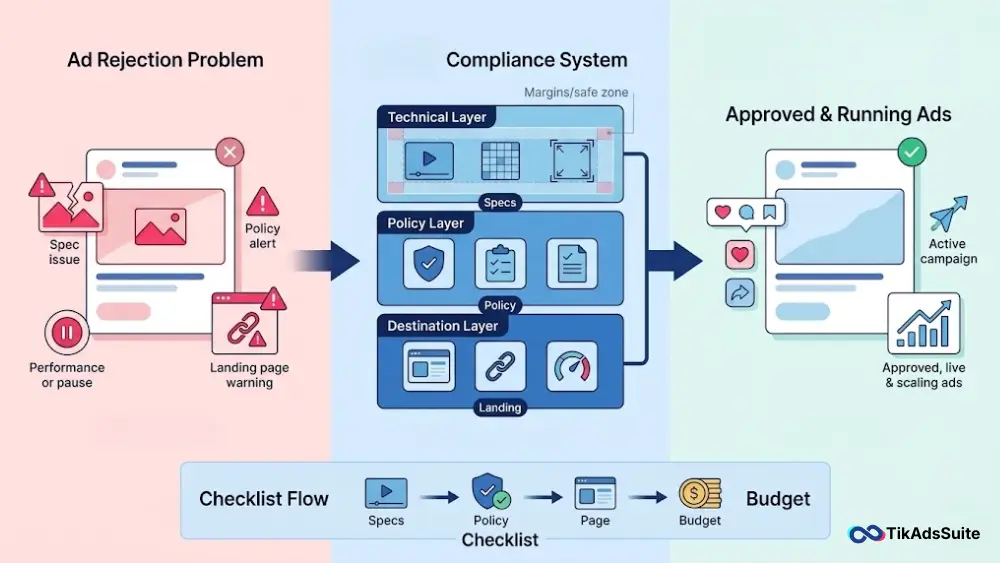
The TikTok ads compliance layers at a glance:
- Technical specs: Resolution, aspect ratio, file size, video length, and audio standards by format
- Policy compliance: Prohibited content, restricted categories, verified account requirements, and 2026 rule updates
- Destination quality: Functional landing page, privacy policy, language consistency, and prohibited page types
- Account eligibility: Age, geography, business verification, and self-serve versus managed access requirements
- Budget thresholds: Minimum daily spend at campaign and ad group level, plus TikTok Creative Challenge requirements
TikTok Advertiser Eligibility Requirements
Not every account or business qualifies to run TikTok ads automatically. TikTok has tightened eligibility requirements significantly through 2025 and into 2026. Knowing the rules before you start saves you from building campaigns on an account that cannot run them.
Account Setup Requirements: Business Center vs. Self-Serve Ads Manager
TikTok offers two primary access paths. Self-serve Ads Manager is available directly at ads.tiktok.com and is open to most eligible advertisers in supported markets. Business Center is TikTok’s centralized hub for agencies and businesses managing multiple ad accounts, assets, and team members across one organization.
If you are a solo advertiser or small business running your own campaigns, self-serve Ads Manager is your starting point. If you manage ads for multiple clients or need to share assets across teams, Business Center is the right move. Remember, these two are not interchangeable.
Business Center also gives you access to the TikTok Ad Library for competitive research, which is a separate function from running campaigns in Ads Manager.
Read this step-by-step guide with detailed images if you want to create a TikTok Business account.
Countries and Regions Where TikTok Ads Are Available
TikTok Ads Manager is available in over 20 countries and regions as of 2026. Key markets include the United States, the United Kingdom, Canada, Australia, Germany, France, Japan, South Korea, Brazil, Mexico, Indonesia, Thailand, Vietnam, and the United Arab Emirates, among others.
Availability varies by account, campaign type, and region. Some formats are only available through managed accounts and are not accessible via self-serve. Some ad objectives and placements are also market-restricted.
Always confirm availability for your specific market inside Ads Manager before building your campaign structure around a format that may not be available to you.
Business Verification: What Documents TikTok Requires in 2026
As of 2026, TikTok requires a verified TikTok Business account linked to every ad campaign. The Custom Identity loophole that allowed unlinked advertising is now closed in all major markets, per TikTok’s official January 2026 announcement.
To complete business verification, you typically need to provide:
- A government-issued business registration certificate
- Your business registration number
- A valid business address matching your registration documents
- In some markets, a tax identification number or VAT number
The verification process runs through TikTok Business Center. Processing time ranges from 24 hours to several business days, depending on your market and the clarity of submitted documents. Start verification before you need to launch. Waiting until campaign launch day creates delays you cannot control.
TikTok Ad Specs Requirements: Video, Image & Format
Your creative must meet TikTok’s technical specifications. One out-of-spec element, a file that is slightly too large, or a resolution that does not hit the minimum, or a video that runs too long for the placement, will trigger an automatic rejection. The table below gives you the core specs at a glance.
TikTok Ad Specs Summary Table
| Format | Aspect Ratio | Minimum Resolution | Max File Size | Video Length | File Type |
| In-Feed Video | 9:16, 1:1, 16:9 | 540x960px (9:16) | 500MB | 5 sec to 10 min | MP4, MOV, MPEG, 3GP, AVI |
| TopView | 9:16 | 540x960px | 500MB | 5 to 60 sec | MP4, MOV, MPEG, AVI |
| Brand Takeover | 9:16 or 1:1 | 540x960px | 500MB (video) | 3 to 5 sec (video) | MP4, MOV, JPG, PNG |
| Spark Ads | 9:16, 1:1, 16:9 | Matches organic post | Matches organic post | Up to 10 min | Via post authorization |
| Image Ads | 1:1 | 720x720px | 50MB | N/A | JPG, PNG |
| Carousel Ads | 1:1 | 720x720px per card | 50MB per card | N/A | JPG, PNG |
In-Feed Video Ad Specs Requirements (Including 2026 Duration Update: Up to 10 Minutes)
In-Feed ads are the standard placement that appears in the TikTok For You page feed. These are the most commonly used formats and the one with the most specification options.
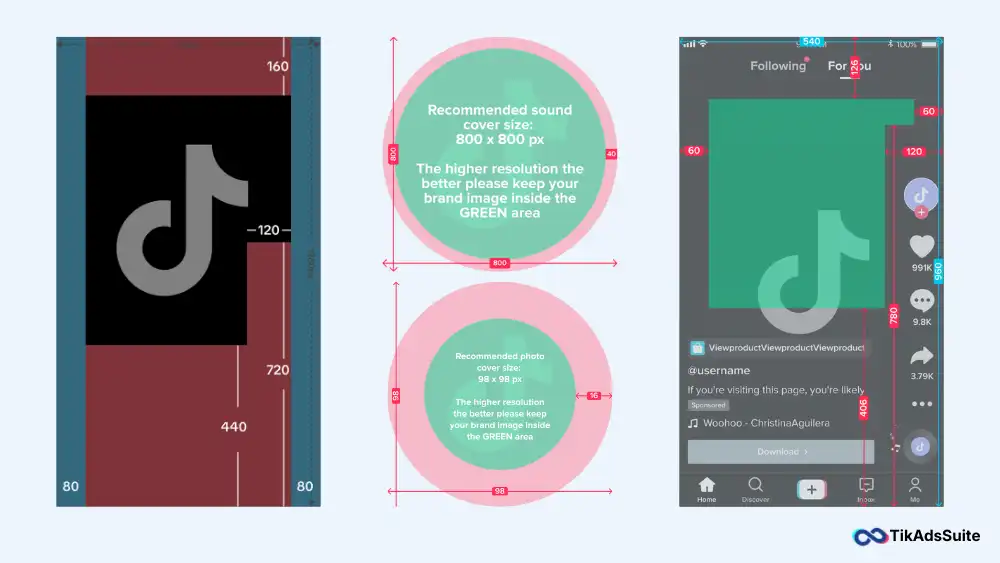
- Resolution: Minimum 540×960 pixels for 9:16 vertical. For 1:1 square, minimum 640×640 pixels. For 16:9 horizontal, minimum 960×540 pixels. TikTok recommends 1080×1920 pixels for vertical to ensure full-quality rendering.
- Aspect ratio: 9:16 is the primary format for TikTok. It performs best because it fills the full screen.
- Video length: 5 seconds minimum. As of TikTok’s July 2025 documentation update, the maximum for Non-Spark In-Feed ads extended to 10 minutes, replacing the older 60-second ceiling. That said, shorter content between 9 and 15 seconds consistently sees the highest completion rates.
- File size: Maximum 500MB.
- File format: MP4, MOV, MPEG, 3GP, or AVI.
- Bitrate: Minimum 516kbps.
- Audio: Stereo or mono. AAC or MP3 encoding. Volume must be within an acceptable range. Silent ads are not permitted for most placements.
- Frame rate: Minimum 23fps, recommended 30fps.
TopView and Brand Takeover Ad Specs Requirements
TopView is the first ad a user sees when they open TikTok. It auto-plays immediately, takes over the full screen for the opening seconds, then transitions into a standard in-feed experience. As of 2025, TikTok moved TopView from flat-rate Reservation buying to CPM-based buying with audience targeting controls. Brand Takeover is a shorter, non-skippable placement that appears for 3 to 5 seconds and remains a Reservation buy.
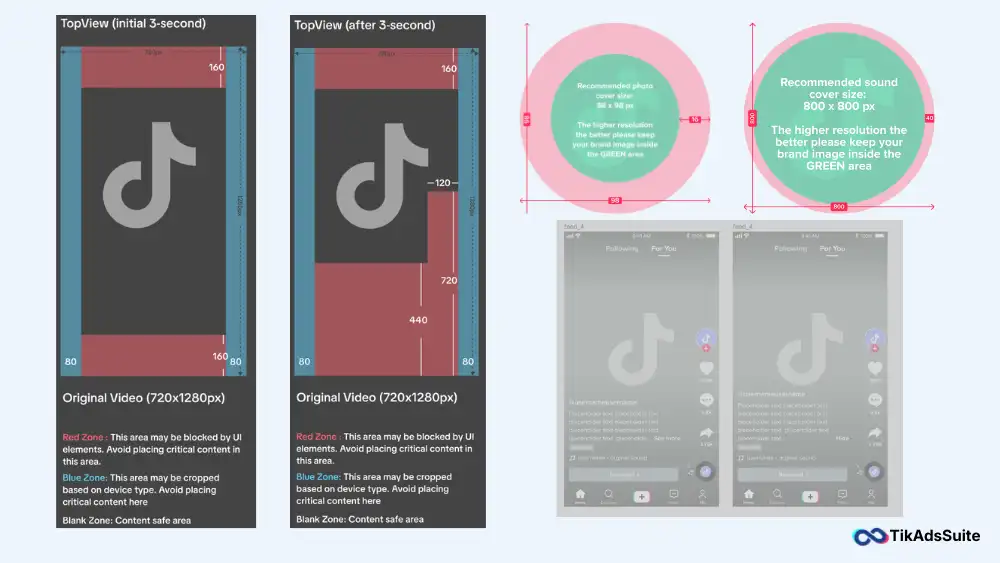
TopView specs Requirements:
- Aspect ratio: 9:16
- Resolution: Minimum 540x960px, recommended 1080x1920px
- Video length: 5 to 60 seconds
- File size: Maximum 500MB
- Format: MP4, MOV, MPEG, AVI
- Sound: Auto-plays with sound
Brand Takeover specs Requirements:
- Aspect ratio: 9:16 (full screen) or 1:1
- Video length: 3 to 5 seconds
- Image display: 3 seconds static
- File size: Maximum 500MB
- Format: MP4, MOV for video. JPG or PNG for the image
Spark Ads Requirements and Authorization Rules
Spark Ads let you boost an existing organic TikTok post, either your own or a creator’s, as a paid ad. The creative spec requirements mirror the original organic post, since you are amplifying existing content rather than uploading new creative.
According to TikTok’s Spark Ads 101, Spark Ads deliver a 134% higher completion rate and a 37% lower CPA compared to standard Non-Spark In-Feed Ads.
To run a Spark Ad using a creator’s post, you need explicit authorization from the creator. The creator generates an authorization code inside their TikTok account, and you enter it inside Ads Manager.
Remember that authorization codes have expiry dates, and standard authorization codes last only for 30 days. Long-term codes can extend up to 365 days but require the creator’s agreement.
Key requirements:
- The post must be public or set to “authorized for ads” by the creator
- The creator must be an eligible TikTok account in good standing
- You cannot edit the content of an authorized post after boosting begins
- Spark Ads support objectives including traffic, video views, community interaction, and conversions
Image Ad and Carousel Ad Specs Requirements
Image Ads are single static creative units. Carousel Ads display multiple images that users swipe through, each with its own caption.
Image Ad specs:
- Aspect ratio: 1:1
- Resolution: Minimum 720×720 pixels
- File size: Maximum 50MB
- Format: JPG or PNG
- Keep text minimal; avoid heavy text overlays that obscure the product or message
Carousel Ad specs:
- Number of cards: 2 to 10 images
- Aspect ratio per card: 1:1
- Resolution per card: Minimum 720×720 pixels
- File size per card: Maximum 50MB
- Format: JPG or PNG
- Each card supports an individual headline and destination URL
TikTok Shopping Ad Specs Requirements (Video, Collection & LIVE Shopping)
TikTok Shopping ads integrate with your product catalog and require a connected TikTok Shop or third-party eCommerce integration (Shopify, WooCommerce, and others).
Collection Ads: Use a video or image hero creative with a product grid below. Video specs match In-Feed. The product grid pulls automatically from your catalog. Product images in the grid should be a minimum of 800x800px in JPG or PNG.
LIVE Shopping Ads: Promote a live stream in progress. The ad creative is pulled from the active live session. You cannot pre-upload creative for LIVE Shopping ads. The live stream itself must comply with TikTok’s commerce and content policies.
For an in-depth analysis with exact pixel measurements, read our TikTok Ad Specs blog.
TikTok Safe Zone Requirements 2026
The TikTok ad safe zone is the area of your video frame where TikTok guarantees no UI elements will overlap your content. Outside the safe zone, TikTok’s interface elements, including the profile icon, caption text, share button, like button, and comment button, cover parts of your video. If your key visuals, text, or logos fall outside the safe zone, users cannot see them clearly.
Safe Zone Pixel Dimensions by Ad Format and Orientation
The following pixel dimensions apply for the standard 1080×1920 canvas (9:16 vertical):
| UI Zone | Overlap Area | Safe Zone Boundary |
| Top | 0 to 130px from top | Keep critical content below 130px |
| Bottom | 1500px to 1920px from top | Keep critical content above 1500px |
| Left | 0 to 68px from left | Keep content right of 68px |
| Right | 1012px to 1080px from left | Keep content left of 1012px |
The full safe zone canvas for a vertical 9:16 video is approximately 944×1370 pixels, centered in the 1080×1920 frame.
For 1:1 square (640×640 canvas): Keep all critical content within a centered 560×480 pixel area. The bottom 160 pixels are the highest-risk overlap zone for the caption and CTA.
For 16:9 horizontal (960×540 canvas): The safe zone spans roughly 900×440 pixels. Horizontal formats are less common on TikTok and carry a higher risk of UI overlap because the platform’s interface is built for vertical.
TikTok’s Creative Center provides downloadable safe zone templates for each format. Use them before designing, not after.
For a more detailed explanation and an in-depth guide, read this article on the TikTok ad safe zone.
TikTok Ad Copy & Text Specs
Character limits matter on TikTok because space is tight and placements differ. The table below gives you exact limits by field and placement.
| Field | Character Limit | Notes |
| Ad Description (In-Feed) | 12 to 100 characters | Displays below the video. May truncate on some devices after 50 characters. |
| Display Name | 2 to 20 characters | The brand name users see. No emojis. Spaces and punctuation count as characters. |
| CTA Button Text | Preset options only | TikTok provides a fixed list: Shop Now, Learn More, Sign Up, Download, Contact Us, Apply Now, Book Now, Order Now, Watch More, and others. |
| Video Caption | Up to 2,200 characters | Organic-style caption on Spark Ads. First 100 characters visible before truncation. |
| Carousel Card Headline | Up to 100 characters | Each card in a Carousel Ad has its own headline. |
| Search Ad Headline | Up to 40 characters | For ads appearing in TikTok Search results. |
A few rules apply across all copy fields:
- No excessive punctuation or capitalization (no ALL CAPS sentences)
- No countdown claims (“Buy now, sale ends tonight”) without verifiable end dates
- No superlative claims (“Best in the world,” “Number one”) without substantiated proof
- Emojis are permitted in some fields, but cannot replace words or be used to obscure meaning
- The symbols “{ }”, “#”, and spaces count toward character limits in non-caption fields
TikTok Landing Page Requirements and Advertising Policy
Your landing page is a separate approval checkpoint. TikTok reviews where your ad sends users, not just the ad itself. A technically perfect video with a non-compliant landing page will be rejected. This is one of the most common failure points we see across account reviews, and it is almost always preventable.
What Must Be on Your TikTok Ads Landing Page?
TikTok requires that your landing page meet minimum functionality and transparency standards. Per TikTok’s advertising policies, these are firm requirements for approval.
Required elements:
- Functional page: The URL must load correctly, load within a reasonable time, and not show error pages (404, 500, or access-denied errors)
- Clear business identity: Your business name must be visible. Users must be able to identify who they are dealing with
- Contact information or support path: An email address, contact form, or support link must be accessible from the page or within one click
- Language and currency consistency: If your ad targets US English speakers, your landing page must be in English. If you show pricing, it must match the target market currency
- Product or service match: The landing page must feature the product or service shown in the ad. Sending users to a homepage when your ad shows a specific product is a common rejection cause
- Privacy policy link: Accessible from the landing page (covered in detail below)
Landing Pages That TikTok Will Not Approve
TikTok maintains a list of prohibited landing page types. Submitting any of these, even once, can flag your account for manual review on future submissions.
Prohibited landing page types:
- Pages that automatically download files without user consent
- Pages with pop-ups that block content or cannot be dismissed
- Pages that redirect users to a different URL than the one submitted in the ad
- Pages promoting content on TikTok’s prohibited products list (covered in Section 7)
- Pages with broken or missing navigation
- Pages that require login before users can see any content
- Parked domains or placeholder pages with no real content
- Pages with misleading UI elements that trigger actions when users try to leave
- Pages that collect personal data without a visible privacy policy
Privacy Policy Requirements for TikTok Advertisers
If your landing page collects any personal data from users, including email addresses, phone numbers, or names via a form, you must have a visible and accessible privacy policy. This is TikTok’s firm requirement, not a recommendation.
Your privacy policy must:
- Be accessible within one click from the landing page
- Clearly state what data you collect and how you use it
- Include how users can request data deletion or opt out
- Comply with applicable laws in your target market (GDPR for the EU, CCPA for California, etc.)
If you run lead generation ads using TikTok’s native Lead Gen forms, TikTok’s own privacy policy applies to data collected within the form. You still need your own privacy policy linked from your landing page for any data collected after the user arrives on your site.
TikTok Advertising Policies: What You Can and Cannot Promote
TikTok’s advertising policies divide content into two groups: fully prohibited and restricted (requires pre-approval or licensing). The distinction matters because restricted does not mean impossible. It means you have to do extra work before submitting.
Prohibited Products and Services on TikTok Ads
These categories cannot be advertised on TikTok under any circumstances, in any market:
| Prohibited Category | Examples |
| Weapons and firearms | Guns, ammunition, conversion kits, silencers |
| Illegal drugs and paraphernalia | Recreational drugs, drug use accessories |
| Tobacco and cigarettes | Cigarettes, cigars, rolling tobacco |
| Counterfeit goods | Replica designer products, fake documents |
| Endangered species and wildlife products | Ivory, products derived from protected animals |
| Malware and surveillance tools | Spyware, keyloggers, stalkerware |
| Pyramid schemes and MLM recruitment | Income opportunity ads with no product substance |
| Gambling (in most markets) | Online casinos, sports betting, poker (prohibited except in licensed markets) |
| Adult content | Pornography, sexually explicit products |
| Weapons components | Bump stocks, untraceable parts |
Restricted Categories That Require Pre-Approval or Licensing
These categories can be advertised on TikTok, but require you to submit documentation and receive approval before your account can run these ad types.
| Restricted Category | Requirement |
| Alcohol | Age-gating, local licensing, market-specific approval |
| Pharmaceuticals and supplements | FDA (US) or equivalent regulatory compliance, no unauthorized health claims |
| Financial products | Regulatory licensing (FCA, SEC, FINRA, or equivalent) |
| Healthcare services | Medical licensing documentation |
| CBD and hemp products | Market-specific legal documentation, no therapeutic claims |
| Online gambling (licensed markets only) | Gambling operator license for the target market |
| Political advertising | Market-specific policies. Restricted or prohibited in many regions |
| Skincare and cosmetics (claim-sensitive) | Ads making specific skin condition treatment claims now require substantiation documentation as of 2026 |
| NFTs and cryptocurrency | Restricted in most markets, prohibited in several |
2026 Policy Updates: AI Endorsement Ban, Verified Account Requirement & More
Several policy changes took effect in early 2026. These are the updates most likely to cause unexpected rejections if you are still using older creative strategies.
Custom Identity phase-out: This is the biggest structural change for advertisers in 2026. TikTok removed the Custom Identity feature that previously allowed campaigns to run without linking to a verified TikTok profile. All campaigns must now originate from a verified TikTok Business account. Per TikTok’s official January 2026 announcement.
AI-generated endorsement ban: TikTok now prohibits ads that use AI-generated voices, likenesses, or scripts designed to simulate real celebrity or influencer endorsements without explicit consent and disclosure. If your ad uses an AI voice that sounds like a recognizable public figure, it will be rejected. Disclosure of AI-generated content is required in ad copy for any creative where AI played a significant generative role.
First-party data mandate for retargeting: Advertisers using custom audience retargeting must now use first-party data collected via the TikTok Pixel or the TikTok Events API. Third-party data uploads for retargeting are no longer accepted in most markets following the 2026 data policy changes.
Political advertising restrictions expanded: Markets previously allowing political ads with licensing now face broader restrictions. Now you need to confirm your market’s current status inside Ads Manager before planning any political or issue-based campaigns.
TikTok Pulse Ad Requirements and Eligibility 2026
TikTok Pulse places your brand ad adjacent to the top 4% of TikTok content by engagement. It is a premium placement that requires a managed account relationship and specific eligibility criteria.
Eligibility requirements for TikTok Pulse:
- A significant minimum spend commitment that varies by market (discussed directly with your TikTok rep)
- Business must have a verified TikTok account and be in good standing
- Creative must meet all standard In-Feed video specs
- Category restrictions apply: brands in restricted categories cannot access Pulse placements even with pre-approval
- Available in select markets only: US, UK, Canada, Australia, Germany, France, Japan, South Korea, and Brazil as of 2026
Pulse is not accessible through self-serve Ads Manager. You must work with a TikTok sales representative to activate it.
TikTok Ads Budget Requirements 2026
TikTok sets minimum budget thresholds at both the campaign level and the ad group level. These minimums are built into the system and cannot be bypassed regardless of your total account spend. According to TikTok Ads Manager’s budget documentation, the thresholds are as follows.
Budget minimums at a glance:
| Budget Level | Minimum Daily Budget | Lifetime Budget |
| Campaign level | $50.00 USD per day | Daily minimum × scheduled days |
| Ad group level | $20.00 USD per day | Daily minimum × scheduled days |
How lifetime budgets work: TikTok calculates your lifetime budget by multiplying your daily budget by the number of days in your scheduled campaign flight. If you schedule 10 days at $20/day per ad group, your minimum lifetime budget for that ad group is $200. TikTok will not approve a lifetime budget below this calculated threshold.
TikTok Creative Challenge (TTCC) requirements: The TikTok Creative Challenge is a program where brands post creative briefs and eligible creators submit original video content for performance-based payment.
Access to TTCC is not self-serve in the traditional sense; TikTok reviews advertiser eligibility based on account standing, spend history, and market. The premium TTCC+ tier, which provides 1:1 TikTok support and access to top-performing creators, requires a substantial monthly ad spend commitment negotiated directly with a TikTok representative.
The effective versus stated minimum distinction: The stated minimums are $50/day at the campaign level and $20/day at the ad group level. In practice, the effective minimum to see meaningful data and algorithmic learning is higher.
Experienced buyers recommend a minimum of $100/day at the campaign level for performance campaigns to give TikTok’s algorithm sufficient data to optimize delivery. The stated minimum will let you launch, and the effective minimum will let you learn.
If you want to learn more, read our guide on TikTok Ad Budget optimization, and also read about TikTok ad Cost.
Why TikTok Ads Get Rejected and How to Fix Each Issue
Understanding the cause of each rejection type saves you from submitting the same broken creative twice. Below are the most common rejection reasons and what to do about each.
| Rejection Reason | Root Cause | Fix |
| Spec violation | Resolution, file size, or video length out of range | Re-export at correct specs. Use TikTok Creative Center’s spec checker before uploading |
| Safe zone violation | Text or logo hidden by TikTok UI elements | Use TikTok’s safe zone overlay template from the Creative Center before upload. Reposition logos, CTAs, and text within the 944×1370px safe area. |
| Misleading claims | Superlatives, unsubstantiated results, or before/after health claims | Remove unverified claims. Replace with specific, substantiated statements. Remove “best,” “guaranteed,” or “clinically proven” unless you have documentation |
| Landing page failure | Page not loading, redirect mismatch, or missing privacy policy | Test your URL before submitting. Add a visible privacy policy. Match the landing page to exactly what the ad promotes |
| Music licensing violation | Background music not cleared for commercial use | TikTok’s Commercial Music Library is accessible directly inside Ads Manager under the creative tools section and contains pre-cleared tracks specifically licensed for paid advertising use. |
| AI content flag | AI-generated content not disclosed or simulating real endorsements | Add clear AI disclosure in your ad copy. Remove any AI-generated likeness of a real person without written consent |
| Prohibited category | Product or service falls on TikTok’s prohibited list | Dense or obscuring text on the image creative |
| Restricted category without approval | Running ads in a restricted category before receiving pre-approval | Apply for category pre-approval through your Ads Manager. Submit required licensing documentation before launching |
| Account not verified or unlinked | Campaign submission from an account without a linked verified TikTok profile | Link a verified TikTok Business account before submitting any campaigns |
| Excessive or misleading text overlay | Dense or obscuring text on image creative | Reduce text coverage. Move key messaging to the ad description field instead of overlaying it on the image |
TikTok Ads Requirements Checklist (Pre-Launch)
Use this checklist before every campaign submission.
Technical Specs
- Video resolution meets the minimum for your chosen format (1080×1920 recommended for 9:16)
- Aspect ratio matches the placement (9:16 for In-Feed and TopView, 1:1 for image and carousel)
- File size is within limits (500MB for video, 50MB per image card)
- Video length is within range (5 seconds minimum, 10 minutes maximum for In-Feed)
- Frame rate is at least 23fps
- Audio is present and within an acceptable volume range
- File format is MP4, MOV, JPG, or PNG as appropriate
- All critical creative elements (logo, text, CTA) fall inside the safe zone boundaries
- Text overlay on image ads is minimal and does not obscure the product or message
- Ad copy character limits respected for all fields (display name 2-20, description 12-100)
Policy Compliance
- Your product or service is not on TikTok’s prohibited list
- If in a restricted category, pre-approval documentation has been submitted and approved
- No unsubstantiated health or performance claims in creative or copy
- No AI-generated celebrity likeness or simulated endorsements
- AI content is clearly disclosed in ad copy where applicable
- Music used is sourced from TikTok’s Commercial Music Library
- No countdown urgency claims without verifiable end dates
- A verified TikTok Business account is linked to your Ads Manager
Destination Quality
- Landing page URL loads correctly and within normal load time
- The landing page displays your business name clearly
- Landing page content matches the product or service in your ad
- Privacy policy is visible and accessible with one click
- Landing page language matches your target market
- No auto-downloads, non-dismissible pop-ups, or redirect mismatches
- Contact information or support path is accessible from the landing page
Budget and Account Setup
- Campaign daily budget is at least $50.00 USD
- Ad group daily budget is at least $20.00 USD
- The lifetime budget (if used) is at least the daily minimum multiplied by the number of scheduled days
- Your account is in good standing and eligible for the Creative Challenge if you plan to submit a brief
Frequently Asked Questions About TikTok Ads Requirements
What are the requirements for TikTok ads?
TikTok ads must pass three checks before they can run. Your creative has to meet the technical specs for resolution, aspect ratio, file size, and length. Your account has to be eligible, which means a verified TikTok Business profile linked to Ads Manager in a supported market. Your landing page has to pass its own content and functionality review. If any one of these fails, the ad won’t be approved.
What is the minimum budget for TikTok ads?
The minimum daily budget in TikTok Ads Manager is $50 at the campaign level and $20 at the ad group level. Those are only the minimums to launch. Many experienced media buyers start with at least $100 a day per campaign, which gives TikTok’s algorithm enough data to optimize delivery.
What video size and specs do TikTok ads need?
Use 1080 x 1920 pixels in a 9:16 vertical format for In-Feed and TopView ads. The minimum accepted size is 540 x 960 pixels. Files can be up to 500MB. In-Feed videos can run from 5 seconds to 10 minutes. TikTok also accepts 1:1 and 16:9 videos, but 9:16 usually performs best because it fills the whole screen without black bars.
What does TikTok require on an ad landing page?
Your landing page must load properly, show your business name, match the product or offer in the ad, link to a privacy policy, and use the same language as your target market. TikTok will reject pages that redirect to a different URL, require a login before showing content, or start automatic downloads. Landing pages are reviewed separately from your ad creative.
What changed in TikTok’s advertising policies in 2026?
There were three major changes in 2026. Custom Identity was retired, so every advertiser now has to link a verified TikTok Business profile. AI-generated endorsements that copy a real person’s voice or likeness without consent and disclosure are now banned. Retargeting now requires first-party data from the TikTok Pixel or Events API. Skincare and supplement ads also face stricter rules on health claims.
How long does TikTok ad approval take?
TikTok ad approval usually takes about 24 hours, and many ads are approved within a few hours. During busy periods or for more complex campaigns, review can take 48 hours or longer. To avoid delays, check your specs, landing page, and policy compliance before you submit.
Conclusion
TikTok’s advertising system runs on three separate approval layers: technical specs, policy compliance, and landing page quality.
TikTok ad rejections are not random; they almost always trace back to just a single unmet requirement. Also, they are easily preventable with the right preparation.
By now, you have a clear, complete picture. And you know the exact pixel specs for every major format, the safe zone dimensions that protect your creative from UI overlap, the 2026 policy updates that are actively causing account-level disruptions, and the landing page rules that trip up even experienced advertisers.
You also have the budget thresholds, an honest breakdown of how the TikTok Creative Challenge actually works, and a complete pre-launch checklist you can use on every campaign.
TikTok’s requirements are more detailed than most platforms, but they are fully documented. Following them precisely is the difference between an ad that launches on schedule and a campaign that stalls in review.
Meet the spec, clear the policy check, and build a compliant destination to freely advertise your ads in TikTok.