
A rejected TikTok ad almost always traces back to a specific trigger inside your video, your copy, or your landing page.
You spent hours building your TikTok ad campaign, picked your audience, set your budget, and then saw a Not Approved status before a single view landed. It stings, but the fix is usually simpler than it looks.
Below you will find the reasons TikTok gives for rejecting ads, where to read the exact reason in Ads Manager, and how to fix, appeal, or prevent each one.
Table of Contents
Get Up to $6000 Free TikTok Ad Credit
Quick Answer
Your TikTok ad was rejected because at least one part of it broke an ad policy. TikTok’s list of common reasons ads fail review names misleading claims, spelling and caption errors, poor video or audio, a product or price that differs from the website, a broken or incomplete landing page, unauthorized third-party logos, and sexual or shocking content.
To fix it, open the ad in Ads Manager, read the rejection reason, change the part it names, and save. The ad goes back into review. If you are sure the ad follows the rules, appeal instead of editing.
Why Was Your TikTok Ad Rejected?
Your TikTok ad was rejected because a specific part of your video, copy, or landing page did not meet TikTok’s Advertising Policies. The rest of the ad can be fine. Most rejections trace back to five repeat problems.
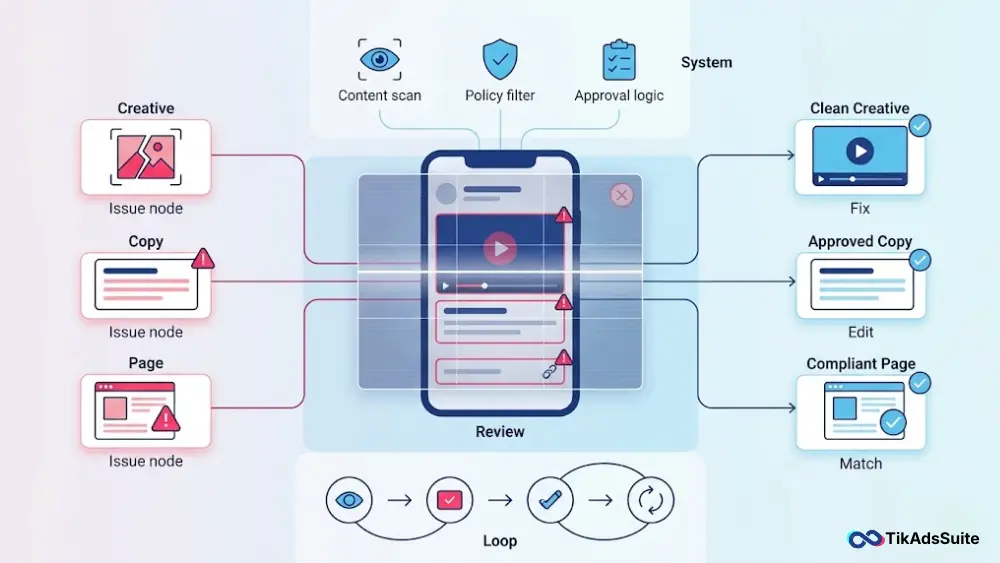
- Misleading or exaggerated claims in the ad copy or voiceover
- Inconsistent product between the ad creative and the landing page
- Low-quality video, audio, or captions that fail technical standards
- Landing page issues, like broken links or a missing privacy policy
- Restricted or prohibited content for your targeted region
How TikTok’s Ad Review Process Works
TikTok reviews every ad before it can run. TikTok’s ad policy guide says the review usually takes around 24 hours and checks three things: the ad content, the landing page, and the target audience.
That means a rejection can come from any of these places:
- The ad itself. The video, the audio, the on-screen text, and the caption all count, so a claim spoken in a voiceover is reviewed the same as one written on screen.
- The landing page. A page that does not load, has no privacy policy, or sells something different from the ad can sink a clean video.
- The targeting. A product that is allowed in one country may be restricted in another, so where you show the ad matters.
You see the result in TikTok Ads Manager. A rejected ad shows which policy it broke, and every fix below starts from that reason.
Top Reasons Your TikTok Ad Was Rejected
Most TikTok ad rejections cluster around the same eight causes. Find yours below, then use the fix steps further down.
Misleading Claims and Exaggerated Results
TikTok rejects ads that promise results the product cannot reliably deliver. In its post on common ad rejection reasons, TikTok says ads must be truthful, factual, and not misleading, with no exaggerated performance or promise.
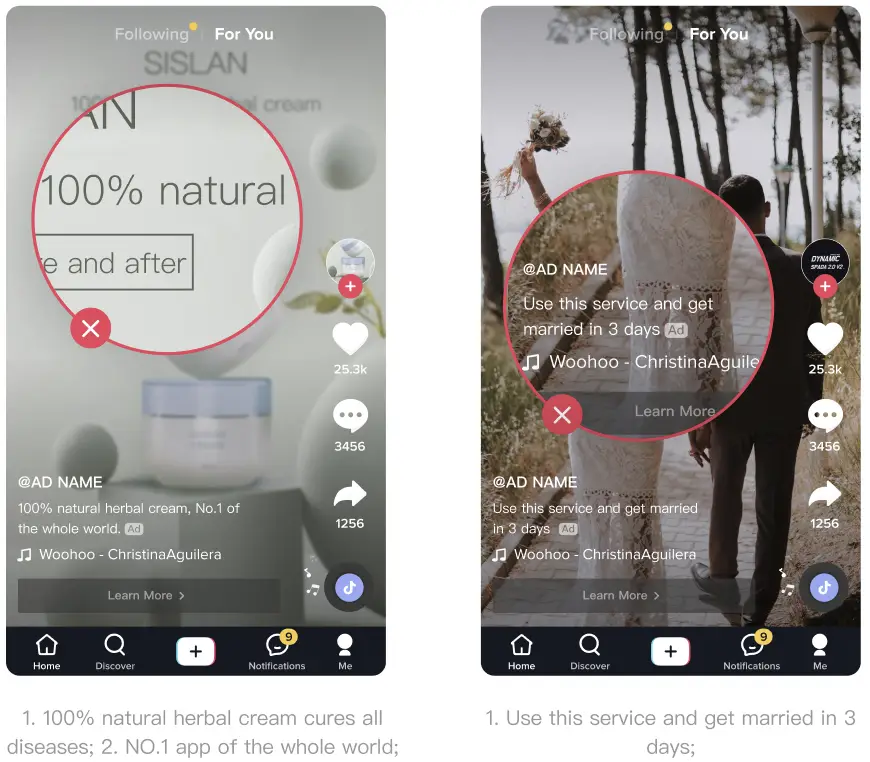
Common examples that get flagged:
- A set weight loss in a set time, like 10 pounds in a week
- Overnight skin results, like clearing acne in one night
- Promised passive income with no risk
- A fixed income by a set date, like a full paycheck by Friday
The fix: describe what the product does, not a result it cannot promise. A line about supporting your fitness routine passes where a 10 pounds in a week claim fails. Talk about the routine, the experience, or the feeling, not a specific body or money outcome.
Risky Words That Often Get Ads Flagged
Some words turn a normal claim into a medical, money, or absolute claim, and that is the kind of claim reviewers flag. One word in the voiceover or on-screen caption can be enough, so check spoken and written text the same way.
High-risk trigger words to remove or rephrase:
- Cure, heal, treat, prevent for any health or skincare ad
- Instant, miracle, secret results for any product
- Free money, easy cash, get rich for any finance offer
- Lose weight fast, melt fat, slim down quick for any wellness product
- Best, #1, world’s leading without verifiable proof
Read your script out loud and swap these words before you film. It is faster than a re-edit later.
Inconsistent Ad Creative and Landing Page
Your ad and your landing page must match. If the product, price, or offer in the creative differs from what people see after the click, the ad can be rejected even when both parts look fine on their own.
Real mismatch examples that fail review:
- Ad shows a face cream, landing page sells shampoo
- Ad says up to 50% off, landing page only shows up to 30% off
- Ad shows blue running shoes, landing page leads to a generic homepage
- Caption promises one app feature, video shows a different one
Match the headline, the product, the price, and the imagery on both sides of the click.
Low-Quality Video, Audio, or Captions
TikTok holds a high bar for technical quality because users expect a polished feed experience. Your ad will fail review for any of the following:
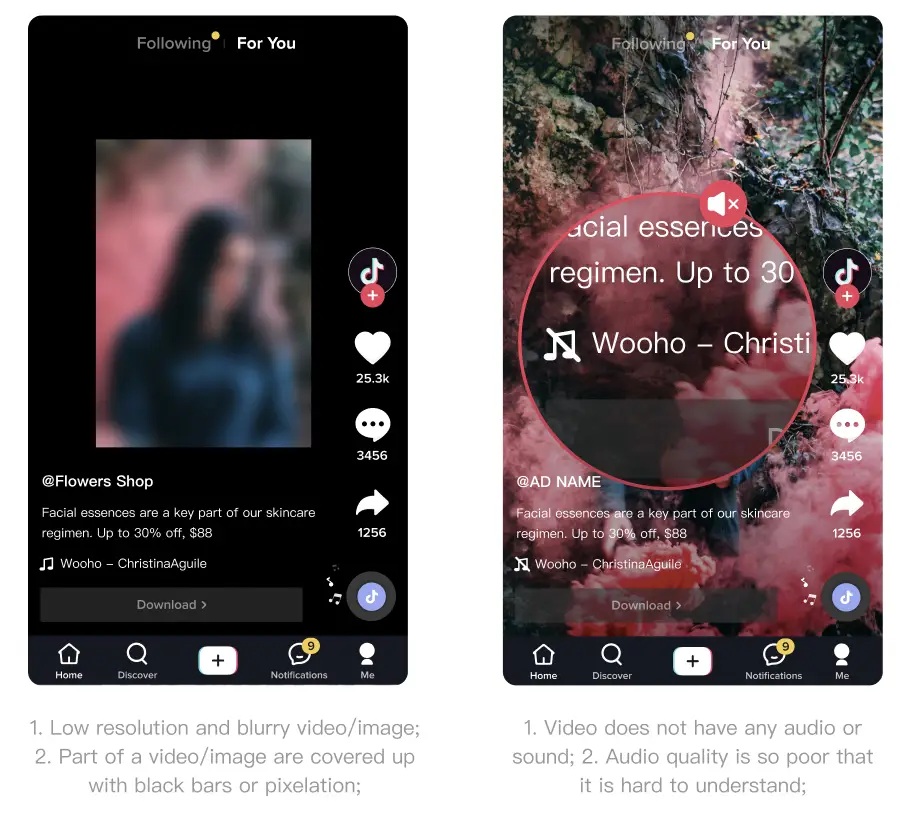
- Low-resolution or blurry footage that misses the current TikTok ad specs
- Black bars, pixelation, or covered video sections
- No audio, muffled audio, or distorted sound
- Spelling errors, like rfom instead of from
- Distracting capitalization, like S.a.L.e
- Symbol-letter swaps, like S@le or M0ney
Shoot vertical, export at the size the specs ask for, and proofread every caption before upload.
Intellectual Property and Trademark Violations
Using someone else’s logo, music, character, or brand name without permission is a common reason ads fail review. This applies to the ad and to the landing page it sends people to.
Things you cannot use without rights:
- Trending songs from major labels, unless licensed for ads
- Logos from brands you do not own or partner with
- Movie clips, TV scenes, or game footage
- Celebrity faces, voices, or names
Use TikTok’s Commercial Music Library inside Ads Manager, or upload original audio you own outright.
Landing Page Compliance Issues (Privacy, Refunds, 404s)
A clean ad still fails if your landing page is broken. TikTok reviews the page your ad links to, so a problem there sinks the whole ad.
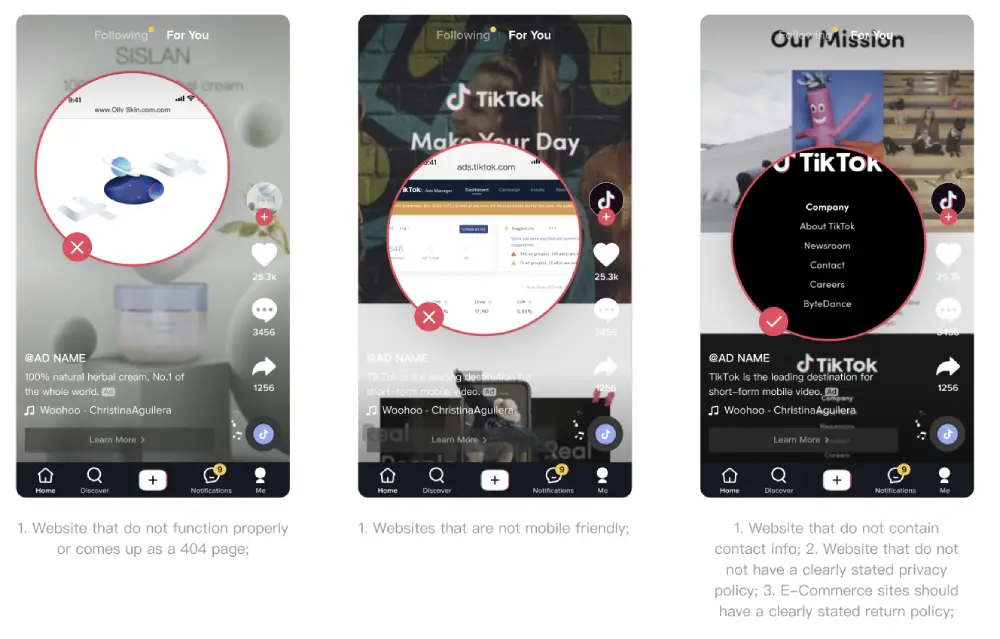
Landing page red flags that trigger rejection:
- Page returns a 404 or fails to load
- No mobile responsiveness
- Missing privacy policy link
- Missing refund or return policy for ecommerce
- No contact information visible
- Different language from your ad targeting region
Fix these before you touch the creative. A missing privacy policy or refund page is a quick fix, but it is easy to overlook when you assume the video is the problem.
Restricted or Prohibited Industries
Some products cannot be advertised on TikTok at all. Others are allowed only in some countries, or only after extra checks and documents.
The rules change by region, so a product that runs in one market can be rejected in another. Before you build a campaign, check the policy for every country you target and read the regulated industries rules if you sell in areas like health, finance, alcohol, or dating.
Undisclosed AI-Generated Content
This is the rule many advertisers miss. TikTok’s ad disclaimer rules make a disclaimer mandatory for AI-generated, synthetic, or manipulated media, which covers images, video, or audio made fully by AI and real footage that AI has changed a lot.
Add the disclaimer when:
- You use an AI voice clone for the voiceover
- You use AI-generated faces or synthetic actors
- You use AI to alter a real person’s appearance, voice, or actions
- You generate the entire video with a text-to-video model
You add the AI-generated content disclaimer while you build the ad in TikTok Ads Manager. The disclaimer option is not open to every account yet, so ask your TikTok sales contact if you cannot see it.
Ad-Level vs. Account-Level Rejection: What’s the Difference?
An ad-level rejection blocks one ad or ad group, while an account-level rejection blocks every ad in the account. You cannot fix an account problem by editing your video, and you cannot fix a creative problem by emailing support, so knowing which one you have saves hours.
| Factor | Ad-Level Rejection | Account-Level Rejection |
| What got rejected | A single ad or ad group | Your entire ad account |
| Cause | Creative, copy, or landing page issue | Business identity, billing, or repeated policy violations |
| Where you see it | Ads Manager campaign tab | Account banner or email from TikTok |
| Time to fix | Usually one review cycle | Depends on the account issue |
| How to resolve | Edit and resubmit the ad | Submit business documents and appeal |
| Risk level | Low, isolated to that ad | High, blocks all future ads |
If only one ad failed, treat it as a creative problem. If your dashboard shows a global warning or your billing is flagged, treat it as an account problem and contact Advertiser Support directly.
How to Fix a Rejected TikTok Ad (Step-by-Step)
To fix a rejected TikTok ad, follow these steps in order. Each one targets a different failure point, so do not skip ahead.
- Read the rejection reason. Open Ads Manager, find the ad in the Campaign tab, and click the Disapproved label. Then click View more, which, as TikTok’s rejected ad help page explains, shows the policy, suggested fixes, and the placements and audiences affected.
- Identify the failure type. Decide if the issue is creative, copy, landing page, or account level.
- Audit your script and captions. Remove trigger words, exaggerated claims, and any spelling errors.
- Check video and audio quality. Confirm the video meets the current specs, the audio is clean, and nothing is covered.
- Test your landing page. Open it on mobile, check for a privacy policy, refund policy, and contact info, and confirm the product matches your ad.
- Match the offer. Make sure the product, price, and discount in the ad match the landing page exactly.
- Add required disclosures. Add the AI-generated content disclaimer if your ad uses synthetic media.
- Resubmit the ad. Save your changes inside Ads Manager. Saving sends the ad back into review.
- Track the result. If it passes, you are live. If it fails again, move to the appeal process.
How to Appeal a TikTok Ad Rejection (With Template)
Sometimes the review gets it wrong. If you believe your ad follows every policy, TikTok’s ad review FAQ says to submit an Advertiser Support ticket to ask for a re-review. Ads Manager also offers a one-click appeal on rejected ads and ad groups.
Here is a copy-paste appeal template you can adapt:
Subject: Appeal Request for Rejected Ad, Ad ID [insert ad ID]

Hello TikTok Support team,

We are appealing the rejection of Ad ID [insert ad ID] under campaign [insert campaign name]. The ad was flagged for [insert exact rejection reason from Ads Manager].

We have reviewed the ad against TikTok's Advertising Policies and believe the rejection was issued in error for the following reasons:

[State the specific policy and why your ad complies]

[Reference the exact creative element that addresses the concern]

[Note any documentation, license, or proof you can provide]

Supporting evidence is attached, including [list documents, licenses, or screenshots].

Please re-review the ad. We are available to provide any additional information needed.

Thank you,
[Your name]
[Your business name]
[Advertiser ID]
Keep your tone professional. Lead with facts, attach proof, and skip emotional language. A reviewer who can see exactly which rule you followed has an easy reason to reverse the call.
Why Your TikTok Ad Was Rejected After Being Approved
Your TikTok ad can be rejected after approval because TikTok keeps reviewing ads while they run. TikTok’s help page on post-approval rejections names negative feedback, such as people hiding, blocking, or reporting an ad, as one reason for a new review, and says an ad found to break policy is suspended and the advertiser is notified.
When this happens, here is what to check first:
- User reports. Negative feedback from viewers can pull an ad back into review.
- Policy changes. Ad policies change over time, so a rule that did not apply at approval may apply now.
- Landing page changes. If you updated your website after approval, the new version may break a rule the old one met, and viewers may report it.
- Creative edits. Saving changes to an approved ad sends it through review again.
You will see the notification in Ads Manager. Treat it like a fresh rejection: read the reason, fix the trigger, and resubmit.
TikTok Ads Not Delivering After Approval
An approved TikTok ad that gets no impressions is usually blocked by a status problem, not a policy problem. The ad status column in Ads Manager tells you which one, and TikTok’s list of ad statuses explains what each status means.
Common statuses that stop an approved ad, and what to do:
| Status in Ads Manager | What it means | What to do |
|---|---|---|
| Insufficient account balance | The account has no funds left | Add funds |
| Out of campaign budget or ad group budget depleted | The budget for the period is spent | Raise or reset the budget |
| Paused or Scheduled | The ad is switched off or its start time has not come | Unpause it or wait for the start time |
| Account under review, failed review, or suspended | An account issue holds every ad | Fix the account issue first |
| Creative asset blocked or authorization revoked | The video can no longer be used | Pick another video |
| TikTok Pixel disconnected | Tracking for the ad is broken | Follow the recommended action card to reconnect it |
If the status says active but spend stays at zero, check the budget, bid, and audience size next. Those are the settings the optimization cards in Ads Manager point to when an ad is running but not spending well.
Pre-Submission Checklist to Prevent Future Rejections
Run this checklist before every upload. It catches the problems that cause most rejections before a reviewer does.
Creative checklist
- Video meets the current ad specs for size and length
- Audio is clear and audible end-to-end
- No black bars, pixelation, or covered sections
- Captions have zero spelling errors
- No symbol-letter swaps in any text
- Voiceover and on-screen text avoid trigger words
Copy and claim checklist
- No cure claims, miracle results, or free money promises
- No specific weight loss numbers or income promises
- No malicious comparisons to other brands
- All claims supported by real product features
Landing page checklist
- Loads quickly on mobile
- Privacy policy link visible in the footer
- Refund or return policy stated for ecommerce
- Contact information available
- Product, price, and offer match the ad exactly
- Page language matches your ad targeting region
Compliance checklist
- AI-generated content disclaimer added if the ad uses synthetic media
- All music and visuals owned or licensed
- Industry is allowed in your target region
- Required certifications uploaded for restricted categories
All boxes checked? Submit the ad.
Frequently Asked Questions
Why are my TikTok ads getting rejected?
TikTok ads usually get rejected for the same few reasons: exaggerated claims, an ad that does not match its landing page, low-quality video or text, a landing page with no privacy policy or contact details, or content you do not have rights to use. If the same ad keeps failing, the trigger is still there. Read the reason in Ads Manager and check each of these areas before you resubmit.
How long does a TikTok ad review take?
Most ads get a decision within about a day, and some take longer. Ads in restricted industries or ads that need a closer look can sit in review past that window. If yours has been pending for more than a day, open an Advertiser Support ticket.
Can I edit a rejected TikTok ad and resubmit it?
Yes. Open the rejected ad in Ads Manager, click Edit ad, fix the issue, and save. The ad goes back into review. You do not need to rebuild the campaign, and you can also create a new ad instead if that is faster.
What does video not approved mean on TikTok Ads?
Video not approved means your ad failed review and will not be shown to users. Ads Manager shows the status with the policy reason. You can edit the creative, fix the issue, and resubmit, or appeal through Advertiser Support if you believe the rejection was a mistake.
Will a rejected ad hurt my TikTok ad account?
One rejected ad that you fix is a normal part of advertising and is limited to that ad. Repeated policy violations are different, because they can lead to problems at the account level. Running every ad through a pre-submission checklist keeps your record clean.
How do I appeal a TikTok ad rejection?
Open the rejected ad in Ads Manager and use the appeal option, or submit a ticket through Advertiser Support. Include the ad ID, the exact rejection reason, a short explanation of why the ad meets the policy, and any proof such as licenses or certifications.
Wrapping Up
Most TikTok ad rejections come from a short list of problems: claims that go too far, a landing page that does not match or does not work, weak video or text, content you do not have rights to, and missing AI disclaimers.
Start with the reason Ads Manager gives you, fix that one thing, and resubmit. Appeal only when you are sure the ad follows the rules. Then run the pre-submission checklist on your next ad so the same problem does not come back.