
Producing video content used to mean hiring someone or spending hours in software that assumed you already knew what you were doing. That’s changed, and CapCut is a big part of why.
Small businesses across eCommerce, services, hospitality, and retail are using it to create short-form videos that connect with real audiences on social media, without a production crew or a design background.
This guide covers both sides of that picture: what CapCut actually brings to small business marketing, and how to use it in a way that drives results.
Whether you’re starting from scratch or trying to speed up what you’re already doing, you’ll finish with a clear sense of where CapCut fits and how to make it work for your business.
Here’s what this guide covers:
- Why CapCut is a practical choice for small business video marketing
- The specific features that help your brand grow
- How to produce your first marketing video step by step
- Free vs. Pro: what your business actually needs
- Real use cases across different business types
- Honest limitations to know before you commit
Get Up to $6000 Free TikTok Ad Credit
Table of Contents
Key Takeaways
- CapCut is free to use and available on iOS, Android, desktop, and browser, with no prior editing experience required.
- AI tools like auto captions, background removal, and text-to-speech reduce the time and effort of producing polished video content.
- Short-form platforms like TikTok, Instagram Reels, and YouTube Shorts are where CapCut-edited content performs best.
- The free plan covers most small business needs; Pro adds brand kit access, higher export quality, and expanded AI usage.
- CapCut works best as a social video tool, not a replacement for full-scale video production.
Can CapCut Actually Help a Small Business Grow?
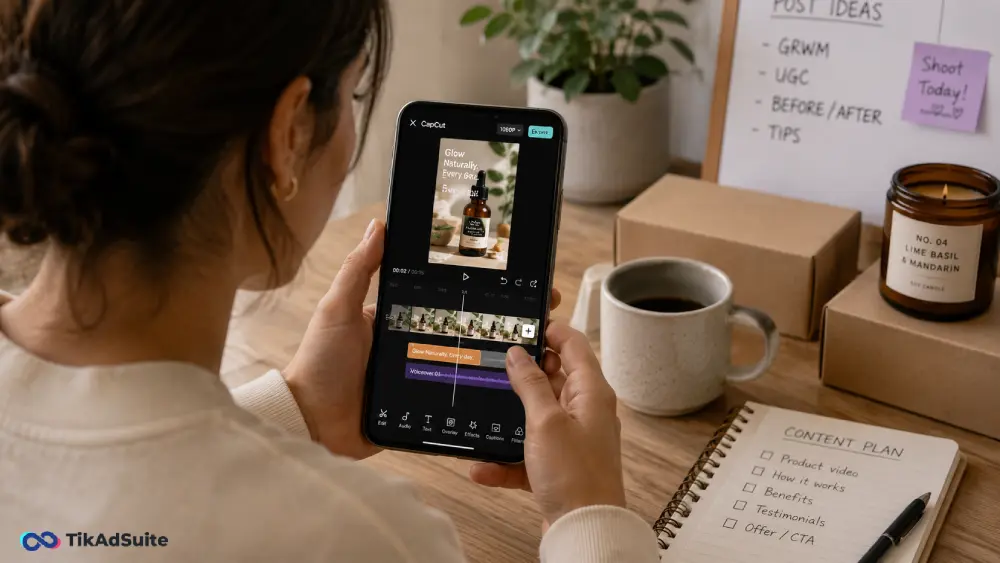
Yes, particularly if your growth strategy includes short-form social video. CapCut gives small teams access to AI editing tools, platform-ready templates, and a clean editing interface without a steep learning curve. It won’t replace a professional production setup, but for businesses that need consistent, branded video content on a budget, it’s one of the most accessible tools available.
What Makes CapCut a Practical Choice for Small Business Marketing
Most small business owners aren’t video editors. They’re managing operations, handling customers, and taking on more roles than they planned for.
A video tool only adds value if someone on the team can pick it up without a tutorial library or a dedicated training session.CapCut is built around that kind of user.
The interface is drag-and-drop, the templates come pre-formatted for social platforms, and the AI features take care of the parts of editing that usually create the most friction.
You don’t need to understand color grading or manual audio sync. You choose a template, add your footage or photos, adjust the text, and export. That short path from idea to finished video is what keeps small business owners coming back to it.
CapCut Features That Support Business Growth
Some features matter more than others when you’re producing marketing content on a tight schedule. These are the ones worth knowing about.
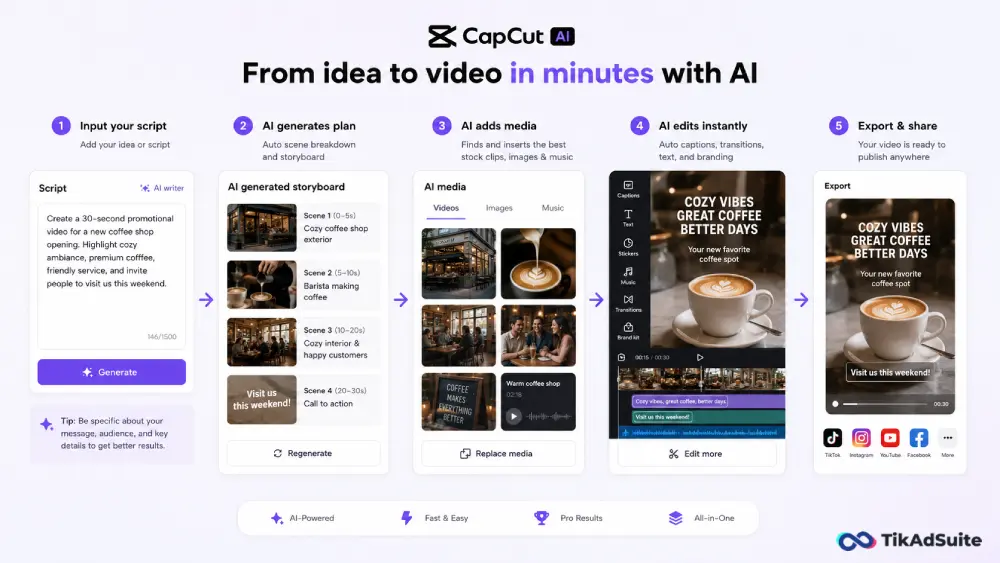
Auto Captions: CapCut generates captions from spoken audio automatically. For any video where someone is talking, this removes a significant manual step. Captions also make content accessible and improve performance on platforms where people watch without sound.
Background Remover: The AI background removal tool works on both video clips and images without needing a green screen. It handles edges and hair reasonably well for most marketing use cases, making it useful for product shots or spokesperson-style clips.
Text to Speech: If recording a voiceover isn’t practical, the text-to-speech feature generates natural-sounding narration from a written script. It supports multiple languages and voice styles, which works well for product demos, explainer clips, or tutorial content.
Templates by Platform: CapCut’s template library organizes content by platform and format. TikTok, Instagram Reels, YouTube Shorts, and other placements each have dedicated templates sized and paced correctly. This removes the formatting guesswork that slows down first-time video creators.
AI Script Assistant: CapCut includes an AI tool that drafts short video scripts from a prompt or topic. For business owners who find it hard to know what to say on camera, this gives you a workable starting point without staring at a blank page.
Brand Kit (Pro): On the Pro plan, you can save your logo, brand colors, and custom fonts, then pull them into any video without rebuilding from scratch each time. For businesses publishing content regularly, that consistency builds recognition faster than a polished one-off video ever could.
How to Use CapCut to Create TikTok Ads
If you’re running TikTok Ads, CapCut gives you a faster path from raw footage to a finished ad than most alternatives.
CapCut connects directly with TikTok’s creative tools, and many of its templates are specifically designed to match the pacing, text placement, and aspect ratio that TikTok’s algorithm responds well to.
For small businesses, this matters because TikTok Ads perform best when they look native to the platform rather than polished and produced.
A clean, straightforward clip with bold captions, a clear hook in the first three seconds, and a direct call to action consistently outperforms ads that feel like traditional commercials.
CapCut’s auto captions, trending audio sync, and short-form templates make that style of ad easy to put together without a media buyer or creative agency.
You can produce multiple ad variations quickly, which is useful when you’re testing what messaging or format connects with your audience.
If you already use CapCut for organic content, applying that same workflow to paid TikTok creative keeps your brand looking consistent across both.
Free vs. Pro: What Does a Small Business Actually Need?
CapCut’s free plan is genuinely capable. Most small businesses can produce solid marketing content without spending anything. The table below shows where the free plan ends and where Pro takes over.
| Feature | Free Plan | Pro Plan |
| Basic Video Editing | Yes | Yes |
| Template Library | Partial | Full |
| Auto Captions | Limited | Expanded Usage |
| Background Remover | Limited | Expanded Usage |
| Text to Speech | Limited | Expanded Usage |
| Brand Kit | No | Yes |
| Watermark-Free Export | No | Yes |
| Higher Export Resolution | No | Yes |
| AI Script Assistant | Limited | Full Access |
If you’re just getting started, the free plan is the right place to begin. Produce a few real videos and see how the limits affect your workflow before committing to Pro. For businesses posting multiple times a week or building a consistent brand look, the Pro features tend to justify the cost fairly quickly.
For current Pro pricing, check CapCut’s official site directly, since plans and rates are updated periodically.
How Small Businesses Use CapCut in Practice
Different businesses find different uses for it depending on what they sell and where their audience is.
eCommerce brands create short product showcase videos with text overlays, background removal, and trending audio. A short clip showing a product in use, with captions and a clear call to action, tends to get more engagement than static product photos on most social platforms.
Service businesses like salons, gyms, and consultants film quick before-and-after videos, client testimonials, or behind-the-scenes content. Auto captions cut editing time, and the templates keep things looking polished without requiring design skills.
Restaurants and cafes film short food preparation clips or daily specials. A brief Reel of a dish being plated, set to trending audio, costs nothing to produce and reaches people in a way that a static menu post rarely does.
Local service providers answer common customer questions on camera. A plumber walking through a quick home maintenance tip or a dentist explaining a common procedure builds trust with an audience before they ever pick up the phone.
How to Make Your First Marketing Video in CapCut
You don’t need a content strategy or a production schedule to get started. Work through these steps with whatever you have available right now.
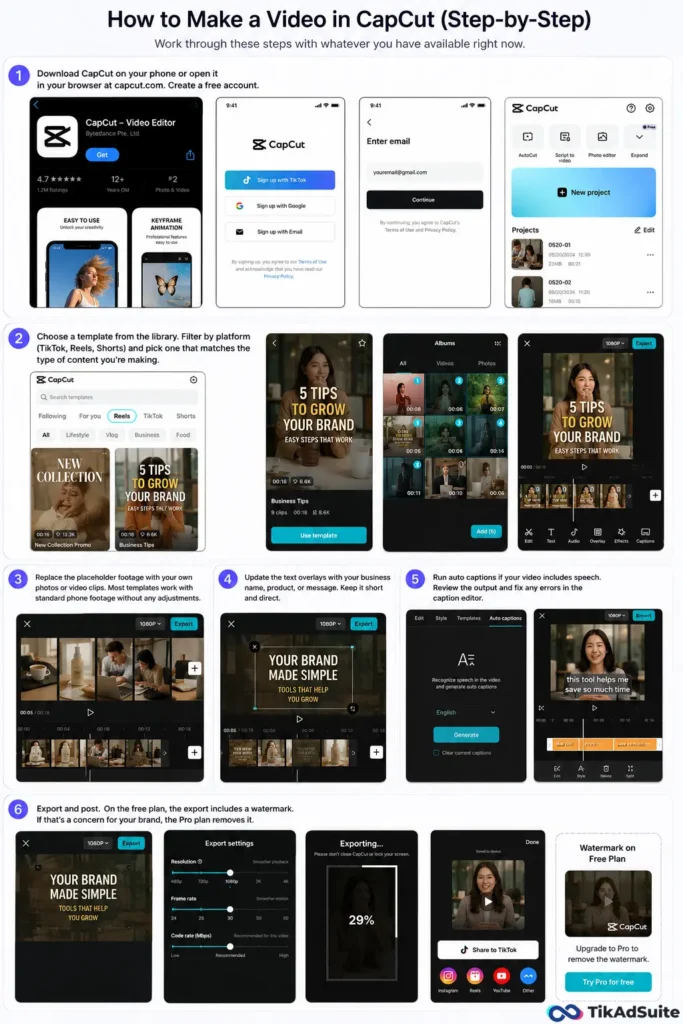
- Download CapCut on your phone or open it in your browser at capcut.com. Create a free account.
- Choose a template from the library. Filter by platform (TikTok, Reels, Shorts) and pick one that matches the type of content you’re making.
- Replace the placeholder footage with your own photos or video clips. Most templates work with standard phone footage without any adjustments.
- Update the text overlays with your business name, product, or message. Keep it short and direct.
- Run auto captions if your video includes speech. Review the output and fix any errors in the caption editor.
- Export and post. On the free plan, the export includes a watermark. If that’s a concern for your brand, the Pro plan removes it.
Where CapCut Has Real Limits
CapCut is a strong tool for what it’s built to do, and knowing where it stops helps you plan around it.
It’s optimized for short-form content. If you need to produce long-form videos, webinars, or anything over a few minutes with complex editing, CapCut’s timeline feels limited. Tools like DaVinci Resolve or Adobe Premiere Pro handle that kind of work better.
Templates get overused. Because CapCut is popular, some trending templates show up across many different brands. Customizing your colors, fonts, and visual style from the start helps you avoid blending in with everyone using the same starting point.
AI features have usage caps on the free plan. Background removal, auto captions, and text-to-speech all carry monthly limits at the free tier. Teams producing content frequently will hit that ceiling.
ByteDance ownership is worth considering. CapCut is owned by ByteDance, TikTok’s parent company. For most small businesses, this has no practical impact, but organizations with specific data governance policies should review CapCut’s privacy terms before uploading sensitive brand assets.
Frequently Asked Questions
Does CapCut work for businesses that aren’t on TikTok?
Yes. CapCut’s templates and export options cover Instagram Reels, YouTube Shorts, Facebook, and standard horizontal video formats. The TikTok integration is a bonus, not a requirement.
Can you build videos in CapCut without any filmed footage?
Yes. CapCut supports photo slideshows, animated text, and transitions that turn a set of product images or service photos into a complete short video without any filmed clips.
Is CapCut suitable for someone with no editing experience?
Yes. The template-first approach means you’re customizing an existing structure rather than building one from scratch. Most business owners with no editing background find the mobile app approachable within a short session.
What type of content performs best when made with CapCut?
Short-form video between 15 and 60 seconds tends to perform best, particularly content with captions, on-screen text, and trending audio. Product showcases, quick tips, and behind-the-scenes clips suit both CapCut’s strengths and current platform behavior well.
How do you keep brand assets consistent across multiple videos in CapCut?
On the Pro plan, the Brand Kit lets you save your logo, colors, and fonts in one place and apply them to any project without rebuilding each time. On the free plan, you can save custom templates manually as a workaround, though it takes more effort to maintain consistency at volume.
The Bottom Line on CapCut for Small Business Video Marketing
CapCut gives small businesses a practical path to producing video content regularly without outsourcing it or learning professional editing software.
The AI tools reduce the technical friction, the templates handle the formatting, and the free plan makes it worth trying before you spend anything.
The businesses that get the most out of it treat video as a consistent habit rather than a one-off project.
Start with the free plan, produce a handful of videos across a couple of weeks, and you’ll quickly see where CapCut earns its place in your marketing routine and whether the Pro plan makes sense for your volume.