
Most TikTok ad spend goes to cold audiences: people who’ve never heard of your brand, never visited your site, and have no purchase intent yet. That’s where the money bleeds.
Your warm audience is a different story. They watched your video, clicked your ad, or dropped a product into their cart. They already know you. Something specific stopped them from buying, and that something is almost always fixable.
This guide covers:
- Installing the TikTok Pixel and Events API correctly
- Building and segmenting your custom audiences by intent level
- Choosing the right lookback window for each audience type
- Writing creative that actually works on warm traffic
- Diagnosing and fixing ad fatigue before it kills your CPA
- Measuring true ROAS instead of TikTok’s self-reported number
- Scaling without tripping the learning phase back into reset
Get Up to $6000 Free TikTok Ad Credit
Table of Contents
Quick Answer
TikTok retargeting shows paid ads to people who’ve already engaged with your brand, through your website, your videos, or TikTok Shop. Because they already know your product, these users often convert at a lower cost than cold traffic. Results still depend on audience size, creative quality, and how well your message matches each buyer’s actual level of intent.
Key Takeaways
- TikTok Custom Audiences can come from a customer file, website or app activity, TikTok engagement, or an audience partner, and each one needs a minimum number of matched users before an ad group can use it.
- Ad engagement audiences give you more view-depth and lookback options than audiences built from organic videos.
- TikTok recommends running the Pixel and Events API together with deduplication, because the Events API catches conversions the Pixel misses.
- Match the lookback window to intent: short for cart abandoners, longer for viewers and past buyers.
- Retargeting creative should skip the brand introduction. Warm audiences already know you, so the job is removing whatever stopped them from buying.

How TikTok Retargeting Works
TikTok retargeting works by building a Custom Audience from people who already interacted with you, then showing them ads made for that stage. Warm audiences have already cleared the awareness stage. They know your product, they weighed your offer, and something specific stopped them from buying. Your ad doesn’t need to introduce your brand. It needs to remove a barrier.
Custom Audiences do two jobs in retargeting: they move past engagers toward a purchase, and they cut wasted spend by excluding recent customers.
Retargeting sits at the bottom of the funnel. Prospecting campaigns run at the top, building awareness and filling your custom audience pools. Retargeting closes the loop by converting people who showed intent but didn’t act. One layer feeds the other. Cut prospecting, and your retargeting pool shrinks and eventually runs dry.
How well it pays off depends on your margins, your audience size, and your creative, so judge it against your own prospecting results rather than a general benchmark.
The 4 TikTok Custom Audience Types You Can Retarget
For most ecommerce advertisers, retargeting comes down to four practical audience sources. Each one represents a different level of buyer intent, and each needs its own message.
Website Visitors (Pixel-Based Segments)
Website visitor audiences come from TikTok Pixel data. When someone views a product page, adds to cart, or starts checkout without finishing, the Pixel logs that event and you can add those people to a custom audience segment.
Cart abandoners are your highest-intent group by a wide margin. The Baymard Institute puts the average documented cart abandonment rate at 70.22%, based on 50 separate studies. That’s a large pool of near-buyers sitting one nudge away from a purchase.
Build separate segments for each event level: product page views, add-to-cart, and checkout initiation. Each one represents a different commitment level and needs its own message.
Video Viewers and Ad Engagers (No Pixel Required)
You don’t need a website pixel for this audience type. TikTok builds engagement audiences from interactions with your ads and your organic videos inside the platform, but the options differ between the two.
| Source | Actions you can target | Lookback options |
|---|---|---|
| Ad groups | Click, impression, 2-second and 6-second views, 25%, 50%, 75% or 100% views | 7 to 180 days |
| Organic videos | 2-second and 6-second views, 100% views, likes, shares and comments | 7, 14 or 30 days |
TikTok’s guide to engagement audiences lists these options and says one advertiser can hold up to 400 custom audiences at a time. People who watched most of an ad are your warmest engagement segment.
This is especially useful if your website traffic is still thin. You can start retargeting from in-platform engagement before your Pixel has much data.
Customer File Uploads (CRM and Email Lists)
You can upload a list of customer emails, phone numbers, or mobile device IDs into TikTok Ads Manager. TikTok matches that data against its users and builds a custom audience from the matches.
This works well for re-engaging past customers, targeting newsletter subscribers who never converted, and excluding your current customers from prospecting campaigns.
Match rates vary a lot depending on list quality and which identifiers you provide. Including phone numbers as well as emails gives TikTok more ways to find a match. Upload a larger list than you think you’ll need, since only the matched part counts toward the audience minimum.
TikTok Shop Activity Audiences
If you run a TikTok Shop, shoppers who browse or buy inside the app are best reached through TikTok’s Shop ad campaigns rather than your website Pixel. Per TikTok’s GMV Max migration notice, GMV Max became the default and only supported campaign type for TikTok Shop Ads starting July 2025.
That means Shop-based retargeting now runs largely inside GMV Max’s automated delivery, while your Pixel and engagement audiences still cover traffic to your own website.
How to Set Up the TikTok Pixel and Events API (Step by Step)
Accurate event data is the base of every retargeting audience. Without it, your custom audiences are unreliable, your optimization signals are weak, and your ROAS reporting is off.
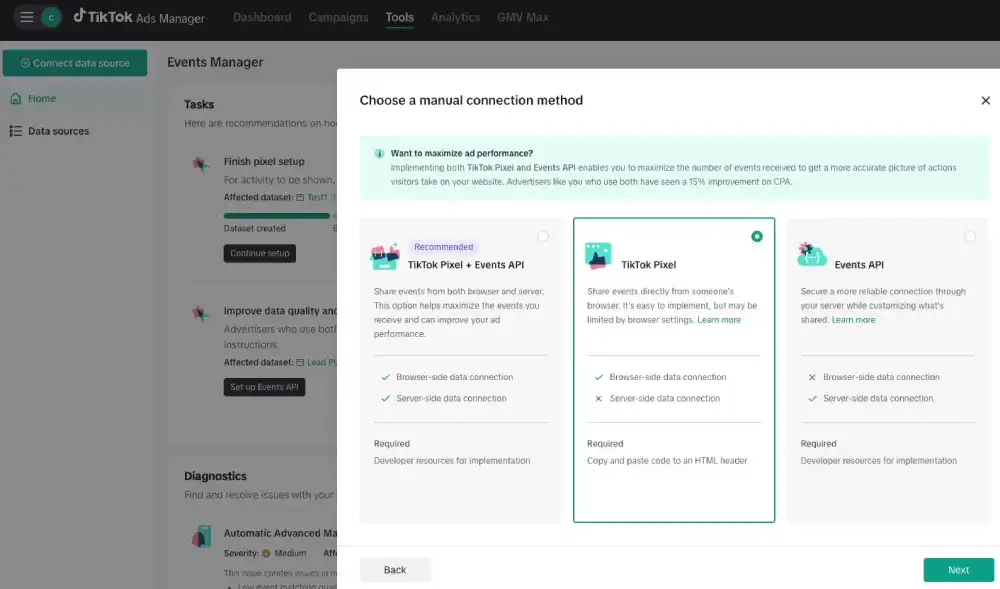
You need both the Pixel and the Events API, not just one. The Pixel fires from the visitor’s browser. The Events API sends conversion data from your server straight to TikTok. TikTok’s About Events API page recommends using both together with event deduplication, because connection problems and browser differences can stop the Pixel from reporting some conversions.
Step 1: Install the Pixel via Ads Manager or Tag Manager.
In TikTok Ads Manager, create a Pixel under your event tools and pick an installation method. Google Tag Manager is a flexible option for most setups, and Shopify stores can connect through the TikTok app for Shopify. The base code goes on every page of your site.
For the full walkthrough, see how to use the TikTok Pixel step by step.
Step 2: Configure the core conversion events.
Set up four standard events at minimum: ViewContent for product pages, AddToCart for cart additions, InitiateCheckout for checkout starts, and Purchase for completed orders. These four events build your retargeting audiences and give the algorithm what it needs to optimize toward each action.
Step 3: Verify firing accuracy with Pixel Helper.
Install the TikTok Pixel Helper Chrome extension, visit every key page on your site, and confirm the right events fire on the right pages. It shows errors as you browse, before they spoil your audience data.
Step 4: Turn on the Events API for redundancy.
Connect the Events API through a partner integration, Google Tag Manager, or your own server with an access token from Ads Manager. Send the same events through both channels with matching event IDs.
Deduplication matters: without it, a single purchase can be counted twice when both tracking channels catch the same event.
How to Build and Segment Your Retargeting Audiences
To build a retargeting audience, go to Assets, open Audiences in Ads Manager, click Create Audience, choose Custom Audience, and pick your source. For website traffic, choose the Pixel event and set your lookback window. For video engagers, pick the ad groups or videos and the action. For customer files, upload your list.

TikTok won’t let an ad group target a custom audience below 1,000 matched users, as its About Custom Audiences page notes. If you’re short, temporarily broaden your event criteria (start with all product-page viewers instead of only cart abandoners) and narrow it once the audience grows.
Exclusion audiences aren’t optional. Exclude anyone who completed a Purchase within your lookback window. Showing a buy-now ad to someone who bought three days ago wastes budget and damages trust. Apply that Purchase exclusion at the ad group level on every retargeting campaign you run.
Keep retargeting and prospecting in separate ad groups. Mixing them muddies your budgets, blurs your creative strategy, and blends your optimization signals. Separated, you also get clean ROAS data per audience type instead of one blended number that hides what’s working.
Which Lookback Window Should You Use?
The lookback window sets how far back TikTok looks when building your audience. Too short, and you miss buyers still deciding. Too long, and you fill the audience with people whose interest has faded.
The engagement audience table above shows how far back each source can look. Inside those limits, a practical starting point looks like this:
- 7 to 14 days for cart abandoners and checkout starters. Interest is freshest here. Start short and extend only if the audience is too small to deliver. This segment responds to urgency and direct, low-friction offers.
- About 30 days for product page viewers and video engagers. These users are warm, but they take longer to decide. Social proof and answers to common objections work better than pure urgency.
- The longest windows for re-engagement and win-back. Use this for past buyers you want to upsell, or people who engaged months ago and never converted. Give them a new product or a new angle, not the same ad twice.
Match the window to your product’s decision cycle. A low-priced skincare item moves fast, so a short window for cart abandoners fits. A large furniture purchase takes longer, so a longer window for product page viewers will hold more real buyers.
TikTok Retargeting vs. Prospecting: What Changes
Retargeting and prospecting differ in who they reach, what the ad has to do, and how you judge results.
| Factor | Retargeting | Prospecting |
|---|---|---|
| Audience | People who already engaged or visited | People who have never seen your brand |
| Audience size | Small and limited by your traffic | Large |
| Creative approach | Direct offer, social proof, urgency | Brand story, hooks, awareness |
| Budget share | The smaller slice | Most of your spend |
| How to judge it | Cost per purchase and ROAS against your own prospecting | Cost to reach and add new people to your pools |
Retargeting depends on prospecting, so keep that budget steady even when retargeting looks like the better deal.
Retargeting Creative: What Warm Audiences Actually Need
Warm audiences need a reason to finish, not an introduction. That single mismatch explains most underperforming retargeting campaigns. Advertisers run their prospecting video against a retargeting audience, watch CTR go flat, and conclude the channel doesn’t work. The channel is fine. The creative is wrong.
Cart abandoners: urgency and a direct hook
Reference the exact product they left behind and give them a reason to act now: a reminder that the cart is still there, an honest low-stock line, or a close-up of the product with a time-limited offer. A small discount or free shipping removes a common friction point, if your margins allow it. Skip the brand story; every second spent on context is a second not spent closing the sale.
Video viewers: social proof and objection handling
Someone who watched most of your video showed real interest but still hesitated. That is often a trust gap, not a product gap. Short, real customer testimonials close that gap better than polished brand content. End with a specific, benefit-led call to action that says what the buyer gets, rather than a generic Shop now.
Website visitors: product-specific creative
Show the exact product they viewed, not your general catalog. Catalog-based ads can pull this from your product catalog automatically. Without a catalog, segment by product category and run category-specific ads. Someone who spent three minutes on your running shoes page doesn’t need to see hiking boots.
You’re not meeting these people for the first time. An introduction burns the opening seconds of your ad, and those are the seconds that decide whether people keep watching. Open with the offer, the result, or the proof, and build from there. For a repeatable way to find which version wins, use a creative testing framework built for TikTok.
Budget Allocation: How Much Should Go to Retargeting?
Retargeting should get a smaller share of your TikTok budget than prospecting, because it converts demand that prospecting creates. The most common mistake is over-funding retargeting before the top of the funnel is healthy.
A practical way to split a mature account:
- Most of the budget: cold prospecting. New audience acquisition and top-of-funnel awareness.
- A smaller slice: warm retargeting. Website visitors, cart abandoners, video engagers.
- A small share: customer retention. Upsell and cross-sell to existing buyers.
- A little for testing. New formats, placements, and lookalike seeds.
Treat this as a starting point, not a rule. If retargeting keeps beating prospecting by a wide margin on your backend numbers, shift budget toward it in small steps. For more ways to stretch spend, see these TikTok ad budget optimization tips.
Give each retargeting ad group enough budget to leave the learning phase. TikTok’s Learning Phase article says volatility usually starts to drop after about 25 campaign results or 7 days. A small cart-abandoner audience may never produce that many results in a week, which is another reason to start with broader segments.
Once a campaign has stable results, scale in steps. TikTok’s About budgets page says to raise the budget by no more than 40% per change while still in the learning phase and no more than 30% after it, and to wait at least two days between changes. Large jumps force the system to find many more converters at once, which can bring back the volatility you just got past.
Diagnosing and Fixing TikTok Ad Fatigue
Ad fatigue hits retargeting campaigns faster than prospecting because the audience is small and fixed. The same people see the same ad over and over until they stop responding, and your CPA climbs quietly while ROAS slides.
Watch three metrics together, not separately:
- Frequency that keeps rising week over week on the same small audience.
- CTR that falls below what the same creative earned in its first days.
- CPA that rises several days in a row while frequency holds steady or climbs, which points to creative fatigue rather than a bidding problem.
When all three show up together, the diagnosis is clear. If CTR is the weak signal on its own, the guide to fixing low CTR on TikTok covers that diagnosis in more depth.
Plan creative rotation before fatigue shows, and expect to rotate faster as spend rises, because the same users see the ad more often in less time. You don’t need an entirely new concept each time; swapping the hook, keeping the body, or changing the background audio can extend a working creative’s life.
When frequency climbs and CTR falls, do two things: upload fresh creative to the same ad group and pause (don’t delete) the underperformer, and broaden the audience slightly, either by widening the lookback window or adding a related event.
How to Measure True ROAS From TikTok Retargeting
TikTok Ads Manager reports ROAS based on the attribution window you set, so know what that number counts before you move budget on it.
You choose the window when you build each ad group. TikTok’s guide to attribution windows lists click-through options of 1, 7, 14, or 28 days and view-through options of off, 1, or 7 days, and the setting cannot be changed once the ad group is published.
The view-through part is where retargeting numbers inflate. If someone sees your ad Monday, doesn’t click, then buys Tuesday after a Google search, a view-through window can credit that sale to TikTok while your backend logs it as search traffic. Retargeting audiences already know you, so many of them would have bought anyway.
For retargeting, build ad groups with a click-through window and view-through turned off or kept short. For high-intent segments like cart abandoners, a 1-day click window is the strictest choice. It will show a lower ROAS, but one closer to real buyer behavior. Since the window is locked after publishing, set it up front.
Marketing Efficiency Ratio (MER) is total revenue divided by total ad spend across every channel, and it doesn’t care which platform claims credit. For example, $5,000 in weekly spend against $20,000 in weekly revenue is an MER of 4.0. Compare that with TikTok’s reported ROAS; a big gap between the two points to attribution inflation.
To reconcile the two, pull TikTok-attributed revenue from Ads Manager and compare it with backend sales by traffic source for the same period. Set your targets against a rolling average of backend data, not a single-day snapshot in Ads Manager.
Mistakes That Quietly Drain Retargeting Budget
Five retargeting mistakes show up in most underperforming accounts, and they overlap with the broader TikTok ads mistakes seen across every campaign type. Each one is fixable, but left alone, any of them can drain budget for weeks without an obvious cause.
- Launching below the audience minimum. A custom audience below TikTok’s matched-user minimum can’t be targeted at all, and one just over the line gives the algorithm little to work with. Build audience size through prospecting first.
- Skipping exclusion audiences. Serving a buy-now ad to someone who purchased three days ago is a budget drain and a trust problem.
- Reusing prospecting creative on warm audiences. A video that introduces your brand from scratch is the wrong message for someone already past that stage. It shows up as weak CTR and a high CPA with no obvious creative explanation.
- Running only the Pixel and skipping the Events API. Conversions the browser fails to report never reach TikTok, so your cost per action looks worse and the algorithm learns from an incomplete picture of your buyers.
- Stacking too many filters on a custom audience. Adding demographic, interest, and behavior layers on top of a behavioral custom audience shrinks an already small pool below what it needs to deliver well or gather enough results to leave the learning phase. Trust the intent signal you already have.
Scaling Winning Campaigns Without Resetting the Algorithm
Scale a winning retargeting campaign in small, spaced budget steps rather than one big jump. Once a campaign clears the learning phase with stable ROAS, the instinct is to scale hard, and that instinct is what brings the volatility back. For the general playbook beyond retargeting, see how to scale TikTok ads without breaking performance.
If you want increases to happen without checking every day, Automated Rules in Ads Manager can raise a budget when conditions you set are met, such as CPA staying under your target, so budget moves on schedule instead of on impulse.
The next step up is a Lookalike Audience built from your best retargeting segments, such as purchasers. TikTok’s lookalike audience options are Narrow, Balanced, and Broad, and the source audience needs at least 1,000 users. A Narrow lookalike from buyers is a sensible first test, and it feeds new people into your retargeting pool.
FAQs
How do I set up TikTok retargeting ads?
Install the TikTok Pixel on your site and add the Events API for server-side tracking. In Ads Manager, open Assets, then Audiences, and build Custom Audiences from Pixel events, ad or video engagement, or a customer file. Create an ad group that targets that audience, add a Purchase exclusion, and use creative made for people who already know you.
What’s a good ROAS for TikTok retargeting?
A good retargeting ROAS is one that clears your break-even point with real profit left over, so it depends on your margins and product costs. Work out your break-even ROAS first. Then compare retargeting against your own prospecting results and backend sales data, not a general benchmark from another account.
How do I fix ad fatigue on a retargeting campaign?
Look for rising frequency, falling CTR, and a CPA that climbs several days in a row. When all three appear together, add fresh creative to the same ad group and pause the tired ad instead of deleting it. Widening the lookback window or adding a related event can also give the ad group new people to reach.
Pixel vs. Events API: what’s the actual difference for retargeting?
The Pixel reports events from the visitor’s browser, while the Events API sends them from your server. Browser and connection issues can stop the Pixel from reporting some conversions, so TikTok recommends running both together with deduplication. For retargeting, that means more of your real visitors end up in your audiences.
How should I segment retargeting audiences?
Segment retargeting audiences by intent level. Give cart abandoners a short lookback and product viewers and video engagers a longer one, each with its own ad group, budget, and creative. Cart abandoners respond to urgency, video viewers to social proof, and product viewers to product-specific ads. Exclude recent buyers from all of them.
Can I run retargeting without a Pixel, using video viewers only?
Yes. TikTok can build audiences from engagement alone, such as people who watched part or all of your ads, or who viewed or engaged with your organic videos. Ad audiences offer more view-depth and lookback choices than organic ones. This is the fastest starting point if your website traffic is still thin.
The Piece Most Accounts Are Missing
Your warm audience is the most valuable segment you have on TikTok. They watched your content, visited your site, or left something in a cart. They’ve already shown where their interest sits. What’s missing is the right message at the right moment.
Most accounts that struggle with retargeting are missing one layer, not the whole system. The Pixel is installed, but not the Events API. The exclusions got skipped. The creative is still the prospecting video. The budget got doubled overnight. Each one is fixable on its own, so check them in that order.