
Your TikTok ads are running. People are clicking. But your conversion numbers just don’t add up.
If many of your buyers use iPhones and your results feel off, you likely have a tracking problem, not a creative problem.
Apple’s privacy rules limit what the TikTok Pixel can store and send from an iPhone browser. And unless you know where to look in Events Manager, you won’t even see it happening.
This article explains what breaks for TikTok web events on iOS, how to check your setup, and which fixes close the gap: Advanced Matching, the Events API and clean deduplication.
Get Up to $6000 Free TikTok Ad Credit
Table of Contents
Key Takeaways
- Every browsing app on iPhone must use Apple’s WebKit engine, except where Apple grants an alternative engine entitlement in the EU and Japan, so Safari’s privacy rules reach most iOS browsers.
- Safari blocks third-party cookies by default, and WebKit can cap cookies set by scripts, like the pixel’s own cookie, to one day after a click from a tracking domain with a decorated link.
- Event Match Quality (EMQ) in TikTok Events Manager is a weighted average of how many of your events carry each match key, such as hashed email or phone.
- TikTok recommends running the Pixel and the Events API together with event deduplication, using the same event_id on both.
- On Shopify, the Enhanced data sharing level already adds the Events API and Advanced Matching. Standard uses the Pixel only.
Quick Answer
TikTok web events break on iOS because Apple’s WebKit engine, which iPhone browsers use, blocks third-party cookies and can cap the TikTok Pixel’s own cookies to one day. Purchases that happen later, or in a session the pixel can’t tie back to the ad, drop out of your reports. The fix is a hybrid setup: keep the browser Pixel, add server-side Events API calls with the same event_id, and turn on Advanced Matching so TikTok can match events with hashed email or phone.
Why iOS Specifically Breaks TikTok Web Events
TikTok web events break on iOS because of how Apple’s browser engine treats cookies and tracking, not because your pixel is broken.
Apple’s App Review Guidelines require apps that browse the web to use WebKit, Apple’s engine, with entitlements for other engines only in the EU and Japan. So in most markets, Safari, Chrome and Firefox on an iPhone all share WebKit’s privacy rules.
Two of those rules matter most for the TikTok Pixel:
- Third-party cookies are blocked. WebKit announced that Safari fully blocks third-party cookies by default. TikTok’s pixel cookies page says the pixel uses a third-party cookie as well as a first-party one, so on Safari only the first-party cookie can help.
- Script-set cookies can expire in a day. Under Intelligent Tracking Prevention 2.2, a cookie set by JavaScript is capped to one day when a domain WebKit classifies as a cross-site tracker sent the visitor and the landing URL carries a query string. An ad click that adds a click ID to your URL can fit that pattern when WebKit has classified the referring domain as a tracker.
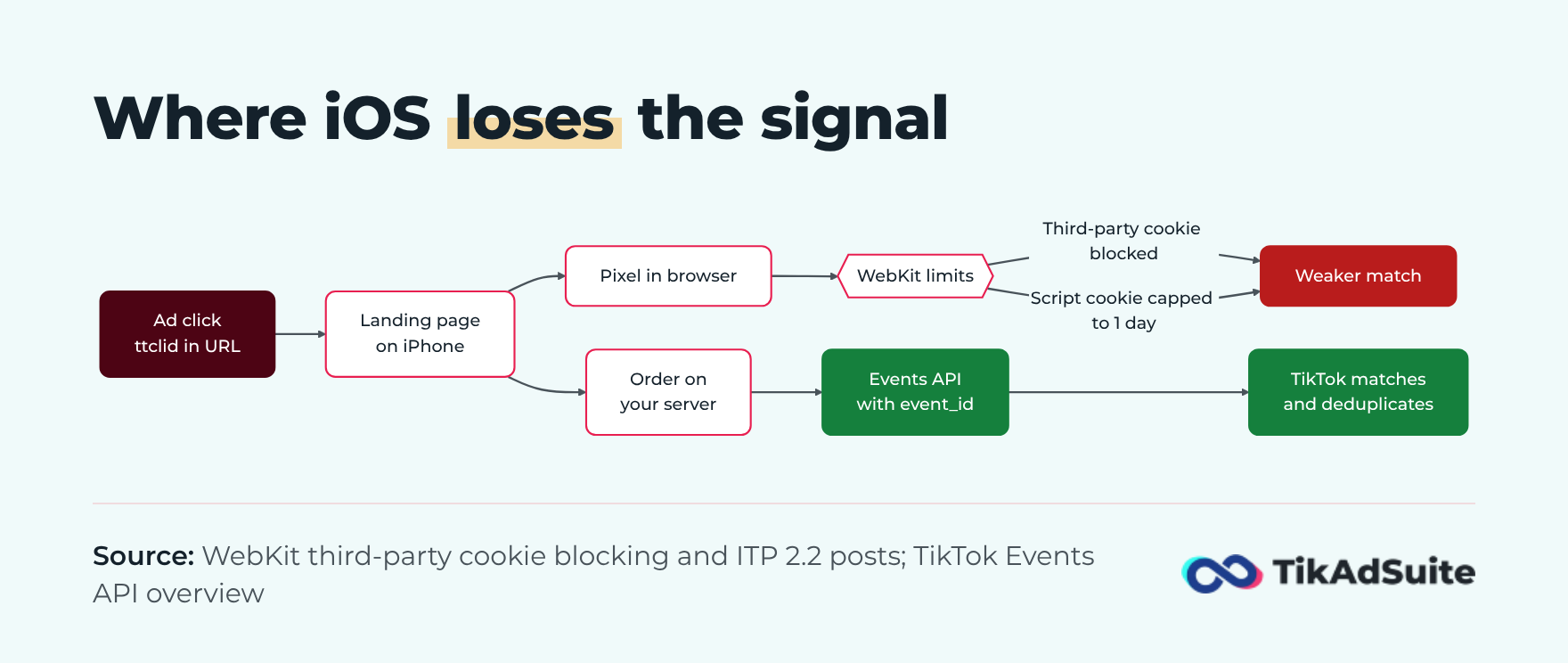
So if a shopper clicks your ad on Monday and buys on Wednesday, the pixel may no longer have a cookie to tie that purchase back to the click.
App Tracking Transparency (ATT) is the other piece. Apple’s user privacy page says ATT lets people choose whether an app may track their activity across other companies’ apps and websites. When someone says no, TikTok has less to connect an ad view to a later site visit.
That’s how a profitable campaign can look like a losing one: the signal never makes it back to TikTok. Keep this in mind when you read your TikTok ad reports, since missing iPhone purchases make results look worse than they are.
What Is Event Match Quality and Why Does It Matter?
Event Match Quality (EMQ) is TikTok’s score for how well your web events can be matched to people on TikTok. You’ll find it in TikTok Events Manager next to each event.
TikTok’s Events Manager monitoring guide says the score is a weighted average of all your match key coverages. In plain terms, it reflects how often your events arrive with the customer details TikTok can match, such as hashed email, phone number or a click ID.
TikTok doesn’t publish fixed bands for a good or bad score, so judge it by direction. If your Purchase event scores lower than your other events, or drops after a site change, the data attached to it got thinner.
A low EMQ doesn’t mean your events aren’t firing. It means they’re firing with too little data attached. That’s a different problem, and it needs a different fix.
How to Check Your EMQ Score Right Now
You don’t need to touch any code to run this check.
Here’s where to find it:
- Go to TikTok Ads Manager
- Click the Tools tab, then Events Manager
- Click on your pixel (data connection)
- On the Overview tab, look at the EMQ Score and Connection Method columns for each event
Connection Method is the quickest check. The monitoring guide says it shows whether each event arrives browser only, server only, or server & browser. If your Purchase event says browser only, iPhone buyers are the most likely to go missing.
You can also use the Test Events tab inside Events Manager. Open your website from there, add a product to the cart or place a test order, and watch the events arrive. TikTok lets you filter test events by browser and server, so you can see whether both layers fire.
The Three Most Common iOS Tracking Problems
Most iOS signal loss for TikTok web events comes from one of three problems, and each has its own fix.
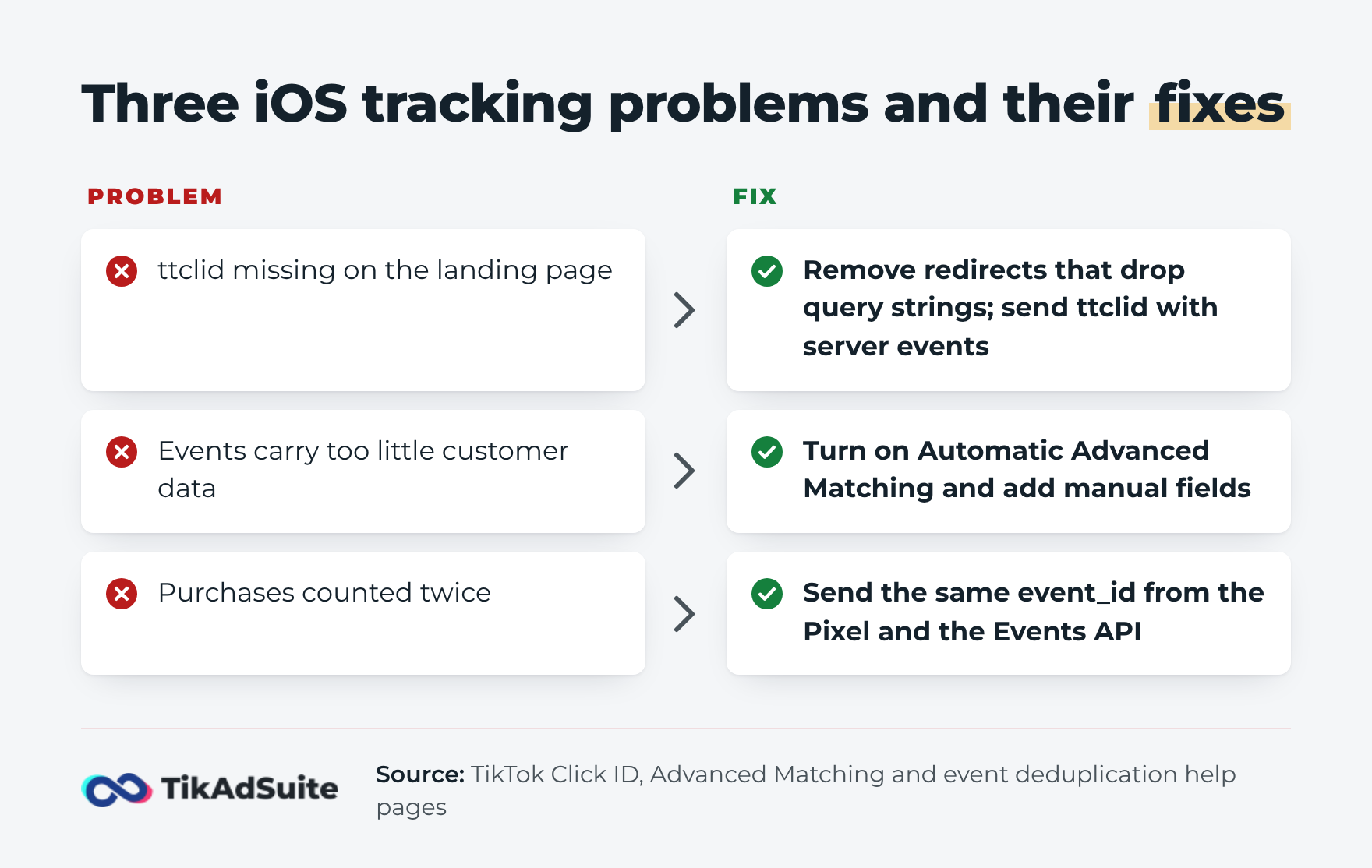
Problem 1: Your ttclid Is Getting Stripped
The ttclid is TikTok’s click ID. TikTok’s Click ID page explains that it’s added to your landing page URL when someone clicks your ad, and that events sent through the Pixel or Events API with that ID are matched to the ad for attribution, audiences and optimization.
Several things can remove the ttclid before your pixel reads it:
- URL redirects between your ad destination and your landing page that drop query strings
- Ad blockers or privacy tools that filter URL parameters
- Apple’s Link Tracking Protection, which Apple’s 2023 privacy announcement says removes tracking information from links shared in Messages and Mail and from links in Safari Private Browsing
If the ttclid is missing, TikTok has a harder time connecting the session to the ad. Your ROAS reporting weakens, and so does optimization.
How to check: Use the Preview option in TikTok Ads Manager, or click your live ad on an iPhone, and see whether ?ttclid= is still in the address bar when the landing page loads. If it isn’t, something in your redirect chain is stripping it. Capture it on arrival and send it with your server events too.
Problem 2: You’re Not Sending Enough Data With Each Event
A basic pixel install sends the event and the page it happened on, which is often not enough for TikTok to make a match on iOS.
TikTok’s matching works best when it receives customer details with the event: an email address, a phone number, or both, hashed before they’re sent. When those fields are empty, your EMQ stays low even if your pixel is technically working.
According to TikTok’s Advanced Matching documentation, customer emails and phone numbers are hashed with SHA256 before they reach TikTok’s servers.
If your setup isn’t passing these fields, Advanced Matching isn’t doing its job.
Problem 3: Your Hybrid Setup Has a Deduplication Error
Many advertisers who add the Events API next to the pixel find they’re now counting purchases twice.
This happens when the browser pixel and the server-side API both send a Purchase event for the same order but use different event_id values.
TikTok’s deduplication matches on event_id. The event deduplication page says you must send the same event_id through both the Pixel and the Events API. When the IDs match, the same page says TikTok merges Pixel and Events API copies that arrive after 5 minutes and within 48 hours of the first event. If the IDs don’t match, both count.
Double counting inflates your reported conversions, distorts your cost per purchase, and teaches your campaign to optimize toward a number that isn’t real.
How Advanced Matching Fixes the iOS Attribution Gap
Advanced Matching links your web events to people on TikTok using hashed customer details, so matching depends less on cookies. It works with events sent through the Pixel, the Events API or a partner platform.
There are two versions: Automatic and Manual
Automatic Advanced Matching has the pixel find form fields on your pages and hash the customer details people enter there. TikTok’s best practices guide for Advanced Matching says you can turn it on with a few clicks in Events Manager, and that it works best on pages where customers enter their details, such as login, registration, checkout and newsletter signup pages.
Manual Advanced Matching lets you choose which customer fields to send with each event in your code. It gives you more control but needs a developer.
TikTok recommends using both together where you can. If you don’t have developer time, turning on Automatic Advanced Matching is the quickest improvement available, and you can add manual fields later.
Why Server-Side Tracking Is the Real Fix for iOS
Server-side tracking is the real fix for iOS because it doesn’t rely on the iPhone’s browser. Advanced Matching improves matching, but it still depends on the browser pixel firing and sending the data, and on an iPhone that browser layer is exactly where the limits sit.
The Events API works differently. It sends events from your server to TikTok, so a purchase confirmed on your server can still be reported when the browser held back data. TikTok’s Events API overview says connectivity issues and browser inconsistency can affect conversions reported through the Pixel, and recommends using the Pixel and Events API together with event deduplication.
For TikTok ecommerce campaigns, this matters most for purchase events. Picture a shopper who clicks your ad, browses your Shopify store on an iPhone, and buys three days later. A browser-only setup may miss the link between that order and the ad.
With server-side tracking, the purchase event is sent after the order is confirmed, carrying the hashed email and the ttclid you saved, regardless of what the shopper’s browser allowed.
How to Validate Your iOS Tracking Is Actually Working
Running the setup isn’t enough: validate that your iOS tracking is working before you trust your numbers.
Here’s a quick validation checklist:
- Connection Method: In Events Manager, check that Purchase and your other key events show server & browser, not browser only.
- Test Events tab: Open your website from Test Events, complete a test purchase or key action, and filter by browser and by server. You should see the event in both.
- Deduplication: Open the event details in Events Manager, which include deduplication information, and confirm the browser and server copies share one event_id.
- Event Status: An event shows Active when it was shared with TikTok in the last 7 days, per the monitoring guide. No recent activity on Purchase after a launch means something broke.
- TikTok Pixel Helper: TikTok’s Pixel Helper guide describes it as a Chrome extension that checks your pixel for errors at the pixel, event and parameter level. Run it on your key pages.
- Attribution window: Know which window your ad groups use. TikTok’s attribution windows blog post says Pixel and Events API advertisers default to 7-day click and 1-day view. The ad group attribution settings page adds that you can pick 1, 7, 14 or 28 days for clicks, but not change it after the ad group is published.
If you’re running TikTok retargeting campaigns, the validation step matters even more. Retargeting depends on accurate audiences, and if your pixel misses iOS sessions, your retargeting pool is smaller than it should be.
Does Your Platform Handle This Automatically?
Some ecommerce platforms set up server-side tracking for you, as long as you pick the right data sharing level.
Shopify: The TikTok app on Shopify has three data sharing levels. TikTok’s Shopify data sharing page describes them like this:
- Standard: the TikTok Pixel only, which browser ad blockers can stop
- Enhanced: the Pixel plus the Events API and Advanced Matching
- Maximum: everything in Enhanced plus Shopify APIs and In-App Shopify Checkout, which is in beta
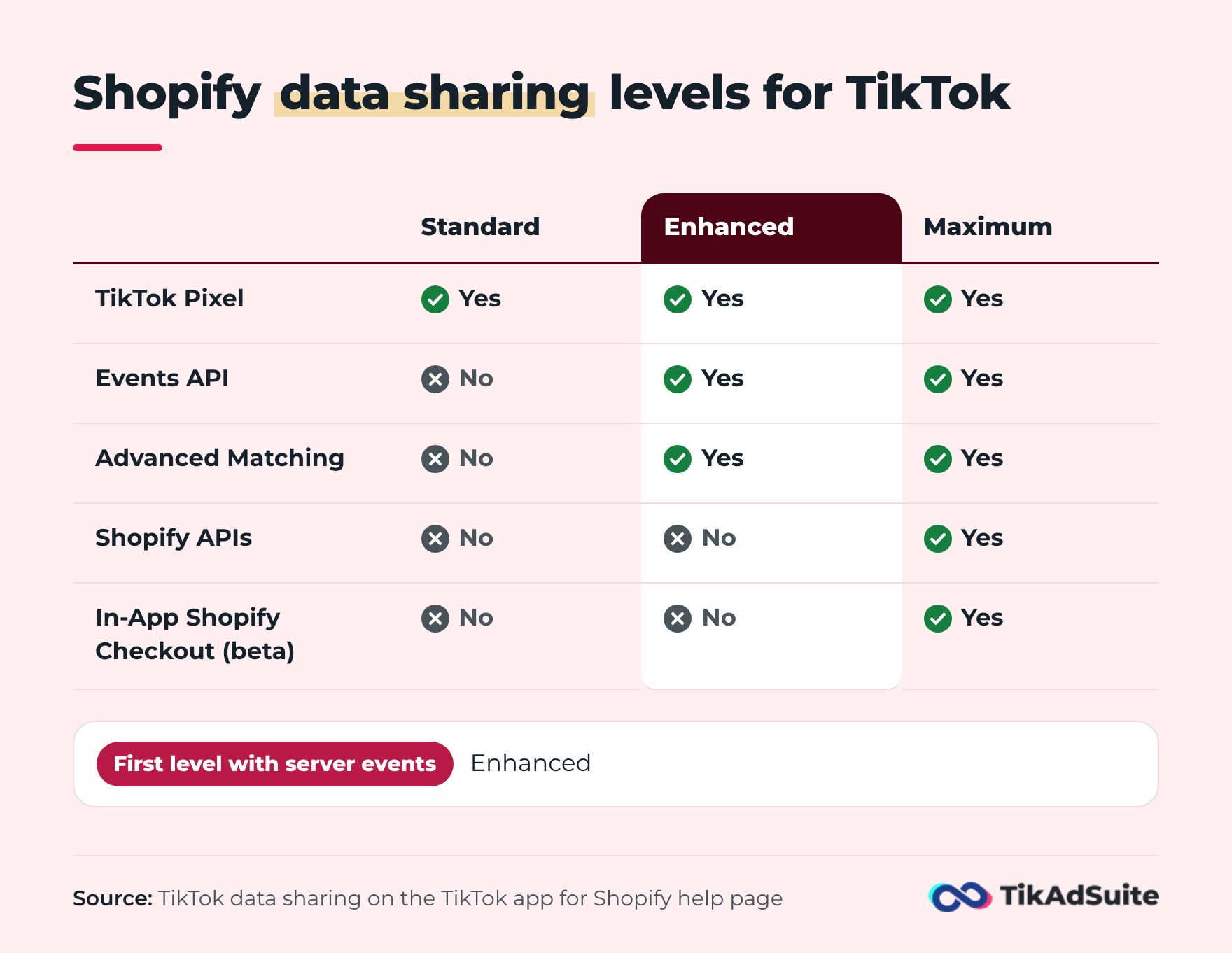
So Enhanced is the first level that sends server events. To check yours, open the TikTok app in your Shopify admin and look at the data sharing setting. If it says Standard, your iPhone buyers depend on the browser pixel alone.
WooCommerce and other platforms: WooCommerce is one of the partner platforms named on TikTok’s pixel cookies page. TikTok’s partner integrations page says partner platforms can set up the Pixel and Events API, often without edits to your site’s code. Check your plugin settings for an Events API option and make sure it’s on.
Custom or headless storefronts: You’ll need a developer to connect the Events API directly. Customer details such as email and phone should be hashed before they’re sent, and every event should carry the same event_id your pixel sends.
If you also sell through TikTok Shop alongside a website, keep in mind this article covers web events on your own site, not orders placed inside TikTok Shop.
What Happens to Your Campaign Performance When EMQ Is Low
When EMQ is low, TikTok can’t match many of your conversion events to people, so your campaigns have less to learn from. It can’t see which audiences buy, it builds smaller retargeting audiences, and it has fewer signals to steer delivery toward likely buyers.
TikTok’s Advanced Matching documentation lists the other side of this: matching more events helps you measure more conversions, improve ad delivery and lower CPAs, and expand audiences for retargeting.
The practical result of poor matching: your TikTok ad costs can rise without a matching rise in results. CPAs creep up. Campaigns that were profitable start to look marginal. Some advertisers pause ads that were working, because the sales never showed up in the report.
Fixing your data connection is often worth doing before you change bids or creative, because both of those decisions rely on the conversions you can see.
Is There a Privacy-Safe Way to Do This?
Yes, there’s a privacy-safe way to do this. Customer emails and phone numbers sent through TikTok’s Advanced Matching are hashed with SHA256 before they reach TikTok’s servers, as the Advanced Matching documentation explains. With Automatic Advanced Matching, the pixel does the hashing in the browser. With the Events API, your server or platform hashes the values before sending.
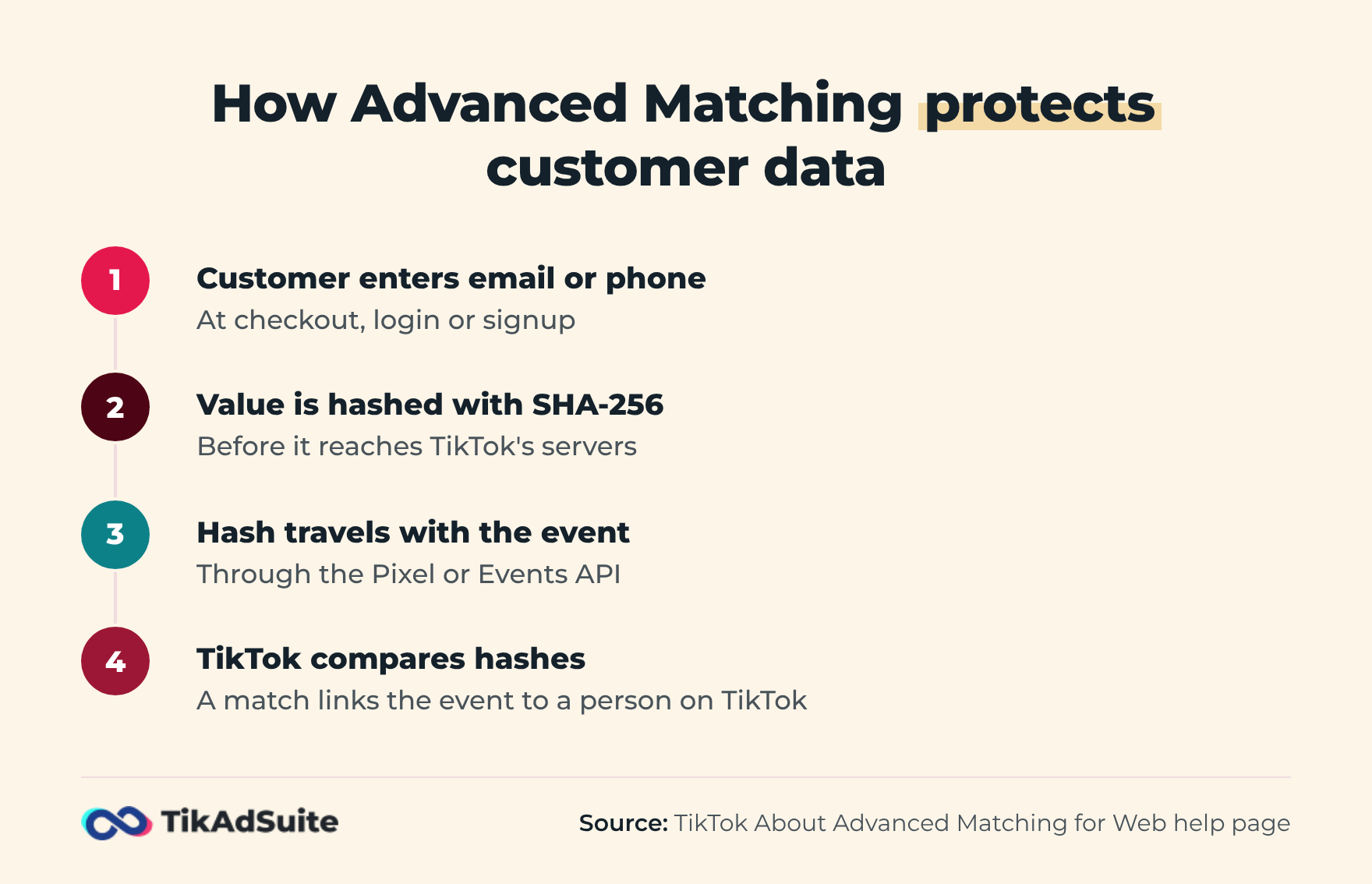
TikTok receives a one-way hash, compares it with its own hashed data, and either finds a match or doesn’t. The same page notes that TikTok is ISO 27001 certified in the US and UK.
If you operate in a regulated industry, such as healthcare or financial services, TikTok suggests considering Manual Advanced Matching instead of Automatic, so you control exactly which fields are sent. Its best practices guide also asks you to check that pixel pages don’t collect sensitive data such as driver’s license or Social Security numbers.
You should also review your privacy policy to confirm it covers hashed customer data used for ad measurement. TikTok’s Shopify page makes the same point for store owners.
Tools like Clym can help you maintain GDPR and CCPA-compliant consent banners alongside your TikTok tracking setup, which is especially important if you have European or California traffic.
FAQ: TikTok Web Events for iOS
Why does TikTok tracking break more on iOS than on Android?
On iPhone, browsing apps must use Apple’s WebKit engine in most markets, so Safari’s rules apply: third-party cookies are blocked and some script-set cookies are capped to one day. Android browsers aren’t bound by Apple’s WebKit rule, so those Safari limits don’t apply there.
Where is my TikTok pixel in Ads Manager?
In TikTok Ads Manager, click the Tools tab, then Events Manager. Your pixels are listed as data connections. Click one to see its events, EMQ Score, Connection Method and the Test Events and Diagnostics tabs.
What is the difference between the TikTok Events API and the TikTok Pixel?
The TikTok Pixel runs in the visitor’s browser and sends events from your web pages. The Events API sends events from your server to TikTok, so it doesn’t depend on browser cookies. TikTok recommends using both together, with the same event_id on each event so duplicates are merged.
Can I set up TikTok web events without a developer?
Often, yes. Partner platforms such as Shopify and WooCommerce can set up the Pixel and Events API without code edits. On Shopify, choose the Enhanced or Maximum data sharing level in the TikTok app. Custom or headless stores usually need a developer to send server events and hashed customer data.
Do I need app events instead of web events?
Only if people convert inside your own iOS app. Web events track actions on your website through the Pixel or Events API. Purchases and signups inside a mobile app are measured with app events, through TikTok’s App Events SDK or a mobile measurement partner, set up from Events Manager.
Wrapping Up
The iOS tracking problem doesn’t announce itself. Your campaigns just slowly stop making sense. Conversions dip. CPAs rise.
You test new creatives and change targeting, but the numbers stay flat. Meanwhile, the pixel may be losing iPhone buyers who came back after their cookie expired or whose browser never kept one.
The fix starts with one check: open Events Manager and look at the Connection Method and EMQ Score for your Purchase event. Browser only, or a score lower than your other events, points to a data problem that creative testing won’t solve.
Next, turn on Automatic Advanced Matching, move your Shopify app to Enhanced or Maximum data sharing, or switch on the Events API in your platform’s plugin.
Confirm both browser and server events show up in Test Events, with the same event_id. Then give it a few days of traffic and check your EMQ again.
If you’re ready to get your TikTok Ads account running with clean data, starting from the measurement layer up is the only approach that holds.