
Someone watched your whole video, tapped through to your site, added a product to their cart, then vanished. That person is not a stranger. They are your easiest sale, and most advertisers let them slip away.
Retargeting fixes that. It puts your ads back in front of people who already know you, so you stop paying to win the same attention twice.
The trouble is that a sloppy setup wastes money and shows ads to the wrong people. This guide walks you through the whole process, clearly and in order.
Here is what you will learn:
- How to install and verify the TikTok Pixel before you build anything
- The exact path to create website and engagement custom audiences
- How to structure a retargeting campaign inside TikTok Ads Manager
- Which audience segments convert best and how to separate them
- How to write retargeting creative that feels like a reminder, not a repeat
- The mistakes that quietly drain budget and how to dodge them
By the end, you will have a working setup you can copy across products and campaigns. Let’s build it.
Get Up to $6000 Free TikTok Ad Credit
Table of Contents
Key Takeaways
- Retargeting only works after the TikTok Pixel is installed and firing correctly, so verification comes first.
- You need at least 1,000 users in a segment before TikTok lets you target a custom audience.
- Cart abandoners and high-percentage video viewers are usually your strongest retargeting segments.
- According to TikTok for Business, the Pixel lets you retarget people who visited your site or took a specific action on it.
- Separate warm audiences into their own ad groups so you can read performance and control spend.
- Fresh creative beats recycled creative, since warm viewers have already seen your first ad.
What Is TikTok Retargeting and Why It Works
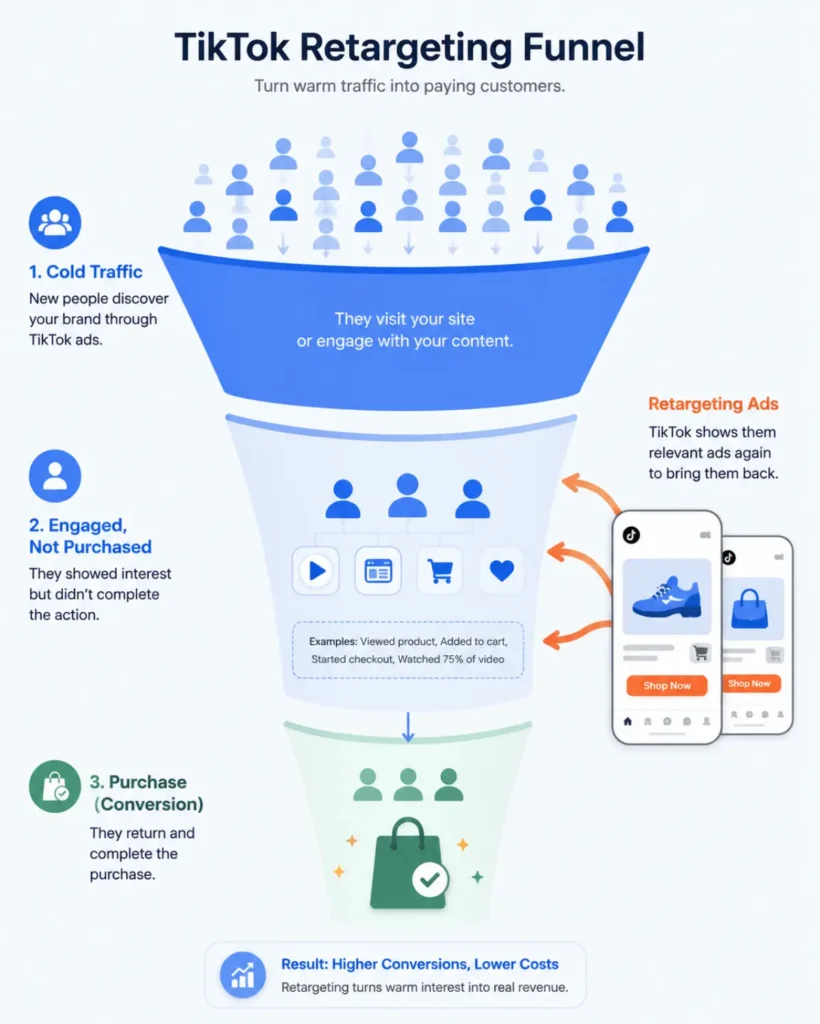
Retargeting means showing ads to people who already interacted with your brand. They watched your video, visited your page, or started a checkout. You are reaching back out, not reaching out cold.
This works because warm traffic converts at a higher rate than cold traffic. The person already crossed the first hurdle of knowing you exist. Your ad becomes a nudge instead of an introduction.
Think of it like a shop owner who recognizes a regular. You do not re-explain what you sell. You point them to the thing they were eyeing last time.
How Do You Set Up Retargeting on TikTok Step by Step?
You set up TikTok retargeting in four stages: install the Pixel, build a custom audience from that data, create a campaign that targets the audience, then load fresh creative built for warm viewers. Each stage depends on the one before it, so follow the order.
Below, each stage is broken into clear actions.
Step 1: Install and Verify the TikTok Pixel
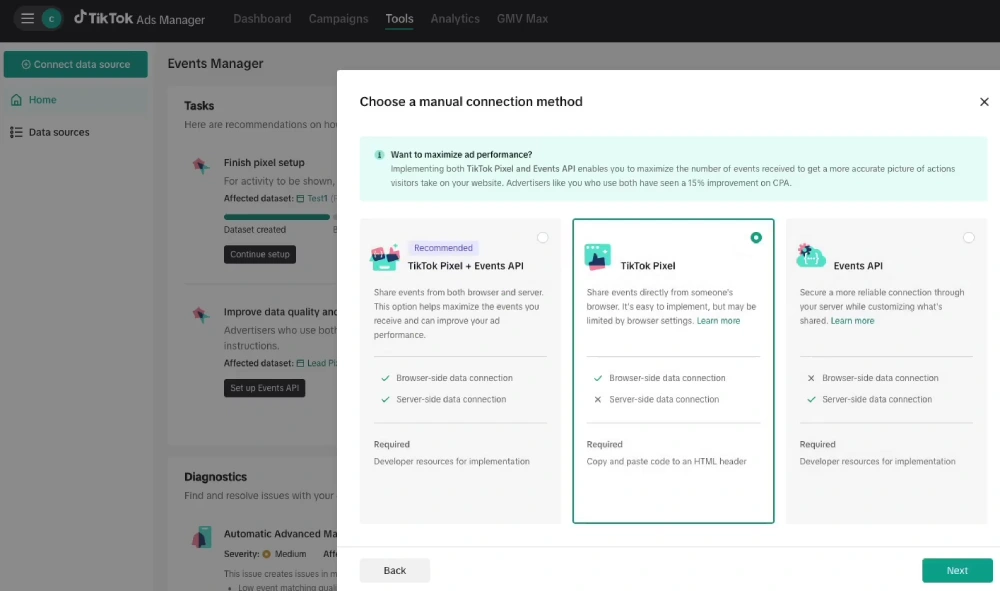
The Pixel is the tracking code that records what people do on your website. Without it, you have no website data to retarget. This is the foundation, so do it first.
In TikTok Ads Manager, open Assets, then Events. Choose Web Events and create your data connection. If you run Shopify or WooCommerce, use the native partner integration. It is faster and far less error-prone than pasting code by hand.
Set up your standard events so the Pixel knows what to track. Configure ViewContent, AddToCart, InitiateCheckout, and CompletePayment. These cover the key steps of a buyer’s journey.
Then verify it. Install the TikTok Pixel Helper Chrome extension and visit your own site. A green check means the Pixel is firing.
You can also check Events Manager to confirm that your data source shows active and is logging recent events. For a deeper walkthrough, our guide on how to use the TikTok Pixel covers placement and common errors.
Step 2: Build Your Custom Audiences
Once the Pixel collects data, you turn that data into targetable groups. In TikTok Ads Manager, go to Assets, then Audiences. Click Create Audience, then Custom Audience.
You will see several source options. The two most useful for retargeting are website traffic and engagement.

Website custom audiences pull from your Pixel. You can build segments like all visitors, product page viewers, or people who added to cart but never paid. You can also set a time window. Common windows are the last 7, 14, 30, or up to 180 days.
Engagement custom audiences pull from your TikTok activity. You can target people who watched 25, 50, 75, or 100 percent of your videos, or who engaged with your profile. High-percentage video viewers are gold, since watching most of a video signals real interest.
One rule matters here. You need at least 1,000 users in a segment before TikTok will let you target it. If your audience is too small, widen the time window or combine segments.
If you are still deciding between warm and cold strategies, the difference between custom audiences and lookalike audiences is worth understanding before you scale.
Step 3: Create Your Retargeting Campaign
Now you build the campaign that uses those audiences. Click Campaign, then Create. Pick your objective based on what you want the warm user to do.
For retargeting, conversions is usually the right call, since these people are close to buying. If you sell through a catalog, you can also use a sales objective that supports dynamic product ads. Picking the right goal matters, so review your options for TikTok ad objectives if you are unsure.
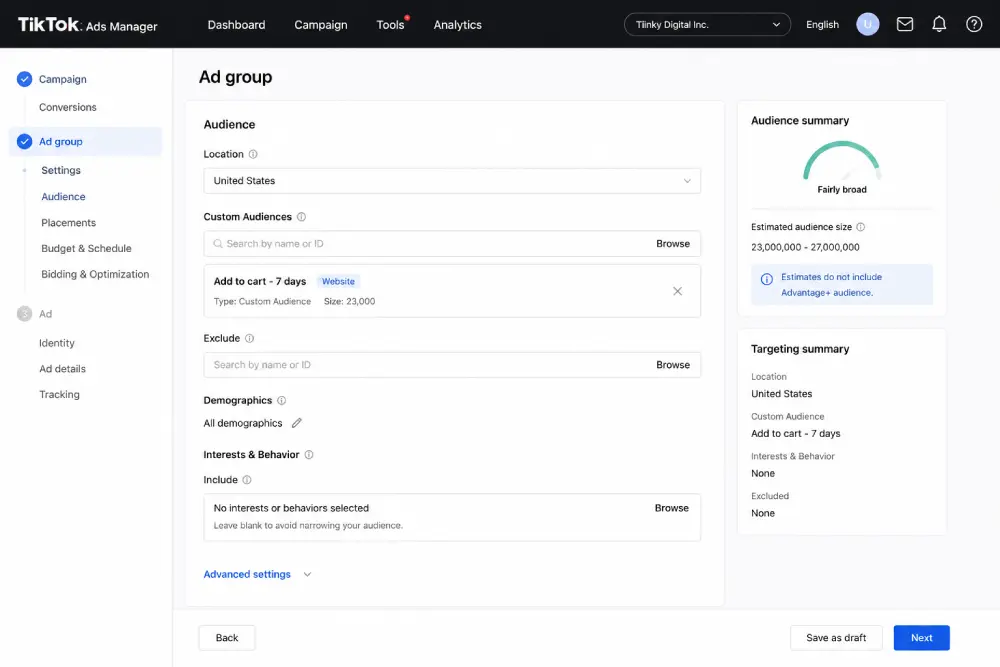
At the ad group level, this is where retargeting actually happens. In the targeting section, find Custom Audiences and select the warm segment you built in Step 2.
Do not layer heavy interest or demographic filters on top. The audience is already narrow, and extra filters can shrink it below the threshold.
Set your budget and schedule. Retargeting audiences are small, so you do not need a huge budget to reach them. Start modest and let the data guide you.
Step 4: Build Creative Made for Warm Viewers
Here is where most people fail. They run the same ad that cold traffic already saw. Warm viewers recognize it and scroll past.
Your retargeting creative should acknowledge the second touch. Address the hesitation directly. A cart abandoner might need a reminder of free shipping or a small discount. A product viewer might need a quick demo or a real customer review.
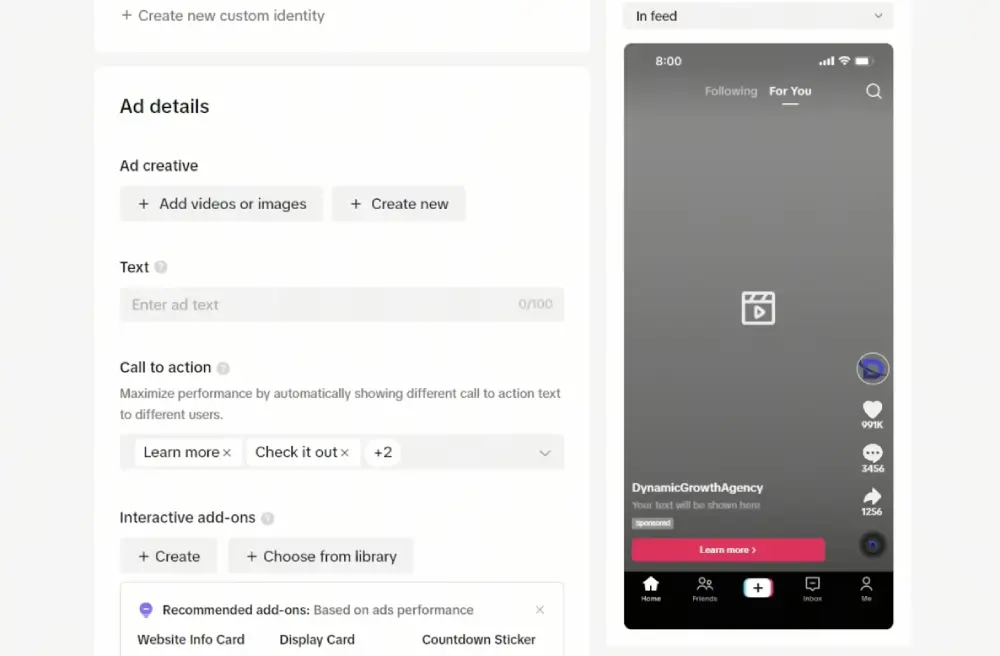
Keep the hook sharp in the first second. Warm or cold, the scroll-stopping opening still decides whether anyone watches. Lead with the benefit they were already interested in.
You do not need a studio to make fresh versions. A tool like CapCut lets you cut new edits, add captions, and test different hooks quickly, so each warm segment gets its own angle.
Which TikTok Retargeting Audiences Convert Best?
The highest-converting segments are people who showed clear purchase intent but stopped short. Cart abandoners and checkout abandoners top the list, since they were one step from buying. Product page viewers and deep video watchers come next.
The table below ranks common segments by typical intent level. Use it to prioritize where your budget goes first.
| Audience segment | Intent level | Best use |
| Initiated checkout, no purchase | Very high | Discount or urgency reminder |
| Added to cart, no purchase | High | Free shipping or product proof |
| Viewed product page | Medium-high | Demo or social proof |
| Watched 75 to 100 percent of video | Medium | Move from interest to consideration |
| All website visitors | Lower | Broad re-engagement, larger pool |
Start with the highest-intent segments and expand outward as you learn what converts. Splitting these into separate ad groups also makes your reporting readable, which ties into smart audience targeting overall.
How Long Should Your Retargeting Window Be?
Match the window to your buying cycle. For impulse or low-cost products, a 7 to 14 day window keeps your ads in front of people while interest is hot. For higher-priced or considered purchases, 30 to 90 days gives buyers time to decide.
Avoid going too wide too fast. An 180-day window includes people who barely remember you, which dilutes your warm pool. Test shorter windows first, then extend only if your audience is too small to run.
Common TikTok Retargeting Mistakes to Avoid
Small setup errors quietly burn budget.
Watch out for these:
- Launching before the Pixel is verified, which leaves your audiences empty
- Layering interest filters on top of a custom audience, shrinking it below the limit
- Mixing all warm segments into one ad group, so you cannot tell what works
- Reusing the same creative cold traffic already saw
- Setting a window so long that the audience stops being warm
- Ignoring frequency, which leads to ad fatigue and rising costs
Tracking the right numbers keeps you honest. Keep an eye on your TikTok ad metrics so you spot fatigue and falling returns early, before they eat your margin.
Frequently Asked Questions
How many people do I need to start retargeting on TikTok?
You need a minimum of 1,000 users in a custom audience before TikTok allows you to target it. If your segment is smaller, widen the date range or combine related segments, like cart adds plus product viewers. Building the Pixel early helps, since it gathers data while you prepare your campaign, so the pool is ready when you launch.
Can I retarget people who watched my TikTok videos without a website?
Yes. Engagement custom audiences let you target people based on video views and profile activity, no website required. You can build segments from viewers who watched 25, 50, 75, or 100 percent of a video. Deeper viewers signal stronger interest, so a 75 to 100 percent segment is a smart starting point for warm video retargeting.
What is the difference between the TikTok Pixel and the Events API?
The Pixel is browser-based code that tracks actions on your site. The Events API sends that data to TikTok from your server instead, which survives browser blocking and gives more reliable tracking. For lower ad spend, the Pixel alone is usually enough. As spend grows or tracking gaps appear, the Events API becomes worth the extra setup effort.
How much budget do I need for a retargeting campaign?
Less than you think, because retargeting audiences are small. You are reaching a limited pool of warm users, not the whole platform. Start with a modest daily budget, watch your cost per result, and scale only when the numbers hold. Spending too much on a tiny audience just raises frequency and triggers ad fatigue faster.
Should retargeting and cold campaigns use the same ads?
No. Cold audiences need an introduction, while warm audiences need a reason to come back. Reusing the same ad means warm viewers see something they already skipped. Build creative that speaks to the second touch, like a reminder, a review, or a small incentive tied to the action they almost completed.
Wrapping Up
The single most important move is to install and verify your Pixel before anything else. Everything in retargeting flows from clean tracking data, and a broken Pixel means empty audiences and wasted spend.
After that, the path is simple. Build your warm segments, target them in their own ad groups, and feed each one creative made for a second look.
Start with your highest-intent buyers, the cart and checkout abandoners, then widen out as you learn.
Do this well and retargeting becomes the most efficient spend in your account. You stop paying to attract attention you already earned, and you start turning near-misses into sales.