
Your ad account is only as strong as its billing setup. Get this wrong, and your best-performing campaign will pause at midnight because of a declined card.
For many advertisers, the most stressful part of TikTok isn’t the creative, it’s the finance tab. Unlike Facebook, which is relatively lenient with billing thresholds, TikTok’s fraud detection systems are aggressive.
If your billing address doesn’t perfectly match your card issuer’s data, or if you trigger a velocity limit on a new account, you can be banned before spending a dollar.
Get Up to $6000 Free TikTok Ad Credit
Furthermore, the platform offers two distinct billing ecosystems: Automatic Payment (Post-Pay) and Manual Payment (Pre-Pay). Choosing the wrong one for your cash flow model can cripple your ability to scale.
If you are asking how to set up TikTok ads billing and payment methods, you need a guide that covers more than just where to click.
You need to understand the liquidity requirements, the threshold logic, and the localized payment options available in 2026.
This guide will walk you through the complete financial setup, from choosing the right payment model to troubleshooting declined transactions and managing your invoices.
Table of Contents
Key Takeaways
- Pre-Pay Safety: If you are a new dropshipper or small business, start with Manual Payment. It prevents accidental overspending and is less likely to trigger fraud alerts.
- Tax IDs Matter: In 2026, TikTok requires a valid VAT/GST number for many regions to remove sales tax from your invoices. Without it, you pay an extra 10-20% in sunk costs.
- Backup Cards: Always add a secondary payment method. If your primary card fails a threshold charge, the system immediately tries the backup, keeping your campaigns alive.
Part 1: Automatic vs. Manual Payment (Which to Choose?)
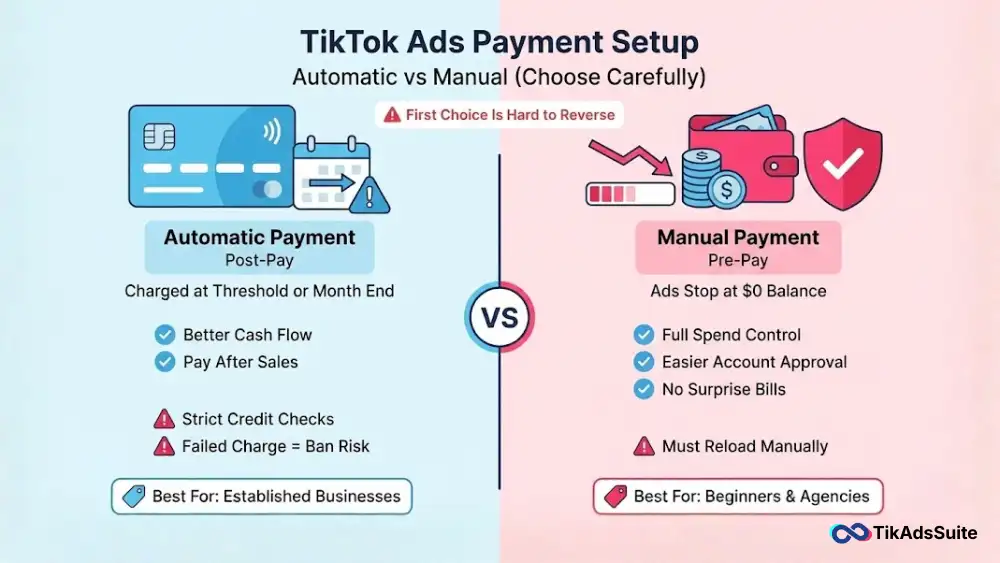
The first decision you make when creating your ad account is irreversible. You can switch from Manual to Automatic, but usually not back.
1. Automatic Payment (Post-Pay)
How it works: You run ads, and TikTok charges your card when you reach a Billing Threshold (e.g., $50) or the Billing Date (end of the month).
Pros: Cash flow friendly. You use TikTok’s money to generate sales before paying.
Cons: Strict credit checks. High risk of Suspicious Payment bans if a charge fails.
Best For: Established businesses with steady cash flow.
2. Manual Payment (Pre-Pay)
How it works: You deposit $500 into the account. Your ads run until the balance hits $0.
Pros: 100% control. No surprise bills. Easier approval for new accounts.
Cons: If you forget to reload, your ads stop.
Best For: Beginners, affiliates, and agencies managing strict client budgets.
Tool Tip: Not sure how much to deposit? Use the TikTok Ad Budget Planner. It calculates your estimated daily spend based on your CPC goals, helping you determine exactly how much Pre-Pay balance you need to cover a 7-day test.
Part 2: Step-by-Step Setup Guide
Here is the exact workflow to configure your TikTok ads billing and payment methods without errors.
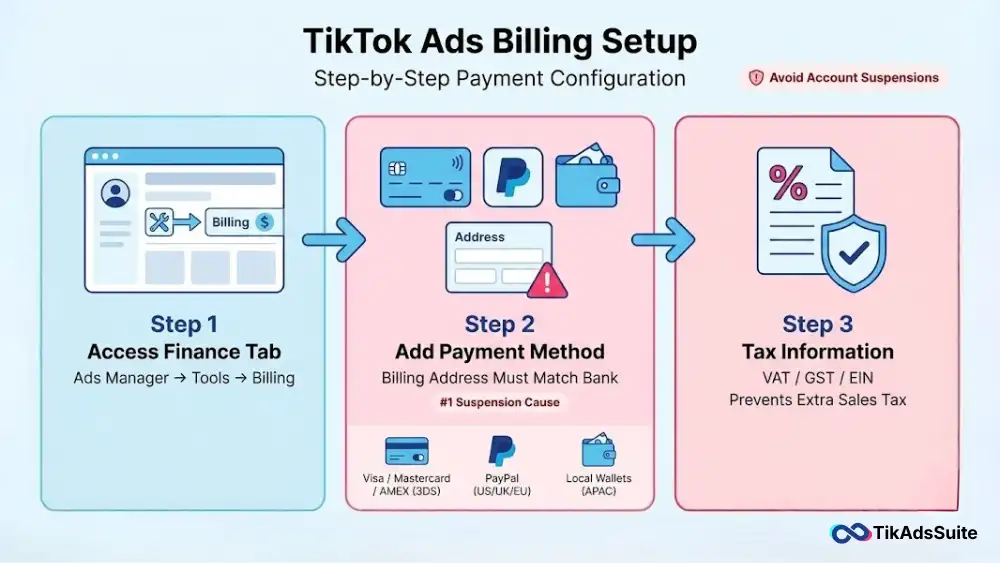
Step 1: Access the Finance Tab
Log in to TikTok Ads Manager.
Hover over the user icon (top right) or click Tools.
Select Payment or Billing.
Step 2: Add a Payment Method
Click Add Payment Method.
Crucial Step: Ensure the Billing Address you enter matches the address on your bank statement exactly. A mismatch here is the #1 cause of account suspension.
Accepted Methods (2026):
- Global: Visa, Mastercard, AMEX (Must be 3DS enabled).
- US/UK/EU: PayPal is widely accepted.
- Asia (APAC): Local wallets like Dana, OVO, and ShopeePay are often supported for Manual Payments.
Step 3: Configure Tax Info
Under Account Info, scroll to Tax Information.
Enter your VAT/GST/EIN number.
Why: If you skip this, TikTok allows the account to run, but you will receive invoices that include sales tax, which eats into your ROAS.
Tool Tip: If you are running ads in multiple countries and are confused about the currency conversions, use the TikTok Ad Cost Estimator by Country. It helps you understand if you should pay in USD, GBP, or EUR to minimize foreign exchange fees.
Part 3: Understanding Billing Thresholds
If you choose Automatic Payment, you must understand the Ladder.
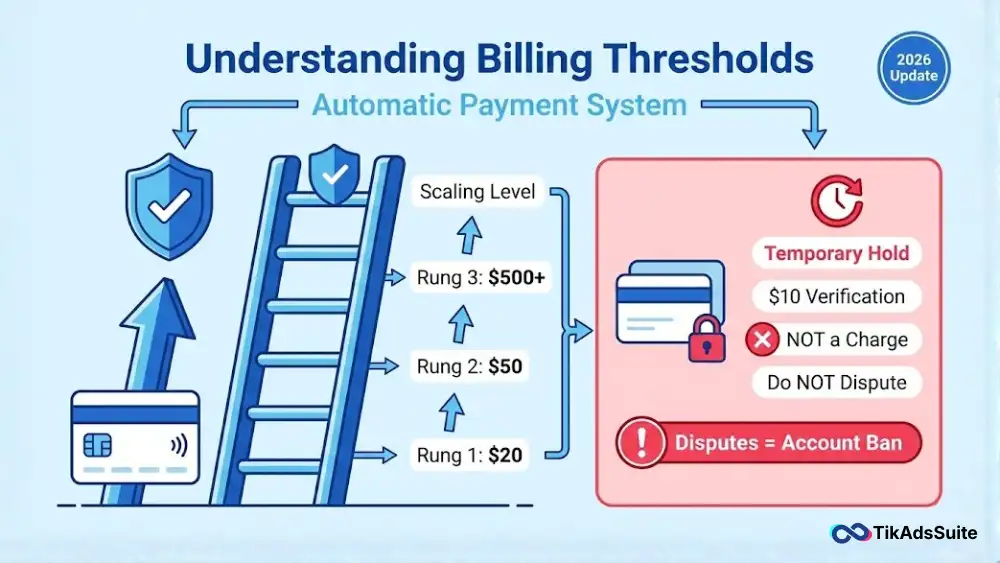
Rung 1: Your first threshold might be $20.
Rung 2: Once you successfully pay $20, TikTok raises the limit to **$50**.
Rung 3: Eventually, this climbs to $500, $2,000, etc.
The Hold Warning: When you start a campaign, TikTok might place a Temporary Hold (e.g., $10) on your card to verify funds. This is not a charge; it will disappear. Do not panic and dispute this, or your account will be banned.
Tool Tip: Worried your account might be flagged for billing irregularities? Run it through the TikTok Ad Account Health Checker. It scans your account status to see if there are any Payment Suspensions pending before you launch a new campaign.
Part 4: Troubleshooting Payment Failures
If your payment fails, your ads stop immediately. Here is the triage list.
1. The 3D Secure Failure
Error: Payment Declined by Bank.
Fix: Call your bank and authorize ByteDance or TikTok as a vendor. Many banks auto-block it as International Media spend.
2. The Insufficient Funds Loop
Error: TikTok tries to charge $500, fails, and retries every 12 hours.
Fix: Add a secondary card immediately and set it as Primary. Then, pay the outstanding balance manually to reset the loop.
3. The Suspicious Activity Ban
Error: Your account is suspended due to suspicious payment activity.
Fix: This usually happens if you used a VPN while entering card details or used a card name different from the account name. You must submit an Appeal Ticket with a photo of your ID and the credit card (last 4 digits visible).
Useful article for you:
👉 TikTok Ads Credit: Get Free $6000 Cash Back Promo
👉 How to Set Up Retargeting Campaigns on TikTok
👉 Dropshipping on TikTok Shop: Is It Still Viable?
👉 Best Music for TikTok Ads: Commercial Sounds Usage Rules
FAQs on TikTok Ads Billing
How to set TikTok ads payment method?
To set your payment method, go to TikTok Ads Manager > Tools > Payment. Click Add Payment Method. You can choose between Credit/Debit Card or PayPal (depending on your region). If you are on Manual Payment, you must add funds here. If on Automatic, this card will be charged when you hit your threshold.
How does TikTok ads billing work?
TikTok billing works on two main models: Automatic Payment (Post-Pay) and Manual Payment (Pre-Pay).
Automatic: You are charged when your ad spend reaches a specific threshold (e.g., $20, $50) or on the billing date (month-end).
Manual: You deposit funds (e.g., $100) upfront. Ads run until the balance hits zero.
Which payment method is best for TikTok?
For most advertisers, Credit Cards (Amex/Mastercard) with a rewards program are best for Automatic Payments because you earn points on ad spend. For beginners or those with strict budgets, Manual Payment via PayPal is best because it prevents overspending and surprise bills.
How to setup TikTok ads?
Setting up TikTok ads involves 4 steps:
Create Account: Sign up at ads.tiktok.com.
Billing: Go to Tools > Payment and add your card/tax info.
Pixel: Install the TikTok Pixel on your website for tracking.
Campaign: Click Create, choose an Objective (e.g., Sales), set your Budget, upload your Video Creative, and hit Submit.
How much is paid per 1000 views on TikTok?
This question has two answers:
For Advertisers (CPM): You pay TikTok roughly $8.00 – $12.00 per 1,000 ad views.
For Creators (Creator Fund): TikTok pays creators roughly $0.02 – $0.04 per 1,000 views.
Note: If you are buying ads, focus on the CPM cost.
How to earn $1000 a month on TikTok?
To earn $1,000/month:
As a Creator: You need roughly 25-50 million views (Creator Fund) OR generate $5,000 in sales as an Affiliate (20% commission).
As an Advertiser: You need to spend roughly $300-$500 on ads (assuming a 3.0 ROAS) to generate $1,000 in revenue.
What is the minimum budget for TikTok ads?
Campaign Level: $50 per day.
Ad Group Level: $20 per day.
Lifetime Budget: Minimum is calculated as ($20 × Days Ran).
Reality: You realistically need at least $500 to properly test a product.
Why is TikTok rejecting my ads?
Common billing-related rejections include:
Insufficient Balance: Your manual balance is $0.
Unpaid Invoice: You have an outstanding threshold charge on your card.
Suspicious Payment: Your card name doesn’t match your account name.
Conclusion: Cash Flow is King
Mastering TikTok ads billing and payment methods is the unsexy foundation of a 7-figure ad account.
The algorithm favors consistency. If your billing fails every week, the algorithm penalizes your account quality score, raising your CPMs.
By choosing the right model (Manual for safety, Automatic for scale) and keeping your tax info updated, you ensure that your business never stops growing because of a banking error.
Your Action Plan:
- Select: Choose Manual Payment if you are just starting, to ensure safety.
- Verify: Call your bank today to whitelist TikTok Ads to prevent 3DS blocks.
- Plan: Use the TikTok Ad Budget Planner to calculate your first month’s deposit.
- Backup: Add a second credit card to the system immediately to act as a fail-safe.
Secure the funds, secure the traffic.