
A competitor’s ad keeps showing up in your feed for weeks. You’d like to know what else they’re running, how long each ad stays live, and who they’re aiming at.
For ads shown in Europe, TikTok answers most of that for free in its Ad Library. You can look up a brand, watch its ads, and see when each one ran and who it targeted.
Below, we cover what the library is, how to search a competitor step by step, how to read the signals without fooling yourself, and what to use when a brand only advertises in the US.
Get Up to $6000 Free TikTok Ad Credit
Table of Contents
Quick Answer
The TikTok Ad Library, officially the Commercial Content Library, is a free public database of paid TikTok ads shown in Europe. To use it, go to library.tiktok.com, choose a target country and date range, and search an advertiser name or keyword.
Open any ad to see its creative, the dates it was first and last shown, its main targeting and how many people saw it. For brands that only advertise in the US, use the Top Ads dashboard in Creative Center instead.
Key Takeaways
- The TikTok Ad Library is free and covers paid ads shown in Europe, searchable by advertiser name or keyword.
- Each ad shows its creative, run dates, main targeting and reach, which tells you who a competitor is paying to reach.
- Ads stay in the library for a year after they were last shown, so you can study finished campaigns too.
- Long run time is a useful signal, but it points to a working ad, not proof of profit.
- For US-only advertisers, Creative Center’s Top Ads dashboard is the free alternative, though you can’t search it by brand.
What Is the TikTok Ad Library?
The TikTok Ad Library is TikTok’s searchable public archive of paid ads, and its official name is the Commercial Content Library. TikTok’s Digital Services Act announcement from August 28, 2023 describes it as a database of paid ads and their metadata, such as the creative, the dates the ad ran and the main targeting parameters.
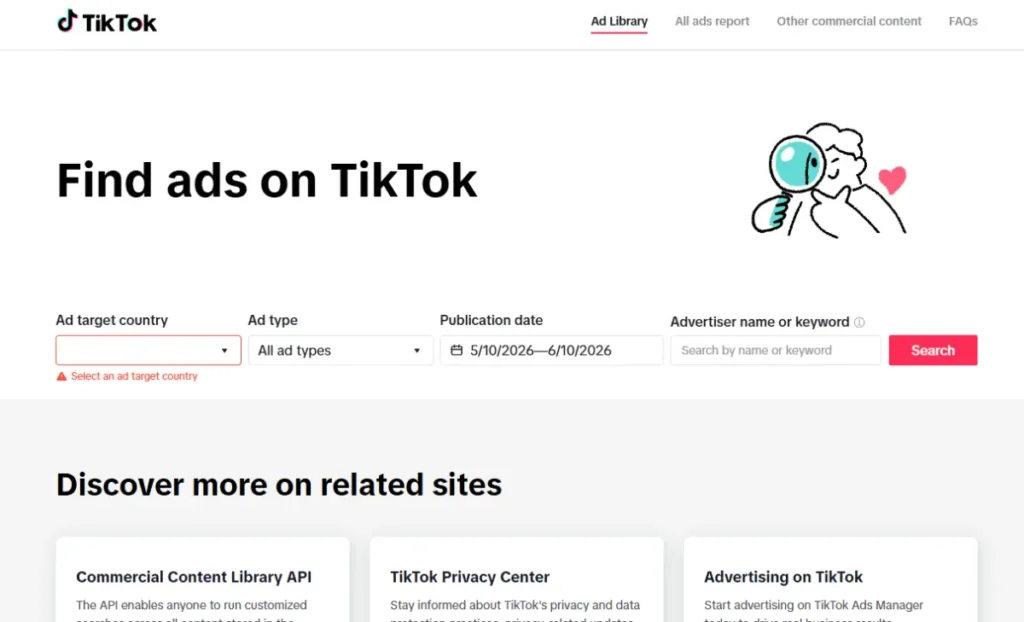
The same data is open to developers. The TikTok for Developers page says it covers ads from EU countries in its current phase, shows the published date, last seen date, targeting and number of people who saw each ad, and keeps ads until one year after they were last shown.
The library is also getting more detailed. In its December 2025 decision, the European Commission accepted TikTok’s commitments to show the full ad as it appears in feeds with its link URLs, add ads within 24 hours, show targeting with age, gender and country breakdowns, and add more search filters.
The library also has an Other commercial content tab for creator posts that are branded content or paid partnerships, rather than ads paid for through TikTok.
This page is about looking up specific advertisers. For trend and niche research with Creative Center tools, see how to use the TikTok Ads Library for research.
How to Search a Competitor’s Ads in the TikTok Ad Library
Searching a competitor’s ads in the TikTok Ad Library takes six steps and about half an hour per brand. Have the names of three competitors ready before you start.
Step 1: Pick the target country and date range
Open the library and choose an ad target country first, since the search won’t run without one. If you don’t know where a competitor advertises, start with a large market such as Germany or France. Set the publication date to roughly the last three months so you see current ads, not old tests.
Step 2: Search the advertiser name
Type the competitor’s business name into the advertiser name or keyword field. Use the exact name from their TikTok profile or website footer. If nothing shows up, try a shorter brand name or their best-known product.
Step 3: Study the creative patterns
Watch at least ten of their ads all the way through. Write down how each one opens, because the opening decides whether people keep watching. A list of common TikTok ad hooks helps you name what you see.
Note the format as well. Are they running raw creator-style clips, polished studio videos or text-heavy demos? Ten ads in a row show you their plan. One ad on its own tells you very little.
Step 4: Read the targeting and reach data
Open individual ads to see the details. You’ll find the main targeting, such as age and gender, and how many people saw the ad. That shows who your competitor thinks their buyer is.
Compare reach across their ads too. If one ad reached far more people than the rest, that’s where most of their budget went.
Step 5: Record the run dates
Every ad shows when it was first and last shown. Copy both dates for each ad into your notes. You’ll use them to separate long runners from short tests.
Step 6: Build a swipe file
Make a simple spreadsheet with columns for advertiser, ad link, hook, offer, format, first seen, last seen and notes. Add every ad worth learning from, and keep a set of proven TikTok ad examples next to it before you film anything new.
How Do You Know Which Competitor Ads Are Actually Winning?
Winning competitor ads leave signals you can read, even though the TikTok Ad Library doesn’t show sales. Four of them are worth tracking.
- Run length: Advertisers usually stop ads that lose money. An ad that stays live for two months or more is probably earning its keep, though you can’t be sure from the outside.
- Repetition: When you see several versions of the same idea with different openings, the idea is likely working and they’re now testing hooks. Check the strongest opening against the 3-second rule to see why it holds attention.
- A repeated offer: If the same discount or free shipping line shows up in new ads month after month, that offer is probably converting.
- The posting account: Ads that run from a creator’s handle instead of the brand’s are often boosted creator posts. A look at Spark vs non-Spark ads explains why brands pay to push those.
Keep in mind that big reach proves spend, not profit, so weigh reach against how long the ad lasted.
What If Your Competitors Only Advertise in the US?
If your competitors only advertise in the US, the TikTok Ad Library won’t show their ads, because it covers ads shown in Europe. The free workaround is the Top Ads dashboard inside TikTok Creative Center.
TikTok’s About Top Ads page says every ad in Top Ads was authorized by its advertiser inside TikTok Ads Manager, and each one comes with a second-by-second graph of its most engaging moments.
The Top Ads dashboard guide adds the practical details: you see only five ads unless you log in, you can filter by region, industry, campaign objective, likes and time frame, and you can sort by reach, CTR, 2-second views rate or 6-second views rate.
What you can’t do is pull one competitor’s full history, since the dashboard guide describes search by product or keyword, not by advertiser. For advertiser-level tracking outside Europe, compare the TikTok competitor spy tools that fill that gap.
TikTok Ad Library vs Top Ads Dashboard: Which Should You Use?
Use the TikTok Ad Library to study specific competitors and the Top Ads dashboard to see what’s working across your industry. Here’s how they compare:
| Feature | TikTok Ad Library | Top Ads Dashboard |
| Where | library.tiktok.com | TikTok Creative Center |
| Coverage | Paid ads shown in Europe | Ads advertisers chose to share, from many regions |
| Search by advertiser | Yes | No, product or keyword only |
| Data shown | Run dates, targeting, reach | Reach, CTR, view rates, likes, engagement graph |
| Includes weak or stopped ads | Yes | No, only strong ads advertisers chose to share |
| Login needed | No | Only to see more than five ads |
| Best for | Deep dives on one competitor | Spotting what wins in your niche |
The engagement graph is the one thing the library lacks. Study that curve on five Top Ads in your niche, and you can get a feel for how long a hook can run before people drop off.
How to Turn Ad Library Findings Into Better Ads
Turn what you find into structure, not copies. Their creative was built for their brand voice and offer, and copying it can bring trademark or copyright trouble. Pull out the hook style, the pacing, the offer type and where the call to action sits.
Then rebuild it with your own footage and angle. An editor like CapCut makes it quick to match the cuts, captions and pacing of a strong ad without reusing a single frame.
Treat every borrowed pattern as a test, not a sure thing. Run your versions through a creative testing framework so results, not your gut, pick the winner.
Once a version wins, use the age ranges and countries you noted in step 4 as a starting point for targeting, then adjust from your own results.
Mistakes to Avoid When Researching Competitor Ads
Five mistakes waste most of what the TikTok Ad Library can teach you about competitor ads:
- Copying creative outright. It invites trademark complaints and puts another brand’s voice in front of your audience.
- Treating reach as proof of profit. A huge reach number on a two-week run often means a big test that didn’t work.
- Studying only one competitor. Look at three brands or more before you call something a pattern. One brand’s habit might just be one brand’s mistake.
- Ignoring the date filter. Old ads reflect trends your audience has already scrolled past.
- Collecting without launching. A swipe file full of ads and no campaigns is research that never pays off.
FAQs
Is the TikTok Ad Library free to use?
Yes. The TikTok Ad Library at library.tiktok.com is a public website with no fee and no account needed. You can watch each ad and open its details. The Top Ads dashboard in Creative Center is free too, but you see only five ads until you log in.
Why can’t I find a competitor in the TikTok Ad Library?
The most common reason is that they don’t run ads in Europe, since the library covers ads shown there. Also check that you picked a target country and a wide enough date range, and try their shorter brand name or a product keyword.
Does the TikTok Ad Library show how much competitors spend?
No. The library shows run dates, targeting and how many people saw each ad, but not spend. You can only estimate investment by combining reach with how long the ad ran. Any tool that claims exact TikTok spend is showing a model, not platform data.
How long do ads stay in the TikTok Ad Library?
Ads stay available while they run and until one year after they were last shown to anyone. That means you can study finished campaigns, but save anything useful to your swipe file before it ages out.
Can I pull TikTok Ad Library data in bulk?
Yes, through the Commercial Content API. You apply with a TikTok for Developers account, and approved applicants get a client key to search ads by advertiser name or keyword. It suits agencies and researchers who track many brands at once.
Wrapping Up
The TikTok Ad Library is the quickest free way to see what a competitor is running in Europe. Block half an hour this week, open the library, and run your three biggest competitors through the six steps above.
You’ll come away with a swipe file of hooks, offers and formats worth testing. Pick the strongest pattern and build your own version with the basics of creating winning TikTok ads.
If you haven’t launched a campaign yet, check whether you qualify for TikTok ad credit before you spend, so your first tests cost less. Run a quick ad credit eligibility check first.