
Spark Ads boost existing organic TikTok posts and outperform Non-Spark Ads on engagement (+142%), video completion (+134%), and conversion rate (+43%), according to TikTok’s own platform data.
Non-Spark Ads offer full creative control and work best for brands without an organic TikTok presence or those needing precise direct-response campaigns.
Choosing between Spark Ads vs Non-Spark Ads is one of the most practical decisions a TikTok advertiser makes.
Both formats run inside TikTok Ads Manager and reach the same audiences, but they behave very differently once a campaign goes live.
This breakdown covers what actually separates the two, where the performance data comes from, and which format fits your goals.
Table of Contents
Get Up to $6000 Free TikTok Ad Credit
Key Takeaways
- Spark Ads amplify existing organic TikTok posts while keeping all original engagement (likes, comments, shares) on the creator’s profile.
- Non-Spark Ads are uploaded directly into TikTok Ads Manager with full creative freedom but zero built-in social proof.
- According to TikTok’s own internal platform data, Spark Ads produce 142% higher engagement rates and 43% higher conversion rates than standard in-feed ads.
- TikTok for Business confirms Spark Ads achieve a 134% higher video completion rate and 37% lower cost per acquisition than non-Spark placements.
- Both formats access the same targeting tools inside TikTok Ads Manager.
- The right format depends on your content assets, not your budget size.
What Actually Separates These Two Formats
Spark Ads turn existing organic TikTok posts into paid placements. The original post stays live on the creator’s profile, and all engagement collected during the campaign, including views, likes, comments, shares, and new follows, is attributed back to that post. According to TikTok’s official Spark Ads documentation, brands can boost posts from their own account or from authorized creators.
Non-Spark Ads, also called standard in-feed ads, are built and uploaded directly through TikTok Ads Manager with no connection to any organic post.
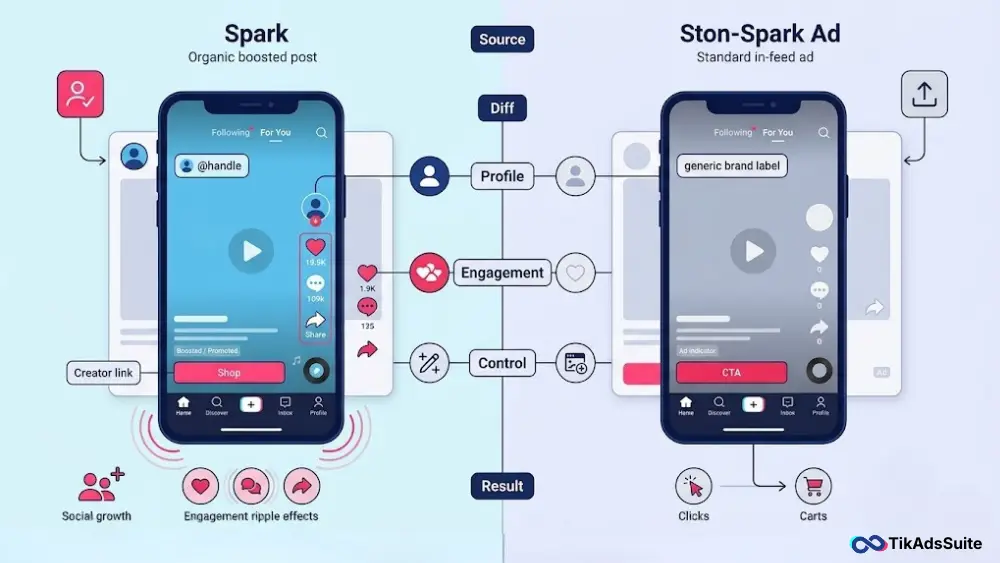
They start with zero social proof and give advertisers complete control over every creative element, caption, CTA, and landing page destination.
ds vs Non-Spark Ads: Feature Comparison
| Feature | Spark Ads | Non-Spark Ads |
| Content source | Existing organic TikTok post | Uploaded directly via Ads Manager |
| Social proof | Carries original likes, comments, shares | Starts at zero |
| Profile visibility | Shows creator’s @handle | Brand identity only |
| Campaign duration | Tied to authorization code (7 to 365 days) | Fully flexible |
| Creative control | Limited to the original post | Full control over every element |
| Ad specs | No restrictions on ratio, resolution, or file size | Specific specs required (e.g., 1080x1920px, 5 to 60 seconds) |
| Engagement attribution | Returns to the original organic post after campaign | Stays within the ad unit only |
| Supported objectives | Reach, Traffic, App Installs, Conversions, Lead Gen, Shop Purchases | Same objectives available |
Where the Performance Gap Opens Up
The numbers here come directly from TikTok’s own platform. According to TikTok’s internal comparison data, Spark Ads produce +142% higher engagement rates, +43% higher conversion rates, and -4% lower CPM than standard Non-Spark in-feed ads.
TikTok’s official video completion data goes further. The TikTok for Business blog reports that Spark Ads achieve a 134% higher video completion rate and a 157% higher 6-second view-through rate than standard in-feed placements. The same source confirms Spark Ads’ profile landing page delivers a 69% higher conversion rate and 37% lower cost per acquisition.
The TikTok Ads Manager FAQ also notes that Spark Ads produce “near-doubled performance in CTR” compared to Non-Spark placements, with significantly lower cost per click.
The reason behind all of it is trust. A Spark Ad looks organic because it is organic. When a user scrolls past a creator’s post with real comments, real likes, and a familiar face, the persuasion is already built in. A standard in-feed ad starts that process from scratch.
What Non-Spark Ads Do Better
Non-Spark Ads are not the weaker format by default. They solve a different set of problems.
Full creative control is their biggest advantage. You write every caption, define the CTA, and set the exact landing page destination without depending on an existing post’s content or a creator’s authorization window.
No organic presence required. Brands that are new to TikTok or don’t maintain an active account can still run targeted in-feed campaigns. No creator partnership or content library needed.
Faster iteration for creative testing. Because Non-Spark Ads are uploaded directly, you can test new hooks, scripts, and visual treatments quickly. Spark Ad authorization codes default to a 30-day window, which adds friction to rapid testing cycles.
Non-Spark Ads also offer cleaner control for conversion campaigns where every click must land on a specific URL rather than routing through a TikTok profile page first.
Targeting: Same Tools, Different Starting Points
Both formats run through TikTok Ads Manager and access identical targeting: demographics, interests, behaviors, custom audiences, and lookalike audiences. There is no targeting advantage exclusive to either format.
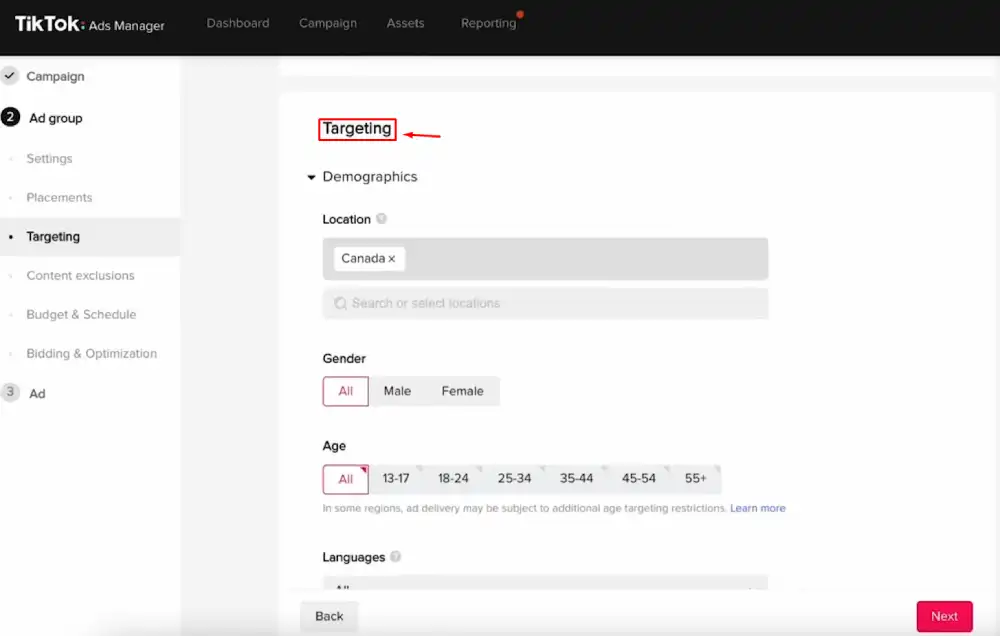
The practical difference is how quickly the algorithm calibrates. Spark Ads carry real engagement signals from the original organic post, giving TikTok’s delivery system a head start on finding the right audience. Non-Spark Ads start cold, so the algorithm needs more data and more initial spend to stabilize delivery.
For smaller daily budgets, this distinction matters most. Spark Ads tend to exit TikTok’s learning phase faster, which reduces wasted impressions in the early days of a campaign.
Does CPM Tell the Full Story?
TikTok’s data shows Spark Ads actually deliver a 4% lower CPM than Non-Spark in-feed placements. But even where CPMs vary by account or industry, the metric that determines real campaign efficiency is effective CPA, not CPM.
With 43% higher conversion rates and 37% lower cost per acquisition confirmed by TikTok for Business, the cost-per-outcome math consistently favors Spark Ads for conversion-focused campaigns. A higher impression cost becomes irrelevant when the cost to actually acquire a customer is significantly lower.
Who Should Choose Spark Ads
Spark Ads are the stronger default when:
- You have an active TikTok account with organic posts already getting real engagement
- You are working with creators or have UGC content and authorization codes ready
- Your campaign goal is brand awareness, follower growth, or product discovery
- You run an eCommerce or TikTok Shop brand where purchase intent is driven by authentic creator content
- You want paid engagement to compound back onto your organic profile long after the campaign ends
Who Should Choose Non-Spark Ads
Non-Spark Ads make more sense when:
- You have no organic TikTok presence and no creator relationships yet
- Your campaign needs complete control over the CTA and a specific landing page destination
- You are A/B testing new creative concepts and need to iterate without authorization delays
- Your conversion goal is tied to a URL path that a TikTok profile page click cannot reach
A hybrid approach works well for many brands: direct the majority of the budget toward Spark Ads for engagement and reach, then allocate a smaller portion to Non-Spark Ads for retargeting users who have already interacted with your content.
FAQs
Are Spark Ads always better than Non-Spark Ads?
Not in every situation. Spark Ads consistently outperform on engagement, completion, and conversions based on TikTok’s own data, but they require existing organic content or a creator authorization code. If you have neither, Non-Spark Ads are a fully capable starting point, especially for direct-response campaigns where creative control matters more than social proof.
Do both ad types use the same TikTok targeting options?
Yes. Both formats access the full targeting toolkit inside TikTok Ads Manager: demographics, interests, behaviors, custom audiences, and lookalikes. The difference is not in what you can target, but in how fast the algorithm learns. Spark Ads carry organic audience signals that speed up delivery calibration, which matters most on tighter budgets.
Can I use the same video for both a Spark Ad and a Non-Spark Ad?
Not from a single source. A Spark Ad uses the live organic post and keeps it tied to the creator’s profile. A Non-Spark Ad requires a separate upload into Ads Manager. Even with identical footage, the two versions run independently with separate engagement counts, attribution, and performance data.
How long does a Spark Ad authorization code last?
Creator authorization codes can be set for 7 to 365 days. TikTok defaults this window to 30 days. Once the code expires, the Spark Ad stops running. You need a renewed code from the creator to restart it.
What happens to Spark Ad engagement after the campaign ends?
All engagement collected during a Spark Ad campaign, including views, likes, comments, and new follows, is attributed back to the original organic post. The post continues to benefit after paid distribution ends. Non-Spark Ad engagement stays within the ad unit and does not carry over to any profile or post.
Do I need a TikTok Business account to run Spark Ads?
To boost your own posts, yes. You need a TikTok Business account linked to TikTok Ads Manager. For creator content, you use an authorization code, so the creator does not need a Business account on their side.
Final Thoughts
The format you choose comes down to the assets you already have. If you have organic posts with real engagement or creator content with authorization codes ready, Spark Ads will return better results on less spend, backed by TikTok’s own performance data.
If you are starting from zero or need granular creative control, Non-Spark Ads get you live and testing without delay. Audit your content library before your next campaign setup, then let that drive the decision.