
A rejected TikTok ad almost always traces back to a specific trigger inside your video, your copy, or your landing page.
You spent hours building the campaign, picked your audience, set your budget, and then got hit with a “Not Approved” status before a single view landed. The frustration is real, and the fix is usually simpler than it looks.
In this guide, you will learn exactly why your TikTok ad was rejected, how the review system reads your content in 2026, and the steps you can take to fix it, appeal it, and stop the same thing from happening next time.
Table of Contents
Get Up to $6000 Free TikTok Ad Credit
Why Was Your TikTok Ad Rejected?
Your TikTok ad was rejected because it broke one of TikTok’s Advertising Policies, but only when a specific element in your creative, copy, or landing page failed review. Most rejections trace back to five repeat offenders.
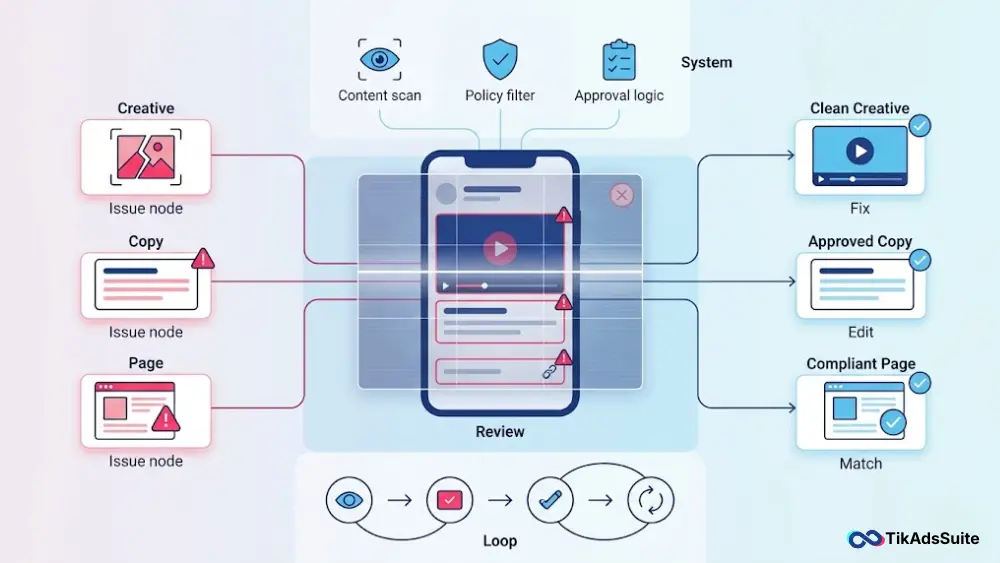
- Misleading or exaggerated claims in the ad copy or voiceover
- Inconsistent product between the ad creative and the landing page
- Low-quality video, audio, or captions that fail technical standards
- Landing page issues, like broken links or a missing privacy policy
- Restricted or prohibited content for your targeted region
How TikTok’s 2026 Smart Review Process Actually Works
TikTok’s review process is no longer a single human glancing at your video. Per the TikTok For Business ad policy guide, every ad now runs through a layered automated system that checks the ad content, the landing page, and the target audience before a human ever sees it. Knowing how that system reads your ad is the difference between a green check and a frustrating rejection.
Here is what we have seen happen behind the scenes when you click submit:
- Pre-screen scan. The system parses your video frames, audio transcript, on-screen text, captions, and metadata in seconds.
- Policy match. It cross-checks every element against TikTok’s Advertising Policies, including the updated AI content disclosure rules.
- Landing page crawl. A bot fetches your destination URL to check load speed, mobile responsiveness, privacy policy presence, and product match.
- Risk routing. Low-risk ads pass automatically. Borderline cases route to a human reviewer. Clear violations get rejected on the spot.
- Notification. You receive the result inside TikTok Ads Manager, usually within 24 hours.
The bot is fast, but it is also strict. Spoken words in your voiceover, on-screen text, and even file metadata all carry weight. If any one of those signals trips the scoring model, your ad fails.
Top Reasons Your TikTok Ad Was Rejected in 2026
Most rejections cluster around the same eight causes. Find yours below, then jump to the fix in the next section.
Misleading Claims and Exaggerated Results
TikTok rejects ads that promise results the product cannot reliably deliver. The TikTok For Business Blog on common ad rejection reasons calls this out directly: ads must be truthful and factual, and exaggerated performance claims are a top trigger.
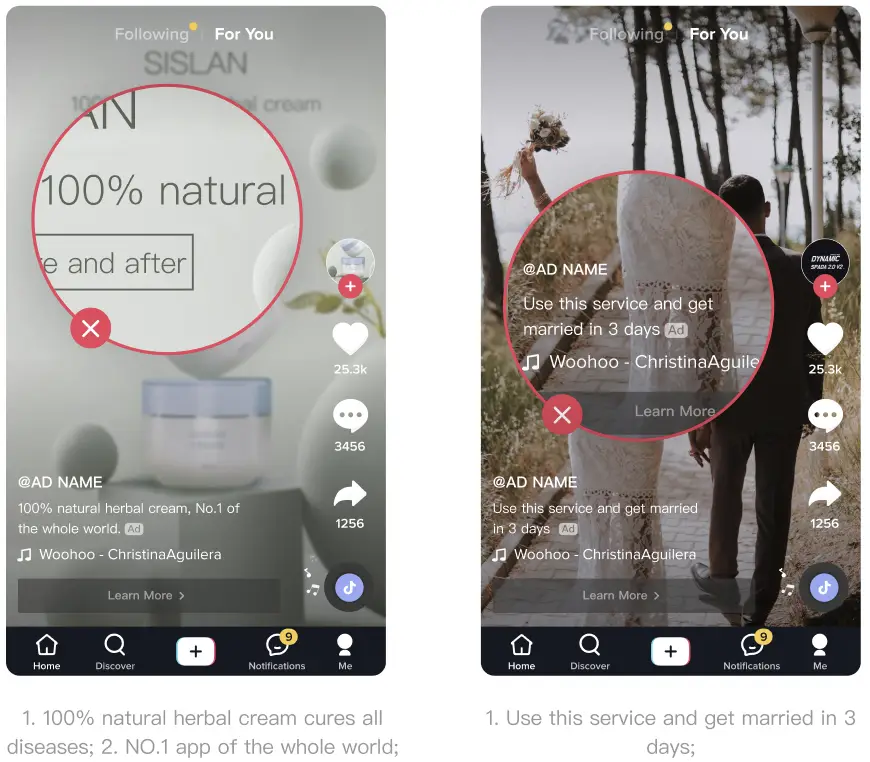
Common examples that get flagged:
- “Lose 10 pounds in a week”
- “Cure your acne overnight”
- “Guaranteed passive income”
- “Make $5,000 by Friday”
The fix is simple: soften the language. Instead of “Lose 10 pounds in a week,” write “Support your fitness goals.” Focus on the routine, the experience, or the feeling, not a specific biological or financial outcome.
Trigger Words That Instantly Flag Your Ad
Some words act like tripwires for TikTok’s review AI. We have seen entire campaigns die on a single word inside the voiceover or on-screen caption.
High-risk trigger words to remove or rephrase:
- Cure, heal, treat, prevent for any health or skincare ad
- Guaranteed, instant, miracle, secret for any product
- Free money, easy cash, get rich for any finance offer
- Lose weight fast, melt fat, slim down quick for any wellness product
- Best, #1, world’s leading without verifiable proof
Run your script through a quick word check before you film. It saves you a re-edit later.
Inconsistent Ad Creative and Landing Page
Your ad and your landing page must match. Per TikTok’s Common Reasons Ads Fail Review, ads get rejected when the product, price, or offer in the creative does not match what the user sees after clicking.
Real mismatch examples that fail review:
- Ad shows a face cream, landing page sells shampoo
- Ad says “50% off,” landing page only shows 30% off
- Ad shows blue running shoes, landing page leads to a generic homepage
- Caption says “Create Your Own Caricature,” video shows “Meet Your Future Self”
Match the headline, the product, the price, and the imagery on both sides of the click.
Low-Quality Video, Audio, or Captions
TikTok holds a high bar for technical quality because users expect a polished feed experience. Your ad will fail review for any of the following:
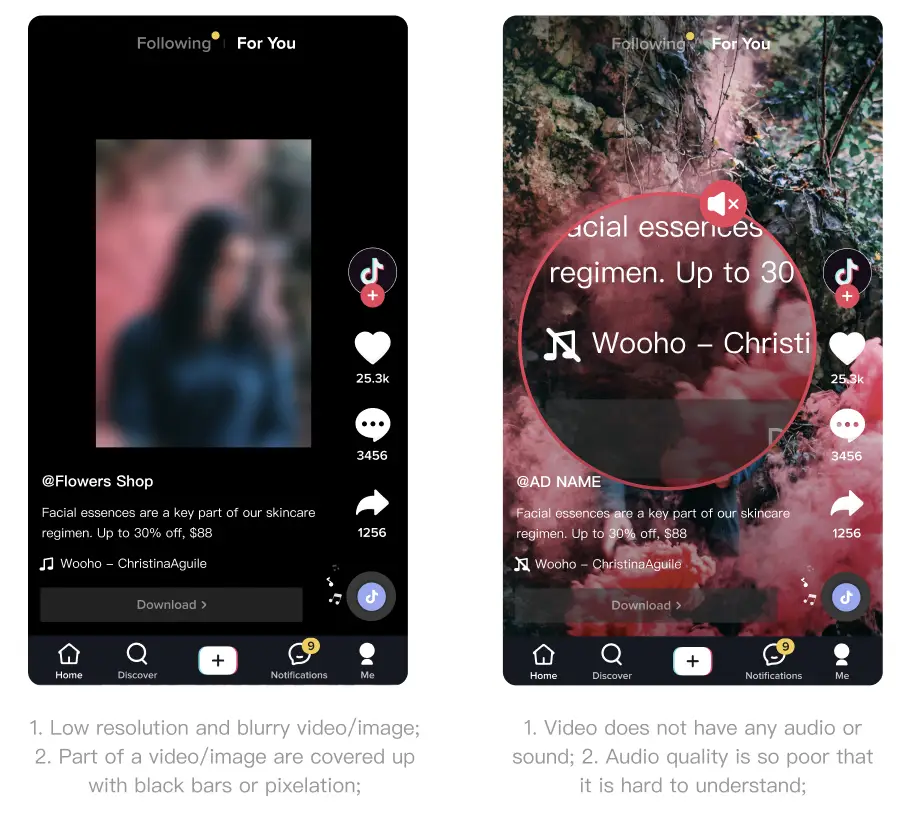
- Resolution below TikTok’s minimum of 540×960 px (720×1280 px or higher recommended)
- Black bars, pixelation, or covered video sections
- No audio, muffled audio, or distorted sound
- Spelling errors, like “rfom” instead of “from”
- Distracting capitalization, like “S.a.L.e”
- Symbol-letter swaps, like “S@le” or “M0ney”
Shoot vertical, shoot in 720p or higher, and proofread every caption before upload.
Intellectual Property and Trademark Violations
TikTok’s Community Guidelines show meaningful volume on intellectual property complaints, and ads are not exempt. Using someone else’s logo, music, character, or brand name without permission gets your ad pulled fast.
Things you cannot use without rights:
- Trending songs from major labels, unless licensed for ads
- Logos from brands you do not own or partner with
- Movie clips, TV scenes, or game footage
- Celebrity faces, voices, or names
Use TikTok’s Commercial Music Library inside Ads Manager, or upload original audio you own outright.
Landing Page Compliance Issues (Privacy, Refunds, 404s)
A perfect ad still fails if your landing page is broken. TikTok’s bot crawls your URL the moment you hit submit. If it finds a problem, the ad dies.
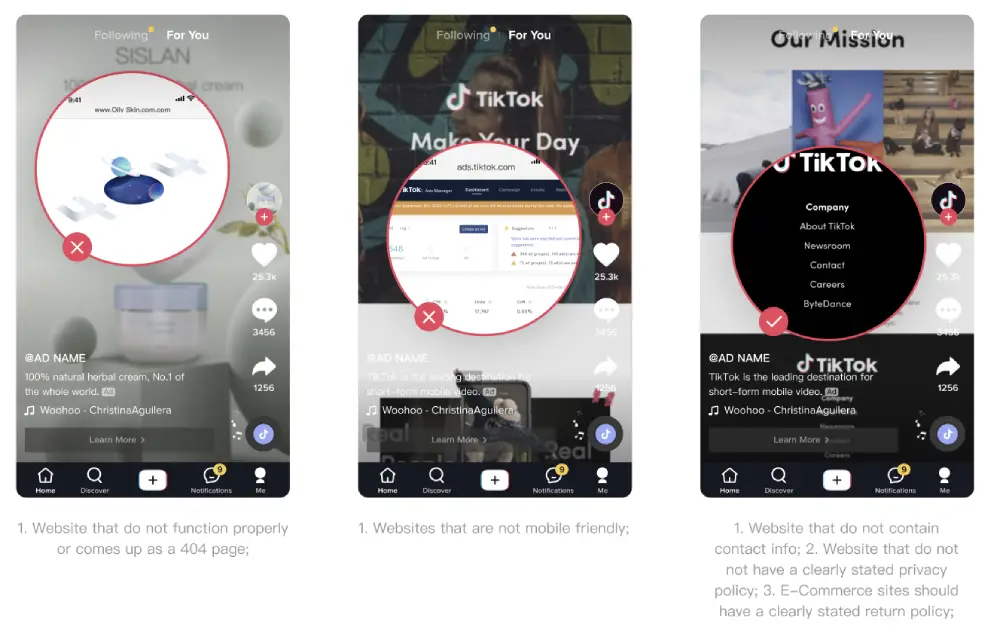
Landing page red flags that trigger rejection:
- Page returns a 404 or fails to load
- No mobile responsiveness
- Missing privacy policy link
- Missing refund or return policy for ecommerce
- No contact information visible
- Different language from your ad targeting region
Fix these before you resubmit. We have seen advertisers waste days re-editing creative when the real issue was a missing privacy policy.
Restricted or Prohibited Industries
Some industries cannot advertise on TikTok at all. Others can, but only with extra documentation and regional approval.
| Status | Examples |
| Prohibited | Alcohol, gambling, lottery, supplements, CBD, cryptocurrency, and financial services |
| Restricted | Alcohol, gambling, lottery, supplements, CBD, cryptocurrency, financial services |
| Region-specific | Cannabis products, dating services, prescription medication |
Check TikTok’s Industry Entry policy for your country before you build a campaign. If your product falls into a gray area, request pre-approval through Advertiser Support.
Undisclosed AI-Generated Content (New 2026 Rule)
This is the rule most advertisers miss. Per TikTok’s AI-generated content guidance, realistic AI-generated images, audio, or video must be clearly disclosed. Skip the disclosure on a paid ad, and you risk rejection or removal.
You should label your ad as AI-generated when:
- You use an AI voice clone for the voiceover
- You use AI-generated faces or synthetic actors
- You use AI to alter a real person’s appearance, voice, or actions
- You generate the entire video with a text-to-video model
Apply the AI-Generated Content label inside TikTok Ads Manager during upload. It only takes one toggle.
Ad-Level vs. Account-Level Rejection: What’s the Difference?
This is where most advertisers waste time. You cannot fix an account problem by editing your video, and you cannot fix a creative problem by emailing support. Knowing which one you are dealing with saves hours.
| Factor | Ad-Level Rejection | Account-Level Rejection |
| What got rejected | A single ad or ad group | Your entire ad account |
| Cause | Creative, copy, or landing page issue | Business identity, billing, or repeated policy violations |
| Where you see it | Ads Manager campaign tab | Account banner or email from TikTok |
| Fix speed | Minutes to hours | Days to weeks |
| How to resolve | Edit and resubmit the ad | Submit business documents and appeal |
| Risk level | Low, isolated to that ad | High, blocks all future ads |
If only one ad failed, treat it as a creative problem. If your dashboard shows a global warning or your billing is flagged, treat it as an account problem and contact Advertiser Support directly.
How to Fix a Rejected TikTok Ad (Step-by-Step)
Follow these steps in order. Each one targets a different failure point, so do not skip ahead.
- Read the rejection reason. Open Ads Manager, click into the rejected ad, and read the exact policy citation TikTok provides.
- Identify the failure type. Decide if the issue is creative, copy, landing page, or account level.
- Audit your script and captions. Remove trigger words, exaggerated claims, and any spelling errors.
- Check video and audio quality. Confirm at least 720×1280 px resolution, clean audio, and no covered sections.
- Test your landing page. Open it on mobile, check for a privacy policy, refund policy, and contact info, and confirm the product matches your ad.
- Match the offer. Make sure the product, price, and discount in the ad match the landing page exactly.
- Add required disclosures. Toggle on the AI-Generated Content label if your ad uses any synthetic media.
- Resubmit the ad. Save your changes inside Ads Manager. This automatically triggers a new review, usually within 24 hours.
- Track the result. If it passes, you are live. If it fails again, move to the appeal process.
How to Appeal a TikTok Ad Rejection (With Template)
Sometimes the system gets it wrong. If you believe your ad follows every policy and was rejected by mistake, you can request a human re-review through Advertiser Support inside Ads Manager.
Here is a copy-paste appeal template you can adapt:
Subject: Appeal Request for Rejected Ad, Ad ID [insert ad ID]

Hello TikTok Support team,

We are appealing the rejection of Ad ID [insert ad ID] under campaign [insert campaign name]. The ad was flagged for [insert exact rejection reason from Ads Manager].

We have reviewed the ad against TikTok's Advertising Policies and believe the rejection was issued in error for the following reasons:

[State the specific policy and why your ad complies]

[Reference the exact creative element that addresses the concern]

[Note any documentation, license, or proof you can provide]

Supporting evidence is attached, including [list documents, licenses, or screenshots].

Please re-review the ad. We are available to provide any additional information needed.

Thank you,
[Your name]
[Your business name]
[Advertiser ID]
Keep your tone professional. Lead with facts, attach proof, and skip emotional language. We have seen polite, evidence-based appeals turn around in 24 to 72 hours.
Why Your TikTok Ad Was Rejected After Being Approved
Your TikTok ad was rejected after approval because TikTok runs continuous re-reviews. Per TikTok’s Help Center on post-approval rejections, an approved ad can be flagged again when users hide, block, or report it, when policy rules update, or when the system detects new patterns the original review missed. The fix is to identify the new trigger and edit the creative or landing page accordingly.
When this happens, here is what to check first:
- User reports. Negative feedback from viewers can pull an ad back into review.
- Policy updates. TikTok updates its Advertising Policies regularly. A rule that did not exist last month may apply now.
- Landing page changes. If you updated your website after approval, the new version may violate policy.
- Updated detection models. TikTok occasionally re-scans active ads with newer models that catch issues the original ones missed.
You will see the notification in Ads Manager. Treat it like a fresh rejection: read the reason, fix the trigger, and resubmit.
Pre-Submission Checklist to Prevent Future Rejections
Run this checklist before every upload. It takes about five minutes and saves hours of re-editing.
Creative checklist
- Resolution is 720×1280 px or higher
- Audio is clear and audible end-to-end
- No black bars, pixelation, or covered sections
- Captions have zero spelling errors
- No symbol-letter swaps in any text
- Voiceover and on-screen text avoid trigger words
Copy and claim checklist
- No “guaranteed,” “cure,” “instant,” “miracle,” or “free money”
- No specific weight loss numbers or income promises
- No malicious comparisons to other brands
- All claims supported by real product features
Landing page checklist
- Loads quickly on mobile
- Privacy policy link visible in the footer
- Refund or return policy stated for ecommerce
- Contact information available
- Product, price, and offer match the ad exactly
- Page language matches your ad targeting region
Compliance checklist
- AI-Generated Content label toggled on if applicable
- All music and visuals owned or licensed
- Industry is allowed in your target region
- Required certifications uploaded for restricted categories
If every box is checked, you are ready to submit.
Frequently Asked Questions
Why does TikTok keep rejecting my ads?
TikTok keeps rejecting your ads because the same trigger keeps surfacing in your creative or landing page. Common repeat issues include exaggerated claims, an inconsistent landing page, low-resolution video, or a missing privacy policy. Audit each of these areas one by one before you resubmit, and the rejection pattern usually breaks.
How long does a TikTok ad review take?
Most TikTok ads are reviewed within 24 hours, according to TikTok’s Ad Review FAQ. Some ads take longer, especially in restricted industries or when human review is required. If your ad has been pending past that window, you can submit a follow-up ticket through Advertiser Support to escalate it.
Can I edit a rejected TikTok ad and resubmit it?
Yes, you can edit a rejected TikTok ad and resubmit it inside Ads Manager. Saving your changes automatically triggers a new review, which usually completes within 24 hours. You do not need to delete the ad or rebuild the campaign, and your previous targeting settings stay intact.
What does “video not approved” mean on TikTok Ads?
“Video not approved” means your ad failed TikTok’s review process and will not be shown to users. The status appears inside Ads Manager along with the policy reason. You can edit the creative, fix the issue, and resubmit, or you can appeal through Advertiser Support if you believe the rejection was a mistake.
Will a rejected ad hurt my TikTok ad account?
A single rejected ad will not hurt your TikTok ad account. Repeated rejections for the same policy violation can raise your account risk score over time and trigger an account-level review. Keep your rejection rate low by running every ad through a pre-submission checklist before you upload.
Does TikTok refund money spent on rejected ads?
If your ad was rejected before delivery, you should not see any spend on that ad. Any unspent budget tied to the rejected ad is generally returned to your account. If you do see a charge for an ad that never ran, contact Advertiser Support with your ad ID and a screenshot of your billing history.
How to appeal TikTok ad rejection?
To appeal a TikTok ad rejection, open Ads Manager, click into the rejected ad, and select the appeal option in the rejection prompt, or submit a ticket through Advertiser Support. Include your ad ID, the exact rejection reason, a clear explanation of why your ad complies with policy, and any supporting documents like licenses or certifications. We have seen evidence-based appeals turn around in 24 to 72 hours.
Final Takeaway: Get Your TikTok Ad Approved Faster
Most TikTok ad rejections come down to a small handful of issues, and you now know exactly what they are. Misleading claims, trigger words, mismatched landing pages, low-quality creative, and missing AI disclosures account for the bulk of failed reviews in 2026.
We walked through how the automated review system reads your ad, how to tell an ad-level problem from an account-level problem, and how to fix or appeal each one with a clear, repeatable process.
The pre-submission checklist is your single biggest defense. A few minutes of review before upload prevents days of re-editing and lost campaign momentum.
When you understand what the review system is looking for and you build creative that respects those signals, approval stops feeling like a coin flip and starts feeling like a normal step in your workflow.
Knowing why your TikTok ad was rejected is the first step. Acting on it with the steps above is what gets you back in the feed.