
TikTok Ads Manager is one of the most powerful self-serve advertising platforms available right now, and most businesses are barely scratching the surface of what it can do.
If you have tried running TikTok ads and felt lost inside the dashboard, no shame; you are not alone. The interface has changed significantly over the past 12 months. New AI-powered tools have been added, the campaign structure has been updated, and the bidding options look nothing like what most older guides describe.
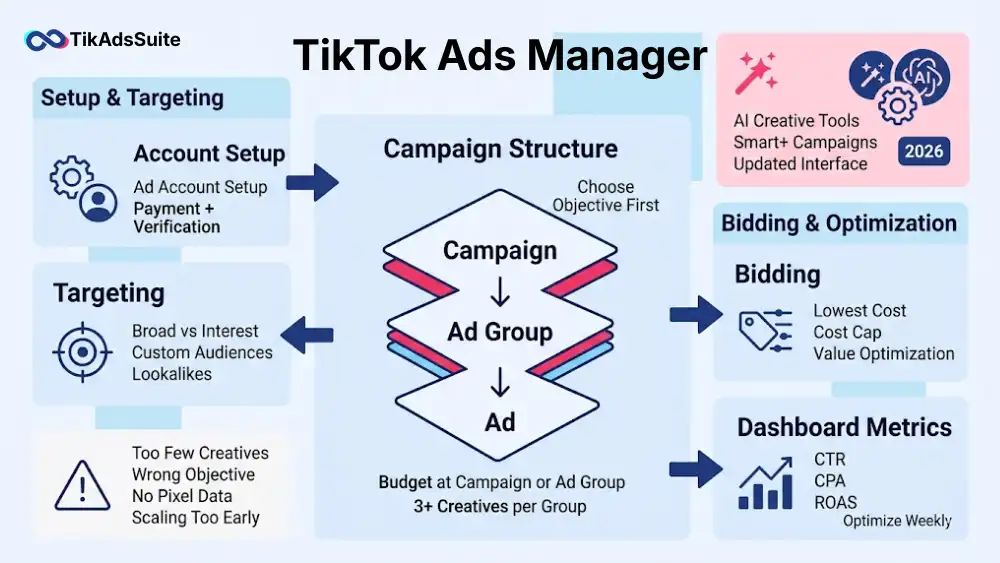
This guide shows you how to use TikTok Ads Manager effectively, covering account setup, campaign structure, targeting, bidding, AI-powered TikTok Ads Manager tools, dashboard optimization, mobile access, and the most common mistakes advertisers make.
By the end, you’ll know how to use TikTok Ads Manager for complete TikTok ad management, from launching your first campaign to optimizing performance at scale.
Table of Contents
Get Up to $6000 Free TikTok Ad Credit
Key Takeaways
- TikTok Ads Manager uses a three-tier structure: Campaign, Ad Group, and Ad. Understanding this hierarchy is the foundation of every successful campaign.
- Smart+ Campaigns in 2026 automate targeting and bidding using AI, reducing manual setup time significantly.
- The platform is free to access. You only pay for the ads you run, with a minimum daily budget of $50 at the campaign level and $20 at the ad group level.
- TikTok’s mobile app for Ads Manager lets you monitor performance on the go, but full campaign creation still requires desktop access.
- The most common reason TikTok ads fail is not creative quality. It is an incorrect bidding strategy selection during setup.
- Your dashboard metrics only become useful when you compare them against your specific campaign objective, not industry averages alone.
What Is TikTok Ads Manager?
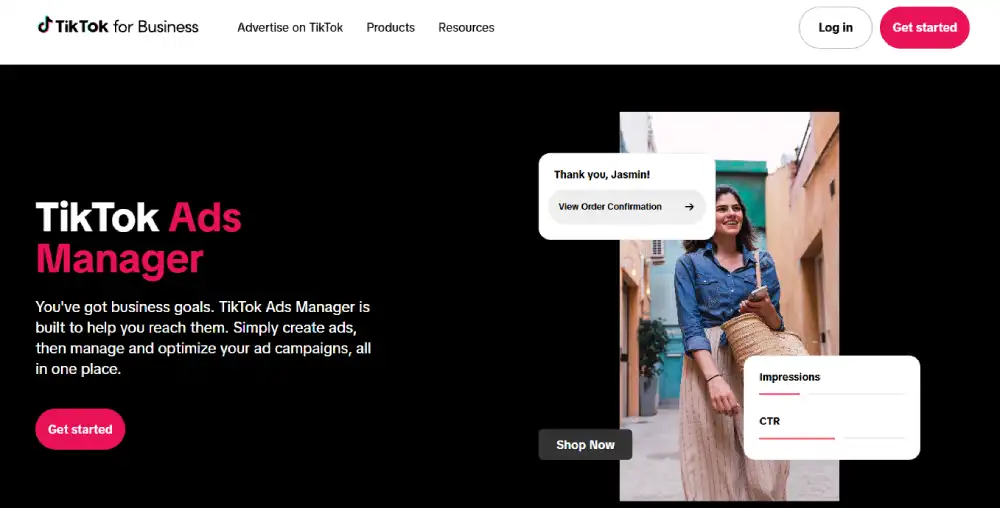
TikTok Ads Manager, sometimes simply called TikTok Ad Manager, is TikTok’s self-serve advertising platform for creating, managing, and optimizing paid campaigns. It gives you access to audience targeting, budget controls, creative tools, and performance analytics, all in one dashboard. Results vary based on your industry, creative quality, and campaign objective selection.
What’s New in TikTok Ads Manager for 2026?
TikTok has shipped more meaningful platform updates in the past year than in the previous two years combined, and most advertisers are still running their accounts the old way. Here is what has changed in TikTok Ads Manager for 2026 that actually affects how you should run campaigns:
Smart+ Campaigns are now the default recommendation for most advertisers. According to TikTok’s Newsroom Smart+ announcement, advertisers using Smart+ Web Campaigns to optimize for value saw a 52% improvement in ROAS compared to standard campaigns.
In a documented case study from the same announcement, Ray-Ban reported a 50% reduction in CPA after adopting Smart+. Smart+ automates audience targeting, bidding, and ad placement using TikTok’s AI model.
TikTok Search Ads are out of beta. You can now run keyword-targeted ads that appear inside TikTok’s search results. This is a significant shift. According to TikTok’s own data reported by Shopify, 57% of users use TikTok’s search function, with 23% performing a search within the first 30 seconds of opening the app.
Separately, a TikTok study conducted with research firm Material found that 61% of TikTok users discover new brands and products on the platform, 1.5x more than users of other platforms. Search Ads give you intent-based targeting that was previously unavailable on TikTok.
Symphony AI Creative Tools are fully integrated. The Symphony suite, including AI script generation, AI video dubbing, and the AI Avatar tool, is now accessible directly inside Ads Manager. You no longer need third-party tools for basic creative production.
The Attribution Manager has been updated. You can now configure custom attribution windows per campaign objective, separate from your account-level defaults. This gives you far more accurate data when comparing upper and lower funnel campaigns.
Unified Measurement is live for eligible accounts. TikTok partnered with third-party measurement providers, including Nielsen and Kantar, to offer cross-platform reach and frequency reporting. If your account is eligible, you will see this option inside the Measurement tab.
These are not cosmetic changes. Each one affects how you should structure, bid, and measure campaigns in 2026.
Creating Your TikTok Ads Manager Account: A Step-by-Step Guide
Setting up your TikTok Ads Manager account correctly from the start saves you from billing issues, policy rejections, and restricted features later. Here is exactly how to do it.
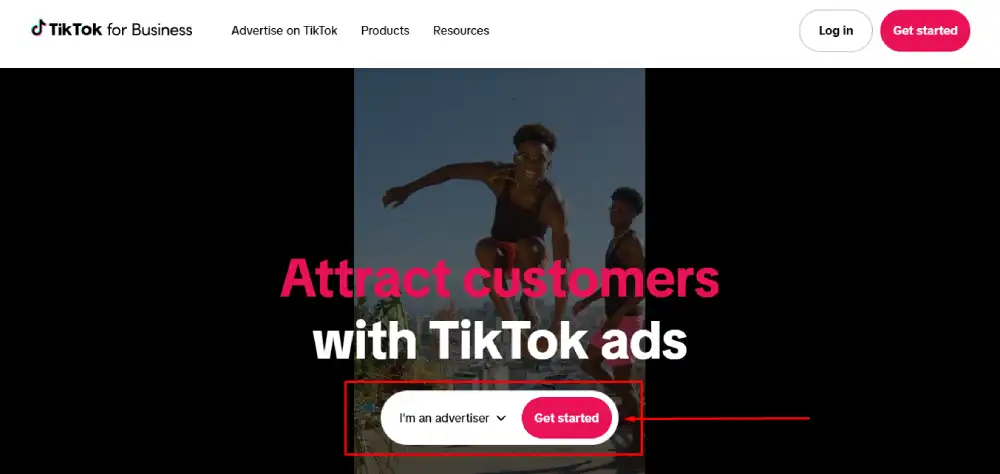
Step 1: Go to ads.tiktok.com, click “Create Now” on the homepage. You will be prompted to enter your email address or phone number, choose your password, and verify your contact information.
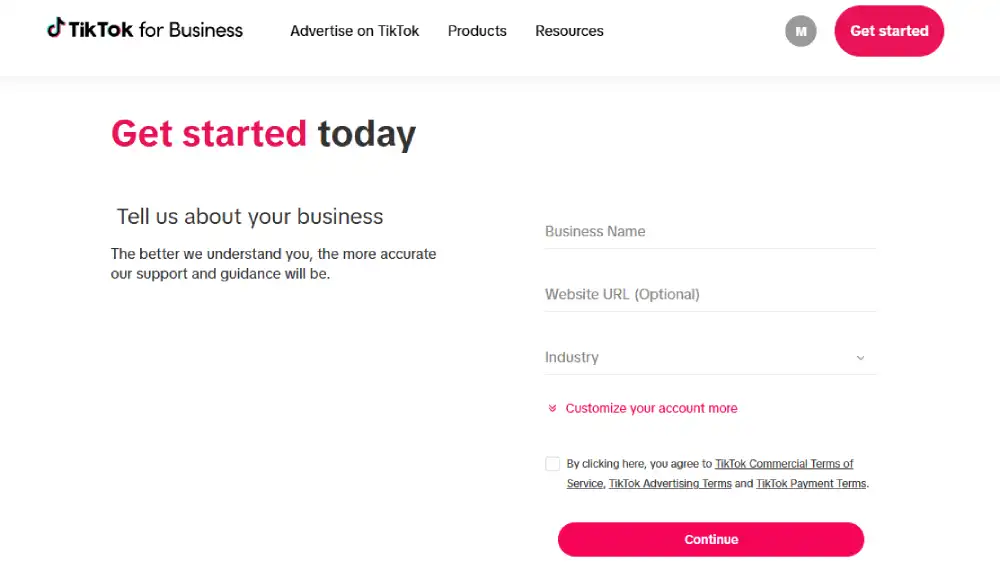
Step 2: Enter your business information. You will need to provide your country or region, your industry category, your business name, your website URL, and your business phone number. Make sure your website URL is live and matches the business name you enter. Mismatches trigger manual review.
Step 3: Set up your billing.
Manual payment gives you tighter spend control, especially useful if you are testing a new account.
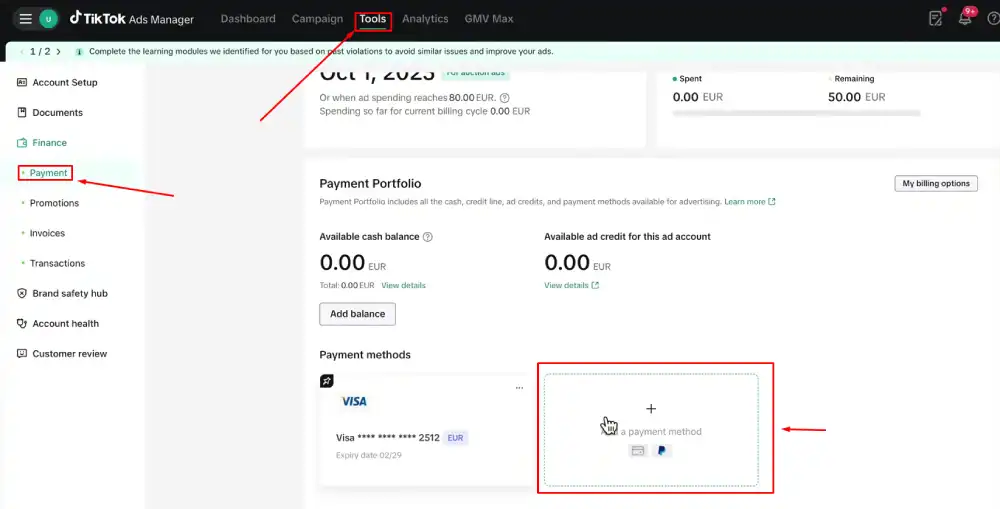
TikTok Ads Manager offers two payment options:
- Automatic payment: Your account is charged after you reach a billing threshold or at the end of each month.
- Manual payment: You add funds to your account in advance, and TikTok deducts from your balance as ads run.
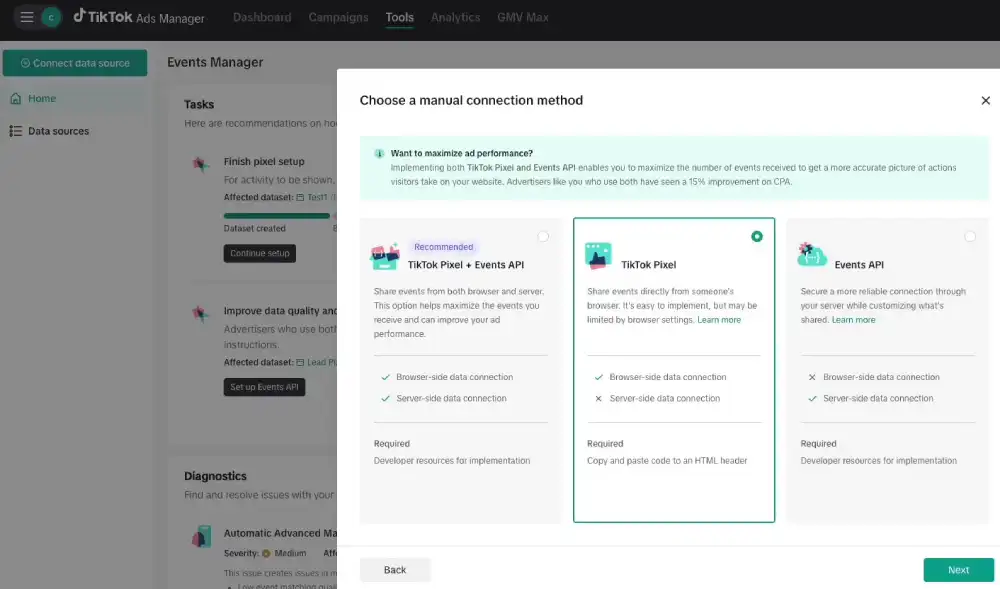
Step 4: Install the TikTok Pixel. Before you run a single ad, install the TikTok Pixel on your website. You will find this under Assets > Events > Web Events. The Pixel tracks conversions, builds Custom Audiences, and powers TikTok’s AI targeting. Without it, your conversion campaigns will underperform from day one.
Step 5: Set up TikTok Business Center (optional but recommended). If you manage multiple ad accounts, work with an agency, or plan to give team members access, connect your Ads Manager to TikTok Business Center at business.tiktok.com. Business Center lets you manage permissions, link TikTok accounts, and access shared assets across multiple accounts from one place.
Step 6: Verify your business (if prompted). High-spend accounts and certain ad categories, including finance, health, and political advertising, require business verification. You will need to upload a government-issued business registration document. Verification typically takes one to three business days.
Your account is now ready to build campaigns.
Understanding TikTok Ads Manager’s Campaign Structure
Every ad you run inside TikTok Ads Manager lives inside a three-tier structure. If you do not understand how these three tiers work together, you will waste budget and get confusing data.
Campaigns, Ad Groups, and Ads: How the 3-Tier System Works
| Tier | What You Control | Key Decision |
| Campaign | Objective, budget type | What goal are you optimizing for? |
| Ad Group | Audience, placement, schedule, bidding | Who sees your ad and how much do you pay? |
| Ad | Creative, copy, call to action | What does the audience actually see? |
The Campaign level is where you set your advertising objective. TikTok organizes objectives into three categories: Awareness, Consideration, and Conversion. Your objective selection locks in what TikTok’s algorithm optimizes for. If you select Traffic, but you actually want purchases, your campaign will bring visitors who never buy. Choose the objective that matches your real business goal.
The Ad Group level is where most of the strategic decisions happen. Here you define your target audience, select your ad placements, set your daily or lifetime budget, choose your bidding method, and set your campaign schedule. One campaign can contain multiple ad groups. This lets you test different audiences or placements against the same objective without creating separate campaigns.
The Ad level is where your creative lives. Each ad group can hold multiple ads. TikTok recommends running three to five creative variations per ad group to give the algorithm enough material to optimize toward the best performer.
A clean account structure looks like this: one campaign per objective, two to four ad groups per campaign, testing different audience segments, and three to five ads per ad group, testing different creatives. This structure keeps your data clean and your optimization signals strong.
How to Create Your First TikTok Ad Campaign (Step by Step)
Before you create your first campaign, have your Pixel installed, your creative assets ready, and your landing page live. Starting without these in place means your first campaign will produce incomplete data.
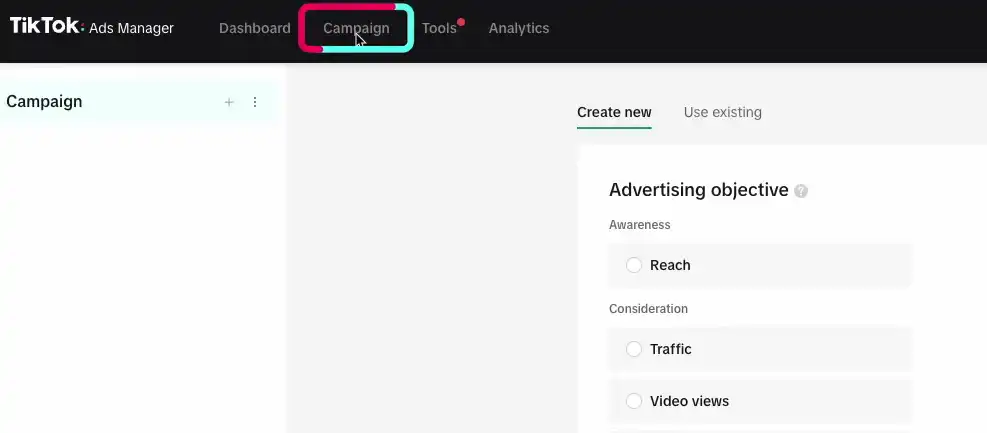
Step 1: Click “Create Campaign” in the Campaigns tab
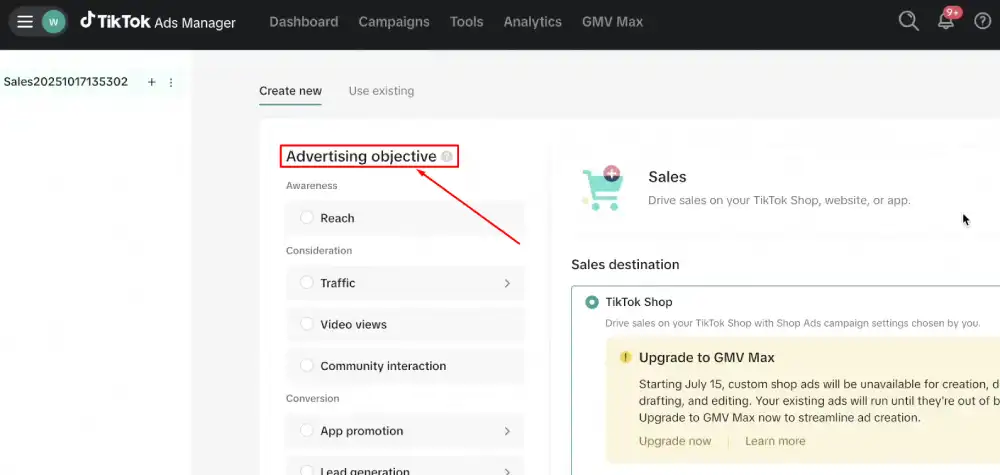
Step 2: Choose your campaign objective: Select the objective that matches your actual goal. TikTok currently offers these objectives: Reach, Video Views, Community Interaction, Traffic, App Promotion, Lead Generation, Website Conversions, Catalog Sales, and In-App Purchases. For most direct-response advertisers starting out, Website Conversions is the right choice.
Step 3: Name your campaign and set your budget: Use a naming convention that includes the objective, date, and target audience. For example: “Conv-US-25to34-March2026.” This makes reporting much easier at scale. Set a campaign-level budget only if you need a hard spend cap. Otherwise, control the budget at the ad group level for more flexibility.
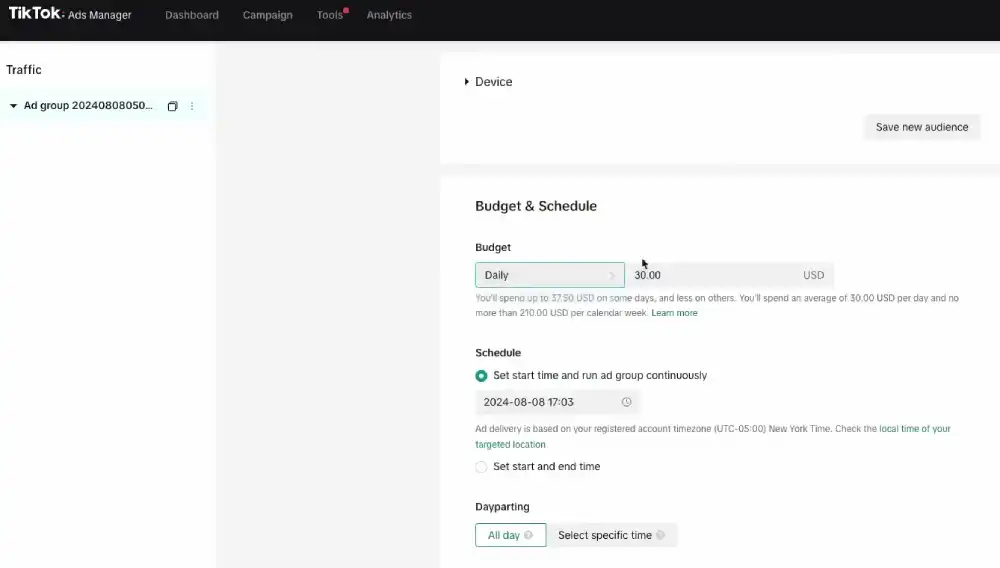
Step 4: Create your first Ad Group:
Inside the ad group, you will:
- Name the ad group using the same naming convention
- Select your Pixel and optimization event (choose “Purchase” for conversion campaigns)
- Define your audience using TikTok’s targeting options
- Select placements (start with “Automatic Placement” for your first campaign)
- Set your budget and schedule
- Choose your bidding strategy
Step 5: Upload your creative and build your ad: TikTok supports video ads, image ads (in Carousel and Collection formats), and Spark Ads (boosted organic posts). For standard in-feed ads, vertical video with a 9:16 aspect ratio and a resolution of at least 720p performs best. Keep your video between 21 and 34 seconds. According to TikTok for Business’s creative performance research, over 63% of videos with the highest click-through rate deliver their core message or highlight their key product within the first three seconds.
Step 6: Review and submit: TikTok’s ad review process typically takes zero to 24 hours. Make sure your landing page URL is accessible, your creative does not include prohibited content, and your ad copy does not contain misleading claims. Ads that fail review will show a rejection reason inside the Ad level of your dashboard.
Step 7: Monitor for the first 48 to 72 hours: Do not make changes during the learning phase. TikTok’s algorithm needs time to gather data and optimize delivery. The learning phase typically lasts two to seven days or until your ad group accumulates 50 conversion events, whichever comes first.
TikTok Ads Manager Targeting Options Explained
TikTok gives you more targeting flexibility than most advertisers use. Here is a full breakdown of every option currently available and when to use each one.
Demographic Targeting You can target by age, gender, location (country, region, city, or radius), language, and household income (available in select markets). This is your baseline filter. Do not over-narrow here. Tight demographic targeting limits the data your algorithm needs to optimize.
Interest and Behavior Targeting TikTok lets you target users based on their content interaction history. Interests are broader categories. Behaviors are more specific, based on recent actions like video engagement or hashtag interaction. Combining one interest category with one behavior layer is a reliable starting point for new ad groups.
Custom Audiences:
Custom Audiences are your highest-performing targeting option when your lists are large enough. TikTok recommends a minimum of 1,000 matched users for meaningful performance.
- Your TikTok Pixel data (website visitors, purchasers, cart abandoners)
- Customer file uploads (email or phone number lists)
- TikTok engagement data (users who interacted with your videos, profile, or ads)
- App activity data (for mobile apps with the TikTok SDK installed)
Lookalike Audiences Based on your Custom Audiences, TikTok can build a Lookalike Audience of users who share behavioral patterns with your source audience. You choose a similarity level: narrow (top 1%), balanced (top 5%), or broad (top 20%). Start with a balance for most campaigns.
AI-Powered Audience Expansion (2026) When you enable Audience Expansion inside an ad group, TikTok’s algorithm automatically tests delivery beyond your defined targeting when it identifies signals of higher performance. This works well for campaigns with clear conversion events and sufficient Pixel data.
Targeting Recommendation: Start Broad, Then Narrow: A common mistake is over-targeting from day one. TikTok’s algorithm performs better with a broad initial audience because it needs volume to identify your best customers. Start with a demographic and one interest layer, run for seven to 14 days, then use your audience data to build Custom and Lookalike Audiences for your next campaign.
TikTok Ads Manager Bidding Strategies and Budgeting
TikTok Ads Manager is free to access. You do not pay for the account itself. You pay only for the ads you run. According to TikTok’s official Budget and Bidding FAQ, the minimum daily budget is $50 at the campaign level and $20 at the ad group level.
Bidding Strategies Available in 2026
| Strategy | Best For | How It Works |
| Lowest Cost | New campaigns, testing | TikTok spends your full budget at the lowest possible cost per result |
| Cost Cap | Stable CPAs needed | TikTok targets your specified average cost per result |
| Bid Cap | Strict cost control | TikTok only bids up to your maximum per auction |
| Value-Based Bidding | eCommerce, high-AOV products | TikTok optimizes for maximum purchase value, not just volume |
Lowest Cost is the right starting point for most advertisers. It lets TikTok’s algorithm find efficient delivery without constraints while you gather performance data.
Cost Cap works well once you have enough conversion data (at least 50 conversions per ad group) and a clear target CPA from previous campaigns. Setting a Cost Cap too low too early will cause your ads to underspend.
Bid Cap gives you the tightest cost control, but it can significantly reduce delivery. Use it when you have a hard CPA ceiling you cannot exceed, not as a default setting.
Value-Based Bidding is specifically for campaigns optimizing for purchases. TikTok’s algorithm prioritizes users most likely to spend more, not just users most likely to convert. According to a TikTok for Business case study, campaigns using Value-Based Bidding drove 35% higher ROAS compared to standard conversion campaigns.
How much does TikTok advertising cost? There is no fixed answer because costs depend on your industry, audience, creative quality, and bidding strategy. TikTok does not publish official average CPM or CPC benchmarks. Based on third-party tracking data, Gupta Media’s Social CPM Tracker recorded an average of $5.26 as of September 2025. Costs in competitive categories like finance, insurance, and software run significantly higher.
TikTok Ads Manager Features for Business in 2026
TikTok has positioned Ads Manager as more than a media buying tool in 2026. It is now a creative production and AI automation platform as well.
Smart+ Campaigns and AI Automation
Smart+ Campaigns are TikTok’s fully automated campaign type. When you create a Smart+ Campaign, TikTok’s AI controls audience selection, placement, bidding, and budget allocation. You provide the objective, the creative assets, and the Pixel event to optimize for. The algorithm handles everything else.
Smart+ is not a shortcut for lazy advertisers. It works best when you give it strong, creative inputs and a clear conversion signal.
TikTok’s own guidance recommends having at least 100 conversion events of your target type before switching to Smart+ for the best results.
There are four types of Smart+ Campaigns: Web Conversion, App Promotion, Lead Generation, and Product Sales. Each is designed to handle optimization automatically so you can focus on creative strategy and budget allocation.
TikTok Symphony: The AI Creative Suite
Symphony is TikTok’s integrated AI creative platform, now fully accessible inside Ads Manager under the Creative tab. These AI-powered TikTok Ads Manager tools help businesses create scripts, videos, avatars, and multilingual creatives without relying entirely on third-party software.
Here is what Symphony currently includes:
- AI Script Generator: Generates video ad scripts based on your product URL, target audience, and campaign goal.
- AI Video Generator: Produces short-form video ads from product images or text inputs.
- AI Avatar: Creates a digital human spokesperson that can deliver your script in multiple languages.
- AI Dubbing: Translates and dubs existing video ads into different languages without re-shooting.
- Symphony Assistant: A chat-based creative assistant you can prompt inside Ads Manager to get script ideas, hooks, and caption suggestions.
Symphony is genuinely useful for teams that produce high volumes of creative or need to test multiple markets. It is not a replacement for original, creator-produced content for top-of-funnel campaigns. TikTok’s Creative Center research consistently shows that authentic creator-style videos outperform polished production at the awareness stage.
How to Use TikTok Ads Manager on Mobile
You can access TikTok Ads Manager on mobile through two methods: the mobile browser version of ads.tiktok.com and the TikTok for Business mobile app.
What you can do on mobile:
- View campaign, ad group, and ad performance data
- Turn campaigns, ad groups, and ads on or off
- Edit budgets on live campaigns
- View and respond to account notifications
- Access basic reporting and metrics
What you cannot do on mobile:
- Create new campaigns from scratch
- Build new ad groups with full targeting configuration
- Upload and configure new ad creatives
- Access Symphony AI creative tools
- Configure Pixel events or audience rules
The TikTok for Business app is available on both iOS and Android. Search “TikTok for Business” in the App Store or Google Play. Log in with your Ads Manager credentials.
How to check campaign performance on mobile:
- Open the TikTok for Business app
- Tap the Campaigns tab at the bottom of the screen
- Select the campaign you want to review
- Swipe between the Campaign, Ad Group, and Ad tabs to drill down
- Tap any metric column header to sort by that metric
- Tap a specific ad group or ad to view the full metric breakdown
Mobile access is best used for monitoring and quick adjustments between desktop sessions. If you need to make significant structural changes, budget overhauls, or creative updates, do that on a desktop where you have full functionality.
How to Read and Optimize Your TikTok Ads Manager Dashboard
Your TikTok Ads Manager dashboard gives you more data than most advertisers know what to do with. The key is knowing which metrics matter for your specific campaign objective and how to act on what you see.
The Core Metrics You Need to Track
| Metric | What It Measures | When It Matters |
| CPM (Cost Per 1,000 Impressions) | Efficiency of ad delivery | Always. High CPM means increased competition or a narrow audience. |
| CTR (Click-Through Rate) | Creative and copy relevance | Traffic and conversion campaigns |
| CPC (Cost Per Click) | Cost efficiency of traffic | Traffic campaigns |
| CVR (Conversion Rate) | Landing page and offer quality | Conversion campaigns |
| CPA (Cost Per Action) | Total cost per conversion | Conversion campaigns |
| ROAS (Return on Ad Spend) | Revenue generated per dollar spent | eCommerce and catalog campaigns |
| Video Play Rate | Hook effectiveness | All video ad campaigns |
| Video Completion Rate | Full video engagement quality | Awareness and consideration campaigns |
How to Diagnose Campaign Problems Using Your Dashboard
If your CPM is high but CTR is low, your creative is not resonating with the audience you are reaching. Test new hooks and opening visuals.
If your CTR is strong but CVR is low, the problem is your landing page or offer, not your ad. Your ad is attracting the right people, but they are not converting after the click.
If your CPA is climbing over time, your audience is fatiguing. Refresh your creative or expand your targeting to reach new users.
If your ROAS is below your target but volume is high, you may be attracting lower-value buyers. Switch to Value-Based Bidding to prioritize higher-spend customers.
How to access the Analytics tab
Go to Reporting in the top navigation. Click “Dashboard” for a campaign-level overview or “Create Report” to build a custom report with any combination of metrics and dimensions. You can schedule custom reports to be delivered to your email automatically on a daily or weekly basis.
Check your dashboard at least every 48 hours during active campaigns. Do not make changes more than once every two to three days unless you see a critical issue. Frequent edits reset the learning phase and destabilize delivery.
Common TikTok Ads Manager Mistakes (And How to Fix Them)
These are the mistakes we see most often across new and intermediate TikTok advertisers. Most of them are avoidable with the right setup from the beginning.
Mistake 1: Choosing the wrong campaign objective: This is the single most common error. If you want purchases but you choose Traffic as your objective, TikTok will optimize for clicks, not buyers. Your cost per click will look great. Your sales will be zero.
Fix: Match your objective to your actual business goal. If you want purchases, select Website Conversions and set your Pixel event to “Purchase.”
Mistake 2: Setting budgets too low to exit the learning phase: TikTok needs data to optimize. If your daily budget is too low to generate at least five to ten conversion events per day, your campaign will stay in the learning phase indefinitely, and performance will remain inconsistent.
Fix: Start with a budget that can realistically generate five conversions per day based on your expected CPA. If your target CPA is $20, your minimum daily budget should be at least $100. Remember, the minimum campaign-level daily budget is $50 per TikTok’s official budget documentation, so plan your overall spend accordingly.
Mistake 3: Making changes too early: You run a campaign for two days, see a high CPA, and immediately cut the budget or change the targeting. This resets the learning phase, and you never get stable data.
Fix: Wait at least five to seven days or until the ad group has 50 conversion events before evaluating performance. Make one change at a time and give each change time to register.
Mistake 4: Running one creative per ad group: If your single creative underperforms, your entire ad group fails. You have no way to know if the problem is the audience, the bid, or the ad itself.
Fix: Run three to five creative variations per ad group. Let TikTok’s algorithm identify the best performer. Pause the lowest-performing creatives after seven to 14 days of data.
Mistake 5: Ignoring the Video Play Rate metric: Most advertisers focus on CTR and CPA and ignore Video Play Rate. If fewer than 25% of viewers are watching beyond the first three seconds, your hook is failing, and no amount of bid adjustment will fix that. This aligns directly with TikTok for Business’s finding that over 63% of the highest-CTR videos lead with their key message immediately.
Fix: Check your Video Play Rate weekly. If it is below 25%, your opening three seconds need to be reworked before you change anything else in the campaign.
Mistake 6: Targeting too narrow an audience: New advertisers often layer demographic, interest, and behavioral filters until their audience size drops below one million. This starves TikTok’s algorithm of the volume it needs to find your best customers.
Fix: Keep your initial ad group audience above five million for most markets. Start broad, collect data, then build Custom and Lookalike Audiences from real converters.
Frequently Asked Questions About TikTok Ads Manager
Is TikTok Ads Manager free to use?
Yes, creating and accessing a TikTok Ads Manager account is free. You only pay for the ads you run.
According to TikTok’s official budget documentation, the minimum daily budget is $50 at the campaign level and $20 at the ad group level. There is no monthly platform fee.
How do I create a TikTok Ads Manager account?
Go to ads.tiktok.com and click “Create Now.” You will enter your email address, set a password, and verify your contact information. After that, you provide your business details, set up billing, and install the TikTok Pixel on your website.
The full setup process takes about 20 to 30 minutes. Business verification, if required, takes one to three additional business days.
Why are my TikTok ads not delivering?
The most common reasons are: your bid is too low for your target audience, your audience size is too narrow for TikTok to find delivery opportunities, your creative was rejected during ad review, or your campaign is still in the learning phase. Check your ad status inside the Ad level of your dashboard.
If the status shows “Under Review” or shows a rejection reason, that is your starting point.
What is the difference between TikTok Ads Manager and TikTok Business Center?
TikTok Ads Manager is where you create and manage ad campaigns. TikTok Business Center is the account management layer above it.
Business Center lets you manage multiple Ads Manager accounts, control team permissions, share audiences and Pixels across accounts, and link your TikTok profiles and commerce accounts.
You can use Ads Manager without Business Center, but Business Center is recommended if you manage more than one account or work in an agency setting.
What is a Smart+ Campaign in TikTok Ads Manager?
A Smart+ Campaign is TikTok’s AI-automated campaign type where the platform controls audience selection, placement, bidding, and budget optimization automatically. You provide the campaign objective, creative assets, and conversion event.
TikTok’s algorithm handles delivery optimization. According to TikTok’s Newsroom, Smart+ Web Campaigns optimizing for value delivered a 52% improvement in ROAS, with advertisers like Ray-Ban documenting a 50% reduction in CPA.
How do I track conversions in TikTok Ads Manager?
You track conversions by installing the TikTok Pixel on your website and configuring Web Events inside Ads Manager under Assets > Events. The Pixel fires when users complete actions on your site, such as making a purchase or submitting a form.
You then set your Pixel event as the optimization goal at the ad group level. TikTok’s Events API is also available as a server-side tracking option for more accurate data when browser-based tracking is limited.
What is TT Ads Manager?
TT Ads Manager is simply a shorthand term some marketers use for TikTok Ads Manager. Both refer to the same advertising platform used to create, manage, and optimize TikTok ad campaigns
Conclusion
TikTok Ads Manager has become a serious advertising platform, not a place to experiment with a budget you can afford to lose. The tools are genuinely sophisticated, and the 2026 updates, particularly Smart+ Campaigns, Search Ads, and Symphony, have made it more competitive with Meta and Google than most marketers realized until recently.
What you have in this guide is a complete picture: how to set up your account the right way, how the three-tier campaign structure works, how to target and bid without wasting budget, how to use the new AI-powered features, how to access performance data on mobile, how to read your dashboard and act on what it tells you, and how to avoid the mistakes that quietly drain most TikTok ad accounts.
Successful TikTok ads management comes from building a clean account structure, using the right TikTok Ads Manager tools, monitoring your TikTok Ads Manager dashboard, and continually improving your creatives with real campaign data.
You now have that process.