
Getting your ads to the right people is the biggest lever you can pull on TikTok. Creative matters, budget matters, but if your targeting is off, both of those are wasted.
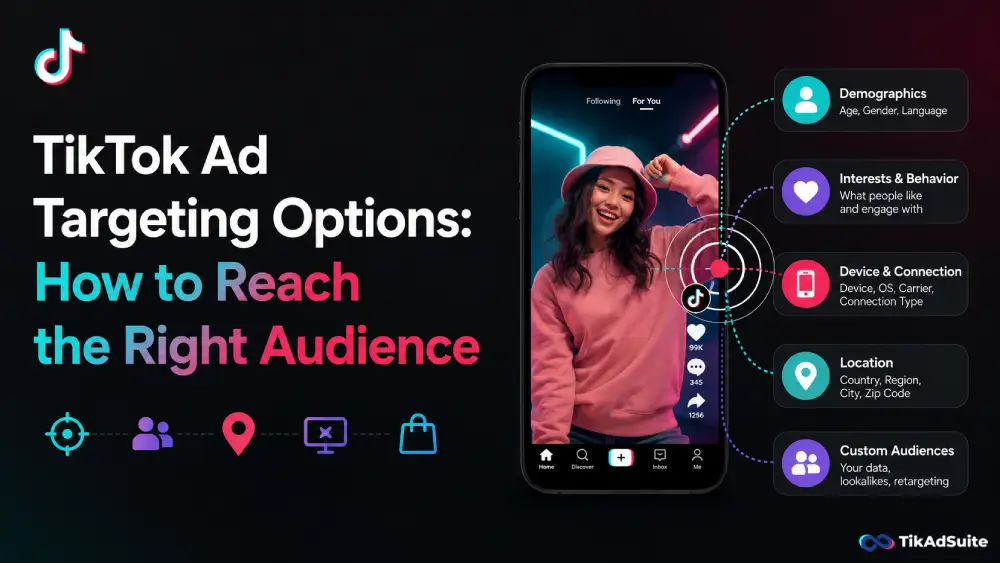
TikTok ad targeting options fall into five core categories, each built for a different stage of the customer journey.
This guide walks through every option available in TikTok Ads Manager, when to use each one, and how to combine them for real campaign results.
What you’ll learn:
- The five main TikTok audience targeting types
- How to match each option to your campaign goal
- When to use Smart Targeting and Smart+ Campaigns
- The most common targeting mistakes and how to sidestep them
Table of Contents
Get Up to $6000 Free TikTok Ad Credit
Quick Answer:
TikTok ad targeting options are the audience filters inside TikTok Ads Manager that control who sees your ads. The five main types are demographic targeting, interest and behavior targeting, custom audiences, lookalike audiences, and Smart Targeting.
What Are TikTok Ad Targeting Options?
TikTok ad targeting options are the audience controls inside TikTok Ads Manager that determine who sees your ads. You can define your audience by demographics, interests, behaviors, your own customer data, or users who share traits with your existing customers. You can also let TikTok’s AI handle it automatically.
According to DataReportal, TikTok’s ad tools reached 19.4 percent of the entire global population in early 2025. That kind of scale means targeting is not just important; it is what prevents your budget from disappearing into an audience that will never buy from you.
Demographic Targeting: Set the Baseline First
Demographic targeting filters your audience by age, gender, location, and language. In the US, you can also narrow by household income or spending power.
These settings are basic but critical. They stop your budget from reaching people you can never serve. A local fitness studio has no reason to pay for impressions in another country. A luxury skincare brand probably wants to filter out age groups that are unlikely to be buyers.
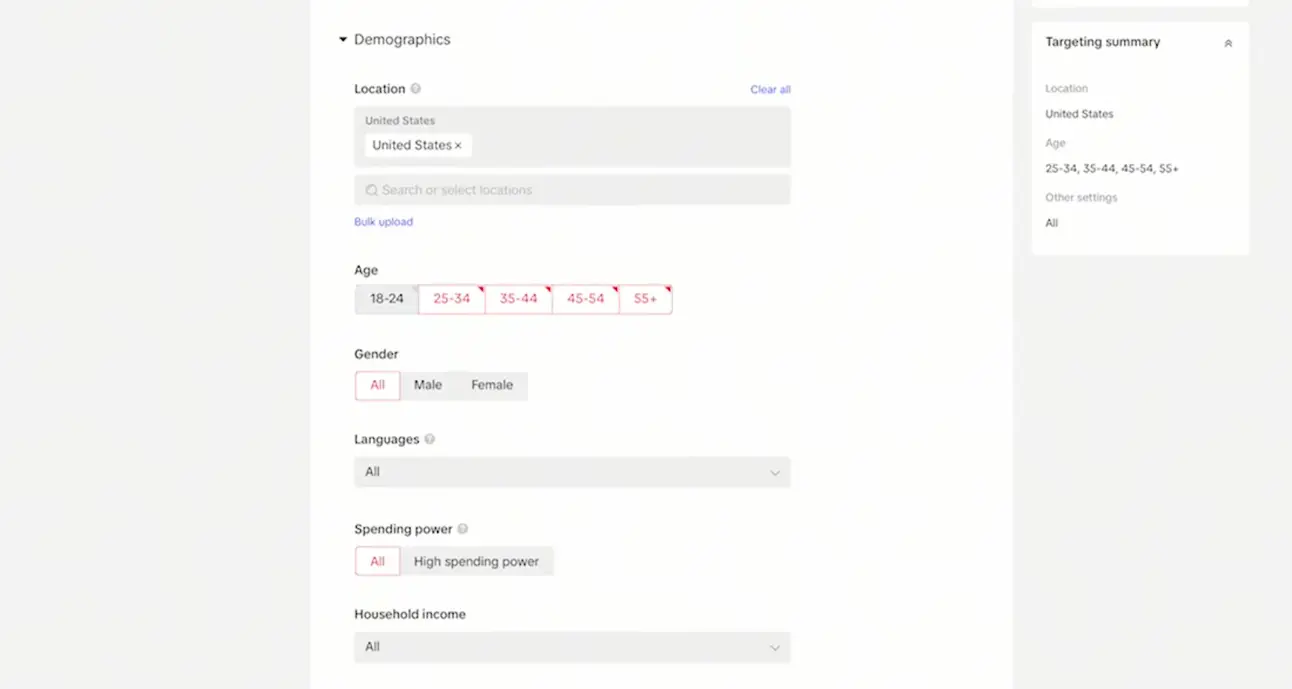
According to TikTok for Business, demographic filters sit at the foundation of every targeting setup in Ads Manager. (Source) You are not being clever here; you are cutting waste before the campaign even starts.
Avoid stacking too many demographic layers at launch. An audience that is too narrow gives TikTok’s algorithm too little room to find patterns and optimize delivery.
Interest and Behavior Targeting: Connect With People by What They Do
Found inside the Interest & Behaviors section of Ads Manager, interest targeting reaches users who engage with specific content categories. TikTok groups these into long-term clusters like beauty, gaming, travel, finance, and food.
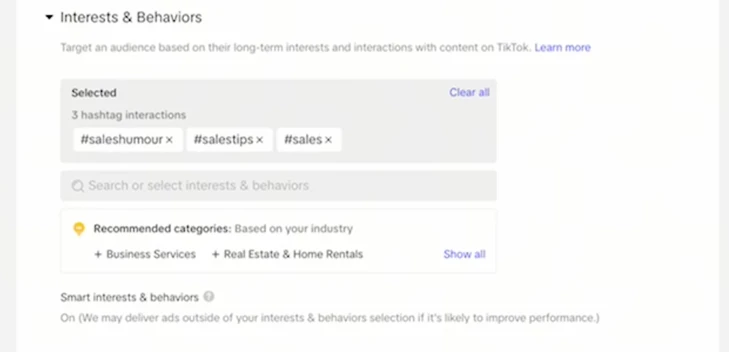
If your product fits inside one of those categories, this is the most direct way to get in front of people already consuming that type of content.
Behavior targeting is different. It focuses on what users have done recently, not just what they tend to watch. That includes videos they liked or shared, creators they followed, or content they engaged with in the last 15 to 90 days.
The distinction matters depending on your goal:
- Interest targeting = long-term affinity, best for brand awareness
- Behavior targeting = recent action signals, better for driving conversions
Use them together when you want both reach and relevance. A user who broadly follows beauty content and recently engaged with multiple skincare reviews is a far stronger prospect than either signal alone.
Custom Audiences: Target People Who Already Know You
Custom audiences let you build targeting segments from data you already have.
There are three main ways to create them inside Ads Manager:
- Customer list upload: Upload a CSV of emails or phone numbers. TikTok matches them against its user database. Match rates vary depending on how clean and current your list is, so using verified customer data rather than old export files gives you better results.
- TikTok Pixel: Place TikTok’s tracking pixel on your website and build audiences from specific actions: page views, product detail views, add-to-cart events, or incomplete checkouts.
- Engagement-based audiences: Retarget users who watched a significant portion of your videos, clicked your ads, or interacted with your TikTok profile.
Custom audiences consistently deliver lower cost-per-acquisition because you are not starting cold. Cart abandoners, past purchasers, and high-intent video viewers are all worth following up on.
TikTok requires a minimum of 1,000 matched users before a custom audience activates. For pixel-based audiences, you will need consistent website traffic before this method becomes viable.
Lookalike Audiences: Scale What’s Already Working
Once you have a custom audience that converts, lookalikes let you find more people like them. TikTok analyzes the shared traits of your source audience and identifies new users who match those patterns.
You choose the audience size at setup:
| Size setting | Similarity level | Best used for |
| Narrow (1-2%) | Highest | High-intent prospecting |
| Balanced (3-5%) | Strong match | Scaling active campaigns |
| Broad (6-10%) | Wider reach | Awareness campaigns |
The source you use matters more than the size you choose. A list of 1,000 actual paying customers will produce a far stronger lookalike than a list of 50,000 cold email signups. Use your cleanest, highest-intent data as the seed.
One more thing: always define a geographic target for every lookalike. Lookalike audiences must be scoped by region, and including markets you cannot serve inflates your reach numbers without improving conversions.
Targeting and Smart+ Campaigns: Let the Algorithm Lead
Smart Targeting is an AI-powered setting that automatically expands your audience when campaign delivery starts to slow.
It never overrides hard limits like age or location, but it probes new segments it expects to perform based on your existing campaign data. The result is an extended reach without manual audience research on your end.
Smart+ Campaigns go further. You set the campaign objective, upload your creative, and TikTok handles targeting, bidding, and optimization as a single automated system.
According to TikTok’s product update, Smart+ now gives advertisers module-level control over automation.
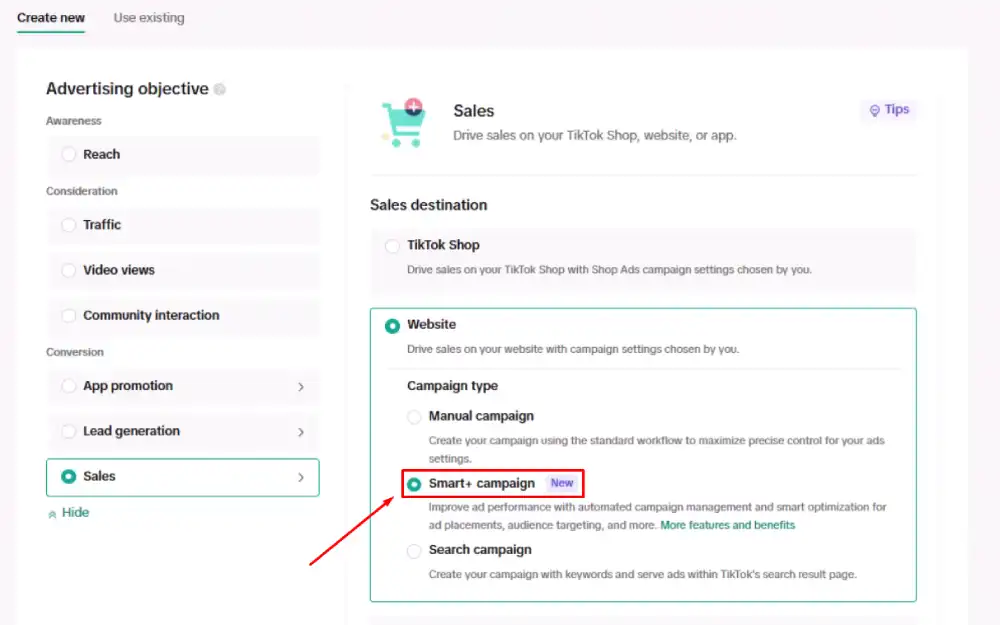
You can keep targeting automated while managing bids manually, or switch any individual module between automated and manual as needed.
A Smart+ label appears on each module inside Ads Manager so you always know what the algorithm is handling.
Smart Targeting works best once a campaign has generated some performance data. In the first week, the algorithm is still learning. Give it 7 to 10 days of delivery before judging performance or making changes.
How to Match Targeting to Your Campaign Goal
Different objectives need different setups. Here is a practical starting point:
Building awareness (cold audience): Start with demographic filters plus two or three interest categories. Keep the audience large, ideally over 1 million users, to give TikTok’s algorithm room to optimize. Enable Smart Targeting to let it expand beyond your initial parameters as data comes in.
Driving conversions (warm audience): Use custom audiences built from pixel events or video engagement. These are your highest-intent segments. The closer someone is to a previous action on your site or ad, the lower your cost-per-acquisition tends to be.
Scaling a working campaign: Layer a narrow lookalike (1-2%) on top of your best-performing custom audience. Run them as separate ad groups so you can compare performance side by side and shift budget toward what is producing results.
Excluding the wrong people: Build an exclusion list before you launch. Exclude past purchasers from prospecting campaigns and people who have already converted from retargeting campaigns. This single step alone can significantly reduce wasted spend.
What Targeting Mistakes Should You Avoid on TikTok?
The most common mistake is over-constraining your audience too early. Stacking too many filters in week one shrinks your audience below what TikTok’s algorithm needs to learn.
A narrow setup sounds precise, but it often produces slow delivery and data you cannot rely on.
A few other patterns worth avoiding:
- Audience overlap between ad groups: If multiple ad groups share the same users, they compete against each other in the auction. Use the Audience Overlap tool in Ads Manager to check before launch.
- Skipping the TikTok Pixel: Without pixel data, you cannot retarget site visitors or build behavior-based custom audiences. Install the pixel before you run your first campaign, not after.
- Using a weak lookalike source: Lookalikes built from low-intent lists such as newsletter signups or sweepstakes entrants produce low-quality reach. Build them from purchasers or high-value users instead.
- Changing targeting too often: TikTok’s algorithm needs time to exit the learning phase. Make changes too early, and you reset the process, which means starting optimization from scratch.
Frequently Asked Questions
Can you target by income on TikTok?
Yes, but only in the United States. Inside TikTok Ads Manager, US advertisers can filter by household income as part of the demographic targeting section. This is particularly useful for premium products and high-ticket services that need to qualify buyers before serving an impression.
What happens if my custom audience falls below 1,000 users?
TikTok will not activate the audience for targeting until the match count reaches 1,000. If your uploaded list falls below that, the audience stays inactive. It is worth cleaning your data before uploading rather than troubleshooting afterward. For new advertisers, the TikTok Pixel is often a faster route to building a usable custom audience than a customer list upload.
Is Smart Targeting the same as Smart+ Campaigns?
No. Smart Targeting is a toggle inside a standard manual campaign that lets TikTok expand your audience automatically when delivery slows. Smart+ Campaigns automates targeting, bidding, and creative optimization together as one system. You can see how the two differ inside TikTok’s help center on Smart+ targeting.
How long should you run an ad group before changing targeting?
Most advertisers wait for at least 50 conversions at the ad group level before making changes. That gives TikTok’s algorithm enough data to exit the learning phase. Change things earlier, and you are making decisions based on noise, not patterns. If you are running a low-volume campaign, two to three weeks of delivery time is a reasonable substitute for conversion count.
Does interest targeting work for niche products?
Yes, and it often works especially well. TikTok groups users by the specific content communities they engage with, not just broad topic areas. A pet supplement brand can target users within the pet care interest category who recently engaged with pet nutrition content, for example. Niche audiences on TikTok tend to be highly engaged because the platform’s communities form around shared interests rather than passive browsing habits.
Conclusion
The right targeting setup is rarely about using every option at once. Pick the method that fits your current funnel stage, run it cleanly, and measure it before adding more complexity.
That approach gives TikTok’s algorithm the data it needs to work in your favor rather than against your budget.