
TikTok Ads Credit is a spend-and-match promotional balance for new advertisers: spend a set amount inside your first 30 days and TikTok matches it, up to $6,000 in free ad credit across 5 tiers. Below you will find how the tiers work, whether you need a coupon or promo code, how to claim the credit without losing it to a technicality, and how to spend it so it turns into real sales.
Organic reach for a new business account is hard to predict, so most brands that want steady sales from TikTok end up paying for reach. The credit offer lowers the cost of that first month of paid testing.
Through the TikTok Ads Credit program, new advertisers can double their testing budget in the first month, because qualifying spend comes back as credit.
Get Up to $6000 Free TikTok Ad Credit
With the current Spend X, Get Y offer, you can claim free ad credit for the highest tier you reach, in USD or the local currency amount shown in your account. Used well, it works more like a funded test budget than a discount.
Table of Contents
Quick Answer
TikTok ads credit is free ad budget that TikTok adds to a new Ads Manager account after you spend your own money. On the TikTok Ads affiliate program page, the offer runs in five Spend X, Get Y tiers, from $200 up to $6,000, and only spend made within 30 days of registration counts.
- You do not need a promo code for this offer. If the offer shows during sign-up, it is added to your account as a coupon.
- You get the highest tier you reach, not the total of every tier.
- You can see the offer in Ads Manager under Tools > Payments > Promotions.
- The credit cannot be cashed out, and it has an expiry date.
What Is TikTok Ad Credit?
TikTok ad credit is a promotional advertising balance provided to eligible advertisers that can be used to run ads after meeting specific conditions. Most offers follow a Spend X, Get Y model (for example, Spend $200, Get $200 in free credit), where you spend your own budget first and receive a matching TikTok ads bonus credit in your TikTok Ads Manager account.
For new advertisers, TikTok often provides a tiered cashback system during the first 30 days after registration, allowing businesses to earn up to $6,000 in TikTok free ad credit based on qualifying spend levels.

What Is TikTok Ad Credit
Inside Ads Manager, TikTok calls these offers coupons or ad credits, not promo codes. The next section explains the difference, since it decides whether you need to type a code at all.
Note: Free credits are time-limited, non-transferable, and cannot be withdrawn as cash.
TikTok Ads Coupon, Promo Code or Ad Credit: What Is the Difference?
For most new advertisers, a TikTok ads coupon and TikTok ad credit are the same offer under two names, and no code is involved. TikTok’s incentive program for new advertisers says that when an offer appears during registration, the coupon is issued as soon as the account is created.
People search for a TikTok ads coupon code or promo code because that is how discounts work on most sites. Ads Manager works a little differently. These are the three offer types you may run into:
| Offer type | How it is applied | Do you type a code? |
|---|---|---|
| Ladder coupon (Spend X, Get Y) | You reach a cash spend tier within the earning window, then matching credit is added | No |
| Discount coupon (a percent off, up to a cap) | A share of each ad charge is taken off automatically until the cap is reached | No |
| Promotional code | Given to advertisers who pre-load money into the account; you activate it before it expires, then meet the spend terms | Yes |
The promotional code is the only one you type in. TikTok’s promotional codes help page says these codes go only to advertisers who pre-load their ad accounts, that the credit usually shows on the payment page within one day after the required spend, and that it normally expires on March 31 of the year after you activate the code.
Is There a TikTok Ads Promo Code for New Accounts?
Not as a public code you can copy from a coupon site. The Spend X, Get Y offer on this page comes through a sign-up link, and the coupon is tied to the account you register.
A code shared on a deal site is unlikely to add anything. The coupon terms make the offer personal to the original recipient and limit it to one redemption per advertiser, so a code passed around online has nothing to attach to.
TikTok Ads Coupon vs TikTok Shop Promo Code
A TikTok Shop promo code is a discount for shoppers buying products in the app. It has nothing to do with ad spend. If you are an advertiser, the offer you want lives in TikTok Ads Manager, not in the Shop checkout.
TikTok Spend X, Get Y Ad Credits (2026): How the 5-Tier Credit Structure Works
TikTok’s Spend X, Get Y promotion follows a structured 5-tier model for new advertiser accounts. Advertisers who meet the required spend threshold within 30 days of registration receive matching TikTok ads cashback of equal value, up to $6,000 USD in total free credit.
Valid for new advertiser accounts within 30 days of registration.
This 5-tier structure comes from TikTok’s Ads Manager affiliate program, the sign-up path used by the link on this page. The general incentive program described above uses its own example amounts, which can be lower and vary by region. Your exact tier and credit amount are confirmed inside Ads Manager once you register, so use the table below as the structure to expect through this sign-up path.
| Tier Level | Spend Requirement | Credit Earned |
|---|---|---|
| Tier 1 | Spend $200 | Get $200 |
| Tier 2 | Spend $500 | Get $500 |
| Tier 3 | Spend $1,000 | Get $1,000 |
| Tier 4 | Spend $4,000 | Get $4,000 |
| Tier 5 | Spend $6,000 | Get $6,000 |
Note on Currency: Tier values may appear in your local currency depending on your account region. Exact spend thresholds and credit amounts are displayed inside TikTok Ads Manager at the time of registration.
Two rules matter when you plan your spend. You get the highest tier you reach, so the tiers do not add up, and each advertiser can redeem the offer once.
You may also see this offer called the TikTok 6k ad credit. That name points to Tier 5 in the table above, the top tier with the largest spend and the largest match.
Why TikTok Is a Powerful Advertising Platform in 2026
TikTok puts short video, search and shopping in one app, so an ad can sit right next to the content people already browse. For a new brand with no following, paid ads are the fastest way to get a video in front of the right viewers and learn what they respond to.

TikTok Advertising Platform
A few features make it a sensible place for a first paid test:
- Native-looking ads: In-feed ads look like normal posts, so a simple phone-shot video can compete for attention.
- Spark Ads: You can put spend behind a post that already exists on your profile and keep the likes and comments it earns.
- Shopping built in: In regions with TikTok Shop, sellers can send viewers to products without leaving the app.
Credit offers like this one exist to get more businesses to run their first paid campaign, which is the stage where extra budget helps most.
How to Claim TikTok Ad Credit Up to $6,000, Step by Step
Credit is easy to lose to small mistakes, such as signing up without the offer showing or spending after the earning window closes.

TikTok Ads Credit
Follow these steps in order.
Step 1: Create the Right Account
Register through the sign-up link on this page or another official TikTok for Business entry point. Do not use your personal TikTok account. If you have not set one up before, here is how to create a TikTok Business account.
- Sign up with a business email.
- Important: Register the account in your own country. The coupon terms require an Ads Manager account registered in your local region, and the region sets your currency and offer.
Step 2: Access the Offer
Once logged in, click the ticket (ad credit) icon in the top right corner of Ads Manager, or go to Tools > Payments > Promotions. This page lists each coupon with its details, validity and the ad products it covers.
- If a coupon is listed, open See details and click Register. If the button says Create campaign, the credit is already assigned to you.
- If TikTok sent you a TikTok for Business promo code, which is usually tied to pre-loading your account, activate it before its expiry date.
Pro Tip: TikTok’s steps to register an ad credit note that some accounts receive credit without registering, so you may not see a register button at all. Either way, check the Promotions page before you spend, because only spend inside the earning window counts.
Step 3: Connect Payment Method
Add a payment method that Ads Manager accepts in your region before you launch your first ad.
Tip: Use a card in the business’s name, with a billing address that matches the details you entered on the account.
Step 4: Hit the Spend Threshold
You have exactly 30 days from registration (not from your first ad launch) to hit the tiers.
- If you spend $199, you get $0.
- If you spend $200, you get $200.
- Only your own cash spend counts toward a tier. Credit already in the account does not.
- Strategy: Run your numbers through the free TikTok Ad Budget Calculator to make sure your daily spend is high enough to hit your target tier before the deadline. For a realistic daily figure, check the minimum budget for TikTok ads.
Step 5: Receive the Free Bonus Credit
Credit lands after TikTok confirms your qualifying spend, not the moment you hit a tier. The incentive program page says the top ladder tier pays out within 1 to 3 business days, while lower tiers are issued after the earning window closes. Each reward shows its own expiry date, which you can check in the coupon progress details.
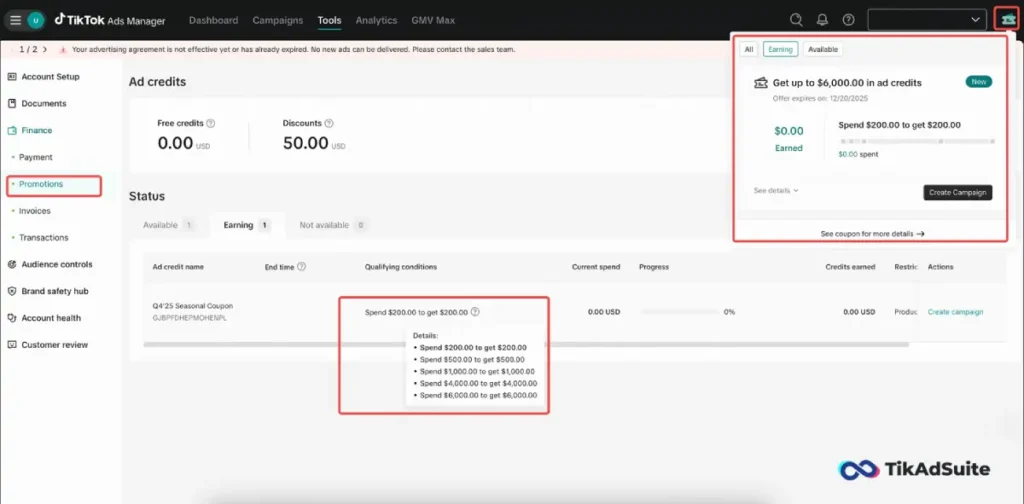
If it hasn’t appeared within a few days, check the Promotions page in Ads Manager before assuming something went wrong.
Best Practices: Using the Credit Strategically
Do not treat this credit like free play. Treat it like seed capital.
The Testing First Method
Use your initial cash spend (the money you pay) to test:
- Creatives: Test 3-5 different hooks (the first 3 seconds of the video).
- Audiences: Broad vs. Interest Stacks.
- Offers: Free shipping vs. a discount code.
By the time you receive the TikTok ads free credit, you should know what works. Then, use the credit to scale the winner. A full TikTok ad testing strategy shows how to set up this kind of split test.
Use Spark Ads
Instead of uploading a raw video ad, post the video on your organic profile first. Then, use Spark Ads to put spend behind it. This builds social proof (likes/comments) on your actual profile while you spend the credit, leaving you with a long-term asset even after the money runs out.
Avoiding Credit Abuse & Policy Violations
TikTok can withhold or withdraw ad credit for any reason, including content that breaks its policies. Avoid these traps, which can cost you the credit or lead to account suspension:
- The Double Dip: Do not open extra accounts to claim the offer twice. The offer is one per advertiser, a new ad account under a Business Center that already got the coupon will not qualify, and accounts that look very similar to existing advertisers may be excluded.
- Misleading Claims: Avoid before and after photos (weight loss) or unrealistic money promises. Ads like these break TikTok’s ad policies and can get rejected.
- Inconsistent Data: Ensure your billing address matches your card’s registered address. A mismatch can hold up your first payments.
Measure Success: Tracking & ROI
Measuring success with ad credit comes down to three things: ROAS, CPA and attribution through the TikTok Pixel. Track them so you can tell whether the credit is bringing in sales or only views.
- ROAS (Return on Ad Spend): Since the credit is free, your ROAS on that spend is technically infinite. However, calculate your Blended ROAS (Total Revenue / Total Cash Spent).
- CPA (Cost Per Acquisition): Watch this closely. If your CPA is $20 and you have $1,000 in credits, you know you can buy roughly 50 customers for free.
- Attribution: Install the TikTok Pixel immediately. Without it, you cannot verify if the credit is driving sales or just clicks.
Common Scenarios to Use This Free Ads Credit: Two Examples
Two made-up examples show how the tiers play out for different budgets. They are not real client results.
Scenario A: The Dropshipper (Starter Tier)
- Spend: $200
- Goal: Validate a product.
- Result: They spent $200 testing 4 videos. None is a clear winner, but they get useful data.
- The credit: Tier 1 is matched, so the same amount comes back as ad credit. They use this second round to test new creatives based on the previous campaign data, finally finding a winner without doubling their out-of-pocket risk.
Scenario B: The eCommerce Brand (Scale Tier)
- Spend: $4,000
- Goal: Aggressive scaling for a seasonal sales push.
- Result: They push hard, spending $133/day.
- The credit: Tier 4 is matched in full as free ad credit. They use it to run retargeting campaigns, which show ads to people who visited the store but did not buy.
FAQs (Quick Answers)
How do I qualify for the full TikTok ad credit?
You need to be a new advertiser and hit your target spend threshold within your first 30 days of registration. The credit matches the highest tier you reach (see the table above for the exact amounts), and it’s added to your account after the threshold is confirmed, usable within the promotion period.
Do I need a coupon code to get this credit?
No, not for the Spend X, Get Y offer. When an offer appears during sign-up, TikTok attaches it to the new account as a coupon, and you can see it under Tools > Payments > Promotions. For more on how TikTok ads coupons differ from a TikTok Shop discount code, see TikTok Ads for Business Coupons.
Is there a TikTok for Business promo code for ads?
Only in specific cases. TikTok gives promotional codes to advertisers who pre-load money into their ad account, and each customer can use one promotional credit. The Spend X, Get Y offer on this page needs no code, because it is applied as a coupon when you register.
What is the TikTok 6k ad credit?
The 6k ad credit is the top tier of the Spend X, Get Y offer, shown as Tier 5 in the table above. You reach it by spending the full Tier 5 amount within your first 30 days.
Does TikTok ad credit expire?
Yes. Every coupon reward has an expiry date, which you can see in the coupon progress details in Ads Manager. Promotional codes carry their own expiry date, covered in the coupon and promo code section above.
Can I stack or combine TikTok ads coupons?
No. With the Spend X, Get Y tiers you get the highest tier you reach, not the sum of all tiers. The offer can also be redeemed only once per advertiser.
Wrapping Up
The TikTok Ads Credit offer exists to help you survive the hardest part of advertising: the beginning, when you don’t yet know what works and every dollar you spend is a guess.
Plan your budget against the tier you’re realistically able to hit, verify your account correctly, and spend with a testing plan instead of randomly. That’s what turns this credit from a nice bonus into a funded head start, whether you’re working the $200 Tier 1 or pushing for the full $6,000 at Tier 5.
Ready to start?
- Check your eligibility.
- Plan your spending with the ROI Calculator.
- Launch your first campaign today.
Register for the offer before you spend your first dollar, because only spend inside the earning window counts toward a tier.