
You launched five TikTok ads. Two flopped, one did fine, and you still can’t say why. A real TikTok ad testing strategy takes that guesswork out of your account.
Most advertisers swap creatives, change audiences and hope something sticks. A testing system changes one thing at a time, so every dollar you spend teaches you something you can use again.
This page covers how TikTok’s built-in Split Test works, what to test first, how much budget a fair test needs, and how to read TikTok ad reports without picking a fake winner.
Get Up to $6000 Free TikTok Ad Credit
Table of Contents
Quick Answer
TikTok ad testing means changing one element of an ad, keeping everything else the same, and letting results decide which version wins. TikTok’s built-in Split Test divides your audience into two equal groups, each seeing one ad group. TikTok recommends running it for at least 7 days, and it names a winner only when the results are statistically significant.
Key Takeaways
- A TikTok ad test compares versions of one element, like the hook or the audience, so you learn from proof instead of opinion.
- The native Split Test tool works at a 90% confidence level, per TikTok’s Split Testing page, and only calls a winner on statistically significant results.
- TikTok’s split test guidance suggests at least 7 days, and a test can run for 30 days at most.
- Test one variable at a time. If you change the hook and the audience together, you can’t tell which change moved the result.
- Audiences are tested at the ad group level and creatives at the ad level, so your account structure decides where each test lives.
- Every ad group in a test needs its own budget, and TikTok’s budget page sets the daily minimum above $20 per ad group.
What Is a TikTok Ad Test?
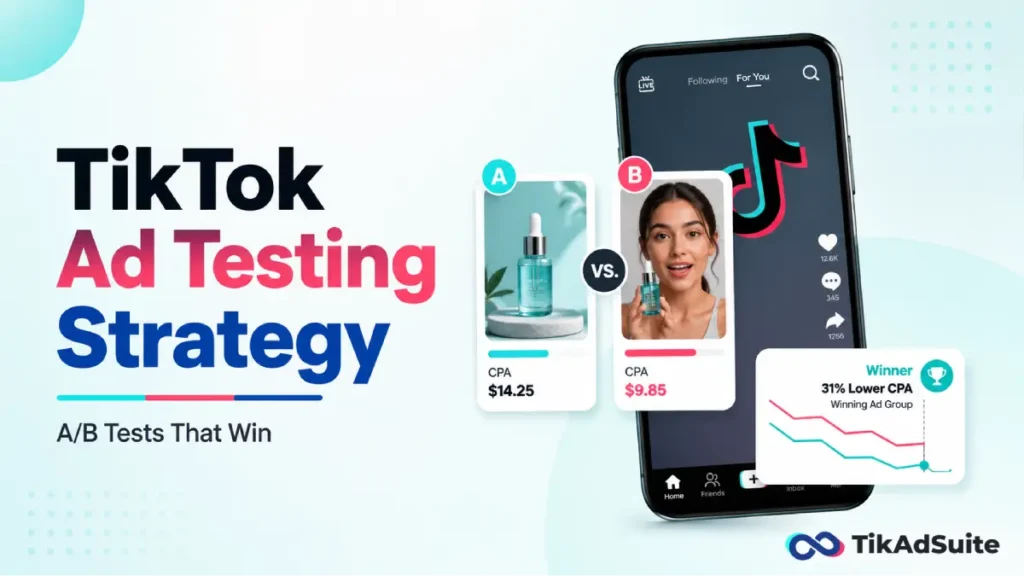
A TikTok ad test is a controlled experiment: you change one thing, keep the rest the same, and measure which version performs better. That one change might be the hook, the audience, the bid setup or the call to action.
The goal is clean data. When only one variable differs, the result points to one clear cause, and you can act on it with confidence.
Testing also builds on itself. Each of your winning TikTok ads becomes the benchmark the next test has to beat, so after a few months your account knows things instead of starting over every week.
The Account Hierarchy That Makes Testing Work
Every test belongs to one level of your account. TikTok organizes each ad account into three levels: the campaign, the ad group and the ad.
Here is what each level controls and what you can test there:
| Level | Controls | What you test here |
|---|---|---|
| Campaign | Objective and overall budget | The goal itself, like Traffic vs Sales |
| Ad group | Audience, placement, bid, schedule | Different audiences and targeting |
| Ad | The video, text and CTA | Creatives, hooks and messaging |
Settings flow downward. A campaign objective applies to every ad group and ad inside it. So you test audiences by building separate ad groups, and you test creatives by running different ads inside one ad group.
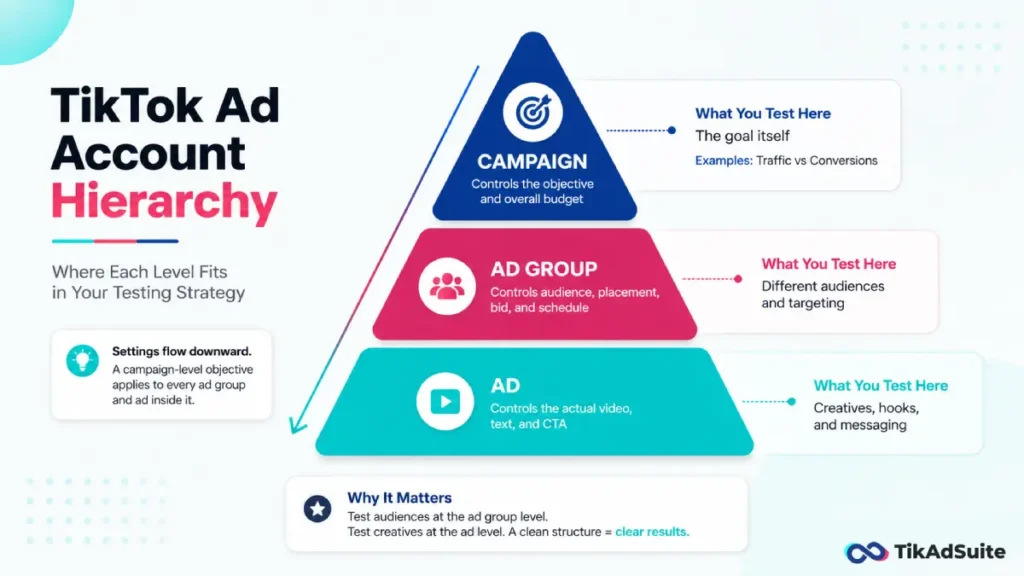
A clean structure makes your results easy to read. For a deeper walkthrough of each level, see how to plan your TikTok ads campaign structure.
A/B Testing on TikTok: The Native Split Test Tool
TikTok’s Split Test is a built-in A/B test in Ads Manager that compares two versions of your ads and shows which one performs better. A/B testing and split testing mean the same thing here, and you don’t need outside software to run one.
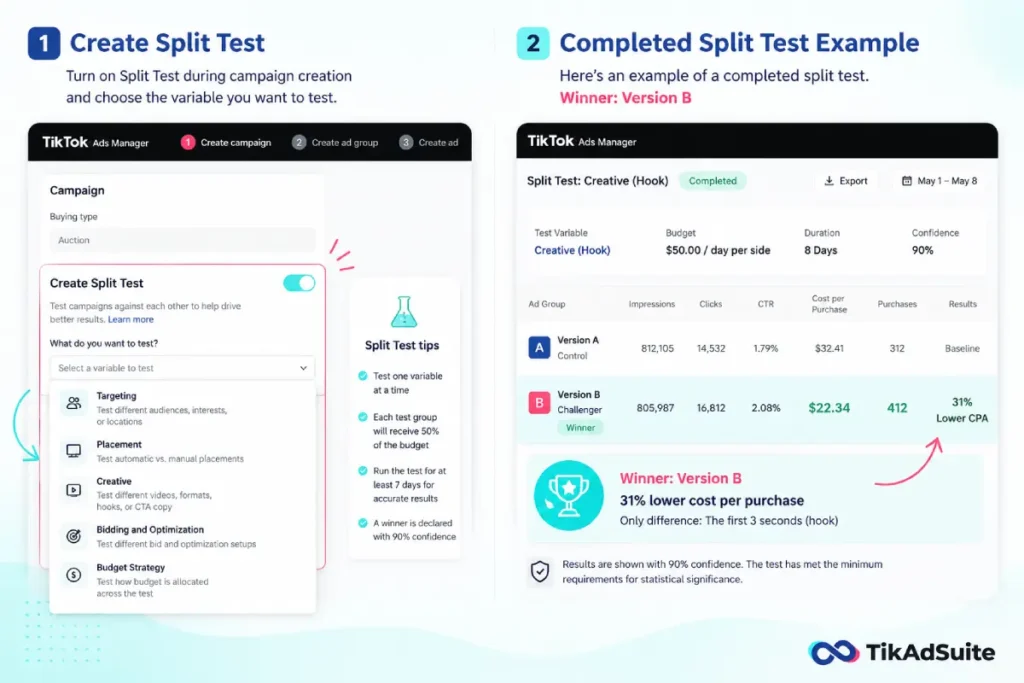
When you turn it on, TikTok splits your audience into two equal groups, and each group sees only one ad group. That separation stops your two versions from competing for the same people, which is what ruins most manual tests.
What You Can Test
The Split Testing help page lists these variables:
- Targeting: broad vs narrow audiences, interests or locations
- Placement: automatic vs manual placements
- Bidding and optimization: different bid strategies or optimization goals
- Budget strategy: how spend is set across the test
- Creative and creative assets: different videos, hooks, formats or CTA copy
- Catalog: different product catalogs for catalog ads
- Custom tests and Smart+: combinations of campaign settings, or Smart+ campaigns
Pick one per test. The two versions should differ in a single way you can name out loud.
How to Set Up a Split Test
TikTok’s guide on how to create a split test follows this order:
- In Ads Manager, open the Campaign tab and click Create.
- Choose your advertising objective and turn on the split test toggle.
- Set up the ad group and ad as usual.
- In the Split test tab, pick the variable and a key metric, such as cost per result.
- Build the second ad group with only that one variable changed, then click Complete.
The key metric matters. The system uses it to compare the two ad groups and decide which one performed better, so choose the number tied to your real goal, not a vanity metric.
Budget You Need Before You Start
A split test runs two ad groups, so you pay for two. TikTok’s budget rules require a daily budget above $20 per ad group and above $50 at the campaign level when you set one there.
That means a two-ad-group test needs more than twice the ad group minimum each day just to start. Treat that as a floor, not a target. TikTok’s split test best practices recommend a budget large enough to reach a statistical power of at least 80%, which in plain terms means enough results for the test to spot a real difference.
A Worked A/B Test Plan You Can Copy
A worked A/B test plan names the question, the one variable, the key metric and the schedule before any money is spent. The sample below is a hook test you can copy for a skincare store selling a face serum. It’s a plan, not a result, so fill in your own numbers.
- Question: Does a person talking to camera in the first seconds beat a calm product shot?
- Variable: The opening only. Version A opens on the bottle. Version B opens with a person stating the problem the serum solves.
- What stays the same: Body footage, offer, landing page, audience, bid strategy and budget per ad group.
- Key metric: Cost per purchase, since that’s what the store pays for.
- Schedule: At least 7 days, with no edits while it runs.
- Decision rule: Keep the version TikTok marks as the winner. If the test ends without a significant result, treat it as a tie and test a bigger difference next time.
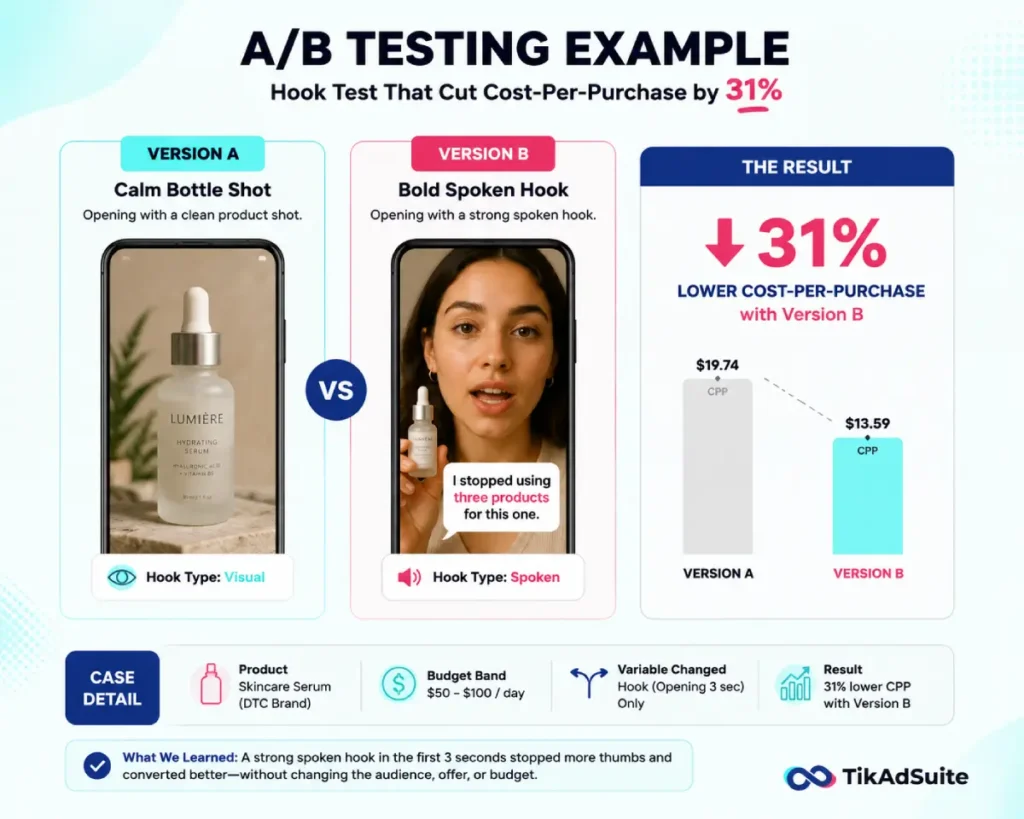
Notice what makes this plan trustworthy. One variable changes, the audience never sees both versions, and the test runs long enough to read. Break any of those rules and the winner is just a guess. For opening ideas worth testing, browse these TikTok ad hooks.
Testing Methods Beyond Simple A/B
A/B testing is the starting point, but a growing account needs a few more ways to learn.
Multivariate testing compares more than two versions at once, like four hooks against the same body. Each version still needs enough data to trust, so it takes more budget than a simple A/B test.
Champion vs challenger is an ongoing loop. Your best ad is the champion, and each new test sends one challenger against it. If the challenger wins, it becomes the new champion.
Holdout testing asks a bigger question: would these people have bought anyway? You keep part of your audience from seeing ads, then compare the two groups to measure real lift rather than clicks.
Modular creative testing splits an ad into parts. You lock one body and one CTA, then test several hooks against them. It’s the cheapest way to keep a steady flow of creative tests, which the next section covers.
TikTok Ads Creative Testing, Step by Step
Creative is usually where TikTok tests pay off first, because the first seconds decide whether anyone keeps watching. Start your creative testing with the hook.
Build a modular set. Film one strong body and one CTA, then script several different openings: a visual surprise, a bold on-screen question, a relatable problem and a result reveal. Pair each opening with the same body to get distinct ads.
You can cut these versions quickly in an editor like CapCut, which makes it easy to swap the opening seconds without reshooting the whole video.
Ads Manager can help too. Its Quick Optimization feature combines visual effects, opening frames and music to make up to 12 creative versions from one video.
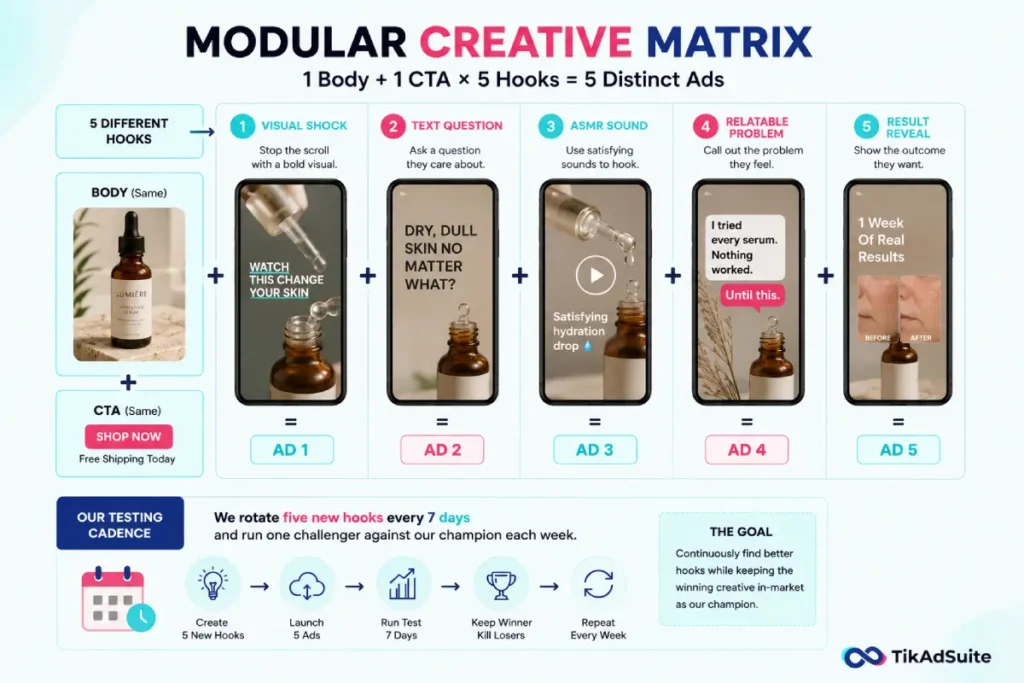
Find the winning hook, then test new bodies against it. The loop doesn’t end, and that’s the point. For a full system, follow a TikTok creative testing framework, and pair hook tests with UGC in TikTok ads for native-looking footage.
How to Read Results Without Crowning a Fake Winner
A winner is only real when the numbers are stable and significant. The most common mistake is calling a test on day two with a handful of clicks. That’s noise.
New ad groups also go through a learning phase. TikTok’s learning phase guide says performance usually steadies after about 25 campaign results or 7 days, and it warns that pausing or making edits that restart learning hurts delivery. A version that looks weak on day two may simply still be learning.
Money matters too. Each version needs enough results to be trusted, and new accounts can stretch testing money with TikTok ad credit so early tests reach a clear answer instead of stalling.
Judge the winner on your real goal, such as cost per purchase or cost per lead, and compare it with current TikTok ad benchmarks before you scale. When you do raise the budget on a winner, TikTok’s budget guidance advises increases of no more than 40% at a time during learning and 30% after it, at most every two days.
What Does Test Stand for on TikTok?
In TikTok advertising, test is not an acronym. It simply means running a controlled experiment, like an A/B test or split test, to find what performs best. There is no hidden meaning behind the word in Ads Manager.
You may see the word used differently outside of ads. In comment sections, some users type test to check whether their comment posts or whether their account is restricted. That use has nothing to do with advertising.
For marketers, read test as experiment. When someone says they are testing TikTok ads, they mean comparing versions to learn what works, then scaling the winner.
How Long Should a TikTok Split Test Run?
Run a TikTok split test for at least 7 days. TikTok’s best practices page says testing for less than 7 days may not be long enough to find a winner, and a split test can run for 30 days at most.
The learning phase is the other reason to wait. Delivery tends to settle after about 25 results or 7 days, according to TikTok’s learning phase page, so numbers read before then are still moving.
Most tests fit somewhere between 7 and 30 days, depending on how fast your ad groups collect results. Low budgets or expensive conversions need the longer end. TikTok also recommends not changing your split test settings once it’s running, because edits break the comparison.
Common TikTok Ad Testing Mistakes
Most TikTok ad testing mistakes come down to breaking one of a few simple rules. Watch for these:
- Changing two things at once. A new hook plus a new audience tells you nothing about either.
- Ending the test early. Fewer than 7 days, or fewer than about 25 results in the learning phase, usually means you’re reading noise.
- Editing mid-test. Budget or setting changes during a split test break the even comparison.
- Spreading a small budget too thin. Five versions at the minimum budget each rarely produce a clear winner.
- Testing versions that barely differ. TikTok’s best practices say the two test groups should differ clearly, or the results will look alike.
- Picking the wrong key metric. A cheap click means little if your goal is purchases.
Frequently Asked Questions
What metrics show that a TikTok ad creative is fatigued?
Watch for the same ad’s results slipping over time: cost per result rising, click-through rate falling, and fewer people watching past the opening, which Ads Manager reports as 2-second and 6-second video views. TikTok also offers Fatigue Detection, which scans ad metrics for early signs of fatigue, and Auto Refresh, which rotates creative assets in and out when fatigue shows up. Have the next tested creative ready before results fall too far.
What is the difference between A/B testing and split testing on TikTok?
There is no real difference. Both compare versions of an ad to find the better one. TikTok uses split test for its native tool, while A/B test is the wider industry term. The key feature is audience separation, so each group sees only one version and the data stays clean.
Can I test more than two ads at once?
Yes, but watch your budget. You can run several ads inside one ad group or compare several versions in a multivariate test. TikTok’s native Split Test compares two versions, though. Each version needs enough results to trust, and splitting a small budget across too many versions starves every one of them.
Which variable should I test first?
Start with creative, especially the hook, because the opening decides whether people keep watching. Once you have a strong creative, test audiences at the ad group level, then bidding and placement. That order usually brings the biggest wins first.
Do I have to pay for TikTok’s split testing tool?
No separate fee is charged for the Split Test feature in TikTok Ads Manager. You pay for the ad spend that runs through the test, and each of the two ad groups needs its own budget above the $20 daily minimum on TikTok’s budget page.
Wrapping Up
The habit that matters most is simple: change one variable, give it enough budget and time, then scale the winner and test again.
Start with your hooks, use the native Split Test so your data stays clean, and keep the next creative ready before the current one fades. Open Ads Manager, pick one thing to test this week, and let the results decide.