
You film an ad, launch it, and watch the budget drain. Meanwhile, a competitor’s ad has sat at the top of your For You page for three straight months.
They are not luckier than you. They are running creative that already survived testing, and TikTok lets you see exactly what it looks like.
The TikTok Ad Library is a free public database of ads that have run on the platform. You can search any advertiser by name, watch their ads, check who they target, and see how long each ad stayed live. Most advertisers either do not know it exists or browse it without a plan.
This guide gives you the plan. Here is what you will learn:
- Where to find the TikTok Ad Library and what data it shows for every ad
- A six-step process for pulling apart any competitor’s ad strategy
- How to spot which competitor ads are actually making money
- What to do when your competitors only advertise in the US
- How to turn your findings into better ads without copying anyone
Write down the names of three competitors before you start. You will want real businesses to search by the time you reach step one.
Get Up to $6000 Free TikTok Ad Credit
Table of Contents
Key Takeaways
- The TikTok Ad Library at library.tiktok.com is free, requires no login, and shows each ad’s creative, the dates it ran, the main targeting parameters such as age and gender, and how many people were served the ad.
- The stakes are high because the platform is crowded. According to Statista, TikTok was projected to generate 33 billion US dollars in advertising revenue by the end of 2025, which means thousands of tested competitor campaigns are sitting in the library right now.
- The paid ad section of the library currently covers ads shown to users in the European Economic Area, Switzerland, and the UK, so US-only campaigns require the Top Ads dashboard instead.
- Ad longevity is the strongest free performance signal you can get. An ad that has run for months is almost always paying for itself.
- Spy for patterns, not scripts. Copying a competitor’s creative outright risks trademark trouble, and an adapted version will fit your brand better anyway.
Quick Answer
Go to library.tiktok.com, search your competitor’s advertiser name, and filter results by country and date. Each ad listing shows the creative, its first and last run dates, age and gender targeting, and an estimate of unique viewers. Flag the ads that ran longest, save them to a swipe file, and adapt their hooks, offers, and formats for your own campaigns.

What Is the TikTok Ad Library?
The TikTok Ad Library is a searchable public database of ads and sponsored content, hosted at library.tiktok.com.
TikTok’s official name for it is the Commercial Content Library. TikTok launched it in 2023 to meet the transparency rules in the European Union’s Digital Services Act, but anyone in the world can browse it.
The library has two parts. The Ad Library section holds paid ads, including ads that are now inactive or were paused by the advertiser.
The other section holds branded content and paid partnerships that creators disclosed, but advertisers did not pay TikTok to promote.
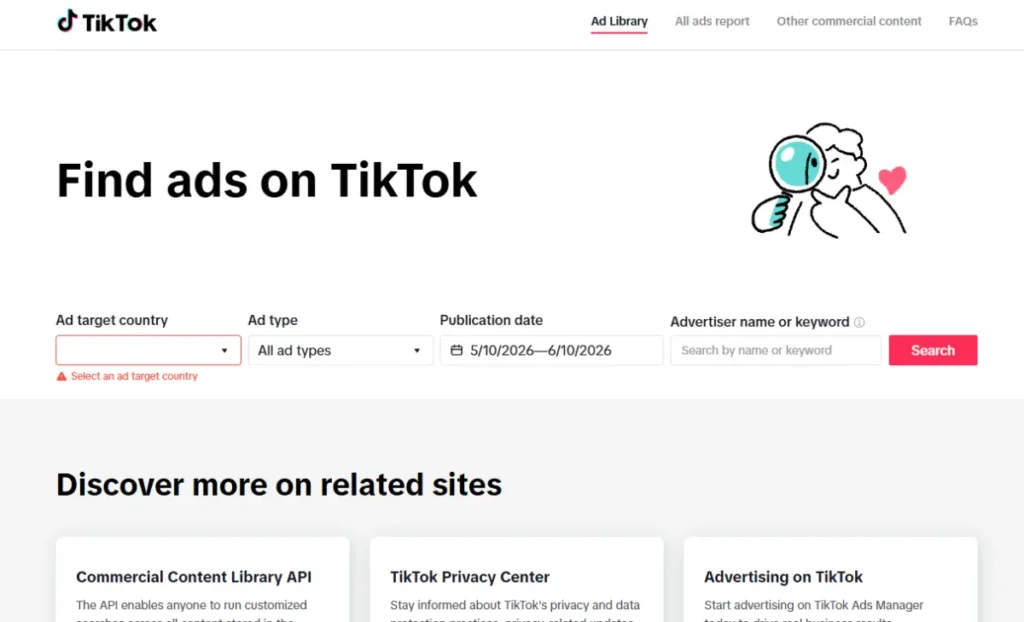
For each paid ad, you can see the advertiser’s name, the first and last dates the ad was shown, targeting data, and the estimated number of unique users reached. Influencer Marketing Hub keeps a detailed breakdown of every data point the library exposes if you want the full list.
That is a lot of intelligence for a free tool. This article focuses on using it against specific competitors. If you want the wider view, our guide to using the TikTok Ads Library for market research covers trend and niche analysis.
How to Spy on Competitors in the TikTok Ad Library, Step by Step
Follow these six steps in order. The whole process takes about 30 minutes per competitor.
Step 1: Search the advertiser name
Open library.tiktok.com and type your competitor’s business name into the search bar. Use the exact name on their TikTok profile or website footer. If nothing comes up, try shortened brand names or their best-known product name, since the library lets you search by advertiser name or keywords.
Step 2: Set your country and date filters
The library lets you filter by target country, ad type, and publication date. If you do not know where a competitor advertises, start with a large market like Germany or France. Set the date range to the last 90 days first. That shows you their current strategy rather than abandoned experiments.
Step 3: Study the creative patterns
Watch at least ten of their ads in full. Write down how each one opens, because the opening is where ads live or die. Our breakdown of TikTok ad hooks lists the most common patterns, so you can name what you are seeing.
Note the format too. Are they running raw creator-style videos, polished studio clips, or text-heavy demos? Patterns across ten ads reveal strategy. One ad reveals nothing.
Step 4: Read the targeting and reach data
Click into individual ads to open the detail view. You will see the main targeting parameters, such as age and gender, plus the number of people served the ad. This tells you exactly who your competitor believes their buyer is.
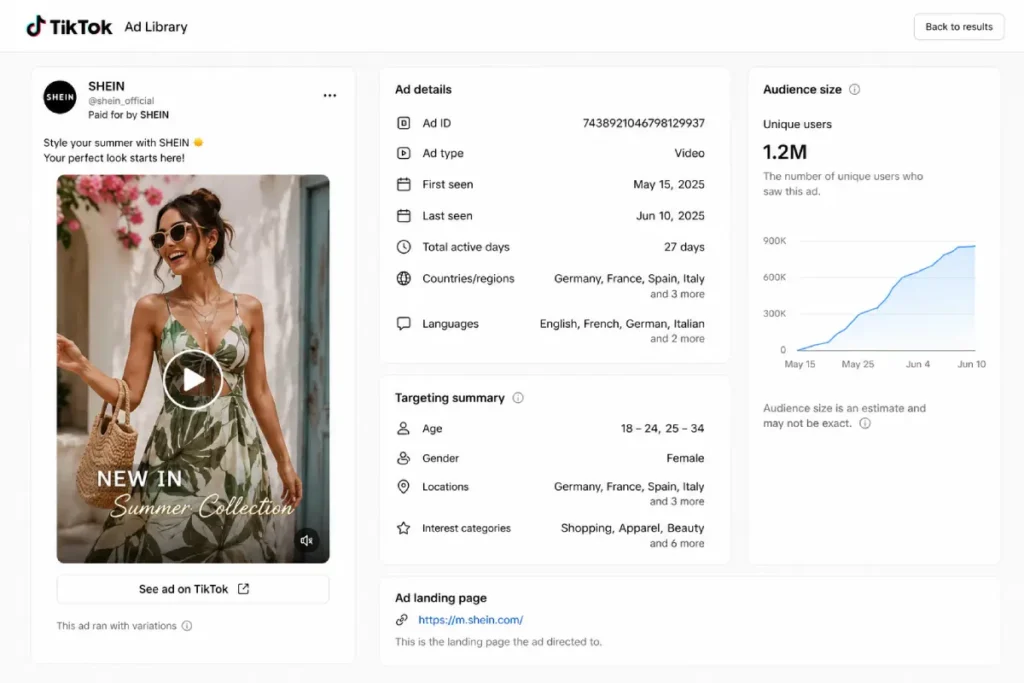
Compare reach across their ads as well. If one ad reached ten times more users than the rest, that is where their budget went.
Step 5: Record the run dates
Every ad listing shows when impressions started and when they ended. Copy both dates for each ad into your notes. You will use them in the next section to separate winners from duds.
Step 6: Build a swipe file
Create a simple spreadsheet with columns for advertiser, ad link, hook, offer, format, first seen, last seen, and notes.
Add every interesting ad you find. Over time, pair it with our library of winning TikTok ad examples so you always have proven references before filming anything new.
![[IMAGE: GRAPHIC - Example competitor swipe file spreadsheet with columns for hook, offer, format, and run length]](https://tikadsuite.com/wp-content/uploads/2026/01/example-competitor-swipe-file-spreadsheet-1024x641.webp)
How Do You Know Which Competitor Ads Are Actually Winning?
The library does not show sales numbers, so you have to read indirect signals. Four of them matter most.
The first is run length. Advertisers kill losing ads fast, so anything live for 60 days or more, is very likely profitable.
The second is repetition. When you spot four versions of the same concept with different openings, the concept works, and they are now testing hooks. Run the strongest opening against the 3-second rule to see why it holds attention.
The third signal is a repeated offer. If “free shipping over $40” appears in every new creative for six months, that offer converts. The fourth is the posting account.
Ads published from a creator’s handle rather than the brand’s page are usually boosted organic posts, and our comparison of Spark Ads vs non-Spark ads explains why brands pay to amplify those winners.
One caution: big reach alone proves spend, not profit. Always weigh reach against how long the ad survived.
What If Your Competitors Only Advertise in the US?
This is the library’s biggest limitation. The paid ad archive only covers ads delivered to users in the European Economic Area, the UK, and Switzerland. A brand running US-only campaigns will not appear, no matter how much it spends.
The workaround is the Top Ads dashboard inside the TikTok Creative Center. Top Ads are real TikTok ads that met performance thresholds and got advertiser approval to be displayed, pulled from markets worldwide, including the US.
You can filter them by region, industry, campaign objective, and time frame, then sort by reach, click-through rate, 2-second view rate, or 6-second view rate.
Two things to know before you open it. You will only see five ads unless you log in, so sign in with any free TikTok account.
And you cannot search by brand name to pull a specific competitor’s full archive, only keywords and categories. For true advertiser-level tracking outside Europe, paid TikTok competitor spy tools fill the gap.
TikTok Ad Library vs Top Ads Dashboard: Which Should You Use?
Use both, but for different jobs.
Here is how they compare:
| Feature | TikTok Ad Library | Top Ads Dashboard |
| Location | library.tiktok.com | TikTok Creative Center |
| Coverage | Ads shown in the EEA, UK, and Switzerland | High-performing ads worldwide |
| Search by advertiser | Yes, full per-advertiser archive | No, keyword and category only |
| Data shown | Run dates, targeting, unique users reached | Likes, CTR, view rates, engagement graph |
| Includes weak or paused ads | Yes | No, winners only |
| Best for | Deep dives on specific competitors | Spotting what wins in your industry |
The dashboard has one feature the library lacks. Each Top Ad includes a second-by-second engagement graph, so you can see the exact moment viewers drop off. Study that curve on five ads in your niche, and you will know precisely how long your hook can run.
How to Turn Spy Data Into Better Ads
Never clone a competitor’s ad. Beyond the legal risk, their creative was built for their brand voice and their offer, not yours. Instead, extract the structure: the hook style, the pacing, the offer type, and the call to action placement.
Then rebuild it with your own footage and angle. A tool like CapCut makes this fast, since you can match the cuts, captions, and pacing of a winning ad in under an hour without copying a single frame.
Treat every borrowed pattern as a hypothesis, not a guarantee. Run your versions through a proper creative testing framework so the data, not your gut, picks the winner.
Once a version proves itself in testing, scale it through TikTok Ads with the targeting insights you pulled in step four. You already know the age range and regions your competitor pays for, so start there and adjust from your own results.
Mistakes to Avoid When Spying on Competitor Ads
These five errors waste most of the value the library offers:
- Copying creative outright. It invites trademark complaints and ships another brand’s voice to your audience.
- Treating reach as proof of profit. A huge reach number with a two-week run usually means a failed test with a big budget.
- Studying one competitor only. Patterns need at least three brands to confirm. One brand’s habit might just be one brand’s mistake.
- Ignoring the date filter. An ad from 18 months ago reflects trends that TikTok’s audience has already scrolled past.
- Collecting without launching. A swipe file with 200 ads and zero campaigns is procrastination dressed up as research.
FAQs
Is the TikTok Ad Library free to use?
Yes. The library is a public website with no fee, no account requirement, and no search limits. You can watch every ad creative in full. TikTok built it as a transparency tool, so access is open to anyone, not just advertisers with active campaigns. The Creative Center’s Top Ads dashboard is also free, though logging in unlocks the full list.
Can competitors see that you viewed their ads?
No. The library does not notify advertisers when someone views their ads, and it does not display who searched for them. Keep in mind that it works both ways. If you can see your competitors’ ads, they can see yours too, so assume every public campaign you run is being studied.
Does the TikTok Ad Library show how much competitors spend?
No. The library shows targeting and reach data but never publishes spend figures or click-through rates for commercial ads. You can estimate investment indirectly by combining the unique users reached with how long the ad stayed live. Any third-party dashboard claiming exact TikTok spend numbers is showing you a model, not platform data.
How long do ads stay in the TikTok Ad Library?
Ads remain searchable after they stop running, and the archive includes paused and inactive ads, so you can study finished campaigns. Ads are kept for about a year after they were last shown. Review your key competitors monthly and save anything valuable to your swipe file before it ages out of the database.
How is it different from Meta’s Ad Library?
Meta’s Ad Library lists active ads from advertisers worldwide, while TikTok’s paid ad archive covers ads shown in Europe. TikTok offsets the narrower coverage with richer detail. It provides extra metrics that Meta does not, including an estimate of unique users who saw each ad and the gender and age groups targeted.
Wrapping Up
Everything in this guide comes down to one action. Block 30 minutes this week, open library.tiktok.com, and run your three biggest competitors through the six steps above.
By the end, you will have a swipe file of proven hooks, offers, and formats that cost you nothing but time.
Then make something with it. Pick the single strongest pattern you found and build your own version using the principles in our guide to creating winning TikTok ads.
If you have not launched a campaign yet, check whether you qualify for TikTok ad credit before you spend. Testing competitor-inspired creative with a discounted budget is the lowest-risk first campaign you can run.