
Bidding is the part of TikTok advertising that confuses people the most, and the confusion is understandable.
The strategy you choose does not just affect how much you pay. It determines how TikTok’s algorithm behaves, how quickly your campaign exits the learning phase, and whether your budget gets spent at all.
Choose the wrong strategy for your campaign objective, and you either burn through budget with no results or watch your ads stall with zero delivery. Neither outcome is about the creative.
It is about misaligning the bidding strategy with what you are actually trying to achieve.
This guide covers how TikTok’s auction works, what each bidding strategy does, and a clear framework for choosing between them at every stage of your campaign.
In this guide, you will learn:
- How TikTok decides which ads win the auction
- The difference between Maximum Delivery and Cost Cap
- When each strategy fits which campaign objective
- How the learning phase interacts with your bid
- The bid adjustment rules that protect performance once campaigns are live
Get Up to $6000 Free TikTok Ad Credit
Table of Contents
Key Takeaways
- TikTok’s ad auction ranks ads by eCPM, which factors in both your bid amount and your ad’s relevance score; the highest bidder does not always win
- TikTok Ads Manager currently offers two bidding strategies: Maximum Delivery and Cost Cap
- Maximum Delivery is a spend-based strategy that prioritizes volume; Cost Cap is a goal-based strategy that prioritizes cost control
- According to TikTok’s official bidding best practices, you should not decrease your bid immediately if CPA does not meet your target; the algorithm needs time to adjust
- During the learning phase for App Event Optimization campaigns, TikTok recommends adjusting bids by no more than 10% at a time
Quick Answer
TikTok Ads Manager offers two bidding strategies. Maximum Delivery (previously called Lowest Cost) spends your full budget to get as many results as possible without a target cost per action. Cost Cap lets you define a target CPA, and TikTok optimizes delivery to hit that cost on average. Use Maximum Delivery to gather data quickly. Use Cost Cap to control profitability once you know your target CPA.
How TikTok’s Ad Auction Actually Works
Before choosing a bidding strategy, it helps to understand what TikTok is optimizing for at the auction level. The platform does not simply give impressions to the highest bidder.
TikTok ranks every competing ad by eCPM, which stands for effective cost per mille, or effective cost per thousand impressions. The eCPM calculation factors in both your bid and your ad’s predicted relevance to the user seeing it.
An ad with a lower bid but high predicted engagement can outrank an ad with a higher bid that is less relevant to the target audience.
This is why creative quality has a disproportionate impact on TikTok ad costs compared to other platforms.
An ad that earns strong engagement signals, video completions, saves, shares, and click-throughs receives preferential auction placement at lower effective costs.
An ad that generates weak engagement gets limited reach even with a competitive bid. The bidding strategy you choose sets the parameters. The creative quality determines whether those parameters actually work in your favor.
The Two Core TikTok Bidding Strategies
According to TikTok’s official bidding documentation, TikTok Ads Manager currently provides two bidding strategies for auction campaigns.
Maximum Delivery
Maximum Delivery is a spend-based strategy. You do not set a target cost per action. Instead, you provide your budget, and TikTok works to deliver as many results as possible against your optimization goal while spending the full amount.
The algorithm controls the bid on your behalf, adjusting dynamically to win impressions and drive volume. Because Maximum Delivery prioritizes spending your budget, it does not pull back on days when efficiency is lower. CPA can fluctuate more compared to Cost Cap.
Maximum Delivery is also only available for daily budgets. It cannot be used with lifetime budget settings.
When Maximum Delivery fits:
- New campaigns where you have no historical CPA data to anchor a target
- Creative testing phases where you need fast data on what resonates
- Awareness and reach campaigns where volume matters more than cost control
- Any situation where you want the algorithm to explore audiences freely before applying constraints
Cost Cap
Cost Cap is a goal-based strategy. You define a target cost per action, and TikTok’s system optimizes delivery to achieve that CPA as closely as possible on average.
The actual CPA on individual conversions may run slightly above or below your target, but the average across the campaign period trends toward your cap.
Cost Cap is the right tool when profitability matters more than volume. Rather than simply spending your budget, the algorithm evaluates whether each potential impression is likely to convert at or near your target cost before bidding.
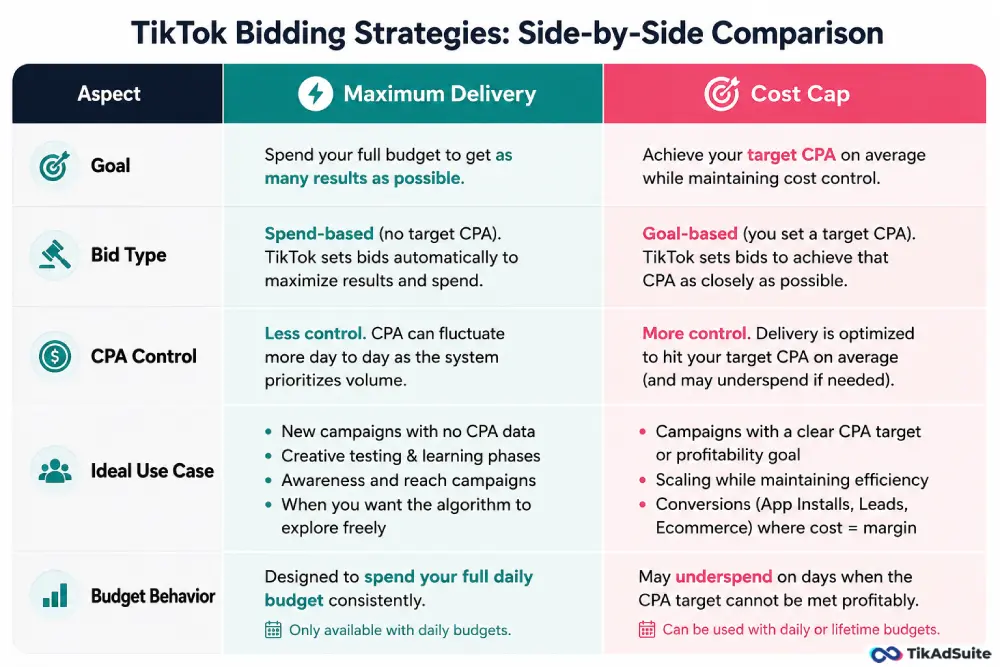
On days when that threshold cannot be met, the campaign deliberately underspends rather than acquiring unprofitable conversions.
According to TikTok’s best practices documentation, when setting a Cost Cap, you should set the highest cost per result you can accept, not the ideal cost.
Bidding directly at a high price performs better than starting low and gradually increasing later, because it gives the algorithm enough room to find efficient delivery from the outset.
When Cost Cap fits:
- Campaigns with a clear profitability target or maximum acceptable CPA
- Scaling campaigns where you want to maintain efficiency as the budget increases
- Conversion campaigns for App Installs, Lead Generation, or ecommerce where cost control is tied directly to margin
How to Choose Between Them: A Decision Framework
| Situation | Recommended Strategy |
| New campaign, no CPA history | Maximum Delivery |
| Testing new creative variations | Maximum Delivery |
| Awareness or reach objective | Maximum Delivery |
| Known target CPA, scaling profitably | Cost Cap |
| Conversion campaign with margin requirements | Cost Cap |
| App Event Optimization (AEO) campaigns | Both available; Cost Cap for control |
The practical path for most campaigns follows the same sequence. Start with Maximum Delivery to gather conversion data and establish a baseline CPA.
Once you have 50 or more conversion events, you have enough data to set a meaningful Cost Cap. Switch to Cost Cap at that point and use your historical average CPA as the anchor for your target.
Setting a Cost Cap before that data exists risks setting the target too low, which causes the algorithm to limit delivery because it cannot find users who convert at the defined cost.
For a broader look at how budget structure interacts with bidding strategy, the TikTok ads budget optimization tips guide covers how to align daily spend with bid settings across multiple ad groups.
Bidding and the Learning Phase
Every new ad group or campaign change triggers a learning phase. During this period, TikTok’s algorithm explores delivery patterns, user responses, and bid efficiency before stabilizing performance.
Campaign metrics during the learning phase are not representative of steady-state performance.
The relationship between bidding and the learning phase matters in two ways.
First, changing your bid too aggressively during the learning phase extends it significantly. For App Event Optimization campaigns specifically, TikTok’s AEO documentation recommends not adjusting bids by more than 10% during the learning phase.
Larger changes during this window reset the algorithm’s calibration and restart the learning process.
Second, underfunding a Cost Cap campaign relative to the bid amount limits the algorithm’s ability to find sufficient conversion opportunities.
TikTok’s guidance suggests a daily budget of at least 50 times your Cost Cap bid as an ideal ratio for optimal delivery.
While that is not always achievable, a daily budget of at least 5 to 10 times your Cost Cap bid is a workable minimum.
For campaign structure decisions that directly affect how the learning phase runs, the TikTok ads campaign structure guide covers how to organize ad groups and budgets to give each one enough signal to optimize.
Bid Adjustment Rules That Protect Performance
Once campaigns exit the learning phase and stabilize, bid adjustments become part of ongoing management.
These rules apply across both strategies:
- Do not decrease your bid immediately when CPA rises. According to TikTok’s official best practices, doing so causes a significant spending drop. Give the algorithm at least a few days to self-correct before making adjustments.
- When you do adjust, keep changes small. Adjustments should not exceed 50% of the current bid at any single time, and smaller incremental changes preserve more of the optimization data the algorithm has accumulated.
- Do not increase the budget and change bids simultaneously. Combining multiple significant changes at once pushes the campaign back into a learning-like state. Make one change at a time and observe the effect before the next adjustment.
- If a Cost Cap campaign stops spending, raise the cap before troubleshooting creative. A campaign that refuses to deliver is usually telling you the cap is too low for the current auction, not that the creative has stopped working.
For a practical walkthrough of how bidding decisions connect to scaling, the how to scale TikTok ads guide covers how to expand budgets without disrupting campaign stability.
FAQs
What is the difference between Maximum Delivery and Cost Cap on TikTok?
Maximum Delivery is a spend-based strategy that uses your full budget to get as many results as possible without a target CPA. Cost Cap is a goal-based strategy where you set a target cost per action, and TikTok optimizes delivery to hit that average. Use Maximum Delivery for testing and volume; use Cost Cap when profitability requires cost control.
How do I know what Cost Cap to set?
Set your Cost Cap at the highest CPA you can accept, not your ideal CPA. TikTok’s system performs better with more headroom to find efficient delivery. If you have historical campaign data, use your average CPA from completed campaigns as the starting anchor and set your cap 20 to 30% above that figure initially.
Why is my Cost Cap campaign not spending?
A Cost Cap campaign that stops delivering usually means the cap is set too low for the current auction competition. TikTok’s algorithm will not bid above the cap, so if no users are available at that price, it limits delivery rather than overpay. Try raising the cap incrementally and monitoring whether delivery resumes.
Does changing my bid reset the learning phase?
A significant bid change can push the algorithm back into a learning-like state, particularly during the early stages of a campaign. Keep bid adjustments under 50% of the current amount at any time, and avoid making multiple changes simultaneously. During the learning phase, specifically, keep adjustments at or below 10%.
Which bidding strategy works best for app campaigns?
For App Event Optimization campaigns, both Maximum Delivery and Cost Cap are available. Maximum Delivery works best during initial testing when you need volume to exit the learning phase. Cost Cap is better once you have a baseline CPA and want to control acquisition costs. TikTok’s AEO documentation recommends using historical CPA from similar ad groups as a guide for setting the initial Cost Cap.
Wrapping Up
The bidding strategy you choose tells TikTok’s algorithm what matters most to your campaign. Maximum Delivery says volume is the priority.
Cost Cap says cost efficiency is the priority. Neither is universally better. The right answer depends on where your campaign sits in its lifecycle, how much data you have, and whether your goal is to gather information or protect profitability.
Start with Maximum Delivery, build your CPA baseline, and shift to Cost Cap when you have enough data to anchor a target. From there, small and deliberate adjustments protect the performance the algorithm has already learned.
Set up and manage your bidding strategy directly through TikTok Ads Manager, where both strategies are accessible at the ad group level during campaign setup.