
You set up a TikTok campaign, picked an age range, added a few interests, and hit publish. The results came back flat, and you had no idea why. The targeting felt like a guess because it was one.
TikTok Ads Audience Insights removes that guesswork. It is a free tool inside TikTok Ads Manager that shows you who is active, what they care about, and how they behave. You read real data first, then make targeting choices with proof behind them.
Here is what you will learn in this guide:
- What TikTok Ads Audience Insights actually shows you
- How to open the tool and read each tab
- How to turn demographic and interest data into targeting decisions
- The difference between a potential audience and a reached audience
- The common mistakes that lead people to read the data wrong
By the end, you will look at one dashboard and walk away with a sharper plan. Let’s start with what the tool puts in front of you.
Get Up to $6000 Free TikTok Ad Credit
Table of Contents
Key Takeaways
- TikTok Ads Audience Insights is free and lives inside Ads Manager, so you can study your audience before spending a dollar.
- The tool reports aggregated data on users active in the last 30 days, pulled from both paid and organic activity.
- The Audience Overview tab gives you a fast snapshot of age, gender, location, and device in one place.
- Reached audience data shows who actually saw your ads, which is the best raw material for lookalike audiences.
- According to Pew Research Center, 37% of U.S. adults reported using TikTok in 2025, so your buyers are very likely already on the platform.
- Insights only matter when you act on them, so pair every finding with a targeting or creative change.
What is TikTok Ads Audience Insights?
TikTok Ads Audience Insights is a free tool inside TikTok Ads Manager. It shows aggregated data about active TikTok users, including age, gender, location, device, interests, and behaviors. You use it to understand a potential audience before launch and a reached audience after a campaign, so your targeting rests on real platform data instead of hunches.
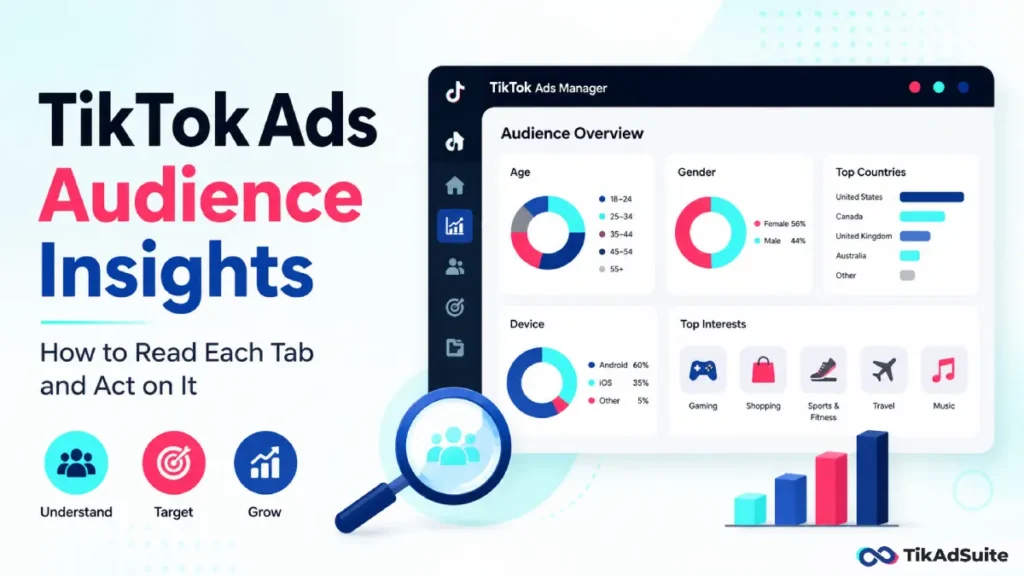
What TikTok Ads Audience Insights shows you
The tool reads signals from both paid and organic activity on TikTok. Then it estimates details about the users who fit your filters, like where they live, what they like, and which devices they use.
It focuses on people active in the last 30 days. The numbers are aggregated estimates, not a list of your exact buyers. Results shift based on your filters, the locations you choose, and the audience size.
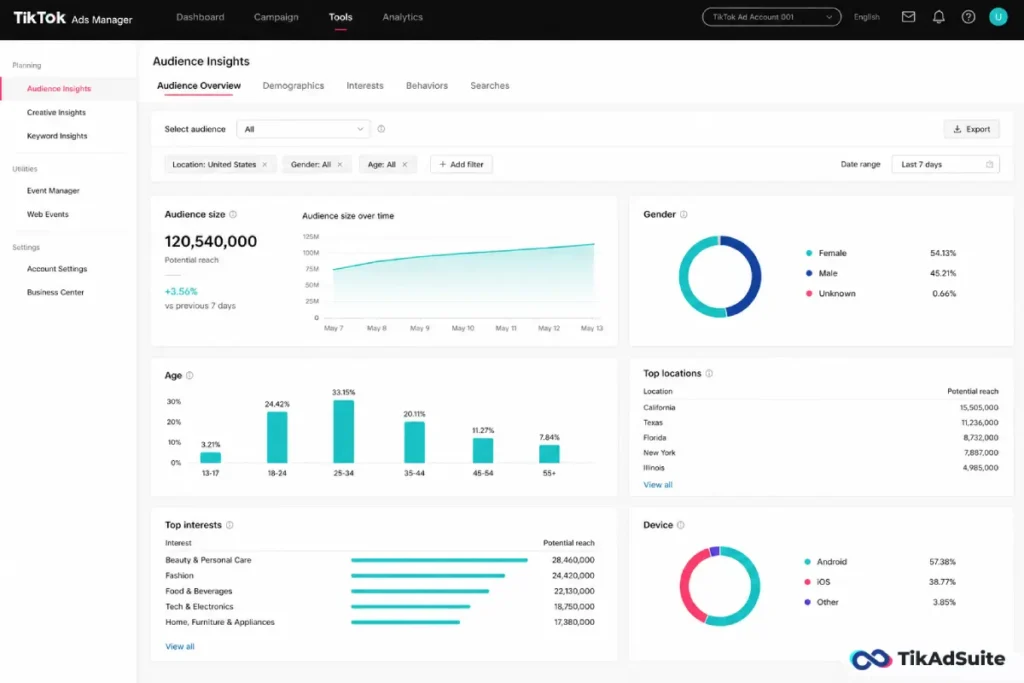
This differs from the demographics in your business profile analytics. For a wider view of the platform’s makeup, our breakdown of TikTok user demographics pairs well with what this tool reports.
How to open Audience Insights in Ads Manager
Getting in takes less than a minute once your account is set up.
Follow these steps:
- Log in to TikTok Ads Manager.
- Open the Reporting section.
- Find the Define Audience panel on the left side.
- Choose your filters, or select a saved custom audience.
- Read the overview tabs to view your data.
One note from TikTok’s own Audience Insights help guide: the feature is still rolling out and may not appear in every market yet. If you do not see it, reach out to your TikTok sales representative.
The four tabs and what each one answers
Each tab answers a different question. Knowing which tab to open saves you from scrolling past data you do not need.
| Tab | What it answers |
| Audience Overview | Age, gender, country, state, device, plus top and bottom interests at a glance |
| Interests | Deeper interest data, top hashtags, and ad interest categories |
| Interests and Behaviors | Refine by ad categories, video interactions, creator types, and hashtag activity |
| Campaign Reach | A post-campaign view of who your ads actually reached |
Start with Audience Overview for the big picture. Move to the Interests tab when you want to know what genuinely pulls attention. If you plan to build campaigns around themes, our guide to TikTok interest targeting shows how to apply that data inside a live campaign.
How do you turn audience insights into targeting decisions?
Data sitting in a dashboard changes nothing. The value comes from the choices you make next.
Look for any group that over-indexes against your assumptions. Maybe you expected women aged 25 to 34, but the data leans toward men aged 18 to 24. That gap is a signal to rethink both your targeting and your creative.
Match the strongest interests in the report to your interest targeting in Ads Manager. Then split your best segments apart so each one gets its own ad group.
Our walkthrough on TikTok audience targeting covers the setup, and our piece on TikTok ads audience segmentation shows how to split groups without bloating your budget.
Want to test these refined audiences without a big upfront spend? New advertisers can lower the risk with a TikTok ad credit offer and validate a segment before committing real budget.
Potential audience vs reached audience: what is the difference?
These two views answer different questions, and mixing them up leads to bad calls.
A potential audience is a pre-launch estimate. It tells you who might be interested before you spend anything. You use it to size a segment and sanity-check your plan.
A reached audience, found in the Campaign Reach tab, shows who actually saw your ads. This is your post-campaign truth. You can feed that data into custom and lookalike audiences to find more people who behave like your best viewers.
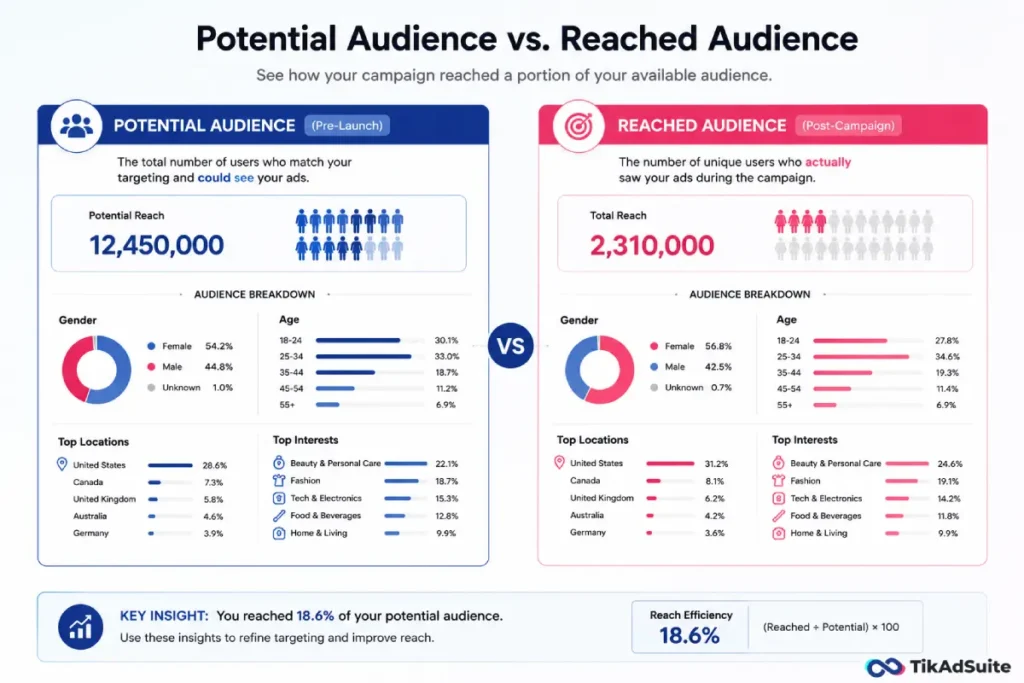
To capture clean reached data, your tracking has to be solid. Setting up the TikTok pixel the right way makes sure the actions you measure actually line up with the people you reached.
Is TikTok Audience Insights accurate?
The data is estimated and aggregated, not exact. Think of it as a strong sense of direction rather than a perfect count.
Accuracy improves as your audience gets larger. A broad segment gives stable, reliable patterns. A tiny segment with heavy filters can swing wildly and mislead you.
Treat the tool as a starting point. Then confirm what you see against your real campaign results once ads go live. When the data and your results agree, you can trust the next decision more.
Common mistakes when reading the data
Smart marketers still misread this tool.
Watch out for these traps:
- Treating a tiny, heavily filtered audience as solid fact
- Ignoring device and price signals that hint at buying power
- Copying interests straight into targeting without testing them
- Checking the data once and never revisiting after launch
- Assuming a single snapshot stays true for months
Each mistake leads to the same place: targeting built on a shaky read. Slow down and confirm before you scale.
Frequently Asked Questions
Is TikTok Audience Insights free to use?
Yes. The tool is built into TikTok Ads Manager at no extra cost. You only need an active Ads Manager account to open it. There is no separate fee and no minimum spend just to view the data. You can study a potential audience before you ever launch a paid campaign.
Can I use it before running any ads?
Yes. The potential audience view is built for pre-launch research. You can filter by location, interests, and behaviors to size a segment and check whether enough people fit your idea. This helps you avoid building a campaign around an audience that turns out to be too small or off-target.
Why don’t I see Audience Insights in my account?
TikTok has noted that the feature is still in testing and is not live in every market or account. Availability can vary by region and account type. If the panel does not appear in your Reporting section, contact your TikTok sales representative directly to ask about access for your market.
How is Audience Insights different from TikTok Analytics?
Audience Insights in Ads Manager shows broad platform-level data about user groups and how they behave. TikTok Analytics in your business profile focuses on your own followers and how they respond to your content. One looks outward at the platform; the other looks inward at your existing viewers.
Can I see who my ads actually reached?
Yes. The Campaign Reach tab gives you a post-campaign view of the people your ads served. You can aggregate it across campaigns, ad groups, and ads to spot patterns. That reached data is the cleanest base for building lookalike audiences and tightening your next round of targeting.
Putting your insights to work
The biggest mistake with this tool is reading the data and changing nothing. Insights without action are just trivia. Pick one finding from your dashboard today, then adjust one targeting or creative choice around it.
Start with the Audience Overview tab, find one gap between what you assumed and what the data shows, and build a test around it. Confirm the result, then repeat. Small, proven changes beat big guesses every time.
Once the data and your results start to agree, you have a foundation worth growing. That is the moment to push harder, and our guide on how to scale TikTok ads shows how to grow spend without losing the precision you just earned.