
If you searched for the TikTok Ads Manager login, you probably want to get into your account, not read a tour of the dashboard. Finding the page is quick. Landing in the right ad account, with the right access and a verification code that actually shows up, is where people get stuck.
This page covers only signing in and getting access: the official login page, the ways TikTok lets you log in, moving between accounts, the roles you need, and fixes for the blocks advertisers hit most. Each step was checked against TikTok’s own help pages on November 22, 2026.
Already inside and ready to build campaigns? The full TikTok Ads Manager walkthrough covers that side. New to TikTok ads altogether? Start with the beginner guide to TikTok ads.
Quick Answer
The official TikTok Ads Manager login is the TikTok For Business login page at ads.tiktok.com/i18n/login. Sign in with the same email, phone number or TikTok account you used to sign up. New to TikTok ads? Create a TikTok Ads Manager account first. One TikTok for Business login opens both Ads Manager and Business Center.
If you signed up with an email but click Log in with TikTok, TikTok asks whether to link your existing account or create a new one, and choosing new leaves you in a second, separate account. The login method table below matches each situation to the right option.
- Open ads.tiktok.com/i18n/login in your browser.
- Enter your email or phone number with your password or an SMS code, or click Log in with TikTok if your accounts are linked.
- Type the 2-step verification code if TikTok asks for one, then check the account name in the top menu bar before you change anything.
Teams that work in Business Center use the same login at business.tiktok.com, where you click Log in in the top right corner, as TikTok’s Business Center setup guide shows.
Key Takeaways
- The TikTok Ads Manager login page is ads.tiktok.com/i18n/login, and the same login opens Business Center at business.tiktok.com.
- Sign in with the method you signed up with. Picking Create new after Log in with TikTok gives you a second account.
- Missing accounts or no permission messages are access problems, so a Business Center admin fixes them, not a password reset.
- For code problems, check every folder, resend and wait a few minutes, and wait at least one hour after Maximum attempts reached.
- Turn on 2-step verification with two methods and keep your recovery email and phone up to date.
How the TikTok for Business Login Works
A TikTok for Business account is the one login behind TikTok’s ad tools. According to TikTok’s Business Center setup guide, it acts as the master login for platforms such as Business Center and TikTok Ads Manager.
That login opens two main places:
- TikTok Ads Manager at ads.tiktok.com, where you create and manage campaigns, ad groups and ads.
- TikTok Business Center at business.tiktok.com, where teams manage several ad accounts and assets and control who can use them.
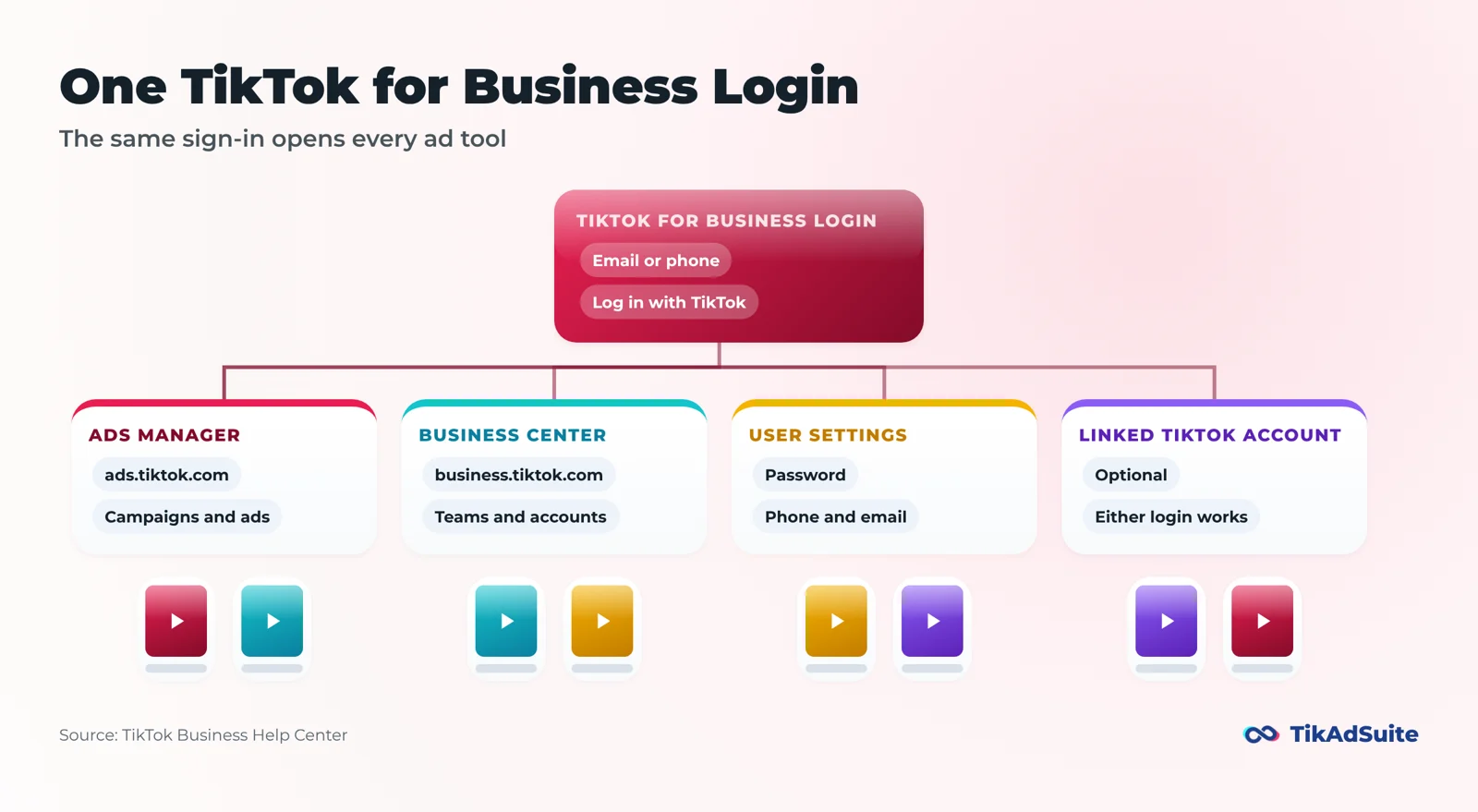
Your sign-in details live in a third place, User Settings. TikTok’s User Settings overview explains that this page handles your password, phone number and email for both Ads Manager and Business Center, and that it is separate from ad account settings such as account name, business details and primary contact.
You can reach User Settings from your profile icon, or go straight to ads.tiktok.com/ac/page/settings, the direct address listed in TikTok’s guide to managing user settings.
How Business Center and Ads Manager split the work is a bigger topic. The Business Center vs Ads Manager comparison explains it in depth.
Login Options TikTok Offers
TikTok’s help pages describe two ways to sign in. The first is your email address or phone number, which TikTok’s 2-step code article says you enter along with your password or an SMS code. The second is a TikTok account, through the Log in with TikTok option.
Email or phone number and password. When you sign up, TikTok’s Ads Manager setup article says you create a login with an email address or phone number and a password, then receive a verification code at that email or phone. Those are the credentials you use every time after that.
Log in with TikTok. On the login page, this option signs you in with a TikTok account, and then you pick a path. TikTok’s steps for linking an existing account have you select Link with an existing TikTok For Business account and enter your TikTok for Business login. The other path, in TikTok’s guide to linking a new account, is Create a new TikTok for Business account. Once the accounts are linked, the existing-account article says both your TikTok login and your TikTok for Business login get you in.
Two limits catch people out:
- One TikTok account can link to only one TikTok for Business account at a time, as TikTok’s page about linking accounts notes.
- A TikTok Organization Account can’t be used to sign up for or log in to TikTok for Business, according to the same new-account guide.
The TikTok login help pages cited here describe only these routes. TikTok’s Ads Manager setup article also notes that its sign-up steps are for self-serve customers, and it sends everyone else to their client service team or account manager.
| Your situation | What to use | Why |
|---|---|---|
| You signed up with an email or phone number | That email or phone with your password or an SMS code | It is the login TikTok created for you at sign up |
| You linked a TikTok account to your ads login | Log in with TikTok or your email or phone login | After linking, both open the same account |
| You have a TikTok account you never linked | Your email or phone login, then link from User Settings | Choosing to create a new account starts a separate one |
| Your brand profile is an Organization Account | Your email or phone login | Organization Accounts can’t log in to TikTok for Business |
| You have no TikTok for Business account yet | Sign up first | There is nothing to log in to until the account exists |
If you are in that last row, the business account setup steps walk through sign up from the start.
Two Accounts With Similar Names
A TikTok for Business account and a TikTok Business Account are not the same thing. The first is your login for Ads Manager and Business Center. The second is a profile type on TikTok itself: TikTok’s overview of account types describes Business Accounts as public brand profiles with tools such as performance metrics and audience insights, and says you need a TikTok for Business account to reach Ads Manager and Business Center.
So if a coworker says to log in with the business account, ask which one they mean. The TikTok business account explainer covers the app side in more detail.
Getting Into the Right Ad Account or Business Center
After you log in, check which ad account you are in before you edit anything. TikTok’s Ads Manager setup article says to click your account name with the drop-down arrow on the right side of the top menu bar, which reveals the account name and its ID.
Write that ID down. You need it to request access to an account and when you contact support.
Business Center works a little differently. If you already manage one, you land on a Select an account page after you log in, with a Create new option in the top right corner. Each TikTok for Business user can create up to 30 Business Centers, per TikTok’s Business Center setup guide.
What you can open depends on what someone gave you. On TikTok’s roles and permissions page, Standard members work only on the accounts and assets they are assigned, while Admins have full access to system functions. Even an Admin needs an added finance role to view or manage finances, the same page notes.
If an ad account you expect is missing from your list, ask a Business Center admin to check your assignments. Agencies that handle many client accounts can find a fuller setup in the guide to running TikTok ads as an agency.
Who Can Give You Access
Access in Business Center comes from an Admin, who adds members and decides what each person can open. TikTok’s guide to adding members lists these steps:
- Click Users in the left-hand menu, then Add Members.
- Enter and confirm the new member’s email address and name.
- Choose Admin or Standard. If the person handles money, add Finance Manager (full control of finance and payments) or Financial Analyst (view and download financial data only).
- Under Grant access, pick the accounts and assets and set an access level for each.
- Click Save. TikTok may ask you to verify your identity.
The new member gets an invitation by email. If it never arrives, TikTok’s member guide says the admin can click the person’s email in the Users tab and choose Resend request. TikTok’s help page also caps each Business Center at 4,000 members.
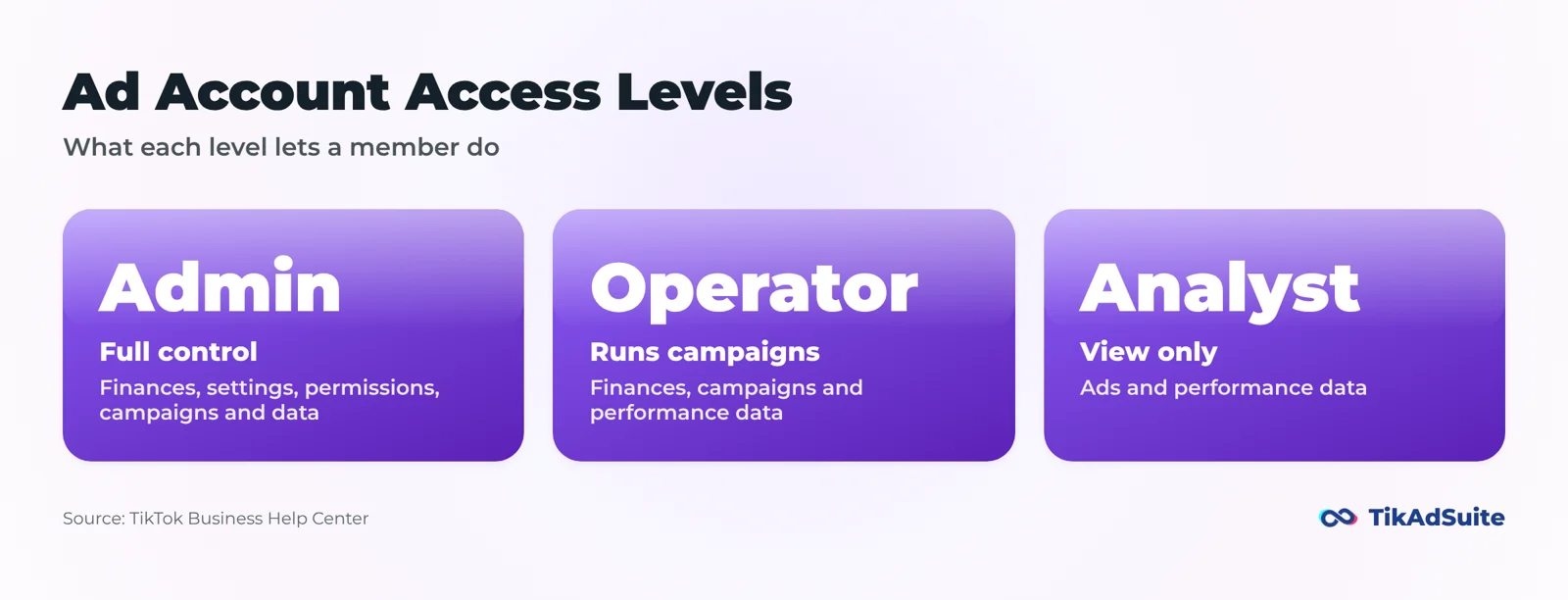
For each ad account, there are three access levels. TikTok’s article on requesting ad account access defines them this way:
- Admin: manages finances, settings and permissions, creates and edits campaigns, and views performance data.
- Operator: manages finances, creates and edits campaigns, and views performance data.
- Analyst: views ads and performance data only.
To work on an ad account that another business owns, a Business Center admin requests access with the ad account ID. The same article says the ad account’s admin, or its creator if it sits outside any Business Center, accepts the request in Ads Manager under the Notifications icon, on the Business Center tab. A disapproved ad account can’t be requested.
This setup also means nobody has to pass a password around. TikTok’s guide to creating ad accounts in Business Center points out that because the Business Center owns those accounts, you can grant and remove access for team members and partners without sharing login credentials.
Fix Common Sign-In Blocks
Start with the symptom you see. Each fix below follows TikTok’s own help steps for that case.
One routing note first. TikTok’s login troubleshooting article is for advertisers; if the problem is your TikTok app login, TikTok sends you to its user support team instead.
Verification Code Not Arriving
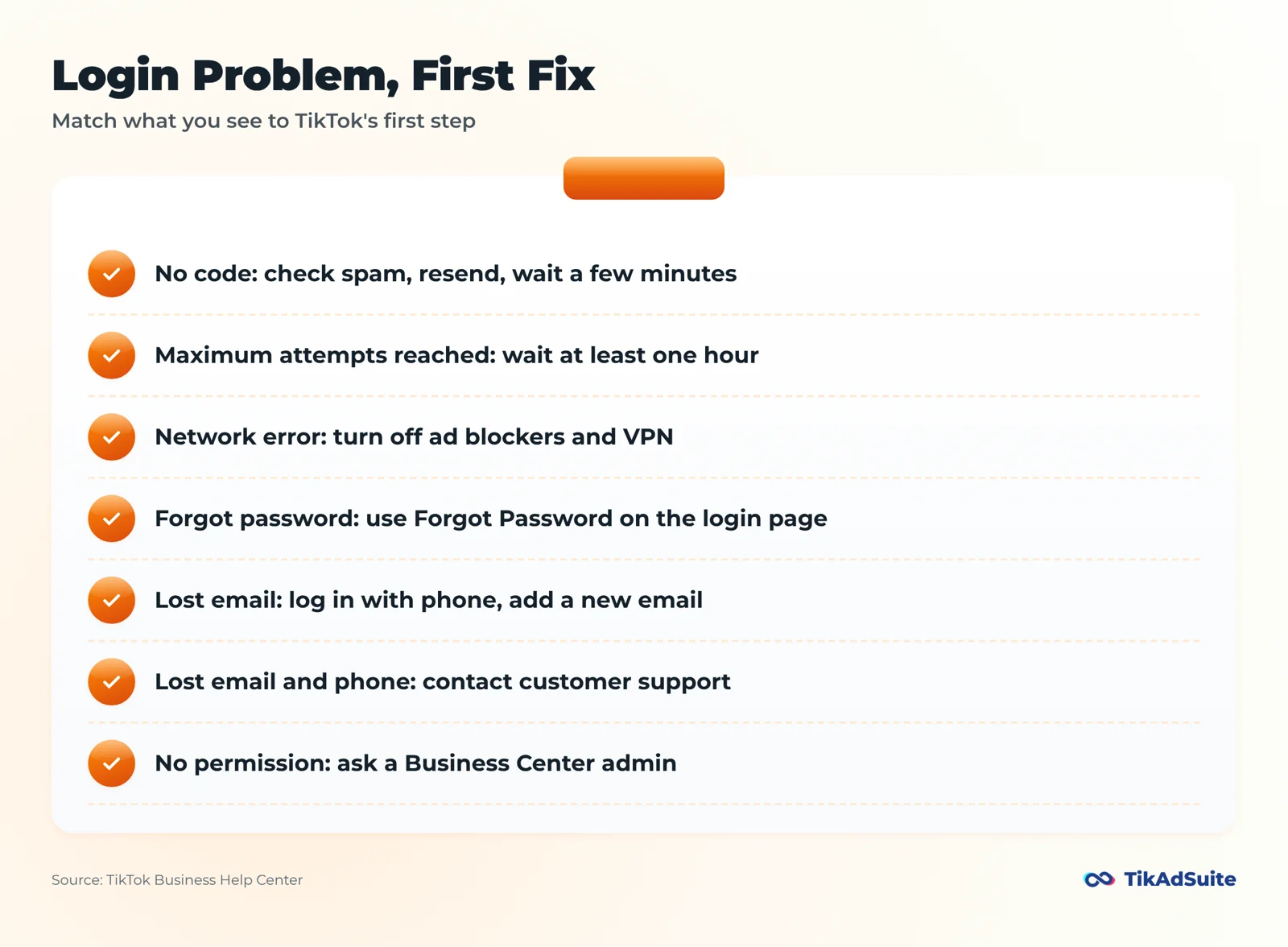
The 2-step verification code comes through the method you set up. TikTok’s 2-step code article lists three places to look: your email inbox (including Spam, Junk, Trash, Deleted Items and Archive), your text messages from known and unknown numbers, or an authenticator app such as Google Authenticator.
If nothing shows up, the login troubleshooting article lists these checks:
- Look in your spam or junk folder.
- Make sure the phone number or email on file is correct.
- Resend the code and wait a few minutes.
- Restart your device and check your network settings.
A Maximum attempts reached message means you asked for too many codes too fast. According to TikTok’s troubleshooting steps, wait at least one hour before you request another code.
A code can also appear after you are already in. With Data Security Verification turned on, TikTok’s security best practices page says you verify your identity with a code before you can see your advertising data.
Network Error at Login
If you see a network error at login or during verification, TikTok’s login troubleshooting article says to turn off ad blockers, pause any VPN or firewall, refresh the login page, and try another browser or device if the error continues.
Forgot Your Password
Use the Forgot Password option on the login page. From there, TikTok’s login troubleshooting article has you choose email or phone as your recovery method, enter the code TikTok sends, then set a new password.
The same article adds that if 2-step verification is on, you should turn it off temporarily to reset the password, then turn it back on. With no second recovery method set up, it suggests adding one in your Security Settings after you log in. If you can still log in and just want a new password, TikTok’s guide to managing user settings places that option under Personal Info, then Password, then Change.
Lost Access to Your Email or Phone
If only the email is gone, TikTok says to log in with your phone number or a linked TikTok login, then add and verify a new email address in your account settings.
If you have lost both the email and the phone number, you need customer support. Have these four details ready before you reach out, since TikTok asks for them:
- The email address you can no longer reach
- Your TikTok Ads Manager or Business Center ID
- Your last known login location
- A new email address that was never registered before
The Ad Assistant chat only works once you are logged in, so TikTok’s support contact page points locked-out users to its Feedback and Help contact form. TikTok’s guide to managing user settings also points people who lost their email or phone to the client service team or account manager in their region.
No Permission After You Log In
If the login works but a page says you lack permission, your password is fine. The block comes from access: your user has not been given that ad account, or your access level does not cover the action.
Ask a Business Center admin to assign the account or raise your level, or ask the ad account admin to accept your pending request. Two layers decide what you can do: your Business Center role (Admin or Standard) and your access level on that ad account (Admin, Operator or Analyst). An Analyst can only view ads and performance data, so creating or editing a campaign needs Operator or Admin access.
Locked, Suspended or Restricted
If your account, ad account or Business Center is locked or suspended, TikTok’s login troubleshooting article says to read TikTok’s email notification about the cause and follow its instructions to request reactivation.
A suspended ad account is different from a login problem. On TikTok’s page about suspended ad accounts, the account shows a suspension notice in Ads Manager, all its ads stop, and Admin and Operator users can only change the delivery status of campaigns, ad groups and ads. Causes and appeal steps are in the guide to a suspended TikTok ads account.
Logging In on a Phone
On a phone, the ad tool TikTok documents is Promote, which lives inside the TikTok app. TikTok’s Promote announcement says to go to your Profile, tap the 3 lines and open Business suite to find it, and that Ads Manager connects to Promote for desktop campaign management, billing and reporting.
The Ads Manager and Business Center help steps cited on this page all describe the web versions. None of the TikTok pages checked for this guide describe a separate Ads Manager phone app, so plan full account work, like roles and billing, for a computer.
Keep Your Login Safe
A few habits keep you from being locked out, or from having someone else get in:
- Turn on 2-step verification with more than one method. TikTok’s 2-step setup steps start in User settings, where you click Set up under 2-step verification and pick Text Message, Email or Authenticator App. TikTok recommends more than one, so you have a backup if a code doesn’t arrive.
- Require it across your Business Center. In TikTok’s Business Center 2-step guide, only Admins can turn it on, under Business Settings and then Security, for Only admins or All members.
- Invite people instead of sharing a password. Each person gets their own login and only the access they need.
- Keep your recovery email and phone current. They are the way back in if you forget your password. TikTok’s guide to managing user settings puts Change Email and Change Phone Number under Personal Info, and TikTok sends a code to the current one before it switches.
- Act fast on a takeover. TikTok’s account security tips say TikTok suspends a compromised account to secure it and, after an investigation, tells you the steps to regain control. Managed clients should contact their account manager right away.
Frequently Asked Questions
Is my TikTok Ads Manager login the same as my TikTok app login?
Only if you linked them. After you link a TikTok account to your TikTok for Business account, TikTok says either login opens TikTok for Business. Without that link they stay separate logins, and a TikTok Organization Account can’t be used to log in to TikTok for Business at all.
How do I contact TikTok support if I can’t log in?
Use TikTok’s Feedback and Help contact form, because the Ad Assistant chat only works after you log in. Once you can sign in, click the blue circular icon in the lower right of Ads Manager or Business Center and choose Get support. Keep your ad account or Business Center ID ready.
Why does TikTok say my TikTok account is already linked?
The TikTok account you picked is already linked to another TikTok for Business account, and one TikTok account can link to only one at a time. TikTok’s linking steps say to click Log Out and try linking a different TikTok account.
Can I use one login for more than one ad account?
Yes. A Business Center admin can grant your one login access to several ad accounts, each with its own level: Admin, Operator or Analyst. You only see the accounts assigned to you, so ask an admin if one is missing. A single TikTok for Business user can also create up to 30 Business Centers, per TikTok’s setup guide.
Can I change the country on my TikTok for Business account?
No. TikTok’s guide to managing user settings says the registered country on a TikTok for Business account can’t be changed once it is created. Check the country carefully when you sign up.
Get Up to $6000 Free TikTok Ad Credit
Wrapping Up
Before you reset a password or open a new account, work out which problem you actually have: the wrong page, a different sign-in method than the one you signed up with, access nobody has granted yet, or a code that never arrived. Each one has its own fix above.
If your ad account is brand new, look at the TikTok ad credit offer for new advertisers before you launch your first campaign.