
Business Center and Ads Manager both live under TikTok for Business, so it is easy to treat them as one tool. They are not. One runs your ads, and the other decides who owns them and who can touch them.
Mixing them up causes real setup pain. A freelancer gets full control when they only needed reports. A Pixel ends up stuck in one ad account. An agency asks for your password instead of sending an access request.
Get Up to $6000 Free TikTok Ad Credit
Below you will find what each tool does, how the account hierarchy fits together, where TikTok Promote fits in, and which setup suits a solo seller, a growing team, an agency, or an online store.
Table of Contents
Quick Answer: What Is the Difference Between TikTok Business Center and Ads Manager?
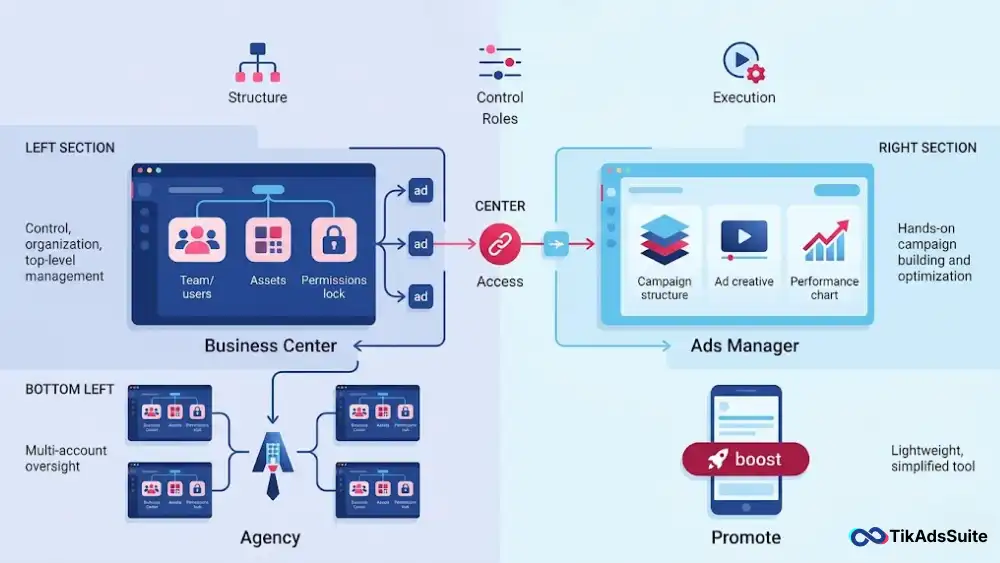
TikTok Ads Manager is where you create campaigns, set budgets, define targeting, and review performance. TikTok Business Center is the administrative layer above it, controlling user permissions, shared Pixels, and linked Ad Accounts. The two are not interchangeable: Ads Manager is where ad spend happens, and Business Center governs your account structure. A solo advertiser with one Ad Account can work in Ads Manager alone. You need both once a team, an agency, or several Ad Accounts are involved.
What Is TikTok Ads Manager?
TikTok Ads Manager, accessed at ads.tiktok.com, is TikTok’s self-serve advertising platform. It is where you go to actually run ads: build campaigns, define ad groups, choose audiences, upload creatives, set bids, and monitor results.
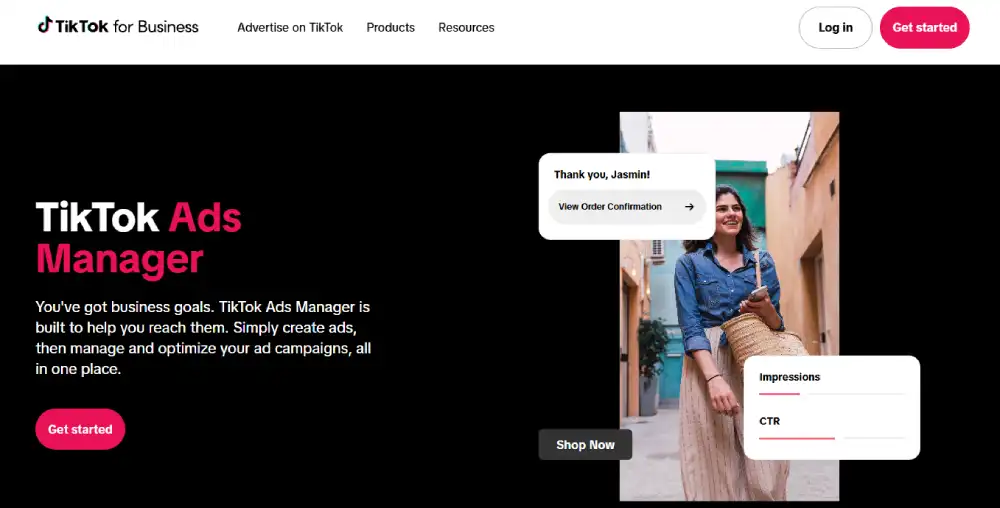
Everything related to your ad spend lives here. You select a campaign objective (traffic, conversions, reach, app installs, and others), set daily or lifetime budgets at the campaign or ad group level, and manage creative assets at the ad level.
Ads Manager operates through an Ad Account, which is the billing container for your campaigns. When you first sign up for TikTok advertising, you create an Ad Account, and that account lives inside Ads Manager.
You do not need the TikTok Business Center to access Ads Manager. A solo advertiser running a single account can sign up, create an Ad Account, and start running TikTok ads entirely within Ads Manager.
What Ads Manager does not handle: it does not manage other users’ access, it does not own your Pixel across multiple accounts, and it does not control agency or team permissions at a higher level. That is the Business Center’s job.
Core functions inside Ads Manager:
- Campaign creation and ad group structuring
- Audience targeting, including Custom Audiences and Lookalike Audiences
- Creative uploads and A/B testing
- Bid strategy choices, such as Cost Cap and Bid Cap
- Performance reporting and analytics dashboard
- Pixel installation at the individual account level
What Is TikTok Business Center?
TikTok Business Center (BC) is the management layer that sits above Ads Manager. TikTok’s Business Center help page calls it a central place to handle your business and advertising activities, and lists ad accounts, TikTok accounts, Shops, Pixels, catalogs, audiences, and leads as the assets it can hold.
Business Center is where you manage the infrastructure that Ads Manager depends on:
- Add team members as Admin or Standard members, with optional finance roles on top
- Link one or more Ad Accounts to a single business entity
- Own and share assets: TikTok Pixels, product Catalogs, and Audiences
- Grant or revoke access for agencies or external partners
- Handle billing, payments, and invoices for the Ad Accounts it owns
One important distinction: Business Center is not the same as a TikTok Business Account. A TikTok Business Account is an organic profile on the TikTok app that gives brands access to content analytics and the in-app Promote feature. Business Center is a completely separate advertising infrastructure tool. If you sign up for a Business Account in the app and expect to see team roles or shared Pixels, you are looking in the wrong place.
Business Center roles work at two levels, and it helps to keep them apart. At the member level, TikTok’s roles and permissions article describes Admins, who can add members, invite partners, and create ad accounts, and Standard members, who only work on the accounts and assets assigned to them. Finance Analyst and Finance Manager are extra roles for people who handle billing.
Business Center also lets you assign assets to specific Ad Accounts. If you own a Pixel and want three different Ad Accounts to use it, you manage that relationship inside Business Center. Without BC, each Ad Account tends to end up with its own Pixel, which splits your conversion data.
TikTok Business Center vs Ads Manager: Key Differences Side by Side
| Feature | TikTok Ads Manager | TikTok Business Center |
| Primary function | Create and manage ad campaigns | Manage accounts, users, and assets |
| Who uses it | Advertisers running active campaigns | Admins, team leads, agencies |
| What it controls | Campaigns, ad groups, creatives, bids | Ad Accounts, Pixels, Catalogs, and user roles |
| Access management | Uses the access each person was given | Business-level permissions across accounts |
| Billing | Handles billing for one Ad Account | View and manage billing across multiple Ad Accounts |
| Pixel ownership | Pixel tied to the individual Ad Account | Pixel owned at BC level, shared across accounts |
| Product Catalog | Uses Catalog if linked from BC | Creates and owns the Catalog |
| eCommerce integration | Executes catalog-based campaigns | Builds and manages the Catalog source |
| Team permissions | Limited | Full role-based access control |
| Agency access | Not managed here | Agency requests and manages client access here |
It comes down to scope. Ads Manager runs the campaigns, and Business Center controls the accounts and people behind them. You can run Ads Manager without Business Center, but you cannot fully govern a multi-account or multi-user setup without it.
Do You Need TikTok Business Center to Use Ads Manager?
No, you do not need the TikTok Business Center to use Ads Manager. But whether you should use it depends entirely on your situation.
When you can skip Business Center:
You are a solo advertiser running one Ad Account with no team members who need access. You are not working with an agency, not sharing a Pixel across accounts, and not running Shopping Ads or catalog-based formats. In this case, you can sign up through ads.tiktok.com and run campaigns without ever setting up a Business Center.
When Business Center becomes essential:
- You manage a team and need to assign different access levels, such as separate roles for creative upload, reporting, and billing
- You are an agency managing multiple client Ad Accounts
- You run eCommerce ads and need a shared Pixel and product Catalog connected across campaigns
- You want to run Smart+ campaigns that depend on BC-owned assets
- You have two or more Ad Accounts that need to share the same audience data or Pixel
One practical note: if you start without Business Center and later want team access or shared assets, you will have to move accounts and assets into a BC at that point. If you expect your team or account count to grow, starting with Business Center saves that step.
Business Center vs Agency Account vs Ad Account: How the Hierarchy Works
TikTok’s account structure has three pieces: the ad account, the Business Center that owns it, and the way an agency gets access. Here is how each one works.
An ad account is the base unit. It is where your campaigns, budgets, and billing live. Every ad you run is tied to an Ad Account. You can have more than one, but each one acts as its own billing container with its own campaign history.
The Business Center sits one level above. It is the administrative hub that owns and manages multiple Ad Accounts under one business entity. It holds shared assets (Pixels, Catalogs, Audiences) and controls who has access to which accounts. One Business Center can link to many Ad Accounts simultaneously.
Agency Account is not a separate platform in TikTok’s structure. An agency creates its own Business Center and asks for access to each client’s Ad Account from there. In the official request access steps, the agency enters the ad account ID and picks a permission level, and the owner of that ad account has to accept before anything changes. The agency then works in Ads Manager with its own login, not the client’s.
Those permission levels are set per ad account. TikTok’s asset permissions guide lists three:
- Admin: full control, including the ad account settings
- Operator: can build and edit ads, manage audiences, and handle finance, but cannot change account settings
- Analyst: can view ads, performance data, and reports, and nothing else
A media buyer usually needs Operator. Someone who only reads reports, like a bookkeeper or a client contact, fits Analyst.
Here is how the structure looks across both use cases:
Agency setup:
- Agency Business Center owns access to: Client A Ad Account, Client B Ad Account, Client C Ad Account
In-house advertiser setup:
- Advertiser Business Center owns: Ad Account 1, Ad Account 2, shared Pixel, Catalog, Audiences
Business Center is not only for agencies. Any advertiser with more than one account or more than one person on the account gets something out of it. Agencies just use it more, because every client account they touch runs through it.
TikTok Promote vs Ads Manager: What’s the Difference?
TikTok Promote is a boost button inside the app, while Ads Manager is a full campaign tool on the web. Both spend money on TikTok reach, but they suit different jobs.
TikTok Promote is an in-app tool for creators, businesses, and TikTok Shop sellers aged 18 or older, according to the About Promote help article. You pick a video or LIVE you already posted and choose a goal: boost the account (views, followers, profile views), get leads, get sales such as website visits, or boost a LIVE, which needs at least 1,000 followers.
Setup is short. You can start from a ready-made promotion pack with a preset budget, length, and audience, or build a custom promotion. What you boost is a post that already exists, so there is no separate ad creative to build.
TikTok Ads Manager gives you full control. You create campaigns from scratch, choose from all available ad formats, including In-Feed Ads, TopView, Spark Ads, and Shopping Ads. You define custom audiences, set specific bidding strategies, run A/B tests, and access detailed performance reporting. You can build Custom Audiences from website traffic or customer lists, and build Lookalike Audiences from those segments.
| Feature | TikTok Promote | TikTok Ads Manager |
| Where you access it | TikTok app | ads.tiktok.com |
| Creative control | Boost existing posts only | Create new ad creatives from scratch |
| Targeting options | Preset pack or custom promotion | Full targeting suite |
| Audience types | Simple audience choices set in the app | Custom and Lookalike Audiences |
| Ad formats | Single boosted post | All TikTok ad formats |
| Reporting depth | Basic metrics only | Full analytics dashboard |
| Business Center required | No | No (optional for single accounts) |
| Best for | Quick content boosts | Campaign management with defined business goals |
Promote is a cheap way to see if a post can pull attention before you put more money behind it. Once you care about conversions, testing, or steady spend, move to Ads Manager, where you control the campaign setup and reporting.
Who Should Use TikTok Business Center, Ads Manager, or Both?
Whether you should use Business Center, Ads Manager, or both depends on how many people and ad accounts you have. These four cases cover most advertisers.
Solo Advertiser or Very Small Business
You only need Ads Manager. Sign up at ads.tiktok.com, create your Ad Account, and run campaigns directly. Business Center adds unnecessary complexity at this stage. You can always add it later if your situation changes.
Small Business with a Growing Team
If more than one person needs access to your Ad Account, set up a Business Center. You can give a colleague or freelancer their own login with Operator or Analyst access instead of sharing your password, and remove them later in one step. Each person then uses the Ads Manager login page with their own details. Getting this right early means you do not have to rebuild the account when the team grows.
Marketing Agency Managing Client Accounts
For TikTok ads for agencies, Business Center is a must. Create a BC for your agency, then request access to each client’s Ad Account through it. Client accounts stay separate, each person on your team gets only the access they need, and the client can remove your access at any time because they still own the account.
eCommerce Brand Running Shopping Ads
You need both. Ads Manager is where you build and run catalog-based campaigns. Business Center is where your product catalog and Pixel live, so every ad account you add can use them.
Keeping the catalog and Pixel in BC also matters if you sell in more than one market, say the USA and the UK, with a separate ad account for each. Both accounts can use the same assets instead of each building its own.
How TikTok Business Center and Ads Manager Work Together
Business Center and Ads Manager are two layers of the same setup. Business Center holds the assets and access rules, and Ads Manager is where those assets get used in campaigns.
Asset ownership and sharing: Your TikTok Pixel and product Catalog are owned at the Business Center level. Ads Manager pulls from those assets when you set up campaigns. If your Pixel lives inside BC, every Ad Account linked to that BC can use the same tracking data. If your Pixel only lives inside a single Ad Account, other accounts cannot use its data for retargeting or conversion tracking.
Access control in practice: Business Center decides who can access what. When you add a team member in BC and assign them to an Ad Account with an Operator role, they log into Ads Manager and manage campaigns within that permission level. BC sets the rules. Ads Manager is where those rules are applied daily.
Smart+ Campaigns: TikTok’s Smart+ campaigns automate targeting and bidding along with creative delivery. Web campaigns still rely on a Pixel for conversion data, and catalog campaigns rely on a catalog. When both sit in Business Center, any linked ad account can run these campaigns without setting the assets up again.
Put simply, the more of your assets you keep in Business Center, the less setup each new ad account needs.
More helpful articles you’ll want to explore:
👉 TikTok Ads Credit: How the Spend and Get Offer Works
👉 TikTok Ads for Local Businesses: How Small Businesses Attract Nearby Buyers
👉 TikTok Ad Optimization Checklist: Boost ROAS Step by Step
👉 Viral TikTok Ads: Complete Guide to High Performing Creatives
Frequently Asked Questions
Is TikTok Business Center free?
TikTok’s Business Center overview and its roles article do not list any fee for using Business Center. What you pay for is the ad spend in the Ad Accounts it manages. Check the current terms when you set one up, since TikTok can change them.
Can I run TikTok ads without a Business Center?
Yes, you can run ads directly through Ads Manager without creating a Business Center. A solo advertiser with one Ad Account does not need BC to launch campaigns, manage budgets, or track performance. Business Center becomes necessary only when you need team access, shared Pixels, a product Catalog, or multi-account management.
What is the difference between a TikTok Business Account and a TikTok Business Center?
A TikTok Business Account is an organic profile on the TikTok app. It gives brands access to content analytics and the in-app Promote feature. TikTok Business Center is a completely separate advertising management platform for managing Ad Accounts, assets, and team permissions. The two serve different purposes, though TikTok lets you add a TikTok account to Business Center as an asset so your team can manage it there.
Can an agency access my TikTok Ads Manager without my login?
Yes, through TikTok Business Center. Your agency creates its own BC and sends a request to access your Ad Account. Once you approve, they can manage your campaigns inside Ads Manager using their own credentials and defined permission level. You keep full ownership of your account at all times and can revoke access whenever you choose.
Does TikTok Business Center affect my ad account billing?
Each Ad Account still has its own billing. What Business Center adds is finance roles: a Finance Analyst can view and download invoices and transaction history, and a Finance Manager can manage payment methods, billing groups, and invoices for the accounts the Business Center owns.
Do I need the TikTok Business Center to run Shopping Ads or use a product Catalog?
Yes. Product Catalogs are created and owned inside the TikTok Business Center. If you want to run Video Shopping Ads or catalog-based Smart+ campaigns, you must have a Business Center with a linked Catalog and a connected Ad Account.
Wrapping Up
Ads Manager is where your money gets spent: campaigns, budgets, creatives, and results. Business Center is where your setup gets owned: ad accounts, Pixels, catalogs, and who is allowed to touch them.
If you run one account on your own, start in Ads Manager and add Business Center later. If you have a team, work with an agency, or sell from a product catalog, set up Business Center first and give each person the lowest access level that lets them do their job.