
Waiting on TikTok ad approval when your campaign is ready to launch is one of the more frustrating parts of advertising on the platform.
Most ads clear review within 24 hours, but a lot of advertisers end up stuck in a loop of rejections, edits, and resubmissions that stretches that window into days.
The good news is that most delays are avoidable. They come down to a handful of things you can check and fix before you ever hit submit.
Once you know what TikTok’s review system is actually looking for, getting your ads approved fast becomes a repeatable process rather than a guessing game.
In this guide, you will learn:
- How TikTok’s ad review process works and what timelines to expect
- The most common reasons ads get delayed or rejected
- Specific steps to take before submitting any ad
- How your account history affects review speed
- What to do if an ad gets rejected after submission
Whether you are setting up your first campaign or managing a high-volume account, these steps will help you cut down on review time and keep your budget running.
Get Up to $6000 Free TikTok Ad Credit
Table of Contents
Key Takeaways
- Most TikTok ads are reviewed within 24 hours, but policy flags and technical errors can push that to 48 hours or more
- Reviewing TikTok’s advertising policies before building your creative is the single fastest way to prevent delays
- Technical spec errors, broken landing pages, and restricted ad copy are the most common causes of rejection
- Editing a submitted ad resets the review clock entirely, so get it right before submitting
- Accounts with clean policy histories tend to move through review more smoothly than new or flagged accounts
Quick Answer
To get TikTok ads approved fast, make sure your video meets TikTok’s technical specs, your landing page is live and matches your ad, your copy avoids restricted language, and your account has no active policy violations. Submitting during lower-traffic periods can also help. Fully compliant ads from established accounts typically clear review within 24 hours.
How Long Does TikTok Ad Review Actually Take?
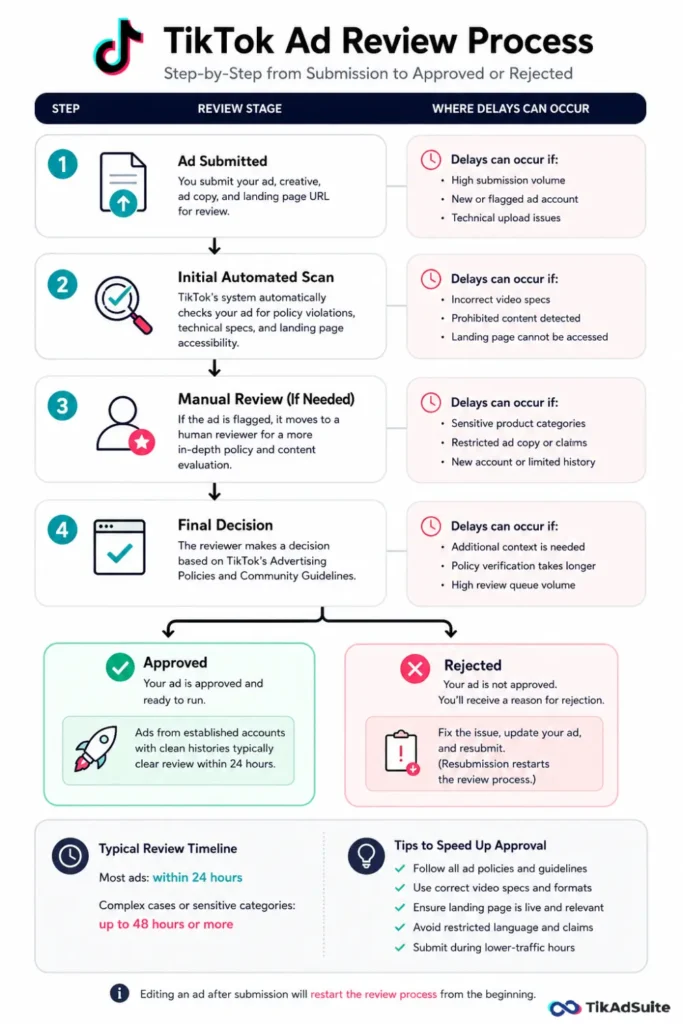
TikTok’s official guidance states that most ads complete review within 24 hours of submission. Many advertisers see approvals come through in a few hours, particularly during standard weekday hours. That said, certain conditions push the timeline out.
Ads submitted during high-traffic windows, such as major sale periods or holiday campaigns, face a heavier queue. New ad accounts typically go through a more thorough manual review. And any ad that touches a sensitive product category, such as supplements, financial products, or certain health claims, often triggers additional scrutiny regardless of account age.
Planning your submissions at least 48 hours before a campaign needs to go live gives you enough buffer to fix any issues without losing your launch window.
What Slows Down TikTok Ad Approval?
Most delays follow a clear pattern. Here are the causes that come up most often:
- Wrong video specs: Incorrect aspect ratio, unsupported file format, or a file size that exceeds the limit
- Landing page problems: Pages that do not load, require a login, or contain content that conflicts with your ad
- Restricted ad copy: Language involving health claims, financial guarantees, or superlatives without backing
- Sensitive product categories: Beauty, supplements, finance, and similar verticals receive more scrutiny by default
- New or flagged accounts: Fresh accounts with no track record tend to go through slower manual review
- Post-submission edits: Changing anything after you submit, even something minor, resets the entire review process
Identifying which of these applies to your situation before submitting removes most of the friction from the process.
Steps to Get Your TikTok Ads Approved Faster
1. Read TikTok’s Ad Policies Before You Build Your Creative
Skipping the policy review is the most common reason advertisers run into delays. TikTok’s advertising policies outline what is prohibited outright, what falls into restricted categories, and what specific industries need to do differently. Reading them before you start building your ad takes far less time than diagnosing a rejection afterward.
Pay particular attention to restricted categories. Products like dietary supplements, financial services, and medical devices often require specific disclaimers or pre-approval before your ads can run. You can find TikTok’s full advertising policy documentation on the TikTok Business Help Center.
For a detailed breakdown of which requirements apply to your ad type, the TikTok ads requirements guide covers the key rules across different campaign formats.
2. Get Your Technical Specs Right Every Time
Technical errors are one of the fastest ways to send your ad into manual review or trigger an outright rejection. TikTok has specific requirements for video ads, and submitting outside those parameters adds unnecessary friction.
Check these every time before uploading:
| Spec | Requirement |
| Aspect ratio | 9:16 (full-screen vertical, recommended) |
| Resolution | Minimum 540 x 960px |
| File format | MP4 or MOV |
| Video length | 5 to 60 seconds |
| File size | Under 500MB |
Exporting your creative using a tool like CapCut makes it straightforward to hit TikTok’s specs directly, since it supports TikTok-compatible export presets by default.
For a complete reference covering every ad format, the TikTok ad specs guide has everything laid out clearly.
3. Check Your Landing Page Before Submitting
Your landing page is part of the review. TikTok checks that it loads, that it matches what your ad promises, and that it does not contain content that conflicts with its advertising policies. A landing page issue can reject an otherwise fully compliant ad.
Before submitting, confirm your landing page:
- Loads quickly on mobile without errors
- Reflects the product, offer, or claim shown in your ad
- Does not contain prohibited content or misleading information
- Has a working privacy policy if you collect any user data
A mismatch between your ad and the page it points to is one of the more frustrating rejection reasons because it has nothing to do with your creative itself.
4. Write Ad Copy That Stays Within Policy
Ad copy goes through the same review filter as your video. Certain phrases consistently trigger delays or rejections, and most of them follow a pattern.
Avoid language that:
- Makes absolute performance guarantees (“guaranteed results,” “100% effective”)
- Uses before-and-after comparisons for health or weight-related products
- Includes unsubstantiated superlatives (“the best,” “number one,” “#1 rated”)
- Creates misleading urgency or scarcity claims
Writing copy that focuses on what your product does rather than what it guarantees keeps things clean and moves through review faster. Direct, specific language also tends to perform better with audiences anyway.
5. Submit During Lower-Traffic Windows
TikTok’s review team operates around the clock, but the queue is not evenly distributed throughout the day. Submitting your ad during lighter-traffic periods, such as early weekday mornings outside of peak US hours, can result in a faster turnaround.
This is not a guaranteed shortcut, but when you have a time-sensitive launch, it is worth factoring into your schedule. Avoid submitting during major global sale events if review speed matters, since those periods see a significant spike in ad submissions platform-wide.
6. Keep Your Ad Account in Good Standing
TikTok’s review system does take into account history. Accounts with a clean record, no prior policy violations, and consistent payment history tend to move through the queue more efficiently than accounts with unresolved issues.
If you are managing your campaigns through TikTok Ads Manager, keep your billing information current and respond promptly to any policy notices you receive. A flagged account can slow down every new submission, regardless of how compliant the creative is.
Staying current on policy changes also helps. The TikTok ads policy update guide covers recent shifts worth knowing about before your next campaign.
7. Do Not Edit Ads After Submitting
Once you submit an ad for review, leave it alone. Any change, including minor copy edits, thumbnail swaps, or URL updates, restarts the review process from the beginning. Your ad goes back to the start of the queue.
If you catch an issue after submitting, decide whether it is significant enough to fix immediately or whether it can wait until after approval. For minor issues, waiting until the ad clears review and then making changes is usually faster overall.
What to Do When Your Ad Gets Rejected
Even when you follow every guideline, rejections happen. When they do, start by reading TikTok’s rejection reason carefully. Each rejection includes a specific reason, and most of them point directly to what needs fixing.
Common fixes include:
- Removing or rewriting ad copy that contains restricted language
- Replacing creative that includes prohibited visuals or claims
- Updating your landing page URL or fixing page load issues
- Adding required disclaimers for sensitive product categories
If you believe a rejection was made in error, TikTok does have an appeal process. The how to appeal TikTok ad rejections guide walks through the steps clearly.
For a deeper look at what typically triggers rejections, why your TikTok ad was rejected covers the most frequent causes with specific examples you can cross-reference against your own ads.
FAQs
How long does TikTok ad approval take in 2026?
Most TikTok ads are reviewed within 24 hours of submission. Ads flagged for manual review due to sensitive content, new accounts, or policy concerns can take up to 48 hours. Submitting a fully compliant ad from an account with a clean history is the most reliable way to stay within the standard timeframe.
Why is my TikTok ad stuck in review for more than 24 hours?
If your ad has been in review for longer than 24 hours, it has likely been flagged for manual review. Check your creative, ad copy, and landing page for potential policy issues. If the delay extends past 48 hours with no update, reaching out to TikTok Business support is a reasonable next step.
Does editing a submitted TikTok ad restart the review process?
Yes. Any change made to an ad after submission resets the review clock entirely. The ad returns to the start of the queue as if it were a new submission. If you need to make corrections, weigh whether the fix is worth the additional wait time before making any changes.
What is the most common reason TikTok ads get rejected?
Restricted language in ad copy and landing page issues are consistently among the top causes of rejection. Prohibited claims, mismatched content between the ad and destination page, and incorrect video specs account for a large portion of rejections across account types.
Does a new TikTok ad account affect how fast ads get approved?
Yes. New accounts with no advertising history typically go through a more detailed manual review, which takes longer. Running a series of compliant campaigns over time builds account credibility and generally speeds up future reviews.
Wrapping Up
Getting TikTok ads approved fast is mostly about doing the prep work before you submit. Reviewing policies, checking your specs, confirming your landing page is clean, writing copy that stays within guidelines, and leaving the ad alone after submission covers the majority of what causes delays.
Advertisers who get consistent, fast approvals are not working any harder. They are just removing the avoidable friction points before they become a problem.
If you are just getting started with TikTok advertising, TikTok Ads gives you access to the full suite of campaign management tools. And if you want to stretch your initial ad budget, the TikTok Ad Credit program is worth checking before your next campaign launch.