
You launch a TikTok campaign. The Ads Manager dashboard shows clicks, spend and a handful of conversions. Then you open Google Analytics 4, and much of that traffic doesn’t show up as TikTok ads. It sits in Direct, Unassigned or an organic channel, mixed in with everyone else.
UTM tags close most of that gap. With them, every click carries its source, campaign and creative into GA4, so you can see which TikTok ad led to a sale and pull TikTok’s cost data into the same reports.
Below are the tags GA4 needs, where to add them in TikTok Ads Manager, how GA4 sorts TikTok traffic into channels, and why the two dashboards never match exactly. Plan on about ten minutes to build a template you can reuse on every campaign after this one.
Get Up to $6000 Free TikTok Ad Credit
Table of Contents
Quick Answer: How to Track TikTok Ads in GA4
To track TikTok ads in GA4, add UTM tags to every ad’s destination URL in TikTok Ads Manager: a fixed lowercase source such as tiktok, a paid medium such as paid or cpc, and a campaign name, ideally filled by TikTok’s macros. Google’s URL builder guide says to always use utm_source, utm_medium and utm_campaign, and to keep values lowercase because they are case sensitive.
Then check where the visits land in GA4’s Traffic acquisition report, build a custom channel group if TikTok isn’t in its own row, and connect TikTok’s cost data using the same source and medium. Expect some gap between GA4 and Ads Manager even with a clean setup, so learn how TikTok’s own reporting metrics are counted before you compare the two.
Key Takeaways
- UTM parameters are text tags added to your landing page URL that tell analytics tools where a visitor came from.
- GA4 files TikTok clicks as paid traffic only when the medium looks paid, such as paid or cpc. A medium like tiktok_ads doesn’t count as paid, so those visits can end up in an organic channel or Unassigned.
- UTM values are case sensitive in reports, so tiktok and TikTok become two sources. Use lowercase everywhere.
- TikTok’s macros fill in real campaign, ad group and creative names on each click, so you build the template once.
- GA4 can now import TikTok cost, clicks and impressions, but only when your source and medium match the values set in the connection exactly.
- GA4 and TikTok Ads Manager count conversions differently, so the totals will not match one to one.
What UTM Tracking Actually Fixes for TikTok Advertisers
TikTok Ads Manager is good at telling you what happened inside TikTok. It shows impressions, clicks, and cost per result. The built-in analytics dashboard covers platform-side performance well. What it can’t always tell you is what happened after someone landed on your site. Did they browse and leave? Add something to a cart? Buy?
That matters because not every click turns into revenue. If you can’t trace those conversions back to a specific ad, you’re guessing which creative to scale and which to cut.
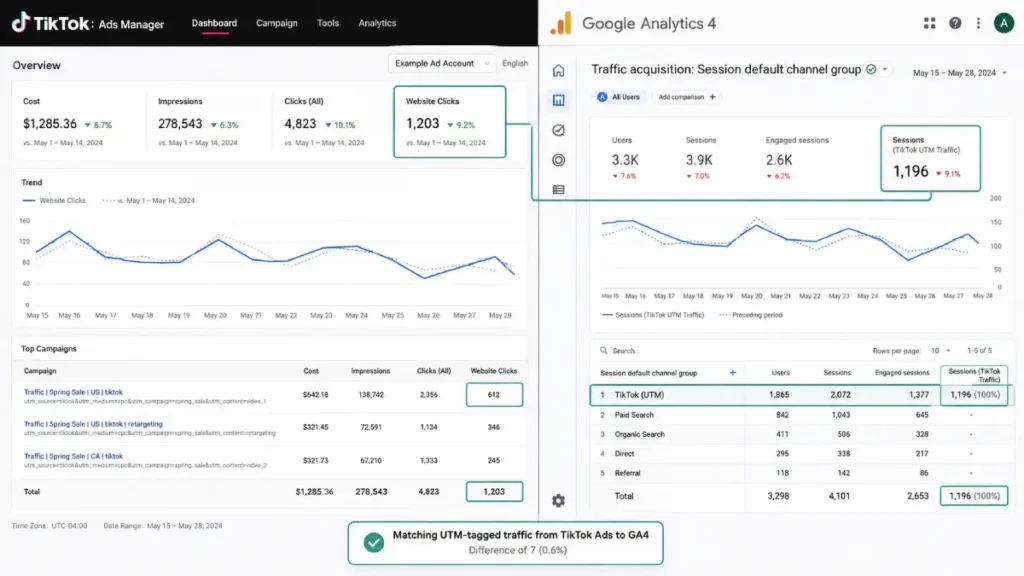
UTM parameters don’t depend on TikTok’s pixel. They ride along in the URL itself. When someone clicks your ad, the tag travels with them to your landing page, and your analytics platform reads it the moment the page loads. That makes UTM data a reliable second source, one that keeps working even alongside your existing pixel setup.
The UTM Parameters GA4 Needs From TikTok Ads
GA4 needs three UTM parameters on every TikTok ad URL: utm_source, utm_medium and utm_campaign. TikTok supports two more, utm_term and utm_content, which are useful for ad group and creative detail.
- utm_source: one fixed value for all TikTok ads, such as tiktok.
- utm_medium: a paid value such as paid or cpc, so GA4 can treat the visit as paid traffic.
- utm_campaign: the campaign name, best filled by a macro.
- utm_content and utm_term: creative and ad group details, also through macros.
- utm_id (optional): a campaign ID, which Google’s URL builder guide also recommends setting.
Join several parameters with an ampersand, for example a link ending in utm_source=tiktok&utm_medium=paid. To build full links without typing them, use the TikTok UTM link builder, then paste the result into Ads Manager.
How to Add UTM Parameters in TikTok Ads Manager
You add UTM parameters in the Ad details section of each ad, either with the Build URL parameters tool or with the Auto-attach toggle. The steps below follow TikTok’s guide to adding URL parameters.
Manual setup at the ad level
- Open your campaign in TikTok Ads Manager and go to the ad level.
- In Ad details, enter your Destination URL.
- Click Edit under the Preview button, then click Build URL parameters.
- Fill in the UTM parameter fields, or click Add under Custom parameters for your own.
- Check the Preview section, then click Apply.
Auto-attach
With Auto-attach on, TikTok adds parameters to the destination URL for you. The same TikTok guide says it fills in the source as TikTok and the medium as Paid, plus an ID and a name. You turn it on or off from the Edit option under Preview, and the Autodetect toggle shows how many parameters it found in your URL.
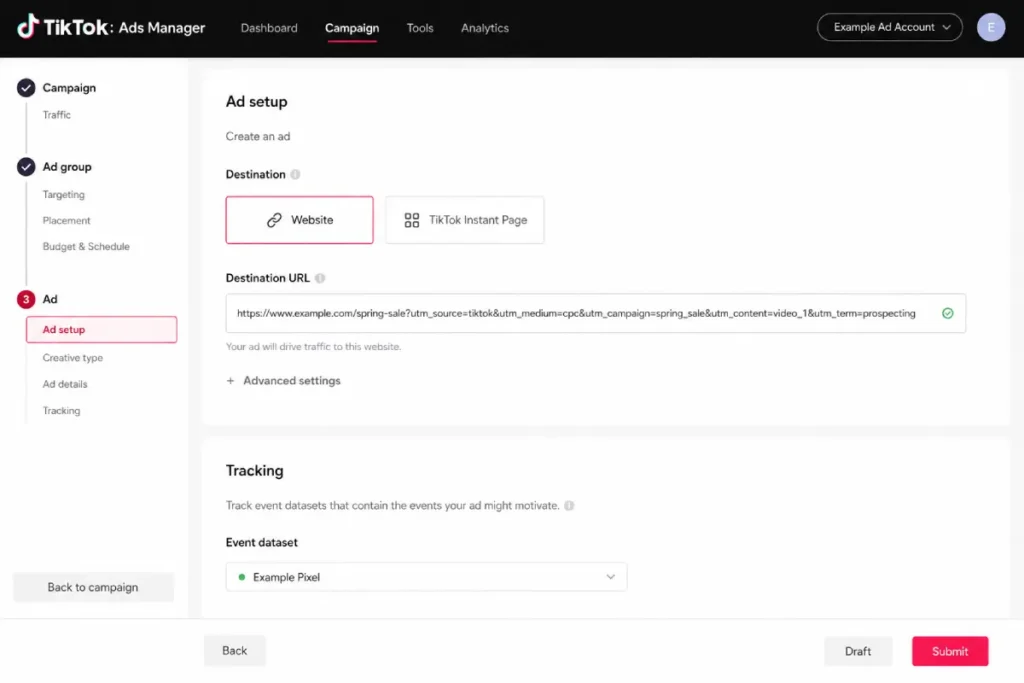
Pick one method and stick with it. Check the exact values Auto-attach writes in the Preview: if they are capitalized and your manual tags are lowercase, GA4 shows them as two separate sources.
TikTok’s Dynamic Macros Explained
A TikTok macro is a placeholder, such as __CAMPAIGN_NAME__, that TikTok swaps for a real value when someone clicks. Macros save you from typing campaign names into every URL once you run more than a few ad groups.
The TikTok page on UTM parameters lists these macros:
- __CAMPAIGN_NAME__ and __CAMPAIGN_ID__: campaign name and ID
- __AID_NAME__ and __AID__: ad group name and ID
- __CID_NAME__ and __CID__: creative name and ID
- __PLACEMENT__: placement type, TikTok or TikTok Pangle
- __ADID_V2_NAME__ and __ADID_V2__: ad name and ID in upgraded Smart+ campaigns
A working GA4-friendly template looks like this:
?utm_source=tiktok&utm_medium=paid&utm_campaign=__CAMPAIGN_NAME__&utm_content=__CID_NAME__&utm_term=__AID_NAME__
Set it once at the ad level and every click carries the real campaign, ad group and creative names. If you run this at scale, pairing it with TikTok Ads automation rules keeps naming consistent as new ad groups spin up.
What Should I Name My TikTok Campaigns for Clean UTM Data?
Macros only pull in what you’ve already typed into TikTok Ads Manager, so your naming inside the platform is what actually shows up in your analytics reports. A messy campaign name becomes a messy UTM value.
Keep names lowercase, use underscores instead of spaces, and include the goal, audience, and date. A name like conversions_spring_sale_us_q1_2026 tells you far more in a report than Campaign 4. This is also where a clear campaign structure pays off, since consistent ad group naming keeps every macro-generated UTM value readable months later. Avoid special characters entirely. Symbols like ampersands, question marks, and hash signs inside a campaign name can break the URL structure and leave a blank value where the macro should have been.
UTM Parameters vs. ttclid: What’s the Difference?
A UTM parameter is a tag for your own analytics, while the ttclid is TikTok’s click ID for its own reporting. The two often get confused because they show up in the same URL. You add UTM tags yourself, by hand or with macros. The ttclid, or TikTok Click ID, is a parameter TikTok appends automatically as part of the TikTok Pixel setup to track ad clicks for its own conversion reporting.
You need both for a complete picture. UTM parameters feed Google Analytics and your CRM so you can see the campaign, source, and creative behind a visit. The ttclid feeds TikTok’s pixel so TikTok can match that visit back to the ad and optimize delivery. Losing either one leaves a gap in your data.
Per TikTok’s Click ID article, the ttclid is added to the landing page URL when someone clicks a TikTok ad, follows the click-through window you set in Attribution Manager, and does not affect your other tracking parameters. Leave it in place unless your developer has a reason to strip it.
How TikTok Traffic Shows Up in GA4
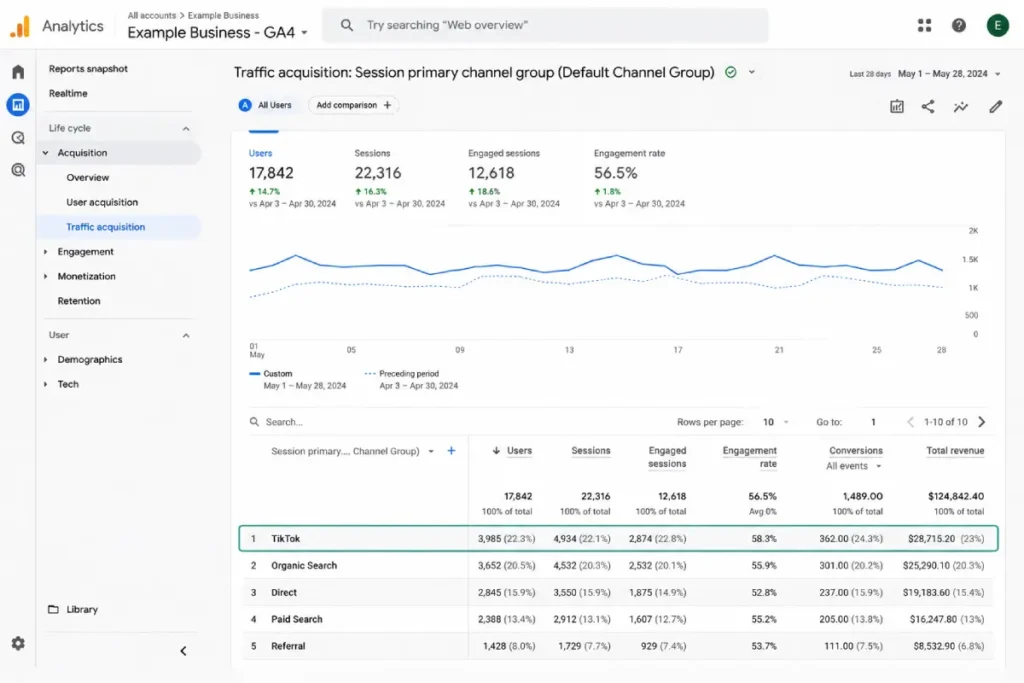
GA4 sorts tagged TikTok visits into a channel based on the source and medium you send. In the GA4 default channel group, Paid Social needs a source on Google’s list of social sites and a medium that matches the pattern ^(.*cp.*|ppc|retargeting|paid.*)$. That is why paid and cpc work as paid mediums, and a made-up value like tiktok_ads does not.
Two details trip people up. First, Google’s channel guide names TikTok as an example of a video site, so paid TikTok clicks can show up as Paid Video instead of Paid Social. Second, GA4 uses Unassigned when no channel rule matches, and a medium that doesn’t look paid can push TikTok visits there or into an organic channel.
Give TikTok Its Own Row With a Custom Channel Group
If you want TikTok in one clear row, build a custom channel group. Per Google’s custom channel groups guide, you create it in Admin under Data display, then Channel groups; a standard property can have 2 custom groups, it can be applied to reports retroactively, and you need Editor access or above.
A simple rule works: a channel named TikTok Ads where the source exactly matches tiktok and the medium matches your paid value. Then cross-check the totals against the TikTok ads metrics you already track in Ads Manager.
Import TikTok Cost Data Into GA4
GA4 can now pull TikTok’s campaign cost, clicks and impressions into your reports. Google’s TikTok connection guide says utm_source and utm_medium are required, must exactly match the source and medium you enter at setup, and can’t be edited after the connector is created.
- Where: Admin, then Product links and TikTok Links, or Data import with Campaign data and TikTok.
- Access: at least the Analyst role in TikTok Ads and Editor on the GA4 property.
- Timing: each new import tries to pull at least 24 months of history, and data can take up to 24 hours to show in reports.
- Watch out: if you already upload TikTok costs by hand, delete the overlapping data first, because GA4 does not remove duplicates between the two methods.
For advertisers managing UTM templates across TikTok alongside Google and Meta at the same time, a dedicated SEO and analytics platform can help keep naming conventions consistent and catch broken links before they cost you a week of clean data.
Why GA4 and TikTok Ads Manager Numbers Don’t Match
GA4 and TikTok Ads Manager report different conversion numbers because they count in different ways, not only because of tagging errors. The TikTok article on conversion discrepancies lists these causes:
- Sessions: GA4’s UTM tags work per session, while the TikTok Pixel is multi-session and can credit a later purchase within its window.
- In-app browser: visits through TikTok’s in-app browser can be undercounted in Google Analytics and show as organic or direct.
- Last click: GA4 measures every channel, so a later email or search visit often takes the credit.
- Matching: TikTok matches with signals like email, phone and IP, while GA4 leans on cookies and UTM tags plus some modeling.
- Blockers: ad blockers and browser settings can stop tracking on either side.
- Dates and time zones: TikTok reports conversions by ad impression time, so a different reporting basis or time zone shifts the totals.
In practice, use GA4 to compare TikTok with your other channels and Ads Manager to judge creatives and bids inside TikTok. If the gap suddenly widens, check your tags first, then the time zone settings in both tools.
Common Mistakes That Break TikTok Attribution
Most broken TikTok attribution in GA4 comes from a handful of setup mistakes that are easy to fix before launch.
- Editing a live ad to add tags: TikTok’s learning phase article advises avoiding edits that retrigger learning, so add your UTMs before the ad goes live.
- A medium GA4 doesn’t read as paid: values like tiktok_ads don’t count as paid and send visits to the wrong channel. Use paid or cpc.
- Mixing macro syntax: TikTok macros use double underscores. Macros copied from another ad platform’s template won’t fill in, and the value comes through blank or as raw text.
- Skipping the preview step: Always test the resolved URL before launch. A missing underscore or stray character means the macro doesn’t fire and you lose that data point for the entire campaign.
- Forgetting non-ad links: Your TikTok bio link and video description links need UTMs too, with an organic medium such as social. Without them, that traffic shows up as direct.
What About Click and Impression Tracking URLs?
Click and impression tracking URLs are for third-party ad servers, not for GA4. The TikTok list of supported third-party measurement partners includes DoubleClick, Flashtalking, Adform and Sizmek for impressions and clicks, and notes that Adform and Flashtalking track only landing page campaigns. If you don’t use one of these tools, UTM tags are all GA4 needs.
FAQ
Do I need UTM parameters if I already have the TikTok pixel installed?
Yes. The pixel and UTM parameters answer different questions. The pixel feeds TikTok’s own reporting and optimization through the ttclid, while UTM tags tell GA4 which campaign and creative sent each visit, so you can compare TikTok with your other channels in one place.
Why does TikTok traffic show as Unassigned or Direct in GA4?
TikTok visits end up in Unassigned or an organic channel when the UTM medium doesn’t look paid to GA4, for example a medium like tiktok_ads. Visits with no UTM tags, or ones opened in TikTok’s in-app browser, may show as Direct or organic. Use a paid medium such as paid or cpc and tag every ad.
Can I use the same UTM template for every TikTok campaign?
You can reuse the structure, but the values should change. Keep utm_source and utm_medium the same on every ad, and let utm_campaign, utm_content and utm_term update through TikTok’s dynamic macros so each ad reports its own real name.
Will adding UTM parameters slow down my ad’s performance?
UTM tags only add text to the landing page URL. What TikTok does warn about is making edits that retrigger the learning phase, so add your tags before the ad goes live instead of editing a running ad.
What happens if I use the wrong macro syntax?
The macro won’t resolve, and that portion of your URL comes through blank or as raw text instead of a real name. Always preview the final URL in TikTok Ads Manager before publishing to catch this before it affects your reporting.
Wrapping Up
Clean TikTok tracking in GA4 comes down to one lowercase template with a paid medium, filled by TikTok’s macros and added before launch. Once that is in place, every new ad inherits the same tags without extra work.
Give it a few weeks of data, then check where TikTok lands in Traffic acquisition, add a custom channel group if needed, and connect the cost import with the same source and medium. From there you can match TikTok spend to revenue in GA4, while accepting that Ads Manager will always count a little differently.