
Most TikTok ads that never run don’t fail on the video. They stall earlier: the ad account waits for approval, business verification asks for a document you don’t have handy, or a campaign won’t publish because no TikTok account is linked to it.
Those account rules changed a lot in 2026, and many guides still describe the old setup.
Get Up to $6000 Free TikTok Ad Credit
This page covers what you need before TikTok lets your ads run: the ad account, the linked TikTok account, business verification, payment and budget, the policies your product must meet and the landing page checks. Each rule links to the TikTok help page it comes from, checked in November 2026.
Table of Contents
Quick Answer
To run TikTok ads, you need to meet six requirements. You need a TikTok Ads Manager account tied to an official business website, a TikTok account linked to your campaigns, verified business details, a payment method with a budget above TikTok’s minimums, a product and ad that TikTok’s policies allow in your target market, and a working landing page with a privacy policy. Creative file specs are a separate checklist.
What Are TikTok Ads Requirements?
TikTok ads requirements are the account, business, payment and policy rules an advertiser must meet before TikTok approves and delivers ads. Some apply once, when you open the account. Others are checked again for every ad you submit.
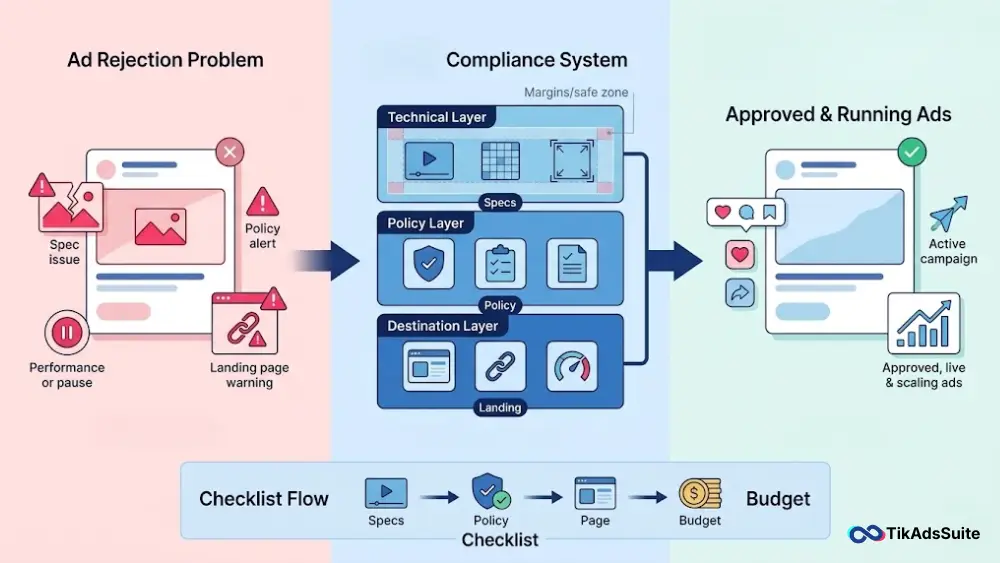
The requirements fall into six groups:
- Account setup: an Ads Manager account, usually inside a Business Center, with accurate business and tax details and a real website.
- Identity: a TikTok account linked to your campaigns, ideally a verified Business Account.
- Business verification: documents that prove your business exists, asked for at sign-up and again as your spend grows.
- Payment and budget: a billing option, a payment method and budgets above the platform minimums.
- Policy: a product, service and ad that TikTok allows in each market you target.
- Landing page: a page that loads, works on a phone and matches what the ad promises.
Miss any one of these and your ads either never start or stop later.
TikTok Ad Account Requirements
You need a TikTok Ads Manager account before you can create a campaign. Self-serve Ads Manager is open at ads.tiktok.com for most advertisers, while Business Center is the hub for businesses and agencies that manage several ad accounts, TikTok accounts, team members and payment methods in one place.
If you are a solo advertiser or a small business running your own campaigns, Ads Manager is your starting point. If you manage ads for clients or share assets across a team, set up Business Center first and create the ad accounts inside it. If you still need a profile for your brand, follow the steps to create a TikTok Business account.
TikTok reviews every new ad account before it can spend. According to the Account Approval FAQ, TikTok only approves an account that has an official website (a social media profile alone does not count), checks your business and tax information and your landing page, and finishes most reviews in under 24 hours. If you disagree with a rejection, you can ask for a new review, then raise a ticket within 3 working days.
Extra Steps for Online Stores
If you sell online, you will usually connect your store platform so TikTok can track sales and read your product catalog. The TikTok app for Shopify sets up the TikTok Pixel, builds a product catalog from your Shopify store and connects your Business Center and Ads Manager account.
WooCommerce stores have a similar option. TikTok’s WooCommerce integration page says it installs the pixel, syncs the catalog and lets you create ads from the plugin, while selling through TikTok Shop is only available in selected markets, including the UK and US.
TikTok Account Requirements: Custom Identity Is Gone
Every new campaign now needs a real TikTok account behind it. TikTok’s Custom Identity update says that starting January 2026, all new campaigns must be linked to a TikTok account, so you can no longer run ads under a made-up display name and profile image.
A few campaign types are exempt from that rule, per the same page:
- Branded Mission campaigns
- Sales campaigns for TikTok Shop
- Campaigns with Smart Creative turned on
- Manual campaigns that use a catalog
- Campaigns that only run on Pangle or Global App Bundle placements
Verification now matters for the linked account too. TikTok’s Business Center linking guide warns that a TikTok account which is not a Verified Business Account might be restricted from linking to ad accounts, and TikTok recommends verifying all of your TikTok accounts to avoid disruptions. You also need Admin access in Business Center to link one.
When TikTok announced the change in its F.I.R.S.T. framework post on January 22, 2026, it recommended an Organization Account for most advertisers. That account type needs a verified Business Account, and TikTok called out verification as especially important for alcohol, gambling and healthcare brands.
If Ads Manager shows a notice that unverified TikTok accounts can’t be linked, verify the account first, then link it through Business Center.
Business Verification Requirements
TikTok asks you to verify your business at two points. TikTok’s business verification article says you verify business information when you create an ad account, and again once your ad spend reaches a set threshold; that threshold depends on your country or region, and TikTok sends a notice with a deadline.
What the ad account check asks for:
- A digital copy of an accepted business document with your business license or registration number
- A JPEG, PNG, PDF or JPG file of up to 10MB, with all four corners visible and in color (scans from the US, China and Australia are the exception)
- A document that stays valid for at least 30 days after you upload it
- Business details that match the document exactly
For a standalone ad account, you start the check in Ads Manager under Tools, Account setting, My accounts, Business Verification. Verifying a Business Center also covers the ad accounts inside it. If TikTok marks you Unverified, you can edit the details and submit again.
Do You Need a Business License to Run TikTok Ads?
In most cases, yes, sooner or later. The verification steps ask for a business document with a license or registration number, and the check returns when your spend crosses the threshold for your region. Accepted documents vary by country, so check the list for yours before you sign up.
Your TikTok profile has its own check. Verifying a TikTok Business Account in the app needs a valid business license for the region you operate in, your legal business name and license ID exactly as printed, an SMS or voice call check, and an account holder aged 18 or older; TikTok’s Business Account verification guide says review usually takes 1 to 5 business days.
File Checks at Upload
Your video and image files have their own rules for size, ratio, length and file type, and they are checked at upload and in ad review. Those limits change often, so they live on one page: see the full list of TikTok ad specs by format, plus the TikTok ad safe zones for text and logos.
TikTok Landing Page Requirements and Advertising Policy
Your landing page is a separate approval checkpoint. TikTok reviews where your ad sends people, not just the ad itself, so a perfect video with a broken or off-topic page still gets rejected.
What Must Be on Your TikTok Ads Landing Page?
TikTok’s account and ad review pages name the same core checks. Your landing page must:
- Work: the URL loads, uses http:// or https:// and shows no error page.
- Work on a phone: visitors can read text and tap buttons without zooming, whether they hold the phone upright or sideways.
- Match the ad: the page shows the product or offer from the ad, not just your home page.
- Use the right language: the page language suits the country or region you target.
- Link a privacy policy: required whenever the page asks for personal information.
- Show who you are: e-commerce and financial service pages must display valid company details in a visible spot, such as the footer, including the site owner, policies, prices in local currency, terms and business licenses.
Landing Pages That TikTok Will Not Approve
TikTok’s landing page checklist adds two hard limits. A page cannot show prohibited products anywhere, even if your ad promotes an allowed product. And a page cannot make visitors hand over sensitive information, such as ID numbers, card details, health data or biometric data, just to enter the site.
If you run lead generation ads with TikTok’s Instant Forms, the form needs its own link to your privacy policy, so publish that policy on your website before you build the form.
TikTok Advertising Policies: What You Can and Cannot Promote
TikTok holds you responsible for what you advertise. Its first things to note page says advertisers must follow TikTok’s Advertising Policies and the laws and ad codes of every region they target, and should confirm a product is acceptable in a market before promoting it there.
Industries With Their Own Rules
TikTok’s industry policy index lists separate policies for industries such as:
- Alcohol
- Financial services
- Gambling and games
- Healthcare and pharmaceuticals
- Weight management and body image
- Politics, governments and elections
- Adult content and dangerous products or services
Many of these rules change by market, and some regions need certificates before an ad can run. Before you build a campaign in one of these industries, read the policy for each market you target.
Political Ads Are Not Allowed
Paid political advertising is not allowed on TikTok. The politics and elections policy covers paid ads, branded political content and tools like Promote. Government bodies can run limited public-interest ads only through a TikTok sales representative after certification.
Account Conduct Rules
TikTok’s Advertiser Account Policy bans trying to get around its review systems, using fake or edited documents, impersonating public figures and paying with unapproved payment methods. Breaking these rules can lead to temporary or permanent suspension. For recent changes to the rules, track TikTok ads policy updates.
TikTok Ads Budget and Payment Requirements
TikTok sets a minimum budget at both campaign and ad group level, and Ads Manager will not accept anything lower. According to TikTok’s budget rules, a campaign needs a daily or total budget of more than $50, an ad group needs a daily budget of more than $20, and a lifetime ad group budget must cover that $20 for every day of the flight, so a 31-day ad group needs at least $620.
Those numbers only let you launch. To learn what a result really costs you, plan a test budget from your expected cost per result; the TikTok ads cost breakdown explains bids and pricing models.
Payment Options
You also need a way to pay. TikTok’s billing options page lists three:
- Manual payment: you add funds in advance, and ads stop when the balance runs out.
- Automatic payment: TikTok charges your card or other saved method when spend reaches your billing threshold or bill date, whichever comes first.
- Monthly invoicing: for eligible businesses only, with payment due 30 days after the invoice date unless agreed otherwise.
Pick carefully, because switching only works in one direction. You can move from manual to automatic, from manual to monthly invoicing, or from automatic to monthly invoicing, but never back.
Why TikTok Ads Get Rejected and How to Fix Each Issue
Most rejections come from a short list of account, policy and landing page problems. TikTok’s Ad Review FAQ says most ads are reviewed within 24 hours, and that saving or editing an ad, or changing an ad group’s target location, sends it back for a new review.
The account-level reasons TikTok names most often:
- Website can’t be verified: the URL is wrong, broken or not your official site. Fix the link and request a new review.
- Business or tax details are wrong: correct them so they match your registration documents.
- Documents are missing: upload the extra documents TikTok asks for.
- Landing page breaks policy: the page doesn’t load, isn’t mobile-friendly, has no privacy policy or shows prohibited products.
- Ad and page don’t match: the landing page must show what the ad promotes.
- Past violations: an account suspended for creative or industry violations can’t run new ads until the suspension is resolved.
If you think a rejection is a mistake, open an Advertiser Support ticket and ask for a re-review. For creative problems such as text, music or claims, see how to fix a rejected TikTok ad step by step.
TikTok Ads Requirements Checklist (Pre-Launch)
Run through this TikTok ads requirements checklist before you submit your first campaign.
Account and identity
- Ads Manager account created, inside a Business Center if you manage several accounts
- Official business website added as your promotion link
- Business and tax details match your registration documents
- TikTok account linked to the ad account, and verified as a Business Account
- You or a teammate has Admin access in Business Center
Business verification
- Business license or registration document ready, valid for at least another month
- Document scanned with all four corners visible, in color unless you are in the US, China or Australia
- A plan for the second check when your spend crosses the threshold
Payment and budget
- Billing option chosen (manual, automatic or invoicing)
- Payment method added
- Campaign and ad group budgets above TikTok’s minimums
Policy and landing page
- Product and ad allowed in every market you target
- Industry policy read if you work in finance, health, alcohol, gambling or weight loss
- Landing page loads on a phone, matches the ad and uses the market’s language
- Privacy policy linked, and company details visible on store and finance pages
- Video files checked against the current ad specs
Frequently Asked Questions About TikTok Ads Requirements
What are the requirements for TikTok ads?
You need a TikTok Ads Manager account tied to an official business website, a TikTok account linked to your campaigns, verified business details, a payment method and budgets above the minimums. Your product must be allowed in the markets you target, and your landing page must work on a phone and match the ad.
Do I need a website to advertise on TikTok?
Yes, for the ad account. TikTok only approves a TikTok For Business ad account that has an official website, and a social media profile on its own does not qualify. Lead ads with Instant Forms keep people inside TikTok, but the form still has to link to a privacy policy on your site.
Can I run TikTok ads without a business license?
You may be able to open an account, but TikTok asks for business verification when you create an ad account and again once your spend reaches a threshold for your region. That check uses a business document with a license or registration number, so plan to have one.
Do I need a verified TikTok account to run ads?
New campaigns must be linked to a TikTok account, and TikTok warns that accounts that are not Verified Business Accounts may be restricted from linking to ad accounts. Verifying the account first avoids that problem.
How long does TikTok ad approval take?
Ad account reviews and ad reviews usually finish within a day, though some take longer. Editing an approved ad or changing its target location starts a new review, so make changes in batches rather than one at a time.
Can I run political ads on TikTok?
No. TikTok does not allow paid political advertising, including branded political content and Promote. Only government bodies can run limited public-interest ads, and only through a TikTok sales representative after certification.
Wrapping Up
TikTok checks the advertiser before it checks the ad. Get the account, the linked TikTok account and the business documents in order first, then add payment, then worry about creative.
Start verification early, because the documents take time to gather and review. Then run one small campaign to confirm everything is approved, and check whether you qualify for free TikTok ad credit before you scale.