
You spend hours editing the perfect hook, then find your Shop Now text hidden under the caption or the profile picture.
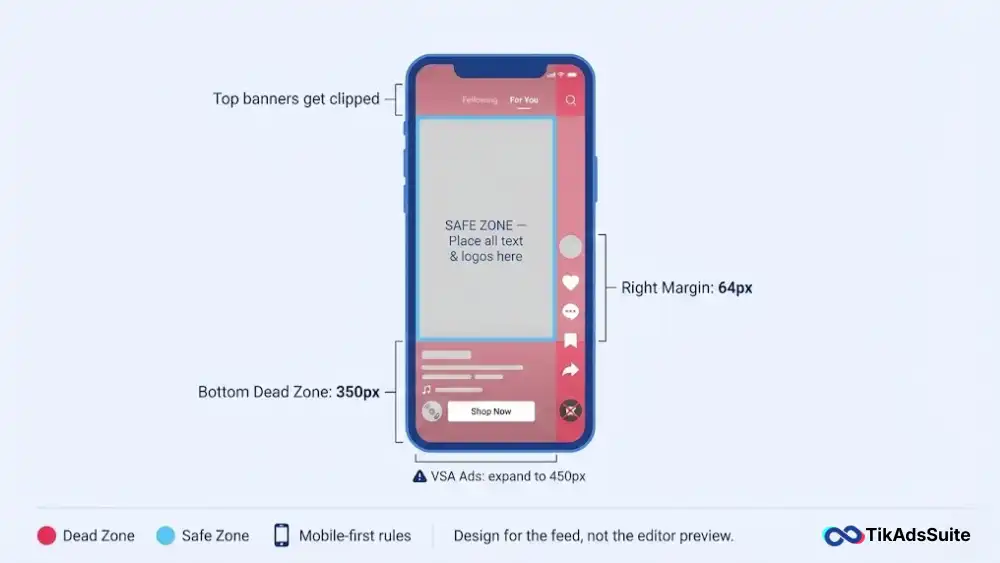
TikTok lays its own interface over every ad. The tabs and search icon sit at the top, the like, comment and share buttons run down the right side, and the caption, account name and call-to-action button fill the bottom. Anything you put under those parts is hard to read or gone.
Get Up to $6000 Free TikTok Ad Credit
Covered text is a quiet budget leak. You still pay for the impression, but the viewer never sees your offer or your price. Track your Click-Through Rate (CTR) before and after you fix a layout to see what the change was worth.
Below you’ll find where the dead zones sit, why free templates list different pixel margins, where to get TikTok’s own safe zone files, and a short check to run before you spend a dollar.
Table of Contents
Quick Answer: What Is the TikTok Safe Zone?
The TikTok safe zone, also called the safe area, is the part of a vertical video that the app’s buttons, caption, account name and call-to-action do not cover. Your hook text, logo, price and product belong inside it.
TikTok does not publish one fixed pixel size for it. The TikTok In-Feed ad spec page says the safe zone depends on the video dimension, the length of your ad caption and any extra formats you add, and it offers official safe zone files to design against.
In practice, keep key content near the center, away from the bottom band and the button column on the right. Then check the finished ad in the Ads Manager preview and on a real phone. Safe zones are one part of planning your TikTok ad creative, so build them into the layout before you film.
Key Takeaways
- No single pixel rule: The safe area grows or shrinks with caption length, video shape and add-ons such as anchors or cards. Use TikTok’s file for your exact setup.
- Short captions save space: A long caption pushes the bottom dead zone higher up the screen, so keep ad text to a line or two.
- Shoot vertical: TikTok recommends vertical video for in-feed ads. Wide and square videos leave empty bands that your message can’t use.
- Center-Middle Rule: The middle of the frame is the area least likely to be covered, so put your hook and product there.
- Preview, then check a phone: The Ads Manager preview is close but not tied to one device. Watch a test on a real phone before you scale.
- No fake buttons: Drawn-on buttons or Swipe up text that don’t work go against TikTok’s ad policy.
The TikTok Dead Zones: Top, Right and Bottom
TikTok’s dead zones are the edges of the screen where the app draws its own buttons and text over your video. The TikTok TopView ad specs ask advertisers not to place text, logos or key messages on areas where buttons, usernames and captions may appear.
Bottom Zone: Caption, Account Name and CTA
The bottom of the screen is the most crowded area. It holds the caption, the account name, the sound label and the call-to-action button, and on shopping ads it can also hold a product link or card.
How tall this band gets depends on your caption. Longer captions push the text block higher, and the TopView spec notes that text past four lines gets covered by a See more message.
Rule: Keep subtitles, prices and offer text well above the bottom band, and leave even more room when the ad uses an anchor or a card.
Right Zone: The Engagement Stack
The right side holds the Like, Comment, Save, and Share buttons, with the profile picture at the top of the column.
Rule: Keep small text and logos away from this column. Don’t put your logo in the bottom-right corner either, since the sound disc and the lower buttons sit there.
Top Zone: Tabs, Search and Status Bar
The top holds the Following and For You tabs and the search icon. Above the app, the phone’s own status bar shows the time and battery.
Mistake: A Breaking News style banner placed at the very top edge often ends up behind the status bar or the search icon.
Why Free Templates Show Different Numbers
Free safe zone templates often list different pixel margins for the same edge. Usually nobody measured wrong. TikTok’s own spec says the zone changes with caption length and add-ons, and the same TopView spec warns that the safe zone may not cover all devices.
When the numbers disagree, use the official file for your exact ad setup as the tie-breaker, then confirm on a real phone.
How Ad Formats Change the Safe Zone
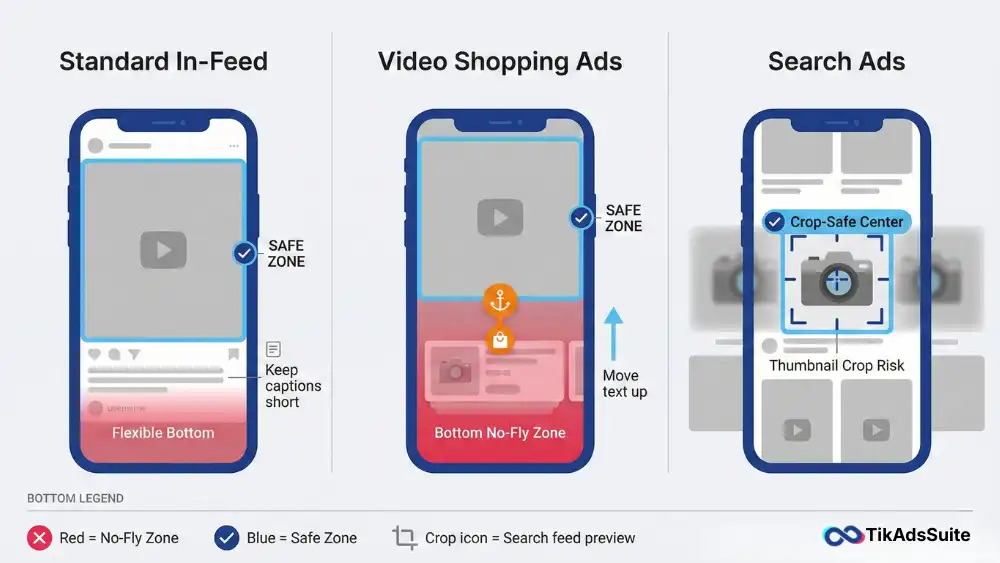
The TikTok safe zone changes with the ad format, because each format adds or moves parts of the interface. Plan the layout for the format you’ll actually run, not the one you tested last month.
Standard In-Feed Ads
Standard in-feed ads have the simplest layout: caption, account name and CTA button at the bottom, engagement buttons on the right. The caption is the part that moves. On Spark Ads it comes from the organic post, and on Non-Spark Ads it shows in white in a fixed font you can’t change.
Strategy: Keep the caption to one short line so it doesn’t climb into your video.
Video Shopping Ads and Anchors
Video Shopping Ads and other ads linked to TikTok Shop can add a clickable product link or card over the video. TikTok offers separate safe zone files with the anchor for these ads, which tells you the covered area is not the same as on a standard ad.
Fix: Move all subtitles and speech bubble text to the upper-middle part of the frame.
Interactive Add-ons Like the Display Card
Interactive add-ons sit on top of the video too. The TikTok Display Card spec says the card pops up on its own after the ad has played for a few seconds, and advertisers can’t change that timing.
Strategy: Don’t save your key message for the moment a card could appear. Show the offer early and repeat it in the center later in the video.
Search Ads
Search Ads show on the TikTok search results page. The TikTok Search Ads campaign guide says they can autoplay as people scroll the results, open in the in-feed format when tapped, and change position based on relevance and testing.
Strategy: Because a tapped Search Ad opens in the in-feed view, design it with the same in-feed safe zone. Keep the product in the center so it is clear from the first frame.
How to Get and Use TikTok’s Safe Zone PNG Files
The most reliable TikTok safe zone PNG is the one TikTok publishes itself. The same In-Feed ad spec page lists the safe zone files as .zip downloads, so you don’t need to hunt for an overlay on Google Images.
Which File to Pick
- Standard (LTR): for ads in every region except the Arabic region.
- With Anchor: for ads that use anchors, such as product links on shopping ads.
- Arabic (RTL): for right-to-left Arabic ads. If you advertise in Arabic, for example in the UAE or Morocco, start here.
- Arabic with Anchor: for Arabic ads that also use anchors.
How to Use the Overlay
- Download the file that matches your ad and unzip it.
- Open a 1080 x 1920 (9:16) project in your editor, such as CapCut, Premiere Pro or Canva.
- Add the overlay as the top layer and lower its opacity so you can see the video under it.
- Move text, logos and faces until nothing important touches a covered area.
- Hide or delete the overlay before you export, so it doesn’t end up in the ad.
- Upload the video and open the ad preview in TikTok Ads Manager. TikTok notes that the preview can differ slightly from the live ad because it isn’t device specific, so watch a test on your own phone too.
Keep Key Content in the Center
The center of the frame is the safest home for your hook, product and face, because it is the area the interface is least likely to cover. A center-first layout also gives you a margin on phones with different screen shapes, since the TikTok TopView spec warns that its safe zone may not fit every device.
A simple layout that works
- Hook text in the upper middle, below the tabs.
- Product, demo or face in the center.
- Background, motion or b-roll near the edges and the bottom.
Vertical vs. Horizontal Logic
TikTok recommends vertical video for in-feed ads and also accepts wide and square sizes. A wide or square video doesn’t fill the phone screen, so it leaves less room for your content and looks less native in the feed.
Common Safe Zone Mistakes
Most TikTok safe zone mistakes start in the editor, where the video looks clean because no interface sits on top of it. These four come up the most.
Burned-In Captions at the Bottom
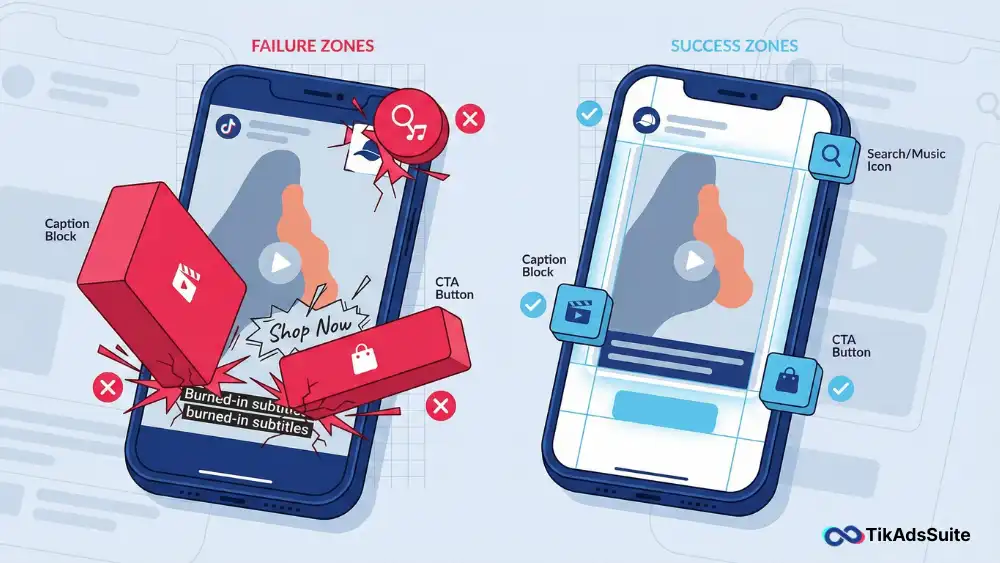
You edit your video in CapCut and place captions at the bottom. You upload to TikTok Ads Manager.
The Result: TikTok’s own caption and account name sit on top of your burned-in captions, and both turn into a hard-to-read mess.
The Fix: Place burned-in captions in the middle of the screen, and keep them short.
Fake Buttons and Swipe Up Text
Some advertisers draw a fake Shop Now button on the video to get clicks. If it sits too low, the real button covers it. If it sits too high, it looks fake.
The Policy: The TikTok Ad Format and Functionality policy says ads must not include buttons, gestures or text that show a function the ad doesn’t support, and it gives Swipe up to learn more as an example. Use the native CTA button from Ads Manager instead.
Logo in the Top-Right Corner
Brands love putting their watermark in the top-right corner, which is exactly where the search icon sits. Your logo ends up half hidden.
The Fix: Build branding into the scene, such as on the product itself or the presenter’s shirt, or place it in the upper middle below the tabs.
Small or Low-Contrast Text
Text can sit inside the safe zone and still fail. The same policy says ads must be legible and high resolution, and thin text in a color close to the background is hard to read on a phone at scrolling speed.
Tool Tip: Want a second opinion before you film? Describe your concept in the TikTok Ad Creative Analyzer to get an AI score and notes on your hook, body and call to action.
FAQ: TikTok Ad Safe Zones
What are TikTok ad safe zones?
TikTok ad safe zones are the areas of a video where text, logos, and key visuals won’t be covered by TikTok’s interface. The app places captions, buttons, the profile icon, and CTA elements over the edges of every ad. Keeping important content inside the safe zone keeps it visible and readable.
What are the exact TikTok safe zone dimensions?
TikTok doesn’t publish one fixed set of pixel margins. Its In-Feed ad spec page says the safe zone depends on the video dimension, the caption length and any extra formats, such as anchors or add-ons. For exact edges, download TikTok’s safe zone file for your ad type and lay it over a 1080 x 1920 project.
Where can I get a TikTok safe zone PNG?
TikTok’s own safe zone files are on its In-Feed ad spec page, as .zip downloads. There is a standard version, a version for ads with anchors, and Arabic right-to-left versions. Unzip the file, add the overlay as the top layer in your editor, and hide it before you export.
Do TikTok safe zones change for iPhone vs Android?
Yes, the safe area can shift between phones. TikTok says its safe zone may not cover all devices, and that the Ads Manager preview isn’t specific to one device. Keep key content toward the center with some extra margin, then check the ad on at least one iPhone and one Android phone before you raise the budget.
What happens if I upload a video that isn’t 9:16?
TikTok accepts wide and square videos for in-feed ads, but it recommends vertical. A wide or square video doesn’t fill the phone screen, so it leaves less room for your message and looks less native in the feed. Reframe the video to vertical before you upload whenever you can.
How do I fix a video that already has text in the dead zone?
You have two options. The best fix is to reopen the source project and move the text into the safe zone. If you no longer have the project file, scale the video down a little so the text moves inward, and fill the background with a blurred copy of the video.
Wrapping Up
TikTok’s interface is part of every ad you pay for, so design around it from the first frame. Keep the edges for background, put your message in the middle, and let TikTok’s own safe zone file settle any doubt about where the edges are.
Your Action Plan:
- Download the safe zone file that matches your ad (standard, with anchor, or Arabic) from the In-Feed ad spec page.
- Set your project to 1080×1920 (9:16) and add the overlay as a guide layer.
- Keep captions short, then check the ad in the Ads Manager preview and on a real phone.
- Before you film the next ad, run the script through the TikTok Ad Creative Audit Tool to check the hook and pacing.