
You launch a TikTok campaign. The Ads Manager dashboard shows clicks, spend, and a handful of conversions. Then you open Google Analytics, and none of that traffic shows up as TikTok. It sits in “direct” or “unassigned,” mixed in with everyone else.
This is the gap UTM parameters close. Without them, you’re flying two separate dashboards that never agree with each other.
With them, every click carries its source, campaign, and creative straight into your analytics tool, so you can finally see which TikTok ad actually drove a sale.
In this guide, you’ll learn:
- What UTM parameters are and why TikTok ads need them
- How to add UTM parameters manually and with TikTok’s Auto-attach feature
- How TikTok’s dynamic macros work and which ones to use
- A naming convention that keeps your data clean as you scale
- How to connect that data to Google Analytics 4
- The mistakes that quietly break TikTok attribution
Set aside about ten minutes. Once your template is built, you’ll reuse it on every campaign you launch after this one.
Get Up to $6000 Free TikTok Ad Credit
Table of Contents
Key Takeaways
- UTM parameters are text tags added to your landing page URL that tell analytics tools where a visitor came from.
- TikTok Ads Manager supports five standard UTM parameters and its own set of dynamic macros that auto-fill campaign and creative names.
- TikTok’s macro table includes options like CAMPAIGN_NAME, AID_NAME, CID_NAME, and PLACEMENT, which expand into the campaign, ad group, creative, and placement values automatically.
- TikTok ads average a CPM near $9.16 and a click-through rate around 0.84%, so knowing which specific creative and campaign earned each click matters for keeping cost per result in check.
- You can add UTMs manually at the ad level or turn on Auto-attach so TikTok appends utm_source and utm_medium automatically.
- Google Analytics 4 treats “TikTok” and “tiktok” as different values, so every UTM parameter you use should be lowercase.
Quick Answer
UTM tracking for TikTok ads means adding short tags like utm_source, utm_medium, and utm_campaign to your ad’s destination URL. You set these in TikTok Ads Manager, either by typing them manually or using TikTok’s dynamic macros, which pull in real campaign and creative names automatically. This data then flows into Google Analytics or your CRM so you can see exactly which TikTok ad drove each visit.
What UTM Tracking Actually Fixes for TikTok Advertisers
TikTok Ads Manager is good at telling you what happened inside TikTok. It shows impressions, clicks, and cost per result. The built-in analytics dashboard covers platform-side performance well. What it can’t always tell you is what happened after someone landed on your site. Did they browse and leave? Add something to a cart? Buy?
This matters because the average TikTok ad converts at roughly 0.46% for eCommerce campaigns, according to WebFX benchmark data, which means most of your ad spend is riding on a small slice of clicks that actually turn into revenue. (source) If you can’t trace those conversions back to a specific ad, you’re guessing which creative to scale and which to cut.
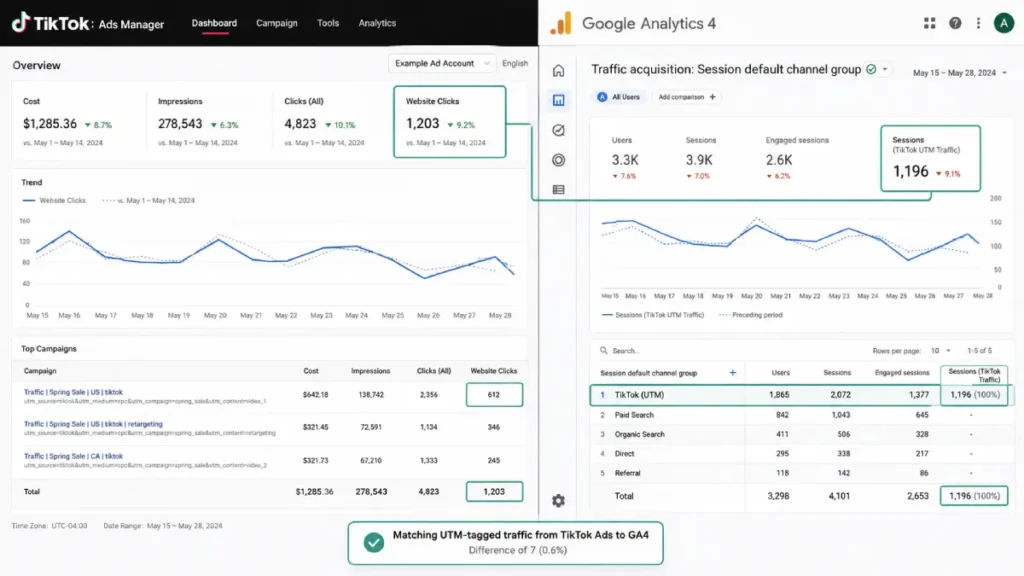
UTM parameters don’t depend on TikTok’s pixel or on cookies at all. They ride along in the URL itself. When someone clicks your ad, the tag travels with them to your landing page, and your analytics platform reads it the moment the page loads. That makes UTM data a reliable second source, one that keeps working even alongside your existing pixel setup.
The Five UTM Parameters TikTok Ads Support
TikTok Ads Manager recognizes five standard UTM parameters, each built to answer a different question about a visit.
| Parameter | What it tracks | Example value |
|---|---|---|
| utm_source | The platform sending traffic | tiktok |
| utm_medium | The type of traffic (paid vs. organic) | cpc |
| utm_campaign | The campaign name or promo | summer_sale |
| utm_term | Paid targeting details | broad_18_34 |
| utm_content | The specific ad or creative | video_ugc_v1 |
You can combine several parameters into one URL by separating them with an ampersand, for example a link ending in utm_medium=cpc&utm_source=tiktok. Keep every value lowercase. Google Analytics 4 reads “tiktok” and “TikTok” as two separate sources, which quietly splits your data into two rows instead of one.
How to Add UTM Parameters in TikTok Ads Manager
You have two ways to set this up, and most advertisers end up using a mix of both.
Manual setup at the ad level
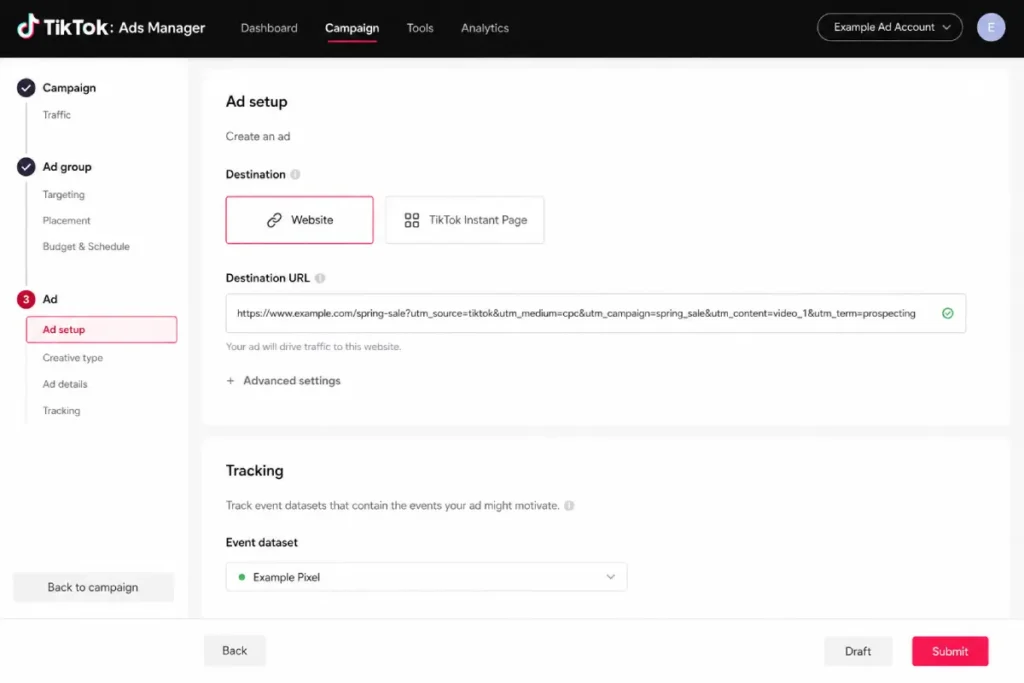
- Open your campaign in TikTok Ads Manager and go to the ad level.
- Find the destination URL field in the Tracking section.
- Type or paste your full UTM string after the base URL.
- Preview the link to confirm every parameter resolved correctly before you publish.
Auto-attach at the account level
TikTok also offers a URL Auto-attach toggle in the tracking section, which automatically appends standard parameters like utm_source=tiktok and utm_medium=paid to every ad URL in the account. This is the faster option if you manage a lot of campaigns and just want the basics covered without touching each ad individually.
Pick one method and stick with it. Running Auto-attach and a manual template at the same time can produce duplicate or conflicting parameters on the same link, which corrupts the data you’re trying to collect.
TikTok’s Dynamic Macros Explained
Typing campaign names into a URL by hand works fine for one ad. It breaks down fast once you’re running dozens of ad groups. That’s where macros come in.
A macro is a placeholder that TikTok replaces with a real value the moment someone clicks, using double underscores as the syntax.
Here’s the current macro table straight from TikTok’s own documentation:
| Macro | Expands to |
|---|---|
| CAMPAIGN_NAME | Name of the campaign |
| CAMPAIGN_ID | Campaign ID |
| AID_NAME | Name of the ad group |
| AID | Ad group ID |
| CID_NAME | Name of the creative |
| CID | Creative ID |
| PLACEMENT | Placement type, TikTok or TikTok Pangle |
For campaigns running in TikTok’s upgraded Smart+ experience, two additional macros cover the ad name and ad ID.
A working template might look like this:
?utm_source=tiktok&utm_medium=cpc&utm_campaign=__CAMPAIGN_NAME__&utm_content=__CID_NAME__
Set this once at the ad level and every click that comes through will carry the actual campaign and creative names, no manual updates required. If you’re running this at scale, pairing it with TikTok Ads automation rules keeps naming consistent as new ad groups spin up.
What Should I Name My TikTok Campaigns for Clean UTM Data?
Macros only pull in what you’ve already typed into TikTok Ads Manager, so your naming inside the platform is what actually shows up in your analytics reports. A messy campaign name becomes a messy UTM value.
Keep names lowercase, use underscores instead of spaces, and include the goal, audience, and date. A name like conversions_spring_sale_us_q1_2026 tells you far more in a report than Campaign 4. This is also where a clear campaign structure pays off, since consistent ad group naming keeps every macro-generated UTM value readable months later. Avoid special characters entirely. Symbols like ampersands, question marks, and hash signs inside a campaign name can break the URL structure and leave a blank value where the macro should have been.
UTM Parameters vs. ttclid: What’s the Difference?
These two often get confused because they show up in the same URL. A UTM parameter is a manual or macro-based tag you choose to add for your own analytics tool. The ttclid, or TikTok Click ID, is a parameter TikTok appends automatically as part of the TikTok Pixel setup to track ad clicks for its own conversion reporting.
You need both for a complete picture. UTM parameters feed Google Analytics and your CRM so you can see the campaign, source, and creative behind a visit. The ttclid feeds TikTok’s pixel so TikTok can match that visit back to the ad and optimize delivery. Losing either one leaves a gap in your data.
Connecting TikTok UTM Data to Google Analytics 4
Once your UTMs are live, GA4 will start picking them up automatically under Acquisition reports. Two things trip up most advertisers here.
First, TikTok clicks often land in an “Unassigned” or generic “Paid Social” channel bucket instead of showing up clearly as TikTok. You can fix this in a couple of minutes by building a custom channel group inside GA4’s admin settings so TikTok traffic gets its own labeled row. Cross-check this against the TikTok ads metrics you already track inside Ads Manager, so a click reported in one dashboard has a clear counterpart in the other.
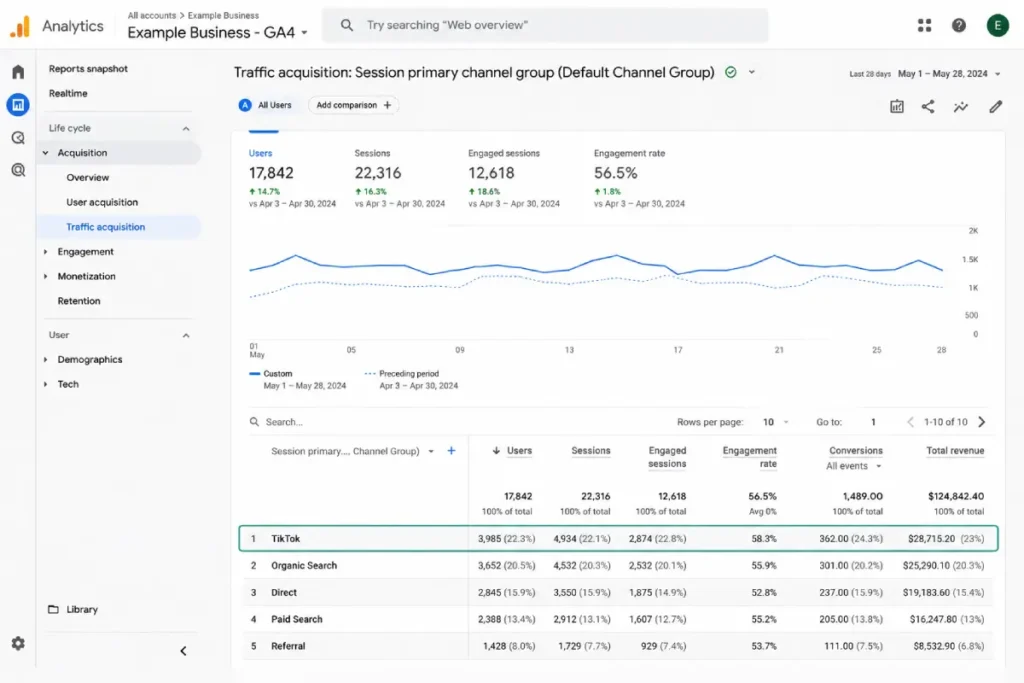
Second, case sensitivity. If half your ads use “tiktok” and the other half use “TikTok,” GA4 splits what should be one channel into two, and your totals stop matching what’s in Ads Manager. Lock in lowercase across every template before you scale a campaign.
For advertisers managing UTM templates across TikTok alongside Google and Meta at the same time, a dedicated SEO and analytics platform can help keep naming conventions consistent and catch broken links before they cost you a week of clean data.
Common Mistakes That Break TikTok Attribution
- Editing a live ad’s destination URL: Changing the URL on a running ad can reset TikTok’s learning phase, which slows delivery while the algorithm relearns your audience.
- Mixing macro syntax: TikTok uses double underscores, not the curly braces used by other platforms. Pasting a Meta-style macro into TikTok’s URL field returns a blank value.
- Skipping the preview step: Always test the resolved URL before launch. A missing underscore or stray character means the macro doesn’t fire and you lose that data point for the entire campaign.
- Forgetting non-ad links: Your TikTok bio link and video description links need UTMs too. Without them, that traffic shows up as direct, and you lose visibility into how much of your organic TikTok presence is actually driving visits.
FAQ
Do I need UTM parameters if I already have the TikTok pixel installed?
Yes. The pixel and UTM parameters answer different questions. The pixel feeds TikTok’s own optimization engine through the ttclid, while UTM data keeps working independently inside your own analytics tool, giving you a second, platform-agnostic view of the same traffic.
Can I use the same UTM template for every TikTok campaign?
You can reuse the structure, but the values should change. Keep utm_source and utm_medium consistent, and let utm_campaign and utm_content update through TikTok’s dynamic macros so each ad reports its own real name.
Will adding UTM parameters slow down my ad’s performance?
No. UTM parameters are added to the destination URL and don’t affect how TikTok’s algorithm delivers or optimizes your ad. What can slow delivery is editing the URL on an ad that’s already live and running.
What happens if I use the wrong macro syntax?
The macro won’t resolve, and that portion of your URL comes through blank instead of populated with real data. Always preview the final URL in TikTok Ads Manager before publishing to catch this before it affects your reporting.
Wrapping Up
Start with one clean UTM template, lowercase everything, and turn off Auto-attach if you’re also adding parameters manually so the two methods don’t collide. Once TikTok’s macros are in place, every new ad you launch inherits accurate tracking without extra setup.
The real payoff shows up a few weeks in, when you can finally match TikTok spend to actual revenue in Google Analytics instead of guessing from two dashboards that never quite agree.
Ready to measure what really drives results? Use our free UTM Builder to create consistent tracking links for every TikTok Ads campaign.