
TikTok advertising is one of the lowest-cost, highest-reach paid channels available to small businesses right now, and most beginners are still setting it up wrong.
The platform has 1.9 billion monthly active users worldwide. Ad costs remain below Meta in most verticals.
But low CPMs mean nothing if your campaign stalls in the learning phase, your creative gets ignored in the first three seconds, or you burn through budget before the algorithm has enough data to optimize.
Most guides skip the parts that actually matter: the learning phase mechanics, what good metrics look like, and why repurposing your Instagram content will hurt your results. This TikTok ads beginner guide covers all of it.
In this guide, you will walk away knowing exactly how to set up your account, launch your first campaign, write creative that works natively on TikTok, and read your results without guessing.
Table of Contents
Get Up to $6000 Free TikTok Ad Credit
What Are TikTok Ads and How Do They Work?
TikTok Ads is a self-serve paid advertising platform that lets you place video ads in front of TikTok users based on demographics, interests, and behavior. You create a campaign, set an objective, define your audience in an ad group, and upload a video creative. TikTok’s algorithm then distributes your ad to users most likely to take your desired action, but only when your budget, creative, and targeting give the system enough signal to optimize effectively.
Should You Run TikTok Ads in 2026? (Honest Pros, Cons & Who It’s For)
TikTok ads work well for brands that sell visually, move fast on creative, and have a product with broad appeal. They are not the right fit for every business, and knowing that upfront will save you real money.
Here is what we consistently see across the platform:
Who TikTok Ads work well for:
- eCommerce brands with products that demonstrate well on video (beauty, fitness, fashion, food)
- Direct-to-consumer businesses with strong offer clarity and a clean landing page
- App advertisers targeting 18 to 34-year-olds in the US, UK, or Southeast Asia
- Businesses with at least $1,500 to $3,000 to test properly before drawing conclusions
Who should wait or look elsewhere:
- B2B companies selling high-ticket services with long sales cycles
- Local service businesses (plumbers, lawyers, dentists) with tight geo radius targeting needs
- Businesses with no video content capacity and no budget to produce it
- Anyone who needs results in the first 48 hours with under $500
TikTok vs. Meta: A quick cost comparison
| Metric | TikTok Ads | Meta Ads |
| Average CPM | $4 to $9 | $9 to $14 |
| Average CPC | $0.20 to $0.60 | $0.50 to $1.50 |
| Minimum daily budget (campaign) | $50/day | $1/day |
| Minimum daily budget (ad group) | $20/day | $1/day |
| Primary ad format | Vertical video | Image, video, carousel |
| Audience age skew | 18 to 34 | 25 to 45 |
The lower CPM on TikTok is real. But the higher creative demand is also real. TikTok requires native-style video. Meta tolerates static images and repurposed content. If you cannot produce short-form video consistently, Meta is the more forgiving starting point.
How Much Do TikTok Ads Cost? (Budgets, CPMs & Minimums Explained)
The minimum budget for TikTok Ads is $50 per day at the campaign level and $20 per day at the ad group level. CPMs typically range from $4 to $9, and CPC ranges from $0.20 to $0.60, though these numbers shift based on your industry, audience size, and how competitive your targeting is.
TikTok Ads cost breakdown:
| Budget Level | Minimum Spend | What It Gets You |
| Campaign daily minimum | $50/day | Required to activate any campaign |
| Ad group daily minimum | $20/day | Controls spend at the targeting level |
| Recommended test budget | $50 to $100/day | Enough data to exit the learning phase |
| Realistic monthly test budget | $1,500 to $3,000 | Sufficient for a meaningful first read |
CPM and CPC ranges by objective:
| Objective | Typical CPM | Typical CPC |
| Traffic | $4 to $7 | $0.20 to $0.40 |
| Conversions | $6 to $12 | $0.40 to $1.00 |
| Video Views | $3 to $6 | N/A |
| App Installs | $5 to $10 | $0.50 to $1.50 |
A few things worth understanding before you set your budget:
- TikTok treats 50 conversions as the clearest sign an ad group has fully passed the learning phase, while volatility itself typically starts easing after about 25 results or 7 days. Your daily budget should make reaching that volume realistic within a week or two.
- If you set your ad group budget at $20/day and your target CPA is $15, you are getting roughly one conversion per day. That will not be enough data to optimize.
- We recommend starting at $50 to $100 per day per ad group if your goal is conversions. Go lower only if you are running a traffic or awareness objective.
Step-by-Step: How to Set Up Your TikTok Ads Account
Setting up your TikTok Ads account takes three steps: creating a Business Center account, setting up an ad account inside it, and installing the TikTok Pixel on your website. Each step must be completed in order before you can launch a campaign.
One thing worth addressing directly: buying or renting someone else’s existing “aged” TikTok ad account to skip this setup, or to bypass a spending-history requirement, carries real policy risk under TikTok’s terms. It isn’t something we recommend. Starting fresh under your own business’s name, following the steps below, is the only fully compliant path.
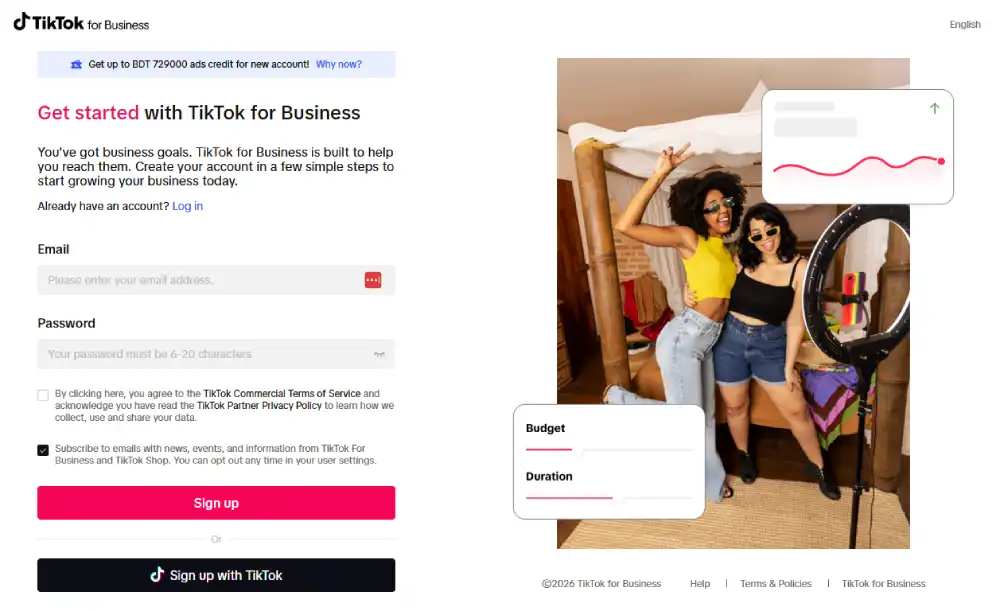
Step 1: Create Your TikTok Business Center Account

- Go to business.tiktok.com and click “Create Now”.
- Sign in with an existing TikTok account or create a new one using your business email.
- Enter your business name, country, and time zone. Use your business’s legal name here, not a brand alias.
- Select your industry category. This affects which ad features and creatives are available to you.
- Accept the Terms of Service and click “Register”.
Your Business Center account is now active. Think of it as the parent account that holds your ad accounts, users, and assets.
Step 2: Set Up Your Ad Account Inside the Business Center
- Inside the Business Center, go to “Ad Accounts” in the left sidebar and click “Create Ad Account“.
- Give your ad account a clear name. Use something like “BrandName – US – Conversions” so you can identify it later.
- Select your currency and time zone. These cannot be changed after setup, so choose carefully.
- Enter your business address and tax information. TikTok requires this for billing compliance.
- Add a payment method: credit card, debit card, or manual top-up, depending on your region.
- Click “Submit” and wait for approval. Approval is usually instant, but can take up to 24 hours.
Once approved, your ad account will appear inside Business Center, and you can start building campaigns.
Step 3: Install the TikTok Pixel on Your Website
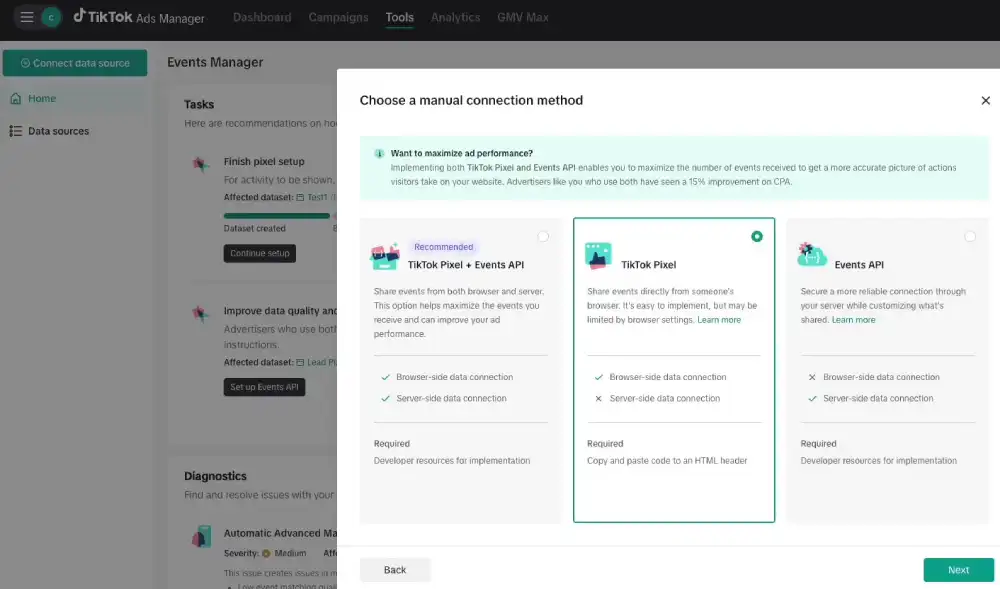
The TikTok Pixel is the tracking code that connects your website actions (purchases, sign-ups, page views) to your ad account. Without it, conversion campaigns cannot optimize.
- Inside TikTok Ads Manager, go to Assets > Events > Web Events.
- Click “Set Up Web Events” and select “TikTok Pixel“.
- Choose your installation method: manual code, partner integration (Shopify, WooCommerce, WordPress), or Tag Manager.
- If using Shopify, connect directly through the TikTok Sales Channel app. It handles pixel and event setup automatically.
- If installing manually, copy the base pixel code and paste it into the <head> section of every page on your site.
- Add standard events to key pages: Purchase on your order confirmation page, AddToCart on your product page, ViewContent on landing pages.
- Use the TikTok Pixel Helper Chrome extension to verify the pixel fires correctly on each page.
Do not launch a conversion campaign until your pixel has recorded at least a few test events and shows as “Active” in the Events Manager.
How to Launch Your First TikTok Ad Campaign (Full Walkthrough)
Before you launch, choose your campaign mode. TikTok offers two options: Simplified Mode and Custom Mode.
Simplified Mode reduces settings to the basics. It is faster but gives you less control over bidding, placement, and targeting. Custom Mode gives you full control over every setting.
We recommend Custom Mode for anyone following this TikTok Ads guide, because it lets you see exactly what you are paying for and why.
Choose Your Campaign Objective
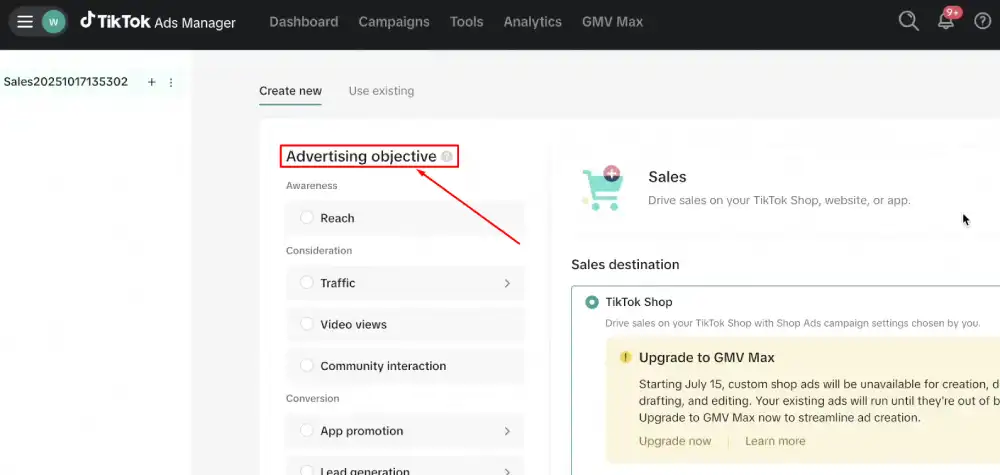
- In TikTok Ads Manager, click “Campaign” in the top navigation, then click “Create”.
- Select Custom Mode when prompted.
- Choose your campaign objective. TikTok groups objectives into three categories:
- Awareness: Reach, Video Views
- Consideration: Traffic, App Installs, Lead Generation, Community Interaction
- Conversion: Website Conversions, Product Sales, App Events
- For most eCommerce beginners, select “Website Conversions” and set the conversion event to “Purchase” or “Complete Payment”.
- Name your campaign clearly. Example: “BrandName | Conversions | Cold | Jan 2026”.
- Leave Campaign Budget Optimization (CBO) off for your first test. Set the budget at the ad group level instead, so you control spend per audience.
- Click “Continue”.
Your campaign objective tells TikTok what to optimize for. If you choose Traffic but you want purchases, the algorithm will send you clicks, not buyers. Choose the right objective from the start.
Build Your Ad Group (Targeting + Budget)
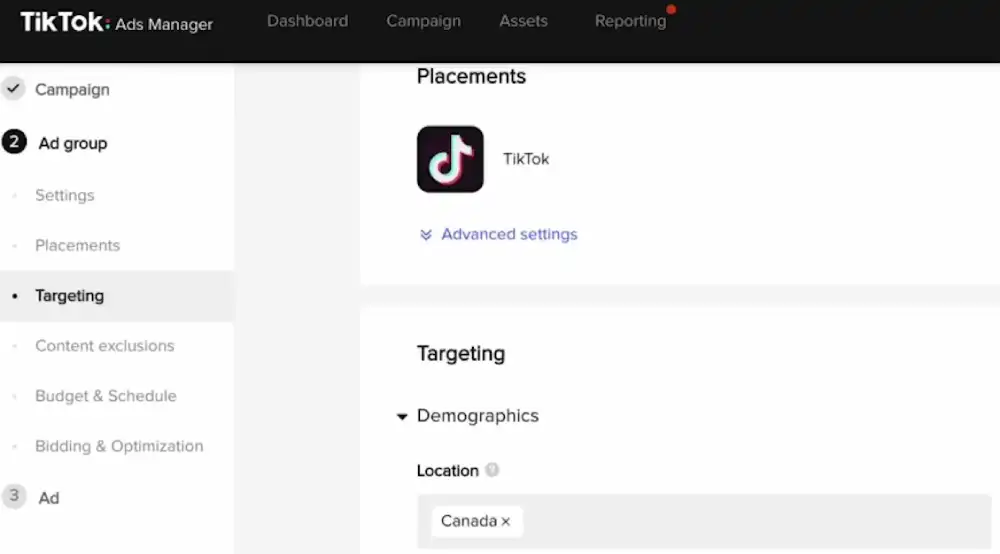
- Name your ad group to reflect the audience you are targeting. Example: US | Women 25-34 | Interest: Skincare.
- Under Placements, select “TikTok” only. Pangle and other placements can drain the budget with lower-quality traffic.
- Under Targeting, set your audience parameters:
- Location: Choose your target country or region
- Age: Start broad (18 to 44) unless you have strong data showing a tighter range converts better
- Gender: Leave open unless your product is clearly gendered
- Interests and Behaviors: Add 3 to 5 relevant interest categories. Do not over-narrow. An audience below 1 million will restrict delivery.
- Set your optimization goal to “Conversion” and your conversion event to “Purchase” (or whatever event you set up in the Pixel).
- Set your bid strategy to “Lowest Cost” for your first campaign. This lets TikTok find the cheapest conversions while it learns.
- Set your daily budget at the ad group level. Start with $50 to $100/day minimum for conversion objectives.
- Set your schedule: start date and no end date initially. Let it run until you have enough data to evaluate.
- Click “Next”.
Create Your Ad (Creative, Copy & CTA)
- Under “Ad Format“, select “Single Video”. This is the standard In-Feed ad format and what we recommend for beginners.
- Upload your video. Minimum resolution: 720p. Aspect ratio: 9:16 (vertical). TikTok technically allows In-Feed video up to 10 minutes, but TikTok recommends 9 to 15 seconds for the strongest engagement and completion rates.
- Add your ad text (caption). Keep it under 100 characters. Lead with the benefit, not the brand name.
- Add your display name (your brand name as it appears on the ad).
- Upload a profile image (your logo or brand icon at a 1:1 ratio).
- Select your call-to-action button. Options include: Shop Now, Learn More, Download, Sign Up, Book Now. Match your CTA to your conversion goal.
- Enter your destination URL. This should be a dedicated landing page, not your homepage.
- Click “Submit”. Your ad will enter TikTok’s review process, which typically takes 24 hours.
Once approved, your ad starts delivering, and your campaign enters the learning phase.
TikTok Ad Formats: Which One Should a Beginner Start With?
Start with In-Feed Ads. This is the format that appears natively in users’ For You Page (FYP) feed, looks identical to organic content, and gives you full control over targeting, budget, and creative. It is the most accessible format for beginners and the one with the most optimization data available.
Here is a quick breakdown of the formats you will encounter:
In-Feed Ads
- Appear in the FYP scroll between organic videos
- Skippable after a few seconds
- Support all objectives: traffic, conversions, app installs, lead gen
- Best for: beginners, direct response, testing creative
- Minimum budget: $20/day at the ad group level
Spark Ads
- Allows you to boost an existing organic TikTok post (yours or a creator’s, with permission) as a paid ad
- The post retains its original likes, comments, and shares, which adds social proof
- Best for: when you already have a high-performing organic video you want to scale
- Requires linking your TikTok organic account to your ad account
TopView Ads
- The first video a user sees when they open TikTok
- Up to 60 seconds, full screen, with sound on by default
- High-impact but requires a minimum spend commitment, typically $50,000 or more per campaign
- Not relevant for beginners. We mention it only so you know what it is and can skip it.
Our recommendation: run In-Feed Ads for your first 60 to 90 days. Once you find a creative that converts consistently, consider boosting it as a Spark Ad to extend its life with social proof built in.
TikTok Ad Creative: What Actually Works for Beginners in 2026
Your creative is the single biggest variable in your TikTok ad performance. Targeting and bidding matter, but a bad video will fail no matter how well you configure the campaign. A great video will outperform poor targeting every time.
The Hook-Body-CTA formula
Every high-performing TikTok ad follows this structure:
- Hook (0 to 3 seconds): Stop the scroll. Your opening frame and first line of audio must give the viewer a reason to keep watching. Lead with a bold statement, a surprising visual, or a problem they recognize instantly.
- Body (3 to 20 seconds): Deliver your core message. Show the product in use, demonstrate the result, or tell the story. Keep it moving. No slow pans, no long intros.
- CTA (final 3 to 5 seconds): Tell the viewer exactly what to do next. Be specific: “Tap Shop Now”, “Link in bio”, “Download free today”. Vague CTAs produce vague results.
The first 3-second rule
According to TikTok for Business Creative Playbook data, ads that hold attention through the first 3 seconds have a significantly higher chance of reaching the 6-second mark, which is when brand recall and intent signals start to register. Your first frame must earn the next frame. If your hook is weak, your CPM goes up and your CTR drops, because TikTok’s algorithm reads low watch time as low relevance.
UGC-style vs. polished video
UGC-style (user-generated content style) ads are filmed to look organic, casual, and creator-like. Polished brand videos look produced, high-budget, and scripted.
On TikTok, UGC-style consistently outperforms polished video for direct-response objectives. We have seen this pattern across beauty, supplement, and SaaS categories.
The reason is simple: polished ads look like ads. TikTok users are highly trained at skipping anything that feels commercial.
This does not mean bad quality video wins. It means authenticity beats production value on this platform. A clear 1080p phone video with good lighting and a compelling hook will outperform a $5,000 studio shoot that leads with a brand logo.
Why repurposing your Instagram or Facebook ads fails on TikTok
This is one of the most common beginner mistakes. An ad that performs well on Facebook or Instagram will almost always underperform on TikTok.
Here is why:
- Facebook and Instagram users are conditioned to horizontal or square formats. TikTok is vertical-only, and cropped repurposed content looks low-effort.
- Facebook ads often open with a product shot or brand logo. TikTok users skip this within one second.
- Instagram Reels and TikTok have different content cultures. What feels native on Instagram feels staged on TikTok.
- TikTok’s algorithm penalizes low watch-time content, and repurposed ads typically have high early drop-off rates.
Shoot your TikTok creatives specifically for TikTok. Film vertically, lead with a hook, and make them feel like something a real person would post. That is the baseline for anything to work.
What Is the TikTok Learning Phase? (And How to Pass It Fast)
The TikTok learning phase is the period during which TikTok’s algorithm experiments with your ad delivery to find the audience most likely to complete your conversion event.
During this window, performance is unstable, CPAs fluctuate, and the data is not yet reliable enough to make optimization decisions.
Understanding the TikTok learning phase is one of the most important parts of this guide to TikTok ads.
Most beginners panic during this period, make changes too early, and reset the process, costing themselves time and budget.
Key facts about the learning phase:
TikTok’s own documentation actually gives two related but different numbers here, worth understanding separately rather than as one combined rule.
- Early stabilization: Per TikTok’s Learning Phase documentation, delivery volatility typically starts to decline after about 25 campaign results or 7 days, whichever comes first.
- What triggers a reset: Any significant edit to your campaign (budget change over 50%, audience change, new creative, pausing and reactivating).
Budget formula for a full week of learning-phase data:
A reasonable planning target is 3 to 4 conversions per day, aiming to clear 25 conversions comfortably within a week rather than treating 7 days as a hard TikTok deadline. If your target CPA is $20, that’s at least $60 to $80 per day. If your target CPA is $50, that’s $150 to $200 per day at a minimum.
Formula: (Target Conversions per day) x (Target CPA) = Minimum daily budget
So, for 7 conversions/day at a $30 CPA: 7 x $30 = $210/day minimum.
If your budget cannot support this math, the algorithm will not have enough data to exit learning. Your campaign will stay in an unstable state indefinitely.
What NOT to do during the learning phase:
- Do not pause the campaign and restart it. Every pause resets the learning.
- Do not edit your audience targeting. This signals a new ad group to the algorithm.
- Do not change your bid or budget by more than 20 to 30% at a time. Large changes restart learning.
- Do not add new creatives mid-learning unless the existing creative has zero delivery. Adding creatives resets the phase.
- Do not evaluate performance on day 1 or 2. The data during early learning is not representative of steady-state performance.
How to pass the learning phase for TikTok ads faster:
- Set your optimization event to something higher in the funnel if purchases are too few. Start with “Add to Cart” or “View Content” instead of “Purchase” if you are under 20 conversions per week.
- Broaden your audience. A larger pool gives the algorithm more room to find converters.
- Use your highest-performing organic video as your first test creative. It already has proof of engagement on the platform.
- Start with a budget you can sustain for 7 full days without reducing it. Budget cuts extend the learning phase.
Once your ad group exits learning, you will see the status change from “Learning” to “Active” in Ads Manager. At that point, your CPA and ROAS data become reliable enough to act on.
How to Read Your TikTok Ads Results
The metrics inside TikTok Ads Manager can feel overwhelming at first. You do not need to track all of them. Focus on these five, and you will have a clear read on what is working.
The 5 metrics that matter:
| Metric | What It Measures | Healthy Benchmark |
| Impressions | How many times our ad has been shown | Higher = broader reach; low impressions signal a targeting or budget issue |
| CTR (Click-Through Rate) | % of viewers who clicked your ad | 1.5% to 3% is healthy for In-Feed Ads; below 1% signals a weak hook or CTA |
| CPC (Cost Per Click) | What you pay per click to your site | $0.20 to $0.60 is typical; above $1.00 for cold traffic suggests audience mismatch |
| CPA (Cost Per Acquisition) | What you pay per conversion | Varies by product price; target CPA should be 30% or less of your product price |
| ROAS (Return on Ad Spend) | Revenue generated per $1 spent | 2x to 3x is break-even for most eCommerce; profitable ROAS depends on your margins |
What good looks like vs. what signals a problem:
A healthy campaign after the learning phase shows stable or improving CPA over 7 to 14 days, a CTR above 1.5%, and a ROAS trending toward your target. Impressions should be growing or holding steady without a rising CPC.
A campaign with problems shows one of four patterns:
- High impressions, low CTR: Your creative is getting distribution but not earning clicks. Your hook or CTA is weak.
- High CTR, high CPA: People are clicking but not buying. Your landing page, offer, or pricing is the issue, not the ad.
- Low impressions despite sufficient budget: Your audience is too narrow, your bid is too low, or your ad is failing review checks.
- ROAS declining week over week: Creative fatigue is setting in. Your audience has seen the ad too many times.
Check your metrics at the ad level, not just the campaign level. Campaign-level averages hide which specific creative or audience is pulling results and which one is draining the budget.
TikTok Ads Not Working? How to Troubleshoot Common Mistakes
TikTok ads failing after launch is common, and the fix is almost always one of four things. Here is how to diagnose each problem and what to do about it.
Problem 1: Campaign stuck in the learning phase
Symptoms: Status shows “Learning” after more than 7 days. CPA is erratic. Delivery is inconsistent.
Causes and fixes:
- The budget is too low to realistically reach 25 conversions within a week. Increase your daily budget or switch to a higher-funnel conversion event like “Add to Cart”.
- You edited the campaign mid-learning and reset the clock. Stop all changes for a full 7-day window.
- Your audience is too small (under 500,000). Broaden targeting to give the algorithm room to find converters.
Problem 2: Low CTR (below 1%)
Symptoms: Impressions are accumulating, but clicks are minimal. CPC is climbing.
Causes and fixes:
- Your hook is not stopping the scroll. Test a new opening frame, a bold text overlay, or a different first line of audio.
- Your ad looks like a traditional commercial. Reshoot in a more native, organic style.
- Your CTA button does not match user intent. If you are targeting cold audiences, “Learn More” often outperforms “Buy Now” for awareness.
Problem 3: High CPA (above target)
Symptoms: Conversions are happening, but at a cost that makes the campaign unprofitable.
Causes and fixes:
- Your landing page is not converting. Check your page speed (under 3 seconds is critical on mobile), your offer clarity, and your social proof. A 1% improvement in landing page conversion rate cuts your CPA roughly in half.
- Your audience is too broad. If you are running to all ages and all interests, you are paying for low-intent traffic. Narrow to your core buyer profile.
- Your offer needs testing. Run two versions of your landing page, one with urgency (limited stock, time-sensitive price) and one without, to see which closes better.
Problem 4: Creative fatigue
Symptoms: A campaign that performed well for 2 to 4 weeks begins showing declining CTR, rising CPC, and rising CPA even with no changes.
Causes and fixes:
- Your audience has seen the ad too many times. Check your Frequency metric. If the average user has seen your ad more than 3 times in 7 days, creative fatigue is the likely cause.
- Introduce 2 to 3 new creative variations with a different hook. Keep the offer and CTA the same, but change the opening 3 seconds.
- Expand your audience to bring in fresh users your ad has not yet reached.
Note: Do not confuse creative fatigue with a bad offer. If your CPA was strong at launch and degrades over time, that is fatigue. If your CPA was never good, even in week 1, that is an offer or landing page problem.
Frequently Asked Questions About TikTok Ads for Beginners
Can I run TikTok ads without followers?
Yes, you can run TikTok ads without any followers on your TikTok account. In-Feed Ads and most standard ad formats run directly from your TikTok Ads Manager account and do not require an active organic presence.
The only exception is Spark Ads, which require you to boost an existing organic post, so a connected TikTok account with at least one published video is needed for that format.
Can I use copyrighted music in TikTok ads?
No, you cannot use copyrighted music in your TikTok ads unless you have a commercial license for that track. TikTok’s Commercial Music Library gives you access to thousands of royalty-free tracks approved for ad use.
Using unlicensed copyrighted music will cause your ad to be rejected during review or taken down after approval, so always source audio from the Commercial Music Library or use original sound.
Do I need a TikTok account to run ads?
You need a TikTok account to create a Business Center account, but you do not need an active personal or brand TikTok profile with content to run standard In-Feed Ads.
You only need a connected organic TikTok account with posts if you plan to run Spark Ads. For most beginners starting with conversion campaigns, a business email and a TikTok login are enough to get started.
What is the TikTok learning phase, and how long does it last?
The TikTok learning phase is a 7-day optimization window during which TikTok’s algorithm tests your ad delivery to find the best-performing audience for your conversion event.
Delivery volatility typically starts to decline after about 25 campaign results or 7 days, whichever comes first, per TikTok’s Learning Phase documentation.
During learning, your CPA will fluctuate, and your data is not reliable enough for optimization decisions.
Avoid editing your campaign during this period, because significant changes reset the learning phase entirely.
Is boosting a TikTok post the same as running TikTok ads?
Boosting a post and running ads through TikTok Ads Manager are different in terms of control and capability.
Boosting (called “Promote” on TikTok) is a simplified feature that pushes an existing post to more users, but it offers limited targeting options and no conversion tracking.
Running ads through Ads Manager gives you full control over your audience, budget, bidding strategy, pixel tracking, and optimization objective. For any serious advertising goal, you should use Ads Manager, not the Promote feature.
How much should a beginner spend on TikTok ads to see real results?
A beginner should expect to spend at least $1,500 to $3,000 over 30 days to gather enough data for a meaningful read on campaign performance. This assumes a daily budget of $50 to $100 per ad group and a conversion-focused objective.
Spending less than this often means your campaign will stay in the learning phase without generating enough conversion events to optimize.
Results vary significantly by industry, offer, and creative quality, so treat your first month as paid testing, not guaranteed returns.
Wrapping Up
TikTok ads give you access to one of the most engaged audiences in paid social, at costs that are still below what Meta charges in most verticals. But the platform rewards preparation.
Setting up your pixel correctly, choosing the right campaign objective, and budgeting enough to exit the learning phase are the structural decisions that determine whether your spend goes to optimization or waste.
The creative gap is where most beginners lose money. Repurposed content from other platforms will not perform here. TikTok users respond to content that feels native, fast, and specific to their problem.
The Hook-Body-CTA formula is not complicated, but it requires you to think about every second of your video before you upload it.
Reading your metrics clearly matters just as much as launching. A high CPA after the learning phase is almost always a landing page or offer issue, not a targeting problem.
Creative fatigue looks like gradual performance decay, not an immediate crash. Knowing the difference keeps you from making the wrong fix.
This TikTok ads beginner guide has walked you through every layer: account setup, campaign structure, ad formats, creative principles, the learning phase, metric interpretation, and troubleshooting.
You now have a complete picture of what it takes to run this platform correctly. The next step is yours.