
When you set up a TikTok campaign, one of the early decisions is where your ads will actually show up.
TikTok’s placement options extend beyond just the For You feed, and the choice affects your reach, cost, and audience quality more than most advertisers realize.
Most accounts default to automatic placements without thinking about it. That works fine for some campaigns and quietly drains budget on others.
Knowing what each placement is, where it appears, and when to enable or disable it gives you tighter control over how your spend gets distributed.
In this guide, you will learn:
- The full list of placement options available in TikTok Ads Manager
- Where each placement actually shows up to users
- When to use automatic versus manual placement
- Which placements tend to work for which campaign goals
- Common placement mistakes that quietly waste budget
The decision is straightforward once you know what each option does. The cost of getting it wrong is just enough wasted spend to matter over time.
Get Up to $6000 Free TikTok Ad Credit
Table of Contents
Key Takeaways
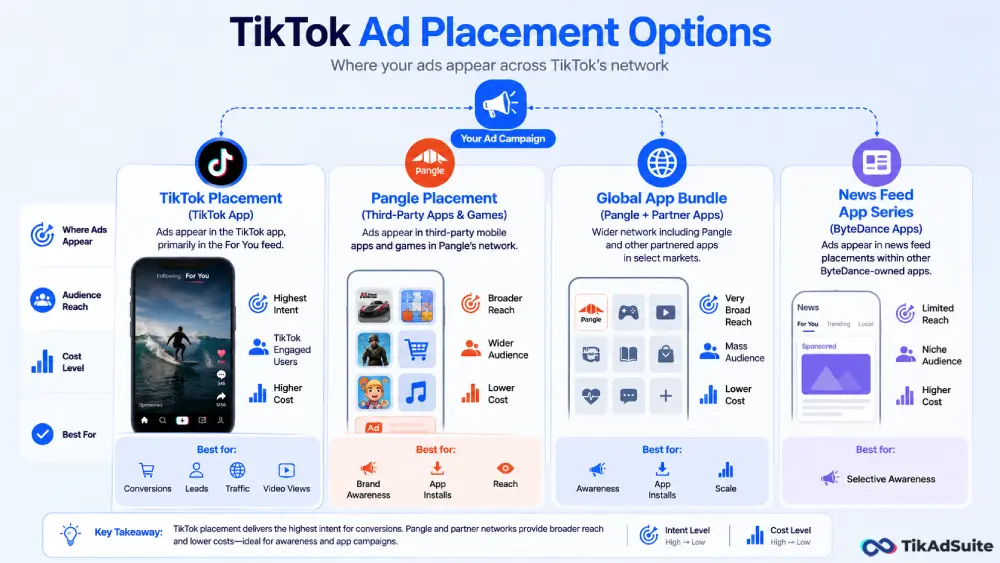
- TikTok offers four main placement categories: TikTok, Pangle, Global App Bundle, and News Feed App Series
- Automatic placement lets TikTok distribute your ads across all available surfaces for the best estimated result
- Manual placement gives you direct control, which matters more for conversion campaigns than awareness campaigns
- Pangle placement reaches users on third-party apps and often delivers cheaper traffic but lower intent
- Disabling placements that do not serve your goal is one of the simplest ways to clean up wasted spend
Quick Answer
TikTok ad placements determine where your ads appear across TikTok’s network. The main options are TikTok itself (For You feed), Pangle (third-party app network), and additional app placements in select markets. You can let TikTok choose placements automatically or select them manually. Automatic placement suits awareness and reach campaigns; manual placement gives better control for conversion-focused campaigns.
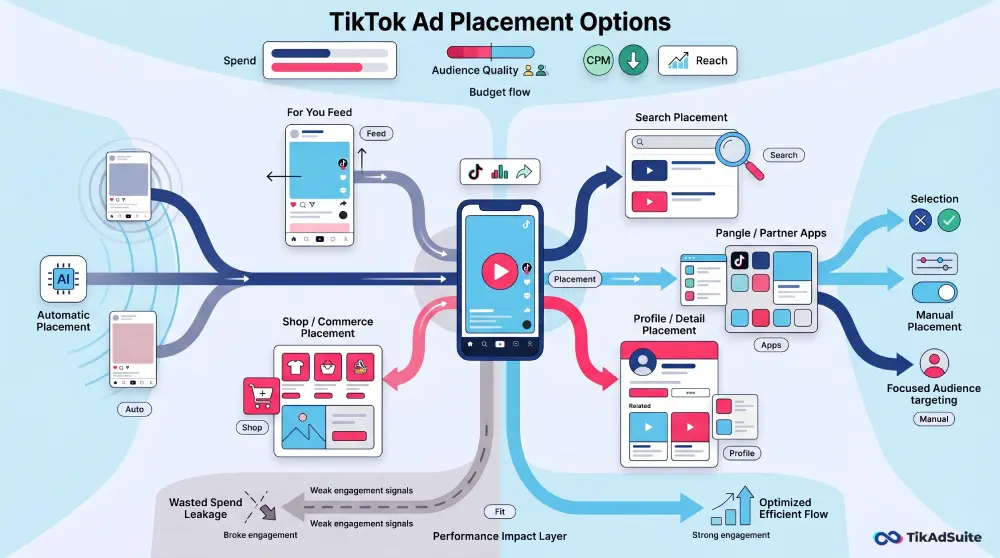
The Main TikTok Ad Placement Options
TikTok groups its placements into a few distinct categories. Availability varies slightly by market and campaign objective, which TikTok documents in detail through its TikTok Business Help Center.
TikTok Placement
This is the placement most advertisers think of first. Ads appear inside the TikTok app, primarily in the For You feed, where they show up between organic videos as users scroll.
This placement carries the highest intent because users are actively engaged with the platform, and your ad gets judged against the organic videos surrounding it.
For most local businesses, ecommerce brands, and lead generation campaigns, the TikTok placement is where the meaningful results come from.
Pangle Placement
Pangle is TikTok’s native advertising network, which extends ad delivery beyond the TikTok app itself. Ads served through Pangle appear inside third-party mobile apps and games that have partnered with the network.
The audience is broader, the cost per impression is usually lower, but engagement quality tends to drop compared to in-app TikTok placements.
Pangle works well for app install campaigns and broad-reach awareness goals. It works less well for conversion campaigns where intent and context matter.
Global App Bundle
This placement bundles Pangle and other partnered apps into a single broader option in some markets. It is essentially a wider net for placements outside the core TikTok app. The same principles apply: useful for awareness and app campaigns, less suitable for high-intent conversion goals.
News Feed App Series
In select markets, TikTok also serves ads within other ByteDance-owned apps. Availability is limited, and the volume from this placement is usually small compared to TikTok or Pangle.
Automatic vs Manual Placement
When building a campaign, you have two choices: let TikTok handle placement selection automatically, or pick placements yourself.
Automatic placement lets TikTok distribute your ads across all eligible placements based on where it predicts the best result for your objective. This usually means broader delivery and often lower cost per result, but you lose direct control over where your budget goes.
Manual placement lets you choose exactly which surfaces your ads appear on. This is the right choice when you have a clear preference about audience quality, or when you have tested placements before and know which ones work for your business.
A practical rule: use automatic placement when you are starting and want TikTok to find the best distribution for your goal. Switch to manual once you have enough data to know which placements actually drive results for your offer.
Which Placement Works for Which Campaign Goal
| Campaign Goal | Recommended Placement |
| Brand awareness | TikTok + Pangle (broader reach) |
| Video views | TikTok only (engagement-focused users) |
| Traffic to site | TikTok only or TikTok + Pangle (test both) |
| Conversions | TikTok only (highest intent surface) |
| Lead generation | TikTok only |
| App installs | TikTok + Pangle (Pangle performs well here) |
Matching placement to objective sounds obvious, but it gets missed often. A conversion campaign running on Pangle inventory frequently produces cheap clicks that never turn into customers. An awareness campaign restricted only to TikTok will leave on the table what Pangle could have captured cheaply.
For a broader view of how to match objectives to other campaign settings, the TikTok ad objectives guide covers the relationship between the objective and the rest of your campaign structure.
Mistakes That Quietly Waste Budget on Placements
Leaving Pangle enabled on conversion campaigns by default. This is one of the most common silent budget leaks. Automatic placement routes a portion of your spend to Pangle, where conversion intent tends to be lower. Check your placement breakdown reports regularly and disable Pangle if it underperforms for your specific offer.
Disabling placements before you have data. The opposite mistake. Turning off Pangle on day one means you never test whether it actually works for you. Run automatic placement first, look at the actual results by placement, then make the call.
Ignoring placement breakdown in reports. TikTok Ads Manager shows you which placement each conversion came from. If you never check this, you have no way to know which surface is actually driving your results. The TikTok ad reporting metrics guide covers how to read placement-level performance properly.
Forcing manual placement on small budgets. If your daily budget is at TikTok’s minimum, restricting placements too tightly can limit delivery and slow the learning phase. Give the algorithm enough room to find efficient delivery before locking placements down.
If you are setting up a new account, TikTok Ads Manager shows all available placement options during ad group setup, and the choices adjust based on your campaign objective and market.
FAQs
Can I run TikTok ads only on the TikTok app and exclude Pangle?
Yes. In your ad group settings, switch from automatic to manual placement and select only the TikTok placement. This restricts your ads to the For You feed and other TikTok-native surfaces, excluding Pangle and partner apps entirely.
Does Pangle deliver lower-quality traffic than TikTok placement?
Not always, but often for conversion-focused campaigns. Pangle reaches users inside third-party apps who are not necessarily in a TikTok engagement mindset, which tends to produce cheaper clicks with lower conversion rates. For app installs and broad awareness, Pangle can perform well at a lower cost.
Should I use automatic or manual placement when starting a new campaign?
Start with automatic placement if you have no historical data. This gives TikTok room to distribute spend across all eligible surfaces and find efficient delivery. After one to two weeks, review the placement breakdown in your reports and switch to manual placement if you spot clear differences in performance by surface.
Can I change placement settings after a campaign is live?
Yes, but every change to placement resets the learning phase for that ad group. If you switch from automatic to manual placement mid-campaign, expect a temporary dip in delivery while the algorithm recalibrates. Plan placement decisions before launch, when possible, to avoid this.
Wrapping Up
Placement is one of the easier TikTok settings to overlook and one of the most useful to get right. The TikTok placement itself drives most high-intent results.
Pangle and other network placements add reach and lower costs but rarely match the conversion quality of TikTok-native delivery.
Start with automatic placement, review the breakdown after enough data comes in, then refine manually based on what is actually working.
The decision rarely needs to be complicated, but skipping it entirely is what costs accounts money over time.