
TikTok is not just a video feed anymore. It is a search engine, and your buyers are already using it.
According to TikTok, 57% of users actively use the platform’s search function, and 23% perform a search within the first 30 seconds of opening the app. (1) That is high-intent behavior, and most advertisers are not set up to capture it.
If you are only running In-Feed Ads, you are reaching people while they scroll past something unrelated to what you sell.
TikTok Search Ads let you show up the moment someone types exactly what you offer into the search bar. That is a different kind of visibility, with a different quality of attention.
This guide covers everything you need: what TikTok Search Ads are, how they work, how they compare to Google Search, whether the ROI holds up in 2026, and a complete step-by-step setup walkthrough.
You will also get the keyword targeting and creative frameworks that separate campaigns that convert from ones that drain budget.
Get Up to $6000 Free TikTok Ad Credit
Table of Contents
What Are TikTok Search Ads?
TikTok Search Ads are keyword-targeted advertisements that appear directly in TikTok’s search results. When a user types a query into TikTok’s search bar, your video or carousel ad appears among the organic content. You choose the keywords, set your bids, and TikTok matches your ad to relevant searches in real time. Results vary based on keyword relevance, creative quality, and bid strength, not budget alone.
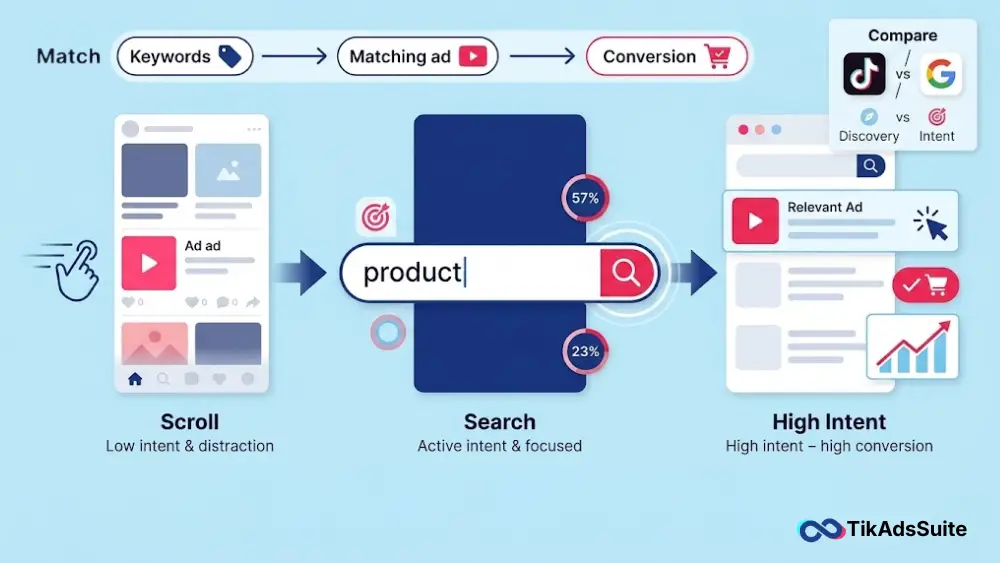
How TikTok Search Ads Work: From Query to Conversion
TikTok Search Ads connect you to users the moment they show intent. Here is the full journey, from search to click.
The Search Journey
A user opens TikTok and taps the search icon at the top of the For You page. They type a query, for example, “best moisturizer for oily skin.” TikTok processes that query and serves a results page with organic videos alongside paid placements. Your ad appears in that feed if your keywords match the search.
The ad looks identical to a standard video in the feed. There is no visual marker that makes it feel intrusive. The user sees your content in context and can tap through to your website, product page, or app store.
The Auction and Ranking System
TikTok does not give the top position to the highest bidder.
The ranking system weighs three factors:
- Keyword relevance: How closely your keyword matches the user’s actual query
- Ad quality: Watch time, CTR, and conversion signals from your creative
- Bid strength: Your maximum bid in the real-time auction
A smaller advertiser with a highly relevant, well-performing creative can outrank a competitor spending significantly more. Your creative is your biggest lever, not your budget.
After the Click
Once a user taps your ad, they land on the destination you set. For eCommerce brands, that is typically a product or collection page. For service businesses, it is a lead form or landing page. TikTok’s tracking pixel connects the click to on-site conversion data so you can measure what actually happened.
TikTok Search Ads vs. Google Search Ads: Key Differences
Both platforms target users based on search queries. The intent behind those searches, and what converts, is very different.
TikTok Search Ads vs Google Search Ads: Feature-by-Feature Comparison
| Feature | TikTok Search Ads | Google Search Ads |
| Primary search intent | Discovery, inspiration, reviews | Transactional, navigational, informational |
| Ad format | Video and carousel (visual-first) | Text ads, shopping ads |
| Match types | Broad, phrase, exact | Broad, phrase, exact, broad match modifier |
| Negative keywords | Supported | Supported |
| Audience targeting | Keyword-driven, limited demographic layering | Full demographics, remarketing, in-market audiences |
| Avg. CPC | Around $1.00 | Often $2.00 to $10.00+ depending on industry |
| Creative requirement | High: video must match search intent visually | Low: text copy only |
| User demographic | Heavy Gen Z and Millennial skew | Broad, cross-demographic |
The Intent Difference Matters
On Google, someone searching “oily skin moisturizer” usually wants to buy. On TikTok, that same query is typically discovery intent. The user wants to see a real person test the product, explain the routine, or give an honest opinion. They are researching, not ready to check out.
This changes your creative approach completely. We cover exactly what that means in the ad creative section below.
One Key Limitation
You cannot send TikTok Search Ad traffic to TikTok Shop. Shop sales require GMV Max campaigns. TikTok Search Ads work exclusively for external URLs: Shopify stores, Amazon listings, landing pages, and app store links.
Are TikTok Search Ads Worth It? Performance Benchmarks for 2026
For the right advertiser, yes. The results from real campaigns make a solid case.
Case Study Results From TikTok For Business
StriVectin partnered with January Digital and ran a two-month TikTok Search Ads test targeting high-intent skincare queries. According to TikTok For Business, they achieved a 78% boost in ROAS, a 188% increase in new customers, and a 46% reduction in CPA.
Opendoor used TikTok Search Campaigns to reach high-intent home sellers. Using broad-match keywords and carousel formats, they delivered a 539% higher CTR and a 66% lower cost per result compared to non-search campaigns. Both figures come from the same TikTok For Business published case study.
Steve Madden ran an evergreen segmented strategy across product categories. Within one month, results included a $4.08 incremental ROAS, a 54% lower CPA, and an average cost per session of $0.63, per TikTok For Business.
General Cost Benchmarks
According to WebFX’s 2026 TikTok marketing benchmarks, average CPC on TikTok runs around $1.00, with CPM averaging approximately $9.16 across campaign types. Costs rise during peak shopping periods and vary significantly by industry and targeting. Your actual numbers will depend on your niche, keyword competition, and creative quality.
When It Does Not Work As Well
TikTok Search Ads perform best for products with real search demand on the platform. If your product is highly commoditized, your audience skews significantly older than 35, or you have no existing TikTok creative to work from, you may find better initial efficiency on Google or Meta before committing meaningful budget here.
How to Set Up a TikTok Search Ads Campaign (Step by Step)
Setting up your first TikTok Search Ads campaign takes around 30 minutes. Follow these steps inside TikTok Ads Manager.
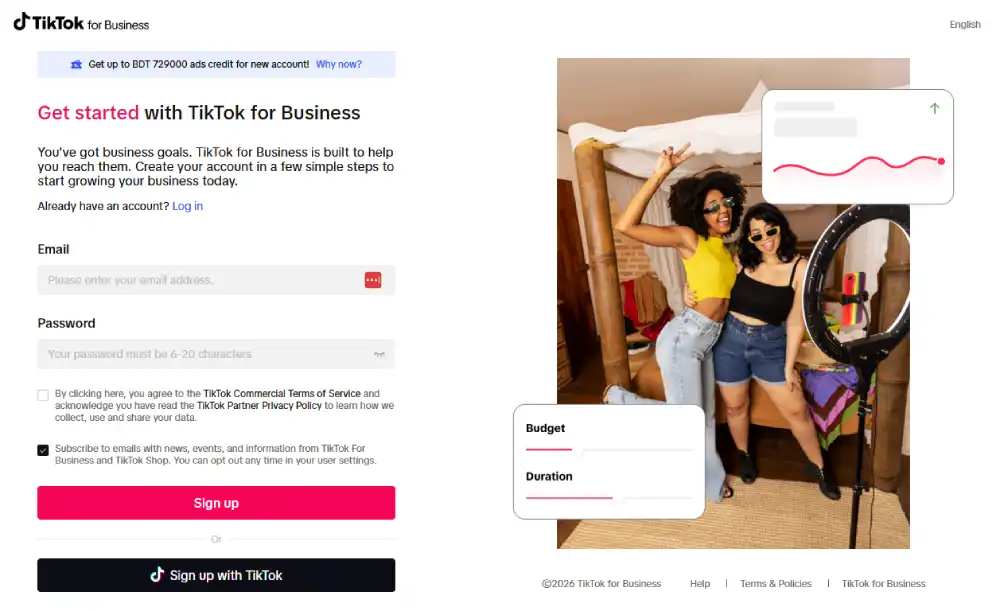
1. Log in to TikTok Ads Manager at ads.tiktok.com. If this is your first campaign, complete business verification before you proceed.
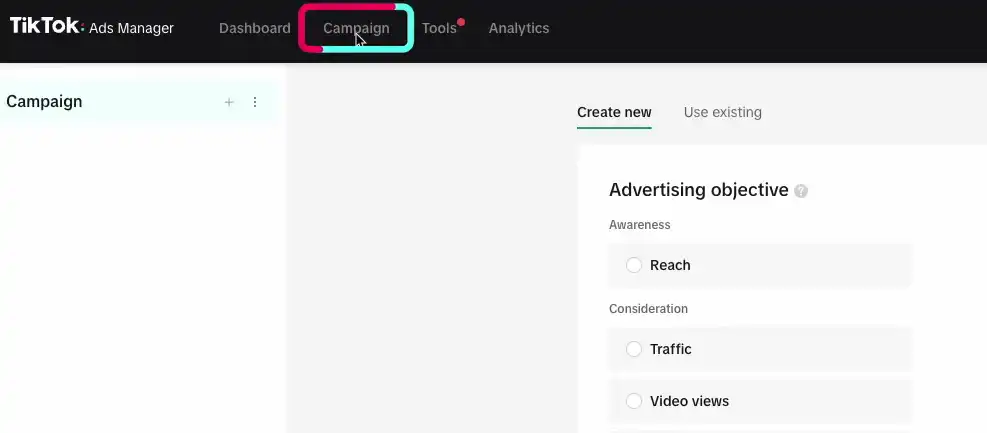
2. Create a new campaign. Click the “Campaign” tab, then “Create.” You will see campaign objectives on the next screen.
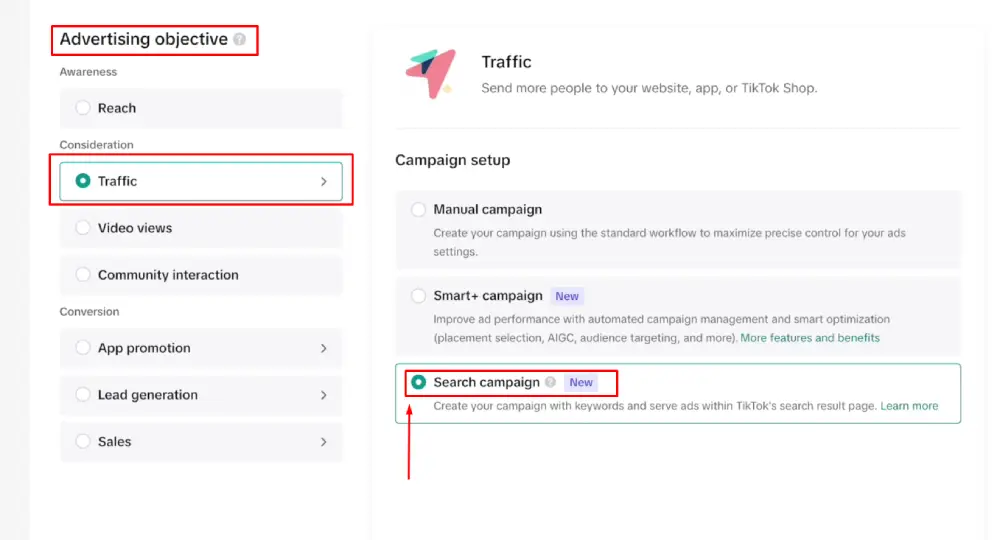
3. Select your campaign objective. Choose Traffic, Web Conversions, or Lead Generation. Then select “Search Campaign” from the campaign type toggle. This unlocks the search-specific setup flow.
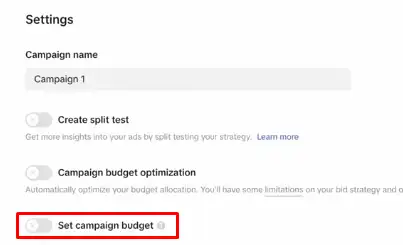
4. Set your campaign budget. Use either a daily or a lifetime budget. TikTok’s official documentation recommends setting your budget at least 20 times your target CPA bid. If your target CPA is $20, start with a $400 daily budget minimum for competitive delivery.
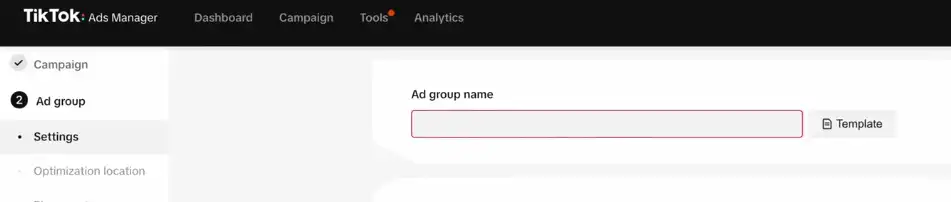
5. Configure your ad group. At this level, you set keyword targeting, bids, placement, and scheduling. Keep search placement separate from feed placement during your testing phase. Mixing them makes it impossible to read performance data accurately.
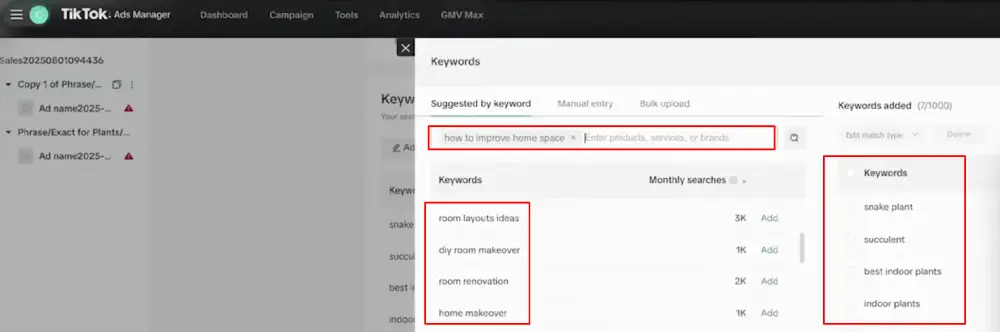
6. Add your keywords. Use TikTok’s built-in Keyword Suggestion Tool to build your list. TikTok recommends a minimum of 20 keywords per ad group, grouped by theme. Start with a broad match to maximize the algorithm’s learning data.
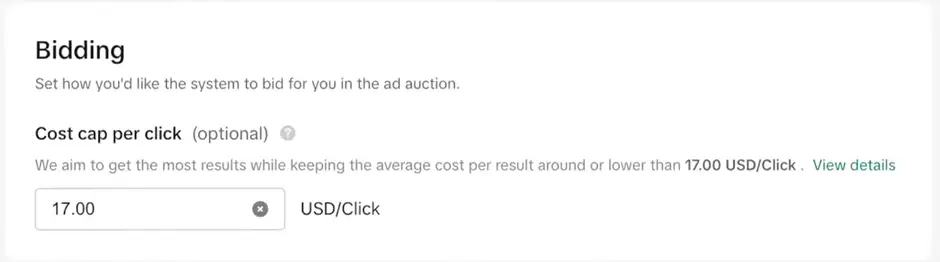
7. Set your bids. You can bid at the ad group level or, if using the Traffic objective, at the keyword level. Start within TikTok’s suggested bid range and refine after the learning phase.
8. Upload your creatives. Search Ads support video and carousel image formats. Upload at least two to three variations per ad group. TikTok’s system automatically serves the creative that best matches each user’s specific query.
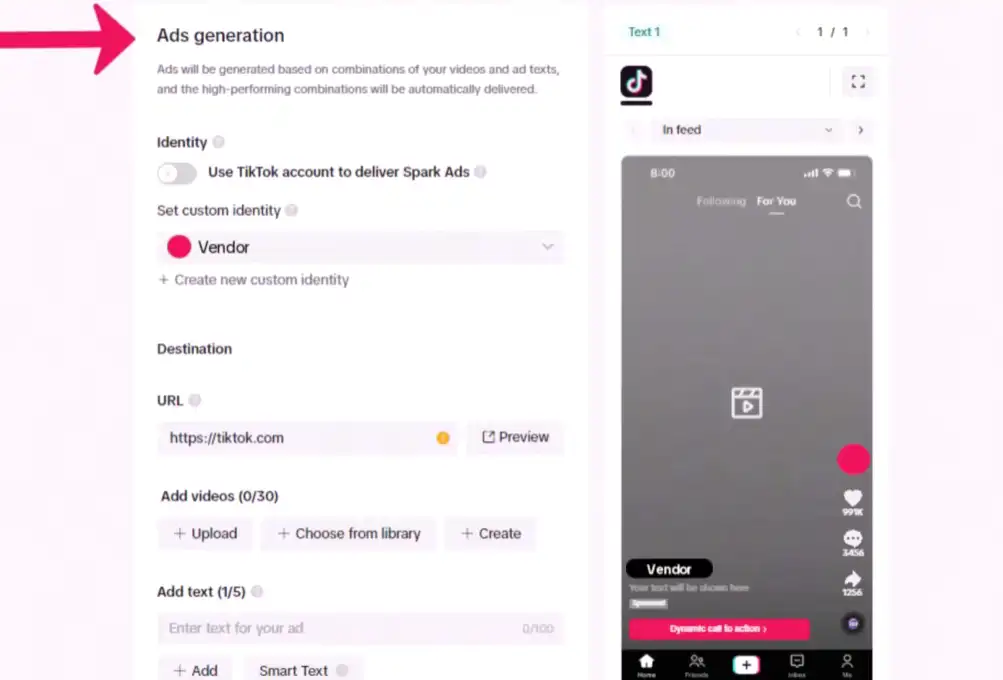
9. Review and launch. Check your keyword list, bids, budget, and destination URL. Submit for review. TikTok typically approves ads within 24 hours.
10. Wait out the learning phase. For the first 3 to 7 days, avoid making changes. Let the system calibrate before you adjust bids or pause keywords.
Choosing the Right Campaign Objective for Search Ads
Your objective determines how TikTok’s ads algorithm optimizes delivery. Choosing the wrong one wastes budget or cuts your scale before you have useful data.
Traffic optimizes for clicks and landing page views. Use this when you are new to TikTok Search Ads and need volume to exit the learning phase quickly. It is also the only objective that supports keyword-level bidding.
Web Conversions optimizes for on-site actions like purchases or sign-ups. It requires a correctly installed TikTok Pixel. According to TikTok’s Search Ads Campaign Objectives documentation, you should aim for at least 20 conversions in the first week to stabilize delivery. If you cannot hit that threshold early, start with Traffic and switch once you have consistent volume.
Lead Generation optimizes for TikTok’s native lead forms. Use this for service businesses, local businesses, or any campaign where the conversion happens inside TikTok rather than on your website.
TikTok Keyword Targeting: Match Types, Research, and Negative Keywords
Keyword targeting is the foundation of TikTok Search Ads. Everything downstream, including creative performance and CPA, depends on getting this right.
To get a clear idea, try our free TikTok SEO Keyword generator.
The Three Match Types
| Match Type | How It Works | Best Used For |
| Broad | Triggers for synonyms, related terms, and variations | Launch phase, maximizing reach, feeding algorithm data |
| Phrase | Triggers when your keyword appears in the query in order | Balancing reach with relevance in the optimization phase |
| Exact | Triggers only when the query closely matches your keyword’s meaning | Proven high-intent terms in the efficiency phase |
Per TikTok Ads Manager’s keyword documentation, broad match is recommended at launch. It gives TikTok’s algorithm the widest range of signals to learn from. Once you see which queries convert, move those terms to phrase or exact match to protect efficiency.
How to Build Your Keyword List
Open TikTok Ads Manager and go to the ad group setup. Use the Keyword Suggestion Tool by entering your product name, service type, or use case. TikTok returns related search terms with estimated monthly volume.
Build thematic ad groups. A fitness brand might run one ad group for “protein powder” keywords and a separate one for “pre-workout” keywords. This keeps your keyword-to-creative relevance high, which directly affects your quality score and ad rank.
TikTok recommends a minimum of 20 keywords per ad group. You can add up to 1,000, but relevance matters far more than volume.
Negative Keywords
Negative keywords stop your ads from triggering for queries that waste spend. Use the Search Terms report inside Ads Manager to find which actual user queries triggered your ads. Any query with impressions but zero conversions over 14 days is a candidate for your negative keyword list.
Check the Search Terms report at least once a week for your first month. The queries TikTok surfaces will shift as your account grows, and staying on top of this is what keeps your CPA under control.
Ad Creative for TikTok Search: How to Match Your Video to Search Intent
Most TikTok Search Ads underperform not because of bad keywords or bids, but because the creative does not answer the question the user just searched.
The 3 Second Rule
When someone searches “best running shoes for flat feet” and sees your ad, they need to know within three seconds that your video is answering their question. A generic brand intro or lifestyle opening loses them before you have said anything useful.
A strong hook for that query: “Flat feet? Here are three shoes that actually support your arch.” On-screen text, direct relevance, immediate hook. That is the standard you are working toward.
Discovery Intent Changes the Creative Formula
TikTok searchers are usually in research mode, not in buying mode. They want to see a real person use the product, hear a direct opinion, or watch a short tutorial. A polished brand commercial built for Google display or television will not perform here.
We have seen three creative formats work consistently well for TikTok Search Ads:
- Tutorial or how-to video: Shows your product solving the exact problem the user searched for
- UGC-style review: A real person sharing their honest experience, filmed naturally on a phone
- Carousel: Works well for product comparisons or multi-item showcases where the user is weighing options
Match Creative to Keyword Intent
The most important rule for search creative: one query, one clear message. If you are targeting “affordable standing desks under $300,” your video should address that specific need directly. Do not run a generic brand video against specific, high-intent queries.
TikTok’s system automatically rotates your creatives to match different queries in your ad group. If your creatives are too generic, TikTok cannot match them accurately, and your quality score drops. That raises your effective CPC and pushes your placement rank down.
How to Measure and Optimize TikTok Search Ad Performance
Running TikTok Search Ads without a clear measurement framework is the fastest way to drain budget without learning anything useful. Here is what to track and when to act.
Key Metrics to Monitor
- CTR (Click-Through Rate): Low CTR on a high-impression keyword means your creative is not matching the query. Fix the creative before adjusting the bid.
- CPC (Cost Per Click): Tracks bid efficiency. Compare against your blended CPA target.
- Conversion Rate: The percentage of clicks that result in your goal action. A low conversion rate with a healthy CTR points to a landing page or offer problem, not a keyword issue.
- CPA (Cost Per Acquisition): Your primary KPI for conversion campaigns.
- ROAS: Revenue per ad dollar spent. Use for eCommerce once you have at least two weeks of stable conversion data.
Read this article if you want to learn more about the TikTok ads metrics.
The Learning Phase
Per TikTok’s Search Ads optimization documentation, every new Search Ads campaign goes through a learning phase of 3 to 7 days. During this window, the algorithm is calibrating delivery. Do not pause keywords, make major bid changes, or swap creatives. Let it run. Stepping in early resets the clock and wastes the data already collected.
Using the Search Terms Report
The Search Terms report inside Ads Manager shows you the actual queries that triggered your ads. It is your most valuable optimization tool.
Use it to identify:
- High-converting queries to promote to exact or phrase match
- Irrelevant queries to add as negative keywords
- New keyword ideas worth testing in their own ad group
Check this report weekly for the first month, then bi-weekly once your campaign is stable.
TikTok Pixel vs. Events API
The TikTok Pixel is a browser-based tracking tag. It works, but it can miss conversions due to iOS privacy restrictions and browser-level blocking. The TikTok Events API sends conversion data server-side, which gives you more complete and accurate attribution. If you are running Web Conversion campaigns, set up the Conversion/Events API before launch. The difference in data quality is significant.
When to Scale vs. When to Pause
If a keyword group is hitting your CPA target after 7 or more days post-learning, increase the budget by 20 to 30% and monitor for 48 hours before adjusting again.
If a keyword is spending budget with zero conversions after 14 days, pause it. Before you do, check whether the creative aligns with the queries it is triggering. The problem is often the match, not the keyword.
TikTok Search Ads + In-Feed Ads: Building a Full-Funnel Strategy
TikTok Search Ads work best as part of a complete TikTok strategy. Used on their own, they capture intent without the awareness layer that makes intent more likely in the first place.
Why Combining Both Formats Works
According to TikTok For Business, advertisers who run Search Ads alongside In-Feed Ads see a 20% average increase in conversions at a similar or better CPA compared to In-Feed alone.
The reason follows a logical sequence: In-Feed Ads build recognition and familiarity. When that same user later searches for a related product or service, your Search Ad is waiting.
TikTok For Business also found that 18% of users who saw an In-Feed Ad but did not convert went on to complete the conversion after seeing the corresponding Search Ad. That is real incremental revenue that search alone would miss.
Where to Start With Budget Allocation
A starting framework that tends to work well: allocate 20 to 30% of your total TikTok budget to Search Ads, with the remainder going to In-Feed. Adjust that split based on what your data tells you. If Search Ads consistently outperform In-Feed on CPA, reallocate accordingly.
Who Benefits Most From This Approach
This full-funnel setup works particularly well for:
- eCommerce brands with products that have clear, searchable use cases on TikTok
- Service businesses targeting Gen Z or Millennial audiences
- Brands with existing TikTok organic content can adapt into search-optimized creatives
If you are new to TikTok advertising entirely, run In-Feed Ads for two to three weeks first. Build creative data and audience familiarity. Then add Search Ads once you know which messages and formats your audience responds to.
Frequently Asked Questions
What are TikTok Search Ads?
TikTok Search Ads are keyword-targeted paid placements that appear in TikTok’s search results. When a user types a query that matches your keyword list, your video or carousel ad appears alongside organic content. You set the keywords, bids, and creative. TikTok then determines ad placement based on keyword relevance, ad quality signals, and bid strength.
How much do TikTok Search Ads cost?
According to WebFX’s 2026 TikTok marketing benchmarks, average CPC on TikTok runs around $1.00, with CPM averaging approximately $9.16. Costs increase during peak shopping periods and in more competitive industries. Your actual spend will depend on industry, keyword competition, and creative quality. TikTok’s official documentation recommends setting your daily budget at 20 times your target CPA bid to ensure competitive delivery.
Are TikTok Search Ads worth it?
For the right business, yes. According to TikTok For Business case studies, StriVectin achieved a 78% boost in ROAS and a 46% reduction in CPA using TikTok Search Ads. Results depend heavily on your product category, keyword demand on TikTok, and how closely your creative matches what the user searched for.
What is the difference between TikTok Search Ads and In-Feed Ads?
In-Feed Ads appear while a user is passively scrolling the For You page, reaching people during content consumption. Search Ads appear when a user actively types a keyword into TikTok’s search bar, reaching them at a specific moment of intent. The two formats serve different stages of the buyer journey. Running both together tends to outperform either format used in isolation.
Do TikTok Search Ads work for small businesses?
Yes, with realistic expectations. Small businesses with niche products and specific search demand on TikTok tend to see strong results. You need at least $20 per day per ad group to meet TikTok’s minimum requirements. Starting with a $30 to $50 daily budget per ad group gives you enough data to exit the learning phase within the first seven days, which is where most under-funded campaigns stall.
How do I find the right keywords for TikTok Search Ads?
Use TikTok’s Keyword Suggestion Tool inside Ads Manager. Enter your product name, service category, or core use case, and TikTok surfaces related terms with estimated monthly search volume. Start with at least 20 keywords per ad group, grouped by theme. Use broad match initially to identify which actual user queries convert, then move proven terms to phrase or exact match to sharpen targeting and protect efficiency.
Conclusion
TikTok Search Ads give you direct access to buyers at the exact moment they are looking for what you sell. That is a different kind of reach than any passive placement can offer.
We covered what TikTok Search Ads are and how the auction and ranking system works. You now understand why search intent on TikTok differs from Google, and why that distinction shapes your entire creative strategy.
The benchmark data from StriVectin, Opendoor, and Steve Madden gives you a realistic picture of what strong execution can produce.
You have the step-by-step setup process, the keyword targeting framework, and the measurement approach needed to run campaigns that actually deliver results.
The brands seeing the most consistent performance pair Search Ads with In-Feed, build creative that answer the query in the first two seconds, and use the Search Terms report to tighten targeting over time.
TikTok’s search behavior is growing fast. The advertisers who build fluency with this format now will have a real head start as competition increases.
Resources used in making this article: