
You spent time on your video. The hook lands. The viewer watches past the 3-second mark. Then they scroll away without doing a thing.
Most of the time, that’s a CTA problem. Your TikTok call to action either blended into the background, said the wrong thing, or wasn’t there at all.
Here’s what this guide covers:
- Every TikTok CTA button option inside Ads Manager
- How to add or change a call to action on your ad
- Why your CTA button might not be showing
- Which CTAs work best for the ad goal
- TikTok call to action best practices for 2026
Whether you’re running your first campaign or fixing a low-CTR ad, this covers everything you need.
Get Up to $6000 Free TikTok Ad Credit
Table of Contents
Key Takeaways
- TikTok Ads Manager offers over 20 CTA button options, from “Shop Now” to “Apply Now” to “Download.”
- The right TikTok CTA depends on your campaign objective, not personal preference
- According to TikTok for Business creative best practices, including a clear CTA in the final seconds of your video lifts click-through performance
- You can change your TikTok ad call to action at any time through the ad edit screen in Ads Manager
- Mismatched CTAs are one of the most common causes of poor CTR on TikTok ads
What Is a TikTok Ad CTA?
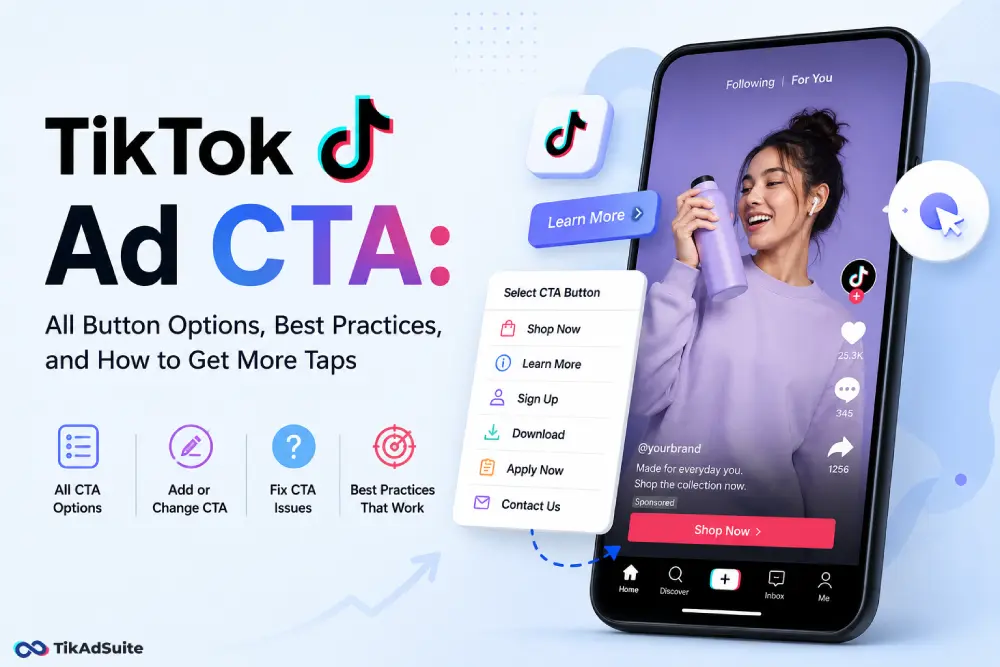
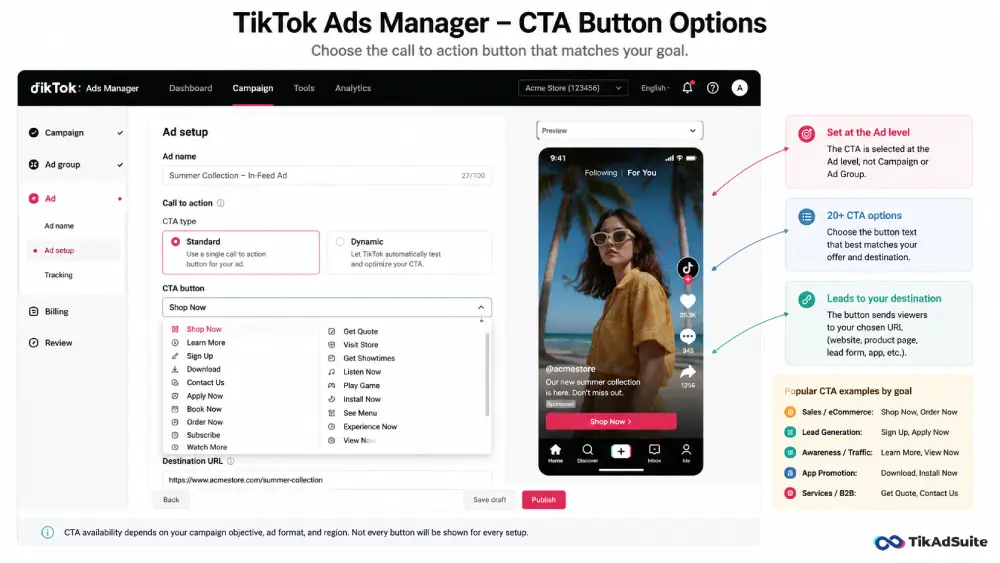
A TikTok ad CTA is the clickable button that appears on your in-feed ad. It tells viewers what to do next, such as “Shop Now,” “Learn More,” or “Sign Up.” You set it at the ad level in TikTok Ads Manager. The best CTA matches both your campaign objective and the message inside your video.
What Does a TikTok CTA Button Actually Do?
The TikTok CTA button appears as a small overlay on your in-feed ad, usually near the bottom-right corner. When a viewer taps it, they’re sent to your destination URL, which could be a product page, a landing page, a lead form, or an app download.
You choose the button text inside TikTok Ads Manager at the ad level. It is separate from your campaign objective setting, though the two need to match.
It sounds like a minor detail. But the wrong CTA label can quietly kill your results.
All TikTok CTA Button Options (Full List)
TikTok gives you a wide range of preset CTA options. The exact buttons available depend on your ad objective and your region.
| CTA Button | Best Used For |
| Shop Now | eCommerce, product sales |
| Learn More | Brand awareness, general traffic |
| Sign Up | Lead gen, memberships |
| Download | App installs |
| Contact Us | Service businesses, B2B |
| Apply Now | Jobs, programs, applications |
| Book Now | Appointments, travel, events |
| Order Now | Food delivery, subscriptions |
| Subscribe | Newsletters, channels |
| Watch More | Video content, media |
| Get Quote | Insurance, finance, services |
| Visit Store | Local businesses |
| Get Showtimes | Entertainment, cinema |
| Listen Now | Music, podcasts |
| Play Game | Gaming apps |
| Install Now | App promotion |
| See Menu | Restaurants, food brands |
| Experience Now | Brand demos, immersive content |
| View Now | General interest content |
Not every button is available for every objective. “Download” is tied to app promotion campaigns. “Shop Now” is most relevant for eCommerce ad campaigns. Always confirm availability when setting up your ad.
How to Add a Call to Action on TikTok Ads
You add a CTA at the ad level inside your campaign, not at the campaign or ad group level.
Here’s exactly how:
- Open TikTok Ads Manager and go into your campaign
- Click through to the Ad level (not Campaign, not Ad Group)
- Scroll to the Call to Action section
- Choose Standard for a fixed button or Dynamic to let TikTok test multiple options
- Select your CTA text from the dropdown
- Add your destination URL
- Save and publish
The Dynamic CTA option tells TikTok to rotate different button texts and automatically favor the one that gets more taps. It’s especially useful when you’re unsure which label fits your audience best.
How to Change Your TikTok Ad Call to Action
You can edit the CTA on a live ad without stopping the campaign.
- In Ads Manager, go to the Ad level
- Click Edit on the ad you want to update
- Find the CTA field and select a new button from the dropdown
- Save your changes
The ad may go back into a brief review. Most edits are clear within a few hours.
If you’re trying to change from “Apply Now” to “Shop Now,” just pick the new button and update your destination URL if needed. Make sure the landing page still matches. Sending someone who clicks “Shop Now” to a contact form is a fast way to waste clicks.
Why Is My TikTok CTA Button Not Showing?
A few things can cause the CTA to go missing.
You skipped it at the ad level. The CTA field is optional in the setup flow, so some advertisers miss it. Go back and confirm the button is enabled and a label is selected.
Your ad format doesn’t support it. Branded Hashtag Challenges and some TopView formats have different display rules. Standard in-feed ads are the most CTA-friendly placement.
The ad is still in review. TikTok reviews all ads before delivery. The button won’t render during this window.
You’re in creative preview mode. Previews inside Ads Manager sometimes don’t show the CTA button exactly as it appears on-feed. Check the live version on your phone.
If the issue continues after the ad is approved, review your ad placement options and confirm that in-feed is selected.
TikTok Call to Action Best Practices 2026
Match the Button to Your Video’s Message
The CTA should feel like the natural next step after watching the ad. If the video shows a product being used, “Shop Now” lands well. If it explains a process or service, “Learn More” or “Get Quote” is a better fit.
Mismatching button and creative is one of the most common TikTok ads mistakes that quietly drains budgets.
Say It Out Loud in the Video Too
The button alone is not enough. A spoken or text-based CTA inside the video itself drives more action. Say it in the last few seconds. Put it on screen. Repeat it if the video runs past 15 seconds.
According to TikTok for Business creative guidelines, including a clear verbal call to action near the end of your video reinforces the button click and improves overall click-through performance.
Use Specific, Action-Driven Language
“Shop Now” outperforms “View Products.” “Get Your Discount” outperforms “Offer Available.” Urgency and specificity drive more taps than vague labels.
Test More Than One CTA
Use the Dynamic CTA feature to let TikTok find the highest-performing option automatically. Or run separate ad sets through the TikTok creative testing framework to compare results directly.
Keep Your Landing Page Consistent
Your CTA sets an expectation. The page the viewer lands on must deliver it. A mismatch between button and destination increases your bounce rate and hurts conversion data.
Which TikTok CTA Drives the Most Taps?
There’s no single winner. The right button depends on the buyer’s stage and your campaign goal. That said, these five consistently perform well across categories:
- Shop now for product-focused eCommerce ads
- Learn more for top-of-funnel awareness campaigns
- Sign up for lead generation and membership offers
- Download for app install campaigns
- Get a quote for service-based and finance businesses
Someone who doesn’t know your brand yet won’t click “Buy Now.” They need “Learn More” first. For TikTok lead gen ad campaigns, “Sign Up” and “Apply Now” tend to outperform generic options when paired with a clear offer inside the video.
CTA and Hook: Two Sides of the Same Ad
Your call to action is only as effective as the creative that leads up to it. If the first two seconds don’t stop the scroll, the viewer never reaches the button.
Think of your ad in three parts. The hook grabs attention. The body builds interest or desire. The CTA captures the action. All three need to work as one unit.
A strong hook paired with a weak CTA loses the conversion at the finish line. A strong CTA attached to a weak hook never gets seen. Read the full guide on TikTok ad hooks to strengthen both ends of your ad.
If your TikTok ads CTR is consistently low, check all three parts before changing your budget or targeting. The problem is usually creative, and the CTA is often where it breaks down.
Does the CTA Affect Ad Approval?
The CTA button itself rarely causes an ad rejection. But if the button text doesn’t match the content of your landing page, TikTok’s review system can flag it as misleading.
For example, a “Download” button that leads to a product page instead of an app download could trigger a review hold. Keep your CTA, video message, and destination URL all pointing toward the same action. Check the full guide on why TikTok ads get rejected if your ads are getting flagged at review.
FAQs
What are all the TikTok ad CTA options available?
TikTok offers over 20 preset CTA buttons, including Shop Now, Learn More, Sign Up, Download, Apply Now, Book Now, Order Now, Contact Us, Subscribe, Get Quote, Visit Store, Get Showtimes, Listen Now, Install Now, Play Game, See Menu, Experience Now, and View Now. Available buttons depend on your campaign objective and region. You select them at the ad level inside TikTok Ads Manager.
Can I write a custom CTA on TikTok ads?
No. TikTok only allows you to choose from its preset CTA labels. You cannot type in a custom button text. However, you can include a custom verbal CTA inside your video, such as spoken dialogue or text overlays, to complement the button and add specificity.
Why is my TikTok CTA not showing up anywhere?
The most common reasons are: the CTA field was left blank during setup, the ad format doesn’t support the button, the ad is still under review, or you’re viewing a creative preview rather than the live ad. Go to the ad edit screen to confirm the CTA is enabled and a label is selected.
What is the difference between Standard and Dynamic CTA on TikTok?
Standard CTA locks in one specific button text for the life of the ad. Dynamic CTA lets TikTok test multiple button labels automatically and distribute more delivery to whichever version drives the most clicks for your objective.
How do I change my TikTok ad CTA from “Apply Now” to “Shop Now”?
Go to the Ad level in TikTok Ads Manager, click Edit on the active ad, and update the CTA dropdown to “Shop Now.” Save your changes. The ad may re-enter review for a short time. Confirm your destination URL and landing page match the updated button label.
Does the TikTok CTA button affect my ad’s click-through rate?
Yes. A CTA that doesn’t match your creative or your audience’s intent will reduce taps even if the video performs well. Testing different CTAs, either manually or using Dynamic CTA, is one of the fastest ways to improve CTR without changing your budget.
Make Every Tap Count
Your TikTok CTA is the last thing a viewer sees before they decide whether to act. The right button, paired with a clear verbal CTA inside your video and a matching landing page, is what turns views into clicks.
Start by picking the button that matches your campaign goal. Say the CTA out loud in your video. Then test. Use Dynamic CTA or split test manually to find what your specific audience responds to.
If you’re ready to launch your next campaign, you can get started with TikTok Ads and access all the CTA options covered here.
For a deeper look at building the full creative, the guide on how to create winning TikTok ads walks through every element from hook to button.