
You spent time on your video. The hook lands. The viewer watches past the 3-second mark. Then they scroll away without doing a thing.
Most of the time, that’s a CTA problem. Your TikTok call to action either blended into the background, said the wrong thing, or wasn’t there at all.
Here’s what you’ll find below:
- Every TikTok CTA button option inside Ads Manager
- How to add or change a call to action on your ad
- Why your CTA button might not be showing
- Which CTAs work best for the ad goal
- When the button appears on screen and how to make it count
Whether you’re running your first campaign or fixing a low-CTR ad, you’ll find the setup steps and the fixes below.
Get Up to $6000 Free TikTok Ad Credit
Table of Contents
Quick Answer
A TikTok ad CTA is the call to action button on your ad, such as Shop Now, Learn More, Sign Up or Download. You set it at the ad level in TikTok Ads Manager. The labels you can choose change with your campaign objective, and the system can test several labels for you and show each viewer the one most likely to get a tap.
Key Takeaways
- The buttons you can pick in TikTok Ads Manager depend on your campaign objective, so two campaigns can show different lists.
- Pick the CTA that matches your goal and your landing page, not the one you like best.
- The CTA button only shows on ads that send people to a website or app page.
- You can change the call to action on a live ad from the ad edit screen in Ads Manager.
- A button that promises one thing while the page delivers another is a common reason for weak click-through rates.
What Is a TikTok Ad CTA? CTA Meaning Explained
CTA stands for call to action. On TikTok, it means the part of your ad that asks viewers to do one thing next, like shop, sign up or download an app.
In paid ads, the CTA is a tappable button with short text, such as Shop Now or Learn More. In organic videos, creators use the same idea with spoken lines or on-screen text, like follow for part two. You set the ad button in TikTok Ads Manager, and it works best when it matches both your campaign objective and the message in your video.
What Does a TikTok CTA Button Actually Do?
The CTA button sends a viewer who taps it to your destination, which could be a product page, a landing page, a lead form or an app store page.
You choose the button text inside TikTok Ads Manager at the ad level. It is separate from your campaign objective setting, though the two need to match.
Where the Button Appears
TikTok’s guide to CTA button placements lists these spots for standard in-feed ads:
- At the bottom of the in-feed ad while it plays
- In the comment panel of the ad
- At the end of the video
Spark Ads, which run from an organic post, also show the CTA on the profile page of the account that posted it.
When the Button Shows Up
The button does not always appear in the first second. The help article on CTA timing and background color gives these windows:
| Ad and buying type | CTA text appears | Background color appears |
|---|---|---|
| Auction, CPM or CPC | From the start | After 5 seconds |
| Auction, oCPM | After 3, 4 or 5 seconds | After 4 to 7 seconds |
| Auction, CPV | After 5 or 6 seconds | After 4 to 8 seconds |
| Reservation in-feed | From the start | After 2 seconds |
| TopView | After 3 seconds | After 5 seconds |
For oCPM and CPV, TikTok picks the exact timing from each person’s past viewing habits. So if your offer only shows up in the last second of a 4 second clip, many viewers will never see the button next to it.
Common TikTok CTA Button Options
TikTok does not publish one fixed list of CTA buttons for every account. The labels you see depend on your ad objective, your landing page type and your region.
TikTok’s help article on CTA buttons in your ads says Ads Manager builds a pool for Performance Ads with about 10 to 20 options preselected from a full list of 20 to 40 CTAs. The same article names three CTA types:
- Dynamic CTA: you pick several CTA texts, and the system decides which one each viewer sees. Performance Ads and Brand Ads for reach, video views or traffic use it.
- AIGC CTA: AI writes extra CTA text based on your landing page or target app, on Performance Ads.
- Text CTA: one fixed text, used for Brand Ads with a community interaction goal.
These are the button labels advertisers most often see in the dropdown, with the goal each one fits:
| CTA Button | Best Used For |
| Shop Now | eCommerce, product sales |
| Learn More | Brand awareness, general traffic |
| Sign Up | Lead gen, memberships |
| Download | App installs |
| Contact Us | Service businesses, B2B |
| Apply Now | Jobs, programs, applications |
| Book Now | Appointments, travel, events |
| Order Now | Food delivery, subscriptions |
| Subscribe | Newsletters, channels |
| Watch More | Video content, media |
| Get Quote | Insurance, finance, services |
| Visit Store | Local businesses |
| Get Showtimes | Entertainment, cinema |
| Listen Now | Music, podcasts |
| Play Game | Gaming apps |
| Install Now | App promotion |
| See Menu | Restaurants, food brands |
| Experience Now | Brand demos, immersive content |
| View Now | General interest content |
Not every button is available for every objective. Download is tied to app promotion campaigns, while Shop Now fits best on eCommerce ad campaigns. Check the dropdown when you build the ad, since the list you see is the one that counts.
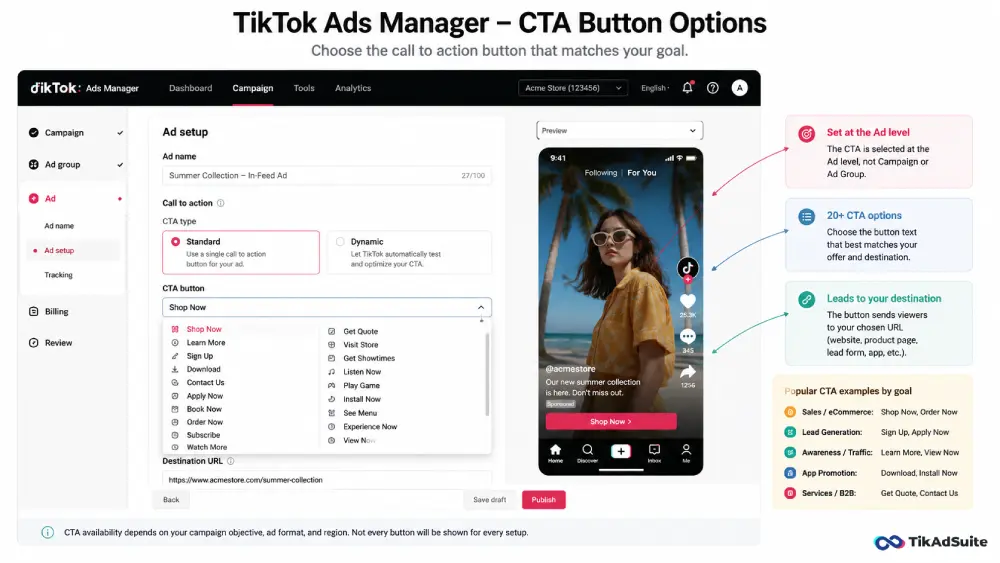
How to Add a Call to Action on TikTok Ads
You add a CTA at the ad level inside your campaign, not at the campaign or ad group level.
Here’s how:
- Open TikTok Ads Manager and go into your campaign
- Click through to the Ad level (not Campaign, not Ad Group)
- Find the Call to Action settings (for Performance Ads they sit under advanced settings)
- Keep the preselected CTA texts, remove the ones that do not fit, or add others from the list
- Add your destination URL
- Save and publish
When you leave several CTA texts selected, TikTok’s Dynamic CTA rotates them and decides which one each viewer sees. That helps when you’re not sure which label fits your audience. If you want one label only, keep a single text that matches your offer.
How to Change Your TikTok Ad Call to Action
You can change the call to action on a live TikTok ad without stopping the campaign.
- In Ads Manager, go to the Ad level
- Click Edit on the ad you want to update
- Find the CTA field and select a new button from the dropdown
- Save your changes
Edited ads can go back into review before they deliver again, so make CTA changes before a busy sales day, not during it.
If you’re switching from Apply Now to Shop Now, pick the new button and update your destination URL if needed. Make sure the landing page still matches. Sending someone who tapped Shop Now to a contact form is a fast way to waste clicks.
Why Is My TikTok CTA Button Not Showing?
A missing CTA usually comes down to your objective, your setup or your timing.
Your ad doesn’t send traffic anywhere. TikTok’s article about the CTA button explains that a CTA only appears on ads that drive traffic to a landing page or an app download page, and not on reach or video view campaigns unless you add a URL to the creative.
You skipped it at the ad level. Some advertisers miss the CTA settings during setup. Go back and confirm that at least one CTA text is selected.
The button hasn’t appeared yet. On many auction ads the CTA text shows a few seconds into the video, as the timing table above shows. A quick scroll past the ad can make it look missing.
The ad is still in review. TikTok reviews ads before delivery, so you won’t see the button on-feed until the ad is approved.
You’re in creative preview mode. Previews inside Ads Manager don’t always show the CTA exactly as it appears on-feed. Check the live version on your phone.
If the issue continues after the ad is approved, review your ad placement options and confirm that in-feed is selected.
TikTok Call to Action Best Practices
Good TikTok call to action practice comes down to a few habits you can repeat on each new ad.
Match the Button to Your Video’s Message
The CTA should feel like the natural next step after watching the ad. If the video shows a product being used, Shop Now fits. If it explains a process or service, Learn More or Get Quote is a better match.
Mismatching button and creative is one of the most common TikTok ads mistakes that quietly drains budgets.
Say It Out Loud in the Video Too
The button is small, so back it up inside the video. Say the action in the last few seconds and put it on screen as text. In a longer video, say it once more.
TikTok’s Creative Codes guide tells advertisers to close on a strong call to action and reports that CTA cards led to a 45% lift in recall and a 19% increase in likeability.
Use Specific, Action-Focused Language
The button label is fixed, but your on-screen text and voiceover are not. Tell people exactly what they get, like a discount on your first order or a free sample, instead of a vague line like offer available. A clear reason to tap does more work than a louder button.
Test More Than One CTA
Leave several CTA texts selected so Dynamic CTA can rotate them, or run separate ads through a creative testing framework to compare one label against another. Change one thing per test so you know what moved the result.
Keep Your Landing Page Consistent
Your CTA sets an expectation, and the page the viewer lands on must deliver it. If the button says Shop Now, land people on the product, not your homepage. A mismatch between button and destination wastes the click and muddies your conversion data.
Which TikTok CTA Drives the Most Taps?
No single TikTok CTA drives the most taps. The right button depends on how well the viewer knows you and what your campaign is built to do. As a starting point, match the label to the goal:
- Shop Now for product-focused eCommerce ads
- Learn More for top-of-funnel awareness campaigns
- Sign Up for lead generation and membership offers
- Download for app install campaigns
- Get Quote for service-based and finance businesses
Someone who doesn’t know your brand yet is less likely to buy on the first view, so Learn More is often the easier first step. For TikTok lead gen campaigns, Sign Up and Apply Now make sense when the video states a clear offer. Then let your own test results, not a general rule, pick the winner.
CTA and Hook: Two Sides of the Same Ad
Your call to action only works if the creative before it does its job. If the first two seconds don’t stop the scroll, the viewer never reaches the button.
Think of your ad in three parts. The hook grabs attention. The body builds interest. The CTA asks for the action. If one part is weak, the other two can’t carry it.
A strong hook with a weak CTA loses the sale at the finish line. A strong CTA after a weak hook never gets seen. Strong TikTok ad hooks take care of the opening half.
If your TikTok ads CTR is low across the board, check all three parts before changing your budget or targeting. The problem is often the creative, and the CTA is a common place where it breaks.
Does the CTA Affect Ad Approval?
The CTA button itself rarely causes an ad rejection. But if the button text doesn’t match the content of your landing page, TikTok’s review system can flag it as misleading.
For example, a Download button that leads to a product page instead of an app download could trigger a review hold. Keep your CTA, video message, and destination URL all pointing toward the same action. If your ads keep getting flagged at review, check the usual reasons why TikTok ads get rejected before you resubmit.
FAQs
What are all the TikTok ad CTA options available?
Common TikTok CTA buttons include Shop Now, Learn More, Sign Up, Download, Apply Now, Book Now, Order Now, Contact Us, Subscribe, Get Quote, Visit Store, Get Showtimes, Listen Now, Install Now, Play Game, See Menu, Experience Now and View Now. The exact set you can pick depends on your campaign objective, landing page type and region, so check the dropdown in TikTok Ads Manager at the ad level.
Can I write a custom CTA on TikTok ads?
Not as free text in the button. You pick labels from the list Ads Manager offers, and on Performance Ads the system can also add AI-written CTA text based on your landing page. For your own wording, use a spoken line or a text overlay inside the video to back up the button.
Why is my TikTok CTA not showing up anywhere?
The usual reasons are an objective with no destination URL (reach or video view ads without a link), no CTA text selected at the ad level, an ad still in review, or the button not having appeared yet in the first seconds of the video. Open the ad edit screen to confirm a CTA text and URL are set.
What is the difference between Standard and Dynamic CTA on TikTok?
A standard CTA, which TikTok calls a Text CTA, shows one fixed label for the life of the ad. Dynamic CTA lets you select several labels, and the system chooses which one each viewer sees.
How do I change my TikTok ad CTA from Apply Now to Shop Now?
Go to the Ad level in TikTok Ads Manager, click Edit on the active ad, and pick Shop Now in the CTA settings. Save your changes. The ad may go back into review for a short time, so confirm your destination URL and landing page match the new label before you save.
Does the TikTok CTA button affect my ad’s click-through rate?
It can. A CTA that doesn’t match your creative or your audience’s intent gives people less reason to tap, even when the video holds attention. Testing different CTA texts, either with Dynamic CTA or with separate ads, is a low-cost way to look for a better CTR without raising your budget.
Make Every Tap Count
Your TikTok CTA is the last thing a viewer sees before they decide whether to act. The right button, paired with a clear verbal CTA inside your video and a matching landing page, is what turns views into clicks.
Start by picking the button that matches your campaign goal. Say the CTA out loud in your video. Then test. Use Dynamic CTA or split test manually to find what your specific audience responds to.
If you’re ready to launch your next campaign, you can get started with TikTok Ads and access all the CTA options covered here.
To build the full creative, from hook to button, learn how to create winning TikTok ads step by step.