
Most confusion about TikTok advertising comes from one simple misunderstanding: Business Center and Ads Manager are not the same thing, and they do not do the same job.
If you have ever logged into TikTok’s ad platform feeling unsure which tool to open, or set up an Ad Account without knowing whether you needed a Business Center first, you are not alone.
According to TikTok’s own business data, over 7 million US businesses are already active on TikTok’s advertising platform. Most of them start without a clear picture of which tool does what, and that confusion costs real time and creates account structures that are hard to fix later.
Get Up to $6000 Free TikTok Ad Credit
This article gives you a clear breakdown of what each platform does, how they relate to each other, and exactly who should use which one.
You will also see how they work together, where an agency account fits into the full picture, and how TikTok Promote compares to both.
Table of Contents
What Is the Difference Between TikTok Business Center and Ads Manager?
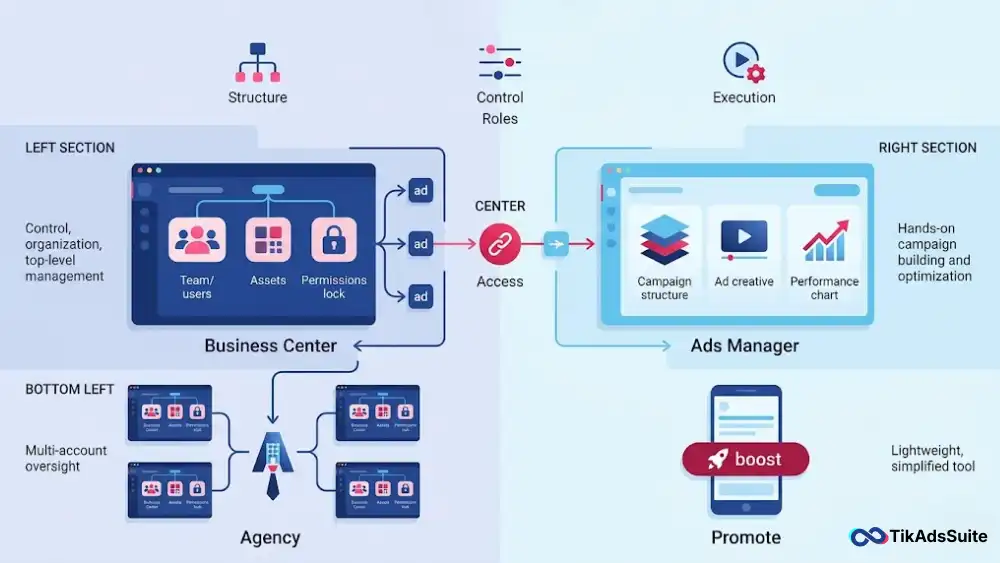
TikTok Ads Manager is where you create campaigns, set budgets, define targeting, and review performance. TikTok Business Center is the administrative layer above it, controlling user permissions, shared Pixels, and linked Ad Accounts. The two are not interchangeable: Ads Manager is where ad spend happens, and Business Center governs your account structure. You need both when working with a team, an agency, or multiple Ad Accounts.
What Is TikTok Ads Manager?
TikTok Ads Manager, accessed at ads.tiktok.com, is TikTok’s self-serve advertising platform. It is where you go to actually run ads: build campaigns, define ad groups, choose audiences, upload creatives, set bids, and monitor results.
Everything related to your ad spend lives here. You select a campaign objective (traffic, conversions, reach, app installs, and others), set daily or lifetime budgets at the campaign or ad group level, and manage creative assets at the ad level.
Ads Manager operates through an Ad Account, which is the billing container for your campaigns. When you first sign up for TikTok advertising, you create an Ad Account, and that account lives inside Ads Manager.
You do not need the TikTok Business Center to access Ads Manager. A solo advertiser running a single account can sign up, create an Ad Account, and start running campaigns entirely within Ads Manager.
What Ads Manager does not handle: it does not manage other users’ access, it does not own your Pixel across multiple accounts, and it does not control agency or team permissions at a higher level. That is the Business Center’s job.
Core functions inside Ads Manager:
- Campaign creation and ad group structuring
- Audience targeting, including Custom Audiences and Lookalike Audiences
- Creative uploads and A/B testing
- Bidding strategy selection: Cost Cap, Bid Cap, and Lowest Cost
- Performance reporting and analytics dashboard
- Pixel installation at the individual account level
What Is TikTok Business Center?
TikTok Business Center (BC) is the centralized management platform that sits above Ads Manager. Think of it as your account’s headquarters, not your ad operations tool.
Business Center is where you manage the infrastructure that Ads Manager depends on:
- Add team members with specific roles: Admin, Operator, and Analyst
- Link one or more Ad Accounts to a single business entity
- Own and share assets: TikTok Pixels, product Catalogs, and Audiences
- Grant or revoke access for agencies or external partners
- View and manage billing across multiple Ad Accounts in one place
One important distinction: Business Center is not the same as a TikTok Business Account. A TikTok Business Account is an organic profile on the TikTok app that gives brands access to content analytics and the in-app Promote feature. Business Center is a completely separate advertising infrastructure tool. Conflating the two leads to real setup errors, and we see this happen regularly among new advertisers.
Business Center also lets you assign assets to specific Ad Accounts. If you own a Pixel and want three different Ad Accounts to use it, you manage that relationship inside Business Center. Without BC, each Ad Account needs its own separate Pixel, which fragments your data.
TikTok Business Center vs Ads Manager: Key Differences Side by Side
| Feature | TikTok Ads Manager | TikTok Business Center |
| Primary function | Create and manage ad campaigns | Manage accounts, users, and assets |
| Who uses it | Advertisers running active campaigns | Admins, team leads, agencies |
| What it controls | Campaigns, ad groups, creatives, bids | Ad Accounts, Pixels, Catalogs, and user roles |
| Access management | Campaign-level roles only | Business-level permissions across accounts |
| Billing | Handles billing for one Ad Account | View and manage billing across multiple Ad Accounts |
| Pixel ownership | Pixel tied to the individual Ad Account | Pixel owned at BC level, shared across accounts |
| Product Catalog | Uses Catalog if linked from BC | Creates and owns the Catalog |
| eCommerce integration | Executes catalog-based campaigns | Builds and manages the Catalog source |
| Team permissions | Limited | Full role-based access control |
| Agency access | Not managed here | Agency requests and manages client access here |
The distinction comes down to scope. Ads Manager handles execution. Business Center handles governance. You can run Ads Manager without Business Center, but you cannot fully govern a multi-account or multi-user setup without it.
Do You Need TikTok Business Center to Use Ads Manager?
No, you do not need the TikTok Business Center to use Ads Manager. But whether you should use it depends entirely on your situation.
When you can skip Business Center:
You are a solo advertiser running one Ad Account with no team members who need access. You are not working with an agency, not sharing a Pixel across accounts, and not running Shopping Ads or catalog-based formats. In this case, you can sign up through ads.tiktok.com and run campaigns without ever setting up a Business Center.
When Business Center becomes essential:
- You manage a team and need to assign different access levels, such as separate roles for creative upload, reporting, and billing
- You are an agency managing multiple client Ad Accounts
- You run eCommerce ads and need a shared Pixel and product Catalog connected across campaigns
- You want to run Smart+ campaigns that depend on BC-owned assets
- You have two or more Ad Accounts that need to share the same audience data or Pixel
One practical note: if you start without Business Center and later want to add team access or share assets, migrating your setup can be messy. Building with Business Center from the start is the cleaner choice if you expect your team or account count to grow.
Business Center vs Agency Account vs Ad Account: How the Hierarchy Works
This is where a lot of people get lost, so let us break the three-tier structure down clearly.
An ad account is the base unit. It is where your campaigns, budgets, and billing live. Every ad you run is tied to an Ad Account. You can have more than one, but each one acts as its own billing container with its own campaign history.
The Business Center sits one level above. It is the administrative hub that owns and manages multiple Ad Accounts under one business entity. It holds shared assets (Pixels, Catalogs, Audiences) and controls who has access to which accounts. One Business Center can link to many Ad Accounts simultaneously.
Agency Account is not a separate platform in TikTok’s structure. An agency operates by creating its own Business Center, then requesting access to client Ad Accounts through it. Once a client approves, the agency can manage campaigns on the client’s behalf inside Ads Manager without needing the client’s login. The client retains ownership of their Ad Account at all times.
Here is how the structure looks across both use cases:
Agency setup:
- Agency Business Center owns access to: Client A Ad Account, Client B Ad Account, Client C Ad Account
In-house advertiser setup:
- Advertiser Business Center owns: Ad Account 1, Ad Account 2, shared Pixel, Catalog, Audiences
The key point: Business Center is not exclusive to agencies. Any advertiser managing more than one account or team member benefits from having one. Agencies simply rely on it more heavily because their entire operation depends on cross-client access management.
TikTok Promote vs Ads Manager: What’s the Difference?
TikTok Promote and Ads Manager are both ways to pay for TikTok exposure, but they are not the same tool and are not built for the same advertiser.
TikTok Promote is an in-app feature available to creators and TikTok Business Accounts. You select an existing organic post, choose a simple goal (more video views, more website visits, or more followers), set a budget, and TikTok boosts the post.
Targeting options are limited: you choose between automatic targeting (TikTok selects your audience) or custom targeting covering age, gender, location, and interest categories. You cannot upload new creatives, access Custom Audiences built from your own data, or create Lookalike Audiences.
TikTok Ads Manager gives you full control. You create campaigns from scratch, choose from all available ad formats, including In-Feed Ads, TopView, Spark Ads, and Shopping Ads. You define custom audiences, set specific bidding strategies, run A/B tests, and access detailed performance reporting. You can build Custom Audiences from website traffic or customer lists, and build Lookalike Audiences from those segments.
| Feature | TikTok Promote | TikTok Ads Manager |
| Where you access it | TikTok app | ads.tiktok.com |
| Creative control | Boost existing posts only | Create new ad creatives from scratch |
| Targeting options | Auto or custom (age, gender, location, interests) | Full targeting suite |
| Audience types | None (no Custom or Lookalike) | Custom and Lookalike Audiences |
| Ad formats | Single boosted post | All TikTok ad formats |
| Reporting depth | Basic metrics only | Full analytics dashboard |
| Business Center required | No | No (optional for single accounts) |
| Best for | Quick content boosts | Campaign management with defined business goals |
If you want to test whether a piece of content resonates before committing real budget, Promote is a low-friction starting point. If you are running campaigns with conversion goals and meaningful spend, Ads Manager is the only right choice.
Who Should Use TikTok Business Center, Ads Manager, or Both?
Your setup should match your actual situation. Here is a clear framework across four common scenarios.
Solo Advertiser or Very Small Business
You only need Ads Manager. Sign up at ads.tiktok.com, create your Ad Account, and run campaigns directly. Business Center adds unnecessary complexity at this stage. You can always add it later if your situation changes.
Small Business with a Growing Team
If more than one person needs access to your Ad Account, set up a Business Center. It lets you assign specific roles without sharing your login. According to a 2024 Oxford Economics report, 88% of small businesses said TikTok activity led to increased sales. Getting your account structure right from the start is what lets you scale that result without rebuilding your setup later.
Marketing Agency Managing Client Accounts
Business Center is non-negotiable for you. Create a BC under your agency, then request access to each client’s Ad Account through it. This keeps client accounts separated, gives you role-based access control, and lets you manage all clients from one hub. Clients always retain ownership of their own data and Ad Accounts.
eCommerce Brand Running Shopping Ads
You need both. According to eMarketer forecasts, US advertisers are projected to spend $11.8 billion on TikTok, up 21% year-over-year, and a large share of that growth is driven by Shopping and catalog-based formats. Ads Manager is where you run those campaigns. Business Center is where your product Catalog lives and where your Pixel is owned.
TikTok’s Shopping Ads and Smart+ campaigns pull directly from BC-owned Catalogs. Building Lookalike Audiences from your customer lists is also more effective when your Pixel is centralized in BC, because the data feeding your audiences stays consistent across all your Ad Accounts.
How TikTok Business Center and Ads Manager Work Together in 2026
Business Center and Ads Manager are not competing tools. They are two layers of the same advertising infrastructure, each handling a different function.
Asset ownership and sharing: Your TikTok Pixel and product Catalog are owned at the Business Center level. Ads Manager pulls from those assets when you set up campaigns. If your Pixel lives inside BC, every Ad Account linked to that BC can use the same tracking data. If your Pixel only lives inside a single Ad Account, only that account benefits from it, limiting your retargeting and conversion data across your full business.
Access control in practice: Business Center decides who can access what. When you add a team member in BC and assign them to an Ad Account with an Operator role, they log into Ads Manager and manage campaigns within that permission level. BC sets the rules. Ads Manager is where those rules are applied daily.
Smart+ Campaigns: TikTok’s Smart+ campaigns use AI to automate targeting, bidding, and creative delivery. Smart+ web campaigns need a Pixel that feeds clean, consistent data. Smart+ Shopping campaigns need a Catalog. Both assets are owned in BC, which is why a well-structured Business Center directly improves campaign performance.
In short, Business Center makes Ads Manager more powerful. The more assets you centralize in BC, the more campaign options and audience data you have available.
More helpful articles you’ll want to explore:
👉 TikTok Ads Credit: Get Free $6000 Cash Back Promo
👉 TikTok Ads for Local Businesses: How Small Businesses Attract Nearby Buyers
👉 TikTok Ad Optimization Checklist: Boost ROAS Step by Step
👉 Viral TikTok Ads: Complete Guide to High Performing Creatives
Frequently Asked Questions
Is TikTok Business Center free?
Yes, TikTok Business Center is free to create and use. You pay only for the actual ad spend inside your linked Ad Accounts. There is no subscription fee or setup cost for the Business Center itself. You need a TikTok for Business account and a verified business to get started.
Can I run TikTok ads without a Business Center?
Yes, you can run ads directly through Ads Manager without creating a Business Center. A solo advertiser with one Ad Account does not need BC to launch campaigns, manage budgets, or track performance. Business Center becomes necessary only when you need team access, shared Pixels, a product Catalog, or multi-account management.
What is the difference between a TikTok Business Account and a TikTok Business Center?
A TikTok Business Account is an organic profile on the TikTok app. It gives brands access to content analytics and the in-app Promote feature. TikTok Business Center is a completely separate advertising management platform for managing Ad Accounts, assets, and team permissions. The two tools serve different purposes and are not connected to each other.
Can an agency access my TikTok Ads Manager without my login?
Yes, through TikTok Business Center. Your agency creates its own BC and sends a request to access your Ad Account. Once you approve, they can manage your campaigns inside Ads Manager using their own credentials and defined permission level. You keep full ownership of your account at all times and can revoke access whenever you choose.
Does TikTok Business Center affect my ad account billing?
Business Center does not change how you are billed. Billing happens at the Ad Account level inside Ads Manager. Business Center lets you view billing activity across multiple Ad Accounts from one place, but it does not consolidate invoices into a single payment or change your payment method setup at the individual account level.
Do I need the TikTok Business Center to run Shopping Ads or use a product Catalog?
Yes. Product Catalogs are created and owned inside the TikTok Business Center. If you want to run Video Shopping Ads or catalog-based Smart+ campaigns, you must have a Business Center with a linked Catalog and a connected Ad Account. There is no alternative path to running catalog-dependent ad formats without one.
Conclusion
TikTok Business Center and Ads Manager solve different problems, and understanding that distinction is what separates a clean account structure from a complicated one.
Ads Manager is your campaign tool. It is where your budget is spent, your creatives run, and your results are measured. Business Center is your account infrastructure. It is where your assets live, your team’s access is defined, and your account governance is handled from the top down.
If you are running ads solo with a single account, Ads Manager alone is the right starting point. If you are managing a team, operating as an agency, or running eCommerce campaigns that depend on Pixels and product Catalogs, Business Center is the foundation you need, not an optional extra.
The two tools are built to work together. Getting your setup right from the beginning saves you the headache of restructuring later, and gives your campaigns access to the full range of tools TikTok’s platform has to offer.