
People do not only scroll TikTok. They type into the search bar to find products, reviews and how-to videos before they buy.
That is a moment of clear intent, and many advertisers are not set up to reach it.
If you only run In-Feed Ads, you reach people while they scroll past videos that may have nothing to do with what you sell.
TikTok Search Ads let you show up the moment someone types exactly what you offer into the search bar. The viewer asked for this topic, so your ad starts with their attention.
Below you will find how Search Ads work, how they compare with Google, what TikTok’s own case studies report, and a step-by-step setup in Ads Manager.
You will also get the keyword rules, creative tips and measurement routine that keep a search campaign from wasting budget.
Get Up to $6000 Free TikTok Ad Credit
Table of Contents
Quick Answer
TikTok Search Ads are keyword-targeted ads that appear on TikTok’s search results page when someone searches for terms you choose. You run them as a Search Ads Campaign in TikTok Ads Manager.
The short version of how to run one:
- Pick a supported objective and select Search Campaign.
- Add a themed keyword list to each ad group and start on broad match.
- Upload two or more video or carousel creatives that answer the search.
- Size the budget from your target CPA and leave the campaign alone while it learns.
- Use the Search Terms report to add negative keywords and move winning queries to phrase or exact match.
They work best for products people already search for on TikTok, and even better alongside In-Feed Ads.
What Are TikTok Search Ads?
TikTok Search Ads are keyword-targeted advertisements that appear directly in TikTok’s search results. When a user types a query into TikTok’s search bar, your video or carousel ad appears among the organic content. You choose the keywords, set your bids, and TikTok matches your ad to relevant searches in real time. Results depend on how well your keywords and creative match the search, not on budget alone.
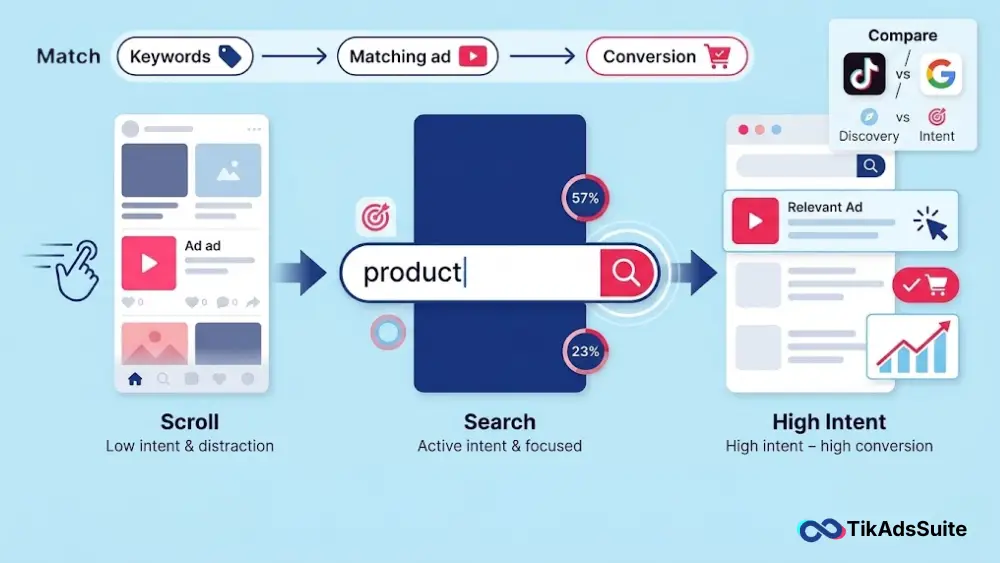
How TikTok Search Ads Work: From Query to Conversion
TikTok Search Ads connect you to users the moment they show intent. The journey runs from the search bar to your landing page.
The Search Journey
A user opens TikTok and taps the search icon at the top of the For You page. They type a query, for example, best moisturizer for oily skin. TikTok processes that query and serves a results page with organic videos alongside paid placements. Your ad appears in that feed if your keywords match the search.
The ad sits among the organic videos and looks much like them. The user sees your content in context and can tap through to your website, product page, or app store.
The Auction and Ranking System
A high bid alone does not decide where your ad shows. TikTok matches ads to searches by relevance, so what you bid is only part of the picture.
Three things shape how your ad competes:
- Keyword relevance: How closely your keyword matches the user’s actual query
- Ad quality: Watch time, CTR, and conversion signals from your creative
- Bid strength: Your maximum bid in the real-time auction
This means a smaller advertiser with a sharp, relevant creative can still compete with bigger budgets. Creative and keyword fit are the parts you control most.
After the Click
Once a user taps your ad, they land on the destination you set. For eCommerce brands, that is typically a product or collection page. For service businesses, it is a lead form or landing page. TikTok’s tracking pixel connects the click to on-site conversion data so you can measure what actually happened.
TikTok Search Ads vs. Google Search Ads: Key Differences
Both platforms target users based on search queries. The intent behind those searches, and what converts, is very different.
TikTok Search Ads vs Google Search Ads: Feature-by-Feature Comparison
| Feature | TikTok Search Ads | Google Search Ads |
| Primary search intent | Discovery, inspiration, reviews | Transactional, navigational, informational |
| Ad format | Video and carousel (visual-first) | Text ads, shopping ads |
| Match types | Broad, phrase, exact | Broad, phrase, exact |
| Negative keywords | Supported | Supported |
| Audience targeting | Keyword-driven, limited demographic layering | Full demographics, remarketing, in-market audiences |
| Creative requirement | High: video must match search intent visually | Low: text copy only |
The Intent Difference Matters
On Google, someone searching oily skin moisturizer usually wants to buy. On TikTok, that same query is typically discovery intent. The user wants to see a real person test the product, explain the routine, or give an honest opinion. They are researching, not ready to check out.
This changes your creative approach completely. We cover exactly what that means in the ad creative section below.
One Key Limitation
Search Ads only pay off if the page after the click is ready to sell. Most advertisers send this traffic to their own site, such as Shopify stores, a landing page, a lead form or an app store listing. If you sell through TikTok Shop, check the destination options in your own Ads Manager before you plan a search campaign around it, since options differ by objective and market.
Are TikTok Search Ads Worth It? Performance Benchmarks
TikTok Search Ads are worth testing if people already search TikTok for your kind of product and you have videos that answer those searches. The best published results come from TikTok’s own case studies, which are chosen wins, so read them as what is possible rather than what is typical.
Case Study Results From TikTok For Business
TikTok’s Search Ads Campaign announcement reports these results from three brands:
- StriVectin: a 78% boost in ROAS, a 188% increase in new customers and a 46% lower CPA from search.
- Opendoor: a 539% higher CTR and a 66% lower cost per result than non-search campaigns, using broad-match keywords and carousel formats to reach high-intent home sellers.
- Steve Madden: a $4.08 incremental ROAS, a 54% lower CPA and an average cost per session of $0.63 within one month, from an evergreen strategy split by product category.
General Cost Benchmarks
Search Ads costs depend on your industry, the season and keyword competition, so outside benchmarks are only a rough guide. Triple Whale’s TikTok benchmarks, built from more than 5,900 brands between August 2025 and July 2026, put TikTok’s overall CPM at $4.08 and conversion rate at 1.56%. Those figures cover TikTok ads in general, not search placements alone.
Your own numbers after the learning phase are the benchmark that matters. Compare cost per result in search against your In-Feed campaigns, not against an industry average.
When It Does Not Work As Well
TikTok Search Ads work best for products people actually look up on TikTok. If few people search TikTok for your category, your product is hard to show on video, or you have no TikTok creative yet, Google or Meta may be the easier place to start before you put real budget here.
How to Set Up a TikTok Search Ads Campaign (Step by Step)
Setting up a TikTok Search Ads campaign happens inside TikTok Ads Manager. Have your keyword list, budget and two or more creatives ready before you start.
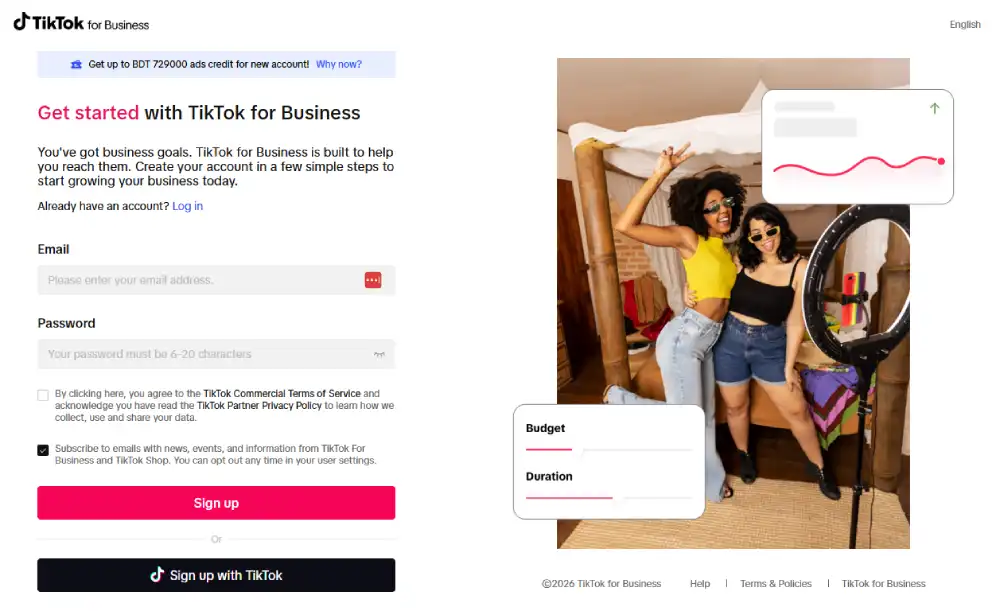
1. Log in to TikTok Ads Manager at ads.tiktok.com. If this is your first campaign, complete business verification before you proceed.
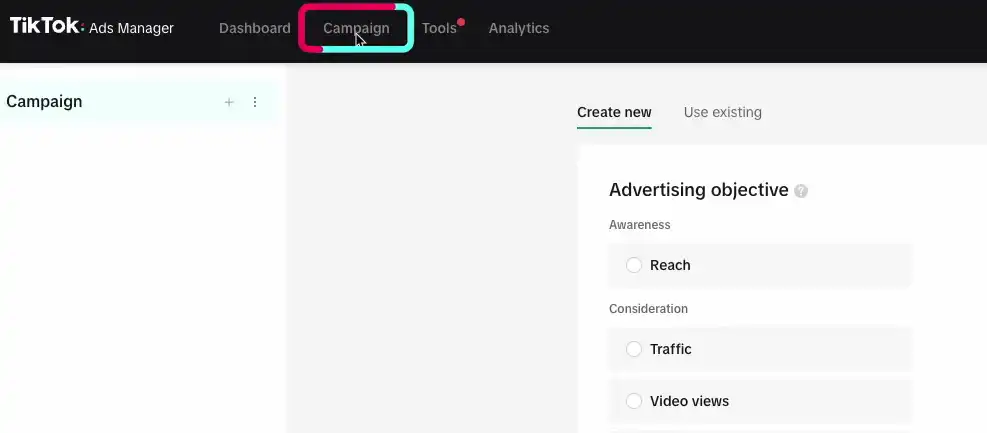
2. Create a new campaign. Open the Campaign tab, then click Create. You will see campaign objectives on the next screen.
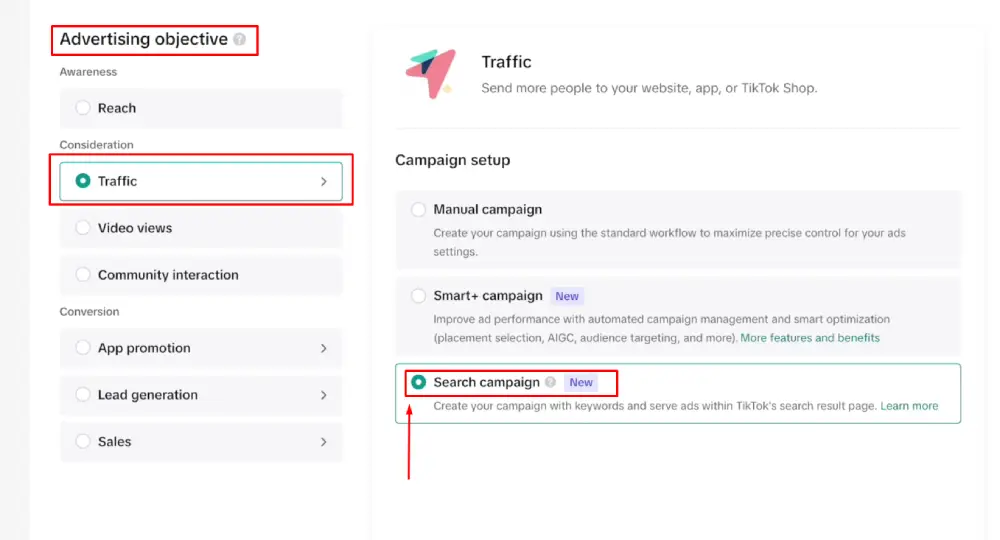
3. Select your campaign objective. Choose Traffic, Sales, Lead Generation or App Promotion, the objectives listed in TikTok’s Search Ads setup guide, then select Search Campaign. This opens the search-specific setup flow.
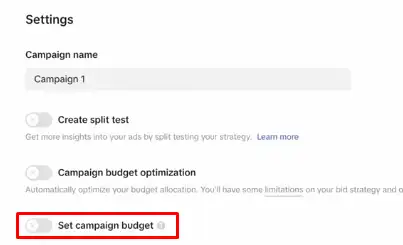
4. Set your campaign budget. Use either a daily or a lifetime budget. Size it from your target CPA rather than a round number; the learning phase section below shows the ratio TikTok suggests.
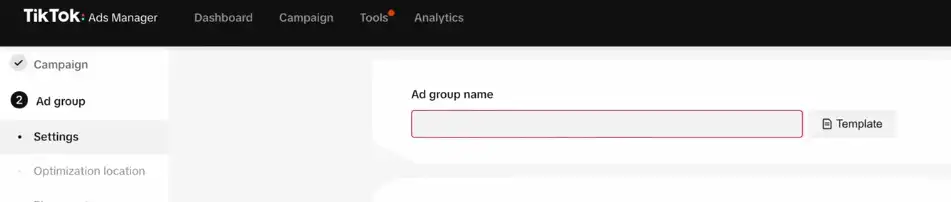
5. Configure your ad group. At this level, you set keyword targeting, bids, placement, and scheduling. Keep search and feed campaigns separate while you test, so you can read search results on their own.
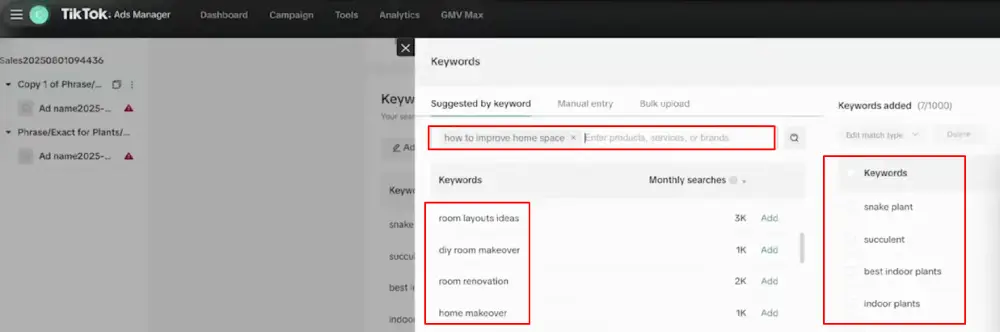
6. Add your keywords. Build your list with the Keyword Suggestion Tool; TikTok’s page on Search Ads keywords recommends no fewer than 20 keywords per ad group and allows up to 1,000 keywords and 10,000 negative keywords. Group them by theme and start with broad match so the system has more searches to learn from.
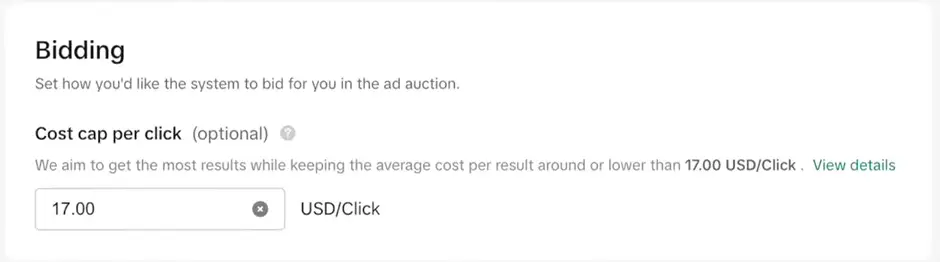
7. Set your bids. You can bid at the ad group level or, if using the Traffic objective, at the keyword level. Start within TikTok’s suggested bid range and refine after the learning phase.
8. Upload your creatives. Search Ads support video and carousel image formats. Upload at least two or three variations per ad group so the system has options to match to different searches.
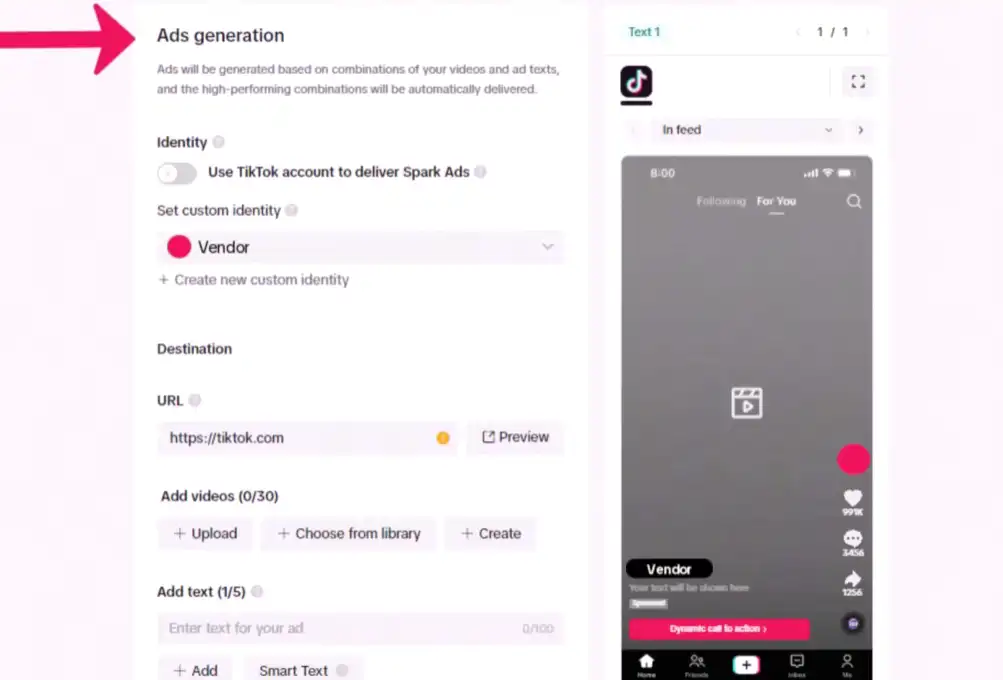
9. Review and launch. Check your keyword list, bids, budget, and destination URL. Submit for review and wait for approval.
10. Wait out the learning phase. For the first 3 to 7 days, avoid making changes. Let the system calibrate before you adjust bids or pause keywords.
Choosing the Right Campaign Objective for Search Ads
Your objective determines how TikTok’s ads algorithm optimizes delivery. Choosing the wrong one wastes budget or cuts your scale before you have useful data.
Traffic optimizes for clicks and landing page views. Use this when you are new to TikTok Search Ads and need volume to exit the learning phase quickly. It is also the only objective that supports keyword-level bidding.
Sales optimizes for on-site actions like purchases or sign-ups. It needs a correctly installed TikTok Pixel and steady conversion volume; the learning phase section below lists the minimums TikTok suggests. If you cannot reach them early, start with Traffic and switch once you have consistent volume.
Lead Generation optimizes for TikTok’s native lead forms. Use this for service businesses, local businesses, or any campaign where the conversion happens inside TikTok rather than on your website.
TikTok Keyword Targeting: Match Types, Research, and Negative Keywords
Keyword targeting decides which searches can trigger your ad, so it shapes everything after it, from creative fit to CPA.
A TikTok keyword generator can help you brainstorm search phrases before you open Ads Manager.
The Three Match Types
| Match Type | How It Works | Best Used For |
| Broad | Triggers for synonyms, related terms, and variations | Launch phase, maximizing reach, feeding algorithm data |
| Phrase | Triggers when your keyword appears in the query in order | Balancing reach with relevance in the optimization phase |
| Exact | Triggers only when the query closely matches your keyword’s meaning | Proven high-intent terms in the efficiency phase |
TikTok’s keyword help page recommends broad match whenever possible, since it gives your ads more chances to show and the system more searches to learn from. Once you see which queries convert, move those terms to phrase or exact match to protect efficiency.
How to Build Your Keyword List
Open TikTok Ads Manager and go to the ad group setup. Use the Keyword Suggestion Tool by entering your product name, service type, or use case. TikTok returns related search terms with estimated monthly volume.
Build thematic ad groups. A fitness brand might run one ad group for protein powder keywords and a separate one for pre-workout keywords. This keeps each keyword close to the creative that answers it.
TikTok recommends a minimum of 20 keywords per ad group. You can add up to 1,000, but relevance matters far more than volume.
Negative Keywords
Negative keywords stop your ads from triggering for queries that waste spend. Use the Search Terms report inside Ads Manager to find which actual user queries triggered your ads. A query that keeps spending with no conversions after a fair run, such as two weeks, is a good candidate for your negative keyword list.
Check the Search Terms report at least once a week for your first month. The queries TikTok surfaces will shift as your account grows, and staying on top of this is what keeps your CPA under control.
Ad Creative for TikTok Search: How to Match Your Video to Search Intent
Most TikTok Search Ads underperform not because of bad keywords or bids, but because the creative does not answer the question the user just searched.
The 3 Second Rule
When someone searches best running shoes for flat feet and sees your ad, they need to know within three seconds that your video is answering their question. A generic brand intro or lifestyle opening loses them before you have said anything useful.
A strong hook for that query: Flat feet? Here are three shoes that actually support your arch. On-screen text, direct relevance, immediate hook. That is the standard you are working toward.
Discovery Intent Changes the Creative Formula
TikTok searchers are usually in research mode, not in buying mode. They want to see a real person use the product, hear a direct opinion, or watch a short tutorial. A polished brand commercial built for Google display or television will not perform here.
Three creative formats fit search intent well and are worth testing:
- Tutorial or how-to video: Shows your product solving the exact problem the user searched for
- UGC-style review: A real person sharing their honest experience, filmed naturally on a phone
- Carousel: Works well for product comparisons or sets of several items where the user is weighing options
Match Creative to Keyword Intent
The most important rule for search creative: one query, one clear message. If you are targeting a query such as affordable standing desk for small rooms, your video should address that specific need directly. Do not run a generic brand video against specific, high-intent queries.
TikTok matches creatives in an ad group to different searches. If every creative is generic, none of them is a strong match for a specific query, and the ad has a weaker case for showing.
How to Measure and Optimize TikTok Search Ad Performance
Running TikTok Search Ads without a clear measurement framework is the fastest way to drain budget without learning anything useful. Track these numbers and act on them in this order.
Key Metrics to Monitor
- CTR (Click-Through Rate): Low CTR on a high-impression keyword means your creative is not matching the query. Fix the creative before adjusting the bid.
- CPC (Cost Per Click): Tracks bid efficiency. Compare against your blended CPA target.
- Conversion Rate: The percentage of clicks that result in your goal action. A low conversion rate with a healthy CTR points to a landing page or offer problem, not a keyword issue.
- CPA (Cost Per Acquisition): Your primary KPI for conversion campaigns.
- ROAS: Revenue per ad dollar spent. Use for eCommerce once you have at least two weeks of stable conversion data.
Each of these TikTok ads metrics means more when you read them together than one at a time.
The Learning Phase
TikTok’s Search Ads optimization guide says new campaigns usually need 3 to 7 days to calibrate, suggests a daily budget of about 20 times your target CPA (for example, $200 a day for a $10 CPA), and asks for about 15 to 20 conversions on Sales or 60 to 100 clicks on Traffic before you judge results. During this window, the system is still calibrating delivery. Do not pause keywords, make major bid changes, or swap creatives. Let it run. Stepping in early resets the clock and wastes the data already collected.
Using the Search Terms Report
The Search Terms report inside Ads Manager shows you the actual queries that triggered your ads. It is your most valuable optimization tool.
Use it to identify:
- High-converting queries to promote to exact or phrase match
- Irrelevant queries to add as negative keywords
- New keyword ideas worth testing in their own ad group
Check this report weekly for the first month, then bi-weekly once your campaign is stable.
TikTok Pixel vs. Events API
The TikTok Pixel is a browser-based tracking tag. It works, but it can miss conversions due to iOS privacy restrictions and browser-level blocking. The TikTok Events API sends conversion data from your server, which can fill some of those gaps. If you run Sales campaigns, set up the Events API alongside the Pixel before launch.
When to Scale vs. When to Pause
If a keyword group hits your CPA target after the learning phase, raise the budget in small steps. TikTok’s budget guidance says to increase by no more than 40% per change during learning and 30% after it, and to wait at least two days between changes.
If a keyword is spending budget with zero conversions after 14 days, pause it. Before you do, check whether the creative aligns with the queries it is triggering. The problem is often the match, not the keyword.
TikTok Search Ads + In-Feed Ads: Building a Full-Funnel Strategy
TikTok Search Ads work best as part of a complete TikTok strategy. Used on their own, they capture intent without the awareness layer that makes intent more likely in the first place.
Why Combining Both Formats Works
The TikTok Search Ads announcement reports two numbers here: advertisers who run Search Ads alongside In-Feed Ads see a 20% average increase in conversions at a similar or better CPA than In-Feed alone, and 18% of users who saw an In-Feed Ad but did not convert went on to convert after seeing the matching Search Ad.
The reason follows a logical sequence: In-Feed Ads build recognition and familiarity. When that same user later searches for a related product or service, your Search Ad is waiting.
That is how search picks up people your feed ads already warmed up.
Where to Start With Budget Allocation
TikTok does not set a fixed split. One simple starting point is to give Search Ads a small share of the budget, for example 20 to 30%, and keep the rest on In-Feed. Adjust that split based on what your data tells you. If Search Ads consistently outperform In-Feed on CPA, reallocate accordingly.
Who Benefits Most From This Approach
This full-funnel setup works particularly well for:
- eCommerce brands with products that have clear, searchable use cases on TikTok
- Service businesses targeting Gen Z or Millennial audiences
- Brands with existing TikTok organic content they can adapt into search-optimized creatives
If you are new to TikTok advertising entirely, run In-Feed Ads for two to three weeks first. Build creative data and audience familiarity. Then add Search Ads once you know which messages and formats your audience responds to.
Frequently Asked Questions
What are TikTok Search Ads?
TikTok Search Ads are keyword-targeted paid placements that appear in TikTok’s search results. When a user types a query that matches your keyword list, your video or carousel ad appears alongside organic content. You set the keywords, bids, and creative. TikTok then decides where the ad shows based on how well it matches the search.
How much do TikTok Search Ads cost?
Search Ads have no fixed price. You set the bids and the budget, and what you actually pay depends on your industry, the season, keyword competition and how well your creative matches the search. TikTok’s own guidance ties the daily budget to your target CPA rather than to a flat amount, so work out your CPA goal first.
Are TikTok Search Ads worth it?
For the right business, yes. The brand results TikTok has published, covered in the benchmarks section above, are strong, but they are chosen wins rather than typical results. Results depend heavily on your product category, keyword demand on TikTok, and how closely your creative matches what the user searched for.
What is the difference between TikTok Search Ads and In-Feed Ads?
In-Feed Ads appear while a user is passively scrolling the For You page, reaching people during content consumption. Search Ads appear when a user actively types a keyword into TikTok’s search bar, reaching them at a specific moment of intent. The two formats serve different stages of the buyer journey. Since each format reaches people at a different moment, running both together is worth testing.
Do TikTok Search Ads work for small businesses?
Yes, with realistic expectations. Search Ads suit small businesses whose products people already look up on TikTok. TikTok’s daily budget rules require more than $20 per day for each ad group. Budgets right at the minimum can take longer to gather enough results, so plan a little above it if you can and give the campaign time to learn.
How do I find the right keywords for TikTok Search Ads?
Use TikTok’s Keyword Suggestion Tool inside Ads Manager. Enter your product name, service category, or core use case, and TikTok surfaces related terms with estimated monthly search volume. Start with at least 20 keywords per ad group, grouped by theme. Use broad match initially to identify which actual user queries convert, then move proven terms to phrase or exact match to sharpen targeting and protect efficiency.
Wrapping Up
TikTok Search Ads put your video in front of people at the moment they search for what you sell. That makes them a different tool from In-Feed Ads, which reach people while they scroll.
To get results, keep it simple. Choose a supported objective, build themed keyword groups, write creative that answers the exact search, size the budget from your target CPA, and let the campaign learn before you change it. After that, the Search Terms report tells you which queries to add, block or move to a tighter match type.
The brands that do best with search usually run it next to In-Feed Ads, so people who saw your video in the feed can find you again when they search.