
You open TikTok Ads Manager to launch a campaign and the screen is full of labels nobody explained: Maximum Results, oCPM, Spark Ads, focused view, GMV Max. Older blog posts and reports add a second layer of names, like Cost Cap or Complete Payment, that TikTok has since changed.
Below, each term gets a short, plain-English definition you can use while you build or read a campaign. Where TikTok renamed something, both the current and the older name are listed, so a term from an old report still leads you to the right setting.
Get Up to $6000 Free TikTok Ad Credit
Table of Contents
Quick Answer
A TikTok ads glossary explains the words you meet in TikTok Ads Manager, from campaign structure and bid strategies to tracking events and video metrics. Most terms fall into six groups: account structure, objectives, bidding, targeting, creative, and tracking and metrics, plus a set of TikTok Shop terms.
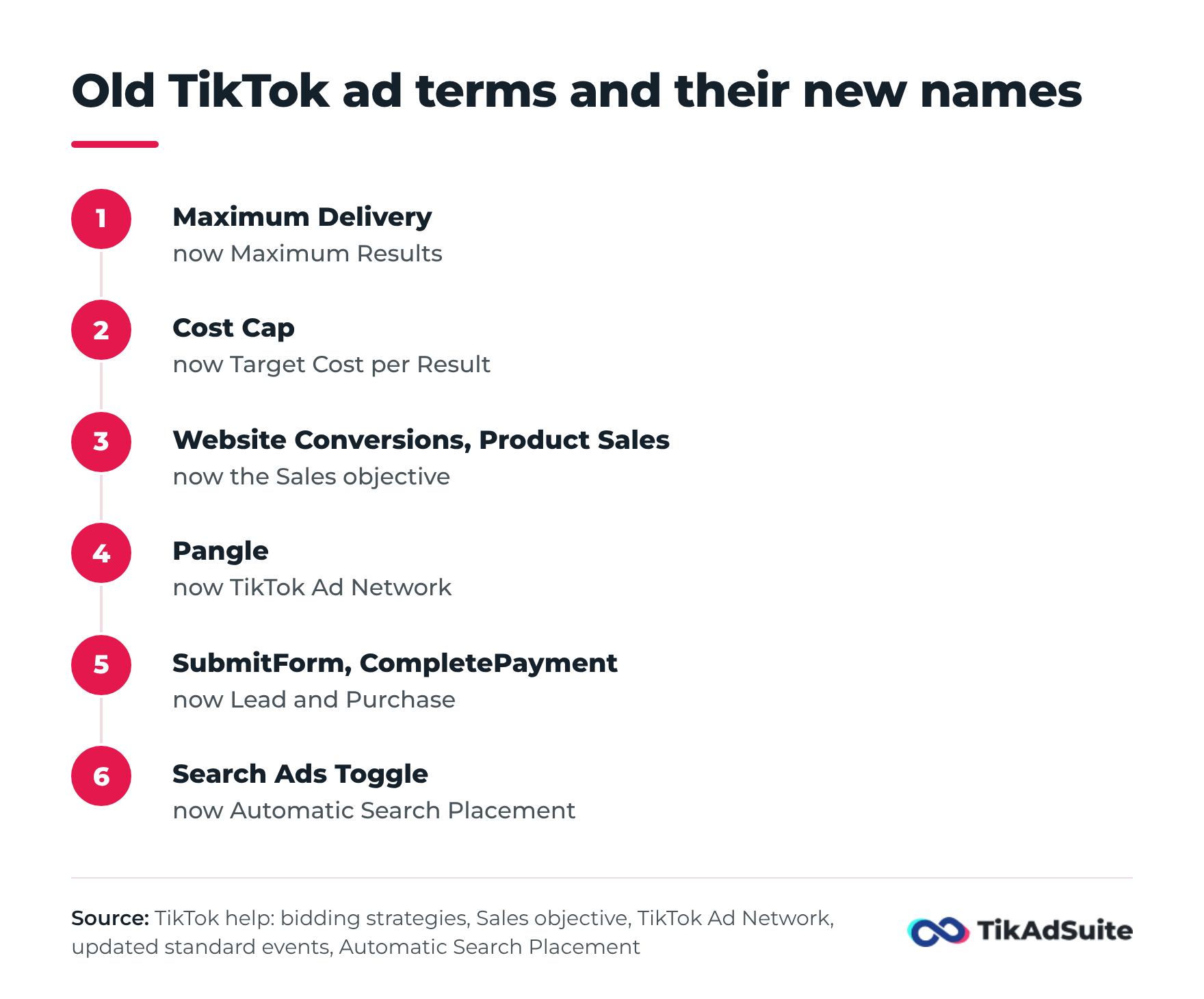
Several common terms have new names. Watch for these renames when you read older guides or reports:
- Maximum Delivery is now Maximum Results.
- Cost Cap is now Target Cost per Result.
- Website Conversions and Product Sales merged into the Sales objective.
- Pangle is now TikTok Ad Network.
- SubmitForm and CompletePayment events are now Lead and Purchase.
- Search Ads Toggle is now Automatic Search Placement.
Key Takeaways
- Every TikTok ad account works in three levels: campaign, ad group and ad. The objective sits at the campaign level; targeting, placements, budget and bidding sit at the ad group level.
- TikTok’s two main bid strategies are now called Maximum Results and Target Cost per Result. Value-based campaigns add Highest Value and Minimum ROAS.
- TikTok Shop has its own vocabulary. Since July 2025, new Shop ad campaigns run as GMV Max.
- Tracking terms such as Pixel, Events API, standard events and attribution window describe how TikTok learns that a sale or lead happened.
- According to TikTok’s video play metrics page, video metrics use fixed thresholds: 2-second and 6-second views, 6-second and 15-second focused views, and plays at 25, 50, 75 and 100% of length.
How This Glossary Is Organized
The terms below are grouped by the job they do: account structure first, then objectives, bidding, targeting, creative and ad formats, followed by tracking, metrics and TikTok Shop vocabulary. Definitions follow TikTok’s Ads Manager glossary and its help pages, with older names noted where TikTok has renamed a feature.
If one specific term sent you here, jump straight to its category instead of scrolling from the top. If you’re setting up your first account, start with Campaign and Account Terms, since nearly every other section builds on that structure.
Campaign and Account Terms

- Accelerated Delivery: A delivery type where TikTok tries to spend your budget and reach your audience as quickly as possible. It suits short, time-sensitive pushes such as a flash sale. Campaign Budget Optimization campaigns can only use Standard delivery.
- Ad: The individual video, image, or Spark Ad a viewer actually sees. It sits at the bottom of the account structure, inside an ad group.
- Ad Account: Your central TikTok advertising account. It holds your billing details, campaigns, and access permissions, and it connects to Ads Manager for setup and reporting.
- Ad Format: The type of ad you’re running, such as In-Feed, Spark, Collection, or TopView. The format determines where the ad shows up and what creative specs it needs.
- Ad Group: The layer between campaign and ad. It’s where you set your budget, audience, placements, and bid strategy for a specific set of ads.
- Ad Placement: The apps or networks where your ad appears, such as the TikTok feed or TikTok Ad Network. You can choose Automatic Placement or Select Placement.
- Ad Preview: A tool inside Ads Manager that shows exactly how your ad will look on a real device before it goes live, so you can catch formatting problems early.
- Ad Schedule: The specific days and hours your ad is allowed to run. You can run ads continuously or limit them to a custom window, such as weekday evenings only.
- Ad Specifications: TikTok’s technical rules for each ad’s creative: file type, file size, resolution, aspect ratio, length and character count. Check them before you export a video.
- Advertising Objective: The goal you pick when you start a campaign, such as Traffic, Sales, Lead Generation or App Promotion. TikTok’s delivery system optimizes toward whichever objective you choose.
- Sales: The objective for driving purchases on TikTok Shop, a website, an app, or a website and app together. It replaced Website Conversions and Product Sales.
- Ads Manager: TikTok’s web platform for building, running, and reporting on ad campaigns. It’s the main dashboard advertisers use every day.
- Automated Rules: Conditions you set in Ads Manager that trigger an action on their own, such as pausing an ad group when cost per result climbs past a number you choose. They save you from checking campaigns all day.
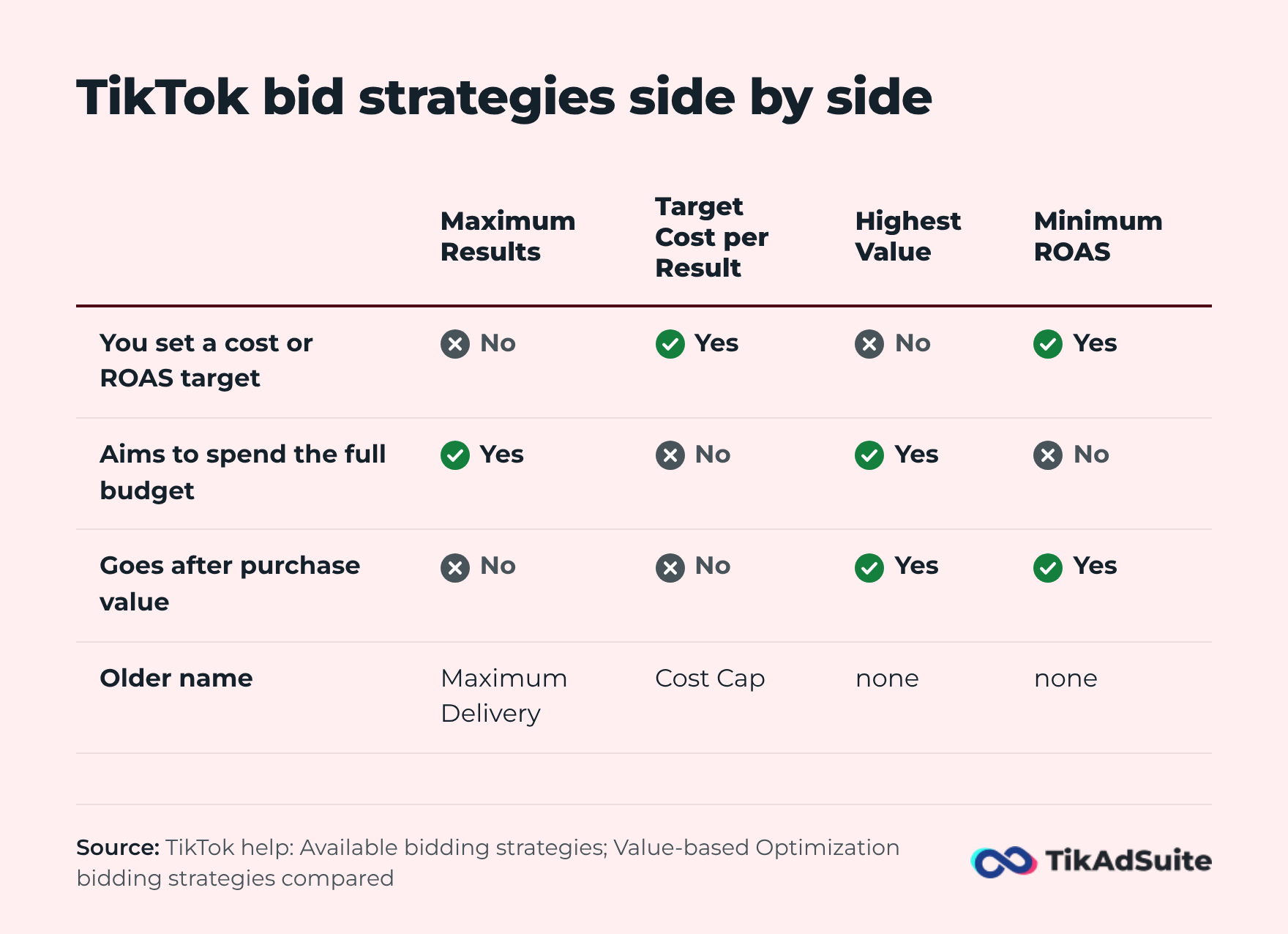
- Bid Strategy: The method TikTok uses to bid for you in the auction. The two main options today are Maximum Results and Target Cost per Result. Your bid strategy decides whether TikTok chases volume or keeps cost near a target.
- Budget: The amount you are willing to spend, set at the campaign or ad group level as a daily or lifetime amount. TikTok’s budget page says a daily budget must be more than $50 at the campaign level and more than $20 at the ad group level.
- Campaign: The top level of the account structure. It holds your objective and, if you turn on Campaign Budget Optimization, your overall budget too.
- Campaign Budget: A budget set at the campaign level rather than the ad group level. TikTok then distributes that budget across the ad groups inside it.
- Campaign Budget Optimization (CBO): A setting that puts one budget at the campaign level and shares it across all ad groups inside. TikTok’s CBO setup page lists Maximum Results or Target Cost per Result as the bid strategy, daily or lifetime budget, and Standard as the only delivery type.
- Daily Budget: The average amount you are willing to spend on a campaign or ad group per day. It suits ongoing campaigns you check and adjust day by day.
- Delivery Estimation: An estimated range of reach, impressions, or results Ads Manager shows you before you publish, based on your targeting and budget.
- Flight: The scheduled start and end dates of a campaign or ad group, essentially the campaign’s calendar window.
- Lifetime Budget: The total amount you are willing to spend over a campaign’s or ad group’s full run. It suits fixed-length pushes such as a product launch. Once a campaign is live, you can change the amount but not switch between daily and lifetime, per the budget page.
- Reach & Frequency: A buying type that lets you buy ad inventory at a set cost with predictable reach and control over how often each person sees your ad.
- Standard Delivery: A delivery type that spreads your budget across the selected period based on traffic, instead of spending it as fast as possible.
Campaign Objective Terms
- Awareness: An objective category focused on getting your brand seen by as many relevant people as possible, without asking for a click or a purchase yet.
- Community Interaction: An objective that drives actions on your TikTok profile itself, such as new followers, profile visits, or messages, rather than actions on an outside website.
- Consideration: An objective category that sits between Awareness and Conversions. It includes goals like Traffic, Video Views, and Lead Generation, aimed at people who are close to engaging but not yet buying.
- Conversions: An older objective that optimized delivery toward actions on your website or app, such as a purchase. On accounts with the new setup, website and TikTok Shop sales goals sit under the Sales objective instead.
- Lead Generation: An objective built to collect contact details directly inside TikTok, using an Instant Form, instead of sending people to an outside landing page.
- Reach: An objective focused on showing your ad to the maximum number of unique people, rather than showing it repeatedly to the same smaller group.
- Traffic: An objective that optimizes delivery toward clicks, sending viewers to a website, app, or TikTok Instant Page.
- Website Conversions: An older objective for website actions tracked with the TikTok Pixel. TikTok’s Sales objective page says Website Conversions and Product Sales merged into one Sales objective, rolling out in phases, so some accounts may still show the old names.
- Product Sales: An older objective for selling products from TikTok Shop or a catalog. It is now part of the Sales objective, where TikTok Shop campaigns run as GMV Max.
Bidding and Optimization Terms
- Bid: The amount you’re willing to pay for a specific result, such as a click or a conversion. TikTok uses your bid alongside other advertisers’ bids to decide which ads win auctions.
- Bid Cap: A bid strategy, still listed in TikTok’s Ads Manager glossary, that sets the maximum amount the system can bid for one result. It gives tight cost control but can limit how much you spend.
- Maximum Results: A spend-based bid strategy that aims to get the most results from your budget without a cost target, so cost per result can move from day to day. It is one of the two strategies on TikTok’s bidding strategies page. Its older name is Maximum Delivery.
- Target Cost per Result: A goal-based bid strategy where TikTok tries to keep your average cost per result near the amount you set. Actual costs can land a little above or below it. In TikTok’s article on why bidding matters, the same idea appears under its older name, Cost Cap.
- oCPM (Optimized Cost Per Mille): A pricing model where you pay per thousand impressions, but TikTok’s algorithm shows your ad to the people most likely to complete your chosen optimization event, not just anyone.
- Optimization Event: The specific action you want TikTok’s algorithm to chase, such as a purchase, a lead, or an app install. TikTok needs enough data on this event to optimize delivery well.
- Optimization Goal: The metric TikTok’s delivery system tries to maximize within your budget, such as conversions, clicks, or reach. It’s closely tied to your chosen objective and optimization event.
- Learning Phase: The period when TikTok tests who to show a new ad group to, so results swing more. TikTok’s learning phase page says volatility usually starts to drop after about 25 results or 7 days, and pausing or heavy edits can restart it.
- Highest Value: A value-based bid strategy for web purchases that aims to spend your full budget while going after the highest purchase value. Per TikTok’s value-based bidding comparison, ROAS may fall as costs rise.
- Minimum ROAS: A value-based bid strategy where you set the lowest return on ad spend you accept. The same TikTok comparison warns that a minimum set too high can stop delivery, and that meeting it is not guaranteed.
- Delivery Type: Whether an ad group spends its budget through Standard Delivery (paced evenly) or Accelerated Delivery (spent as fast as possible).
Targeting Terms
- Audience: The group of people your ad is eligible to reach, defined by a combination of demographics, interests, behaviors, and other criteria you set in the ad group.
- Audience Insight: Data inside Ads Manager that shows characteristics of your existing audience, like top interests or devices, so you can refine targeting based on real behavior instead of guesses.
- Audience Size Estimate: A range Ads Manager displays while you build targeting, showing roughly how many people fall within your selected criteria before you publish.
- Automatic Targeting: A setting where TikTok picks the audience for you instead of you choosing demographics and interests.
- Broad Targeting: Using only the required targeting settings in an ad group, such as location, and letting TikTok’s system find the best audience for your ads.
- Custom Audience: An audience built from your own data, such as website visitors, app users, or a customer list you upload, used to retarget people who already know your brand.
- Demographic Targeting: Targeting based on traits like age, gender, and location.
- Device Targeting: Targeting based on the device someone uses, such as operating system or connection type.
- Geographic Targeting: Targeting based on location, from an entire country down to a specific region or city.
- Interest Targeting: Targeting based on topics someone shows ongoing interest in, based on the content they watch, like, and follow on TikTok.
- Behavior Targeting: Targeting based on actions someone recently took on TikTok, such as engaging with certain types of videos, rather than their long-term interests.
- Lookalike Audience: An audience TikTok builds by finding new users who share traits with an existing Custom Audience, such as your past buyers.
- Narrow Targeting: Using several targeting settings in an ad group to define the audience. It gives you more control but leaves the system fewer people to test.
- Placement Targeting: The choice of which surfaces, such as the TikTok feed or TikTok Ad Network, your ad is eligible to appear on.
- Targeting Expansion: A setting that allows TikTok to reach people slightly outside your defined audience when the algorithm predicts they’ll still perform well, in exchange for more reach.
Creative Terms
- Automated Creative Optimization (ACO): A tool that lets you upload multiple creative elements (videos, images, text, CTAs), then automatically tests different combinations to find which one performs best.
- Call to Action (CTA): The button or on-screen prompt that tells the viewer what to do next, such as Shop Now or Learn More. The right CTA matches what happens after the tap.
- Creative: The actual content of your ad: the video, image, text, and sound the viewer experiences.
- Creative Center: TikTok’s free public tool for researching trending sounds, hashtags, and top-performing ads, useful for creative research before you start production.
- Creative Library: A storage space inside Ads Manager holding every video and image you’ve uploaded, so you can reuse assets across ad groups without re-uploading them.
- Creative Optimization: The ongoing process of testing and refining ad creative, such as hooks, pacing, and CTAs, based on real performance data.
- Display Name: The brand or account name shown alongside your ad, visible to viewers as the source of the ad.
- Interactive Add-on: An interactive element placed on top of an ad, such as a card or sticker, that invites viewers to tap or engage.
- Smart Video: A tool that automatically generates ad videos from your product images or existing footage, useful when you don’t have dedicated video assets.
- Smart Video Soundtrack: A creative tool in Ads Manager that adds background music to your video with the help of AI.
- TikTok Video Editor: TikTok’s built-in editing tool inside Ads Manager, letting you trim, caption, and adjust video ads without third-party software like CapCut.
- Video Template: A pre-built video structure with placeholder scenes you can fill with your own footage or images, used to produce ads faster.
Ad Format Terms
- Collection Ads: A shoppable video ad format that opens into an Instant Gallery Page, letting viewers browse products without leaving TikTok.
- Carousel Ads: An ad format made of multiple still images a viewer can swipe through, each with its own caption, often used for product carousels that highlight more than one item at once.
- Dynamic Showcase Ads: Ads that automatically pull products from your catalog and show the specific items each viewer is most likely to want, based on their browsing behavior.
- Image Ads: A static, single-image ad format, mainly used on TikTok Ad Network placements rather than the main TikTok feed.
- In-Feed Ads: The standard TikTok ad format that appears in the For You feed between organic videos, designed to blend in with normal content.
- Playable Ads: An interactive ad that lets people try a short, playable version of an app or game before installing it. TikTok’s glossary says only TikTok Ad Network (Pangle) placements support it.
- Shopping Ads: A group of ad formats built to drive product discovery and purchases. For TikTok Shop, new campaigns now run as GMV Max.
- Spark Ads: An ad format that boosts an existing organic TikTok post, either your own or a creator’s (with permission), instead of uploading new ad-only creative. It behaves differently from non-Spark ad formats in what likes, comments, and view history carry over.
- TopView Ads: A reservation ad that opens with a 3-second full-screen takeover when someone opens TikTok, then turns into a normal in-feed video. TikTok’s TopView page sets separate safe zones for the two stages.
- Video Ads: The broad category covering any ad format built around video content, including In-Feed, TopView, and Spark Ads.
Shopping and Commerce Terms
- Catalog: A structured file listing all of your products, including images, prices, and descriptions, that TikTok uses to build shopping ads automatically.
- Catalog Feed: The data file (usually a URL) that keeps your Catalog updated with current stock, pricing, and product details, refreshed on a schedule.
- Catalog Manager: The section of Business Center where you upload, organize, and troubleshoot your product Catalog.
- Catalog Sales: An objective that builds ads directly from your product Catalog, showing viewers the specific items they’re likely to buy.
- Dynamic Product Ads: The name other ad platforms use for ads built automatically from a product catalog. On TikTok, the same idea is called Dynamic Showcase Ads.
- Instant Gallery Page: The shoppable landing experience that opens inside TikTok when someone taps a Collection Ad, displaying multiple products without leaving the app.
- Product Catalog: Another name for Catalog, the structured product data feed that powers shopping and dynamic ads.
- Product Feed: The file format and data structure your Catalog is built from, similar to feeds used on other ad platforms.
- Product Set: A filtered group of items in your catalog, such as one product line or price range, used to point specific ads at specific products.
Tracking and Attribution Terms
- App Event: An action a user takes inside your mobile app, such as a purchase or a level completed, tracked so TikTok can measure and optimize toward it.
- Attribution: The process of connecting a conversion, like a sale, back to the specific ad that caused it.
- Attribution Window: The time after someone clicks or views your ad during which a conversion still counts for that ad. TikTok’s attribution settings page lists click windows of 1, 7, 14 or 28 days and view windows of off, 1 or 7 days, and the setting cannot change after the ad group is published.
- Conversion: A completed action you’re tracking as a result, such as a purchase, sign-up, or lead form submission.
- Conversion Event: The specific action defined as a Conversion for tracking purposes, set up through the Pixel, Events API, or in-app SDK.
- Events API: A server-to-server connection that sends your web, app and offline events to TikTok. TikTok’s Events API page recommends using it together with the Pixel and event deduplication.
- In-App Events: The general category of trackable actions that happen inside a mobile app, reported back to TikTok through an SDK or Events API integration.
- Measurement: The overall practice of tracking, verifying, and reporting how your ads perform, covering everything from Pixel setup to third-party verification tools.
- Offline Events: Conversions that happen outside of a website or app, such as an in-store purchase, uploaded to TikTok manually or through a CRM integration.
- Page Events: Actions tracked directly on a website page through the TikTok Pixel, such as a page view or a checkout completion.
- Pixel: A snippet of tracking code placed on a website that reports visitor actions back to TikTok.
- Playback Events Tracking: Tracking of what viewers do at set points in a video, usually 2 and 6 seconds, to measure interest in your ad.
- Server-to-Server Events: Conversion data sent from your server straight to TikTok instead of from the browser. The Events API page says connectivity issues and browser differences can make the Pixel miss conversions, and server events help report more of them.
- TikTok Pixel: TikTok’s specific name for its website tracking code, set up and managed through Events Manager.
- Web Events: The general term for any trackable action on a website, whether captured through the Pixel, Events API, or both together.
- Lead (event): The standard event for form sign-ups, formerly called SubmitForm. TikTok’s standard events update says the rename took effect for web, offline and CRM on May 1, 2025, and old names keep working.
- Purchase (event): The standard event for completed purchases, formerly called CompletePayment. Older reports may still show Complete Payment columns.
Metrics Terms
- Average Play Time: The average time your video was played, either per user or per video view, including any time spent replaying it.
- Click: Any tap or click on your ad, including taps on the ad itself, the CTA button, or the display name.
- Click-Through Rate (CTR): The percentage of people who saw your ad and clicked it, calculated as clicks divided by impressions.
- Completed View: A view where the viewer watched your entire video ad from start to finish.
- Cost per Acquisition (CPA): The average amount you spent to get one full acquisition, such as a paying customer, calculated as total spend divided by acquisitions.
- Cost per Click (CPC): The average amount you paid for each click, calculated as total spend divided by clicks.
- Cost per Conversion: The average amount you spent to get one conversion of your chosen type, whether that’s a purchase, lead, or another tracked event.
- Cost per Follower (CPF): The average amount spent to gain one new follower through a Community Interaction campaign.
- Cost per Mille (CPM): The cost to reach one thousand impressions, used as the standard way to compare ad pricing across campaigns and platforms.
- Cost per Result: The average cost to achieve one result tied to your chosen optimization goal, whichever metric that happens to be.
- Cost per View (CPV): The average amount you paid for each counted video view. With the Video Views objective, you pay per focused view of 6 or 15 seconds.
- Engagement: Any interaction with your ad or post, including likes, comments, shares, and follows.
- Engagement Rate: The percentage of viewers who engaged with your ad in some way, calculated as total engagements divided by impressions or reach.
- Frequency: The average number of times a single person saw your ad during a set period.
- Frequency Capping: A setting that limits how many times an individual person can be shown the same ad within a given time window, preventing ad fatigue.
- Impressions: The total number of times your ad was displayed on screen, counting repeat views from the same person.
- Landing Page View: A tracked event confirming someone’s browser actually loaded your landing page after clicking your ad, not just clicked toward it.
- Result: The count of actions matching your chosen optimization goal, shown as the primary success metric in campaign reporting.
- Return on Ad Spend (ROAS): The revenue generated for every dollar spent on ads, calculated as revenue divided by ad spend.
- Spend: The total amount of money used by a campaign, ad group, or ad within a given time period.
- Unique Reach: The number of distinct individuals who saw your ad at least once, counted only one time per person regardless of how many impressions they received.
- Video Completion Rate: The percentage of viewers who watched a video ad all the way to the end.
- Video Views: How many times your video ad was watched, counted at TikTok’s view thresholds such as 2-second, 6-second and focused views.
- Focused View: A view counted when someone watches at least 6 or 15 seconds, or interacts early. TikTok’s video views objective page says the Video Views objective is billed per focused view and caps frequency at 7 times per 7 days.
- View-Through Rate (VTR): The percentage of impressions that resulted in a video view, showing how often people who saw the ad actually watched it.
Lead Generation Terms
- Instant Form: A form that opens directly inside TikTok when someone taps your ad, letting them submit contact details without ever leaving the app.
- Lead: A person who submitted their contact information through your Instant Form or landing page, indicating interest in your product or service.
- Lead Quality: How likely a lead is to become a customer. You judge it after follow-up, often by marking leads in your CRM, since a form fill alone does not prove intent.
- Qualified Lead: A lead that meets specific criteria you’ve defined as sales-ready, such as budget, role, or intent, separating it from a lead that’s unlikely to convert.
Identity and Publishing Terms
- Authorized Account: A TikTok account (yours or a creator’s) that has granted permission for its organic post to be used as a Spark Ad.
- Business Center: TikTok’s hub for managing multiple ad accounts, assets, and team permissions in one place, distinct from the day-to-day Ads Manager dashboard most advertisers use for campaign building.
- Business Verification: A review where TikTok checks your business details with official documents. Ad accounts and TikTok profiles each have their own verification steps.
- Advanced Access: An account level TikTok gives a TikTok account once it is linked to a TikTok for Business account or an unverified Business Center. TikTok’s account entitlements page says it adds basic analytics and automatic messages.
- Identity: The TikTok account, whether your brand’s own account or an authorized creator’s, that an ad appears to come from in the viewer’s feed.
- Organic Post: A regular, unpaid TikTok video posted to a profile, as opposed to a paid ad. Spark Ads work by boosting an existing organic post.
- Post Authorization: The permission a creator grants a brand to run their organic post as a Spark Ad, generated through a Spark Code.
- Publishing Identity: The specific account identity selected when publishing an ad, determining whose name and profile appear on the ad.
- Spark Code: A unique authorization code a creator generates and shares with a brand, allowing that brand to run the creator’s post as a paid ad.
- TikTok Account Authorization: The overall permission process that lets a brand’s ad account use another TikTok account’s content or identity for advertising.
Placements and Inventory Terms
- Automatic Placement: A setting that lets TikTok decide where your ad runs across all eligible surfaces, based on where it’s likely to perform best.
- Placement: Any specific surface where an ad can appear, such as the TikTok feed, TikTok LIVE, or a TikTok Ad Network partner app.
- TikTok Ad Network (formerly Pangle): TikTok for Business’s ad network that shows your ads inside partner apps outside TikTok. TikTok’s page on TikTok Ad Network confirms the name change from TikTok Pangle.
- Select Placement: A setting where you manually choose which specific placements your ad is eligible to appear on, instead of letting TikTok decide automatically.
- TikTok Feed: The main For You feed, where in-feed ads appear between organic videos.
Testing and Experiments Terms
- A/B Test: A controlled comparison between two versions of one variable, such as two different hooks, run at the same time as part of a broader creative testing framework to see which performs better.
- Experiment: A test you run inside Ads Manager to compare variables such as creative, audience or bid strategy under controlled conditions.
- Holdout Test: A test that withholds ads from a control group entirely, then compares their behavior against a group that saw the ads, to measure true incremental impact.
- Split Test: Another name for an A/B test, where budget and audience are divided evenly between test groups to keep the comparison fair.
- Test Variable: The single element being changed and measured in a test, such as the video hook, the CTA, or the audience, while everything else stays the same.
Brand Safety Terms
- Block List: A list of specific apps or placements on TikTok Ad Network that you exclude from showing your ads.
- Brand Safety: The broader set of tools and settings that control what kind of content your ads can appear alongside, protecting your brand from unwanted associations.
- Inventory Filter: A setting that lets you control ad placement based on content sensitivity level, ranging from more inclusive to more restrictive filtering.
- Sensitive Categories: Content types TikTok flags as needing extra caution for ad placement, such as content involving conflict, tragedy, or controversial topics.
Mobile App Advertising Terms
- App Installs: A tracked event confirming someone downloaded and opened your app after seeing or clicking your ad.
- App Promotion: An objective category built specifically to drive app install campaigns and post-install actions, connected to your app through an MMP or SDK integration.
- Deep Link: A link that opens directly to a specific screen inside an app, such as a product page, instead of just launching the app’s home screen.
- Deferred Deep Link: A deep link that still routes a new user to the correct in-app screen even if they didn’t have the app installed yet when they clicked, by remembering the destination through the install process.
- Mobile Measurement Partner (MMP): A third-party analytics company (such as AppsFlyer or Adjust) that tracks app installs and events, then reports that data back to TikTok for optimization.
- SKAdNetwork: Apple’s privacy-focused framework for measuring app install ad performance on iOS without tracking individual users.
AI and Automation Terms
- AI Creative: Ad creative generated or substantially assisted by TikTok’s AI tools, such as auto-generated scripts, voiceovers, or video edits, through TikTok Symphony.
- Smart+: An AI-run campaign type where TikTok automates targeting, optimization and creative. TikTok’s Smart+ page lists support for sales, app promotion, leads and traffic.
- AIGC Label: The label TikTok asks for on ad content that AI has significantly edited or generated. TikTok’s ads policy on edited media accepts the label or your own clear disclaimer, caption, watermark or sticker.
- Automated Creative: A general term for ad creative assembled or adjusted automatically by TikTok’s systems, rather than built manually from scratch.
Commerce and TikTok Shop Terms
- Affiliate Ads: Ads that use TikTok Shop creators’ affiliate videos featuring your products. In GMV Max, you add them by setting the video source to Affiliate post.
- GMV Max: An automated TikTok Shop campaign type that runs ads across your own posts, affiliate posts and paid ads to grow gross merchandise value. TikTok’s GMV Max migration notice says it became the default and only supported campaign type for TikTok Shop Ads from July 2025. Details are in the GMV Max guide.
- LIVE Shopping Ads: Ads that send viewers into a live TikTok shopping stream. Since GMV Max became the default for TikTok Shop, they can still be created by choosing a TikTok identity, as the TikTok LIVE shopping stream guide explains.
- Product Anchor: A pinned product tag attached to an organic video or LIVE stream, letting viewers tap through to buy without the seller running a paid ad.
- Product Link: A clickable link inside a video or LIVE stream that leads directly to a specific product listing on TikTok Shop.
- Shop Ads: The group of paid ad types that send traffic and sales to TikTok Shop listings. New Shop Ads campaigns run as GMV Max.
- Shop Tab: The dedicated storefront section inside the TikTok app where users browse and shop products directly.
- TikTok Shop: TikTok’s built-in social commerce platform, letting sellers list, promote, and sell products directly within the app.
- Video Shopping Ads: A shoppable video ad that linked to a product. It can no longer use TikTok Shop as its destination; Shop sellers use GMV Max instead.
Video Performance Terms

- 2-Second View: A view counted when your video plays for at least 2 seconds in one impression session, with replays excluded, per TikTok’s video play metrics page.
- 6-Second View: A view counted when your video plays for at least 6 seconds in an impression session, plays in full if it is shorter than 6 seconds, or gets at least one engagement in the first 6 seconds.
- 15-Second Focused View: A view counted when someone watches at least 15 seconds of your video, or all of it if it is shorter. It is available to advertisers using focused view products.
- Average Watch Time: The average length of time, in seconds, that viewers spent watching your video ad.
- Complete Video View: A view where someone watched the ad in full, from the very first frame to the last.
- Video Engagement: Any interaction tied specifically to a video ad, including likes, comments, shares, and follows generated from that video.
- Video Play: An instance of a video ad starting to play, regardless of how long the viewer actually watched.
- Video View Rate: The percentage of impressions that turned into a counted video view, based on whichever view threshold the campaign is measuring.
Additional TikTok Advertising Terms
- Ads Library: TikTok’s public, searchable library of ads, useful for competitor research before you build your own creative. When TikTok opened it as the Commercial Content Library, TikTok’s newsroom post said only data from Europe was available.
- Ads Policy: TikTok’s rulebook for what advertisers can say, show and promote. Breaking it leads to rejected ads and can restrict your account.
- Auction: The real-time process TikTok uses to pick which ad shows. TikTok’s glossary says the system weighs each ad’s bid, quality and fit for the viewer, and ads that are not competitive are not shown.
- Brand Lift Study: A research tool that measures the impact of a campaign on brand perception, such as awareness or purchase intent, using surveys shown to exposed and unexposed groups.
- Branded Effects: Custom AR filters or effects created for a brand, which users can apply to their own videos, spreading brand exposure through user-generated content.
- Branded Mission: A campaign that asks creators to make videos for your brand and then turns the best ones into ads. TikTok’s Branded Mission page describes it as crowdsourcing content from the creator community.
- Click Destination: The page or app screen a viewer lands on after clicking your ad.
- Destination URL: The specific web address your ad’s link points to, entered when setting up the ad.
- Interactive Gesture: An on-screen action TikTok asks viewers to perform, such as double-tapping or swiping, often used in Interactive Add-ons.
- Landing Page: The webpage a viewer arrives at after clicking your ad, typically built to continue the message from the ad and drive a specific action.
- Organic Reach: The number of people who saw your content for free, without any paid promotion behind it.
- Paid Reach: The number of people who saw your content specifically because you paid to promote it.
- Profile Visit: A tracked action where someone taps through from your ad to view your TikTok profile page.
- Profile Visit Objective: A Community Interaction sub-goal that optimizes ad delivery specifically toward getting people to visit your profile.
- Promotion: A simplified, self-serve way to boost an existing organic TikTok post, distinct from building a full campaign in Ads Manager.
- Recommendation System: TikTok’s core algorithm that decides what content, including ads, to show each individual user based on their behavior and interests.
- Search Ads: Ads that appear in TikTok’s in-app search results when people search for related terms.
- Automatic Search Placement: A setting, formerly called Search Ads Toggle, that lets your in-feed ads also show on TikTok’s search results page. TikTok’s Automatic Search Placement page says it is on by default for new campaigns and supports negative keywords.
Frequently Asked Questions
What’s the difference between a campaign, an ad group, and an ad?
A campaign holds your objective and, with Campaign Budget Optimization, a shared budget. An ad group sits inside it and sets placements, targeting, budget, schedule and bidding. An ad is the video or image people see. Think of three nested folders, each one narrowing the setup.
What’s the difference between CPM, CPC, and CPA?
CPM is what you pay per thousand impressions, CPC is what you pay per click, and CPA is what you pay per acquisition, such as a sale or sign-up. CPM measures the cost of reach, CPC the cost of interest, and CPA the cost of the result you wanted.
Do I need the TikTok Pixel if I’m only selling through TikTok Shop?
No. TikTok’s Sales objective page says you don’t need a catalog or Pixel to use the Sales objective for TikTok Shop. You still need the Pixel or Events API if you also send traffic to your own website, so TikTok can measure those purchases.
What’s the difference between Spark Ads and a regular In-Feed Ad?
Spark Ads run an existing organic post, yours or a creator’s with permission, and the likes, comments and follows from the ad count toward that post. A regular, non-Spark In-Feed Ad is uploaded as ad-only creative with no organic post behind it.
Is GMV Max the same thing as Campaign Budget Optimization?
No. Campaign Budget Optimization shares one budget across the ad groups of a standard campaign. GMV Max is a separate, automated TikTok Shop campaign type that picks creatives, placements and spend across your posts, affiliate posts and ads to grow shop sales.
What does Maximum Results bidding mean?
Maximum Results means you set a budget but no cost target, and TikTok tries to get as many results as that budget allows. Cost per result can change from day to day. Older guides call it Maximum Delivery.
Wrapping Up
You don’t need to memorize every one of these terms before your next campaign. Start with the ones tied to whatever you’re setting up right now, whether that’s your first Ads Manager campaign or your first GMV Max test, and come back to this page whenever a new term stops you.
The terms that matter most for beginners are the account structure (campaign, ad group, ad), your bid strategy, and your optimization event. Get those three right, and most of the rest of the vocabulary will start making sense as you go.
Starting from zero, the TikTok Ads beginner guide covers account setup in order, and TikTok Ad Credit can help offset your first campaign’s cost while you’re still learning the platform.